October 31, 2016 at 18:04
Game Proportions and Scale Tips
- Transfer
Are you creating a new hit and want your characters to fit into the game? Many developers often have difficulty selecting the proportions of individual characters and the relationships between characters and surroundings. You can use the approach described in the article.
Obviously, if there are no characters in your game, this post may be useless for you (but maybe it will be useful to you in the next project). This approach is not limited to humanoid songs and can be applied to anthropomorphic and inanimate objects.
Step one: determine the size of the tiles
The selection of the size of tiles is a separate task that is solved in the early stages of game development. Tiles can be measured in units of the world (inches, meters, etc.) or in pixels.
If your game does not have a tile grid, you can create a draft layout and use aspect ratios for the initial setup of the project. In my examples, I will use the isometric grid, but the type of projection does not affect anything.
Questions to ask:
- What will be the smallest object the player interacts with? Is it a small chest on earth, or a building, or a planet?
- What will be the screen size, aspect ratio and resolution?
- What will be the scale of the game (in terms of topics and mechanics)? Is the most important thing in the game the characters? Is this a game about insects or are you controlling a city? How many objects should a player see (or interact with) during the game?
- Does the game support camera movement? What will be the default camera position?
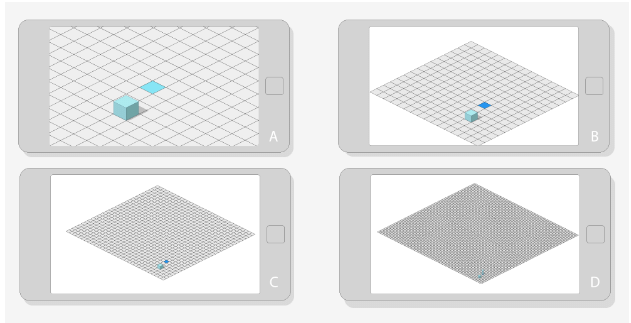
Option “A” is suitable for a claustrophobic horror (you can even get even closer), “B” is better to use for RPG or RTS, option “C” can no longer be controlled from a mobile phone or tablet, but it can be suitable for large-scale military operations. “D” is too small for any interaction: with such a tile size, it is impossible to select a separate tile (unless your audience is aliens with thin fingers). There are an infinite number of intermediate between “A” and “D” options. The choice depends on the type of game being created.
After choosing the most suitable tile size, you can go to the characters.
Step Two: Count By Head
How many goals does your character fit in?

Illustration by Andrew Loomis
A little help: realistic adult characters are 7-8 goals tall. If your characters fit 8 or more goals in height, they will resemble Greek gods or superheroes.
But we will not discuss style or growth. Growth is relative, two characters with the same proportions can be of different stature.

Any style can be adapted to various proportions of the head and body.
Illustration of Garon Rossignol
The main thing we need to consider here is the ratio of the sizes of the character’s head and the rest of it. For example, when creating a character with a height of 8 goals, we can say that his body is 7 times larger than the head. Most of the communicative information and details are transmitted through the body, and the head and face have a secondary role. I do not want to say that the head is not important: we usually always draw first faces and hands (and some other prominent parts of the body). But in a silhouette with a height of 8 goals, details and facial expressions will be redundant.

“A” - the face and body are clearly visible.
“B1” - the body takes up more space when the characters are 8 goals high. Face details are hard to read.
“B2” - if in your game you need to show the emotions of characters with realistic proportions, you will need to use close-ups.

Left side: exaggerated emotions, “cartoony” movements, playful mood.
Right edge: mild emotions, realistic movements, serious mood.
Most animated characters are categorized as 2-6 goals. Although characters with a height of 8 goals can also be hyperbolic and playful, most often they will be categorized as serious and realistic. Characters above 8 goals can also be playful, but again, the body will attract more attention than the head and face.
Questions to ask:
- How important are facial expressions in the game?
- Is realistic movement important?
- How serious / foolish is your game? Realistic proportions imply serious and realistic gameplay.
- What will be the angle of the camera and does it change during the game?
- What is the average width of the head and body?

Wide heads have a larger surface area, attract more attention and cover most of the body when the camera is pointing down. If the visual style requires wide heads, increase the height by 1-2 heads and add more body.
The converse is true for body width.

Do you have wide-bodied characters who need to show more emotions? Increase the size of the head.
Remember the important rule: characters with a small body can be made much larger on the screen, they can express more emotions and have more artistic freedom and distortion. This allows you to place more objects and information in the screen space.

(© Microsoft)
In Age of Empires, facial expressions are not important. Individual units differ slightly.

(© Beeline Interactive)
Facial expressions are important in Smurfs' Village, and even more important in Minions Paradise. On the screen, the characters (and their heads) look bigger.

(© EA)
Step Three: Relative Scale and Ratios
So, we have characters and tile size. How large should other objects be relative to the characters? The time has come to check whether the selected visual style and proportions meet the requirements of the game.
In general, if you choose realistic proportions for the characters, you need to adhere to the realistic dimensions of buildings and objects.

(© Firaxis Games)

(© Firaxis Games)
Even more distortion can be tolerated if you create a desktop game with iconography, similar to Civilization and aimed at an adult audience.
Let's go through the general scenario:
- The player can interact with buildings.
- The player can interact with the characters.
- Character height - 3 heads.
As a starting point, we will choose the golden ratio (1: 1,618).
Understand correctly, I do not encourage numerology or any mystery of numbers. You can choose any aspect ratio that suits you. In my examples, I use 1.618, but the same thing can be done with other ratios.

We use 1: 1,618 as a starting point for determining the height boundaries of characters and buildings.

Left: believability, buildings are important. Right: exaggeration, characters are important.
Obviously, the character must be smaller than the buildings in order to enter them.
You can also use the ratio to create buildings and architectural elements. If your game needs tall buildings, you can expand the selected ratio to additional floors.

Use option “A” (simple construction) if the character needs to move between floors. Select “B” (simplified golden ratio) and “C” (expanded golden ratio) if movement is not required.
Do not forget about the doorways.

Make sure the doorways are large enough for characters to fit into them.
This is not the only way to solve the problem of scale, but I hope it will be useful to you.
Good luck with your game design!
Posted by Yuriy Sivers, Lead Graphic Designer at Kongregate He is involved in game design, concept art, illustrations and animation.