
 October 27, 2016 at 08:40
What's New in vSphere 6.5: Security
vSphere 6.5 is a turning point in VMware's security infrastructure. What was considered secondary to many
VM encryption
Encryption of virtual machines is what has been in development for many years. However, this solution has not been properly developed, because each solution has negative operational impacts. With vSphere 6.5, this issue is resolved.
Encryption will be performed at the hypervisor level, "under" the virtual machine. Since the virtual disk controller in the VM acts as I / O, encryption takes place instantly using the module in the kernel before sending it to the kernel storage layer. VM files (vmx file, snapshot
The benefits are many.

- Since encryption takes place at the hypervisor level, and not in the VM, the type of guest OS and the type of data store are not important. Virtual machine encryption is agnostic.
- Encryption is done through policies. Policies can be applied to many VMs, regardless of their guest OS.
- Encryption is not managed "inside" the virtual machine. This is a key factor in differentiating from any other solution on the market! You do not have to control the encryption performed in the virtual machine, and the keys are not stored in its memory.
- Key management is based on industry standard KMIP 1.1. In vSphere vcenter is a KMIP client, it works with a large number of KMIP 1.1 key managers. This gives a choice and sufficient flexibility for customers. VM keys are not stored in vCenter.
- Virtual machine encryption makes it possible to use the latest technical features inherent in today's processors. For encryption, the
AES-Ni algorithm isused . - VMotion encryption. This question has been around for a long time, and with version 6.5 the answer is finally received. The uniqueness of the encryption technology vMotion is that the network is not encrypted. There are no certificates to manage, and no network settings to do.
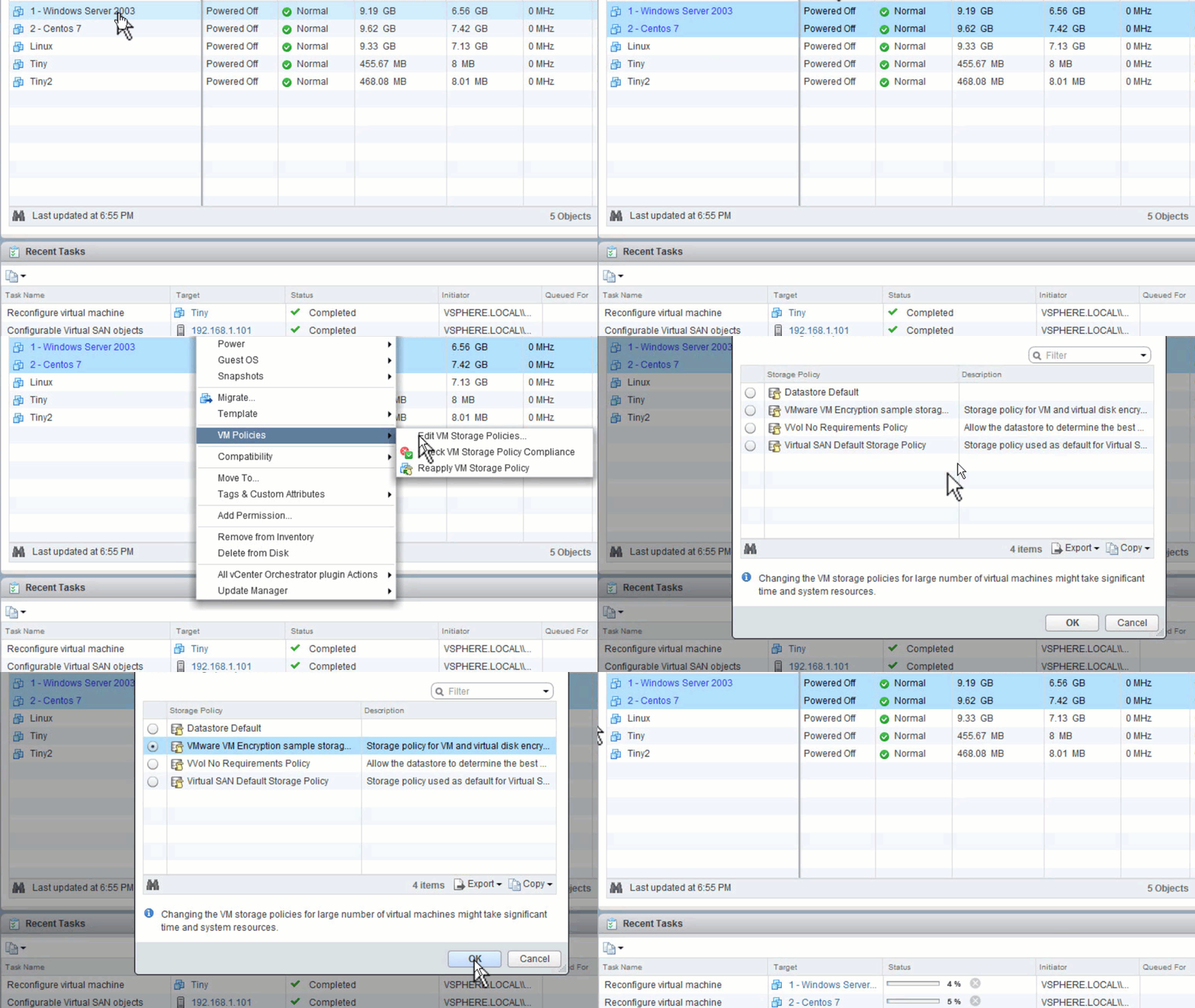
Encryption takes place at the level of each individual virtual machine. VMotion encryption technology gives a boost to everything else. During the migration of the VM, the
In addition, a
Vmotion encryption can be used for unencrypted VMs, and on encrypted VMs it is always used.

Secure Boot Support
The vSphere 6.5 release introduces Secure Boot support for virtual machines and for the ESXi hypervisor.
ESXi Secure Boot
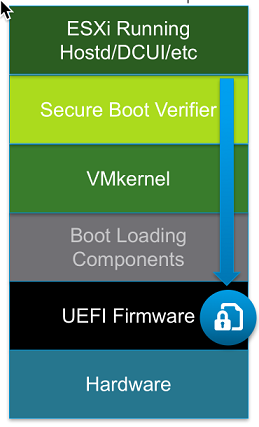 With Secure Boot enabled, the integrated UEFI verifies the digital signature of the ESXi core against a digital certificate in the UEFI firmware. This ensures that only the “correct” kernel will boot. For ESXi, Secure Boot goes even further by adding cryptographic support to all ESXi components.
 Today, ESXi already has a digital package signature - VIB (vSphere Installation Bundle). The ESXi file system refers to the contents of these packages (packages cannot be cracked). Thanks to the use of digital certificates in the built-in UEFI, at boot time, the already trusted ESXi Kernel will, in turn, check each VIB for an embedded certificate. This provides a cryptographically clean download.
Note: if Secure Boot is enabled, then you cannot force the unsigned code to be installed on ESXi. This ensures that when Secure Boot is enabled, ESXi will only work with VMware signed digital code.
Secure Boot Virtual Machine
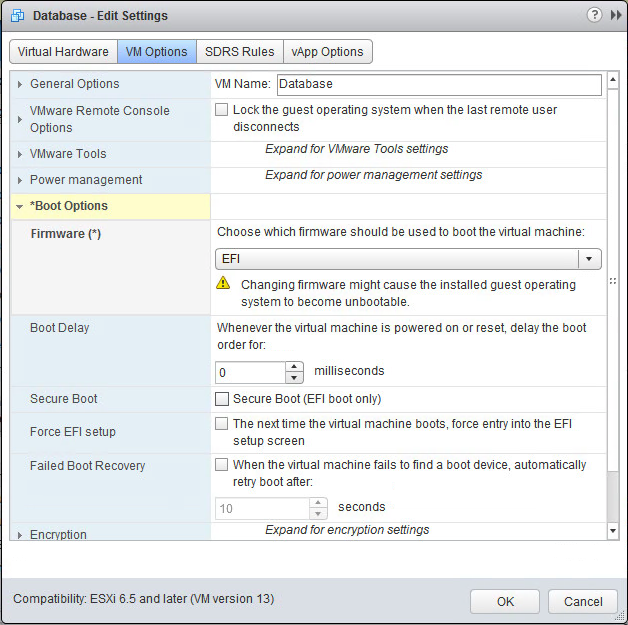
For VMs, SecureBoot is very simple. The virtual machine must be configured to use the built-in EFI, and then Secure Boot is enabled by ticking the checkbox. Please note that if secure boot is enabled, you can only download certified drivers to the virtual machine.
Secure Boot for virtual machines works with Windows and Linux.
Advanced Logs
VSphere logs have traditionally been focused on troubleshooting rather than security. The situation is changing in vSphere 6.5 with the introduction of advanced logs. Gone are the days when you made significant changes to the virtual machine, and in the log you received only a record that the VM was changed.
In the new release, the logics are improved and made more efficient by sending event data, such as “VM was reconfigured”, through the syslog data stream. Events now contain what is actually called data. Instead of notifying you that
In 6.5 you get a descriptive action report. For example, if 4 GB of memory is added for a virtual machine that currently has 6 GB, the log will tell you how it looked before and what it looks like now. In the security context, when moving a virtual machine from vSwitch with the label “PCI” to vSwitch with the label
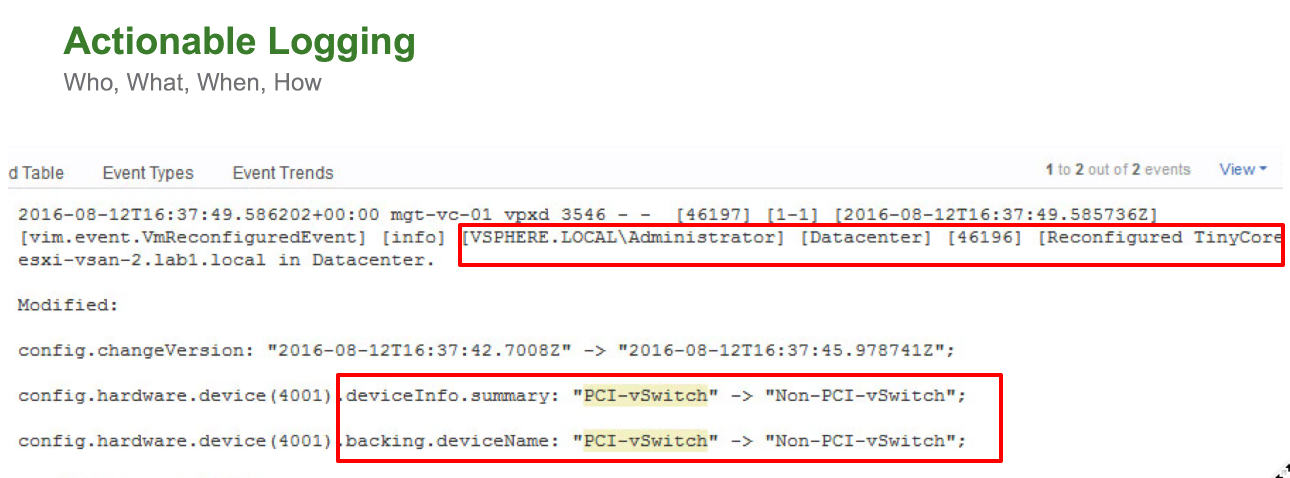
Solutions like VMware Log Insight will now provide much more information, but more importantly, a more detailed report means that you can create more predictive warnings and corrections. More detailed information helps you make more informed, critical decisions about data centers.
Automation
All these characteristics have a certain level of automation, for example, encryption of vMotion policies. That's all we wanted to talk about security in vSphere 6.5. VSphere Security Guide will be released within a quarter of the release of version 6.5.