 October 5, 2016 at 11:23
EBU R128 / BS.1770-3: Batch Normalization of Audio / Video File Volume
Hello!
I decided to share my experience in automating the control of the broadcast volume of my media. I think that all profile techies have had a headache for a long time, as if it continues to hurt. The recommendation introduced by the Ministry of Communications in the field of standardization of the volume of sound signals caused disturbance waves.
Neither means of control nor means of production were provided. Twist as you like.
However, for a long time, long before that momentous event, various plug-ins for editing programs exist.
But what if a huge media base has already been accumulated? I wandered around the Internet and came across a very, in my opinion, an elegant solution. And, to my delight, it turned out to be free software. The project is called r128gain .
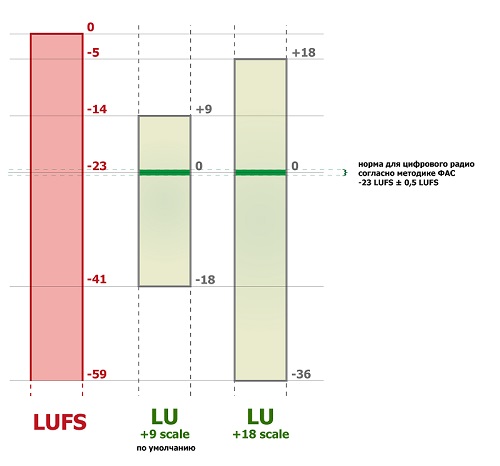
r128gain measures the volume of audio files in LUFS units . She understands, as far as I found out, two formats:
After the measurement, it is proposed to apply the volume to the track in two ways:
1. Using the SoX - Sound eXchange utility , get a combed sound:
2. Using the FFmpeg utility, replace / add an audio track to the video file:
I chose the first option. To extract sound from my video files, I use ffmpeg:
Normalization:
Build the finished video file. Since besides the old files there is a constant stream of third-party files, we bring to a single format. My standard is:
Assembly:
The output is a product in a single format.
Thanks for the help arteast
Thank you for your attention! I hope my article will be useful to you.
Read the second part about implementation
I decided to share my experience in automating the control of the broadcast volume of my media. I think that all profile techies have had a headache for a long time, as if it continues to hurt. The recommendation introduced by the Ministry of Communications in the field of standardization of the volume of sound signals caused disturbance waves.
Neither means of control nor means of production were provided. Twist as you like.
However, for a long time, long before that momentous event, various plug-ins for editing programs exist.
But what if a huge media base has already been accumulated? I wandered around the Internet and came across a very, in my opinion, an elegant solution. And, to my delight, it turned out to be free software. The project is called r128gain .
r128gain measures the volume of audio files in LUFS units . She understands, as far as I found out, two formats:
- Flac
- PCM signed 16 bit little endian (Microsoft WAVE)
After the measurement, it is proposed to apply the volume to the track in two ways:
1. Using the SoX - Sound eXchange utility , get a combed sound:
r128gain "--command=sox %TRACK% out.wav|flac gain %TGDB%" in.wav|flac -o .2. Using the FFmpeg utility, replace / add an audio track to the video file:
r128gain "--command=ffmpeg -i %TRACK% -vcodec copy -acodec flac -af volume=%TG% -y out.mkv" in.wav|flac -o.I chose the first option. To extract sound from my video files, I use ffmpeg:
ffmpeg -i in.avi -vn -c:a pcm_s16le -ac 2 in.wav -yNormalization:
r128gain "--command=sox %TRACK% out.wav|flac gain %TGDB%" in.wav|flac -o .Build the finished video file. Since besides the old files there is a constant stream of third-party files, we bring to a single format. My standard is:
video: MPEG2 PAL 720x576
audio: MPEG1 Layer II
Assembly:
ffmpeg -i in.avi -i out.wav -c:v mpeg2video -b 30000k -s pal -r pal -aspect 4:3 -vf scale=min(576*15*sar*iw/ih/16\,720):min(720*16*ih/15/sar/iw\,576),pad=720:576:(ow-iw)/2:(oh-ih)/2 -flags +ilme+ildct -movflags faststart -c:a mp2 -map 0:v:0 -map 1:a:0 out.mpg -yThe output is a product in a single format.
Thanks for the help
arteastThank you for your attention! I hope my article will be useful to you.
Read the second part about implementation









