 September 23, 2016 at 18:25
Modern operating system: what the developer needs to know
Alexander Krizhanovsky ( NatSys Lab. )
Today we will be interested in the operating system - its insides, what’s going on there ... I want to share the ideas that we are working on now, and from here a short introduction - I’ll talk about what modern Linux consists of, how can I tune it out?
In my opinion, a modern OS is a bad thing.
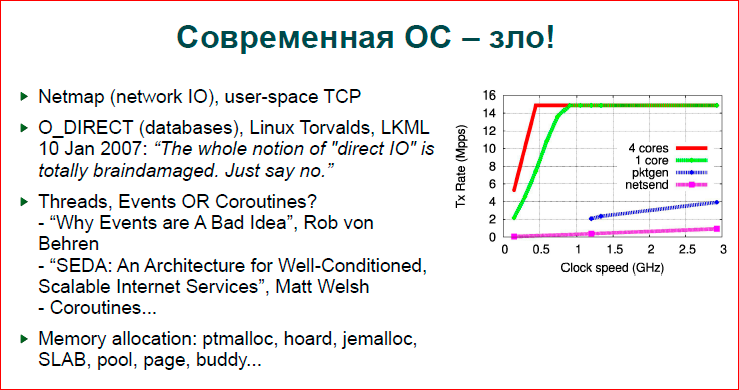
The fact is that the picture shows the graphs of the Netmap site (this is a gizmo that allows you to very quickly capture and send network adapter packets), i.e. This picture shows that on a single core with different clock speeds up to 3 GHz, Netmap allows 10 Gbps - 14 million packets per second. work out already at 500 MHz. The blue line is pktgen - the fastest that, in general, is in the Linux kernel. This is such a thing - a traffic generator that takes one packet and sends it to the adapter many times, i.e. no copying, no creation of new packages, i.e., in general, nothing - just sending the same package to the adapter. And now it sags so much compared to Netmap (what is done in user-space is shown by a pink line), and it is generally somewhere down there. Accordingly, people
The second point is about databases. It was about networks, now about databases. If someone looked into the databases, we know and today we will see that you can use MMAP, you can use O_DIRECT. In large databases - Postgres, MySQL, InnoDB - they mainly use O_DIRECT, and back in 2007 there was a discussion in LKML, and it was said that O_DIRECT is a dirty collection, it is incorrect. If we look at the code of the operating system, at the code of a powerful database, then we will see that the database grabs a large area of memory for itself and manages it. She herself keeps a pool of pages, working with pages, crowds them out, discards, i.e. everything the operating system does at the virtual memory level, file system level, etc.
Linux then said that please use madvise in order for you to work. Pyotr Zaitsev asked: “And how are we going to live without O_DIRECT?” Because we need to know when to which page to reset. " There was no answer, and we continue to live the same way.
The next point is how we program our applications. If you write multi-threaded network daemons, then, as a rule, the question should arise: “What will I use? Will there be processes, events, threads, how many threads can be launched there, how can I make a machine state so that each thread processes a lot of events, state machines and threads, or maybe use coroutines, like Erlang does? ” etc. This is a rather complicated question.
There are wonderful articles - “Why Events are A Bad Idea” (Rob von Behren) and “SEDA: An Architecture for Well-Conditioned, Scalable Internet Services” (Matt Welsh), which are completely contradictory. Some say that you need to do everything on threads, that the modern OS works very well with threads, and we can give it as many threads as we want, and synchronize them well and everything will work well. SEDA talks about a heavier architecture, that we launch a certain number of threads, we redistribute them between certain tasks, there is a rather complicated mechanism for scheduling threads and tasks for these threads.
In general, a rather hemorrhoids issue that needs to be addressed, and, in fact, either we use some kind of streaming framework, for example, Boost.Asio, or we ourselves do it with our own hands and should think about what is needed. We need performance, we need to think about it.
We live in a world where we have a lot of memory allocators, i.e. if we write something simple, then we use malloc or new in C ++ and don’t think about how we are and what happens. As soon as we reach high loads, we begin to drag jemalloc, hoard and other ready-made libraries, or we write our memory allocators - SLAB, pool, etc. That is. if we make a server, first we start with a simple program and then go to re-implement the OS in user-space.

We make a buffer pool for quick input and output, we make our own flows, some kind of scheduling, synchronization mechanisms, our own memory allocators, etc.
On the other hand the desktop. Yesterday I looked at what was running for me - I have launched 120 processes, many of them are even unknown to me. I love lightweight systems and, in principle, I understand what works for me. If I run KDE or GNOME, then there will be a sea of processes - 200-300, which I don’t even know what it is, what they do. What load they give to the system, I also don’t know, and, in general, it doesn’t matter to me. I print, compile code, in general, I am not interested in the maximum benchmarks in my desktop, I am interested in the maximum benchmarks on my server - where I need to set records.
The second thing is that desktops are now fairly low-powered, it’s some ordinary single processor, a bit of cores, a little memory, no NUMA, i.e. everything is very simple, everything is very small. And, nevertheless, we know that Linux works on our phones and on large servers. This is not very correct.
If we look at how the progressive world lives ... Maybe if someone faced heavy DDoS, they know this plate:
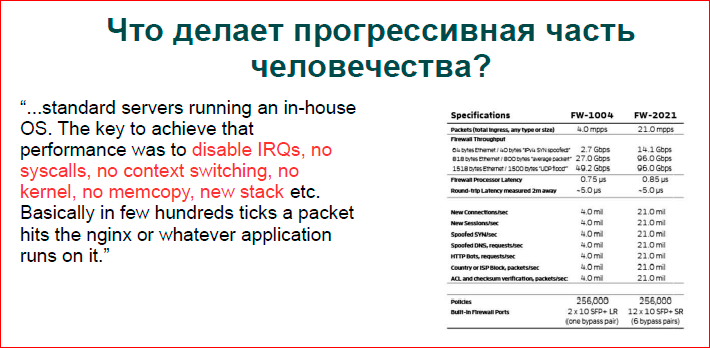
This is a data plate from one of the pioneers of building large data centers for filtering traffic, they work on regular Intel hardware without any network accelerators, and people make their own OS. Red color shows what they removed, and they received data that can remove 10 Gb of traffic from a basic cheap server.
If you just start Linux, you won’t remove anything. Moreover, these people do fairly serious filtering at the Application Layer DDoS level. They climb not only into IP / TCP - what a regular OS does, but they also parse HTP, parse it, run some sort of classifier, and they manage to parse one packet for some processor cycles - everything is very fast.
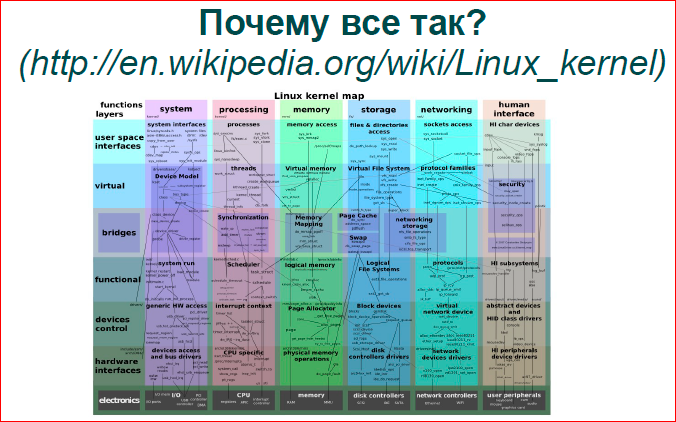
If we try to answer why this is how we live with Linux, we are glad. Somewhere in the 2000s, Solaris had strong positions, there was a debate that Solaris is old, heavy, Linux fast and light, because it is small - this can also be found on the mailing lists. Now we have what Solaris had then - Linux is very large, its code is colossal, there are a lot of options, it can do a bunch of everything, everything you want to do, you can do in it. There are other OSs such as OpenBSD, NetBSD, which are much simpler, they are less used, but Linux is a very powerful thing.
I tore off the picture above from Wikipedia - they tried to portray Linux in some context. We have vertical columns - its subsystems according to its directories in the core, and below they went from a higher level to a lower one. Here is a very complex graph. In fact, if you look at some point, for example, I / O planning at the hundred-level level - blue and blue-green - not everything is shown there. Everything is actually more complicated, there are big connections, a lot of different queues, a lot of locks, and all this should work, and it all works slowly.
Let's go through the vertical columns, look at the Linux subsystems, and what you can do with them, where there may be problems. Partly from the point of view of the administrator, partly from the point of view of the developer of the application code.

Firstly, work with processes and threads. Linux has a fair I / O scheduler that works in logarithmic time. He is now the default scheduler, before that there was a scheduler that works for constant time. I never had to get into the scheduler itself in order to optimize, get more performance out of it, that is, I know how it works there, but I never had to optimize it. Everything is planned there somehow and, probably, it is planned well. Problems usually arise elsewhere.
As I said, desktops and servers are completely different worlds, i.e. if there is a server with one processor, 8 or 16 cores - this is one option. If we have a server with 4 processors, each with 10 cores, we have 40 cores in the system, plus hyper-threading, we have 8 threads. Now processors have become more massive, there are even more parallel contexts, and the picture is completely different.
First of all, if we talk about threads, about processes, about events, then whatever we choose - threads, processes or state machines - it's all about your convenience.
If you want to write fast, take some kind of framework and use it, either Vent, or Boost.Asio with a bunch of streams, whatever.
If you need performance, then you need to understand exactly that you have a certain amount of iron, nuclei that can do something per unit time. If you force one unit to do more than it can, and you give a lot of software flows to one hardware stream, then nothing good will happen. The first Context switch will happen. Context switches are cheap if you have a system call. We have a special optimization in the operating system that if the application process goes to the kernel and immediately returns, then its caches are not washed out so much, and it does not invalidate the caches. A little washing out occurs, but, in general, we live well. If your application contexts begin to be rescheduled, then everything becomes very bad.
- On modern Intel processors, we must invalidate level 1 caches, i.e. our most valuable, that we have the smallest and most expensive, that allows us to work really fast with slow memory - we lose it. Older caches L2, L3 are simply washed out. If you have several threads running in parallel, several processes, programs that work with a sufficiently large amount of data, and they are rescheduled for you, then it’s clear that the memory with which each program or each thread works is loaded into caches and washed out what the previous one did, the one that was gaining caches for itself. And when the reverse Context switch occurs, when the first program gets control again, it switches, in fact, to cold caches and starts pulling data from memory, and we have a completely different operating time order.
- Following. What we do not find on desktops, on our smartphones is NUMA. Modern X86s, before that were AMD, now Intel, now they have become asymmetric architecture. The bottom line is that our OS scheduler - and we have different processors - these are our different nodes. Each node works with its own physical local memory, and if the OS scheduler decides to move from one node, move the process from one processor to another processor, then everything becomes very bad for us. Our memory stretches through slow channels. Fortunately, the OS knows the topology of the kernels it runs on, it tries not to do this, but, nevertheless, sometimes it has to do this, due to some of its considerations.
- Further. The mechanism of how we work with shared data has changed a bit. If we could take a spin lock quietly some years ago and assume that this is the fastest, i.e. take some small variable, spin in a loop, expect it in some values on this variable, now we can’t do that. If our 80 cores are breaking by one byte, by 4 bytes, then the data bus suffers, and everything becomes very slow with us, i.e. we cannot use the synchronization mechanisms that we used before.
I highly recommend reading “What Every Programmer Should Know about Memory” (Ulrich Drepper) - a wonderful book, it’s a bit old, but the general concepts are very good, it shows how it works and what you can do.
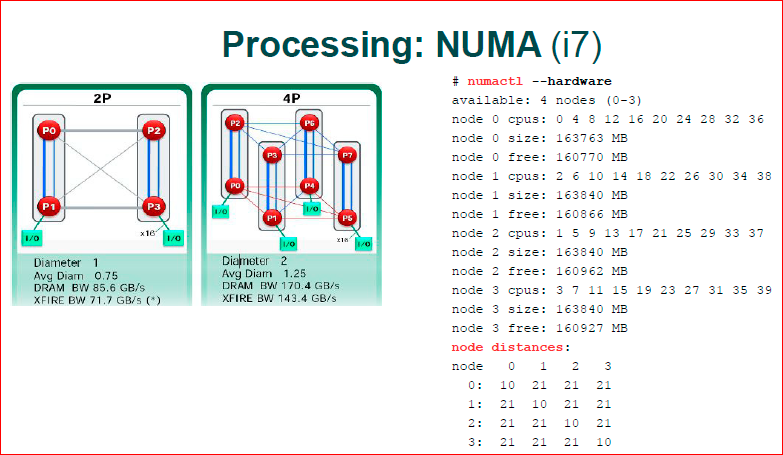
The first picture is 2008 or 2009 from AMD, when everything began to enter the masses. We have two processors in total. The blue channels are the channels through which two cores communicate, i.e. here we have 2 processors with 2 cores. Between the two cores we have a very fast transfer, and between different processors it is very slow. Accordingly, if we have a 0.3 kernel, they work with the same lock, with the same int, then they start to drive these 4 bytes on a slow memory channel - this is very slow. If P0 and P1 with the same int variables work for us, then everything is very fast with us.
In modern architecture, they came closer, probably, they even went further than a picture with 4 processors. If we have a flat structure here - we have 2 processors, fast and slow channels, then we already have a three-dimensional design, and not all the cores and not all communicate there. For example, P3 does not communicate with P4, he must do two hop. Those. if we need data in P3 from P4, we first go to P0, and then P0 already goes to P4, i.e. we need to use another processor in our transfer.
Modern Intel's i7 architecture - it has a very serious bus, it has KPI. In fact, there is this infrastructure, core communication and data synchronization. They built their TCP / IP, i.e. there is a multi-level communication protocol, their packets run on the data bus between the processors, there is a rather complicated thing and to understand the modern i7, where it has a faster transfer, where it is slower, very difficult. Numactl shows node distances. That is, if we look diagonally, this core by itself is some weights, some parrots - it has the cheapest price. It’s already hard for him to go to any other node, i.e. there already weights of 21 are considered.
Even a utility that should show you the topology of your iron, it believes that any core you go to has the same price. Actually, this is a bit wrong, but if we work with NUMA, then it is easier to assume that everything is fast in the local processor, and everything is slow in the alien processor.

What can we do and what is right to make the code work fast? Firstly, spin lock, various data structures, lock-free, which became very popular in the 2010s. Different lock-free queues and stuff do not work on large machines. Recently I was asked that “here we have 20 thousand streams, and their person wanted to write a quick queue that would allow us to quickly insert and collect data. It will not work like that, i.e. everything will be very slow. 20 thousand threads will be cached, they will ugly atomic instructions, data, and everything will be very slow. Accordingly, if you write code for the NUMA system, you think that you have a small cluster inside your machine, inside one piece of iron, and you build your software so that you have a small machine, one processor, it is multi-core, there are 8-10 -16 cores she does her own thing locally and sometimes communicates with strangers. And then, if you combine a cluster of machines, you will have even slower communication. You get such a hierarchy of clusters - a faster cluster and slower clusters.
A good example of shared data is that it is not good to use shared data when C ++ is shared_ptr, i.e. we have a pointer to the data - these are our smart pointers, and they have a reference counter, which changes with each copy of the pointer, respectively, if you write a loaded server, then shared_ptr cannot be used.
One of the reasons why the boost donkey is there, for example, will never give you good performance on the server, because it uses shared_ptr very much, smart pointers and other high-level things that slow down actions a lot, i.e. This high-level object code does not expect it to work with raw hardware as quickly as possible.
Further. False sharing. One way or another, in different languages of high-level programming, we operate with one byte, two-four, eight bytes. The processor operates with 64 bytes - this is one cache line of the processor. Those. if your variables are stored in the same cache line in 64 bytes, then for the processor it is one variable, and it will do all its algorithms precisely on your two variables. If for some reason you have your two hot variables, for example, two spin locks, completely different and ideologically fit into the same cache line, then you have big problems. You have different cores, not wanting to, they start to fight for the same data, although they should work in parallel. And you come to the fact that you, in fact, have two locks, but they work as one.
Binding processes is just the case with NUMA. Fairly old test. There was a machine 4 processors with 4 cores. First, when we run dd and send it to nc, we have dd running on one core, nc on another. And at that moment, for some reason, the OS decided that “we have different processors, it’s better for us to scatter the application process for different processors”, and it gave one process to one processor, another to another, and got rather low performance. If we rigidly write that both processes must live on the same processor, then the transfer has increased significantly. Those. The OS does not always do good things, not always smart things in scheduling processes.
One more thing - we have different servers, i.e. we have desktops on which generally everything is spinning, and we don’t know what it is. We have servers on which, maybe, apache, nginx, MySQL, a router or something else works, i.e. there are such prefabricated hodgepodge. But if we are building a high-performance cluster, if you look at how large companies are built, as a rule, there is a cluster, there are levels, there is the first level - we have, for example, nginx on 10 machines, and on each machine only nginx and OS . The next level - we have Apache with some scripts, the next level - we have MySQL, i.e. it turns out that one machine is one high-level task. This is a completely different approach, and in this situation, our application, nginx or apache, can count on the fact that it owns all the resources, it does not need virtualization, which the OS gives is virtual memory, it is the isolation of address spaces, the fact that every program believes that it works with some unknown amount of CPU. We can bind, for example, when we launch a web server, we launch workers either equal to the number of cores, or twice as many, i.e. we are based - the number of workers on the number of cores. This is just the example that we have one application that fully utilizes the entire machine.
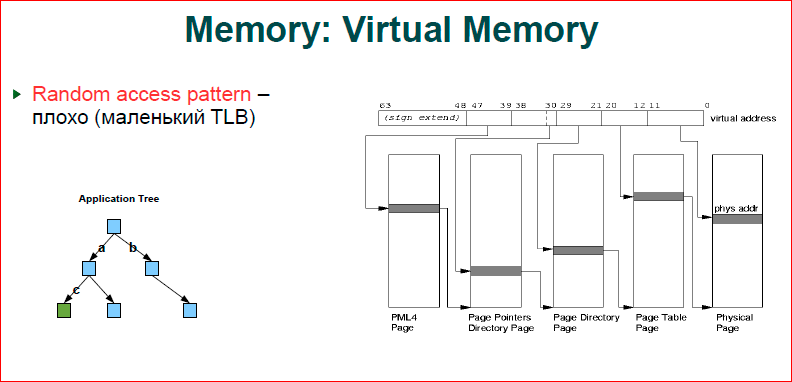
About the memory. In short, the more memory you use, the worse for you. If you look at the picture, this is how our virtual memory works. We have an address (this is a line above) - from 0 to 63 bits, and when we work in a virtual address space, and we have hardware with a physical address space, we, as always, map the virtual address space to physical. Accordingly, if two programs work for you, their variable addresses may be the same, but these addresses refer to different physical memory cells. This is the principle of virtual memory. Accordingly, when our processor accesses a certain address, we must resolve this virtual address to a physical one.
The page table works for us - what is shown. Page table consists of four levels. We have the first four levels, from where the 39th to 47th bits refer - this is the page. This page is a plate, the index is a number that is encoded with a bit, we jump to the next level, then we resolve the next part of the bits, etc. This shows a flat structure of what one page, one level links to the next. It is clear that at the first level, the senior addresses in the program, as a rule, coincide.
The OS, when doing a memory allocation, selects the lowest addresses as close as possible to those that are available, i.e. we get a tree. The first gray ruler will be one, the second can also be one, then at the third level we have two, at the last level we begin to fully use the entire level, i.e. we get such a tree with a root in the main page, and then it branches. Thus, the more memory we spend, the more branched a tree we get, and, of course, that this should also be stored somewhere, this is also our physical memory. Next, we will see how all this is spent and, above all, memory consumption.
The second one. Suppose we create some kind of binary tree, we believe that we have blue nodes and green nodes where we want to come. For us, this is a tree, for the OS, it is a tree inside a tree, i.e. when we pass by key a - from the first level to the second, we have a transfer through our tree and completely we go through four levels of the tree. Now we jump from the second level to the third - to s, the next moment. Again, the tree resolves, i.e. in order to go down from the top of the tree, we will have eight memory transfers - this is a lot.
Fortunately, we have a TLB cache. This, in fact, is a fairly small cache, in total about 1000 addresses are placed there, i.e. translation tables we address with pages. 4 Kb pages, 1000 pages - we get 4 Mb, i.e. 4 MB is what we have cached in TLB. As soon as your application goes beyond 4 MB, you start running around the tree, and 4 MB for a modern application is, generally speaking, nothing. And you quite often get out of the TLB cache, i.e. the more memory we consume, the more performance degrades.
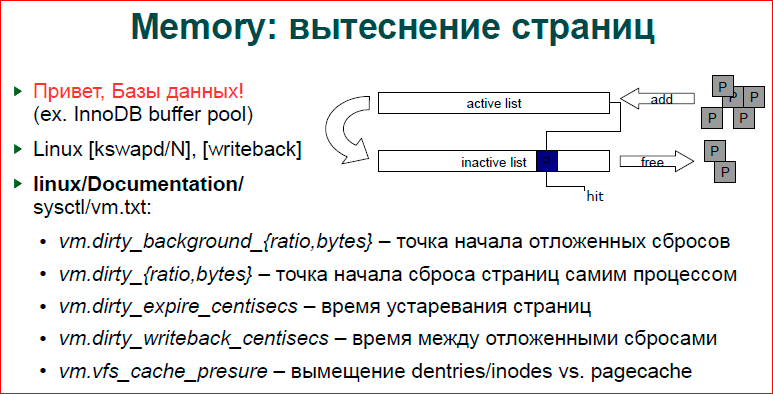
About crowding out pages. I already said that our databases do this, and indeed, some mechanisms are very similar in databases and in the OS, and Linux keeps a double list of LRUs, i.e. we have an active list and an inactive one. Accordingly, the page, when you only do an allocation or do something with the page, is placed in the active list. Then, after some time, it is pushed into the inactive list. The kswapd daemon, if you make ps, you will see kswapd - one at a time per core, they are just doing these page-to-page page-to-page transfer. And when the page completely expires a second time, it is already pushed out of the inactive list, and if it is an anonymous page, for example, some malloc, it goes to swap. If this is a filed file, then the page is simply thrown away, we will go to the filed filed.
In addition to the fact that we have an active and inactive list, our page can be dirty and clean. Those. if we only read the page, it is clean. If we wrote something down, then it is dirty until it is dumped to secondary repositories - it is either swap or written back to the file. Every time we write something in memory, we don’t want to go and dump it all to disk. Obviously, this will slow down the work. But sometimes we need to dump, because if we have a massive load, if we write everything now, write to memory, and then we don’t dump anything anywhere, then we don’t have enough memory. A record arrives in one byte of memory, and we begin an active reset, go through these lists, dump this all to disk, and we generally get up.
Accordingly, we have a writeback process, and file systems add their work to this process. And writeback just does the dumping of dirty pages to secondary repositories.
We have sysctl variables. I use documentation inside the kernel for sysctl, I always have a kernel at hand, I look in there, and there is documentation in the kernel where it is well written what each sysctl does.
Accordingly, dirty_background_ {ratio, bytes} is the start point of delayed faults, i.e. when our file system decides that we need to put work for writeback, about how many bytes we have already written, how many dirty bytes we have, or how many percent of dirty pages we get from clean pages, and then we start dumping this data onto disk.
dirty_ {ratio, bytes} is when our process writes data and makes a new dirty page, and at that moment it looks at how many dirty pages we already have. If we have a lot of them, then he will dump it right now on secondary storage, if there are not enough of them, then he will leave this to work for writeback, i.e. this is how we try to get away from the situation when we write very intensively, but the writeback stream does not have time to reset everything.
Writeback_centisecs controls how our page goes through the sheets, and how often they are popped.
Cache_presure is some compromise between how we push what data. Those. if it's some kind of file server, then we need a lot of inode and a lot of directory writers. If this is just a database that populated a large area of memory, then we do not need an inode. For example, ngnix opens a file and holds it in its cache, we don’t need directories there, inodes may be needed, but most likely not, and the page cache is more important to it.
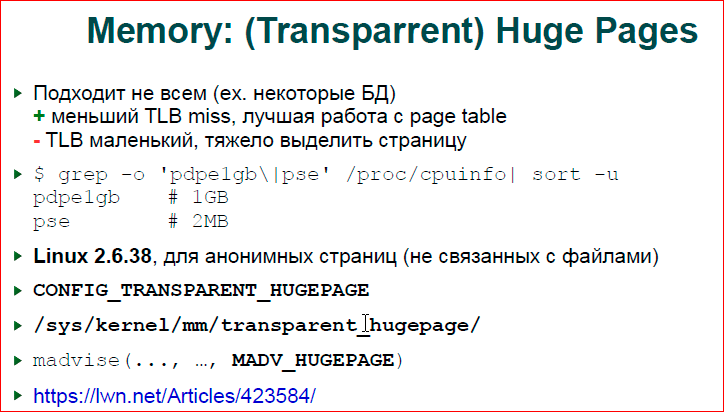
About large pages. I say that our page tables work with 4 KB pages and, indeed, it turns out that in TLB we can only address 4 MB - this is not enough. Thus, we have optimization at the kernel level and at the processor level - this is a large page. I honestly don’t know how the processor works with it, but the bottom line is that if you allocate a page, we don’t have a physical page of 2 MB or 1 GB. Physically, we still have 4 KB. And when you allocate a large page, your OS, in fact, is looking for a continuous block of 4 KB, which will make you this large page. This large page will comprise only one occurrence of the page table and one occurrence in the TLB.
The trouble here is that if we have a first-level TLB for regular pages - this is about 1000 entries, then for large pages - this is probably about 8 for 2 MB, and 1-2 for GB. Based on this, if you have a large database, then large pages may not suit you, and if you write only 1 byte, 1 GB is allocated to this byte, and it twitches from the file, it ultimately becomes not profitable for you. If you hold some very intense stack of relatively small data, i.e. not like you raise MySQL to 40 GB of memory, but if you have a small database, literally 1 GB, to 2-4 MB, which works very hard with data structures, it makes sense to use hugh pages.
The beauty is that Linux 2.6.38 introduced transparent large pages. For some time we needed to bother with large pages, mount a special file system to work with it, now Linux can do everything on its own. If you specify for your memory region, do madvise, because you want this memory region to use large pages, then when you select pages, say in the large mmap, Linux will try to allocate a large page for you. If he cannot allocate, he will slide to 4 Kb, but he will do everything possible for this. Support for large pages can be viewed at xdpyinfo.
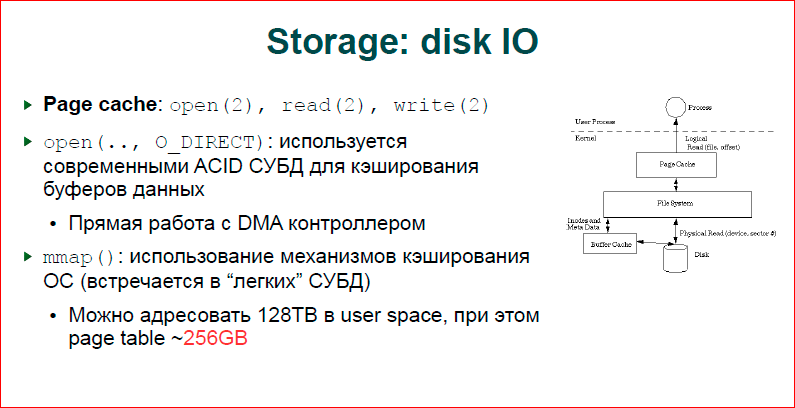
About disk input-output. Here we have three options that can be divided into two large interesting categories: the first is file I / O with copying, the second two are without copying.
The picture shows normal operation. If we do the usual open, do read, write, everything goes through our cache, the so-called page cache. For any file I / O occurring, there are pages into which data read from the file is written, written to the file, and they are dumped to the file using kswapd, writeback streams, or, on the contrary, lifted from it. Here we get the copy. If we have a buffer in our application program, we will make it read or write from it, then we write data to this buffer, and we also write to page cache, i.e. we have double copying. It’s slow, respectively, large databases use O_DIRECT I / O, we bypass the page cache, we say that we have our own large memory area, allocate it with the same mmap and do direct I / O from the disk controller to this area.
The second approach is that we do mmap. This means that if in the case of O_DIRECT we ourselves do read or write on certain pages and dump it ourselves to disk, then in the case of mmap, our OS somehow somehow resets something, we don’t know when and what she will dump. Accordingly, if we have a transaction log, and we say that this data block must be written before another block, we cannot do this, we can only do this in the case of O_DIRECT.
Another interesting thing with mmap. Generally speaking, we have a large address space in X86, there is a temptation, because we have virtual memory, since we can map 128 TB of memory, and having only 10 GB is just a map, a lot of files and somehow work with them. In particular, we tried to do it, since we know that we have page 3, we can map 128 TB, make one mmap, and these 128 TB are a bit in our address.
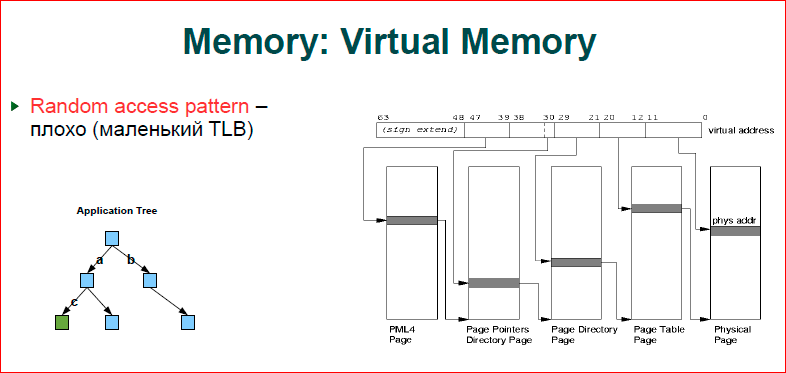
Let’s say there will be the least bit n bit, we make mmap and we get already the iron tree, which the equipment gives us. Those. we take any address, take bits as our key, which we store, and put them on the bus and we already get the data in this mmap.
So you can work. In some cases, it will work quickly, but we have a very large page table and caches are sagging. Thus, the page table is quite an expensive thing, for 128 TB we have 256 GB using the page table, i.e. an order of magnitude smaller, but the figure is very serious.
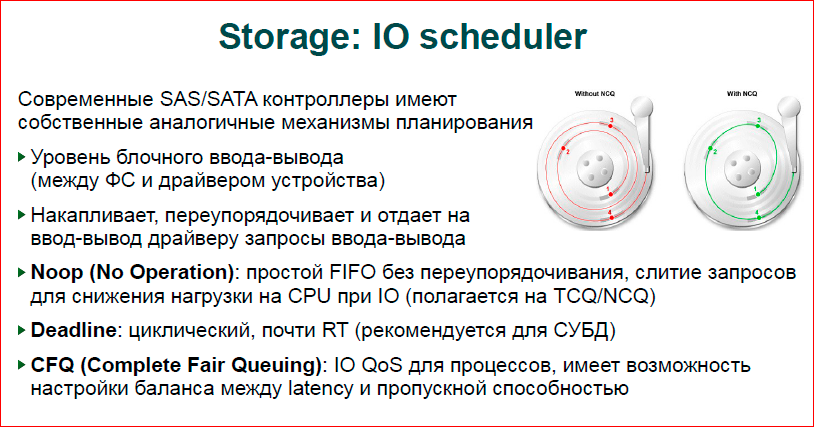
About the story. We have I / O planning at our store. In the picture, what is shown in red. Imagine that we have three blocks that are stored in different places on different tracks of our disk, and we throw them in some order to the controller. The controller starts to run first on the inner track, then, fortunately, he immediately sees the second block, then he must run a sufficiently large distance to reset the third and fourth. Those. our disk spins all the time if it does not order.
Green shows the optimization mechanism. He will be able to move our head as the disk rotates, he can still move it between the tracks and, accordingly, do I / O from different tracks in parallel. And it turns out - in one turn we manage to do everything. Here we do three turns.
It works just as briskly, but Linux also has its own I / O schedulers. Thus, we have a simple scheduler that, in fact, does nothing, just merges requests and relies on the fact that the hardware scheduler will do everything. It merges requests in order to reduce the time of the CPU and the OS for input-output, i.e. large pack immediately give more profitable.
The deadline of the scheduler is what is recommended for databases, it provides us with a guarantee that after a while our data will be discarded, i.e. they will not live there forever. This is a fairly simple scheduler and allows databases to understand well how their data will go to disk.
There is now CFQ - this is the default scheduler, probably in all distributions, it does complex things, if you have virtualization, different users, it tries not to offend everyone, balance I / O, give the same quality of service to each user. But for databases, for servers, this is not very suitable.
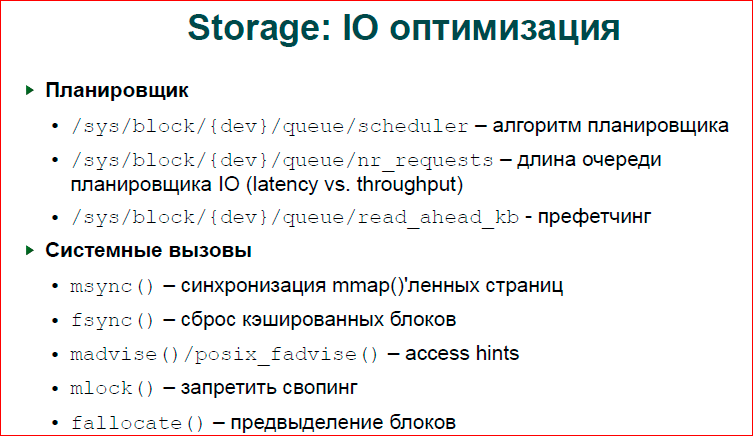
About the optimization. There are parameters in sysctl, I have listed here, they can be tuned, in particular, change the scheduler, change the length of its queue. So ... this queue that we throw at the controller, if it is longer, then the controller and scheduler will be able to better do its task of reordering, to build a queue of requests more optimally. If it is shorter, then we, for example, read from the disk will be faster, because we do not expect reordering.
Read_ahead is when we read some block from the disk, then we read the next as much as there. Here we just have a variable that sets how much we should read. In particular, InnoDB has a more complex mechanism, which adapted tries to understand how our load is going and adapt to prefetching.
If you are writing your own applications, there are a number of system calls that allow you to better control the flushing of data to disk.
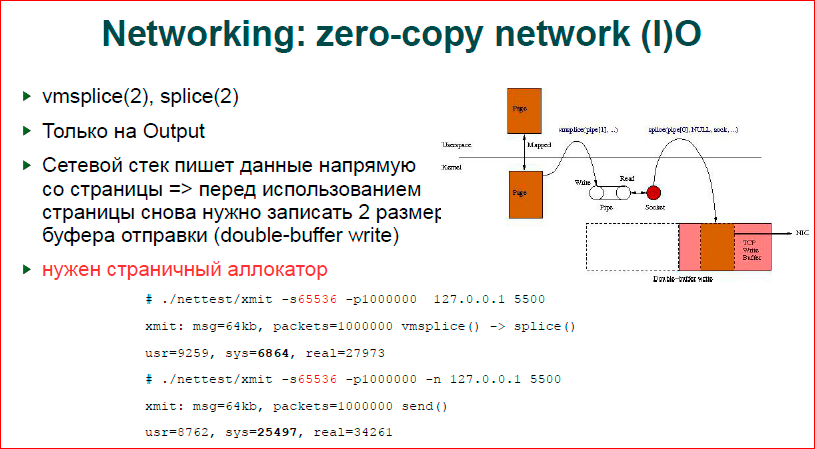
Network. We have zero-copy input, unfortunately we do not have zero-copy input. Those. if we have an htp server that is in such conditions that it has very intensive input and filters it, or build some kind of user space firewall, then you cannot optimize much.
The second drawback of this approach is that two system calls are written at the top of user space, i.e. for each output, you need to call two system calls and make, accordingly, more context switches. There is a benchmark made by Jen Saxburg himself, who, in fact, implemented all this. The size used here is 64 Kb. At 64 Kb, the acceleration is very strong, 4-5 times. If we reduce the size, for example, to 100 bytes, our zero-copy output will be worse than copying the largest number of system calls.
Another disadvantage is the inconvenience of work. When you take a page, give it to zero-copy, your data page is directly placed on the TCP / IP stack of the OS. You have given back and you do not know when TCP will send the data. It can do retransmit, etc., you do not know when it will be possible to reuse this area of memory. Thus, the double buffer approach is used. If you have, for example, 64 KB of the TCP send buffer, then you make a buffer of 128 KB. And you can be sure that if at first you wrote down 64 Kb in full, went to the second 64 Kb, and the socket is not blocked on these second, then it means that it has already sent something, and you can start using the first part of the buffer . Those. the double buffer ensures that the TCP buffer is completely pushed through before we reuse this data again.
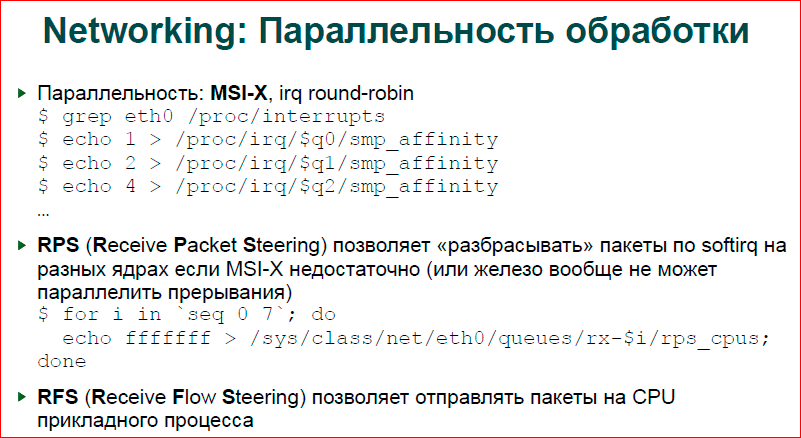
Parallel processing. In fact, this information is losing relevance, because modern network adapters are already really cheap and have options already with hardware parallelization. Those. if you make grep / proc / interrupts on an ethernet card, then you will see not one interrupt for our adapter, but 16, 24, 40, many, in general. These are just the queues of this adapter. Those. we can use up to 20-40 interrupts for network processing, that is, if we put a separate interrupt on each core, then all cores will work in parallel with us.
There is a software implementation of RPS, i.e. if your adapter has only one queue, then you can use the software implementation, and the OS, having one interrupt, will decide which kernel to process this package for. The advantages of the software implementation are that a good hash is read there, i.e. the hardware implementation considers the hash from the destination and send IP addresses, two TCP ports, plus the application protocol TCP, IGP, etc. This five is used as a hash to select a kernel. In theory, it should be so, but, apparently, by default the adapter uses a rather bad hash function, and if you have enough cores, you have made many queues, then you will often see an uneven load of cores. RPS, on the other hand, uses fairly good hash functions and allows you to better distribute traffic.
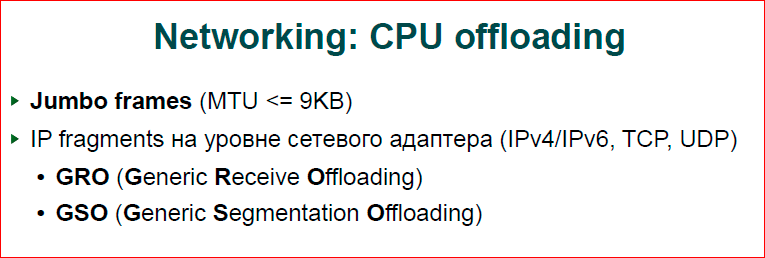
Offloading. If you can use Jumbo frames, use them because the OS has a lot less work to do. Processing each packet due to the power of the stack is very expensive, and GRO and GSO help solve this problem in a slightly different way. If your application generates different packets, for example, 64 bytes each, then the OS will collect all your packets in one large chain and send this chain to the adapter at once, and the adapter will spit it out at once. As a rule, GSO, GRO operate on 64 Kb, and in principle, you can expect that if your application program generates data in small pieces, then at high speeds the OS will collect it and will work with sections of 64 Kb. Another thing is that these are not real packages, as is the case with Jumbo frames, but these are segments that some OS paths go much faster due to the fact that this is an assembled chain.
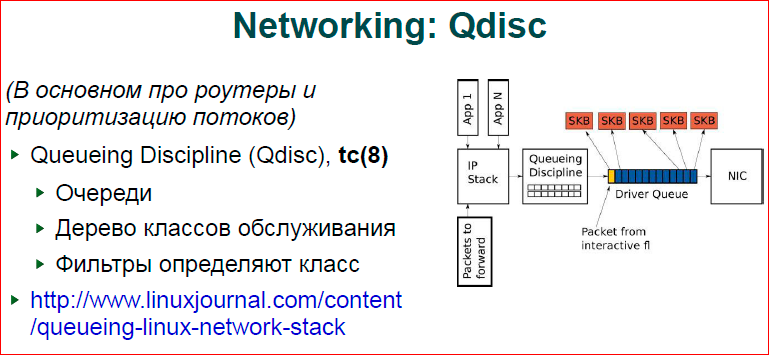
Regarding Qdisc, this is more for routers. If you are building a complex system on Linux, for example, you have a router, and you need to give a certain band to all wi-fi users, and let some users run at a higher quality of service. You can build several queuing disciplines, define discipline for each discipline, as you define, for example, a pool of IP addresses, a network mask — you will have one discipline with one quality of service, other addresses with a different quality of service, etc. In particular, it solves the problem well. If you have any data, for example, torrents (the blue packets in the picture) are massive data processing, and the yellow one packet is your Skype, your voice, you cannot wait long for your voice packet to go through the whole chain with torrent. Qdisc allows you to assign a higher priority and shove a package earlier than less priority. There is a good livejournal article on these disciplines -www.linuxjournal.com/content/queueing-linux-network-stack .

I included sysctl in the presentation simply because it should be. In general, any article on the same hub on how to optimize nginx will definitely say that there are such sysctl, you can find them everywhere, and we can do it.
Contacts
» [email protected]
» NatSys Lab Blog.
This report is a transcript of one of the best presentations at a training conference of developers of highly loaded systems HighLoad ++ Junior . Now we are actively preparing the 2016 conference - this year HighLoad ++ will be held in Skolkovo on November 7 and 8.
This year, Alexander Krizhanovsky will continue for us an excursion into the insides of the operating system (in general, Alexander is one of the most serious specialists in Russia in this field) - " Linux Kernel Extension for Databases ".
Also, some of these materials are used by us in an online training course on the development of highly loaded systems HighLoad. Guide is a chain of specially selected letters, articles, materials, videos. Already in our textbook more than 30 unique materials. Get connected!









