Blend4Web vs Unity. The battle in the ring. Round 2
The next "parrots" ?! Oh no. Three real tests, three different directions, various devices and interesting facts.

A year has passed since my first attempt to compare Blend4Web and Unity . A somewhat naive article caused a flurry of comments, where supporters of the engines, as expected, took the diametrical sides. Much has changed since then - Unity WebGL is no longer beta, Blend4Web has matured and matured, and your humble servant has gained some experience.
As you understand, I return to the topic of comparing Blend4Web and Unity in the “battle for the Internet” field. I'm not interested in the usability or functionality of the engines. Only the result, only hardcore and only web browsers. I'm not going to breed holivar on the topic "who is cooler." Real tests and real numbers. You can always check on your devices and unsubscribe in the comments, and now let's get started ...
It is very difficult to conduct a test comparison of completely different software tools. It is necessary to take into account many nuances and try to achieve symmetrical projects and settings, starting from the location of objects and ending with the parameters of the final export.
Blender was chosen as the base scene designer and there are several reasons for this. Firstly, Unity perfectly imports native Blender files. No FBX exporters and manual installation of objects in the editor are required. Secondly, for Blend4Web, this is the only way to create a scene.
Therefore, all the scenes and models were preliminarily prepared in Blender, textured and completely devoted to the engines. In some cases, I used Empty dummies to fine-tune objects that don’t “see” Unity in blend files. These are light sources, as well as cameras.
All textures, especially the settings for materials (Diffuse, Normal map, etc.) were practically mirrored from project to project. I will talk about some points later.
Basic tools and engine features were also used to create the environment, some landscape effects, lighting settings and shadows. I tried to achieve full identity perception of the same scenes for both engines. True, this did not work out everywhere, and you will notice some discrepancies.
The following items were selected as the main criteria:
This is very important for browser applications. Of course, a lot depends on the server settings, application optimization and connection speed. For the correct testing of this option, I decided to leave the proposed export options as default. So, Unity performs unzipping of data on the fly, and Blend4Web completely “shifts” the solution to this issue. The test server itself sends the files "as is", without any compression.
On the one hand, it seems that Unity already has a clear advantage over Blend4Web, but, in fact, it also has its “pitfalls”.
To exclude from the results such an ambiguous phenomenon as data transfer, this criterion was invented. Content is now loaded from the browser cache. Here the real time needed by the engines to display the scene is interesting.
This is the favorite parameter of all players, and game developers are not far away! FPS counters have been added to applications. This script was used for Unity , and Blend4Web originally had this feature.
Also, for the test browser, the limit of 60 frames was forcibly disabled. For example, Google Chrome was launched with the --disable-gpu-vsync option. As for mobile browsers, the existing restriction did not play a special role in them. Many results were obviously below 60 frames per second.
The stable operation of the browser is largely determined by the memory consumption for a particular tab. Careless handling of memory can lead to a crash of the browser itself, which is absolutely unacceptable for games and web applications. Actually, the data was taken from the Task Manager of the Google Chrome browser (shortcut keys SHIFT + ESC).
Different devices were used as test equipment (thanks to my friends, because I didn’t have some), starting from a desktop computer and ending with a productive smartphone.
In testing we used: PC (Intel I5-3570, 8RAM, GTX 650 with a screen resolution of 1680 × 1050), Apple iPad 3, Motorolla Nexus 6, Samsung Galaxy S6 Edge.
Extremely versatile equipment ...
Traditionally, programming begins by writing the Hello World application. I decided to use something similar for the first test, but a bit more adapted to the realities of game development.
So, a simple scene with several cloned objects. Normal textures are enhanced by Normal Map. Two light sources and simple animation. Since the tests are supposed to run on mobile devices, measures were taken to optimize the scene in both engines.

As you can see, a fairly standard scene for a game. There is nothing complicated here and both engines should “chew” this without problems. But the results were a little different than expected.
Test results by the criterion "Cold boot"
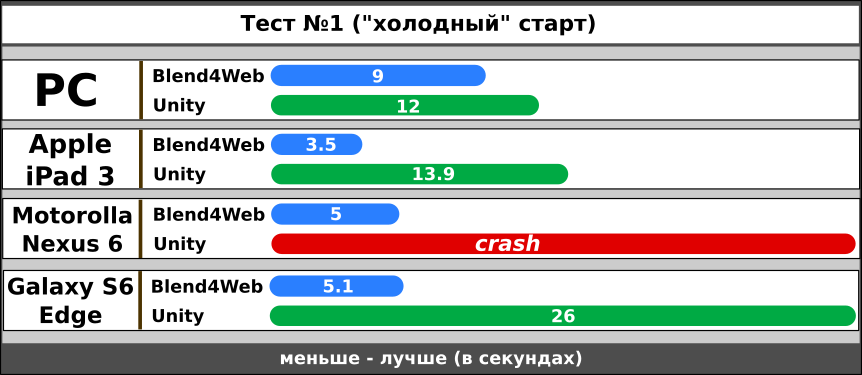
The faster the application loads, the better. Of course, channel bandwidth is of great importance here. Therefore, it is worth considering the results relative to each other, and not real numbers. And here we find out an interesting feature - building the application on Unity loads much more slowly than the one from Blend4Web, and on the Nexus 6 device the browser tab unexpectedly “dropped”.
Please note that the final download time was counted from the moment of start in the browser line until the scene screen appears.
Test results by the criterion of "Hot boot"

The second test demonstrates the speed of launching the application from the browser cache. The readings are not affected by the connection speed, server settings and other parameters, but only the readiness of the engine itself to quickly display the scene is characterized. And here Blend4Web starts just fast, almost the same on different devices, which can not be said about Unity.
If we compare the results of the Unity application download speed in two tables, a very interesting picture emerges - a very small time difference between a cold start and a hot start.
It looks like the features of WebGL initialization and content loading played a trick here. In this article on a habr everything is remarkably painted.
You also need to consider the time taken by Unity to demonstrate the splash screen. This is a non-disable option for the Standard version that I have. Of course, in the paid version of the engine, you are free to decide the fate of the splash screen yourself.
FPS test results
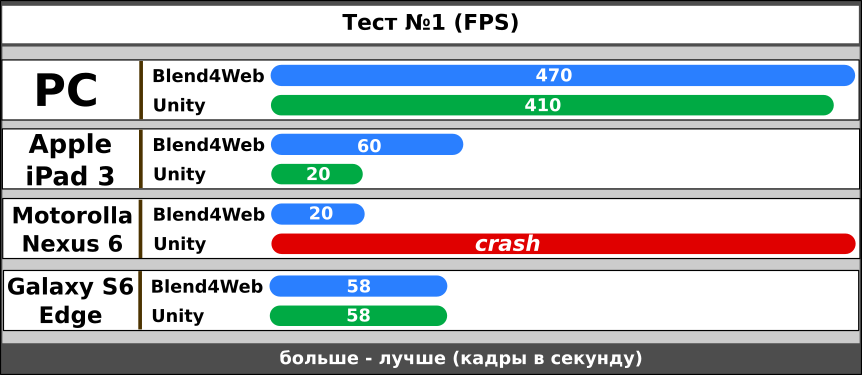
The first thing that catches your eye is the sharp difference between the FPS readings for a computer and mobile devices. It is likely that iPad 3 can produce more frames per second (at least in the case of Blend4Web), but it was not possible to find a way to disable FPS restrictions for mobile browsers. However, for the eyes, a screen update of 30 units looks quite comfortable.
Interestingly, on the Galaxy S6 device, both engines were equal in performance, while on the iPad 3 Unity remained in the “tail”. It’s a pity, of course, that the Unity application completely failed the test on the Motorolla device.
Test results by the criterion of "memory consumption"

Again, it was not possible to find a way to correctly measure the memory consumption for a specific tab of a mobile browser. Therefore, hereinafter only readings taken from a desktop computer. Theoretically, the same values should be for mobile browsers.
In general, I expected to see a slightly different picture that could explain the browser crash for the Unity application. But, as the tests showed, there is not much difference in memory consumption, at least for this scene. The more surprising is the fact that the browser crashed in Nexus for such a primitive scene.
The second test is the exact opposite of the cube scene. Hundreds of objects, large space, dozens of textures, shadows, more than a million vertices. This will probably only a desktop computer. I did not expect this test to run on mobile devices at all! No optimization specifically for low-power devices was performed.

In this scene, the main difficulty was precisely the synchronization of appearance for both engines. Everything is clear with Blend4Web - models and terrain were created in Blender, and water and environment settings were also performed there . Everything went smoothly somehow and there were no special difficulties.
There were problems with Unity. Firstly, I refused to use the built-in terrain. It is a pleasure to populate with trees and paint it, but, despite the power of this solution, the internal terrain can unnecessarily slow down. Therefore, we used a scene entirely from Blender with a landscape model and pre-arranged objects. In this case, it was possible to achieve the most identical scenes.
Secondly, standard Unity shaders do not know how to work with double-sided materials and the foliage of trees shone through from the back. Attempts to use built-in shaders like "tree leaves" for some reason were unsuccessful. I did not deal with this and found on the Internet a self-made shader that did an excellent job.
But let's move on to the test results, and they turned out to be stunning!
Test results by criteria "download"
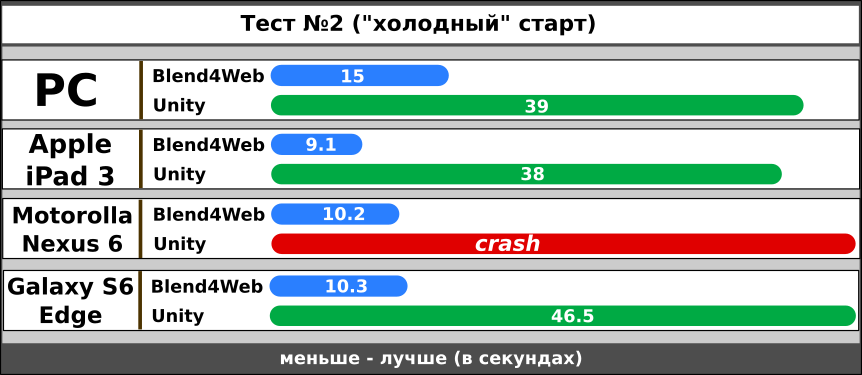
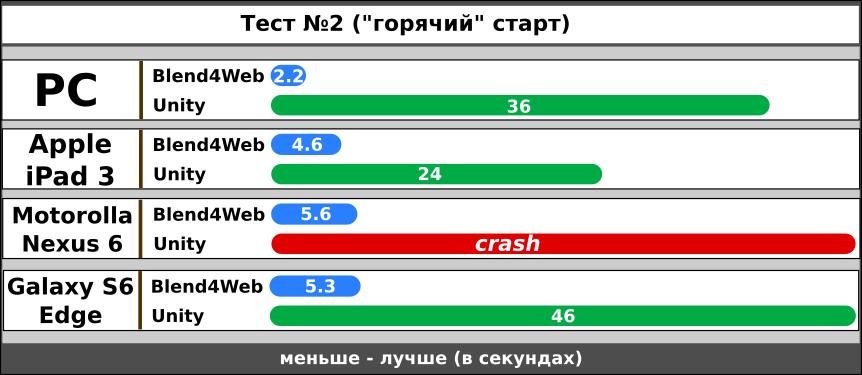
First, this again crashes the Nexus device’s browser when launching the Unity application. And also a very long, indecently long download of content from Unity. Interestingly, the temporary difference between “cold” and “hot” results for this engine is generally insignificant. It seems that Unity is spending fabulous time preparing the scene for demonstration.
FPS Test Results

This test showed very interesting results in terms of performance. Firstly, the FPS readings on the PC and Galaxy devices are the same for both engines. Neither Unity nor Blend4Web stand out much here. Interestingly, the dynamics of FPS when changing the scene scale for different engines varied. So, for Unity, the highest value was obtained when the camera was removed from the island. Blend4Web gave the best result, on the contrary, at the maximum approximation. Obviously, the engines use different optimization algorithms. Therefore, the table shows the maximum possible FPS in the most favorable angles for the engines.
Now about the unexpected crash of the Apple iPad 3 ... As you can see, this device has been added to the Nexus. Unlike the standard “lying” motorbike, the iPad resisted to the last and flew already on the stage itself. So, it was possible to measure the load, but, alas, the Unity application was not working here.
Test results by the criterion of "memory consumption"

The first test showed almost the same amount of memory consumed. It is here that the too big difference between the work of two engines is visible. Obviously, Blend4Web was able to perform internal scene optimization, which Unity did not succeed.
The scene uses cloned objects and, ideally, the instance should work. Probably, adjusting certain parameters can improve the result, but the engines are put in the same conditions and use the same scene made in Blender.
A very difficult test, an unoptimized scene for WebGL, low FPS, but of the two engines only Blend4Web completely coped.
Initially, I thought of stopping at only two scenes, but I remembered about physics. Yes Yes. We all beloved physics, when objects behave differently than planned, fall through obstacles, but often you can’t do without it.
The third test is very simple in terms of using the GPU. Here, the processor should basically “blow off”. An enclosed space of a cube filled with several tens of balls. The object slowly rotates around its axis, causing the balls to move, collide and fall.

On the technical side, the physics in the scene is represented by simple colliders (sphere, cube), rigid body, torque. Both scenes are completely identical for the tested engines, some of the physical parameters are the same.
As usual, the performance of physics in the scene required some effort. You probably already guessed what the problem was.
The balls stubbornly sought to leave their cage and banally spilled out of it. This applies to both engines. In the end, an acceptable quality of work was found for the PC platform, when all the objects behaved as planned, but on mobile devices, this scene sometimes looked wild. Therefore, a new testing criterion was introduced - the stability of physics or, as I also called it, “outsider balls”. The scene worked for a minute, and then the remaining objects in the cell were checked. The more lost, the worse the result.
And now ...
Test results by the criteria of "download"


Test results by the criterion of "FPS"

Note the same FPS for the Blend4Web scene. It is logical to assume that the engine can produce much more FPS than 60, which are limited by vertical synchronization. The fact is that Blend4Web can handle physics in a separate stream (worker). As far as I know, Unity is incapable of this. This is where FPS is so high and, as you will see later, good results by the criterion of “stability”.
Test results by the criterion of “stability of physics”

As mentioned, Unity and Blend4Web performed very well for the PC platform. All balls remained in place.
Among the mobile devices, the Galaxy S6 (Blend4Web) turned out to be the leader, and the iPad 3 (Blend4Web) became an outsider. The Unity application failed by this criterion, with the exception of the PC platform.
In general, the physics of Unity in WebGL left a very bad impression. After loading the scene, the screen slowed down and only after a couple of seconds did the long-awaited FPS get in. Of course, this applies only to the PC, as there is absolutely nothing to say about mobile devices - everything is in the table.
It is likely that the answer to such a egregious physics behavior in the case of Unity lies in the following memory test results.
Test results by the criterion of "memory consumption"
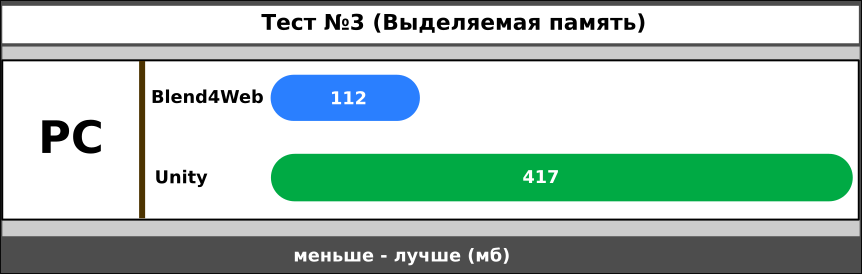
Compared with the first two, the third scene was the most voracious in terms of memory usage. And this applies to both engines.
The behavior of the Unity application was very strange. After starting the scene, the memory consumption jumped to 700 mb and only after a few seconds fell to 400. It is clear that during this time low-power mobile devices already lost all the balls. Therefore, the FPS data for this part of the devices is incorrect, because the already empty cube spun on the screen without any objects.
I don’t know how to explain this behavior, but physics in Unity WebGL has not proved to be at its best.
Conclusions do you. The results are in the article, and below you will find links to test applications, but I still add a few words from myself.
Three different scenes were created and they were tested on a wide variety of devices, browsers, systems. In most cases, the results of Blend4Web were much better than those of Unity. This is correct, because Blend4Web was created as a framework for creating WebGL applications. Less memory consumption, quick preparation of the scene for launch, a fairly high FPS, regardless of the device. And for the year the framework is very prettier in terms of tools and capabilities. Significantly increased performance.
Unity WebGL completely disappointed. Complete inoperability on mobile devices. Extremely prolonged launch (even if you exclude the demonstration of the splash screen from time). Instability of physics on weak devices. And yes, the same slow compilation! It seems that over the year the developers of the engine did nothing really and created a simple stub suitable for the simplest scenes.
Links to test scenes:
» Test No. 1. “Hello World!” (Unity)
” Test No. 1. “Hello World!” (Blend4Web)
” Test No. 2. “Heavy Artillery” (Unity)
” Test No. 2. “Heavy Artillery” (Blend4Web)
” Test No. 3. “Bouncing Balls” (Unity)
” Test No. 3. Bouncing Balls (Blend4Web)
Attention! Links to Unity application tests are functional, the bootloader is simply not visible. Keep in mind that Unity downloads are much slower.
Update
Test sources .
Update # 2 (10/10/2016)
Projects reassembled taking into account the release of new versions of engines. Shadows were added to Scene 1. Performance decreased for both engines almost equally (PC). For mobile, the FPS of B4W increased slightly and Unity remained unchanged. Therefore, I don’t see much point in redoing the tables.
Also, the meta name = "viewport" ... tag , which was originally present at Blend4Web, was added to the HTML files for UNITY projects . Thank you to those who noticed this discrepancy!
Scene 2 was added to the source.
A year has passed since my first attempt to compare Blend4Web and Unity . A somewhat naive article caused a flurry of comments, where supporters of the engines, as expected, took the diametrical sides. Much has changed since then - Unity WebGL is no longer beta, Blend4Web has matured and matured, and your humble servant has gained some experience.
As you understand, I return to the topic of comparing Blend4Web and Unity in the “battle for the Internet” field. I'm not interested in the usability or functionality of the engines. Only the result, only hardcore and only web browsers. I'm not going to breed holivar on the topic "who is cooler." Real tests and real numbers. You can always check on your devices and unsubscribe in the comments, and now let's get started ...
Test preparation
It is very difficult to conduct a test comparison of completely different software tools. It is necessary to take into account many nuances and try to achieve symmetrical projects and settings, starting from the location of objects and ending with the parameters of the final export.
Blender was chosen as the base scene designer and there are several reasons for this. Firstly, Unity perfectly imports native Blender files. No FBX exporters and manual installation of objects in the editor are required. Secondly, for Blend4Web, this is the only way to create a scene.
Therefore, all the scenes and models were preliminarily prepared in Blender, textured and completely devoted to the engines. In some cases, I used Empty dummies to fine-tune objects that don’t “see” Unity in blend files. These are light sources, as well as cameras.
All textures, especially the settings for materials (Diffuse, Normal map, etc.) were practically mirrored from project to project. I will talk about some points later.
Basic tools and engine features were also used to create the environment, some landscape effects, lighting settings and shadows. I tried to achieve full identity perception of the same scenes for both engines. True, this did not work out everywhere, and you will notice some discrepancies.
The following items were selected as the main criteria:
- Cold boot time . From the moment of activation in the address bar until the test scene appears.
This is very important for browser applications. Of course, a lot depends on the server settings, application optimization and connection speed. For the correct testing of this option, I decided to leave the proposed export options as default. So, Unity performs unzipping of data on the fly, and Blend4Web completely “shifts” the solution to this issue. The test server itself sends the files "as is", without any compression.
On the one hand, it seems that Unity already has a clear advantage over Blend4Web, but, in fact, it also has its “pitfalls”.
- Hot boot time . How fast the engine will launch files already cached by the browser.
To exclude from the results such an ambiguous phenomenon as data transfer, this criterion was invented. Content is now loaded from the browser cache. Here the real time needed by the engines to display the scene is interesting.
- Frame Rate per Second (FPS) .
This is the favorite parameter of all players, and game developers are not far away! FPS counters have been added to applications. This script was used for Unity , and Blend4Web originally had this feature.
Also, for the test browser, the limit of 60 frames was forcibly disabled. For example, Google Chrome was launched with the --disable-gpu-vsync option. As for mobile browsers, the existing restriction did not play a special role in them. Many results were obviously below 60 frames per second.
- Memory usage . This is a painful topic for many WebGL engines.
The stable operation of the browser is largely determined by the memory consumption for a particular tab. Careless handling of memory can lead to a crash of the browser itself, which is absolutely unacceptable for games and web applications. Actually, the data was taken from the Task Manager of the Google Chrome browser (shortcut keys SHIFT + ESC).
Different devices were used as test equipment (thanks to my friends, because I didn’t have some), starting from a desktop computer and ending with a productive smartphone.
In testing we used: PC (Intel I5-3570, 8RAM, GTX 650 with a screen resolution of 1680 × 1050), Apple iPad 3, Motorolla Nexus 6, Samsung Galaxy S6 Edge.
Extremely versatile equipment ...
Test number 1. "Hello World!"
Traditionally, programming begins by writing the Hello World application. I decided to use something similar for the first test, but a bit more adapted to the realities of game development.
So, a simple scene with several cloned objects. Normal textures are enhanced by Normal Map. Two light sources and simple animation. Since the tests are supposed to run on mobile devices, measures were taken to optimize the scene in both engines.
As you can see, a fairly standard scene for a game. There is nothing complicated here and both engines should “chew” this without problems. But the results were a little different than expected.
Test results by the criterion "Cold boot"
The faster the application loads, the better. Of course, channel bandwidth is of great importance here. Therefore, it is worth considering the results relative to each other, and not real numbers. And here we find out an interesting feature - building the application on Unity loads much more slowly than the one from Blend4Web, and on the Nexus 6 device the browser tab unexpectedly “dropped”.
Please note that the final download time was counted from the moment of start in the browser line until the scene screen appears.
Test results by the criterion of "Hot boot"
The second test demonstrates the speed of launching the application from the browser cache. The readings are not affected by the connection speed, server settings and other parameters, but only the readiness of the engine itself to quickly display the scene is characterized. And here Blend4Web starts just fast, almost the same on different devices, which can not be said about Unity.
If we compare the results of the Unity application download speed in two tables, a very interesting picture emerges - a very small time difference between a cold start and a hot start.
It looks like the features of WebGL initialization and content loading played a trick here. In this article on a habr everything is remarkably painted.
You also need to consider the time taken by Unity to demonstrate the splash screen. This is a non-disable option for the Standard version that I have. Of course, in the paid version of the engine, you are free to decide the fate of the splash screen yourself.
FPS test results
The first thing that catches your eye is the sharp difference between the FPS readings for a computer and mobile devices. It is likely that iPad 3 can produce more frames per second (at least in the case of Blend4Web), but it was not possible to find a way to disable FPS restrictions for mobile browsers. However, for the eyes, a screen update of 30 units looks quite comfortable.
Interestingly, on the Galaxy S6 device, both engines were equal in performance, while on the iPad 3 Unity remained in the “tail”. It’s a pity, of course, that the Unity application completely failed the test on the Motorolla device.
Test results by the criterion of "memory consumption"
Again, it was not possible to find a way to correctly measure the memory consumption for a specific tab of a mobile browser. Therefore, hereinafter only readings taken from a desktop computer. Theoretically, the same values should be for mobile browsers.
In general, I expected to see a slightly different picture that could explain the browser crash for the Unity application. But, as the tests showed, there is not much difference in memory consumption, at least for this scene. The more surprising is the fact that the browser crashed in Nexus for such a primitive scene.
Test number 2. "Heavy artillery"
The second test is the exact opposite of the cube scene. Hundreds of objects, large space, dozens of textures, shadows, more than a million vertices. This will probably only a desktop computer. I did not expect this test to run on mobile devices at all! No optimization specifically for low-power devices was performed.
In this scene, the main difficulty was precisely the synchronization of appearance for both engines. Everything is clear with Blend4Web - models and terrain were created in Blender, and water and environment settings were also performed there . Everything went smoothly somehow and there were no special difficulties.
There were problems with Unity. Firstly, I refused to use the built-in terrain. It is a pleasure to populate with trees and paint it, but, despite the power of this solution, the internal terrain can unnecessarily slow down. Therefore, we used a scene entirely from Blender with a landscape model and pre-arranged objects. In this case, it was possible to achieve the most identical scenes.
Secondly, standard Unity shaders do not know how to work with double-sided materials and the foliage of trees shone through from the back. Attempts to use built-in shaders like "tree leaves" for some reason were unsuccessful. I did not deal with this and found on the Internet a self-made shader that did an excellent job.
But let's move on to the test results, and they turned out to be stunning!
Test results by criteria "download"
First, this again crashes the Nexus device’s browser when launching the Unity application. And also a very long, indecently long download of content from Unity. Interestingly, the temporary difference between “cold” and “hot” results for this engine is generally insignificant. It seems that Unity is spending fabulous time preparing the scene for demonstration.
FPS Test Results
This test showed very interesting results in terms of performance. Firstly, the FPS readings on the PC and Galaxy devices are the same for both engines. Neither Unity nor Blend4Web stand out much here. Interestingly, the dynamics of FPS when changing the scene scale for different engines varied. So, for Unity, the highest value was obtained when the camera was removed from the island. Blend4Web gave the best result, on the contrary, at the maximum approximation. Obviously, the engines use different optimization algorithms. Therefore, the table shows the maximum possible FPS in the most favorable angles for the engines.
Now about the unexpected crash of the Apple iPad 3 ... As you can see, this device has been added to the Nexus. Unlike the standard “lying” motorbike, the iPad resisted to the last and flew already on the stage itself. So, it was possible to measure the load, but, alas, the Unity application was not working here.
Test results by the criterion of "memory consumption"
The first test showed almost the same amount of memory consumed. It is here that the too big difference between the work of two engines is visible. Obviously, Blend4Web was able to perform internal scene optimization, which Unity did not succeed.
The scene uses cloned objects and, ideally, the instance should work. Probably, adjusting certain parameters can improve the result, but the engines are put in the same conditions and use the same scene made in Blender.
A very difficult test, an unoptimized scene for WebGL, low FPS, but of the two engines only Blend4Web completely coped.
Test number 3. Bouncing Balls
Initially, I thought of stopping at only two scenes, but I remembered about physics. Yes Yes. We all beloved physics, when objects behave differently than planned, fall through obstacles, but often you can’t do without it.
The third test is very simple in terms of using the GPU. Here, the processor should basically “blow off”. An enclosed space of a cube filled with several tens of balls. The object slowly rotates around its axis, causing the balls to move, collide and fall.
On the technical side, the physics in the scene is represented by simple colliders (sphere, cube), rigid body, torque. Both scenes are completely identical for the tested engines, some of the physical parameters are the same.
As usual, the performance of physics in the scene required some effort. You probably already guessed what the problem was.
The balls stubbornly sought to leave their cage and banally spilled out of it. This applies to both engines. In the end, an acceptable quality of work was found for the PC platform, when all the objects behaved as planned, but on mobile devices, this scene sometimes looked wild. Therefore, a new testing criterion was introduced - the stability of physics or, as I also called it, “outsider balls”. The scene worked for a minute, and then the remaining objects in the cell were checked. The more lost, the worse the result.
And now ...
Test results by the criteria of "download"
Test results by the criterion of "FPS"
Note the same FPS for the Blend4Web scene. It is logical to assume that the engine can produce much more FPS than 60, which are limited by vertical synchronization. The fact is that Blend4Web can handle physics in a separate stream (worker). As far as I know, Unity is incapable of this. This is where FPS is so high and, as you will see later, good results by the criterion of “stability”.
Test results by the criterion of “stability of physics”
As mentioned, Unity and Blend4Web performed very well for the PC platform. All balls remained in place.
Among the mobile devices, the Galaxy S6 (Blend4Web) turned out to be the leader, and the iPad 3 (Blend4Web) became an outsider. The Unity application failed by this criterion, with the exception of the PC platform.
In general, the physics of Unity in WebGL left a very bad impression. After loading the scene, the screen slowed down and only after a couple of seconds did the long-awaited FPS get in. Of course, this applies only to the PC, as there is absolutely nothing to say about mobile devices - everything is in the table.
It is likely that the answer to such a egregious physics behavior in the case of Unity lies in the following memory test results.
Test results by the criterion of "memory consumption"
Compared with the first two, the third scene was the most voracious in terms of memory usage. And this applies to both engines.
The behavior of the Unity application was very strange. After starting the scene, the memory consumption jumped to 700 mb and only after a few seconds fell to 400. It is clear that during this time low-power mobile devices already lost all the balls. Therefore, the FPS data for this part of the devices is incorrect, because the already empty cube spun on the screen without any objects.
I don’t know how to explain this behavior, but physics in Unity WebGL has not proved to be at its best.
Conclusions...
Conclusions do you. The results are in the article, and below you will find links to test applications, but I still add a few words from myself.
Three different scenes were created and they were tested on a wide variety of devices, browsers, systems. In most cases, the results of Blend4Web were much better than those of Unity. This is correct, because Blend4Web was created as a framework for creating WebGL applications. Less memory consumption, quick preparation of the scene for launch, a fairly high FPS, regardless of the device. And for the year the framework is very prettier in terms of tools and capabilities. Significantly increased performance.
Unity WebGL completely disappointed. Complete inoperability on mobile devices. Extremely prolonged launch (even if you exclude the demonstration of the splash screen from time). Instability of physics on weak devices. And yes, the same slow compilation! It seems that over the year the developers of the engine did nothing really and created a simple stub suitable for the simplest scenes.
Links to test scenes:
» Test No. 1. “Hello World!” (Unity)
” Test No. 1. “Hello World!” (Blend4Web)
” Test No. 2. “Heavy Artillery” (Unity)
” Test No. 2. “Heavy Artillery” (Blend4Web)
” Test No. 3. “Bouncing Balls” (Unity)
” Test No. 3. Bouncing Balls (Blend4Web)
Attention! Links to Unity application tests are functional, the bootloader is simply not visible. Keep in mind that Unity downloads are much slower.
Update
Test sources .
Update # 2 (10/10/2016)
Projects reassembled taking into account the release of new versions of engines. Shadows were added to Scene 1. Performance decreased for both engines almost equally (PC). For mobile, the FPS of B4W increased slightly and Unity remained unchanged. Therefore, I don’t see much point in redoing the tables.
Also, the meta name = "viewport" ... tag , which was originally present at Blend4Web, was added to the HTML files for UNITY projects . Thank you to those who noticed this discrepancy!
Scene 2 was added to the source.









