Exit “in the field”: How we did a mobile application to increase the efficiency of field workers
Field management software usually consists of a web part used by managers in the office and a mobile application for employees traveling on orders with clients. Today we will talk about the development of such an application .
Why is it necessary
Different companies have on-site employees: installers from telecom providers, furniture assemblers, window installers, and so on. Such workers are difficult to control, which leads to abuse on their part. For example, they negotiate with the client bypassing the employer, use their equipment, or do work outside of the established deadlines.
Beginners often perform the task as they think best. This leads to errors that are difficult to track. Field management tools solve the problem of control and increase the productivity of field employees.
Application idea
Mobile Planado application is used by visiting employees who arrive at the client’s address and perform work (equipment installation, assembly, installation, etc.). Before Planado was created, we worked on the Hydra billing, which is used by telecom operators. We are well aware of the needs of such companies, so we decided to create a tool that takes into account their needs.
We set ourselves the task - to create an application with high functionality and ease of interaction. This application was supposed to be a tool that would help employees do their job better.
Development
The internal complexity of the service should not affect the user interface. During the design, we relied on scenarios of its use - imagined the "day of the installer" and visualized it using cards.
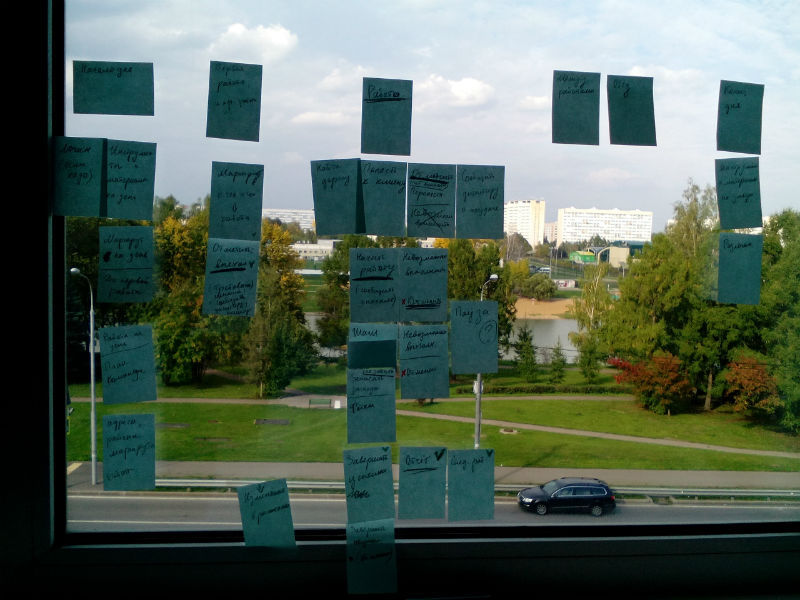
At the beginning of the day, the employee needs to understand the plan of work for the day: where he will go, what he will do, what equipment or tools may be required.
Then the person leaves for the outfit, he needs information about the client: name, phone, intercom code, the presence of an angry dog. Then the work begins. Performance is important here: stretch the cable, assemble and install the cabinet, photograph the result. And it is important not to forget to thank the client and offer an additional service or talk about current promotions and discounts.
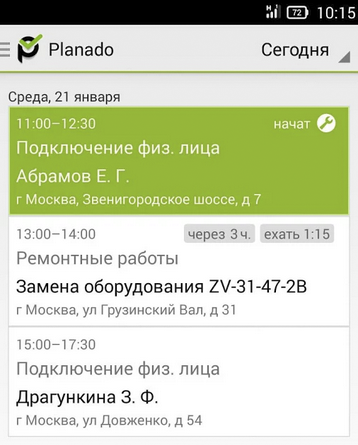
Before your eyes on the employee’s smartphone should be a list of orders for the day. In each such “outfit” there should be information about the client and a checklist.
Also takes into account the interests of the company, whose management needs a report of the contractor. Managers are interested in the performers keeping records of materials, indicating what equipment was used, writing down the wishes of the client and collecting photos of the work performed. Part of the report is filled out by the user during the passage through the checklist - this eliminates the need to re-enter the same information.
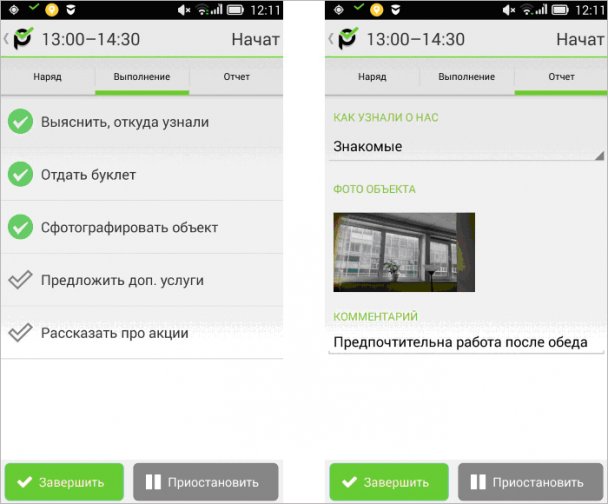
The report, of course, is configured independently for the business, and it will be its own for the business of installing windows, delivering or installing equipment, etc.
In this way, we came to the structure of the application screens: Order list → Outfit → Three tabs: Outfit, Execution, Report.
Interface for "harsh installers"
The main users of the application are installers, equipment adjusters, pretty brutal guys. This left its mark on the development - such users practically do not care about the appearance, but they very sensitively feel when the interface is inconvenient and confusing. The application should really help in the work.
There are many models of Android devices available, even people far from the world of the Internet and technology use smartphones and are familiar with popular applications. When developing the application for Android, we decided to follow the platform’s guidelines.
It turned out an application that immediately seems familiar. Users quickly adapt, they do not need to learn new patterns of interaction and get used to the various animations and effects that designers love so much. Sometimes guidelines have to be violated so as not to create unnecessary problems for users. For example, we decided not to make minimalistic buttons, but made them larger, brighter and more convenient.

While testing the application, we created outfits for ourselves, went to addresses and sent photo reports to the office. One of the popular test "orders" was a trip to the supermarket with a subsequent report on purchases.
What do we understand
When we started testing the mobile application on a live business, the list of functions that users lack was also replenished. The app learned:
- Compress photos of the results of work and upload them to the server in the background so as not to interfere with the main work and not wait until synchronization passes.
- Better track location to save battery.
- Fulfill the order even without communication with the server (offline mode).
We also created a web application that displays data from smartphones of field employees, updates the status of orders and uploads photos from the place of work.
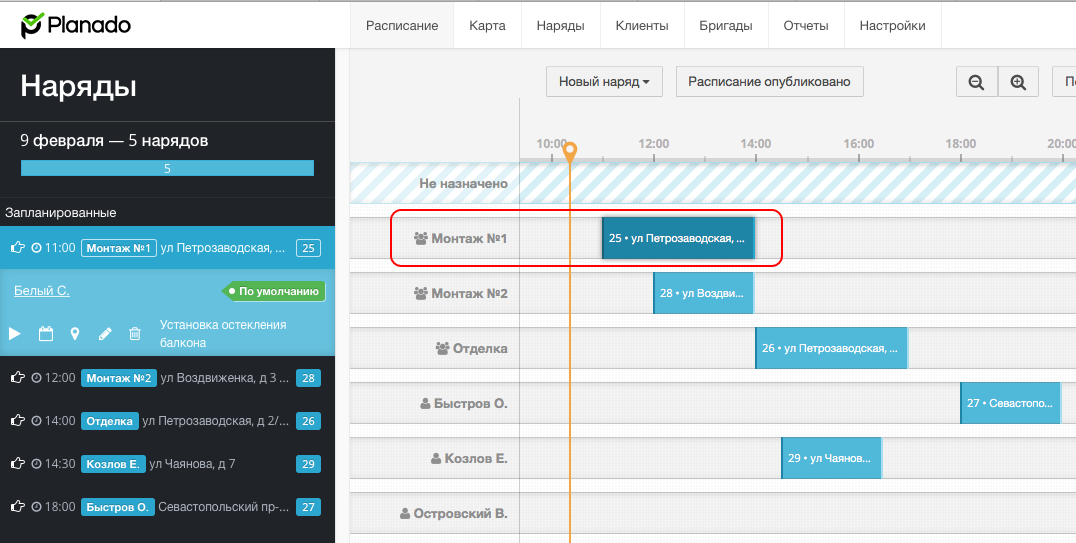
The discovery for us was the fact that field workers also began to use the web application - for example, the installation manager, who himself went to order the client, can use it to find out where his subordinates are.
During testing, we realized that employees need to be given more independence. A person "in the field" knows about the situation better. Planning occurs centrally, but in some areas of the business it is much better if the field employee can independently make sudden changes to the order: reschedule the outfit, take the outfit for work, create a new outfit.
As it often happens in life: the installer arrives, and they tell him that they forgot about the appointed time, and it would be nice to transfer the work to the next day. In such a situation, it’s foolish to make the client call the dispatcher and set another time. The installer represents the company and can independently agree with the customer on the spot.
We realized that you can not consider the mobile application separately from the web version of the service. The application and settings in the browser should work interconnected. For some reason, we did not immediately notice this, but the settings in the web version were not always obvious, and the application often looked wrong.
As a result, some users worked only in the browser, while others switched completely to the mobile application and did not know about the settings in the web version. Therefore, we simplify the configuration scheme and add illustrative examples.
How to develop a service
We tried to make the application interface minimalistic, but the information content suffered. For example, there was not enough data in the list of orders: the number of the order, the name of the brigade. The outfits did not have a date and time for the start and completion.
There are orders for several addresses at once, most often it is delivery. For example, warehouse address and customer address. For such an order, you need to make settings both in the web version and in the mobile application, so I had to change the position of “one outfit - one address”.
In the application, we paid more attention to location tracking - we delved into the platform and redid the algorithm. Not all organizations need high tracking accuracy, someone does not need it at all, and someone is satisfied with only the maximum accuracy on GPS.
GPS operation requires too much energy, so we will add the ability to enable and disable this feature in the settings. For many customers, location tracking is a crucial factor when purchasing.
What's next
Planado is a tool to increase the efficiency and control of field employees. Few people love control, so only an easy-to-use application will bring maximum benefit.
We fixed uncomfortable moments in the interface. For example, so that the manager in the office finds out that the employee has finished work and is leaving for the next order, the worker must press the corresponding button in the application. From the point of view of the employee, this action does not make much sense, therefore, not all and not always pressed it - they forgot or did not do it on purpose.
Reduce unnecessary actions in the application. In the example described above, you can simplify the situation if you keep track of when the smartphone begins to move in space - that means the installer has moved to a new address. We are also finalizing the interface for new versions of Android.
We learn from mistakes and find optimal solutions to problems. Most importantly, we have created a service that helps to increase the productivity of field employees, and the mobile application is its most important part.