 September 9, 2016 at 16:05
Google Analytics for Telegram Bot
On Habré already there are some articles about bot telegrams. But how to monitor the use of the bot? Under the cut, we collect data to assess the most used bot functions, campaign performance and failure rates.

First, a small remark. I am neither an analyst nor a SEO specialist. Perhaps some tasks can be solved more efficiently, but there is very little information about this. It so happened that our colleagues across the ocean flatly refused to work with the Yandex botan product and demanded the familiar interface “like in google analytics”. It was decided to use google analytics measurement protocol . With it, you can transfer almost all of the same data to google analytics as in the usual way (for example, a script on a site).
If your bot is written in laravel, we can recommend the irazasyed / laravel-gamp package for the measurement protocol to work.
In our bot, we marked the main user interaction with the bot by dialogs and steps. For example, the settings dialog looks something like this:

In fact, this is one step of a dialog with buttons and 6 separate steps for setting specific parameters. This structure can be represented as addresses:
We consider the set of current user buttons as its state or as the page on which it is located. Accordingly, we can send pageviews to analytics.
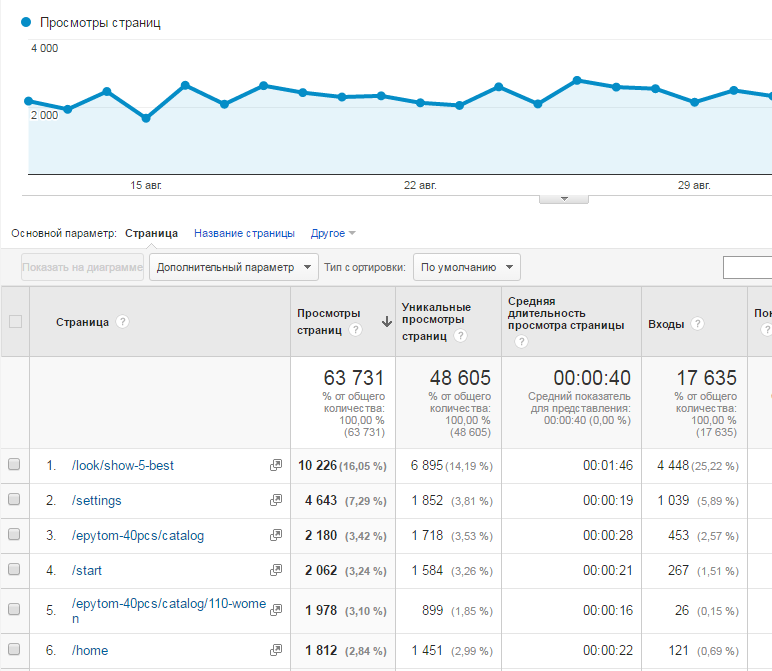
If the analogy of the site’s pages with the state of the user (his current keyboard) is quite obvious, then how to draw an analogy with the traffic source? In fact, we can’t find out exactly how the user found our bot. But there is one trick. We already had a tool for passing the utm_campaign analog to Google Analytics.
Telegram makes it possible to start a dialogue with the user not from scratch. When the user clicks on the “start” button in the telegram application, the bot receives a “ / start ” message . This message can be expanded with an additional parameter . Each bot has a link that opens a chat with him in a telegram - telegram.me
In this case, we can transfer the source of “habr” to the analytics and even refine it with the “gamp” channel.
From this moment we can monitor the success of advertising campaigns:

The next time you send a message, you may encounter an unpleasant situation - the user has blocked the bot. How is this reflected in analytics? In fact, we cannot give analytics a view of the “ / unsubscribe ” page or the like, as the user is now in a different state (on a different “page”). But gamp also supports events. Accordingly, we send him an event about blocking the user.
Because all messages come from the same server; its geographical affiliation is practically irrelevant. We are interested in the distribution of the audience of the bot. Fundamentally, we can find out about the user's location in two ways: by sent geolocation or by his ip.

An attentive reader might have noticed that for some reason Greenland has almost as many sessions as Russia. The fact is that this is a little trick. Not all users follow the links or send their location. Since it’s important for us to understand not only the geographical location, but also how many users have not provided it to us, we decided everyone who has not yet had time to tell about their location to consider in a large but sparsely populated Greenland.
First, a small remark. I am neither an analyst nor a SEO specialist. Perhaps some tasks can be solved more efficiently, but there is very little information about this. It so happened that our colleagues across the ocean flatly refused to work with the Yandex botan product and demanded the familiar interface “like in google analytics”. It was decided to use google analytics measurement protocol . With it, you can transfer almost all of the same data to google analytics as in the usual way (for example, a script on a site).
If your bot is written in laravel, we can recommend the irazasyed / laravel-gamp package for the measurement protocol to work.
How to use the bot?
In our bot, we marked the main user interaction with the bot by dialogs and steps. For example, the settings dialog looks something like this:
In fact, this is one step of a dialog with buttons and 6 separate steps for setting specific parameters. This structure can be represented as addresses:
- / settings
- / settings / gender
- / settings / frequency
- / settings / language
- ...
We consider the set of current user buttons as its state or as the page on which it is located. Accordingly, we can send pageviews to analytics.
use Irazasyed\LaravelGAMP\Facades\GAMP;
...
$gamp = GAMP::setClientId( '123456' );
$gamp->setDocumentPath( '/settings' );
$gamp->sendPageview();
...
Where do new users come from?
If the analogy of the site’s pages with the state of the user (his current keyboard) is quite obvious, then how to draw an analogy with the traffic source? In fact, we can’t find out exactly how the user found our bot. But there is one trick. We already had a tool for passing the utm_campaign analog to Google Analytics.
Telegram makes it possible to start a dialogue with the user not from scratch. When the user clicks on the “start” button in the telegram application, the bot receives a “ / start ” message . This message can be expanded with an additional parameter . Each bot has a link that opens a chat with him in a telegram - telegram.me
https://telegram.me/bot_name?start=habr-gampIn this case, we can transfer the source of “habr” to the analytics and even refine it with the “gamp” channel.
if($campaign){
   if(strpos($campaign,'-')){
       list($campaign,$medium) = explode('-',$campaign);
       $gamp->setCampaignMedium($medium);
   }
   else{
       $gamp->setCampaignMedium('none');
   }
   $gamp->setCampaignSource($campaign);
}
From this moment we can monitor the success of advertising campaigns:
What if the user blocked the bot?
The next time you send a message, you may encounter an unpleasant situation - the user has blocked the bot. How is this reflected in analytics? In fact, we cannot give analytics a view of the “ / unsubscribe ” page or the like, as the user is now in a different state (on a different “page”). But gamp also supports events. Accordingly, we send him an event about blocking the user.
use Irazasyed\LaravelGAMP\Facades\GAMP;
...
$gamp = GAMP::setClientId( '123456' );
$gamp->setEventCategory('User')
	->setEventAction('Unsubscribe')
	->setEventLabel('Blocked')
	->sendEvent();
...
Geography of using the bot
Because all messages come from the same server; its geographical affiliation is practically irrelevant. We are interested in the distribution of the audience of the bot. Fundamentally, we can find out about the user's location in two ways: by sent geolocation or by his ip.
- The google map api has a wonderful geocoding service and, in particular, reverse geocoding . Accordingly, it remains to submit to the analyst the appropriate country:
$gamp->setGeographicalOverride($oChat->country); - An alternative way is to
calculate by ipthe ip of the user. The only way to find out is to “lure” the user to the site. For example, through short redirect links.
In this case, it is no longer necessary to find out which country ip belongs to, google can do it on its own.$this->gamp->setIpOverride($oChat->last_ip_address)
An attentive reader might have noticed that for some reason Greenland has almost as many sessions as Russia. The fact is that this is a little trick. Not all users follow the links or send their location. Since it’s important for us to understand not only the geographical location, but also how many users have not provided it to us, we decided everyone who has not yet had time to tell about their location to consider in a large but sparsely populated Greenland.









