August 22, 2016 at 15:34
How it works and what the “deep” integration of Bitrix24 and UniSender email newsletter can do
The new integration of UniSender and Bitrix24 email newsletters, developed by Pinol, is still the only Bitrix24 marketplace that inherits employee access rights to the CRM contacts database.
 Now the leader can open access to the email newsletter application for ordinary managers without fear of confusion and without putting additional risk to the safety of the client base.
Since the integration takes into account the access rights of employees configured in CRM, each manager will be able to send mailings only to "their" leads, contacts and companies that have already been assigned to him in CRM.
Integration also allows you to do segmentation of contacts before mailing.
It has built-in capabilities to work with letter templates, personalize and receive data on openings and clicks for each recipient.
It is important that the integration itself is free. There are no in-app purchases. Users pay only for UniSender tariffs .
Let's take a look at the steps of how this “deep” integration works and what opportunities it opens up.
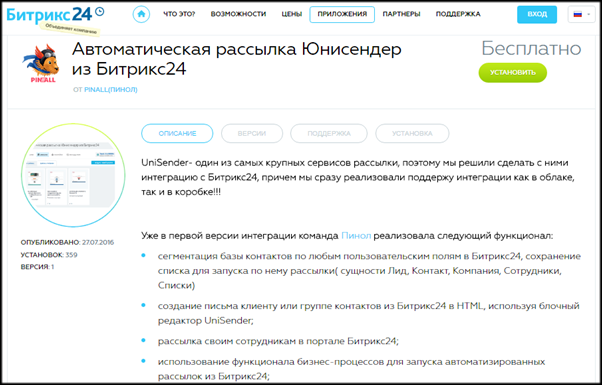
Integration with UniSender can be installed and configured in a few minutes. The Bitrix24 Unisender Automatic Sending application is located in the mailing category of the application store on the Bitrix24 website.
At the beginning of the installation, the system will ask if you are registered with UniSender, and if not, it will create a new account automatically. To complete the installation, you need to copy the API key from your UniSender account to Bitrix24.
Next, you need to make sure that Bitrix24 has the correct access settings for the manager role. With administrator privileges, we go into the access settings, select the "manager" role and check that the "own" setting for the manager is set for the manager for the "Contact", "Company", "Deal", "Lead", "Offer" and "Account" entities .

The application “picks up” these settings, and your managers will be able to do mailings only to clients assigned to them.
Everything, you can start mailing. To test the application, you don’t have to immediately replenish the account, because when registering new users receive $ 30 on balance in UniSender.
Conveniently, the account balance in UniSender is moved to the upper right corner of the application. And therefore, the account balance can always be viewed directly from CRM.
A step-by-step wizard right in the application will guide you through all the stages of writing and sending a letter.
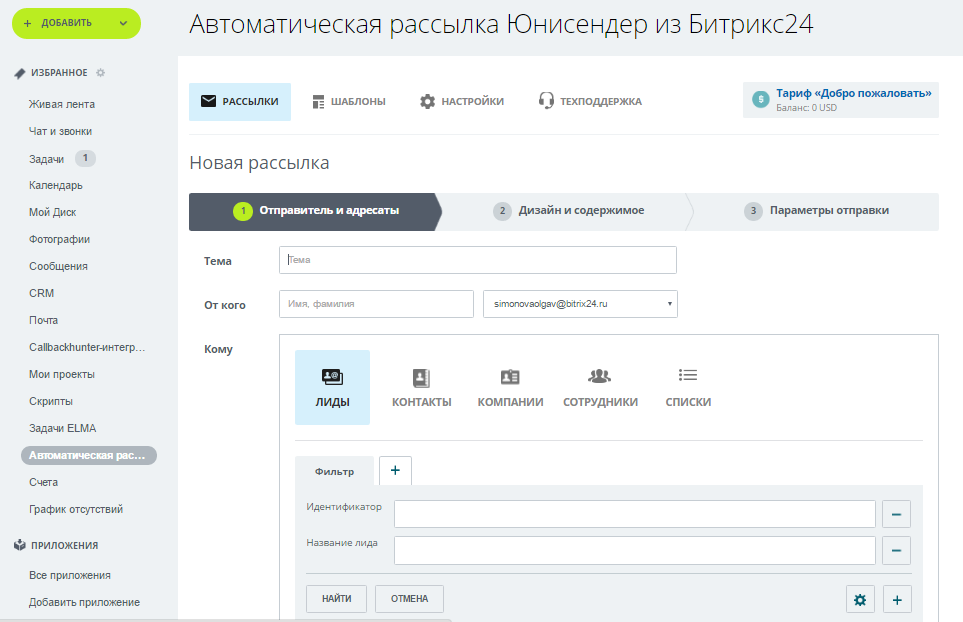
At the first stage, it is necessary to confirm your sender address, from which letters will be sent to customers. This can be either your corporate address or the personal address of the manager.
After that, you set the subject of the letter and choose to whom it will be sent. And here you will find a pleasant surprise: it is possible to flexibly create a list of mailing recipients - both according to data from CRM, and based on existing lists in your UniSender account.
When creating a recipient list, you can use filters for 4 entities in CRM:
• Leads
• Companies
• Contacts
• Employees
In the “Lists” tab, lists of recipients stored in the UniSender service will be visible. Thus, you can select for recipients both those recipients whose data are in CRM, and subscribers from UniSender lists.

It is important that when segmenting, you can use both existing and custom fields.
What is this useful for?
Imagine that the travel agency wants to do a newsletter with an offer on tours to Egypt. To make the newsletter more targeted, you can, firstly, select those who showed interest in Egypt. If in advertising on tours to Egypt a separate landing page was used, then by the source of leads you can filter out those who left applications for this particular direction. And secondly, in a letter you can offer residents of different cities - say, Moscow and Omsk - tours with departure from their city of residence. In a letter to Muscovites put a tour with a departure from Moscow, and for Omsk citizens - a departure from Omsk.
Such micro-segmentation improves results and increases sales. “I had mailings when there were 300 openings for 300 letters sent,” says Alexey Okara, founder of Pinol. “Because we have carefully selected the recipients and sent exactly the proposal that they are likely to be interested in.”
Alexey Okara, founder of the integration development company
When preparing mailings, you can use dozens of ready-made templates already created in UniSender. They will be visible directly from the CRM - no need to go anywhere to use them.

The finished template can be finalized in a convenient block editor, which opens directly in CRM. It is possible to change the design, set styles, edit images.
Directly from the editor, the manager can click on the "view" button to see how the letter will be displayed on desktops and on mobile devices. And if necessary, make changes. Adaptability is supported.
Based on the experience of companies that already use integration, the following algorithm works well. A marketer prepares and tests several templates for corporate mailings: holiday greetings, invitations to various events, newsletters about new products, promotional letters, newsletters - all that managers may need to work with clients. This is more convenient to do in the UniSender service interface.
And managers, right from CRM, choose the appropriate template, make changes to the text, put a picture of the desired product and do newsletters on their databases without leaving CRM. Convenient and fast.
For mailing list recipients selected by filters from CRM, a mailing list is automatically created in UniSender. Letters go through the server and from the UniSender IP addresses. The service infrastructure is set up to provide high deliverability in Russia, Ukraine and the CIS countries.
UniSender customers send 460 million letters a month, 99.4% of them are delivered to recipients. Control of the delivery of mailings and the absence of spam provides an anti-spam department of 3 people.
A single list of unsubscribing from newsletters is maintained on the UniSender side. Even if the manager, when preparing the newsletter, includes the address of a subscriber who previously refused the newsletters, UniSender will detect this address and will not allow him to send an email.
This reduces the risk of unsubscribing claims. As practice shows, lawsuits with subsequent heavy fines are often initiated by angry customers who unsubscribed several times or asked to unsubscribe their address from newsletters, but letters from the company still continued to come. This reason was the “undocking” of the mailing service, which stores information about unsubscribes, and CRM, from which managers sent letters.
Now the risk of sending letters to unsubscribes is minimized. If the subscriber clicked the unsubscribe link at the end of the letter, UniSender will save his address in the stop list. And even if the manager re-enters this address in CRM from the client’s business card and includes it in the newsletter, UniSender will not allow sending emails.
Companies that have already “fallen” to fines of hundreds of thousands of rubles for similar reasons will appreciate this integration advantage.
Not only general reporting is available on mailings sent from CRM - what percentage of recipients opened emails and clicked on links.
The manager in the Contact Buzz sees what and when the message was sent, whether the recipient opened it and followed the link. This allows you to flexibly conduct further communication with a potential buyer in a telephone conversation. For example, if a client reads a letter about a stock, it makes sense to immediately go over to questions about it, and if not, first talk about the stock itself and the offer.
It is important that the system administrator sees all sent mailings, and each of the managers - only his own. This makes the work convenient and at the same time allows you to control whether managers use this opportunity correctly.
 “We have a user forum on pinall.ru . I personally answer the questions about integration with UniSender in order to “keep abreast” and immediately add to the development plan what is still important for users, ”says Alexey Okara.
- The application appeared on the Bitrix24 marketplace in late July. More than 350 installations have been made, and during this time we have already released 3 new releases with updates.
We are developing in two directions: firstly, the essence of the "Deal" will be supported soon - this will open up enormous opportunities for segmentation of the base based on purchases made.
And secondly, we are working on advanced mailing automation through the use of business process functionality in Bitrix24. This will give, for example, the ability to immediately activate individual series of letters on new leads and much more.
Application on the Bitrix24 website.
Forum on CRM integrations on the developer's website.
Recording of a 4-hour webinar with detailed setup tips:
Questions about setting up and running the application are best asked immediately on the forum . And we are happy to answer questions regarding UniSender here.
Now the leader can open access to the email newsletter application for ordinary managers without fear of confusion and without putting additional risk to the safety of the client base. Since the integration takes into account the access rights of employees configured in CRM, each manager will be able to send mailings only to "their" leads, contacts and companies that have already been assigned to him in CRM.
Integration also allows you to do segmentation of contacts before mailing.
It has built-in capabilities to work with letter templates, personalize and receive data on openings and clicks for each recipient.
It is important that the integration itself is free. There are no in-app purchases. Users pay only for UniSender tariffs .
Let's take a look at the steps of how this “deep” integration works and what opportunities it opens up.
The application will automatically create an account in the mailing service
Integration with UniSender can be installed and configured in a few minutes. The Bitrix24 Unisender Automatic Sending application is located in the mailing category of the application store on the Bitrix24 website.
At the beginning of the installation, the system will ask if you are registered with UniSender, and if not, it will create a new account automatically. To complete the installation, you need to copy the API key from your UniSender account to Bitrix24.
Next, you need to make sure that Bitrix24 has the correct access settings for the manager role. With administrator privileges, we go into the access settings, select the "manager" role and check that the "own" setting for the manager is set for the manager for the "Contact", "Company", "Deal", "Lead", "Offer" and "Account" entities .
The application “picks up” these settings, and your managers will be able to do mailings only to clients assigned to them.
Everything, you can start mailing. To test the application, you don’t have to immediately replenish the account, because when registering new users receive $ 30 on balance in UniSender.
Conveniently, the account balance in UniSender is moved to the upper right corner of the application. And therefore, the account balance can always be viewed directly from CRM.
Sending newsletters directly from CRM
A step-by-step wizard right in the application will guide you through all the stages of writing and sending a letter.
At the first stage, it is necessary to confirm your sender address, from which letters will be sent to customers. This can be either your corporate address or the personal address of the manager.
After that, you set the subject of the letter and choose to whom it will be sent. And here you will find a pleasant surprise: it is possible to flexibly create a list of mailing recipients - both according to data from CRM, and based on existing lists in your UniSender account.
Segmentation of mailing list recipients according to data from CRM
When creating a recipient list, you can use filters for 4 entities in CRM:
• Leads
• Companies
• Contacts
• Employees
In the “Lists” tab, lists of recipients stored in the UniSender service will be visible. Thus, you can select for recipients both those recipients whose data are in CRM, and subscribers from UniSender lists.
It is important that when segmenting, you can use both existing and custom fields.
What is this useful for?
Imagine that the travel agency wants to do a newsletter with an offer on tours to Egypt. To make the newsletter more targeted, you can, firstly, select those who showed interest in Egypt. If in advertising on tours to Egypt a separate landing page was used, then by the source of leads you can filter out those who left applications for this particular direction. And secondly, in a letter you can offer residents of different cities - say, Moscow and Omsk - tours with departure from their city of residence. In a letter to Muscovites put a tour with a departure from Moscow, and for Omsk citizens - a departure from Omsk.
Such micro-segmentation improves results and increases sales. “I had mailings when there were 300 openings for 300 letters sent,” says Alexey Okara, founder of Pinol. “Because we have carefully selected the recipients and sent exactly the proposal that they are likely to be interested in.”
Let's be honest: 80% of managers hate CRM because of the need to enter a lot of data into customer cards. After the manager sees how well the segmented mailings work, this problem will go away. It will be clear to him that customer data in CRM will be useful for “thin cutting” the customer base in the preparation of mailings. And letters on microsegments will provide both the best sales and the growth of managers' incomes.
Alexey Okara, founder of the integration development company
Block drag-and-drop editor opens directly from CRM
When preparing mailings, you can use dozens of ready-made templates already created in UniSender. They will be visible directly from the CRM - no need to go anywhere to use them.
The finished template can be finalized in a convenient block editor, which opens directly in CRM. It is possible to change the design, set styles, edit images.
Directly from the editor, the manager can click on the "view" button to see how the letter will be displayed on desktops and on mobile devices. And if necessary, make changes. Adaptability is supported.
Based on the experience of companies that already use integration, the following algorithm works well. A marketer prepares and tests several templates for corporate mailings: holiday greetings, invitations to various events, newsletters about new products, promotional letters, newsletters - all that managers may need to work with clients. This is more convenient to do in the UniSender service interface.
And managers, right from CRM, choose the appropriate template, make changes to the text, put a picture of the desired product and do newsletters on their databases without leaving CRM. Convenient and fast.
Unsubscribe control over a single list
For mailing list recipients selected by filters from CRM, a mailing list is automatically created in UniSender. Letters go through the server and from the UniSender IP addresses. The service infrastructure is set up to provide high deliverability in Russia, Ukraine and the CIS countries.
UniSender customers send 460 million letters a month, 99.4% of them are delivered to recipients. Control of the delivery of mailings and the absence of spam provides an anti-spam department of 3 people.
A single list of unsubscribing from newsletters is maintained on the UniSender side. Even if the manager, when preparing the newsletter, includes the address of a subscriber who previously refused the newsletters, UniSender will detect this address and will not allow him to send an email.
This reduces the risk of unsubscribing claims. As practice shows, lawsuits with subsequent heavy fines are often initiated by angry customers who unsubscribed several times or asked to unsubscribe their address from newsletters, but letters from the company still continued to come. This reason was the “undocking” of the mailing service, which stores information about unsubscribes, and CRM, from which managers sent letters.
Now the risk of sending letters to unsubscribes is minimized. If the subscriber clicked the unsubscribe link at the end of the letter, UniSender will save his address in the stop list. And even if the manager re-enters this address in CRM from the client’s business card and includes it in the newsletter, UniSender will not allow sending emails.
Companies that have already “fallen” to fines of hundreds of thousands of rubles for similar reasons will appreciate this integration advantage.
Information on delivery, openings and clicks on each contact
Not only general reporting is available on mailings sent from CRM - what percentage of recipients opened emails and clicked on links.
The manager in the Contact Buzz sees what and when the message was sent, whether the recipient opened it and followed the link. This allows you to flexibly conduct further communication with a potential buyer in a telephone conversation. For example, if a client reads a letter about a stock, it makes sense to immediately go over to questions about it, and if not, first talk about the stock itself and the offer.
It is important that the system administrator sees all sent mailings, and each of the managers - only his own. This makes the work convenient and at the same time allows you to control whether managers use this opportunity correctly.
Next in line is the automation of mailing from CRM through business processes
“We have a user forum on pinall.ru . I personally answer the questions about integration with UniSender in order to “keep abreast” and immediately add to the development plan what is still important for users, ”says Alexey Okara. - The application appeared on the Bitrix24 marketplace in late July. More than 350 installations have been made, and during this time we have already released 3 new releases with updates.
We are developing in two directions: firstly, the essence of the "Deal" will be supported soon - this will open up enormous opportunities for segmentation of the base based on purchases made.
And secondly, we are working on advanced mailing automation through the use of business process functionality in Bitrix24. This will give, for example, the ability to immediately activate individual series of letters on new leads and much more.
useful links
Application on the Bitrix24 website.
Forum on CRM integrations on the developer's website.
Recording of a 4-hour webinar with detailed setup tips:
Questions about setting up and running the application are best asked immediately on the forum . And we are happy to answer questions regarding UniSender here.