August 1, 2016 at 09:47
Unite Europe 2016: Review of the report “Overthrowing the MonoBehavior tyranny in a glorious ScriptableObject revolution”

Recently, we visited Amsterdam at the Unite Europe 2016 conference , where we got a lot of emotions and interesting experience. At this conference there were a lot of fascinating reports in different directions and various levels of complexity. The topic of one of the speeches was “Overthrowing the MonoBehavior tyranny in a glorious ScriptableObject revolution”, on which Richard Fine ( https://twitter.com/superpig / https://github.com/richard-fine ), a specialist from Unity Technologies, He spoke in detail about ScriptableObject and showed by examples how it can be applied in a project.
In his report, Richard addressed the following issues:
- Why MonoBehaviour (hereinafter simply MB) - sucks.
- What is ScriptableObject (hereinafter referred to as SO) and why is it better.
- How to use SO.
- Patterns of using SO.
- Demonstration of the power of SO on the example of the demo project Pimp My Tanks (we will not talk about it in this article, for review, see https://bitbucket.org/richardfine/scriptableobjectdemo ).
Next is a free translation / retelling of what Richard was talking about, with various additions.
Tyranny MB
MB General Information:
- Most scripts are written as MB.
- They are attached to GameObject (hereinafter referred to as GO).
- Live in scenes or prefabs.
- They get some callbacks from the engine (such as Start, Update, etc.).
What are the disadvantages?
- Reset when exiting the playmod.
- At instantiation, a full copy is created.
- Instances are inconvenient to "fumble" between scenes.
- Instances are inconvenient to "fumble" between projects.
- Bad VCS granulation (when changing a script on a scene object, the whole scene changes, conflicts often arise, etc.).
- May be inconsistently customized. If there are several identical objects in the scene, there is a chance of accidentally changing the properties of one of them, which is not always easy to detect and is not entirely correct from the point of view of game design, because if all the game objects are the same, then their properties must be the same. Although there are exceptions when this behavior is convenient, but these are more rare cases.
- Not entirely appropriate conceptually: very often it is necessary to operate with clean data with the possibility of native and automatic serialization in the inspector, and not a component / object with a certain position in space, etc.)
How can you escape from the tyranny of MB?
Pure static C # classes?
- Still reset when exiting the playmod.
- You have to serialize them manually.
- Inside such classes, it is inconvenient to operate on Unity objects.
- I have to write my own inspector.
But after all, we specifically use the engine, which provides all this “out of the box” in order to avoid inconvenience!
What about prefabs ?
They solve the problem of storage and transfer from scene to scene and between projects, and do not violate VCS granulation. But this solution also has disadvantages:
- You can easily ruin everything, for example, by accidentally instantiating / dragging into the scene.
- There may be additional components (for example, AudioSource), but why are they needed, because the data should be separated from such things!
- Conceptually, it’s still not an ideal solution, perhaps an acceptable one, but ...
SO comes to the rescue here
SO is a class that allows you to store a large amount of information transmitted regardless of script samples. You can inherit from this class if you need to create objects that will not be attached to GO.
Imagine that there is a prefab with a script that has an array of a million integers. The array occupies 4 megabytes of memory and belongs to the prefab. Each time, creating an instance of this prefab, an instance of this array is also created. If you create 10 game objects, then the size of the memory occupied by arrays for these 10 instances will be 40 megabytes.
When using SO, the result will be completely different. Unity serializes all types of primitives, strings, arrays, lists, specific types, such as Vector3 and custom classes with the Serializable attribute as copies related to the object in which they are defined. This means that when you create an instance of the SO class with an array of a million integers declared in it, this array will be transmitted along with the sample. In this instance, they believe that they have different data. SO fields or any UnityEngine.Object fields, such as MonoBehaviour, Mesh, GameObject, etc., are stored in links, unlike values. If there is a script referencing SO containing a million integers, then Unity will only store the reference to SO in the script data. SO in turn stores the array. 10 prefab instances that reference the SO class, using 4 megabytes of memory, it would end up occupying 4 megabytes instead of 40, as mentioned above. This is especially important when it comes to a large number of objects and / or large amounts of data in scripts.
So SO:
- It's like an MB, but not a component (it's worth inheriting custom classes from SO, not from MB).
- Cannot be attached to GO / prefabs.
- It can be serialized and inspected in the Inspector, like MB.
- It can be placed in an .asset file (you can create custom assets by placing your textures / materials and so on).
- Solves some problems of polymorphism. If you look deeper into the serialization code in Unity, it turns out that when inheriting, not all things can be correctly serialized, in the case of SO there are no such problems.
How SO saves us from problems:
- Storage in assets prevents reset when exiting the playmode.
- It can be referenced, and not copied during instantiation (memory consumption decreases, the speed of instantiation increases).
- Like any other asset, it can be used and "rummaged" between scenes.
- It's easier to “fumble” between projects: just transfer one asset file, there is no need to delve into the entire hierarchy and look for dependencies.
- Ideal VCS granulation (one file - one object).
- No additional unnecessary parts (e.g. Transform).
But SO is not perfect either:
- Only three callbacks: OnEnable / OnDisable, OnDestroy. Although this problem can be solved using MB as a proxy.
- The general data, in fact, is not entirely general. They cannot be changed for a specific entity, which has its own advantages and disadvantages, it depends on the selected flow.
How to use SO
The SO class must be used in cases where you need to reduce memory consumption by avoiding copying values. But it can also be used to determine which datasets to include. It is great for configuration files, for example, for level settings, global game settings or individual settings for characters / enemies / buildings and so on (for example, you can store maximum health, damage, and other parameters). SO is also handy for writing custom tools, level editors, etc.
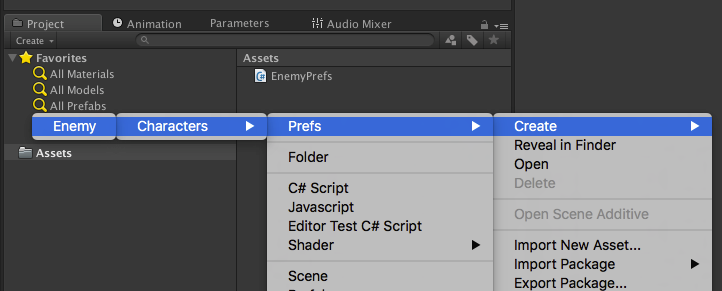
From SO instances, you can quickly and conveniently create custom assets, reuse them, load them over the network, etc. When declaring an inheritor of the SO class, you can mark it with the CreateAssetMenu attribute, which will add an asset creation item for this object to the Assets / Create context menu.
An example of a simple script with settings:
using UnityEngine;
[CreateAssetMenu(fileName="EnemyData", menuName="Prefs/Characters/Enemy", order=1)]
public class EnemyPrefs : ScriptableObject
{
    public string objectName = "Enemy";
    [Range(10f, 100f)]
    public float maxHP = 50f;
    [Range(1f, 10f)]
    public float maxDamage = 5f;
    public Vector3[] spawnPoints;
}
Creating an asset:
Serializing an asset with data in the inspector:
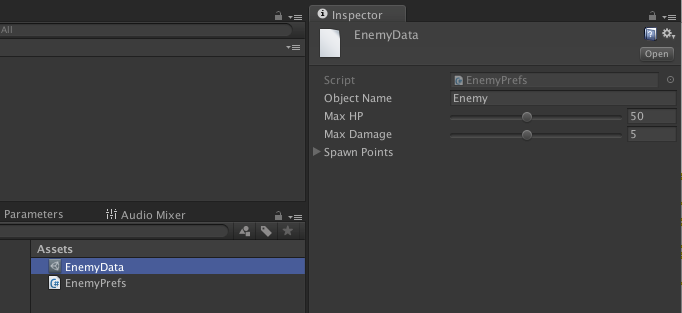
When working with the instances of the SO in the inspector, you can double-click the link field to open the inspector for your SO. It is also possible to create a custom editor to determine the type of inspector of your type to help manage the data that it represents.
An SO instance can be created without binding to the .asset file: programmatically, using SсriptableObject.CreateInstance <> .
SO lifetime:
- Same as any other asset.
- When it is persistent (attached to .asset file, AssetBundle, etc.):
- SO can be unloaded by GC through Resources.UnloadUnusedAssets ,
- continues to exist in memory if there are links to it in other scripts,
- if necessary, can be reloaded,
- When it is not persistent (created using CreateInstance <> and not attached to any .asset):
- can be destroyed by GC, not just unloaded,
- can be left in memory using HideFlags.HideAndDontSave .
Patterns of use
Most developers consider SO a data container, but in reality it is something more. Let's consider some patterns of its application.
Like data objects and tables:
- Plain-Old-Data (POD) class attached to .asset file.
- You can edit in the Inspector, commit in VCS as a single file. For example, a game designer can change some settings or other data without affecting scenes or prefabs, which is very convenient.
- Using a custom editor, you can make it even more convenient when using and settings in the Inspector.
- It is worth choosing an approach when using SO: apply one object per entity or one per table / set of entities. For example, when creating a localization table or configuration file, one common object will be enough, and if you need to create templates for different units, each one will need its own.
- Examples of use: localization tables, inventory items, unit templates, level configurations, etc. None of the above require a position in space, or some kind of logic. This is just data that can be changed without affecting the scenes and prefabs, thereby not interfering with the work of other team members.
Example:
class EnemyInfo : ScriptableObject
{
   public int MaximumHealth;
   public int DamagePerMeleeHit;
}
class Enemy : MonoBehaviour
{
   public EnemyInfo info;
}
As extensible listings:
- In the form of an empty SO, bound to an .asset file.
- They can be used only for checking for equality with other such objects, or for checking for null.
- Like Enums, but instead of writing code, they can be created by designers right in the editor.
- Examples of use: inventory items, event categories, damage types, unit types, etc.
- If necessary, they can easily be expanded to data / table objects by adding the necessary properties.
Example:
class AmmoType : ScriptableObject  { }
…
if (inventory[weapon.ammoType] == 0)
{
    PlayOutOfAmmoSound();
    return;
}
…
inventory[weapon.ammoType] -= 1;
...
Dual Serialization
As mentioned earlier, one of the advantages of SO is its full compatibility with the Unity serialization system. Wherein:
- SO can interact with JsonUtility .
- As a result, you can get a mixture of assets created at the design stage using the Unity serializer and assets created after that programmatically using JsonUtility.
- Examples of use: built-in levels (design, saved by the Unity serializer) + user levels (created in runtime and saved using JsonUtility). From the point of view of architecture, there is no need to worry about why such levels were created, they can be loaded into memory as SO and work with them universally.
Example:[CreateAssetMenu] class LevelData : ScriptableObject { /*...*/ } - You can create directly in the editor through the menu, adjust the values, etc.
LevelData LoadLevelFromFile(string path) { string json = File.ReadAllText(path); LevelData result = CreateInstance<>(LevelData); JsonUtility.FromJsonOverwrite(result, json); return result; } - The method allows you to read a text file with JSON (which was created locally in the process of creating the level or, for example, came from the server) and distilled it to SO
Like singletones:
- SO + static instance variable (an SO instance is created, and a link to it is stored in a static variable).
- FindObjectWithType to restore an instance after a level reload.
- Examples of use: global game states.
Example:
class GameState: ScriptableObject
{
   public int lives, score;
   static GameState _instance;
   public GameState Instance
   {
       get
       {
           if (!_instance) _instance = FindObjectOfType();
           if (!_instance) _instance = CreateDefaultGameState();
           return _instance;
       }
   }
}
As delegates:
- SO that contain methods.
- MB passes the reference to itself in the SO methods, SO does the work, using MB if necessary.
- This makes it possible to implement embedded and custom behavior.
- Examples of use: AI types, various power-ups, buffs / debuffs.
Example:
abstaract class PowerupEffect : ScriptableObject
{
   public abstract void ApplyTo(GameObject go);
}
class HealthBooster : PowerupEffect
{
   public int Amount;
   public override void ApplyTo(GameObject go)
   {
       go.GetComponent().currentValue += Amount;
   }
}
class Powerup : MonoBehaviour
{
   public PowerupEffect effect;
   public void OnTriggerEnter(Collider other)
   {
       effect.ApplyTo(other.gameObject);
   }
}
Thus, Powerup MB delegates its work to PowerupEffect SO, which is the pattern.
Conclusion
Summarizing the above, we can conclude that SO has its pros and cons, some of which are given below:
Advantages:
- It is perfectly serialized “out of the box”, both using JsonUtility, and visually in the editor (unlike static classes, for example).
- Changes are saved and not reset after exiting the playmod.
- You can conveniently fumble between other scripts.
- Can be easily inherited.
- Not placed in the inspector, thereby not cluttering it.
- It does not have an overhead and is more lightweight than MB.
- It does not attach to GO, respectively, and is not deleted when the object is destroyed.
- It can be stored in a scene until at least one object in this scene refers to it.
- It can be saved in assets and reused in other scenes using AssetDatabase, in runtime in already deployed builds, etc.
Disadvantages:
- It does not appear in the scene - it is visually unclear how many SO instances are currently in use, which can make debugging difficult.
- There is a possibility of implicitly destroying it if you destroy the last object that refers to it (in the scene).
- Not so convenient to use in prefabs.
- It is not obvious to whom the object belongs, when it should be destroyed, in what area of visibility it is located.
- Since SO is not attached to GO, there is no way to quickly get links through GetComponents.
SO is a very important tool that, although it cannot completely replace MB, can be used in combination with it, eliminating its tyranny. SO should not be used for everything, but it gives you more flexibility. Much more than those who are superficially familiar with SO or not at all think. It also provides an opportunity to build an excellent workflow for your project, create convenient and useful tools and templates for designers, etc.
Richard at the beginning of his speech said: “MonoBehavior sucks” (MonoBehavior sucks :)). It is difficult to completely agree with this, because one way or another, one can hardly do without it (MB). But the main thing is to understand that you should not use it always and everywhere, and that there are various alternatives, one of which is a powerful, flexible and convenient ScriptableObject. It is necessary to correctly choose these or other means, based on the task under specific conditions.