 July 22, 2016 at 16:14
Greedy loading in Yii2, for those who want to understand what it is
- Tutorial
The post tells why it is necessary to use "greedy loading", instead of "lazy loading", does not claim to be ideal. And it is unlikely to interest professionals, more suitable for beginners in the study of YII2.
We use greedy loading in our application. Suppose we have two tables with posts and categories. Each post can have one category, with categories of 1 or more posts.

Suppose we scrambled models, controllers, views on these tables. Fill out the list of posts. Please note that the category names themselves are displayed in the category column, not category id.
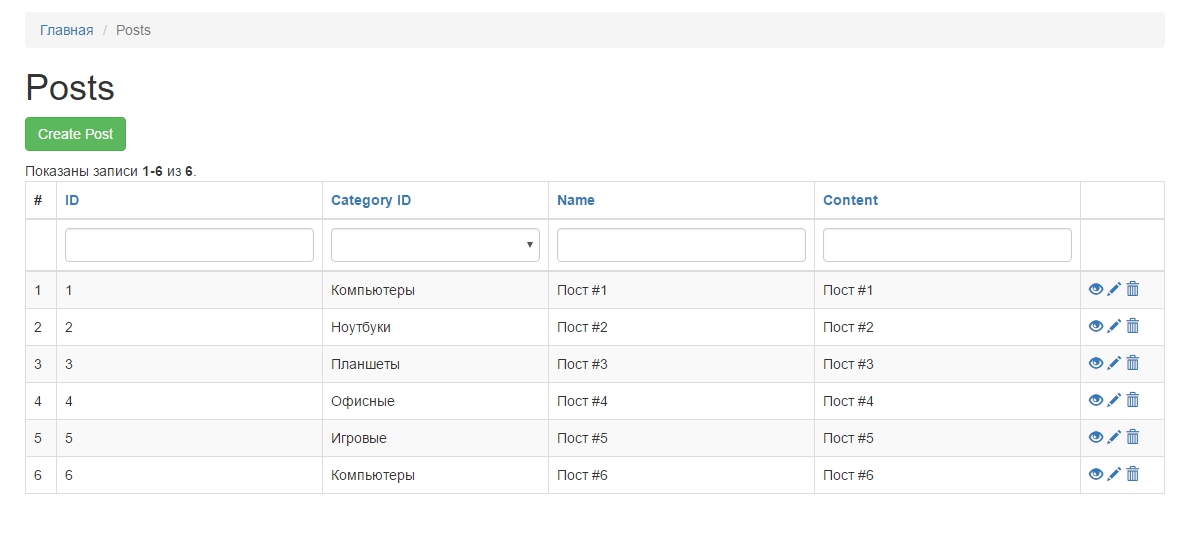
You can display the category name in the view: "views / post / index.php" by changing the GridView in this way:
This is exactly where greedy loading comes in handy. The fact is that if we look at sql - queries of our application.

We will see many queries from the category table, of this kind
Where x is the id from the posts - category_id. If we have 100, 500, 1000 posts displayed on the page, there will be as many selections in the post table. In this case, if you look at the execution time of the script, queries in the database are executed quickly. But if we can save resources, why not take advantage of this. To do this, created a "greedy download." A greedy load is a load with redundant data, as if with a table attached.
In the app \ models \ PostSearc model, in the search method, add greedy loading through the with method
After that, we look at the result:

Now we see, instead of numerous queries in the database, we get only 2. A selection of data from the psot and category tables.
The with method collects all category_id fields from the post table, and makes one query in the database, retrieving all categories according to the WHERE `id` IN (1, 2, 3, 4, 5) condition. That is, where all id that are in the first post selection are listed in where
In order for filtering to work, sorting in the GridView. Instead of with (), use joinWith ().
joinWith () eagerly loads and joins an additional table with join and this gives us the ability to add conditions, sort.
We use greedy loading in our application. Suppose we have two tables with posts and categories. Each post can have one category, with categories of 1 or more posts.
Suppose we scrambled models, controllers, views on these tables. Fill out the list of posts. Please note that the category names themselves are displayed in the category column, not category id.
You can display the category name in the view: "views / post / index.php" by changing the GridView in this way:
  $dataProvider,
        'filterModel' => $searchModel,
        'columns' => [
            ['class' => 'yii\grid\SerialColumn'],
            'id',
            [
                'attribute' => 'category_id',
                'filter' => Category::find()->select(['name', 'id'])->indexBy('id')->column(),
                'value' => 'category.name',
            ],
            'name',
            'content:ntext',
            ['class' => 'yii\grid\ActionColumn'],
        ],
    ]); ?>
  //    'attribute' => 'category_id', к атрибуту category_id, добавляем значение 'value' => 'category.name', где name как раз после с названием категории
  //    'filter' => Category::find()->select(['name', 'id'])->indexBy('id')->column(), -- дает фильтрацию по название категорий
  //    'value' => 'category.name',
This is exactly where greedy loading comes in handy. The fact is that if we look at sql - queries of our application.
We will see many queries from the category table, of this kind
SELECT * FROM `sb_category` WHERE `id`=x
Where x is the id from the posts - category_id. If we have 100, 500, 1000 posts displayed on the page, there will be as many selections in the post table. In this case, if you look at the execution time of the script, queries in the database are executed quickly. But if we can save resources, why not take advantage of this. To do this, created a "greedy download." A greedy load is a load with redundant data, as if with a table attached.
In the app \ models \ PostSearc model, in the search method, add greedy loading through the with method
    public function search($params)
    {
        $query = Post::find();
    public function search($params)
    {
        $query = Post::find()->with(['category']);
After that, we look at the result:
Now we see, instead of numerous queries in the database, we get only 2. A selection of data from the psot and category tables.
The with method collects all category_id fields from the post table, and makes one query in the database, retrieving all categories according to the WHERE `id` IN (1, 2, 3, 4, 5) condition. That is, where all id that are in the first post selection are listed in where
SELECT * FROM `sb_post` LIMIT 20
In order for filtering to work, sorting in the GridView. Instead of with (), use joinWith ().
joinWith () eagerly loads and joins an additional table with join and this gives us the ability to add conditions, sort.









