User profiles in analytics, or how to become Sherlock Holmes
If you read the stories about Sherlock Holmes or watched numerous adaptations, then you probably remember the name of the method that the hero uses to solve complicated affairs. Just in case, we recall: he uses induction - the transition from the particular to the general as opposed to deduction, when conclusions are drawn from the general data on the particulars. How to use the induction method to study user behavior in our application? .. “Elementary!” - the hero of Sir Arutra Conan Doyle would say. “Exactly so,” Vasily Sabirov, a leading devtodev analyst, echoes .

image source www.smartdatacollective.com/sites/smartdatacollective.com/files/Sherlock-Holmes-Big-Data-Analytics-and-BI-Attivio.png
Until recently, most analytical systems offered a deductive method: all users were analyzed at once, and the conclusion was drawn about the behavior of each specific user. This cannot be considered a mistake, but for more accurate conclusions it is still worth using the inductive method. And now the devtodev service is pleased to introduce a new functionality of analytical systems, which is based on the inductive method: analysis of user profiles .
If you set the goal to better understand your project, then first you build analytics into it and begin to see certain metrics (DAU, ARPU, LTV, and so on) and reports. Does this mean that you fully understand the project you are working on? Not really. Yes, you can draw conclusions about the behavior of the majority, but you still can’t get a look at the project through the eyes of a specific user.
To see a product from this point of view, you need to trace the behavior of a specific user: what actions he performs, what problems he faces, whether he understands the essence of your product. By following each user and finding out what actions he performs inside the product, you can no doubt understand him better.
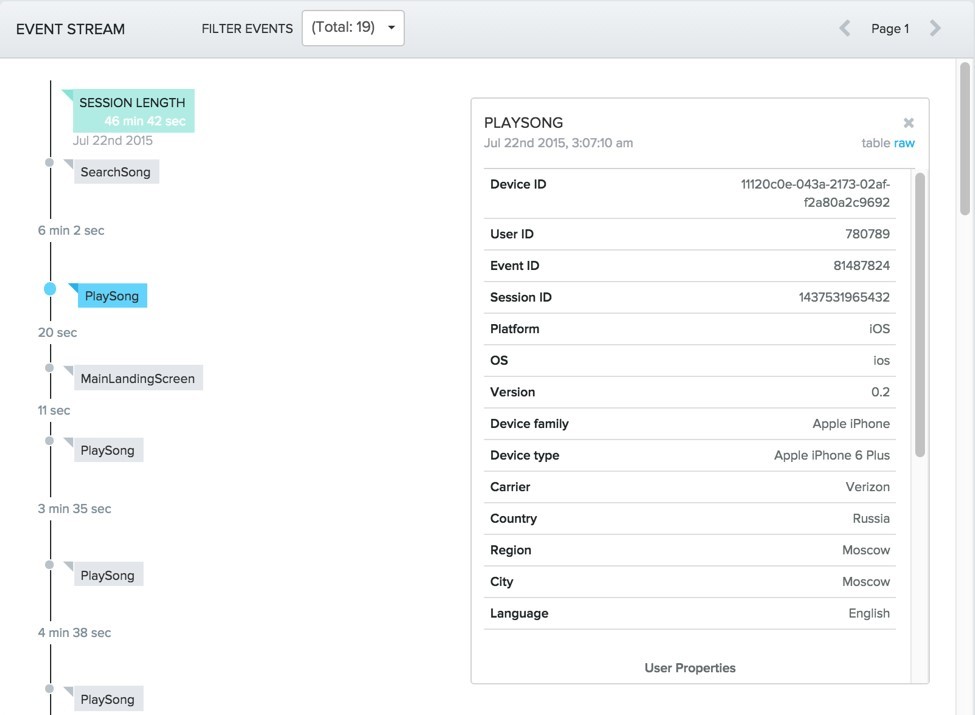
Amplitude user profiles
picture sourceamplitude.zendesk.com/hc/en-us/article_attachments/202671468/User_Search_2.png
Having analyzed N users in this way, you can collect the data necessary to formulate a number of hypotheses about improving the product. And their number will certainly not be less than the results of the analysis of metrics for all users at once. Practice shows that N does not have to be large in this case: when you study in detail already on the third user, you will formulate some hypotheses, on the fifth - you identify problems, on the tenth, plans for changing and improving the product mature in your head.

image source www.ew.com/sites/default/files/1452454622/christian-bale_0_1.jpg
Another example from a work of art, this time is the movie “The Short Game”. An attentive viewer remembers how the hero of Christian Bale studies a huge table with mortgages taken by each particular borrower, and then interviews these very people, thus finding the prerequisites for the impending financial crisis. Banks, accustomed to assessing the general situation, and not each case individually, do not believe in the approach of the end, as the overall situation is excellent, and nothing portends a collapse. What is not a vivid example of an erroneous analysis?
As a result, the following trend is formed: many analytical systems on the market launch their modules, which provide the ability to analyze user profiles. Localytics has Profiles, Mixpanel has People, Amplitude has User Activity.
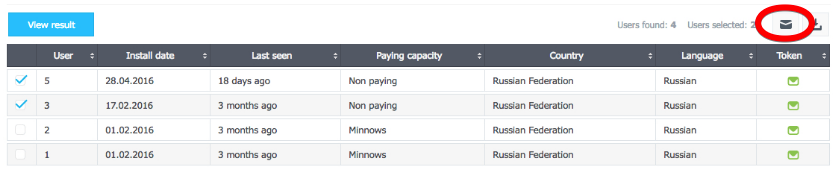
In devtodev, we created an advanced version of such a module and named it Users .
What is the user profile made up of?
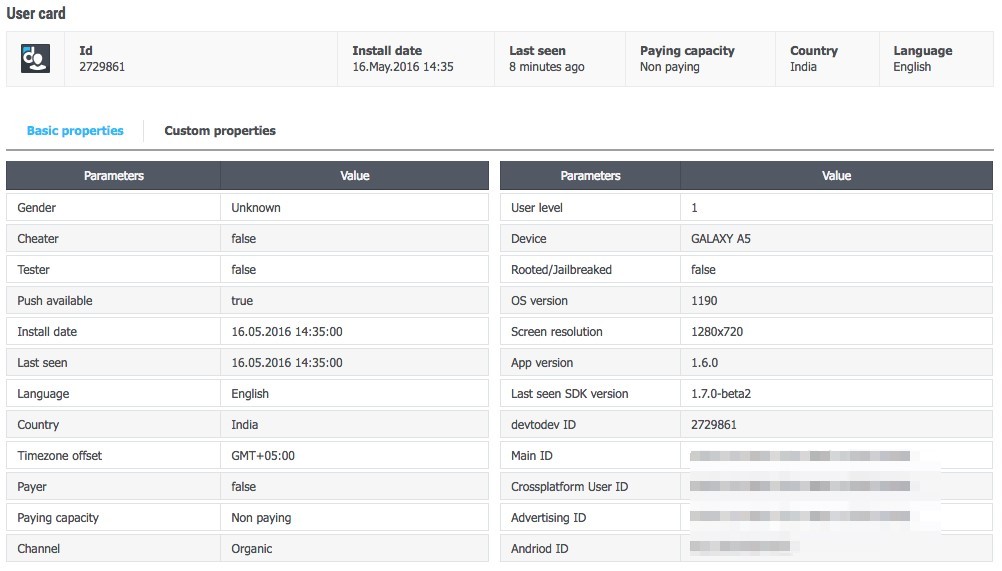
Firstly, this is information that is collected by default by the analytical system:
Using this information, you can filter users by various parameters, create segments and track their behavior in the future. Suppose you can select all users with an iPad, all from France, all who come from Facebook, all who use a previous version of the application, and so on. Filters can be combined to focus on a targeted audience: English-speaking users from Western Europe, using the new version of the application and registered in the service no more than two months ago.
Secondly, profiles about user payments are stored in profiles :when he paid how much and for what. You seem to try on his profile for yourself and begin to better understand the motive for his actions: why he bought this particular IAP, why so much time has passed between payments and so on.
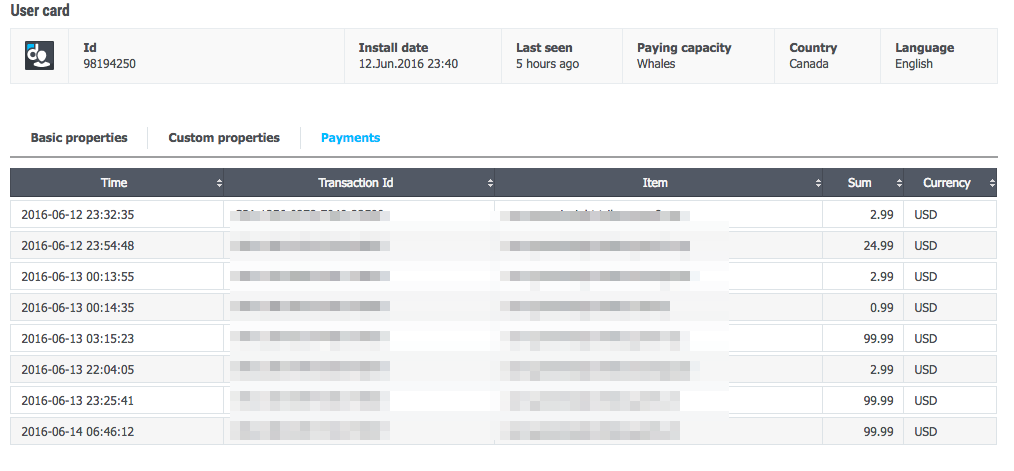
Without user profiles, you can see monetization metrics, purchase statistics, and this is certainly very useful information. However, a deeper understanding is achieved precisely by moving to the level of the player.
Thirdly, the user profile includes statistics on events (custom events ) that occurred with the user in the project. You begin to see their sequence, you are kind of watching a video about how a particular person uses your product.
Here are examples of some questions that can be answered using this method:
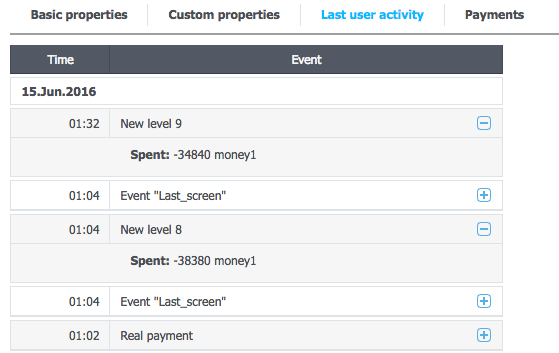
You can select all users who entered the application’s store (who completed the “Store entrance” event) and evaluate which events preceded this entrance and what the user’s behavior was like after entering the store. This will make it clearer how the conversion of the user into interest in the purchase takes place, and directly into the transition to the purchase, and as a result, into a successful perfect payment.
User profiles in the MixPanel system image
source cdn.mxpnl.com/cache/81e4c82a27f699ba6153b46064105a1e/images/static/landing/marketing/people2/feature-illus.png
Finally, the user profile includes User Properties,which you determine. It can be anything: the level in the game, the group code during the A / B test, classification by the amount of payment activity (minnow / dolphin / whale) and so on.
You’ll save up on all projects of standard methods, and the most correct tactics of the analytical system will be to create a universal set of useful parameters for tracking user actions, while leaving the client the opportunity to independently choose any other parameter for analysis.
The practical benefit of having user profiles in the analytics system is obvious, for those who doubt, I’ll give the following arguments:
Case study: application developers noticed that the user was stuck at some level, and sent him a notification with a hint how to pass this level. Then it turned out that he was not the only one, and a significant number of users were stuck at the same level, and then left the application for an average of seven days. While everyone was writing a statement to simplify the level (I wanted users to not leave), you sent a push notification with an explicit hint to everyone stuck at the level. What did they do with those who did not enter the game for seven days or more? That's right, they sent out a small but pleasant bonus in virtual currency using the same push notifications using the transferred parameters.
Thus, the analysis of user profiles greatly simplifies the life of both the client of the analytical system and the system itself, leaving the modern Sherlock Holmes out of work. The client has much more opportunities to evaluate the actions of users, and the main one is the ability to conduct inductive analysis (analysis "vice versa"). It is important that the system itself remains the winner, gaining even greater trust from the client.
image source www.smartdatacollective.com/sites/smartdatacollective.com/files/Sherlock-Holmes-Big-Data-Analytics-and-BI-Attivio.png
Until recently, most analytical systems offered a deductive method: all users were analyzed at once, and the conclusion was drawn about the behavior of each specific user. This cannot be considered a mistake, but for more accurate conclusions it is still worth using the inductive method. And now the devtodev service is pleased to introduce a new functionality of analytical systems, which is based on the inductive method: analysis of user profiles .
If you set the goal to better understand your project, then first you build analytics into it and begin to see certain metrics (DAU, ARPU, LTV, and so on) and reports. Does this mean that you fully understand the project you are working on? Not really. Yes, you can draw conclusions about the behavior of the majority, but you still can’t get a look at the project through the eyes of a specific user.
To see a product from this point of view, you need to trace the behavior of a specific user: what actions he performs, what problems he faces, whether he understands the essence of your product. By following each user and finding out what actions he performs inside the product, you can no doubt understand him better.
Amplitude user profiles
picture sourceamplitude.zendesk.com/hc/en-us/article_attachments/202671468/User_Search_2.png
Having analyzed N users in this way, you can collect the data necessary to formulate a number of hypotheses about improving the product. And their number will certainly not be less than the results of the analysis of metrics for all users at once. Practice shows that N does not have to be large in this case: when you study in detail already on the third user, you will formulate some hypotheses, on the fifth - you identify problems, on the tenth, plans for changing and improving the product mature in your head.
image source www.ew.com/sites/default/files/1452454622/christian-bale_0_1.jpg
Another example from a work of art, this time is the movie “The Short Game”. An attentive viewer remembers how the hero of Christian Bale studies a huge table with mortgages taken by each particular borrower, and then interviews these very people, thus finding the prerequisites for the impending financial crisis. Banks, accustomed to assessing the general situation, and not each case individually, do not believe in the approach of the end, as the overall situation is excellent, and nothing portends a collapse. What is not a vivid example of an erroneous analysis?
As a result, the following trend is formed: many analytical systems on the market launch their modules, which provide the ability to analyze user profiles. Localytics has Profiles, Mixpanel has People, Amplitude has User Activity.
In devtodev, we created an advanced version of such a module and named it Users .
What is the user profile made up of?
Firstly, this is information that is collected by default by the analytical system:
- installation date;
- tongue;
- the country;
- Timezone;
- Device (device);
- OS version
- traffic channel;
- application version;
- etc.
Using this information, you can filter users by various parameters, create segments and track their behavior in the future. Suppose you can select all users with an iPad, all from France, all who come from Facebook, all who use a previous version of the application, and so on. Filters can be combined to focus on a targeted audience: English-speaking users from Western Europe, using the new version of the application and registered in the service no more than two months ago.
Secondly, profiles about user payments are stored in profiles :when he paid how much and for what. You seem to try on his profile for yourself and begin to better understand the motive for his actions: why he bought this particular IAP, why so much time has passed between payments and so on.
Without user profiles, you can see monetization metrics, purchase statistics, and this is certainly very useful information. However, a deeper understanding is achieved precisely by moving to the level of the player.
Thirdly, the user profile includes statistics on events (custom events ) that occurred with the user in the project. You begin to see their sequence, you are kind of watching a video about how a particular person uses your product.
Here are examples of some questions that can be answered using this method:
- what event usually follows after event A?
- which event precedes event B?
- Do all users execute event C after event D? or go to event E?
- What events precede the user leaving the project?
You can select all users who entered the application’s store (who completed the “Store entrance” event) and evaluate which events preceded this entrance and what the user’s behavior was like after entering the store. This will make it clearer how the conversion of the user into interest in the purchase takes place, and directly into the transition to the purchase, and as a result, into a successful perfect payment.
User profiles in the MixPanel system image
source cdn.mxpnl.com/cache/81e4c82a27f699ba6153b46064105a1e/images/static/landing/marketing/people2/feature-illus.png
Finally, the user profile includes User Properties,which you determine. It can be anything: the level in the game, the group code during the A / B test, classification by the amount of payment activity (minnow / dolphin / whale) and so on.
You’ll save up on all projects of standard methods, and the most correct tactics of the analytical system will be to create a universal set of useful parameters for tracking user actions, while leaving the client the opportunity to independently choose any other parameter for analysis.
The practical benefit of having user profiles in the analytics system is obvious, for those who doubt, I’ll give the following arguments:
- Using this module, you can conduct the analysis “vice versa”, or inductive analysis, if you want. You watch the behavior of specific users and begin to better understand how they feel using your product.
- Based on the analysis, you can send push notifications to selected users - some systems ( including devtodev ) allow this.
Case study: application developers noticed that the user was stuck at some level, and sent him a notification with a hint how to pass this level. Then it turned out that he was not the only one, and a significant number of users were stuck at the same level, and then left the application for an average of seven days. While everyone was writing a statement to simplify the level (I wanted users to not leave), you sent a push notification with an explicit hint to everyone stuck at the level. What did they do with those who did not enter the game for seven days or more? That's right, they sent out a small but pleasant bonus in virtual currency using the same push notifications using the transferred parameters.
- Using user profiles, it’s easy to test analytics integration . In general, the integration of analytics is not a difficult process, but rather painstaking: first you need to create a set of events, clearly understanding that these events will be enough for subsequent conclusions (I wrote more about this here). And when the integration is complete, it would not hurt to test it well. And here, user profiles and real-time analytics work will be of great help: you open the application yourself, make a chain of events, then find your profile in the analytics and just see if events with parameters were transmitted correctly. If the analytics is not tested correctly, then the iteration for correction may take more than a month, which could be devoted to more necessary things.
- Finally, confidence in the analytic system is increasing.. Suppose this very system has calculated something for you (for example, ARPU = $ 0.2), and you don’t know how this value was obtained and whether it can be trusted at all. As a representative of the analytical service, I declare that you can trust, but I perfectly understand people who have a slight distrust of the system, considering it a black box. Often people working with data want to upload the data themselves and double-check everything with their hands. The presence of user profiles increases confidence in the analytics system: you do not see empty numbers, but the data for each user separately, and the ability to upload data just makes it possible for especially incredulous people to upload data and calculate everything by themselves. Thus, the presence of user profiles is mutually beneficial for both the client and the analytical system itself.
Thus, the analysis of user profiles greatly simplifies the life of both the client of the analytical system and the system itself, leaving the modern Sherlock Holmes out of work. The client has much more opportunities to evaluate the actions of users, and the main one is the ability to conduct inductive analysis (analysis "vice versa"). It is important that the system itself remains the winner, gaining even greater trust from the client.












