GFI LanGuard - Virtual Security Consultant
One of the important tasks of ensuring information security is the identification of potential risks and “holes” in protection. You need to find and fix vulnerabilities before attackers can exploit them. For this purpose, security scanners also serve. A security scanner or a network vulnerability scanner is an automated solution for full port scanning, monitoring software updates, and checking software and hardware. This application scans the network and its devices to detect weaknesses in the security system.

Scanners check the applications used, look for “holes” that could be used by hackers, and warn the administrator about risk zones and security gaps. Their tasks are identification and analysis of vulnerabilities, inventory of resources, generation of reports containing a description of vulnerabilities and options for their elimination. Of course, the functionality of different products varies significantly, but correctly using a network vulnerability scanner that has proven itself in the market can significantly enhance network security.
Such a tool is a necessary tool not only for companies that own unique databases, valuable archives or work with confidential information. They are useful wherever information leakage is undesirable or even dangerous; there are databases of personal data of clients. This is one of the important elements of the enterprise information security system. Let's talk
about one of these products - GFI LanGuard . This is a much more mature tool than many security scanners flooding the market, marked by a number of industry awards, and in terms of functionality it surpasses many similar platforms.
Let's see how such a product can be useful for both system administrators in small companies and information security specialists in large organizations.
GFI Software's LanGuard is a network security scanner and software update management tool that builds a network map and performs risk analysis. GFI Software is one of the leaders in the information security market. The company has been operating since 1992 and during this time has earned a reputation as a reliable organization producing professional products for solving a wide range of IT problems.
This product solves several problems at once - it works as a security scanner, serves to manage updates, audit software and hardware. Moreover, he manages updates not only of the OS and Microsoft products, but also of Microsoft’s excellent software - Acrobat Reader, Flash Player, Skype, etc. In addition, it is useful for companies that need to meet PCI DSS requirements.
LanGuard installs on the same Windows computer and scans the local network, finding all the devices in it - servers, workstations, laptops, mobile gadgets, virtual machines, switches, routers and printers to check for security.
The vulnerability scanner checks everything: from servers to network hardware, virtual machines and smartphones. This is done with or without software agents. In the first case, you can get more accurate and deeper results.
Combined with new cloud infrastructure protection tools like CloudPassage or IDM products such as ViewFinity, GFI LanGuard will become an integral tool in the arsenal of network security products.
 Network Scanning at GFI LanGuard
Essentially, GFI LanGuard works as a virtual security consultant:
As a network security scanner, GFI LanGuard detects, identifies and repairs network vulnerabilities. Full port scanning, the availability of the necessary software updates to protect the network, as well as audit of software and hardware - all this is possible from a single control panel.
An important feature is port scanning. Several already created scan profiles allow you to conduct a full scan of all ports, and quickly check only those that are commonly used by unwanted and malicious software. GFI LanGuard scans several nodes at once simultaneously, significantly reducing the required time, and then compares the software found on busy ports with the expected one.
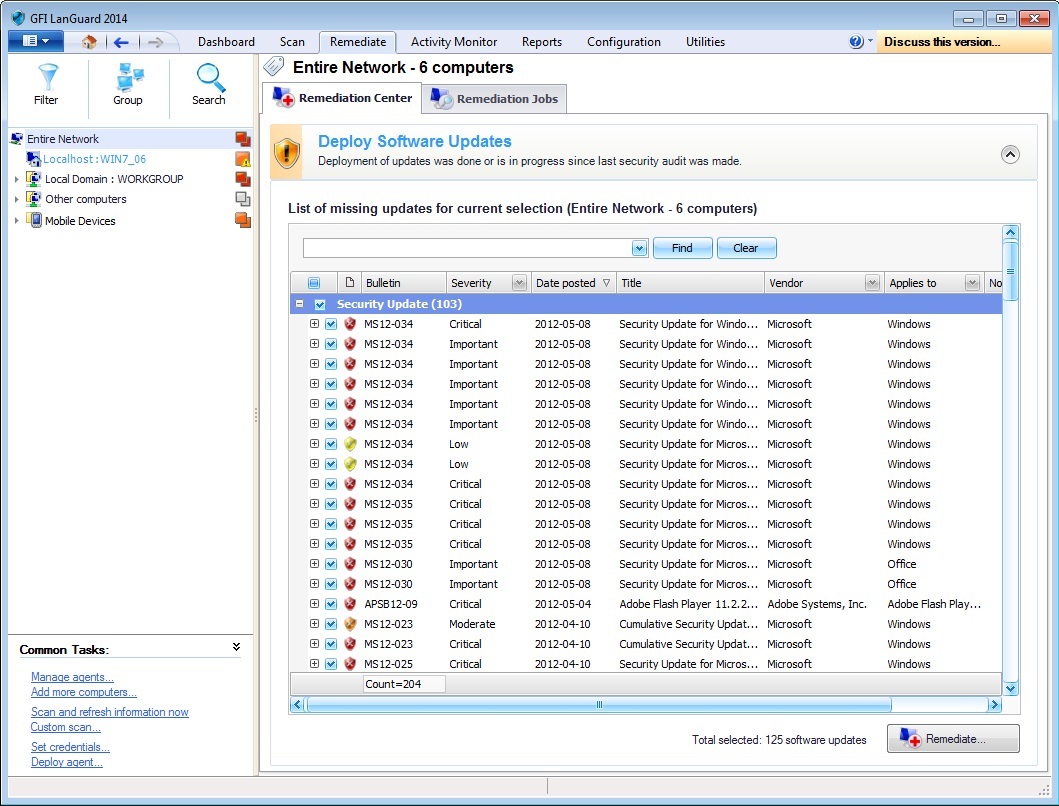 LanGuard can be used to deploy updates throughout the network.
This network vulnerability scanner has a very important difference from many competitors. It can automatically update software. Prior to installing the latest updates, the hosts are completely unprotected, since it is the latest vulnerabilities that cover the latest patches and updates that are used by hackers to penetrate.
Unlike tools built into the OS, GFI LanGuard will check not only the OS itself, but also popular software, vulnerabilities of which are usually used for hacking: Adobe Acrobat / Reader, Flash Player, Skype, Outlook, browsers, instant messengers.
It should be noted that after updating the data on vulnerabilities, the number of which in the GFI LanGuard database has already exceeded 50,000, network scanning starts automatically. The threat information providers are the software vendors themselves, as well as the proven SANS and OVAL lists. This provides protection against the latest threats.
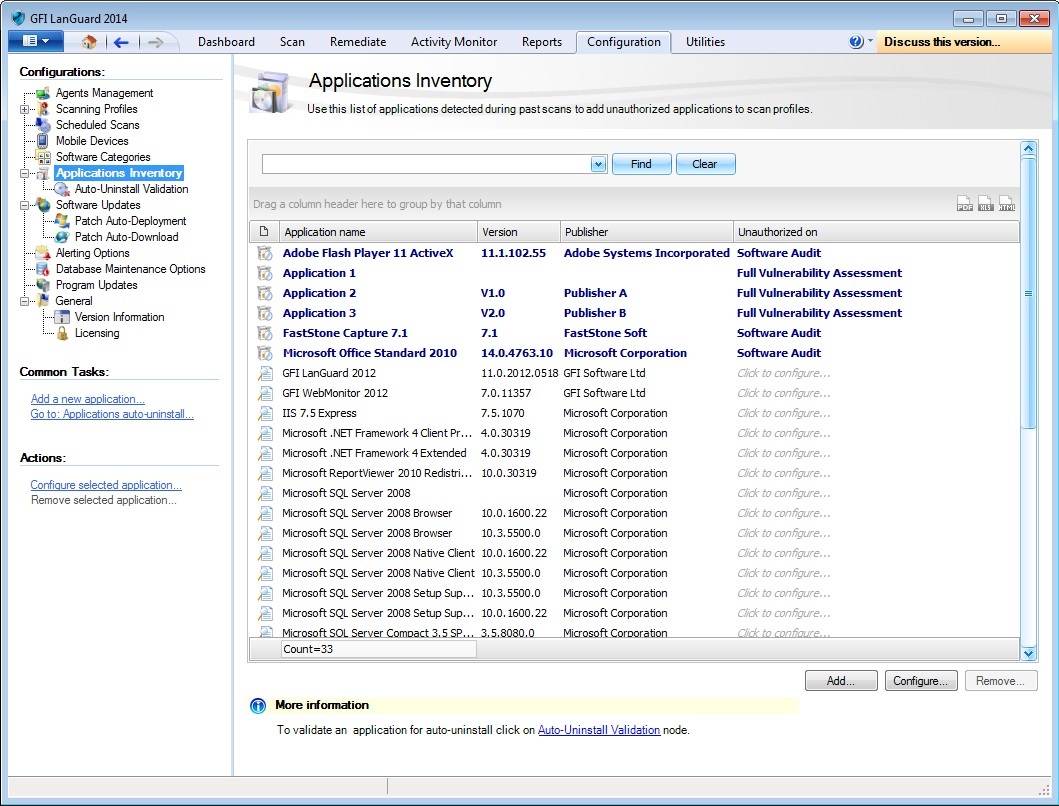 Application inventory result
Network auditing is required to get the full picture. LanGuard will prepare a detailed list of installed software and hardware on each of the computers, detect forbidden or missing programs, as well as unnecessary connected devices. Multiple scans can be compared to identify changes.
The network security scanner functions apply to all popular operating systems for workstations and servers (Windows, MacOS, popular Linux and Unix distributions), as well as smartphones based on iOS and Android. The security picture is supplemented by virtual machines VMware, Virtual PC, VirtualBox, etc.
LanGuard "weighs" about 300 MB, and the product activation key can be obtained by e-mail. A special utility helps you complete the installation steps - in about five minutes you can scan the network.
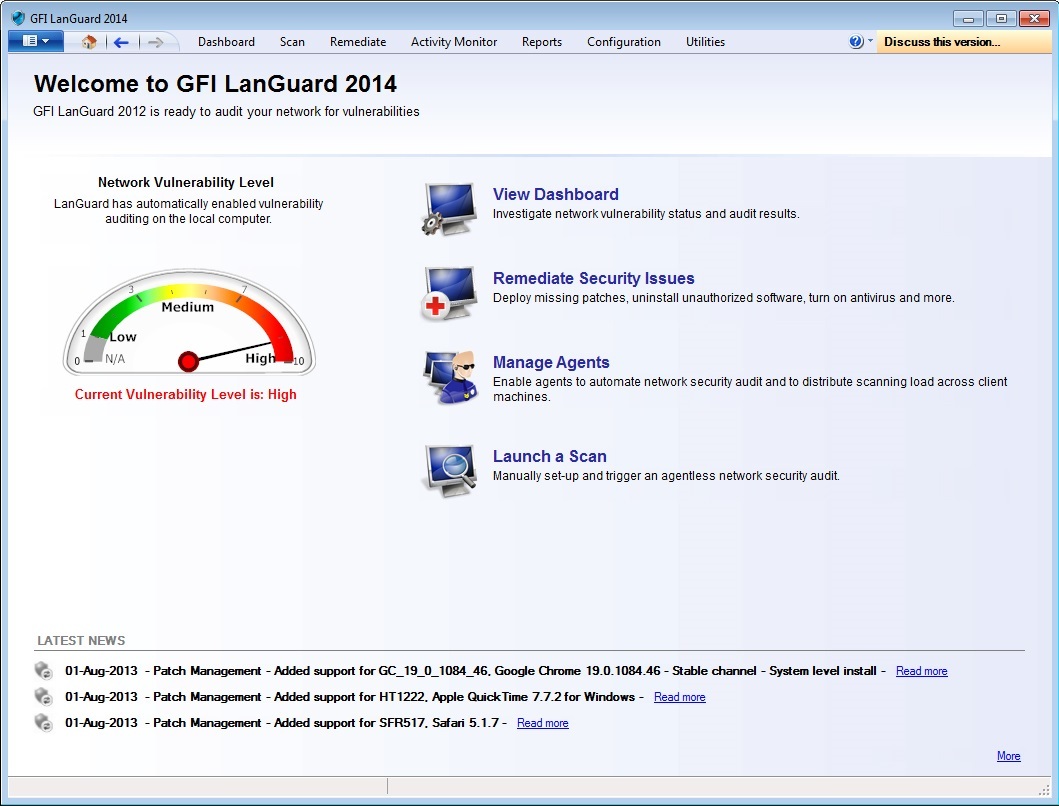 LanGuard
main screen The product’s main screen displays the scan results — network vulnerability status and audit data, as well as tips on enhancing protection, for example, recommending to use missing patches, remove unauthorized programs, enable anti-virus protection, etc. In addition, the software provides information on how with software agents, for example, recommends allowing them to be used to automate network security auditing and load balancing when scanning through client PCs. And at the bottom of the screen there are links to product news.
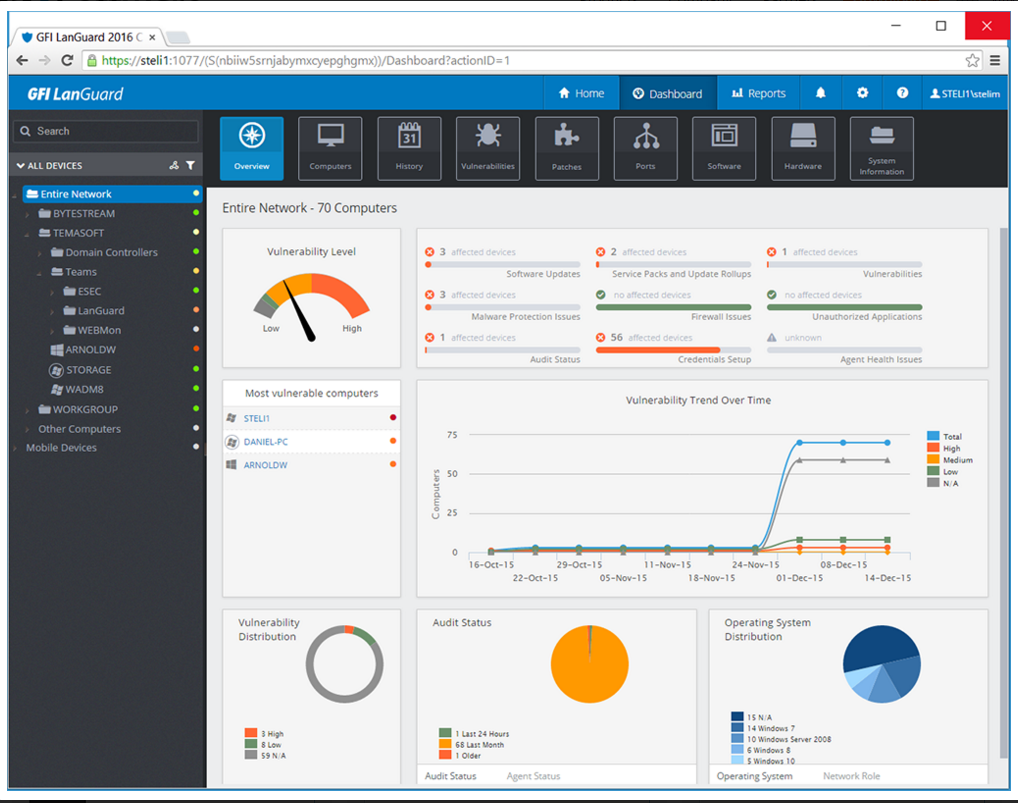 LanGuard Web Console
After installing and running a scan in LanGuard, vulnerability scanning on local systems is automatically enabled. Detailed information shows the level of vulnerability, the main problems that need to be addressed, the status of the scan, the status of agents, and the change in vulnerability during the monitoring period.
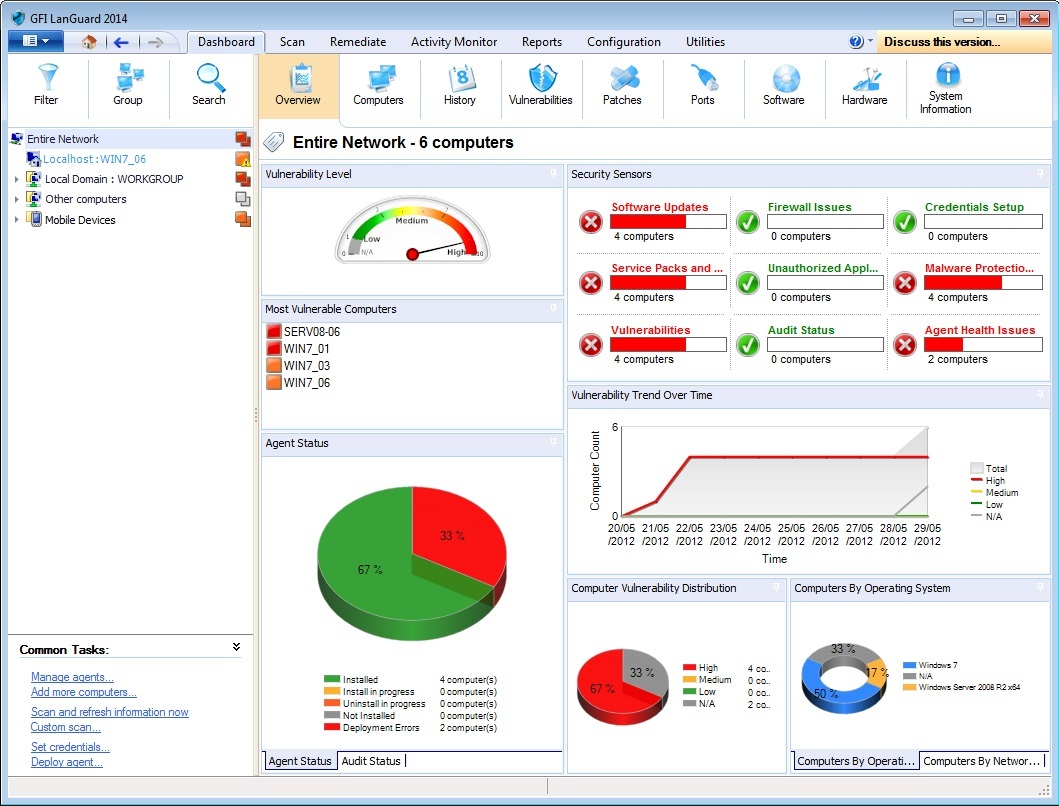 Network scan results are displayed in an easy-to-read format.
The product provides consolidated statistics on the vulnerability of the network as a whole, shows the level of threats (fractions of potential, high, medium and low security problems), the dynamics of the security level and a list of the most insecure systems in the network.
Additional features include checking DNS IP addresses (DNS Lookup), network tracing (Traceroute), checking domain or IP address information, building a list of computers on the network and users in Active Directory.
If you click one of the security sensors shown, a list of vulnerabilities appears in order of severity with detailed information about each. These statuses can be changed, as well as the rules related to the vulnerability.
Working with the product is facilitated by the availability of complete documentation and even video tours . In addition, there is an informative knowledge base available online. For support, you can also use chat with GFI specialists.
 Configuring Vulnerability Assessment Options
To start the initial remote scan, go to the scan page. Here you can specify a scan group by specifying a range of IP addresses and clicking the Scan button. LanGuard shows the number of computers scanned and an approximate estimate of the scan time - this operation can take several hours.
 Configuring network and software scan profiles
In addition to detecting open ports, insecure settings, and prohibited from installing software, LanGuard checks for updates and patches not only on the OS (desktop and mobile, physical and virtual), but also on the installed software. The results window displays the IP addresses of the systems, PC name and OS name / version. You can obtain additional information on TCP and UDP ports, hardware and software, and system information.
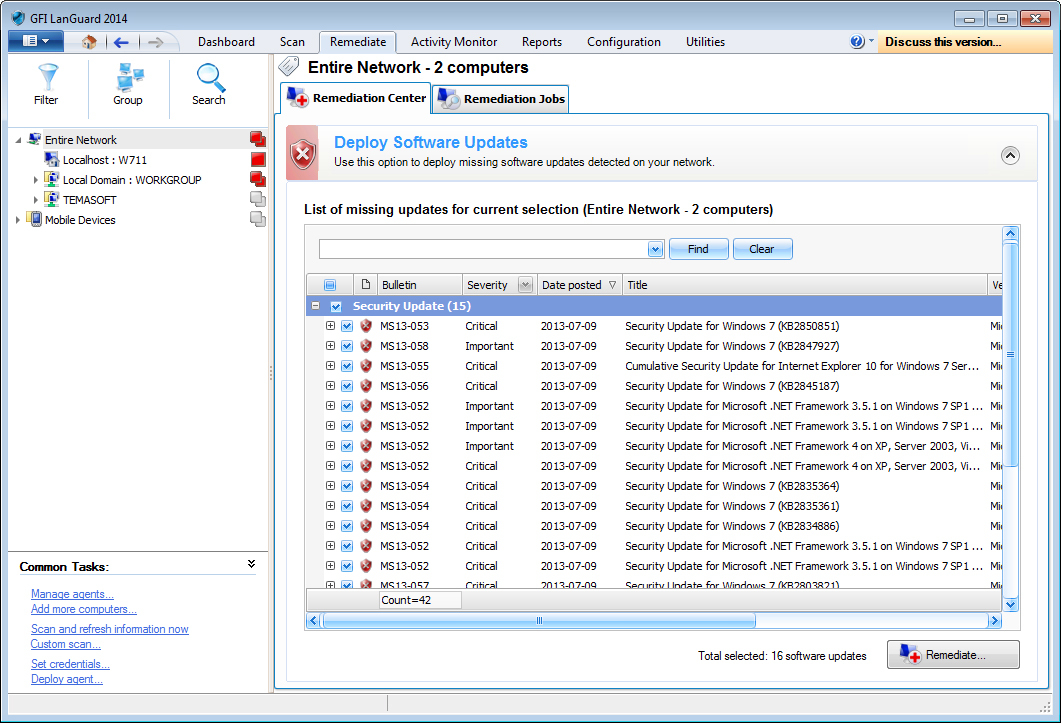 Monitoring the status of patches
Each Windows computer has sections with vulnerability assessment, network audit data, and software. Vulnerabilities are divided according to severity level - high, low, potential, no Service Pack, no updates are applied. Double-clicking on the name of the application displays a new window with more in-depth information and a link to the update.
The LanGuard interface is well thought out and polished. Windows and fields can be dragged, resized. The contents of almost any window can be copied to the clipboard. The windows show information about devices, help information, the interface is intuitively clear even to a not very sophisticated user, not to mention system administrators.
The network security scanner can be configured to work offline, in which case it will start on a timer, and the fixes allowed by the administrator will be performed automatically. No less thoughtful and reports.
After scanning, GFI LanGuard sends the user a complete report with the characteristics of all vulnerabilities and instructions for their elimination in manual mode. You can immediately close the gaps in protection, fix the settings, update the software (including the installation of missing items), delete prohibited programs.
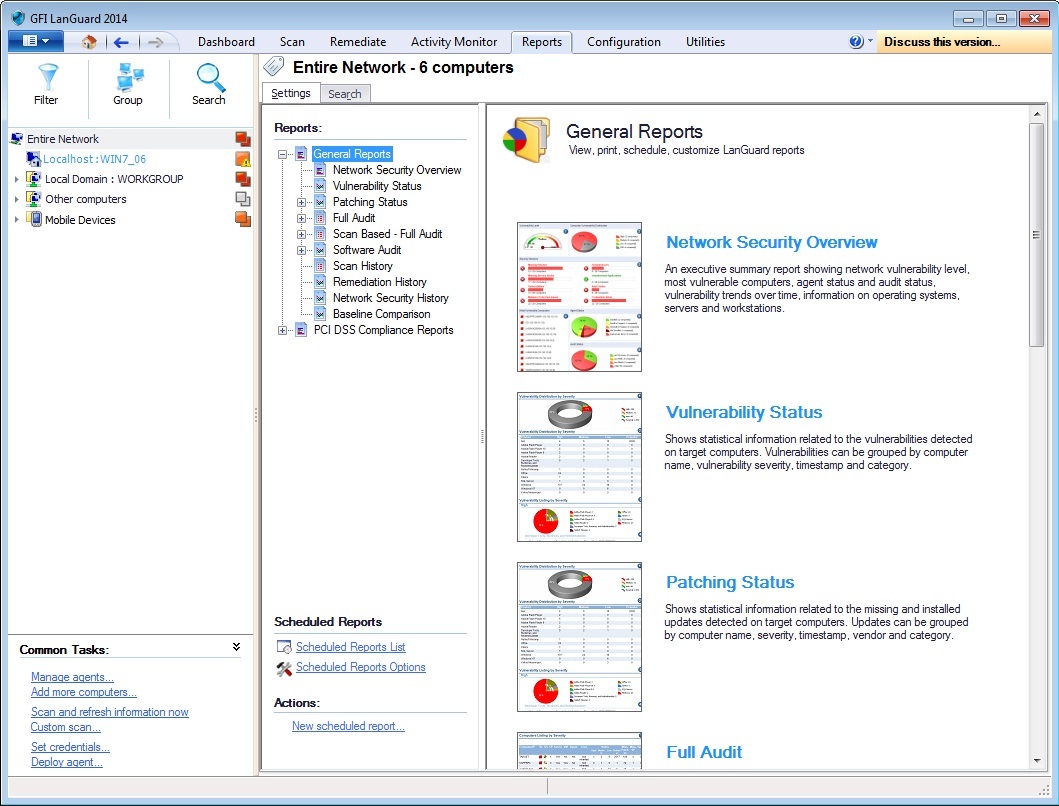 The reports that GFI LanGuard builds are suitable for both technical specialists and company management.
The reports tab, along with general reports, contains reports that meet regulatory requirements, such as reports on PCI DSS, HIPAA, etc. The report can be customized, printed or sent. by email.
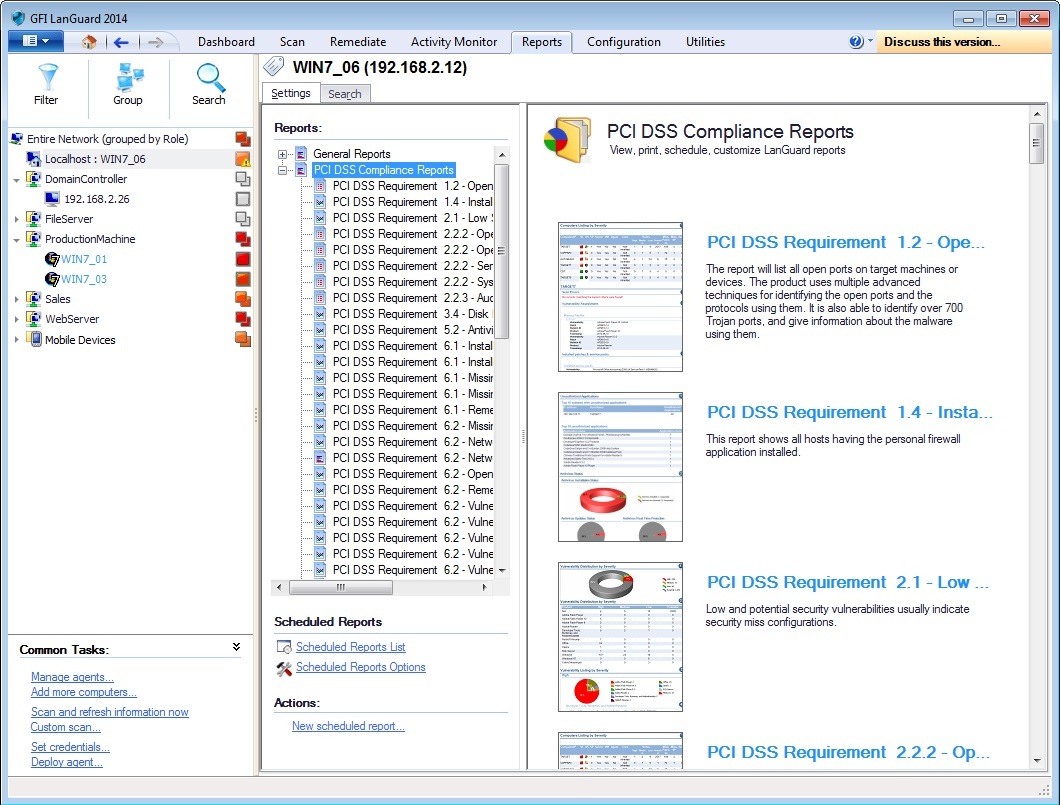 PCI DSS Compliance Report
Popular formats supported: PDF, HTML, XLS, XLSX, RTF, and CSV. You can add your own templates to the scheduler for existing PCI DSS, HIPAA, SOX, GLB / GLBA, and PSN CoCo reports.
Having received a detailed report on the scan results with a description of each vulnerability and links to additional literature, you can fix most of the threats with one click on the “Fix” button: ports will be closed, registry keys fixed, patches installed, software updated, prohibited programs removed, and missing programs installed .
It is no coincidence that LanGuard is at the top of the ranks of network scanners. The product provides a complete picture of what is happening on the network for a quick response and effective troubleshooting in the shortest possible time. Along with well-implemented traditional network scanner functions, it can automatically update outdated software and install updates and patches on different operating systems, and the price of GFI LanGuard will not become burdensome for a small organization. Finally, it is suitable for companies using virtual environments. GFI LANguard really allows you to get reliable information about network problems, which will allow the system administrator to take measures to increase its security level.
Download the free fully functional version (demo, 30 days) here:
gfi-software.ru/downloads/gfi-languard
For the time of use, technical support in Russian is provided in accordance with the policy:
gfi-software.ru/support/policy
Post 2 - GFI Archiver: storage for mail >>
Post 3 - GFI MailEssentials: mail under protection >>
Scanners check the applications used, look for “holes” that could be used by hackers, and warn the administrator about risk zones and security gaps. Their tasks are identification and analysis of vulnerabilities, inventory of resources, generation of reports containing a description of vulnerabilities and options for their elimination. Of course, the functionality of different products varies significantly, but correctly using a network vulnerability scanner that has proven itself in the market can significantly enhance network security.
Such a tool is a necessary tool not only for companies that own unique databases, valuable archives or work with confidential information. They are useful wherever information leakage is undesirable or even dangerous; there are databases of personal data of clients. This is one of the important elements of the enterprise information security system. Let's talk
about one of these products - GFI LanGuard . This is a much more mature tool than many security scanners flooding the market, marked by a number of industry awards, and in terms of functionality it surpasses many similar platforms.
Let's see how such a product can be useful for both system administrators in small companies and information security specialists in large organizations.
What is LanGuard?
GFI Software's LanGuard is a network security scanner and software update management tool that builds a network map and performs risk analysis. GFI Software is one of the leaders in the information security market. The company has been operating since 1992 and during this time has earned a reputation as a reliable organization producing professional products for solving a wide range of IT problems.
This product solves several problems at once - it works as a security scanner, serves to manage updates, audit software and hardware. Moreover, he manages updates not only of the OS and Microsoft products, but also of Microsoft’s excellent software - Acrobat Reader, Flash Player, Skype, etc. In addition, it is useful for companies that need to meet PCI DSS requirements.
LanGuard installs on the same Windows computer and scans the local network, finding all the devices in it - servers, workstations, laptops, mobile gadgets, virtual machines, switches, routers and printers to check for security.
The vulnerability scanner checks everything: from servers to network hardware, virtual machines and smartphones. This is done with or without software agents. In the first case, you can get more accurate and deeper results.
Combined with new cloud infrastructure protection tools like CloudPassage or IDM products such as ViewFinity, GFI LanGuard will become an integral tool in the arsenal of network security products.
Essentially, GFI LanGuard works as a virtual security consultant:
- Manages updates for Windows, Mac OS and Linux.
- Detects vulnerabilities on computers and mobile devices.
- Conducts an audit of hardware and software.
As a network security scanner, GFI LanGuard detects, identifies and repairs network vulnerabilities. Full port scanning, the availability of the necessary software updates to protect the network, as well as audit of software and hardware - all this is possible from a single control panel.
Features of LanGuard
An important feature is port scanning. Several already created scan profiles allow you to conduct a full scan of all ports, and quickly check only those that are commonly used by unwanted and malicious software. GFI LanGuard scans several nodes at once simultaneously, significantly reducing the required time, and then compares the software found on busy ports with the expected one.
This network vulnerability scanner has a very important difference from many competitors. It can automatically update software. Prior to installing the latest updates, the hosts are completely unprotected, since it is the latest vulnerabilities that cover the latest patches and updates that are used by hackers to penetrate.
Unlike tools built into the OS, GFI LanGuard will check not only the OS itself, but also popular software, vulnerabilities of which are usually used for hacking: Adobe Acrobat / Reader, Flash Player, Skype, Outlook, browsers, instant messengers.
It should be noted that after updating the data on vulnerabilities, the number of which in the GFI LanGuard database has already exceeded 50,000, network scanning starts automatically. The threat information providers are the software vendors themselves, as well as the proven SANS and OVAL lists. This provides protection against the latest threats.
Network auditing is required to get the full picture. LanGuard will prepare a detailed list of installed software and hardware on each of the computers, detect forbidden or missing programs, as well as unnecessary connected devices. Multiple scans can be compared to identify changes.
The network security scanner functions apply to all popular operating systems for workstations and servers (Windows, MacOS, popular Linux and Unix distributions), as well as smartphones based on iOS and Android. The security picture is supplemented by virtual machines VMware, Virtual PC, VirtualBox, etc.
Product Installation and Launch
LanGuard "weighs" about 300 MB, and the product activation key can be obtained by e-mail. A special utility helps you complete the installation steps - in about five minutes you can scan the network.
main screen The product’s main screen displays the scan results — network vulnerability status and audit data, as well as tips on enhancing protection, for example, recommending to use missing patches, remove unauthorized programs, enable anti-virus protection, etc. In addition, the software provides information on how with software agents, for example, recommends allowing them to be used to automate network security auditing and load balancing when scanning through client PCs. And at the bottom of the screen there are links to product news.
After installing and running a scan in LanGuard, vulnerability scanning on local systems is automatically enabled. Detailed information shows the level of vulnerability, the main problems that need to be addressed, the status of the scan, the status of agents, and the change in vulnerability during the monitoring period.
The product provides consolidated statistics on the vulnerability of the network as a whole, shows the level of threats (fractions of potential, high, medium and low security problems), the dynamics of the security level and a list of the most insecure systems in the network.
Additional features include checking DNS IP addresses (DNS Lookup), network tracing (Traceroute), checking domain or IP address information, building a list of computers on the network and users in Active Directory.
If you click one of the security sensors shown, a list of vulnerabilities appears in order of severity with detailed information about each. These statuses can be changed, as well as the rules related to the vulnerability.
Work with LanGuard
Working with the product is facilitated by the availability of complete documentation and even video tours . In addition, there is an informative knowledge base available online. For support, you can also use chat with GFI specialists.
To start the initial remote scan, go to the scan page. Here you can specify a scan group by specifying a range of IP addresses and clicking the Scan button. LanGuard shows the number of computers scanned and an approximate estimate of the scan time - this operation can take several hours.
In addition to detecting open ports, insecure settings, and prohibited from installing software, LanGuard checks for updates and patches not only on the OS (desktop and mobile, physical and virtual), but also on the installed software. The results window displays the IP addresses of the systems, PC name and OS name / version. You can obtain additional information on TCP and UDP ports, hardware and software, and system information.
Each Windows computer has sections with vulnerability assessment, network audit data, and software. Vulnerabilities are divided according to severity level - high, low, potential, no Service Pack, no updates are applied. Double-clicking on the name of the application displays a new window with more in-depth information and a link to the update.
The LanGuard interface is well thought out and polished. Windows and fields can be dragged, resized. The contents of almost any window can be copied to the clipboard. The windows show information about devices, help information, the interface is intuitively clear even to a not very sophisticated user, not to mention system administrators.
The network security scanner can be configured to work offline, in which case it will start on a timer, and the fixes allowed by the administrator will be performed automatically. No less thoughtful and reports.
LanGuard Reports
After scanning, GFI LanGuard sends the user a complete report with the characteristics of all vulnerabilities and instructions for their elimination in manual mode. You can immediately close the gaps in protection, fix the settings, update the software (including the installation of missing items), delete prohibited programs.
The reports tab, along with general reports, contains reports that meet regulatory requirements, such as reports on PCI DSS, HIPAA, etc. The report can be customized, printed or sent. by email.
Popular formats supported: PDF, HTML, XLS, XLSX, RTF, and CSV. You can add your own templates to the scheduler for existing PCI DSS, HIPAA, SOX, GLB / GLBA, and PSN CoCo reports.
Having received a detailed report on the scan results with a description of each vulnerability and links to additional literature, you can fix most of the threats with one click on the “Fix” button: ports will be closed, registry keys fixed, patches installed, software updated, prohibited programs removed, and missing programs installed .
conclusions
It is no coincidence that LanGuard is at the top of the ranks of network scanners. The product provides a complete picture of what is happening on the network for a quick response and effective troubleshooting in the shortest possible time. Along with well-implemented traditional network scanner functions, it can automatically update outdated software and install updates and patches on different operating systems, and the price of GFI LanGuard will not become burdensome for a small organization. Finally, it is suitable for companies using virtual environments. GFI LANguard really allows you to get reliable information about network problems, which will allow the system administrator to take measures to increase its security level.
Download the free fully functional version (demo, 30 days) here:
gfi-software.ru/downloads/gfi-languard
For the time of use, technical support in Russian is provided in accordance with the policy:
gfi-software.ru/support/policy
Post 2 - GFI Archiver: storage for mail >>
Post 3 - GFI MailEssentials: mail under protection >>









