 June 6, 2016 at 11:49
Asus automatically updates BIOS / UEFI over HTTP without verification
Asus took on the old again. You can send any executable file or even BIOS firmware to the Asus computer under the guise of updating - this file will be automatically launched for execution with maximum privileges, and the firmware is installed without any checks. Nothing needs to be done - the system will crack itself, automatically.
In short: computers with Asus motherboards make requests to the remote server via HTTPon a regular basis. The reason is the LiveUpdate software, which is preinstalled on Asus computers. It is responsible for downloading new BIOS / UEFI firmware and executable files. Updates are received in ZIP archives using pure HTTP, are unpacked into a temporary folder, and the executable file is launched on behalf of the user. There is no verification of files or authentication when downloading them, which allows a MiTM attack and a banal escalation of privileges to
NT AUTHORITY\SYSTEM. Asus has been distributing LiveUpdate with its laptops and PCs for a very long time, since Windows XP, for more than ten years. During this time, the principle of its operation has not changed. The client makes unencrypted HTTP requests to the Asus update servers ( liveupdate01.asus.com ordlcdnet.asus.com , depending on the version).
For example, on a UX303UA model laptop, the latest version of LiveUpdate is trying to reach the following addresses. She does this until she receives a response other than error 404.
- http://liveupdate01.asus.com/pub/ASUS/LiveUpdate/Release/Notebook/UX303UA.ide
- http://liveupdate01.asus.com/pub/ASUS/LiveUpdate/Release/Notebook/UX303UA.idx
- http://dlcdnet.asus.com/pub/ASUS/LiveUpdate/Release/Eee%20Book/UX303UA.ide
- http://dlcdnet.asus.com/pub/ASUS/LiveUpdate/Release/Eee%20Book/UX303UA.idx
These “.idx” files are quite complex, they allow you to roll up various updates, including flashing the BIOS through WinFlash (if the program is installed) and installing the drivers.
For example, here is the entry in the XML file for the updated ACPI driver for ET1602 Notebook:
ATK0110 ACPI Utility ATK0110 ACPI Utility ATK0110 ACPI Utility driver ACPI\ATK0110 WinXP 1043.2.15.37 837015 1219104000 pub/ASUS/DigitalHome/DAV/B202/ACPI_V104321537.zip .\AsusSetup.exe 1 The coolest thing here is the procedure of unpacking and automatically launching the .exe file.
These are still flowers. Imagine that you can easily easily and flash the BIOS.
To solve the issue which charge speed will be slower when battery capacity is above 60% 解決當電池容量大於60%時,充電速度變慢的問題 解决当电池容量大于60%时,充电速度变慢的问题 BIOS 210 2717731 1422628620 pub/ASUS/nb/X453MA/X453MAAS210.zip X453MAAS.210 1 There is no procedure for verifying the authenticity of this XML file.
In the task scheduler, the frequency is set to execute the task once an hour, in addition, the updater constantly accesses the LiveUpdate server via HTTP. The resulting file will be unpacked and launched for execution, whatever it is.
The vulnerability discovered by security researcher Morgan [ indrora ] Gangver (Morgan Gangwere).
The timeline of events from the moment the vulnerability was discovered on April 27 to the moment of public disclosure of information is very funny:
From the vendor that brought you a
                        vulnerable cloud storage platform comes
           ___              ____  __        __     __
          / _ \___ ___ ____/ / / / /__  ___/ /__ _/ /____
         / // / -_) _ `/ _  / /_/ / _ \/ _  / _ `/ __/ -_)
        /____/\__/\_,_/\_,_/\____/ .__/\_,_/\_,_/\__/\__/
         Because popping SYSTEM /_/ is easy when you trust HTTP
                        Or, "How I learned to stop worrying and
                       execute arbitrary executables from HTTP"
Affected software:          LiveUpdate (any version? 3.3.5 tested)
Vulnerability:              HTTP MITM to SYSTEM execution + more.
CVSS: est. 9.3 CVSS:3.0/AV:A/AC:L/PR:N/UI:N/S:C/C:H/I:H/A:N
   (N.B.: This assumes "Hijack some HTTP" is easy and you're local)
Timeline:
    2016-04-27      Initial discovery
    2016-04-28      Attempt to contact vendor ([email protected] - bounce)
    2016-04-28      Disclosure to MSFT MSRC attempting vendor coordination
    2016-05-09      Attempt to contact vendor (via phone; told to go away)
    2016-05-10      Disclosure to CERT/CC (tracked as VU#215055)
    2016-05-11      CERT/CC attempts to contact vendor
    2016-05-24      CERT/CC: No response from vendor
    2016-06-01      CERT/CC: Disclose at will
    2016-06-03      Public disclosure
As you can see, the hacker tried to contact the vendor twice. The first time he wrote to the address
[email protected], but received an automatic shit.Delivery to the following recipient failed permanently: [email protected] Technical details of permanent failure: Google tried to deliver your message, but it was rejected by the server for the recipient domain asus.com by mg.asus.com. [103.10.4.32]. The error that the other server returned was: 550 #5.1.0 Address rejected.
Then he called on the phone, but he was told ... no longer to call.
PoC
Based on the logic of auto-update, you can run any file with a valid signature.
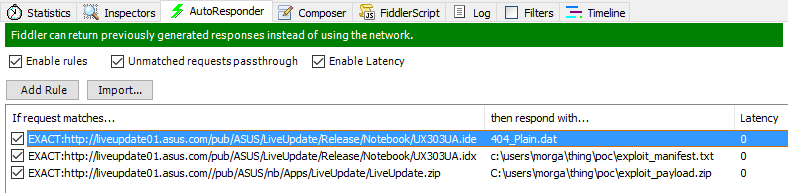
For a visual demonstration of an escalating privilege attack, Morgan Gangver used SysInternals PSEXEC. He made a fake “update”.
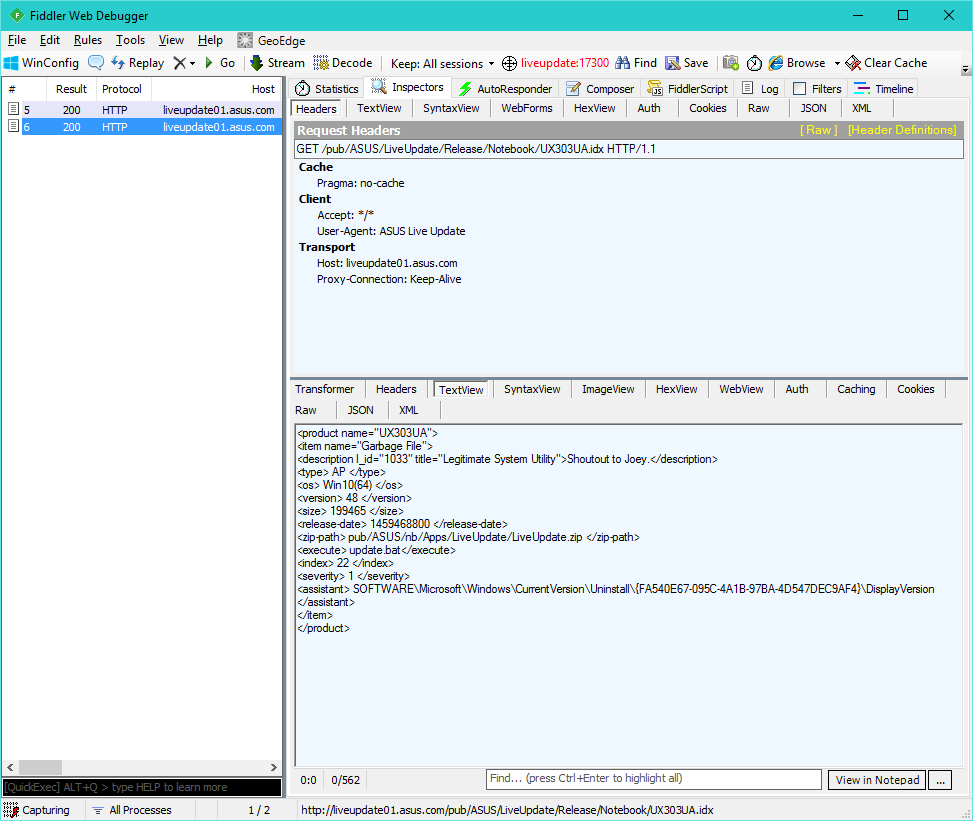
Shoutout to Joey. AP Win10(64) 48 199465 1459468800 pub/ASUS/nb/Apps/LiveUpdate/LiveUpdate.zip update.bat 22 1 SOFTWARE\Microsoft\Windows\CurrentVersion\Uninstall\{FA540E67-095C-4A1B-97BA-4D547DEC9AF4}\DisplayVersion A copy of psexec, a fictional whoami, and a script to run are packaged in the "update" archive.
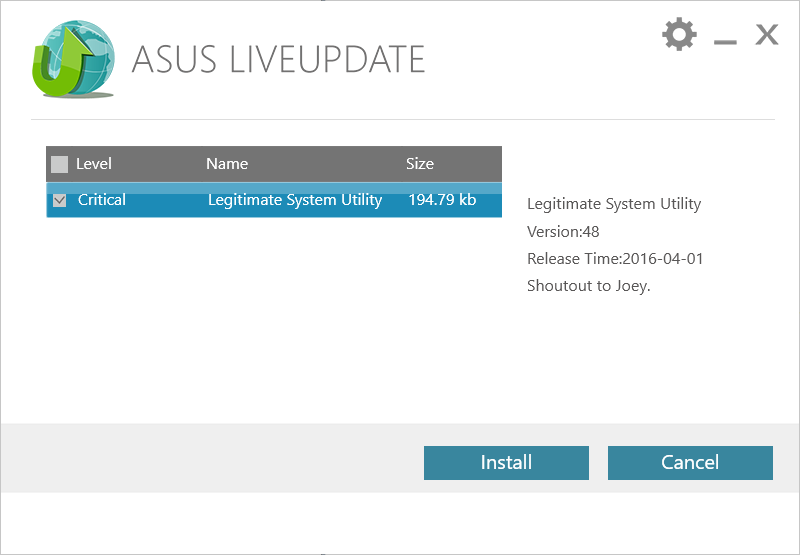
Asus LiveUpdate immediately sees a “critical” update.
Receiving a “critical” update, it is immediately assigned to execution with all rights.

Here is the result.

Thus, we launched arbitrary code for execution
NT AUTHORITY\SYSTEM, just by giving it to the system in response to a call over HTTP. Everything else does LiveUpdate for you. In general, the terrible procedure from the point of view of security for updating the firmware is typical not only for Asus motherboards, but also for equipment from other manufacturers. In an unsafe way, for example, the firmware of many routers is updated.









