February 24, 2016 at 09:21
The best search engine for your company
Friends, in the drafts this article was a long time ago, to finish writing it was prompted by a visit to a client who again could not find documents from the catalog in SharePoint.

In my working practice there was a period in one organization when I formally did not manage anything, but the bosses did not want to say goodbye to me. At that time, I was a quick fix manager. The tasks that others would solve in three days, I solved in three hours. The boss called me, outlined the situation, asked "they say, it is necessary today", and I did. Because I already knew what and how it works in our company and to whom I should turn to what issue.
And how are you looking for information in your organization? It is possible that as described below. If you are a new employee, you are asking your boss for any new question. He begins to introduce new people to you. If he has enough patience, then gradually your contact base is growing. At some point, the situation comes that you already know all the key people, you figured out who is doing what, you know what to ask. When a question arises, contact the right person and find out everything from him. From a technical point of view, this means that the indexing of your personal search engine was carried out for several months or years, the index is in your head, and you are looking in the heads of your colleagues.
What else is there besides personal contacts? There are group e-mail newsletters. You ask a question, you get a couple of unsuccessful answers, and then two dozen letters like "Stop writing at all!"
Your organization also has several corporate portals. You will surely find there answers to typical questions, but you will encounter difficulties in an unusual situation. And their search index is most likely not combined ( if you have several portals with a common search - write, please, I really want to know the cost of the solution ). For example, the leader of the IT industry Microsoft has more than 700 (!) Corporate portals. As an employee of this company, which one will you look for?
There are still forums, but I can’t ask any question there, because administrators can ban me if I break the structured logic of this forum with my question.
So I offer an interesting alternative. If you have Bitrix24, Jive, Yammer, DaOffice or IBM Connections, then they most likely work for your entire organization and everything that people do in the system is indexed there. The search takes place according to the contents of the correspondence, groups, user names and tags. In essence, the organization becomes flat for you. But what is even more remarkable is that there are groups in these tools and there are people in them. Therefore, the search is carried out in two stages: 1) you make a request in the search window, and if this is not enough, then 2) you make a request to the group that was found at your request, without even knowing who specifically can answer you.
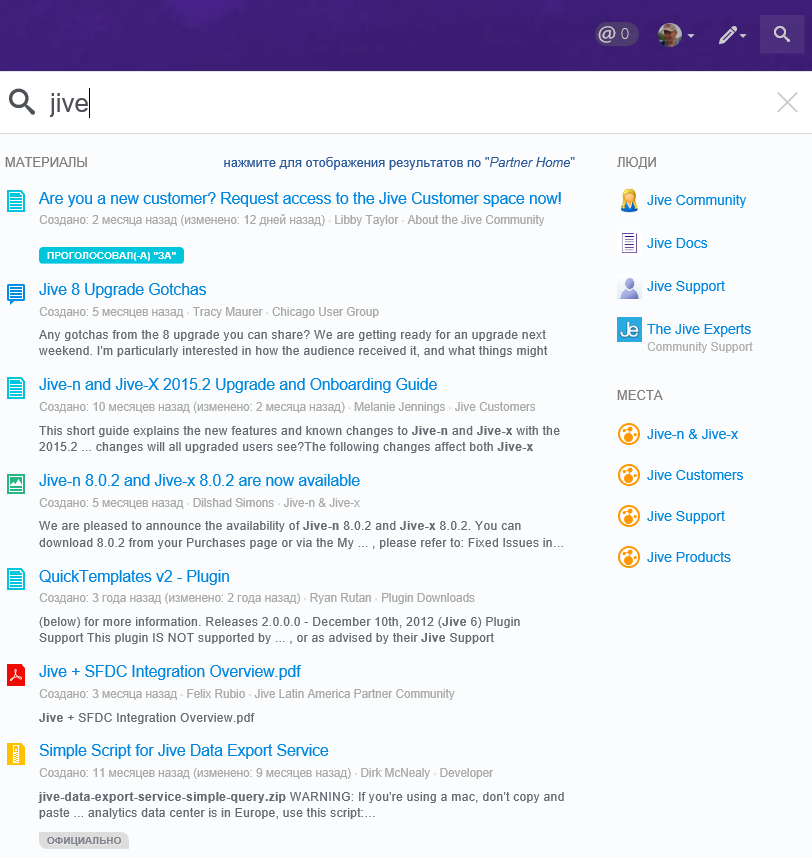
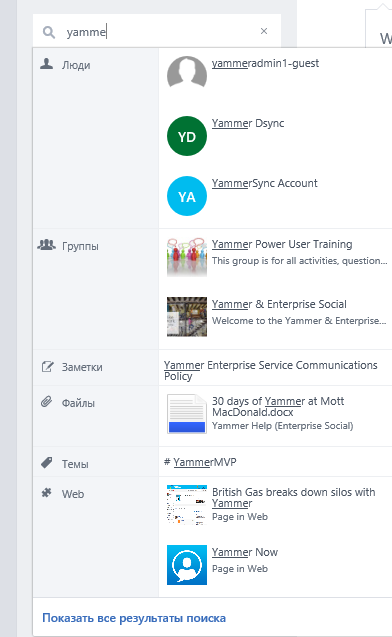
Here are a couple of examples of how the search looks in the Jive's and Yammer communities .
It turns out something similar to a neural network, close to what is happening in the human brain (thanks to Dmitry Garin for the fact that he thought it in due time).
I already mentioned my personal success story of such a search once.. As a Microsoft employee, I was able to find the person I needed exclusively with Yammer. Here is another good example. In December, I participated in an open Yammer development workshop for one large organization. So they recognized that the new employee is recognized as his only after three years of work in the company. This is the time it takes for a person to understand and get comfortable in the corporate environment. And in one of the working groups, the task was formulated as "Yammer - a year in three." I believe that this is the most superb mission of the corporate social network that I have ever met.
***
The proposed search engine has limitations.
The first one. By default, everything is open on the corporate social network. Perhaps you will find in your organization that you really don’t like it and it would be better not to know. It's hard to fight this Perhaps in time you need to understand that the search engine is looking for too much and not apply it. Seriously.
The second one. A corporate social network can provide so much information that it can easily overload users. This is easier to deal with. As in e-mail, corporate social networks have implemented tools to withstand the onslaught of information. These funds took the following forms:
At the same time, one more unresolved problem remains. You don’t remember the keywords to look for. But this is not a question for the search engine))).
Vladimir Ivanitsa Facebook | LinkedIn
In my working practice there was a period in one organization when I formally did not manage anything, but the bosses did not want to say goodbye to me. At that time, I was a quick fix manager. The tasks that others would solve in three days, I solved in three hours. The boss called me, outlined the situation, asked "they say, it is necessary today", and I did. Because I already knew what and how it works in our company and to whom I should turn to what issue.
And how are you looking for information in your organization? It is possible that as described below. If you are a new employee, you are asking your boss for any new question. He begins to introduce new people to you. If he has enough patience, then gradually your contact base is growing. At some point, the situation comes that you already know all the key people, you figured out who is doing what, you know what to ask. When a question arises, contact the right person and find out everything from him. From a technical point of view, this means that the indexing of your personal search engine was carried out for several months or years, the index is in your head, and you are looking in the heads of your colleagues.
What else is there besides personal contacts? There are group e-mail newsletters. You ask a question, you get a couple of unsuccessful answers, and then two dozen letters like "Stop writing at all!"
Your organization also has several corporate portals. You will surely find there answers to typical questions, but you will encounter difficulties in an unusual situation. And their search index is most likely not combined ( if you have several portals with a common search - write, please, I really want to know the cost of the solution ). For example, the leader of the IT industry Microsoft has more than 700 (!) Corporate portals. As an employee of this company, which one will you look for?
There are still forums, but I can’t ask any question there, because administrators can ban me if I break the structured logic of this forum with my question.
So I offer an interesting alternative. If you have Bitrix24, Jive, Yammer, DaOffice or IBM Connections, then they most likely work for your entire organization and everything that people do in the system is indexed there. The search takes place according to the contents of the correspondence, groups, user names and tags. In essence, the organization becomes flat for you. But what is even more remarkable is that there are groups in these tools and there are people in them. Therefore, the search is carried out in two stages: 1) you make a request in the search window, and if this is not enough, then 2) you make a request to the group that was found at your request, without even knowing who specifically can answer you.
Here are a couple of examples of how the search looks in the Jive's and Yammer communities .
It turns out something similar to a neural network, close to what is happening in the human brain (thanks to Dmitry Garin for the fact that he thought it in due time).
I already mentioned my personal success story of such a search once.. As a Microsoft employee, I was able to find the person I needed exclusively with Yammer. Here is another good example. In December, I participated in an open Yammer development workshop for one large organization. So they recognized that the new employee is recognized as his only after three years of work in the company. This is the time it takes for a person to understand and get comfortable in the corporate environment. And in one of the working groups, the task was formulated as "Yammer - a year in three." I believe that this is the most superb mission of the corporate social network that I have ever met.
***
The proposed search engine has limitations.
The first one. By default, everything is open on the corporate social network. Perhaps you will find in your organization that you really don’t like it and it would be better not to know. It's hard to fight this Perhaps in time you need to understand that the search engine is looking for too much and not apply it. Seriously.
The second one. A corporate social network can provide so much information that it can easily overload users. This is easier to deal with. As in e-mail, corporate social networks have implemented tools to withstand the onslaught of information. These funds took the following forms:
- Follow / friends. You receive messages in the feed only from those users you have subscribed to. And don't subscribe to people you don’t want to.
- Subscriptions You can also subscribe to documents or discussions, in which case you will see their changes. Useful when there is a joint work on some important document.
- Groups. You subscribe to certain groups on a specific topic, information flows are limited by the tasks and audience of the group. Usually 10-15 groups is the limit of what you need.
- News filters. Specially selected groups, people, and tags for collecting information. For example, news streams in Jive.
At the same time, one more unresolved problem remains. You don’t remember the keywords to look for. But this is not a question for the search engine))).
Vladimir Ivanitsa Facebook | LinkedIn