7 Reasons Wrike Marketers Love Wrike
Recently, Wrike interviewed 1,468 people to find out what things prevent them from working productively every day. Reason # 1, relevant for 60% of participants, is the need to constantly switch between too many tasks. 49% are forced to wait for action from other people to continue working. 40% spend too much time emailing. The list also includes endless meetings, and problems with setting priorities, and continuous new requests from superiors, and other “delights” of working days.
Such polls Wrike, of course, does not out of sporting interest. This, in essence, is a study of market demand, which allows you to better understand what problems a consumer needs to aim for with his service. As Harvard professor Theodore Levitt taught his students, people buy not 4-inch drill bits, but 4-inch holes.
This post is about “holes” and “drills” for marketers.

Firstly, they are one of Wrike's target and most popular audiences. And secondly, the above problems in the case of marketing departments are epidemiologically widespread. Here are changes in deadlines, and coordination among themselves and with other colleagues, and many versions of files in the work of different people.
Wrikethis, in a nutshell, is a “two in one” service - project management + collaboration. In practice, this means that in addition to the functions of planning and conducting work tasks, for example, tools are provided for group work on documents and visual materials in real time, and connecting a person from another department to the discussion is no more difficult than mentioning someone on Twitter .
Since the Wrike marketing team obviously uses Wrike in an exemplary way, we asked them to tell which of the service features they use every day.
So, below are the top Wrike features from a marketer's perspective.
1. Files and discussions in one task
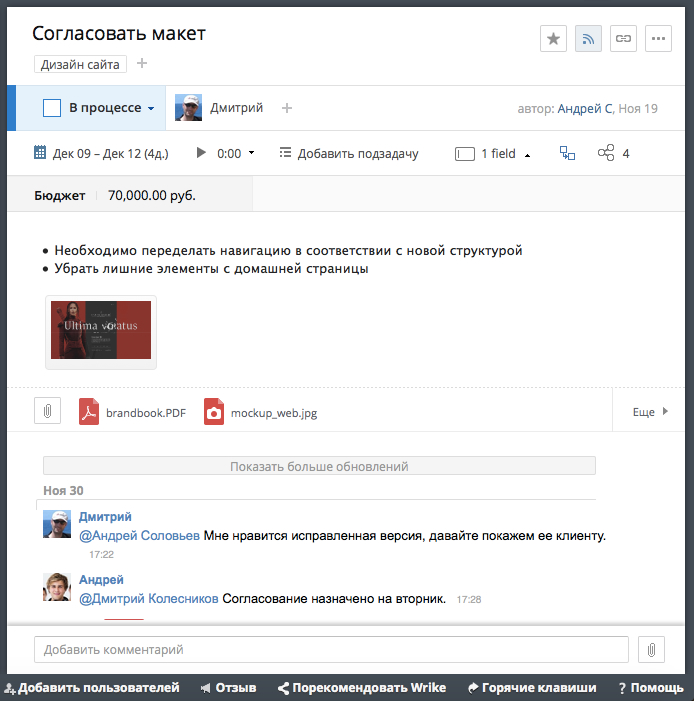
Discussing tasks and files in mail or instant messengers is inconvenient, especially when you need to collect all the information on a task or include a new participant in the discussion. Plus, different versions of the same file are scattered across mailboxes, file storages and computers, and the search for the latest version turns into a detective story.
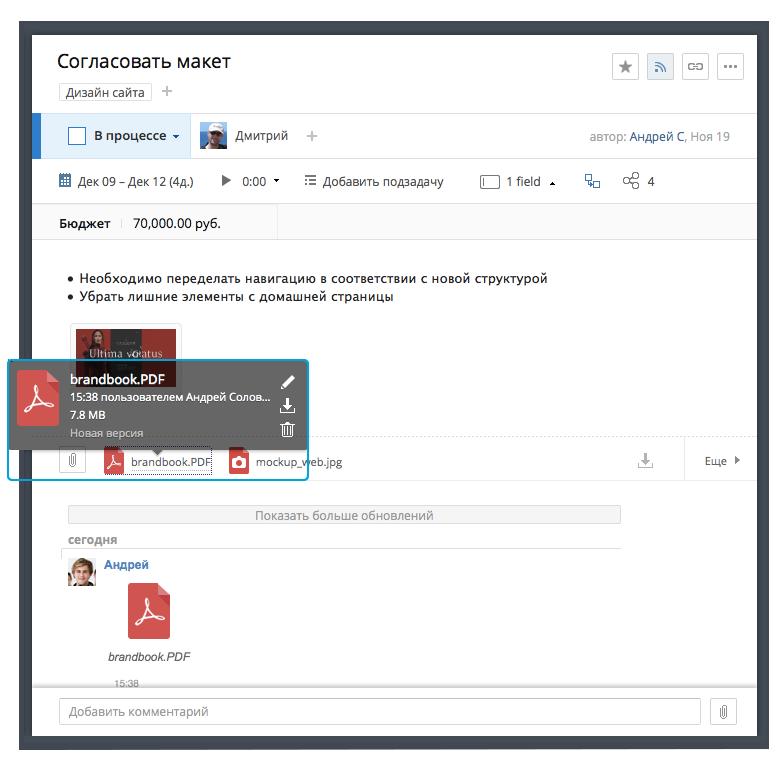
Wrike is good here because it helps to collect all the information on a task in one tab. Having opened a task, a person sees who is responsible for it, deadlines (sometimes a ticking time tracker) and the initial wording of the task in the description. You can attach files to the task both from a computer and from the clouds (there is integration with Google Drive, Box, Dropbox and OneDrive). New versions of the file can be uploaded to an existing one to avoid confusion. In the same tab, you can view the entire discussion on the task and add your comment.
It looks pretty simple, but it can dramatically simplify life when working even on the most common tasks, for example, preparing a post on a corporate blog or an advertising campaign on Facebook.
2. Online file editing
In order not to waste time repeatedly uploading, editing, backfilling files, there are special Wrike plugins to edit and update documents online. This works with all types of Microsoft Office, JPEG and PDF files.
3. History of changes in the task The
initial statement of the problem, unfortunately or fortunately, rarely becomes final. Therefore, the task description in Wrike is editable by the author’s colleagues. However, to correct the text and say that it was, will not work. Having entered the history of changes, the user will see who was the author of those or other edits and will be able to restore previous versions of the text.
4. Citation and @ mention
Two features of Wrike to bring working discussions closer to social networking. By writing @ colleague_name in the comment, you can quickly summon the needed colleague into the discussion - he (s) will receive a notification. Quoting helps if the description of the problem is voluminous, and the commentator has something to say for each part of it.
5. Setting up access
Almost always, marketing tasks require the involvement of people from other departments, and sometimes even outsourcers or customers. Wrike will help to differentiate access for each user at the folder, project and task level and assign rights for editing or viewing only. This allows you to store all the working information in the system, giving everyone access to only the part that is needed for work.
6. Notification Center
Wrike will automatically send notifications to employees about new tasks, mentions, and late assignments. They can come to mail, an alert in the browser, push'em in the application - to whom it is more convenient. This saves you the time to keep everyone informed.
7. Gantt charts for planning
In order not to dig into the tasks, forgetting why everything was started, and to have an idea of the overall progress of the project, Gantt charts were invented. They may not be loved, but the best for visualizing work processes has not yet been invented. The interactive timeline gives the team quick access to the project schedule.
The value here is not only in the sensation a la “we are doing a common thing”, but in the quite tangible saving of time for meetings. You can always see how everything and everyone is affected by a change in the term of one task. By the way, if you change the time for a particular task in the diagram, all involved will receive notifications automatically (minus the meeting, plus an hour of life).
Even on the interactive schedule, you can evenly distribute the load between team members in order to avoid overloads or inefficient waste of time. The periods in which the employee will be forced to work on two or more tasks at the same time are highlighted in emergency orange. If this is not the norm in your team, you can avoid multitasking by removing extra tasks from it with just one click of the mouse.

***
And one more thing. Business consultants, developers of corporate automation solutions and reporters reviewing this market constantly talk about transparency of work processes, how it is lacking, and how it kills productivity. We rarely think that this transparency is not some abstract term for use in conference topics, but those very files hidden in mailboxes, managers with ten parallel tasks and people who don’t even know that the whole department expects a fifth layout from them day.
You can implement ten systems in the company that promise you an extraordinary level of visibility and transparency, but nothing will happen if we forget to introduce new work habits for ourselves.
Productive work and good habits for everyone in the new year! Use Wrike and feel the amazing ease of working life.
Such polls Wrike, of course, does not out of sporting interest. This, in essence, is a study of market demand, which allows you to better understand what problems a consumer needs to aim for with his service. As Harvard professor Theodore Levitt taught his students, people buy not 4-inch drill bits, but 4-inch holes.
This post is about “holes” and “drills” for marketers.
Firstly, they are one of Wrike's target and most popular audiences. And secondly, the above problems in the case of marketing departments are epidemiologically widespread. Here are changes in deadlines, and coordination among themselves and with other colleagues, and many versions of files in the work of different people.
Wrikethis, in a nutshell, is a “two in one” service - project management + collaboration. In practice, this means that in addition to the functions of planning and conducting work tasks, for example, tools are provided for group work on documents and visual materials in real time, and connecting a person from another department to the discussion is no more difficult than mentioning someone on Twitter .
Since the Wrike marketing team obviously uses Wrike in an exemplary way, we asked them to tell which of the service features they use every day.
So, below are the top Wrike features from a marketer's perspective.
1. Files and discussions in one task
Discussing tasks and files in mail or instant messengers is inconvenient, especially when you need to collect all the information on a task or include a new participant in the discussion. Plus, different versions of the same file are scattered across mailboxes, file storages and computers, and the search for the latest version turns into a detective story.
Wrike is good here because it helps to collect all the information on a task in one tab. Having opened a task, a person sees who is responsible for it, deadlines (sometimes a ticking time tracker) and the initial wording of the task in the description. You can attach files to the task both from a computer and from the clouds (there is integration with Google Drive, Box, Dropbox and OneDrive). New versions of the file can be uploaded to an existing one to avoid confusion. In the same tab, you can view the entire discussion on the task and add your comment.
It looks pretty simple, but it can dramatically simplify life when working even on the most common tasks, for example, preparing a post on a corporate blog or an advertising campaign on Facebook.
2. Online file editing
In order not to waste time repeatedly uploading, editing, backfilling files, there are special Wrike plugins to edit and update documents online. This works with all types of Microsoft Office, JPEG and PDF files.
3. History of changes in the task The
initial statement of the problem, unfortunately or fortunately, rarely becomes final. Therefore, the task description in Wrike is editable by the author’s colleagues. However, to correct the text and say that it was, will not work. Having entered the history of changes, the user will see who was the author of those or other edits and will be able to restore previous versions of the text.
4. Citation and @ mention
Two features of Wrike to bring working discussions closer to social networking. By writing @ colleague_name in the comment, you can quickly summon the needed colleague into the discussion - he (s) will receive a notification. Quoting helps if the description of the problem is voluminous, and the commentator has something to say for each part of it.
5. Setting up access
Almost always, marketing tasks require the involvement of people from other departments, and sometimes even outsourcers or customers. Wrike will help to differentiate access for each user at the folder, project and task level and assign rights for editing or viewing only. This allows you to store all the working information in the system, giving everyone access to only the part that is needed for work.
6. Notification Center
Wrike will automatically send notifications to employees about new tasks, mentions, and late assignments. They can come to mail, an alert in the browser, push'em in the application - to whom it is more convenient. This saves you the time to keep everyone informed.
7. Gantt charts for planning
In order not to dig into the tasks, forgetting why everything was started, and to have an idea of the overall progress of the project, Gantt charts were invented. They may not be loved, but the best for visualizing work processes has not yet been invented. The interactive timeline gives the team quick access to the project schedule.
The value here is not only in the sensation a la “we are doing a common thing”, but in the quite tangible saving of time for meetings. You can always see how everything and everyone is affected by a change in the term of one task. By the way, if you change the time for a particular task in the diagram, all involved will receive notifications automatically (minus the meeting, plus an hour of life).
Even on the interactive schedule, you can evenly distribute the load between team members in order to avoid overloads or inefficient waste of time. The periods in which the employee will be forced to work on two or more tasks at the same time are highlighted in emergency orange. If this is not the norm in your team, you can avoid multitasking by removing extra tasks from it with just one click of the mouse.
***
And one more thing. Business consultants, developers of corporate automation solutions and reporters reviewing this market constantly talk about transparency of work processes, how it is lacking, and how it kills productivity. We rarely think that this transparency is not some abstract term for use in conference topics, but those very files hidden in mailboxes, managers with ten parallel tasks and people who don’t even know that the whole department expects a fifth layout from them day.
You can implement ten systems in the company that promise you an extraordinary level of visibility and transparency, but nothing will happen if we forget to introduce new work habits for ourselves.
Productive work and good habits for everyone in the new year! Use Wrike and feel the amazing ease of working life.