Use smart remarketing lists in Google Analytics
Last year, Google announced Remarketing Smart Lists, which you can customize through Google Analytics and apply to your Adwords ad campaigns.
However, few people in Russia use them and many do not even know about the existence of this function. Today we’ll try to figure out how to configure them, how efficiently they can work, and who may need them at all.
The smart list is an additional audience for remarketing in Google Analytics, which allows you to increase the number of conversions. Given the statistics of completed conversions, Google identifies new users who are most likely to make a conversion. In the future, when managing bids, Google will give preference to these people.
For training, Google uses signals such as: devices, browsers, location, referral URL, page depth, information about the time spent on the site, etc.
• Creating a list and launching a campaign takes a minimum amount of time, 5 minutes is enough.
• Google daily updates targeting criteria automatically based on the latest data.
• Additional targeting will allow you to get even more targeted actions on the site.
• Remarketing function enabled in Google Analytics ( add an additional line to the GA code )
• At least one linked Google Adwods account
• From 10,000 page views per day
• From 500 conversions per month
If your site does not have 10,000 views or 500 conversions, Google will use conversion data from companies like yours that anonymously submit their data to Google.
I’ll give the result of using smart lists as an example of my campaigns. An experiment was conducted over 90 days, in which he participated in an online store of a well-known cosmetic brand. We compared the average for all remarketing lists and the smart list that we created 3 months ago.
The total result for all remarketing lists:

Traffic and conversion data from smart lists
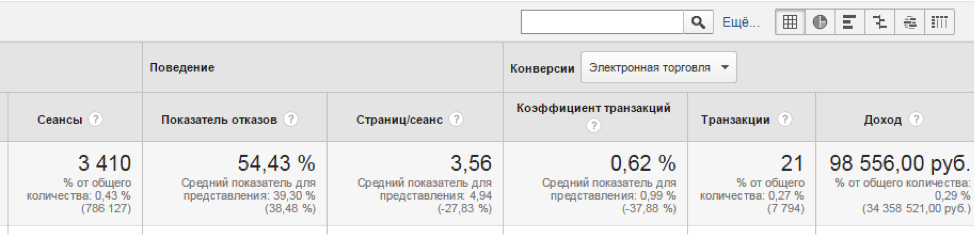
As you can see, the effectiveness of smart lists is significantly higher than the rest. We spent 10 minutes of extra time and received almost 100,000 rubles of income and 21 additional transactions.
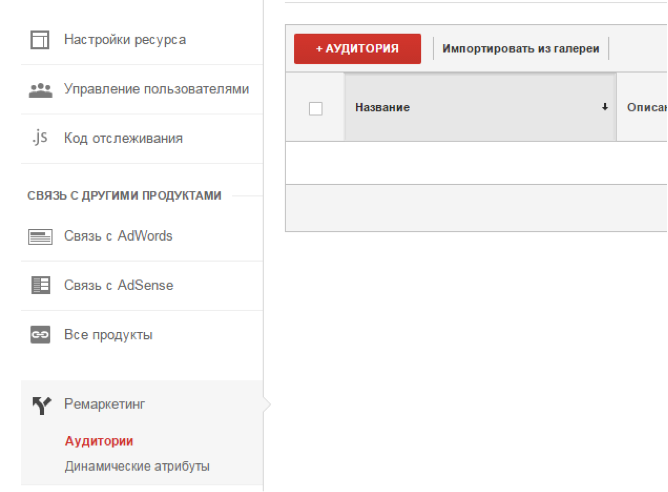
In the Admin tab of your account, go to the Remarketing section and create a new audience.
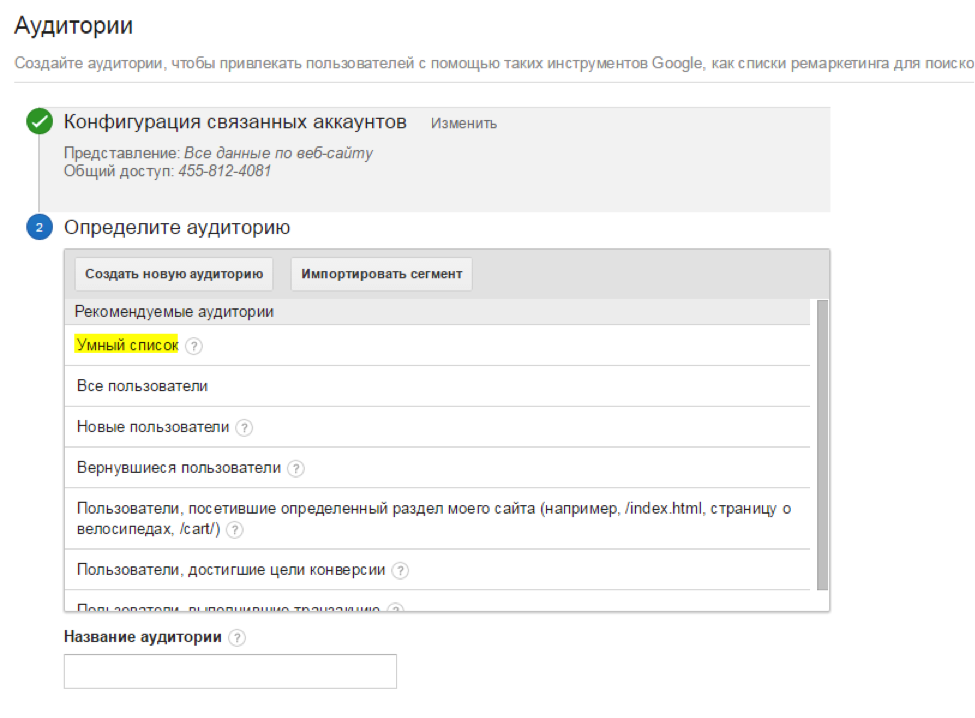
Choose a ready-made audience “ Smart List ”, enter a name for the list and set the Term of participation
Create an advertising campaign in Google Adwords targeting this audience.
I recommend trying smart lists as soon as possible. A few minutes to set up a list and an advertising campaign can bring you additional conversions. You won’t need to keep an eye on this list every day, since Google takes care of all the work, it remains to periodically change the ads, test advertising messages and measure the effectiveness of this campaign in Google Analytics.
Whoever uses smart lists? Any results? I really wanted you to share them in the comments.
However, few people in Russia use them and many do not even know about the existence of this function. Today we’ll try to figure out how to configure them, how efficiently they can work, and who may need them at all.
What are smart lists?
The smart list is an additional audience for remarketing in Google Analytics, which allows you to increase the number of conversions. Given the statistics of completed conversions, Google identifies new users who are most likely to make a conversion. In the future, when managing bids, Google will give preference to these people.
For training, Google uses signals such as: devices, browsers, location, referral URL, page depth, information about the time spent on the site, etc.
What is the advantage of smart lists?
• Creating a list and launching a campaign takes a minimum amount of time, 5 minutes is enough.
• Google daily updates targeting criteria automatically based on the latest data.
• Additional targeting will allow you to get even more targeted actions on the site.
List Connection Conditions
• Remarketing function enabled in Google Analytics ( add an additional line to the GA code )
• At least one linked Google Adwods account
• From 10,000 page views per day
• From 500 conversions per month
If your site does not have 10,000 views or 500 conversions, Google will use conversion data from companies like yours that anonymously submit their data to Google.
What are the expected results?
I’ll give the result of using smart lists as an example of my campaigns. An experiment was conducted over 90 days, in which he participated in an online store of a well-known cosmetic brand. We compared the average for all remarketing lists and the smart list that we created 3 months ago.
The total result for all remarketing lists:
Traffic and conversion data from smart lists
As you can see, the effectiveness of smart lists is significantly higher than the rest. We spent 10 minutes of extra time and received almost 100,000 rubles of income and 21 additional transactions.
How do I set up smart lists in Google Analytics?
In the Admin tab of your account, go to the Remarketing section and create a new audience.
Choose a ready-made audience “ Smart List ”, enter a name for the list and set the Term of participation
Create an advertising campaign in Google Adwords targeting this audience.
Try smart lists - now
I recommend trying smart lists as soon as possible. A few minutes to set up a list and an advertising campaign can bring you additional conversions. You won’t need to keep an eye on this list every day, since Google takes care of all the work, it remains to periodically change the ads, test advertising messages and measure the effectiveness of this campaign in Google Analytics.
Whoever uses smart lists? Any results? I really wanted you to share them in the comments.









