
 April 20, 2016 at 13:40
9 secrets of online payments. Part 4: the correct payment form is the key to successful payment
 The payment form is the final step when making an online payment, and nothing should stop the buyer from taking this step. In the new issue of the series “9 Secrets of Online Payments” we will tell you what the payment form should be on a commercial site so that nothing prevents the client from successfully making the payment.
 The payment page is critical. This is the "end station" for customers shopping on your site. This is the place where the user enters the data of his bank card and makes the final decision to part with the money earned "sweat and blood." Here, a site visitor becomes a client, bringing the company money.
According to the results of seven years of work in the e-commerce market and based on the experience of hundreds of customers, the specialists of our company PayOnline, which organizes online payments, identified seven key points that you need to pay attention to each owner of an online store that accepts payments by credit card online.
Part 1. Configuring 3D Secure
Part 2. Regular payments
Part 3. Payment method selection page
Part 4. Payment form
Part 5. Mobile payments
Part 6. One-click payment
Part 7. Fraud monitoring system
Part 8. Refunds and how to avoid them
Part 9. Payment service settings for a business type
1. Trust and security
A page with a payment form must be generated individually for each payment. User data must be reliably protected from intruders and transmitted to the acquirer bank in encrypted form using the TLS (Transport Layer Security) cryptographic protocol. Payment security must be certified by PCI DSS (Payment Card Industry Data Security Standard). And most importantly - the payer should be aware that his money is safe. Whenever the customer’s payment and personal information is involved in the process of placing an order, do not forget to demonstrate all the precautions that you and your payment partner are taking to ensure their safety.
A survey conducted by Econsultancy found that 58% of respondents interrupted ordering due to concerns about payment security. Use only the services of payment providers that have a TLS (Transport Layer Security) certificate. The certificate is used to provide a secure connection and encrypt information about bank card information. In addition, the payment processing process on your site must comply with the PCI Security Standards Board (PCI SSC) standards. The PCI DSS certificate confirms that payment processing is carried out in accordance with international security standards established for companies that store, transfer, process payment data.
Be sure to show users the PCI DSS, Verified By VISA, MasterCard Secure Code, etc. certificate badges, as shown below on the example of the payment form of the LitRes online store.

2. Get rid of distractions
The payment page is the last step that the client takes on your site, and in our era of clip thinking and a total lack of concentration, it is necessary to eliminate all factors that can distract the client from completing the purchase. This means that you should not post any advertising materials on the checkout and payment page, under any circumstances.
At this stage, the main goal is to carefully “bring” the client to the payment. An example is the registration page in the Budist service. The service concertizes the attention of users on the form by removing the top menu from this page and leaving only the most necessary motivating information. Each field is accompanied by a hint - why does the service need this or that data.
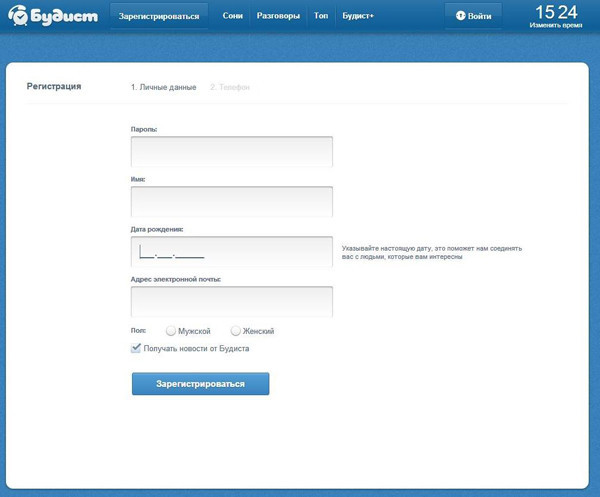
3. Request only really necessary information
Nothing is more harmful to conversion than the need to fill out a form with information that is not needed to make a purchase. A long list of fields to fill becomes for payers an obstacle course that only bothers him. Payment should not look like a kilometer race with barriers for the payer. For your customers, the payment process is a sprint, and you must help the customer run through it quickly and effortlessly.
According to Forrester, 11% of users refused to purchase only because they did not want to register or they requested too much information. The task of simplifying the process and minimizing the amount of required data is handled perfectly by a payment form made in the form of a bank card. Even an inexperienced payer will be able to intuitively guess how to fill in which field.
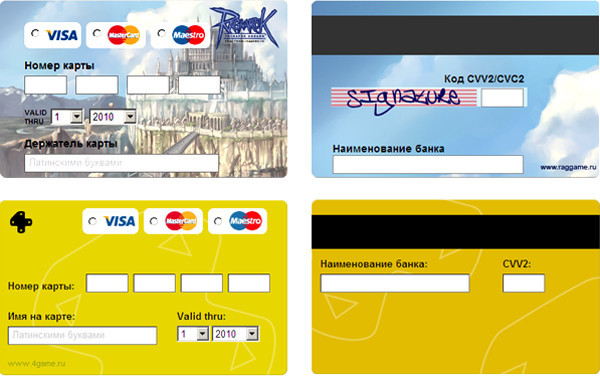
If you critically need any additional information, be sure to explain to the client why you are requesting it.
4. Let customers easily fix their mistakes.
Everyone understands that people tend to make mistakes. Sometimes they skip the zip code input field or forget to insert “@” in the email address. Your task is to point out the error and help the user fix it.
On some sites, an error message appears at the top of the page, but people don’t understand that they have to “scroll” all the way to the top to understand what went wrong. Ideally, the error message should appear in the area where the error occurred.
Another useful hint: it’s much easier for people to continue to pay in case of an error if you automatically save all correctly entered information on the form. So the user will need to re-enter the data only in the field where the error was made. In the illustration below, you will see that on the standard PayOnline payment form, the data that has already been entered is not deleted and the error messages that contain their description are clearly highlighted in red.
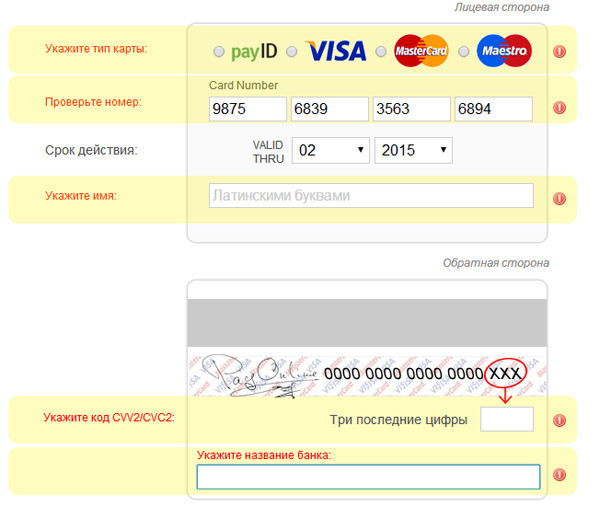
There is nothing more annoying for the user, especially if he fills out a long form than re-entering all the data. According to a study prepared by Invesp, the problem of losing customers due to incorrect display of error messages when filling out forms is among the top ten conversion killers during payment.
5. Allow customers to pay for purchases without registering.
Do I need to force the user to remember another username and password? Unlikely. You should not create another obstacle in the way of the client to pay. Forcing users to register an account on your site is too intrusive, especially for those who make a purchase for the first time. Mandatory registration is one of the winners of the conversion killers rating.
A usability study conducted by Smashing Magazine showed that the main reason for users' dislike of registering accounts is the expectation of unwanted spam. The study also notes that many customers do not understand why they need to register in the online store in order to buy something, while in offline stores no one needs to register for the purchase. Another drawback of registration is that it adds several additional fields to fill out, which delays the process of placing an order and negatively affects the conversion. To make life easier for customers and increase the likelihood of a favorable outcome, it is necessary to minimize the customer’s time for placing an order and request from him only the necessary minimum information.
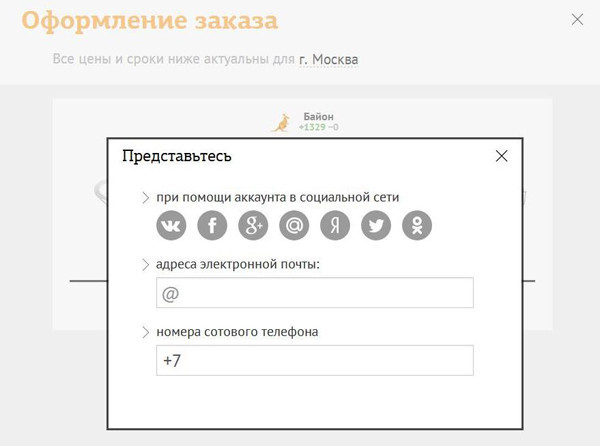

For example, the Bayon online store does not require the client to “register”, he asks him to introduce himself. And for this, he offers the client to choose the most convenient way for him to meet - using a social network, phone or e-mail. In addition, the registration form consists of only two fields, which cannot but please the client.
6. Do not “redirect” buyers
You have spent a lot of effort to attract customers to your site. Why send them to another site for payment? If you cannot control the design of the payment page of a third-party service, your customers may have the feeling that he is paying at all to the wrong company from which he buys a product or service.
Today, commercial sites have the opportunity to integrate the payment form directly on the page of your site using Iframe technology. This allows you to reduce customer distrust to a minimum, without scaring them with unexpected redirects and “reassuring” the identity of the registration page design and payment form. This is how we implemented the integration of the payment form on the payment page of our client, Avito ad exchange.

Placement of the order and payment are the last actions that your customers take when they make a purchase, which is why you need the client to see the name of your company on these pages.
7. Adhere to a uniform style
From the point of view of branding, you should make all the elements of your site as visually identical as possible. This means that you need to use the same colors, fonts, design elements. These requirements apply to the design of your payment instrument selection page and payment page, as well as to other pages on your site.
By observing the visual identity of all elements of the site, you can also increase your brand awareness among buyers. Of course, payment service providers are ready to provide you with ready-made payment pages designed to maximize the conversion in payment. But if you have the resources for this, you should take care of adapting the form to the unique style of your online store. And given the variety of types of online fraud and related scary stories, it is not surprising that users are skeptical about the difference in the design of the payment page and the design of the website of the online store on which they made a purchase.
To avoid confusion and fear on the part of buyers, use an identical design for the design of all pages of your site, especially the pages of ordering and payment, as MTT did. It is worth noting that a change in the design of a payment page does not affect its security, only the “cover” changes.

In this example, you can observe a visual identity in which the payment page is fully consistent with the design of the site, even in relation to the characteristic design elements, including fonts, colors, “buttons”, shapes, and even the corporate character.
Convenience and security - these are the basic requirements that users make to the payment page. In the next part of the "9 Secrets of Online Payments" series, we will tell you what opportunities mobile players provide to e-commerce market players and what you need to know in order not to lose potential customers from the fastest growing segment. And if you want to configure the acceptance of online payments on the website or in the mobile application, feel free to contact , our specialists will advise you on any questions.