 April 10, 2016 at 17:37
Asynchronous operations and recreation of Activity in Android
In one article on the hub ( 274635 ), a curious solution was demonstrated for transferring an object from
Such a solution functions correctly until Android unloads your application. And he has the right to do it.
However, this is not the point. (If the application does not need to restore its state after such a restart, then this solution is also suitable).
But the purpose for which such "non-serializable" objects are used there seemed strange to me. There, calls from asynchronous operations are transferred through them
I always thought that since Smalltalk, any developer will recognize this typical design task. But it seems I was wrong.
Features
In the latter case, the results should be displayed at the next opening
MVC (with active model) and Layers.
The rest of the article is an explanation of what MVC and Layers are.
I will explain with a specific example. Let us need to build the “Electronic ticket to electronic queue” application.
I will receive a ticket from the server using an asynchronous operation. Also, asynchronous operations will be reading the ticket from the file (after restarting) and deleting the file.
You can build such an application from simple components. For instance:
The most interesting thing is how these components interact.
An application is not required to contain a component at all
in a static field
However, it is very important that the condition there is / is not a ticket coming from an object capable of playing a role
If you make the
Then the asynchronous operation “Obtaining a new ticket” will be able to simply record the received ticket in
Obviously, the ticket should be the model. However, in the application, the ticket cannot “hang” in the air. In addition, the ticket does not initially exist, it appears only upon completion of the asynchronous operation. It follows from this that there must be something else in the application where the ticket will be located. Let it be
Active model - the model notifies the idea that changes have occurred in it. wikipedia
There are several helper classes in java for creating an active model. For example:
I personally like the third way. It supports strict naming of observed fields, thanks to annotation
Groovy has a wonderful annotation groovy.beans.Bindable . Together with the possibility of a brief declaration of the properties of the object, a very concise code is obtained (which relies on
So in
The examples in the article, I'll use
details. And the source code for the link at the bottom of the article will be used by the library
as providing the most concise code.
The code is pretty straightforward. But without the use of special tools, one has to write quite a lot of operations of the same type. For each element in the model hierarchy, you have to create a field and create a separate listener.
The asynchronous operation code is also quite simple. The basic idea is to write the results to at the end of the asynchronous operation
Here the link
Suppose that the user clicked the “Take a Ticket” button, the application sent a request to the server, and at that time an incoming call occurred. While the user answered the call, a response came from the server, but the user does not know about it. Not only that, the user clicked “Home” and launched some application that gobbled up all the memory and the system had to unload our application.
And now our application should display the ticket received before the restart.
To provide this functionality, I will write the ticket to a file and read it after the application starts.
This template defines the rules by which one class is allowed to depend on other classes, so that there is no excessive code entanglement. In general, this is a family of templates, and I focus on the version of Craig Larman from the book "Application of UML and design patterns." There is a diagram here .
The basic idea is that classes from the lower levels cannot be dependent on classes from the upper levels. If we place our classes by levels
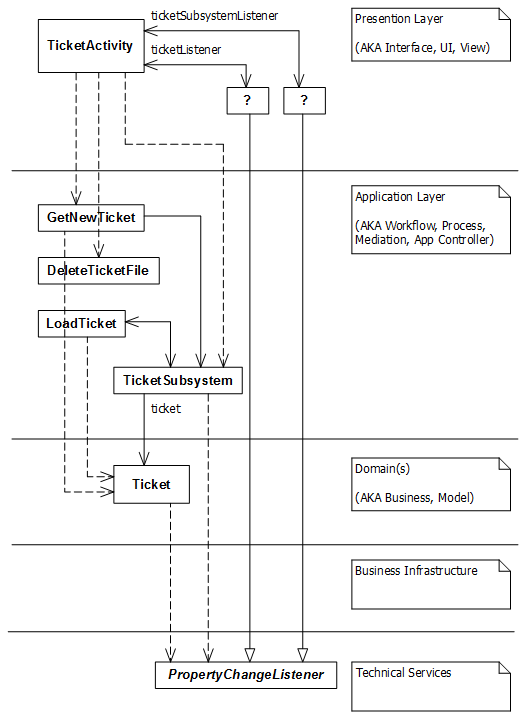
Note that all the arrows that cross the boundaries of the levels are directed strictly down!
That is, any dependencies (inheritance, use as a type of a member of a class, use as a parameter type or return type, use a local variable as a type) are allowed only to classes at the same level or at lower levels.
Another drop of theory, and move on to the code.
Objects at the level
A level
If you need to do something with an appearance, then this is a class for the level
Belonging to a certain level
How to determine at what level a given class should be? I will share a modest heuristic, but in general I recommend studying an accessible theory. Begin even here .
Heuristic
The repository https://github.com/SamSoldatenko/habr3 contains the application described here, built using
thanks
onSaveInstanceStateto onRestoreInstanceStatewithout serialization. The writeStrongBinder(IBInder)class method is used there android.os.Parcel. Such a solution functions correctly until Android unloads your application. And he has the right to do it.
... system may safely kill its process to reclaim memory for other foreground or visible processes ...
( http://developer.android.com/intl/en/reference/android/app/Activity.html )
However, this is not the point. (If the application does not need to restore its state after such a restart, then this solution is also suitable).
But the purpose for which such "non-serializable" objects are used there seemed strange to me. There, calls from asynchronous operations are transferred through them
Activityto update the displayed state of the application. I always thought that since Smalltalk, any developer will recognize this typical design task. But it seems I was wrong.
Task
- On command from user (
onClick()), start the asynchronous operation - At the end of the operation, display the result in
Activity
Features
Activitydisplayed at the time the operation is completed may be- the same from which the team came
- another instance of the same class (screen rotation)
- an instance of another class (the user switched to a different screen in the application)
- At the time the operation is completed, it may turn out that none
Activtyof the application is displayed
In the latter case, the results should be displayed at the next opening
Activity.Decision
MVC (with active model) and Layers.
Detailed solution
The rest of the article is an explanation of what MVC and Layers are.
I will explain with a specific example. Let us need to build the “Electronic ticket to electronic queue” application.
- The user enters the bank branch, clicks the button “Get a ticket” in the application. The application sends a request to the server and receives a ticket.
- When the queue comes up, the application displays the number of the window that you need to contact.
I will receive a ticket from the server using an asynchronous operation. Also, asynchronous operations will be reading the ticket from the file (after restarting) and deleting the file.
You can build such an application from simple components. For instance:
- Component where the ticket will be located (
TicketSubsystem) TicketActivitywhere the ticket will be displayed and the button "Get ticket"- Class for the Ticket (ticket number, line item, window number)
- Class for Asynchronous Ticket Acquisition
The most interesting thing is how these components interact.
An application is not required to contain a component at all
TicketSubsystem. The ticket could be in a static field
Ticket.currentTicket, or in a field in the successor class android.app.Application. However, it is very important that the condition there is / is not a ticket coming from an object capable of playing a role
Модельof MVC- that is, generate notifications when a ticket appears (or is replaced). If you make the
TicketSubsystemmodel in terms MVC, you Activitycan subscribe to events and update the ticket display when it is loaded. In this case, it Activitywill fulfill the role of View( Представление) in terms of MVC.Then the asynchronous operation “Obtaining a new ticket” will be able to simply record the received ticket in
TicketSubsystemand not to worry about anything else.Model
Obviously, the ticket should be the model. However, in the application, the ticket cannot “hang” in the air. In addition, the ticket does not initially exist, it appears only upon completion of the asynchronous operation. It follows from this that there must be something else in the application where the ticket will be located. Let it be
TicketSubsystem. The ticket itself must also be somehow presented, let it be a class Ticket. Both of these classes must be able to play the role of an active model.Ways to build an active model
Active model - the model notifies the idea that changes have occurred in it. wikipedia
There are several helper classes in java for creating an active model. For example:
PropertyChangeSupportandPropertyChangeListenerfrom the packagejava.beansObservableandObserverfrom the packagejava.utilBaseObservableandObservable.OnPropertyChangedCallbackfromandroid.databinding
I personally like the third way. It supports strict naming of observed fields, thanks to annotation
android.databinding.Bindable. But there are other ways, and all of them are suitable. Groovy has a wonderful annotation groovy.beans.Bindable . Together with the possibility of a brief declaration of the properties of the object, a very concise code is obtained (which relies on
PropertyChangeSupportfrom java.beans).@groovy.beans.Bindable
class TicketSubsystem {
Ticket ticket
}
@groovy.beans.Bindable
class Ticket {
String number
int positionInQueue
String tellerNumber
}
Representation
TicketActivity(like almost all objects related to the presentation) appears and disappears at the will of the user. The application only needs to correctly display the data at the time of appearance Activityand while changing the data is displayed Activity. So in
TicketActivityneed:- Update UI widgets when data changes in
ticket - Connect listener to Ticket when it appears
- Connect listener to
TicketSubsytem(to refresh view when appearsticket)
1. Update UI widgets.
The examples in the article, I'll use
PropertyChangeListenerfrom java.beansthe sake of demonstration details. And the source code for the link at the bottom of the article will be used by the library
android.databinding, as providing the most concise code.
PropertyChangeListener ticketListener = new PropertyChangeListener() {
    @Override
    public void propertyChange(PropertyChangeEvent event) {
        updateTicketView();
    }
};
void updateTicketView() {
    TextView queuePositionView = (TextView) findViewById(R.id.textQueuePosition);
    queuePositionView.setText(ticket != null ? "" + ticket.getQueuePosition() : "");
    ...
}
2. Connecting the listener to the ticket
PropertyChangeListener ticketSubsystemListener = new PropertyChangeListener() {
    @Override
    public void propertyChange(PropertyChangeEvent event) {
        setTicket(ticketSubsystem.getTicket());
    }
};
void setTicket(Ticket newTicket) {
    if(ticket != null) {
        ticket.removePropertyChangeListener(ticketListener);
    }
    ticket = newTicket;
    if(ticket != null) {
        ticket.addPropertyChangeListener(ticketListener);
    }
    updateTicketView();
}
setTicketWhen replacing a ticket, the
method deletes the event subscription from the old ticket and subscribes to events from the new ticket. If called setTicket(null), it will TicketActivityunsubscribe from events ticket.3. Connecting a listener to TicketSubsystem
void setTicketSubsystem(TicketSubsystem newTicketSubsystem) {
    if(ticketSubsystem != null) {
        ticketSubsystem.removePropertyChangeListener(ticketSubsystemListener);
        setTicket(null);
    }
    ticketSubsystem = newTicketSubsystem;
    if(ticketSubsystem != null) {
        ticketSubsystem.addPropertyChangeListener(ticketSubsystemListener);
        setTicket(ticketSubsystem.getTicket());
    }
}
@Override
protected void onPostCreate(@Nullable Bundle savedInstanceState) {
    super.onPostCreate(savedInstanceState);
    setTicketSubsystem(globalTicketSubsystem);
}
@Override
protected void onStop() {
    super.onStop();
    setTicketSubsystem(null);
}
The code is pretty straightforward. But without the use of special tools, one has to write quite a lot of operations of the same type. For each element in the model hierarchy, you have to create a field and create a separate listener.
Asynchronous operation “Take a ticket”
The asynchronous operation code is also quite simple. The basic idea is to write the results to at the end of the asynchronous operation
Модель. And it Представлениеwill be updated by notification from Модели.public class GetNewTicket extends AsyncTask {
private int queuePosition;
private String ticketNumber;
@Override
protected Void doInBackground(Void... params) {
SystemClock.sleep(TimeUnit.SECONDS.toMillis(2));
Random random = new Random();
queuePosition = random.nextInt(100);
ticketNumber = "A" + queuePosition;
// TODO записать данные билета в файл, чтобы можно было
// его загрузить после перезапуска приложения.
return null;
}
@Override
protected void onPostExecute(Void aVoid) {
Ticket ticket = new Ticket();
ticket.setNumber(ticketNumber);
ticket.setQueuePosition(queuePosition);
globalTicketSubsystem.setTicket(ticket);
}
}
Here the link
globalTicketSubsystem(it was also mentioned in TicketActivity) depends on how the layout of the subsystems in your application.Restore state upon restart
Suppose that the user clicked the “Take a Ticket” button, the application sent a request to the server, and at that time an incoming call occurred. While the user answered the call, a response came from the server, but the user does not know about it. Not only that, the user clicked “Home” and launched some application that gobbled up all the memory and the system had to unload our application.
And now our application should display the ticket received before the restart.
To provide this functionality, I will write the ticket to a file and read it after the application starts.
public class ReadTicketFromFileextends AsyncTask {
...
    @Override
    protected Void doInBackground(File... files) {
        // Считываем из файла в number, positionInQueue, tellerNumber
    }
    @Override
    protected void onPostExecute(Void aVoid) {
        Ticket ticket = new Ticket();
        ticket.setNumber(number);
        ticket.setPositionInQueue(positionInQueue);
        ticket.setTellerNumber(tellerNumber);
        globalTicketSubsystem.setTicket(ticket);
    }
}
Layers
This template defines the rules by which one class is allowed to depend on other classes, so that there is no excessive code entanglement. In general, this is a family of templates, and I focus on the version of Craig Larman from the book "Application of UML and design patterns." There is a diagram here .
The basic idea is that classes from the lower levels cannot be dependent on classes from the upper levels. If we place our classes by levels
Layers, we get something like this diagram: Note that all the arrows that cross the boundaries of the levels are directed strictly down!
TicketActivitycreates GetNewTicket- down arrow. GetNewTicketcreates Ticket- down arrow. Anonymous ticketListenerimplements the interface PropertyChangeListener- down arrow.Ticketnotifies listeners PropertyChangeListener- down arrow. And so on. That is, any dependencies (inheritance, use as a type of a member of a class, use as a parameter type or return type, use a local variable as a type) are allowed only to classes at the same level or at lower levels.
Another drop of theory, and move on to the code.
Level Assignment
Objects at the level
Domainsreflect the business entities with which the application works. They should be independent of how our application is arranged. For example, the presence of the positionInQueuey field Ticketis due to business requirements (and not the way we wrote our application). A level
Applicationis the boundary of where the application logic can be located (except for shaping the appearance). If you need to do some useful work, then the code should be here (or below). If you need to do something with an appearance, then this is a class for the level
Presentation. So this class can contain only the display code, and no logic. For logic, he will have to turn to classes from the level Application. Belonging to a certain level
Layers- conditional. A class is at a given level as long as it fulfills its requirements. That is, as a result of editing, the class can go to another level, or become unsuitable for any level. How to determine at what level a given class should be? I will share a modest heuristic, but in general I recommend studying an accessible theory. Begin even here .
Heuristic
- If the application removes the Presentation Level, then it should be able to perform all its functions (except for demonstrating the results). Our application without a Presentation Level will still contain the code for requesting a ticket, the ticket itself, and access to it.
- If an object of some class displays something, or responds to user actions, then its place is at the View Level.
- In case of conflict, divide the class into several.
The code
The repository https://github.com/SamSoldatenko/habr3 contains the application described here, built using
android.databindingand roboguice. Look at the code, and here I will briefly explain what choice I made and for what reasons.Brief explanation
- Dependency
com.android.support:appcompat-v7added because commercial development relies on this library to support older versions of android. - A dependency has been
com.android.support:support-annotationsadded to use annotations@UiThread(there are many other useful annotations). - Dependency
org.roboguice:roboguice- a library for implementing dependencies. Used to compose an application from parts using Inject annotations . Also, this library allows you to embed resources, links to widgets and contains a message forwarding mechanism similar to CDI Events from JSR-299.TicketActivityc using the annotation@Injectgets a link toTicketSubsystem.ReadTicketFromFileUsing an annotation,@InjectResourcean asynchronous task retrieves the file name from the resources from which the ticket must be loaded.TicketSubsystemusing@InjectgetsProviderwhich uses to createReadTicketFromFile.- and etc.
- The dependency
org.roboguice:roboblendercreates a database of all annotations fororg.roboguice:roboguiceat compile time, which is then used at run time. - Added
app/lint.xmlsettings file to suppress warnings from the libraryroboguice. - The option
dataBindingtoapp/build.gradlepermit a special syntax in the layout files likeExpression Language(EL) and connects the packageandroid.databinding, which is used to makeTicketand theTicketSubsystemactive model. As a result, the view code is greatly simplified and replaced with declarations in the layout file. For instance: - The folder is
.ideaincluded in.gitignoreorder to use any versionsAndroid StudioorIDEA. The project is perfectly imported and synchronized through filesbuild.gradle. - The gradle wrapper configuration is left unchanged (files
gradlew,gradlew.batand foldergradle). This is a very effective and convenient mechanism. - Setting
unitTests.returnDefaultValues = truecapp/build.gradle. This is a compromise between the protection against random errors in unit tests and the brevity of unit tests. Here I preferred the brevity of unit tests. - The library is
org.mockito:mockito-coreused to create stubs in unit tests. In addition, this library allows you to describe the “System Under Test” using annotations@Mockand@InjectMocks. When using Dependency Injection, components “expect” that dependencies will be implemented before they are used. Before the tests, you also need to implement all the dependencies.MockitoCan create and implement stubs in the tested class. This greatly simplifies the test code, especially if the embedded fields have limited visibility. See GetNewTicketTest. - Why
MockitonotRobolectric?- Android developers recommend writing local unit tests this way.
- This results in the fastest pass through the “edit” cycle - “test run” - “result” (important for TDD).
- Robolectric is more suitable for integration testing than for unit testing.
- Library
org.powermock:powermock-module-junitandorg.powermock:powermock-api-mockito. Some things cannot be replaced with plugs. For example, substitute a static method or suppress a call to a base class method. For these purposes,PowerMockreplaces the class loader and corrects the bytecode. InTicketActivityTestusing thePowerMockcall is suppressedRoboActionBarActivity.onCreate(Bundle), and the return value is set from the static method callDataBindingUtil.setContentView - Why do many class fields have package local scope?
- This is application code, not a library. That is, we control all the code that uses our classes. Therefore, there is no need to hide the fields.
- Visibility of fields from tests makes writing unit tests easier.
- Why then are all the fields not public?
A public member of a class is a commitment made by the class to all other classes that exist and those that will appear in the future. And package local is a commitment only to those who are in the same package at the same time. Thus, you can change the package local field (rename, delete, add a new one) if you update all classes in the package. - Why is the variable
LogInterface lognot static?- There is no need to write the initialization code yourself. DI does this better.
- To make it easier to replace the logger with a stub. Log output in certain cases is "specified" and checked in tests.
- Why do we need
LogInterfaceandLogImplwhich are just descendants of similar classes from RoboGuice?
To prescribe Roboguice configuration annotation@ImplementedBy(LogImpl.class). - Why annotation
@UiThreadfor classesTicketandTicketSubsystem?
These classes are event sourcesonPropertyChangedthat are used in UI components to update the mapping. It must be guaranteed that calls will be made in the UI thread. - What happens in the constructor
TicketSubsystem?
After starting the application, you need to load data from the file. In an Android application, this is an Application.onCreate event. But in this example, such a class was not added. Therefore, the moment when you need to read the file is determined by when it is createdTicketSubsystem(only one copy is created, because it is marked with an annotation@Singleton). However, the constructorTicketSubsystemcannot be createdReadTicketFromFile, because it needs a link to the one that has not yet been createdTicketSubsystem. Therefore, creation isReadTicketFromFiledeferred to the next cycle of the UI thread. - To check how the application works after restarting:
- Click "Get a ticket"
- Without waiting for it to appear, click "Home"
- In the console, execute
adb shell am kill ru.soldatenko.habr3 - Launch the application
thanks









