 March 26, 2016 at 21:09
Caller ID Processing and Distinctive Ringing in 3CX Phone System
We are often asked to clarify the principle of processing incoming and outgoing Caller IDs in 3CX Phone System. In this article we will try to answer this question. In addition, we describe how the function called the Dictinctive Ring (distinctive ring) works . It is infrequently used in modern organizations because it has been replaced by CRM integration capabilities. However, for a quick understanding of where the call came from, a distinctive call can be useful.
Attention! In 3CX Phone System v14 SP3, you can disable Caller ID processing in the E164 format (see screenshot below).
To process incoming Caller ID 3CX uses the parameters specified in the interface section Parameters - PBX - e164. 3CX tries to determine the type of call (number) using the parameters specified in the Parameters - PBX - e164 section (see figure). The system checks the incoming Caller ID from left to right. How the system determines that the number received in the international format can be considered local i.e. Does Caller ID belong to the country in which the system is located?

If the system sees that the Caller ID does not belong to the country in which the system is installed, i.e. the number is of type International (international) - no Caller ID is processed and it goes to extension 3CX. The Distinctive Ringing feature, implemented in 3CX, adds an additional Alert-info: international header to the call . The user's IP phone will ring in accordance with the settings for international calls.
If the system sees that the Caller ID belongs to the country in which the system is installed, then the call type is checked again: national (National) or city (Local). Moreover, if the Delete option is set , if in the same country, only the part of the number that does not contain the country code is checked.
If Caller ID comes in national format, i.e. the region code does not correspond to the region in which the system operates (specified in the Parameters - PBX - e164 section), no number processing is performed and it is sent to the extension number. The Distinctive Ringing function adds an additional Alert-info: national header to the call . The number comes with the cut off international part, since the Delete option was set if in the same country. The user's IP phone will ring in accordance with the settings for national calls.
If Caller ID starts with a region codespecified in Parameters - automatic telephone exchange - e164, then it is recognized as city. If the Delete option is set , if in the same region, the Caller ID (with the international and national parts cut off) is sent to extension 3CX. The Distinctive Ringing function adds an additional Alert-info: local header to the call . The user's IP phone will ring in accordance with the settings for city calls.
3CX Phone System processes the outgoing number according to the Outgoing rules using the digits of the dialed number. In accordance with the matching Outgoing Rule, the desired route (SIP line or gateway) is selected.
The 3CX Phone System must explicitly determine in which SIP header the Caller ID is located. For this:

How is the value of the OriginatorCallerID variable determined?
Initially, the value of OriginatorCallerID is undefined. Then the OriginatorCallerID value is set by the Outgoing Caller ID parameter in the trunk settings. Then, if the extension 3CX is assigned an External Caller ID , it is assigned to the OriginatorCallerID variable. The following rules apply:
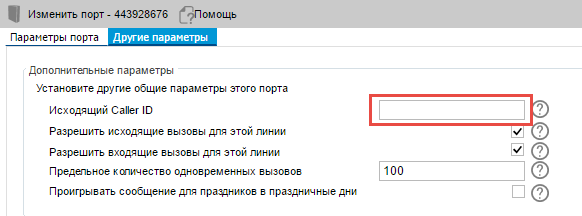

After that, the outgoing Caller ID is reformatted according to the trunk settings.
Starting with 3CX Phone System v.12 SP1, the caller ID (Caller ID) from the port, trunk, VoIP gateway, or VoIP provider can be obtained in the form in which the system administrator needs it. You can also modify the outgoing number, i.e. send it to the port / trunk / gateway / provider in the required form.
Formatting incoming and outgoing Caller IDs is done in the same way. To make it correct, we explain the principles of formatting the number / line replacement.

Follow these steps to configure Caller ID.
1. The company requires that all international US numbers be reformatted to a local format. In this case, a simple rule is enough
Source CID Pattern + (1) (...) (. *)
New Source CID Pattern 3
In this example,
+ is deleted (ignored)
(1) corresponds to the US country code and transmitted in the first variable 1
(...) corresponds the three-digit city code and is transmitted in the second variable 2
(. *) corresponds to the remaining digits of the number and transmitted in the third variable 3
In our example, in the new reformatted number we leave only the third variable 3, which corresponds to the local number.
It was +12021234567, it became 1234567.

2. The company needs to bring the number to the national format and add 0 at the beginning of the number for a quick call back to the client. The incoming Caller ID is +17864722245.
Source CID Pattern + (1) (...) (. *)
New Source CID Pattern 023
In this example
, 0 is added to the beginning of the number.
Variables 2 (786) and 3 (4722245) are saved, converting the number to the national format.
It was +17864722245 , it became 07864722245 .

Attention! In 3CX Phone System v14 SP3, you can disable Caller ID processing in the E164 format (see screenshot below).
Call Caller ID Processing
To process incoming Caller ID 3CX uses the parameters specified in the interface section Parameters - PBX - e164. 3CX tries to determine the type of call (number) using the parameters specified in the Parameters - PBX - e164 section (see figure). The system checks the incoming Caller ID from left to right. How the system determines that the number received in the international format can be considered local i.e. Does Caller ID belong to the country in which the system is located?

- Ahead is the + sign, followed by the country code specified in the Parameters - PBX - e164 section, or
- Ahead is the international dialing code, followed by the country code specified in the Parameters - PBX - e164 section, or
- Ahead is the country code specified in the Parameters - PBX - e164 section.
If the system sees that the Caller ID does not belong to the country in which the system is installed, i.e. the number is of type International (international) - no Caller ID is processed and it goes to extension 3CX. The Distinctive Ringing feature, implemented in 3CX, adds an additional Alert-info: international header to the call . The user's IP phone will ring in accordance with the settings for international calls.
If the system sees that the Caller ID belongs to the country in which the system is installed, then the call type is checked again: national (National) or city (Local). Moreover, if the Delete option is set , if in the same country, only the part of the number that does not contain the country code is checked.
If Caller ID comes in national format, i.e. the region code does not correspond to the region in which the system operates (specified in the Parameters - PBX - e164 section), no number processing is performed and it is sent to the extension number. The Distinctive Ringing function adds an additional Alert-info: national header to the call . The number comes with the cut off international part, since the Delete option was set if in the same country. The user's IP phone will ring in accordance with the settings for national calls.
If Caller ID starts with a region codespecified in Parameters - automatic telephone exchange - e164, then it is recognized as city. If the Delete option is set , if in the same region, the Caller ID (with the international and national parts cut off) is sent to extension 3CX. The Distinctive Ringing function adds an additional Alert-info: local header to the call . The user's IP phone will ring in accordance with the settings for city calls.
Outgoing Call Caller ID Processing
3CX Phone System processes the outgoing number according to the Outgoing rules using the digits of the dialed number. In accordance with the matching Outgoing Rule, the desired route (SIP line or gateway) is selected.
The 3CX Phone System must explicitly determine in which SIP header the Caller ID is located. For this:
- Choose the necessary SIP trunk or PSTN gateway
- Go to Outgoing Settings
- Define the SIP field that passes the Caller ID. Caller ID is assigned to the OriginatorCallerID variable.

How is the value of the OriginatorCallerID variable determined?
Initially, the value of OriginatorCallerID is undefined. Then the OriginatorCallerID value is set by the Outgoing Caller ID parameter in the trunk settings. Then, if the extension 3CX is assigned an External Caller ID , it is assigned to the OriginatorCallerID variable. The following rules apply:


- If the call came to the extension as an external incoming call and went outside again. In this case, the number of the caller outside (which was reformatted in accordance with the parameters specified in Parameters - PBX - e164) will be set to the OriginatorCallerID variable.
- If the call goes to an external number when the call forwarding rule on the extension is triggered, or the call is not made directly from this extension, the outgoing Caller ID will be overwritten by the value that is already contained in the OriginatorCallerID field of the call received on this extension (original call) .
- If the call leaves when dialing directly from the extension (i.e. no call forwarding rules are used), the Caller ID is not overwritten and sent as is.
After that, the outgoing Caller ID is reformatted according to the trunk settings.
Formatting Incoming and Outgoing Caller ID
Starting with 3CX Phone System v.12 SP1, the caller ID (Caller ID) from the port, trunk, VoIP gateway, or VoIP provider can be obtained in the form in which the system administrator needs it. You can also modify the outgoing number, i.e. send it to the port / trunk / gateway / provider in the required form.
Formatting incoming and outgoing Caller IDs is done in the same way. To make it correct, we explain the principles of formatting the number / line replacement.
- () Brackets - groups of numbers are enclosed (separated from each other). Each group is assigned to the variable 1, 2, 3 ... 9.
- (. *) - means any sequence of digits. This line should be indicated last, because all numbers and other characters after it will be ignored.
- 0-9, + - The numbers 0-9 and + are used to indicate the match of the corresponding character in the Caller ID
- (xxx) -, where x is any digit in the range 0-9. For example, if the number 0203123456 is passed in and you specify (0203), 3CX will look for a string that exactly matches 0203.
- (.) - dot - replaces any character. For example, specifying (...), you make 3CX look for any 3 digits in the number. So, if the city code starts with 3 and contains 3 digits, you can specify (3 ..)
- 1, 2, ... 9 - these lines are replaced by the contents of variables 1, 2, ... 9

Follow these steps to configure Caller ID.
- Go to the SIP trunks or PSTN gateways section and select the port or trunk that you want to configure
- By clicking on the desired port, select the Other options section on the right.
- In the Change Caller ID section, you can configure the necessary rules for incoming and outgoing Caller ID
- You can configure multiple rules at once, and a higher priority rule will take precedence.
Examples
1. The company requires that all international US numbers be reformatted to a local format. In this case, a simple rule is enough
Source CID Pattern + (1) (...) (. *)
New Source CID Pattern 3
In this example,
+ is deleted (ignored)
(1) corresponds to the US country code and transmitted in the first variable 1
(...) corresponds the three-digit city code and is transmitted in the second variable 2
(. *) corresponds to the remaining digits of the number and transmitted in the third variable 3
In our example, in the new reformatted number we leave only the third variable 3, which corresponds to the local number.
It was +12021234567, it became 1234567.

2. The company needs to bring the number to the national format and add 0 at the beginning of the number for a quick call back to the client. The incoming Caller ID is +17864722245.
Source CID Pattern + (1) (...) (. *)
New Source CID Pattern 023
In this example
, 0 is added to the beginning of the number.
Variables 2 (786) and 3 (4722245) are saved, converting the number to the national format.
It was +17864722245 , it became 07864722245 .










