June 7, 2016 at 12:13
NetApp AltaVault: Backing Up and Archiving Data in the Cloud
In October 2014, NetApp acquired the SteelStore product line from Riverbed Technology's. This product has long been popular in corporate environments due to its simplicity and the ability to collect backups (to be a target for folding backups) from almost all possible backup products and the ability to store this data in the cloud. This product has complemented NetApp's portfolio perfectly and fits into the company's vision for the future of hybrid, private and public clouds. After the acquisition, this product received the new name AltaVault and several innovations, which will be discussed below.
The first innovation is that the product “replaced iron”, now it has moved to the same platform on which ONTAP now lives, known as FAS, respectively, the same disk shelves are used. This was a very logical step, as the company recently completed debugging and released the updated FAS8000 platform based on PCI Express Gen 3, during which a lot of work was done and, importantly, hardware bugs related to the performance of the PCIe gen architecture itself were found and fixed 3. Plus, it is economically more feasible not to produce multiple platforms. In other words, the platform for the FAS and AVA products (AltaVault) is the same, and so people don’t get confused, a small purple icon with the inscription “AVA” appeared in the upper right corner of the chassis with controllers on the images of these products.
NetApp has long established itself as a company that deeply integrates all its products, and the AltaVault platform is no exception. A second major innovation is the addition of NetApp StorageGrid Web Scale support as an object data warehouse. This allowed us to build a backup scheme not only in the public, but also in the private cloud. Perhaps in the near future other features will be added for even deeper integration with other NetApp products.
The product is available as a physical device and is represented by the AVA400 (48-288TB local storage) and AVA800 (72-576TB local storage) models, as well as the AVA-v virtual machine (2-32TB local storage), which is delivered as a virtual appliance for hypervisors Hyper-V (2012 R2), ESXi (vSphere / ESXi 5.5 or 6.0: VMFS-5 or on RDM volume) or KVM (RedHat Enterprise Linux OS 6.5 or higher). There are 2TB, 8TB, 16TB and 32TB versions. AVA-s virtual appliance is also available in Amazon (EC2 Marketplace) and Azure public clouds, which is very convenient when deploying a backup site in a public cloud. Local storage here is the physical space on disks, not including compression. Those. if your backups shrink very well, then much more data can be stored on local storage, than physically there are spaces. Read more onofficial website .
The AVA400 and AVA800 have 10GB interfaces that can be aggregated using 802.3ad mode. VLAN tagging is supported. The AVA400 can only connect disk shelves with 4TB drives, and the AVA800 can only connect disk shelves with 6TB drives.
AltaVault is a regular CIFS / NFS file share where backup software sends backups. NFS v3 / v4, SMB v2 / v3 (SMB multi channel connections supported) and Veritas OpenStorage API (Veritas OST: NetBackup 6.5 and 7.7) are supported. Due to this simplicity, the product integrates with such a wide range of backup software, including competing vendors such as IBM Tivoli, EMC NetWorker, HP Data Protector and Dell vRanger. Data that arrives at AVA is online deduplicated (using a variable block length, which allows to increase the degree of data compression). All the most recent copies of the data are stored locally, while older data is sent to a private or public cloud. All data before encryption is encrypted using an encryption certificate.
There are two modes of operation: Cold Backup or Cold Storage mode (local caching does not work) and Hot Backup (local caching is enabled).
In Cold Backup mode, data that enters the AVA is deduplicated, encrypted, and sent immediately to the cloud, local disks store only a very small set of meta-information about backups, and therefore good communication channels are needed so that backups are poured into the cloud.
In the cached mode, the data arriving at AVA is deduplicated, encrypted and then transferred to local disks, then sent from the disks to the cloud as far as possible, this allows recovering the newest backups much faster and having a less demanding communication channel with the cloud than for Cold Backup mode. Those. in cached mode, the most recent backups are stored both on local drives and in the cloud. Older data from the cache is gradually replaced by new data that is simply deleted (because there is a copy of it in the cloud).
As a rule, the size of the archive, which can be uploaded to the cloud, is 5 times (Backup mode) larger than the local cache on the disks of AVA. In the Cold Storage mode, the local cache is used only for storing meta information, which allows you to exceed the amount of data stored in the cloud by more than 5 times in relation to the local cache. More details .
SnapMirror is a type of replicationbased on snapshots. After the purchase, SteelStore NetApp actively embarked on its integration with its flagship product ONTAP. Since the ability to replicate data from ONTAP directly to AVA would be a logical decision, which would make it possible to perform a backup much more efficiently by transmitting only data changes and not a complete data set each time during backup. Replication from ONTAP directly to AVA is also very convenient because it eliminates the need to pull the back from the host (the host CPU and its network ports are not loaded), as well as eliminates the intermediate Proxy server, which was necessary for transferring backup files from the host to the backup target (AVA, cloud). Snapshots are replicated as follows: first, a “basic data set” is sent, and then a la increments are rolled to it. Each such snapshot (together with the already replicated basic data set and older snapshots) is a complete data set with which, unlike increments, there is no need to perform the “gluing” operation in order to restore something. In this configuration, AltaVault will be able to target these replicas with OS ONTAP, this will allow more economical use of AltaVault space resources, transfer less data over the network and load the backup storage with which FullBackup operation is performed. Read more about this will allow more economical use of AltaVault space resources, transfer less data over the network and less load the storage system with which the backup is performed compared to the FullBackup operation. Read more about this will allow more economical use of AltaVault space resources, transfer less data over the network and less load the storage system with which the backup is performed compared to the FullBackup operation. Read more aboutsnapshots in the product NetApp ONTAP . SnapMirror is available in the new AVA 4.3 firmware as part of the DataFabric concept .
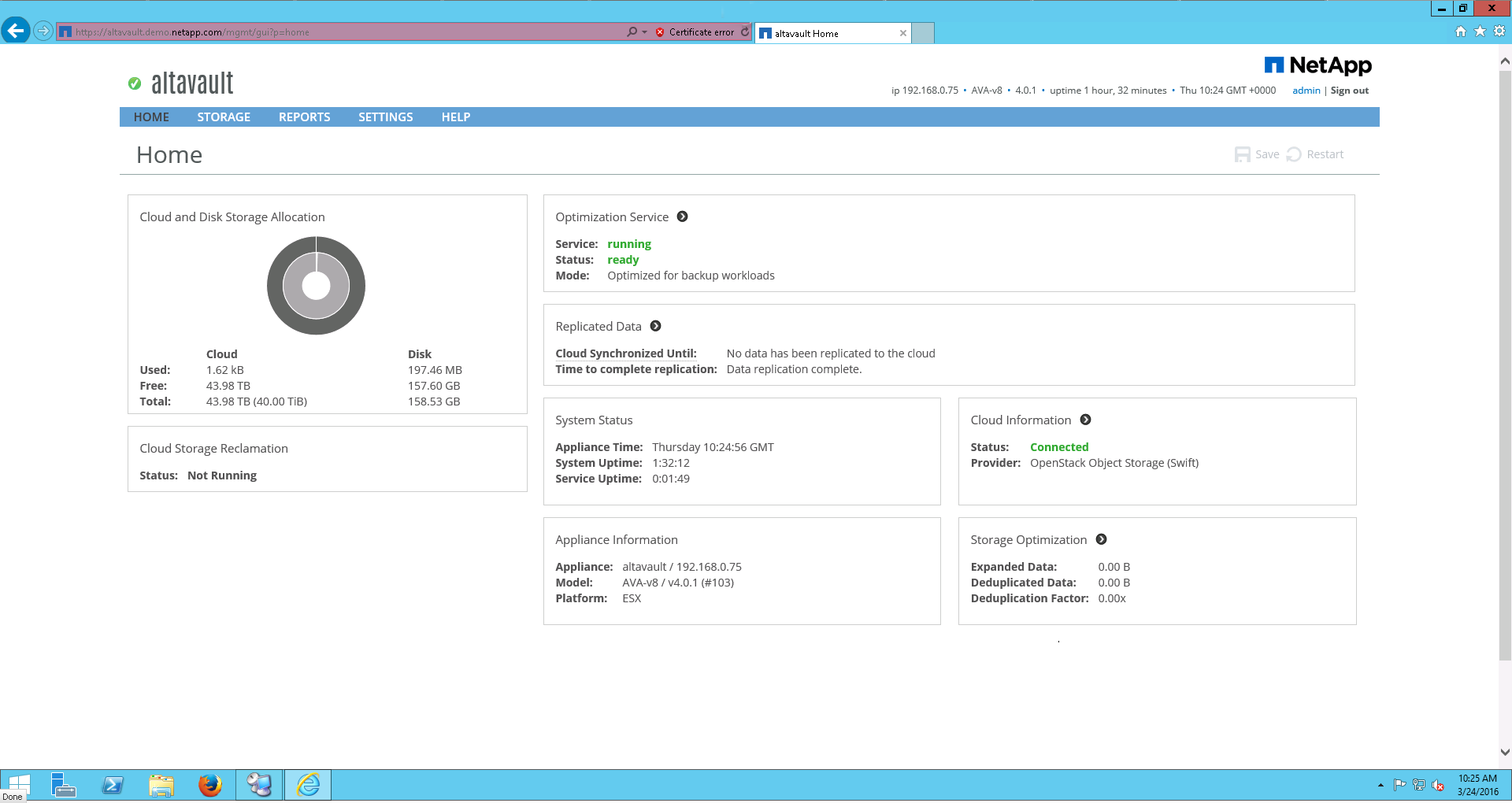
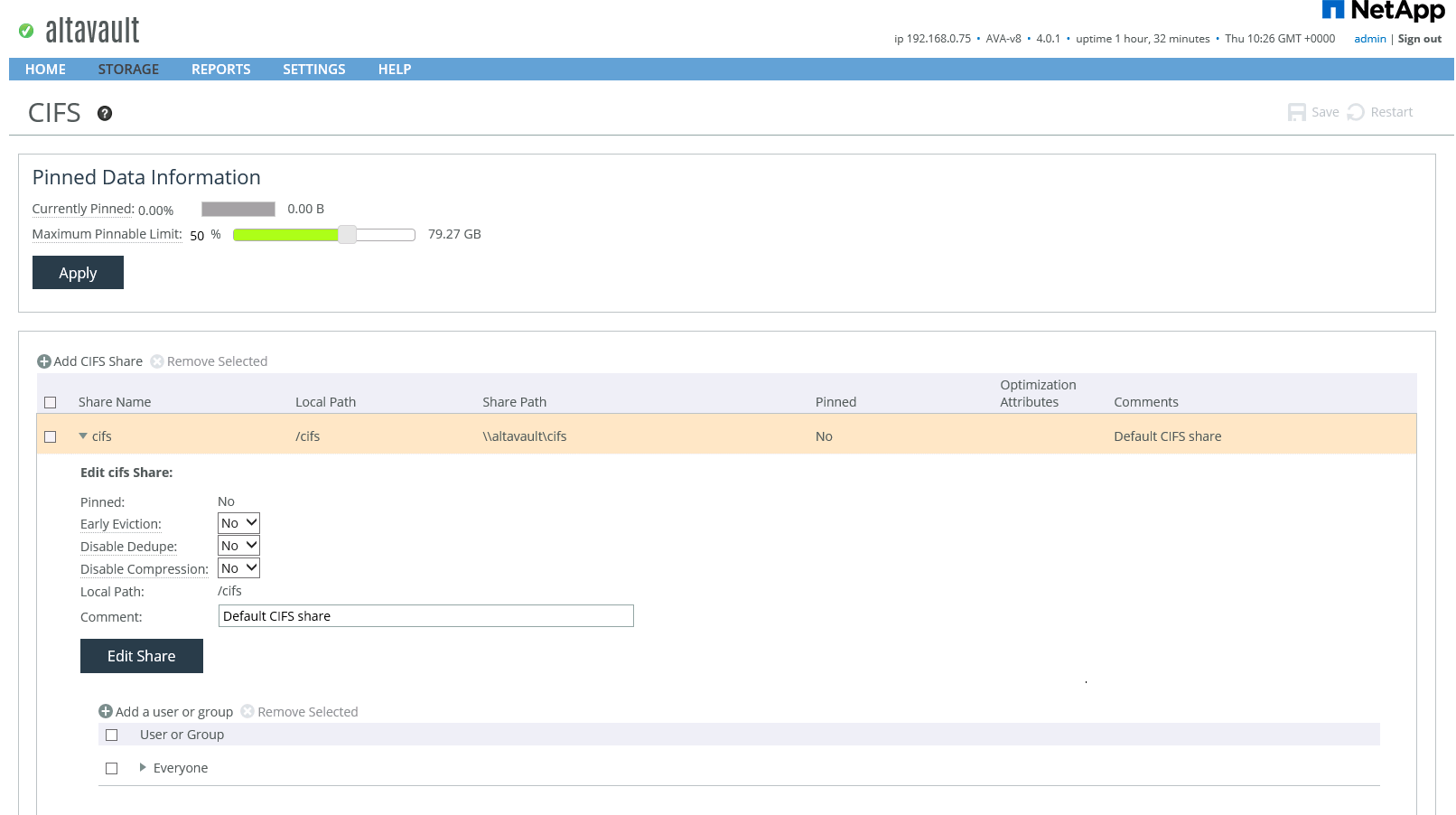
The system has both a Web GUI with a very simple and clear location of objects, and the SSH console, syntax, config file and its device is very similar to a Cisco router. You can use many different backup products at the same time, which put their backups on one AltaVault, it is recommended to have a separate file share for each application.
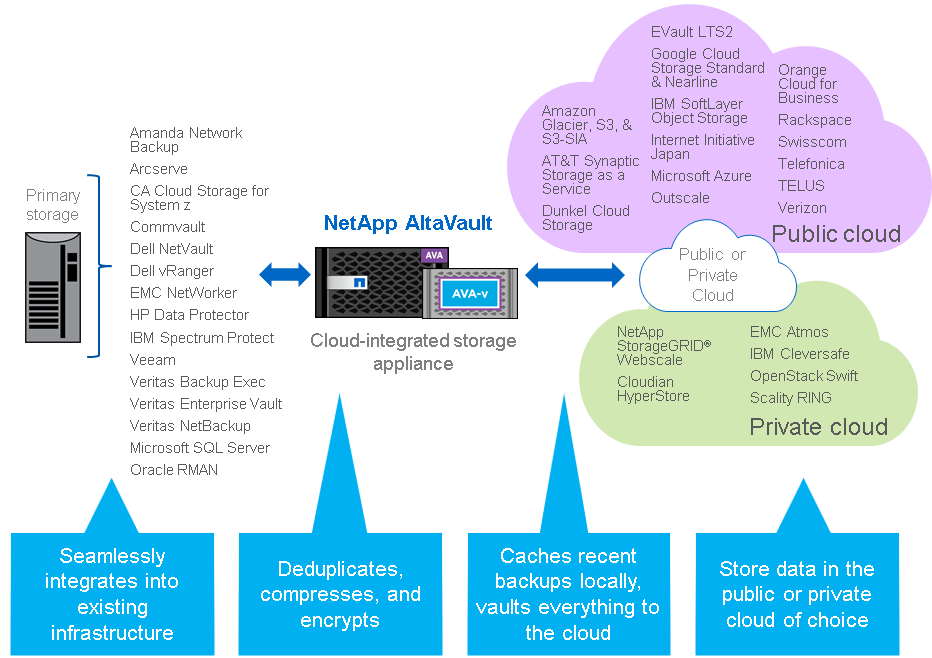
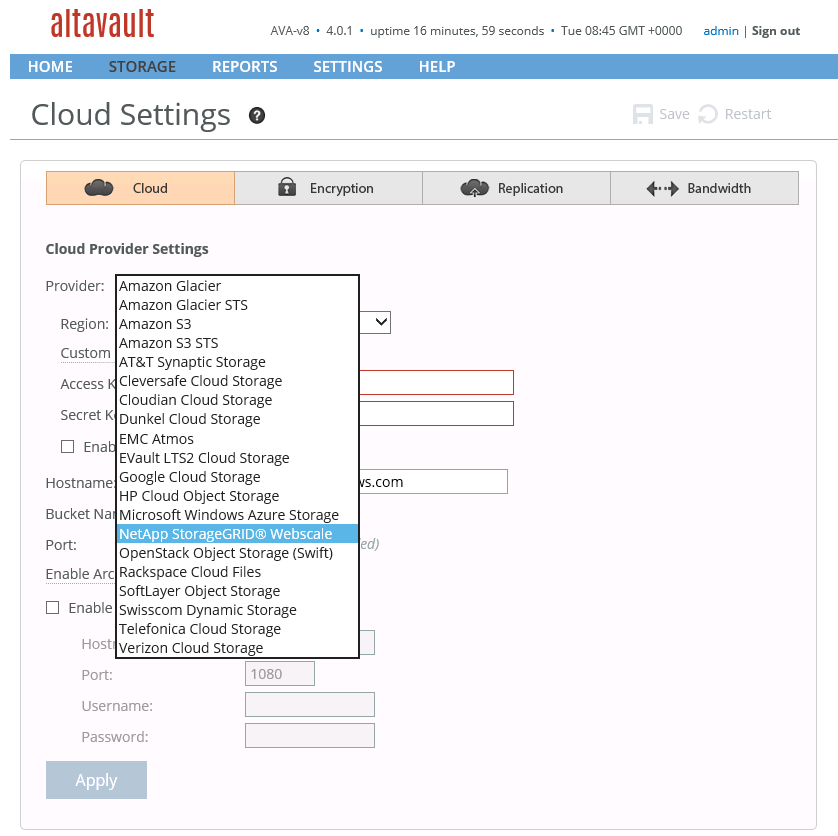
AltaVault cannot work on its own in backup storage mode only on internal drives. The system needs either specialized software installed in a private cloud or in a public cloud provider that supports object data storage. A very wide list of public providers and software for private data storage is supported, including OpenStack Swift and competitors such as EMC Atmos, IBM Cleversafe and Dell NetVault. AltaVault allows you to connect one of the cloud services. Also, the migration mode from one to the second cloud service is supported.
Data sent to the cloud is already compressed and encrypted using an encryption certificate using the AES 256-bit algorithm. This eliminates the need to worry about where backups are located, even if they are backed up by cloud provider staff. KMIP is supported for key exchange, RBAC for user access, AD / LDAP authentication, TACACS, RADIUS, NFSv4 with Kerberos. AVA complies with FIPS 140-2 Lavel 1 security level.
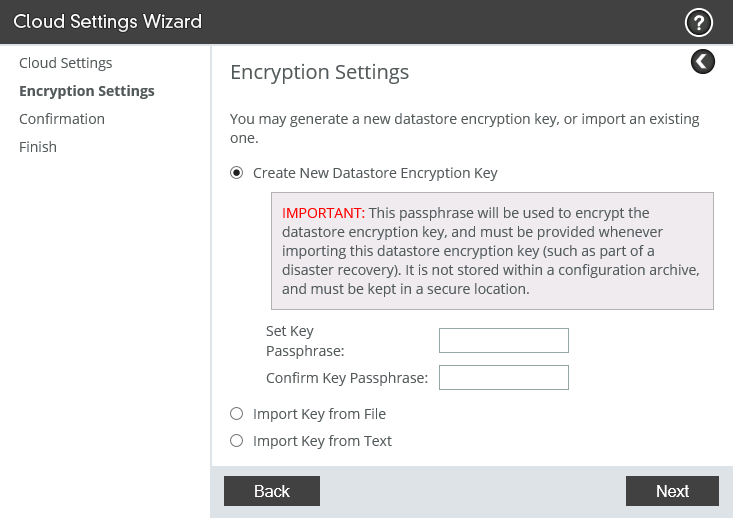
AltaVault allows you to upload a config file that can be used to restore the entire configuration on the new system, and the Re-Population function will pull the latest data from the cloud to the local disks of the new system.
AltaVault has a simple and intuitive interface, well complements the NetApp backup and archive portfolio, has been integrated with existing StorageGrid and SnapProtect products, supports a wide range of backup software and many cloud providers and storage systems. The product has already earned a good reputation in the market and is the corporate standard for backing up many companies.
This may contain links to Habra articles that will be published later .
Please send messages about errors in the text to the LAN .
Comments, additions and questions on the opposite article, please comment .
The first innovation is that the product “replaced iron”, now it has moved to the same platform on which ONTAP now lives, known as FAS, respectively, the same disk shelves are used. This was a very logical step, as the company recently completed debugging and released the updated FAS8000 platform based on PCI Express Gen 3, during which a lot of work was done and, importantly, hardware bugs related to the performance of the PCIe gen architecture itself were found and fixed 3. Plus, it is economically more feasible not to produce multiple platforms. In other words, the platform for the FAS and AVA products (AltaVault) is the same, and so people don’t get confused, a small purple icon with the inscription “AVA” appeared in the upper right corner of the chassis with controllers on the images of these products.
NetApp has long established itself as a company that deeply integrates all its products, and the AltaVault platform is no exception. A second major innovation is the addition of NetApp StorageGrid Web Scale support as an object data warehouse. This allowed us to build a backup scheme not only in the public, but also in the private cloud. Perhaps in the near future other features will be added for even deeper integration with other NetApp products.
Product Release Form
The product is available as a physical device and is represented by the AVA400 (48-288TB local storage) and AVA800 (72-576TB local storage) models, as well as the AVA-v virtual machine (2-32TB local storage), which is delivered as a virtual appliance for hypervisors Hyper-V (2012 R2), ESXi (vSphere / ESXi 5.5 or 6.0: VMFS-5 or on RDM volume) or KVM (RedHat Enterprise Linux OS 6.5 or higher). There are 2TB, 8TB, 16TB and 32TB versions. AVA-s virtual appliance is also available in Amazon (EC2 Marketplace) and Azure public clouds, which is very convenient when deploying a backup site in a public cloud. Local storage here is the physical space on disks, not including compression. Those. if your backups shrink very well, then much more data can be stored on local storage, than physically there are spaces. Read more onofficial website .
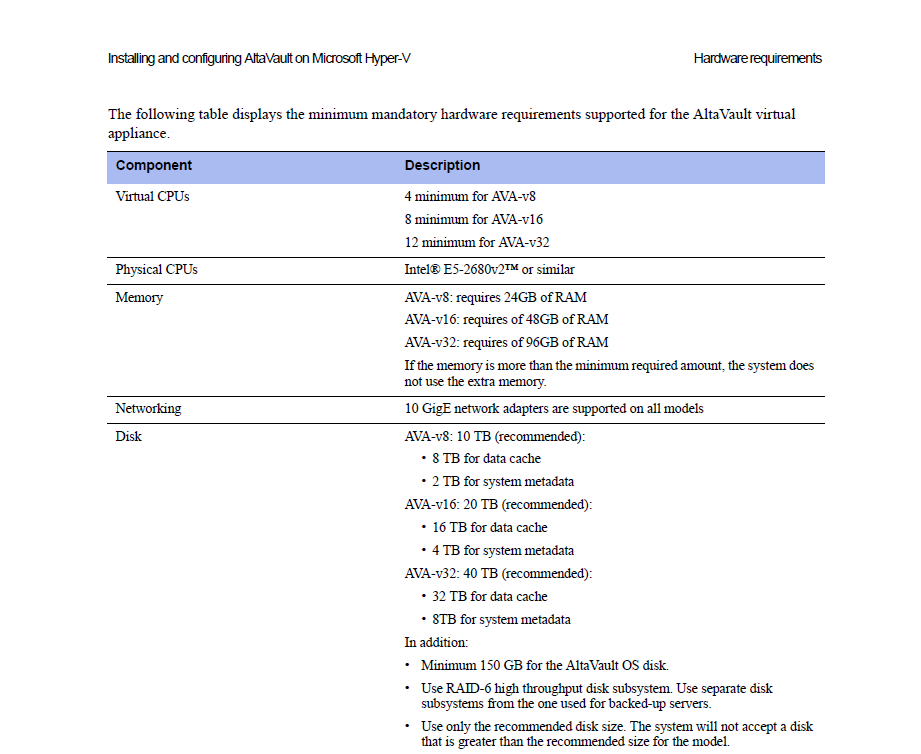
Server system requirements for running AVA-v
AVA400 and AVA800
The AVA400 and AVA800 have 10GB interfaces that can be aggregated using 802.3ad mode. VLAN tagging is supported. The AVA400 can only connect disk shelves with 4TB drives, and the AVA800 can only connect disk shelves with 6TB drives.
Work device
AltaVault is a regular CIFS / NFS file share where backup software sends backups. NFS v3 / v4, SMB v2 / v3 (SMB multi channel connections supported) and Veritas OpenStorage API (Veritas OST: NetBackup 6.5 and 7.7) are supported. Due to this simplicity, the product integrates with such a wide range of backup software, including competing vendors such as IBM Tivoli, EMC NetWorker, HP Data Protector and Dell vRanger. Data that arrives at AVA is online deduplicated (using a variable block length, which allows to increase the degree of data compression). All the most recent copies of the data are stored locally, while older data is sent to a private or public cloud. All data before encryption is encrypted using an encryption certificate.
Operating Modes: Cold & Hot Backup
There are two modes of operation: Cold Backup or Cold Storage mode (local caching does not work) and Hot Backup (local caching is enabled).
In Cold Backup mode, data that enters the AVA is deduplicated, encrypted, and sent immediately to the cloud, local disks store only a very small set of meta-information about backups, and therefore good communication channels are needed so that backups are poured into the cloud.
In the cached mode, the data arriving at AVA is deduplicated, encrypted and then transferred to local disks, then sent from the disks to the cloud as far as possible, this allows recovering the newest backups much faster and having a less demanding communication channel with the cloud than for Cold Backup mode. Those. in cached mode, the most recent backups are stored both on local drives and in the cloud. Older data from the cache is gradually replaced by new data that is simply deleted (because there is a copy of it in the cloud).
Cloud backup size
As a rule, the size of the archive, which can be uploaded to the cloud, is 5 times (Backup mode) larger than the local cache on the disks of AVA. In the Cold Storage mode, the local cache is used only for storing meta information, which allows you to exceed the amount of data stored in the cloud by more than 5 times in relation to the local cache. More details .
Snapmirror
SnapMirror is a type of replicationbased on snapshots. After the purchase, SteelStore NetApp actively embarked on its integration with its flagship product ONTAP. Since the ability to replicate data from ONTAP directly to AVA would be a logical decision, which would make it possible to perform a backup much more efficiently by transmitting only data changes and not a complete data set each time during backup. Replication from ONTAP directly to AVA is also very convenient because it eliminates the need to pull the back from the host (the host CPU and its network ports are not loaded), as well as eliminates the intermediate Proxy server, which was necessary for transferring backup files from the host to the backup target (AVA, cloud). Snapshots are replicated as follows: first, a “basic data set” is sent, and then a la increments are rolled to it. Each such snapshot (together with the already replicated basic data set and older snapshots) is a complete data set with which, unlike increments, there is no need to perform the “gluing” operation in order to restore something. In this configuration, AltaVault will be able to target these replicas with OS ONTAP, this will allow more economical use of AltaVault space resources, transfer less data over the network and load the backup storage with which FullBackup operation is performed. Read more about this will allow more economical use of AltaVault space resources, transfer less data over the network and less load the storage system with which the backup is performed compared to the FullBackup operation. Read more about this will allow more economical use of AltaVault space resources, transfer less data over the network and less load the storage system with which the backup is performed compared to the FullBackup operation. Read more aboutsnapshots in the product NetApp ONTAP . SnapMirror is available in the new AVA 4.3 firmware as part of the DataFabric concept .
Interface and software backup
The system has both a Web GUI with a very simple and clear location of objects, and the SSH console, syntax, config file and its device is very similar to a Cisco router. You can use many different backup products at the same time, which put their backups on one AltaVault, it is recommended to have a separate file share for each application.
Appearance of the command line and config file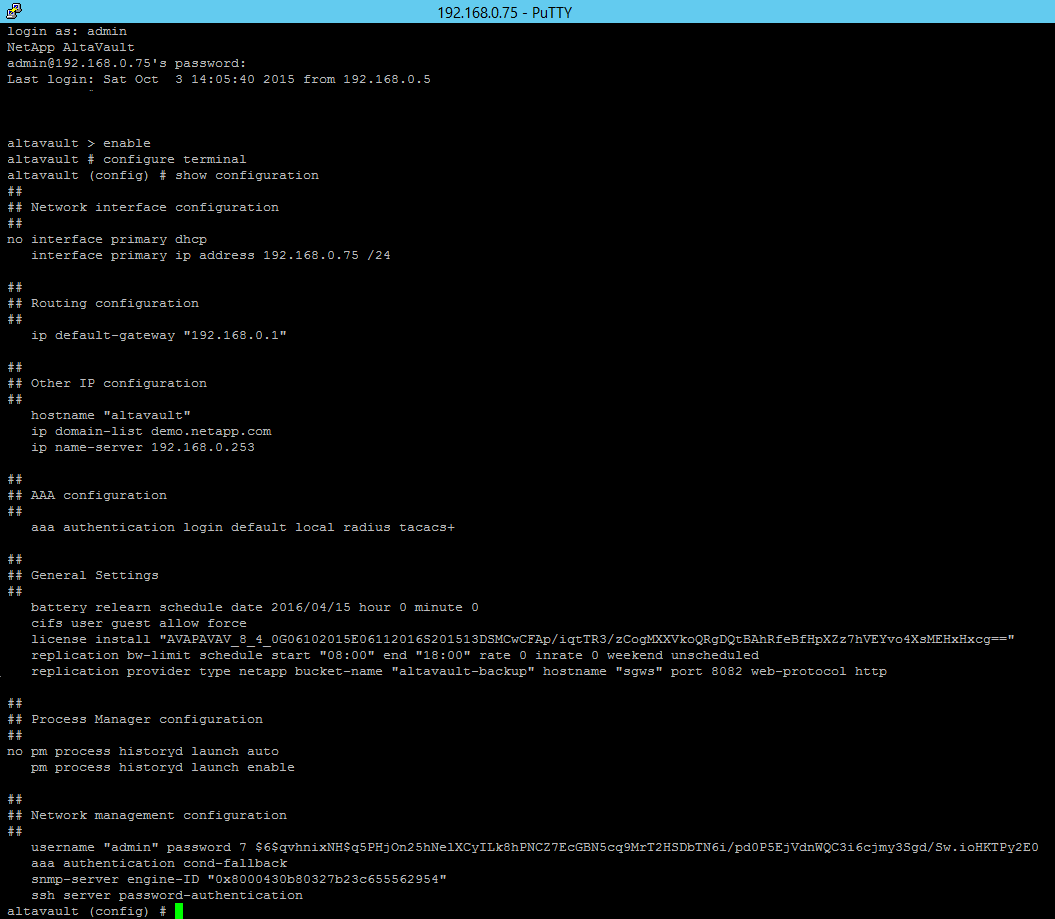
Officially supported backup systems
Backup apps:
Amanda Network Backup (Community and Enterprise)
Arcserve
Commvault Simpana
Dell vRanger
EMC NetWorker
HP Data Protector
IBM Spectrum Protect (Tivoli Storage Manager)
NetApp SnapProtect
Veeam
Veritas (Symantec) Backup Exec
Veritas (Symantec) Enterprise Vault
Veritas (Symantec) NetBackup
CA BrightStor ARCServe Backup
OpenStack Cinder NFS Backup Driver
Backups from
Microsoft SQL Server
Oracle RMAN Database
This list may be supplemented | changed, check with authorized NetApp partners
Amanda Network Backup (Community and Enterprise)
Arcserve
Commvault Simpana
Dell vRanger
EMC NetWorker
HP Data Protector
IBM Spectrum Protect (Tivoli Storage Manager)
NetApp SnapProtect
Veeam
Veritas (Symantec) Backup Exec
Veritas (Symantec) Enterprise Vault
Veritas (Symantec) NetBackup
CA BrightStor ARCServe Backup
OpenStack Cinder NFS Backup Driver
Backups from
Microsoft SQL Server
Oracle RMAN Database
This list may be supplemented | changed, check with authorized NetApp partners
Public and private clouds
AltaVault cannot work on its own in backup storage mode only on internal drives. The system needs either specialized software installed in a private cloud or in a public cloud provider that supports object data storage. A very wide list of public providers and software for private data storage is supported, including OpenStack Swift and competitors such as EMC Atmos, IBM Cleversafe and Dell NetVault. AltaVault allows you to connect one of the cloud services. Also, the migration mode from one to the second cloud service is supported.
Officially supported cloud services
Public cloud storage providers
Amazon Glacier
Amazon GovCloud
Amazon S3
AT&T Synaptic Storage as a Service
Cloudwatt
Dunkel Cloud Storage
EVault LTS2 (Seagate)
Google Cloud Platform
HP Cloud Services
IBM SoftLayer Object Storage
IIJ
Microsoft Azure Blob
Orange Cloud for Business
Outscale
Rackspace
Swisscom
Telefonica
TELUS
Verizon
and ~ 20 more others.
Private cloud storage providers
NetApp StorageGRID Webscale
Cleversafe
Cloudian HyperStore
EMC Atmos
OpenStack Swift
Scality RING
Dell NetVault
This list is subject to change | change, check with authorized NetApp partners
Amazon Glacier
Amazon GovCloud
Amazon S3
AT&T Synaptic Storage as a Service
Cloudwatt
Dunkel Cloud Storage
EVault LTS2 (Seagate)
Google Cloud Platform
HP Cloud Services
IBM SoftLayer Object Storage
IIJ
Microsoft Azure Blob
Orange Cloud for Business
Outscale
Rackspace
Swisscom
Telefonica
TELUS
Verizon
and ~ 20 more others.
Private cloud storage providers
NetApp StorageGRID Webscale
Cleversafe
Cloudian HyperStore
EMC Atmos
OpenStack Swift
Scality RING
Dell NetVault
This list is subject to change | change, check with authorized NetApp partners
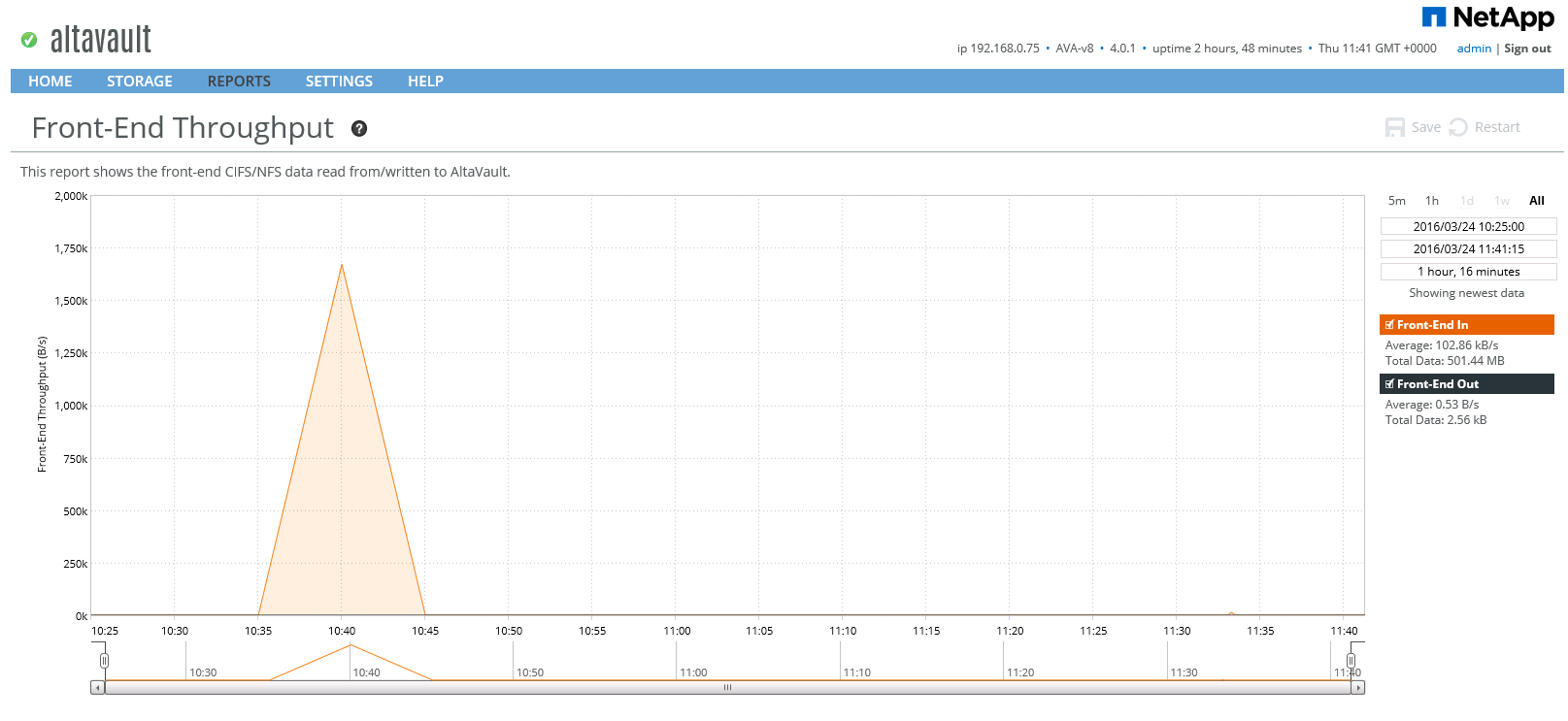
Back-End and Front-End Load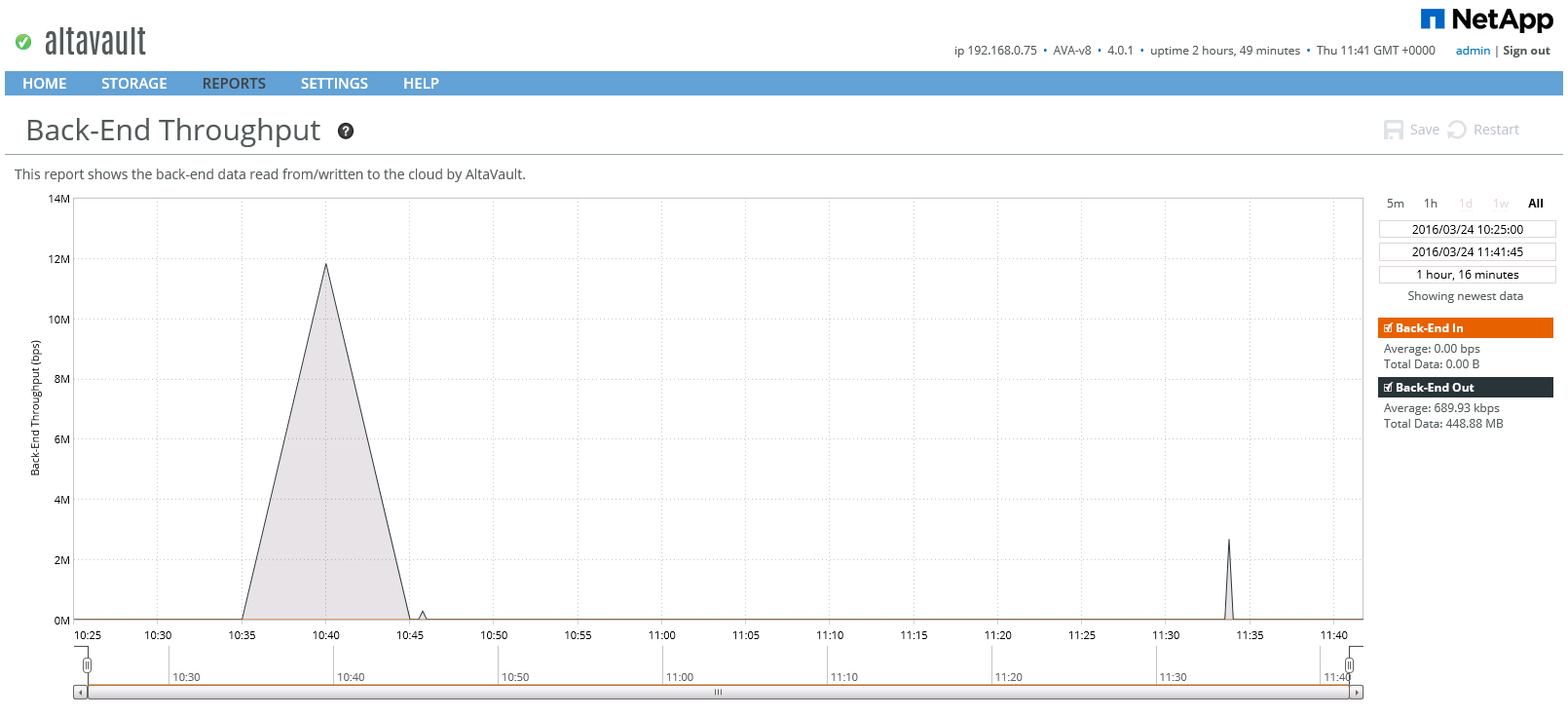
Encryption
Data sent to the cloud is already compressed and encrypted using an encryption certificate using the AES 256-bit algorithm. This eliminates the need to worry about where backups are located, even if they are backed up by cloud provider staff. KMIP is supported for key exchange, RBAC for user access, AD / LDAP authentication, TACACS, RADIUS, NFSv4 with Kerberos. AVA complies with FIPS 140-2 Lavel 1 security level.
DR and restore settings
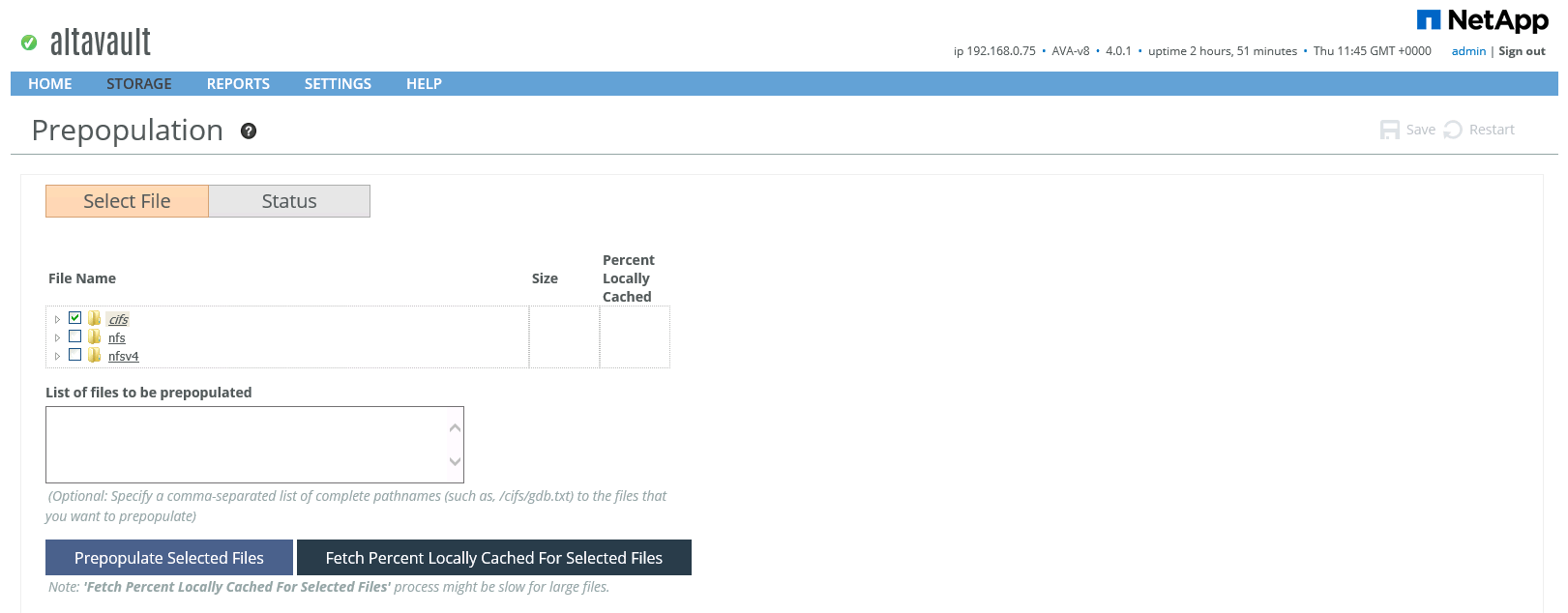
AltaVault allows you to upload a config file that can be used to restore the entire configuration on the new system, and the Re-Population function will pull the latest data from the cloud to the local disks of the new system.
Repopulation data from the Cloud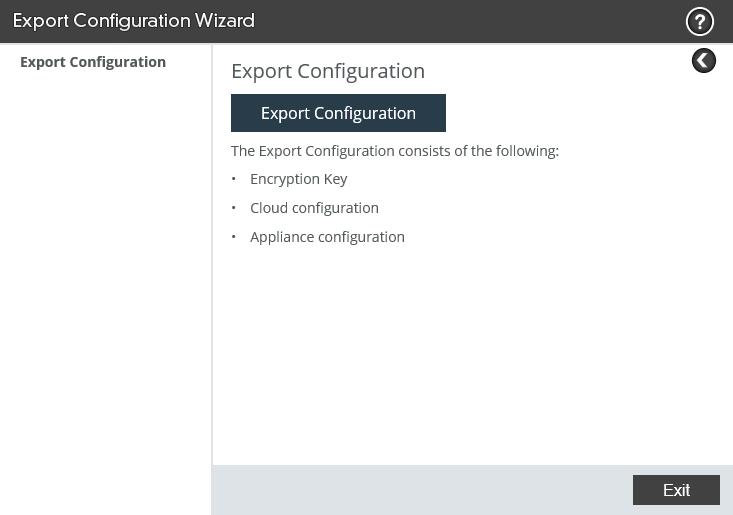
conclusions
AltaVault has a simple and intuitive interface, well complements the NetApp backup and archive portfolio, has been integrated with existing StorageGrid and SnapProtect products, supports a wide range of backup software and many cloud providers and storage systems. The product has already earned a good reputation in the market and is the corporate standard for backing up many companies.
This may contain links to Habra articles that will be published later .
Please send messages about errors in the text to the LAN .
Comments, additions and questions on the opposite article, please comment .