 February 28, 2016 at 16:56
Integrating Webpack in Visual Studio 2015
- Tutorial

In the article, I will tell you how to make working with webpack from Visual Studio more convenient, namely: automatically starting webpack when you open a project, bundling when files are changed, and reporting errors on the desktop.
Installation
Install webpack if you haven’t installed it yet.
npm install webpack babel-loader babel-core --save-devNext, install the Webpack Task Runner add-on (Tools -> Extensions & Updates).
Configuration file
After installing the add-on, a new WebPack Configuration File template will appear in Visual Studio.

Add it to our project.
The boilerplate
webpack.config.jslooks like this:"use strict";
module.exports = {
entry: "./src/file.js",
output: {
filename: "./dist/bundle.js"
},
devServer: {
contentBase: ".",
host: "localhost",
port: 9000
},
module: {
loaders: [
{
test: /\.jsx?$/,
loader: "babel-loader"
}
]
}
};In
entryindicate the entry point of our js project, in outputindicate where to save the finished bundle. If you have several input points (for example, you are developing components for different pages), then
entryyou can transfer several files to this like this: entry: {
file1: "./src/file1.js",
file2: "./src/file2.js"
}To save multiple bundles, change the field
output. output: {
path: path.join(__dirname, "./dist"),
filename: "[name].js"
}As a result, we get two bundles at the output:
file1.jsand file2.js. Basic setup is complete. To make sure that everything works, run
Run-Developmentfrom the Task Runner. 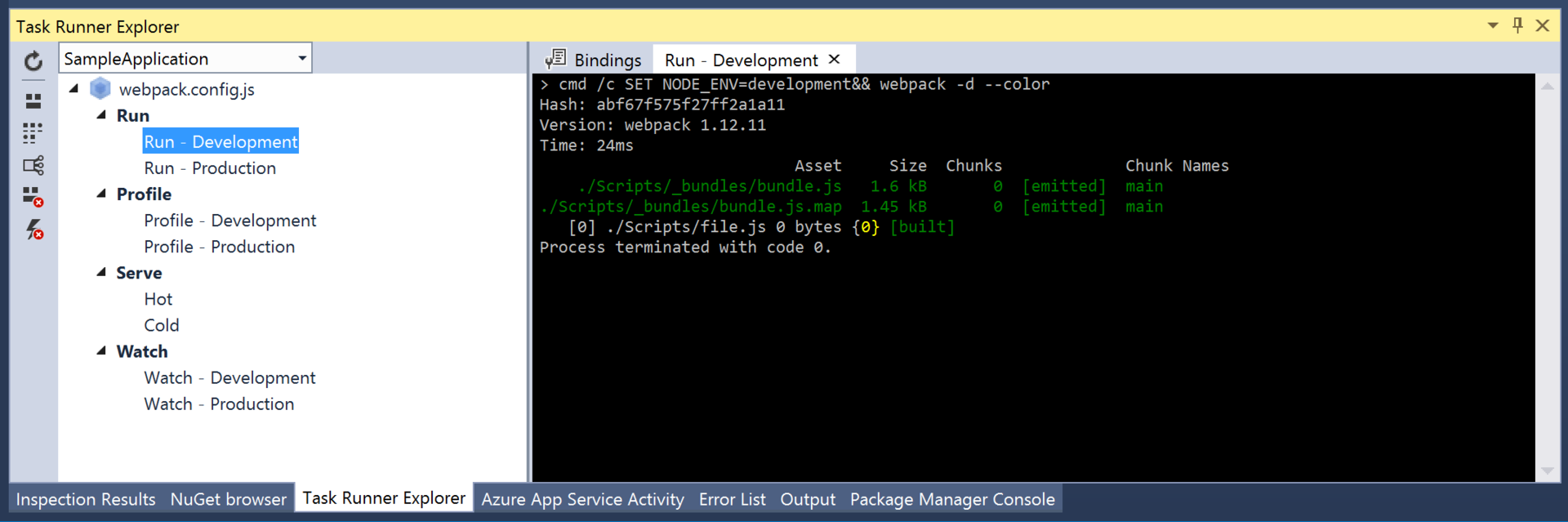
Since it is
Run-Developmentnot convenient to start manually , we will force webpack to monitor changes in files. To do this, he has a mode --watch. We will start webpack in this mode every time you open a project. Add a line
to the beginning and you're done. Yes, it is so simple!/// webpack.config.jsNotification of build results
Add alerts about the results of the assembly. We will use WebpackNotifierPlugin .
Install it using the command:
npm install --save-dev webpack-notifierModify our
webpack.config.jsfilevar WebpackNotifierPlugin = require('webpack-notifier');
module.exports = {
// ...
plugins: [
new WebpackNotifierPlugin()
]
};Now, with a successful assembly, the following notification will appear on the desktop:

That's all. Webpack also has live-reloading and profiling, we will consider them next time.
Thanks for attention.









