 March 2, 2016 at 01:01
Grandstream First Conference Background Overview - GAC2500
- Transfer
- Recovery mode
Grandstream recently unveiled its video conferencing solution , and it announced the imminent release of a conference background as part of the same solution. We publish a translation of the device review.
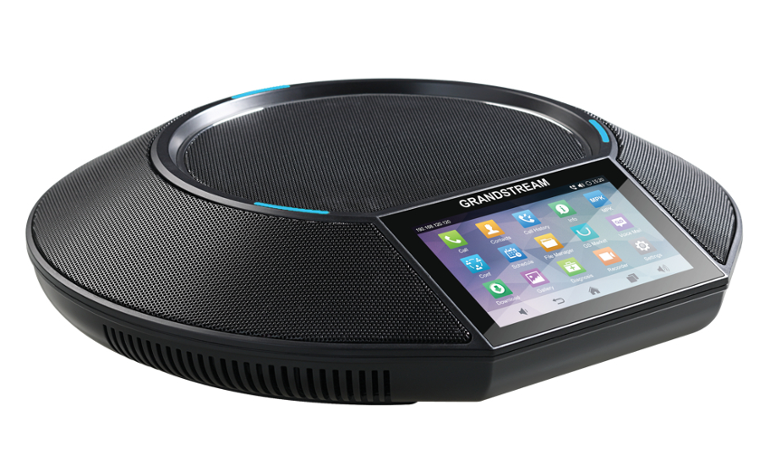
Grandstream GAC2500 is the first conference background released by the company. As a device that runs on the Android OS and has a touch screen, it is in many ways similar to the GXV3275 and GXV3240 phones. The smartphone interface compares it favorably with those conference phones we are used to, and the presence of this kind of interface means that the GAC2500 can already be put a notch higher than the similar conference phones in the market before starting our review.
The GAC2500 has much similar functionality with the GXV3275 and GXV3240 models, including 6 SIP accounts, built-in WiFi, Bluetooth, Gigabit Ethernet, and a 4.3 "capacitive touch screen. It is possible to connect several devices for collaboration in large rooms in series, 3 cardioid microphones that are sensitive up to 3.5 meters away, built-in conference bridge for 7 participants, HD quality audio, including Opus and G722 codecs.
Can the GAC2500 cause a stir in the market? We tested the phone from all sides to find out this is.
First impression when unpacking the Grandstream GAC2500
The GAC2500 looks thinner than it looked in the photo, but the design looks solid. The speakers are protected around the case by a fairly durable metal mesh to the touch instead of plastic, otherwise the entire assembly is also of high quality and is credible. The phone has 3 LED indicators embedded along the circumference of the case, which do not look intrusive. The case is made of matte durable black plastic, it looks solid and leaves no fingerprints. The touch screen has a diagonal of 4.3 "and is located at a comfortable angle, the available brightness adjustment of the screen allows you to adjust it for various lighting conditions.
The home screen has a noticeably different look than the GXV3275 and GXV3240 phones. Here, the entire screen space is occupied by the dialer widget. This innovation allows you to conveniently use the main function of the device - to collect conferences. Other various applications and widgets can be reached by simple swipe to the side.
Many settings are also available from the web interface. In particular, it is possible to fully control calls remotely - call, transfer a call, enable or disable call recording. The GAC2500 also has a number of interesting conference-specific features. The phone allows you to create and schedule conferences from the web-based interface, add participants, program the distribution of notifications and automatically dial participants, if necessary.

Functions
The Android interface is probably the most outstanding feature of the GAC2500.
The ability to plan conferences is truly an innovation that simplifies the process and makes organizing conferences much more comfortable. The ability to collect up to 7 participants is also quite an outstanding feature. Another plus is the ability to do without a separate conference server. The conference background can gather various devices with its resources into the conference.
Thanks to the USB interface, the GAC2500 can be used as an audio module to a PC. It should be noted that this is a new feature, previously this type of device on the market did not have such an opportunity. For example, the conference bridge will work perfectly with Bria softphone or other similar softphones and will allow you to broadcast private phone calls over the speakerphone if necessary. Six SIP accounts in a conference phone is quite a lot, more than most SIP desktop phones on the market can offer. The phone can work both over Ethernet and over WiFi. Over a wired network, the conference phone can also work without a PoE power supply.
On the GAC2500, you can install many different applications from the Android interface, it becomes possible, for example, to participate in communication on Google Hangouts and Skype directly from your phone. If the remote participant can talk on the video, he can be seen on the screen. This integration of voice and video conferencing is a very interesting feature of the GAC2500, few people on the market can offer this.
Voice quality
The GAC2500 has excellent sound quality that most desk phones will envy. The volume on the phone can be raised to a very loud level, but this does not lead to poor quality, wheezing, etc.
Testing
With OnSIP, we carried out with all the phones that we had, a multi-step test, which included about 30 steps. An example of such a step:
A test phone rings the telephone B
Phone B picks up the
telephone Phone B sets the test telephone on hold
Phone B rings the telephone C
Phone C picks up the
telephone Telephone B transfers the call to telephone C The
call must be correctly transferred to telephone C, B must be answered correctly after the transfer operation . After C answered, the audio should work in both directions between the test phone and C, etc.
There were no problems passing these tests with the Grandstream GAC2500.
Customization
Step 1: Collect user information.
Each user has a set of settings that need to be collected:
• SIP address
• SIP password
• Name for authentication
• Username
• Proxy / Domain
This information is on the user details page in the User tab in the Phone Settings section.

Step 2: Login to the web interface of the Grandstream phone from a browser
After the phone is turned on and connected to the LAN, using the browser you enter the IP address of the phone, which should be displayed. The password is “admin”. After logging in, select “Account 1”
Step 3. Entering User Information
For most cases, you just need to configure "Account1". If you need to configure several users or several lines, the steps for each Account are repeated
• Account Active: Yes
• Account Name: the name that appears on the screen opposite the button
• SIP Server: Domain
• Outbound Proxy: sip.onsip.com
• SIP User ID: username I
• authenticate ID: name to authenticate
• the authenticate the password: the SIP password
• name: your name that others will see when they call

tab Network Settings you must specify
the Outbound the Proxy - 'sip.onsip.com',
the DNS-Mode - 'A Record 'and
NAT Traversal - 'Keep Alive'.

Step 4. Register your phone
In the “Users” tab on the Admin portal, next to each user, a notification should light up in green if registration was successful.
Conclusions The
Grandstream GAC2500 is the best in its class in every way. Its nice Android interface is not only for beauty. It gives the phone unique flexibility and many features to use that other phones simply do not have. Crossing video and audio conferences is a new niche for conference telephones, and features such as automatic conference scheduling make this model even more than an aesthetic superior to other market leaders. Even without its smartphone interface, the device is superior to similar offers.
Voice quality also exceeded expectations. The conference phone has raised the bar in this direction, and HD quality audio sometimes makes you think that you are talking to someone who is nearby in the room. Everyone who uses conference telephones frequently knows that office workers will be enthusiastic about this shift in quality. The Grandstream GAC2500 is a new leader to catch up with, and we look forward to what other companies will offer in return.
Grandstream GVC 3200 Video Conferencing Solution Overview
For all questions: [email protected]
Distribution of Grandstream solutions in Ukraine, Georgia, Kazakhstan, CIS countries .
MUK-Service - all types of IT repair: warranty, non-warranty repair, sale of spare parts, contract service









