January 21, 2016 at 15:12
Fear and Loathing in Multipeer Connectivity

Posted by Roman Ivchenko, iOS developer DataArt.
Introduction
Surely everyone who has at least once been looking for a ready-made solution for exchanging messages, files, streams between iOS devices without using the server side has heard about the Multipeer Connectivity framework released in iOS 7. In
general, this is one of the most innovative frameworks released in the 7th system version. It was supposed to replace the slightly outdated CoreBluetooth.
To understand the full power and strength of Multipeer Connectivity, we tried to run it in our R&D project , the task of which is very simple - sharing presentations and synchronizing slide switching between listeners and speaker devices at conferences, in classrooms, etc.
Short review
To implement our task, the framework, at first glance, fits very well into the application architecture. By convention, we have only two types of users - the speaker and the listener. Multipeer Connectivity just provides the necessary classes for the implementation of the functionality of each type of user.
The article does not claim to fully cover all the intricacies of the framework, but talks more about its problems and reliability. All technical details can be found in the Apple documentation .
Speaker aka Advertiser

The mechanism is simple. There is a session that is initialized with security and encryption parameters, as well as with an object of the MCPeerID class, the essence of which is rather minimalistic, since this class has only one property - displayName. It, in fact, can be considered the name of the ID session. So that other users can see our session, the framework provides us with the MCAdvertiserAssistant class, a beacon that informs everyone about this session and stores information about it.
As soon as the listener wants to connect to the session, MCAdvertiserAssistant will automatically show a notification about this, with the “allow / decline connection” options. As soon as the user advertizer allows the listener to connect, the listener enters the session and gets the opportunity to communicate with the advertizer.
Listener aka Browser
In the case of the listener, everything is even simpler - the developer writes the code of the side of the listener with minimal effort using the built-in controller of the MCBrowserViewController framework, which completely takes on all the search logic and connects to the advertiser or implements its own controller. In our application, the second approach was used, because the first, as it turned out, in terms of stability and quality of work pretty well matches the title of the article. But more on that later.
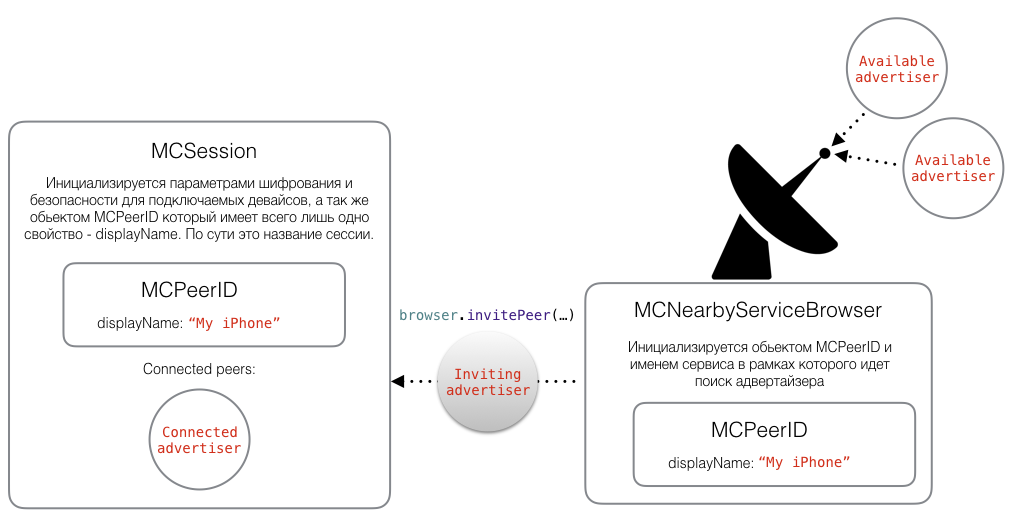
For the browser device, the MCNearbyServiceBrowser class is provided, something like a radar that searches for advertisers within a specific service name.
Communication between the MCNearbyServiceBrowser and the controller class is implemented through the MCNearbyServiceBrowserDelegate protocol, where the logic of the implemented delegate methods involves displaying the current active sessions of the advertisers, changing their states.
It is important to note that a session is also being created on the browser side, in which MCNearbyServiceBrowser invites the advertiser. As soon as the advertiser accepts the invitation from the listener, the devices can be considered connected to each other.
The message sending interface is also very transparent and simple, the advertiser and the browser send each other messages in NSData format, and the processing of receiving messages, the status of the connection between devices, file transfer progress can be monitored by implementing the MCSessionDelegate protocol methods.
First touch
In theory and even, at first glance, in practice, everything looks very convenient from the point of view of architecture implementation - the developer gets access only to the most necessary, saving himself from the complex logic of working with wifi / bluetooth networks.
As usual, before starting to integrate the framework into the project, everyone wants to see how it works in the official demo project from Apple . MultipeerGroupChat basically shows what’s happening, and it works quite stably with the starter pack-set - simulator and iPhone / iPod / iPad. Developers who have the opportunity to look at the demo application, having more than two devices, can immediately feel: that something in this framework is amiss.
Ghost sessions
The first bug of the framework that immediately catches your eye, even having a simulator and a device with you for testing everything, is a problem of ghost sessions.
Imagine the situation. Alice is the speaker (advertizer), Bob is the listener (browser). Alice begins the presentation session, and Bob connects to it, they exchange a pair of messages, everything is fine. Alice finishes the presentation, and ends her session. The first is the likelihood that Bob will receive a notification that there is no more advertiser - a little more than the probability that he will not.
For a browser device, a nonexistent advertiser session may exist indefinitely. When you try to connect to this session, nothing may just happen, or after a while, the connection attempt goes into the failed state. The problem takes on serious proportions if the advertizer has created his sessions several times. In this case, the browser in the native MCBrowserViewController controller can display several identical iPhone Simulator adverters when you work with only one device and one simulator, and you have no idea which advisor from the list is active. An example of a bug in Apple’s demo application:

By the way, this problem cannot be solved either by restarting the application or reinstalling it. Old sessions can still haunt you. Only turning on and off airplane mode helps.
Workaround:
When we have only one advertizer, each new session of this advertizer should have discoveryInfo. This parameter is in Dictionary format.

If everything is done correctly, the list of active sessions for each device advertizer will have the latest session.

The problem of the maximum number of devices in a session
Strange, but initially the framework has a limit of seven connected devices in one session. The goals, for example, of our task, clearly go against this restriction from Apple engineers. When using our application, 30 to 40 devices can participate at the same time, and it is a pity that the framework initially does not have a solution for such a case.
Workaround:
Despite the framework’s limitation on the number of devices in a session, it does not have a limit on the number of sessions. In order, for example, to have one advertizer able to exchange data with 40 browsers, you need to implement a solution that can support work with six sessions. But here, again, there is a problem: the browser device will see several sessions from the same advertiser, and you need to make the browser see the most recent session with free places to connect. Alternatively, the same discoveryInfo parameter comes to the rescue, which can contain, say, the session index.
Management mechanism for additional sessions on the advertiser:


On the browser side, you need to filter all sessions by index and display the session with the highest index value. If free space suddenly appeared in previous sessions, we won’t be able to inform the browser that wants to connect to the advertiser in any way, because the discoveryInfo property of the MCAdvertiserAssistant class is readonly.
Reconnection
I consider this framework headache to be the most costly for crutches. I think it’s very strange on the part of Apple to release a framework without a ready-made reconnection mechanism. The usual case - the browser device went into a slip mode, for 15-20 seconds it can still receive messages from the advertiser, but then the framework tells us that connection lost ...
Workaround:
It would seem that in order to reconnect to the session of the advertiser, you just always need to store a pointer to the object of this session, and in which case re-send the invitation to the advertiser using this session. In practice, this obvious approach does not work. Only hard reset of the browser session and everything that was connected with it, and the process emulation, as if the user manually updated the list of available advertisers and connected to the one from which he disconnected after leaving the background, helped in our project.
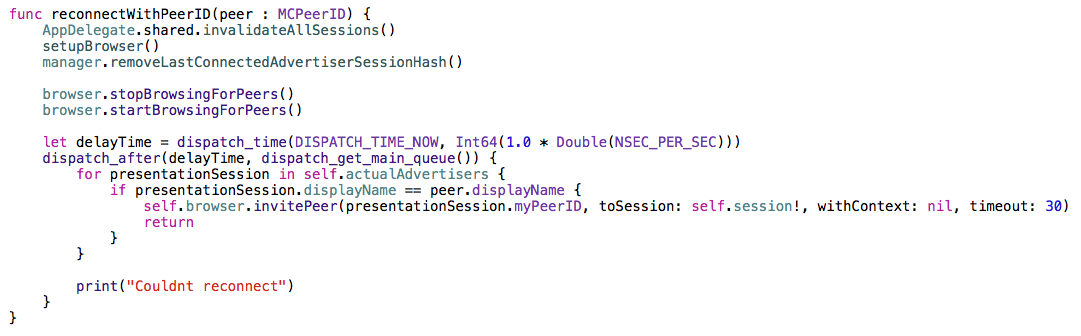
The solution is very rude, and I’m sure that for some projects and tasks it’s absolutely inappropriate, but apparently it’s impossible to do it in another way. Proof , Problem 4.
General instability, sudden connection lost
If the previous bugs and limitations could somehow be resolved, then everything already depends on Apple engineers. According to my observations, out of 10 attempts to test the simplest cases for our application, about 7 - 8 ended more or less successfully. Simple cases - approximately 10 - 15% of the maximum possible application load (advertizer and 20 - 30 browsers). In the remaining feil cases, the following occurred:
- The browser device suddenly stops receiving messages from the advertiser, and no notifications from the framework, no alerts, calls to delegate methods are just silence.
- The browser device suddenly stops receiving messages from the advertiser, except for connection lost messages it arrives, the reasons are not specified.
- The browser device or their group receives messages with a serious delay (on one device the slide switched, on the other - only after 5 seconds).
- When you try to reconnect any of the browser devices to the advertizer, other browsers begin to fall off, or the speed of receiving messages from the advertizer drops sharply.
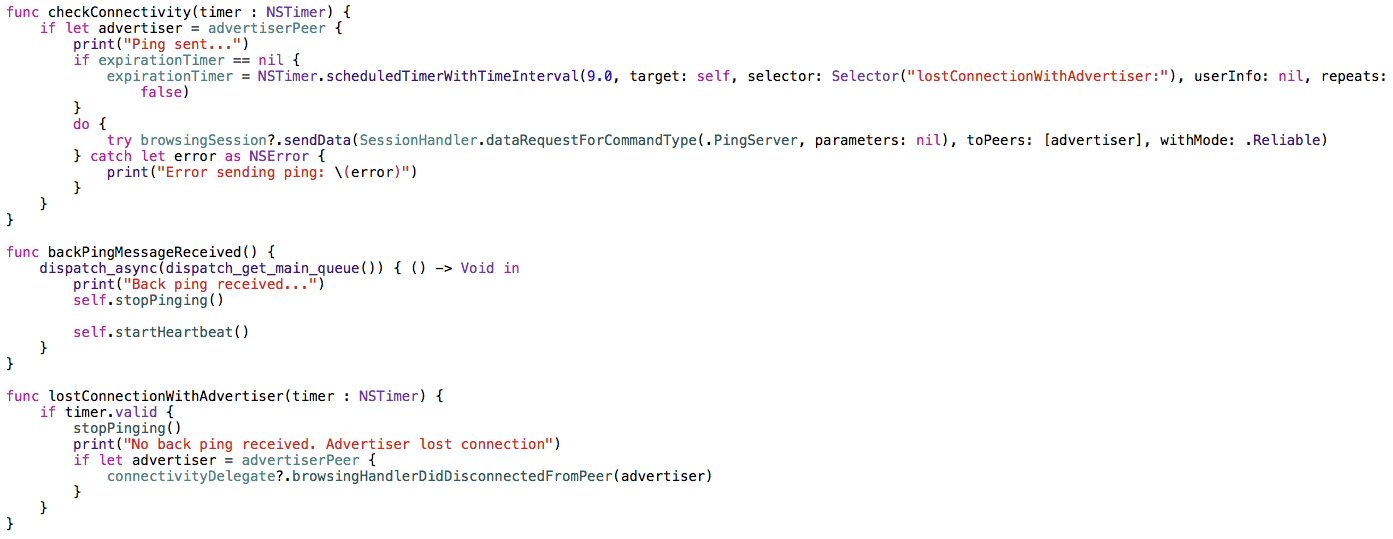
The first problem mentioned above can be solved by implementing the health check mechanism. At certain intervals, the browser sends a lightweight ping message, which is waiting for a response. If the answer does not arrive within a few seconds, we can assume that the connection to the advertizer is lost. In our project, this mechanism was implemented as follows:

Increasing the number of connected devices proportionally reduces the stability of the entire system
This problem is the main one in the article. If, in the case of two or three devices, the stability of operation is more or less normal, with seven or nine, not to mention a larger number, then the stability begins to tend to zero. The framework just doesn't work. I will make a reservation right away: we are talking about a connection like "an advertiser and many browsers." Perhaps there are some other more stable configurations, but this one is the easiest to implement, and when using the framework, I want it to work equally stable for all configurations.
No solution to this problem was found during the work on the project, and was not sought further, since it was more and more like sticking up a riddled inflatable boat in the middle of the ocean.
Fear, hatred and conclusions
While working on this project and exploring this framework, I still hoped to the end that I was doing something wrong, and that Apple could not be so screwed up. But after a couple of hours of researching the issue, I found many similar complaints from the developers and a good article devoted to the same problems.
Many messages are two years old, and you might think that all these are children's diseases of the framework, and in iOS 7 it was introduced in the alpha version, but now it's already 2016, the latest version of iOS is 9.2, but the problems remained the same .
MultipeerConnectivity is highly discouraged for use with more than three devices. For two or three devices, the forecast is favorable, but there will still be many problems: to achieve what, in theory, should be out of the box, you need to spend twice as much time.
The article will end well with a couple of comments on the topic at devforums.apple.com/message/956192#956192 and a link to our application on GitHub github.com/DataArt/SmartSlides .


Confirmation of the problem :
www.ymc.ch/en/multipeer-connectivity-a-bag-of-hurt
stackoverflow.com/questions/28418965/multipeer-connectivity-vs-real-time-matches
devforums.apple.com/message/956192 # 956192
devforums.apple.com/message/982861#982861