January 12, 2016 at 09:35
Java and time: part two
- Tutorial
This article was continued in the first part and is devoted to the new Date Time API , which was introduced in Java 8. I initially wanted to make this topic separate, since it is quite large and serious. I myself have not fully started using this API in projects, so we will deal together along the way. In principle, there is no urgent need to switch to the new API, moreover, many have not yet started projects in Java 8, which means that there is still time for development.
In the article I will try not to slip into the banal translation of the staff documentation, I would like to concentrate more on what seemed to me especially important.
As for working with time, there have been complaints about the standard Java library for a long time. The criticized version of the API was developed a long time ago and serious errors were made in its design. As an alternative, many used the third-party Joda-time library. I myself am not a very big fan of Joda-time for several reasons:
Probably it’s worth starting with what didn’t suit many in the old API. And then, in order not to lose time, I will immediately indicate that the new API has changed for the better.
Breakdown of classes into packages:
Class Names:
Immutability and thread safety:
Accuracy:
Storing time and date stamps:
Time Zone Indication:
Testing:
Month numbering:
Tagging:
Duration Designation:
It’s also probably worth talking about what I’m definitely not going to call “deterioration”, but carefully call it “fears”:
I’ll tell you more about these and other cases that alerted me in the examples.
Let's start as usual with time zones. The new java.time.ZoneId class designates a time zone. Its two subclasses java.time.ZoneRegion and java.time.ZoneOffset implement two types of time zones: a geographical time zone and a time zone by a simple offset relative to UTC, UT or GMT. The rules for translating arrows are placed in separate java.time.zone.ZoneRules class , an instance of which is available through the java.time.ZoneId # getRules method.
In general, apart from the specified refactoring, I did not find any significant fundamental changes here, except that the rules for translating arrows now provide more methods for requesting information. Therefore, everything written in the old article The same is true for new classes of time zones, except that the methods differ somewhat in name.
It is not very clear why case-4, which actually requests the same as case-3, as a result creates java.time.ZoneRegion, and not java.time.ZoneOffset.
A special constant java.time.ZoneOffset # UTC has been set up for the UTC time zone, but nevertheless, a request for ZoneId.of ("UTC") in the new API already issues an object of the java.util.ZoneRegion class, and not this constant.
" Time is a clock " - as some physicists claim. And that phrase is key to the new API, where the java.time.Clock class is the cornerstone. And just like some of our watches, time for us can be: constant (inactive), late, running with varying degrees of accuracy, moving arrows differently in different time zones. In general, in the new API, you can use (or define yourself) almost any course of time, including for testing tests.
A standard java.time.Clock instance can be created only by factory static methods (the class itself is abstract).
The standard instance of java.time.Clock always knows about the time zone in which it was created (although this is also unnecessary).
Let's go through the factory methods:
You can override java.time.Clock and write your own logic for issuing time, for example, a clock that gives a random time for each request, why not?
The java.time.Clock object has only three working methods:
Now a little criticism:
java.time.Instant is the new java.util.Date, only immutable, with nanosecond precision and the correct name. Inside, it stores Unix-time in the form of two fields: long with the number of seconds, and int with the number of nanoseconds inside the current second.
The value of both fields can be requested directly, and you can also be asked to calculate the more familiar Unix-time representation of milliseconds for the old API:
Like java.util.Date (if used correctly), the java.time.Instant class object knows nothing about the time zone.
Separately, it is worth mentioning the java.time.Instant.toString () method. If earlier java.util.Date.toString () worked taking into account the current locale and the default time zone, then the new java.time.Instant.toString () always generates a text representation in the UTC time zone and the same ISO-8601 format - this applies and outputting variables to the IDE when debugging:
Let's take a look at the base interface java.time.temporal.TemporalAccessor . The TemporalAccessor interface is a reference for requesting separate partial information on the current point or label and it is implemented by all temporary classes of the new API.
Let's ask the Unix-time value from java.time.Instant:
We get an exception with a completely inexplicable message:
Having made a little money, the reason for the exception becomes clear: the result theoretically may not fit in the int range (although at the moment it fits). The INSTANT_SECONDS field must be requested as long. We will correct the request, along the way, we will request additional meta-information:
The CLOCK_HOUR_OF_DAY field is not supported by the Instant type. This is quite expected, because to find out the hour of the day by time point, we need to specify a time zone, which is not in java.time.Instant. Let's try to request this value all the same:
Everything is correct - when requesting an hour of the day, we get an exception. It’s great that the request method did not use the default time zone (which is not in the new API).
In addition to querying individual fields, you can query values using more complex algorithm-strategies inheriting the java.time.TemporalQuery interface :
java.time.temporal.Temporal - the interface is a descendant of the TemporalAccessor interface. Introduces the operations of shifting the time point / mark forward and backward, the operation of replacing part of the temporal information, as well as the operation of calculating the distance to another time point / mark. It is implemented by almost all the "full" time classes of the new API.
We try to move the label a day ahead and calculate the difference:
Since all classes have finally become immutable, you should not forget to assign the results of operations to another variable, since the original does not change during the operation - everything is the same as java.lang.String or java.math.BigDecimal.
Let's try changing the hour of the day in java.time.Instant:
We are expected to get our hands on it, since this operation requires a time zone.
java.time.temporal.TemporalAdjuster - interface of a strategy for correcting a time point / mark, for example, moving on the first day of the current code. Previously, you had to write your own helper classes for working with java.util.Calendar fields - now all the code can be written in the form of a strategy, if the necessary one is not already in the standard delivery:
Now you can go to the temporary classes.
java.time.LocalTime is a tuple (hour, minutes, seconds, nanoseconds)
java.time.LocalDate is a tuple (year, month, day of the month)
java.time.LocalDateTime are both tuples together
I would also refer to these classes and specific classes for storing part of the information: java.time.MonthDay , java.time.Year , java.time.YearMonth
All these classes have in common is that they contain timestamps or parts of them, but the time points on the time axis define by themselves not able (even LocalDateTime) - since none of them has a time zone or even an offset.
These classes, like all others, support the java.lang.Comparable interface, but you need to understand that this is a comparison of time stamps, not time points:
I must say that despite the inevitable parallels in use between java.time.LocalTime and java.sql.Time, as well as between java.time.LocalDate and java.sql.Date, these are completely different classes. In the old API, the classes java.sql.Time and java.sql.Date are the heirs of java.util.Date, which means that their interpretation (getting the hour value for example) depends on the time zone in which the object of this class was created and on the time the zone in which this object will be read. In the new API, the java.time.LocalTime and java.time.LocalDate classes are honest tuples of values and the time zone is not involved in writing and reading the hour value.
However, a time zone is necessary when creating them from a time point, since the interpretation of days-hours depends on it:
An exception is thrown due to the fact that there is simply no place to take the time zone (in Instant it is not, but we do not take the zone by default). But it can be obtained either from the java.time.Clock clock, or transferred additionally:
Now everything works, but the ease with which you can make a mistake is somewhat alarming.
In the comments to the previous article , they mentioned that real paranoids should also indicate a calendar when operations with calendar values (which includes creating objects of all time classes except Instant). The new API has several calendars called chronologies:
In general, it is difficult to imagine a case where an IsoChronology chronology other than ISO-8601 (which is almost equivalent to the Gregorian calendar) may be required , but, if anything, the new API supports it.
java.time.ZonedDateTime - an analogue of java.util.Calendar. This is the most powerful class with complete information about the time context, includes the time zone, so this class conducts all operations with shifts correctly.
Let's try to create a ZonedDateTime from LocalDateTime:
Immediately we get hands on the fact that the operation (in LocalDateTime) does not have a time zone, and the new API again refuses to use the default time zone (this is very good).
The correct option:
Let's see how strict ZonedDateTime is with respect to incorrectly specified dates. There is a lenient switch in java.util.Calendar, which can be set to both "strict" and "soft" mode. There is no such switch in the new API.
February 29th not in a leap year will not pass:
The 60th second cannot be specified:
But the indication of the label at the time the hands are switched to summer time passes successfully, and the result differs from the expected one. In strict mode, java.util.Calendar did not miss this (see the previous article ).
I won’t write anything about operations in ZonedDateTime - you can see the documentation.
java.time.OffsetTime is LocalTime + ZoneOffset
java.time.OffsetDateTime is LocalDateTime + ZoneOffset I
must say that just as the offset is not a time zone (the time zone is a history of offsets, plus even more information), OffsetDateTime also stores less information than ZonedDateTime. OffsetDateTime can fully indicate the time point on the time axis, but it is not able to produce completely correct shifts, since this class does not know anything about future and past transfers of arrows.
These classes can be used if only the current user offset is known by the situation (for example, via JavaScript) They do not allow completely correct shift operations, so it is better to use ZonedDateTime - if there is a way to find out the user's full time zone. On the other hand, between two instances of OffsetDateTime you can always successfully and correctly calculate the difference in seconds.
Of all the classes of the new API, only three uniquely determine the time point on the time axis: java.time.Instant, java.time.ZonedDateTime and java.time.OffsetTime.
Shift and time modification operations are generally performed correctly only in java.time.ZonedDateTime, since only he knows about time zones.
Let's run an example with the calculation of elapsed hours on the day the hands are switched to winter time:
Cases case # 1 and case # 2 are executed on the full-fledged ZonedDateTime class and give the correct result, since on this day the arrows moved back, as a result, it turns out 25 hours.
Case case # 3 shows that OffsetDateTime fully stores information about a point on the time axis, but case # 4 shows that with the loss of the time zone, this class performs calculations differently.
The same is with case # 5 and case # 6 - despite the fact that Instant fully defines a point on the time axis, it performs calculations without a time zone.
Cases case # 7 and case # 8 - show that LocalDateTime can neither fully reflect the time point nor perform calculations without a time zone.
By no means do I want to say that these examples show errors in the new API (if someone thought so). All effects are expected and explainable. Another thing strains - how much this behavior will be realized by an army of Java developers. In the old API, such potential problems were impossible, since only one java.util.Calendar class was involved in all the calculations, and the only thing that could be done incorrectly in it was to forget to explicitly specify the time zone.
Perhaps it was worth banning most operations over time in all classes except ZonedDateTime, since only he is one in the course of arrow translations. Perhaps it was worthwhile to prohibit the calculation of Duration using LocalDateTime, since without a time zone it does not define a time point. I am not ready now to somehow seriously discuss the possibility or impossibility of such solutions, but I have a sense of danger from the new API.
There are two classes in the new API for determining duration.
java.time.Period - description of the calendar duration (period) in the form of a tuple (year, month, day).
java.time.Duration - A description of the exact duration as an integer number of seconds and fractions of the current second in the form of nanoseconds.
The difference between the two can be shown in the example with the day the hands are switched to winter time. Due to the movement of the hands back, this calendar day consists of 25 hours.
When adding Period.of (0, 0, 1), we correctly move to the next calendar day. In the case of adding Duration.of (1, ChronoUnit.DAYS), we actually add 24 hours and do not move on to the next calendar day.
In the old API, it was always a surprise that java.text.SimpleDateFormat was not thread safe. Intuitive thread-safety was expected, since SimpleDateFormat did not seem to have to store any state.
The new API resolved this issue.
java.time.format.DateTimeFormatter - the class defines formatting and parsing settings.
If you look in the JavaDoc, you can see that the new API has added more options for formatting. It is also interesting that parsing does not return a specific time class, but an abstract java.time.Temporal (java.time.format.Parsed as an implementation), and from it, as from a bag with spare parts, we can assemble an object of the class that we needed.
I will give the class diagram of the new API. Some minor classes are not given, as well as the implementation of such interfaces as java.util.Serializable and java.lang.Comparable.
Several methods have been implemented to exchange information between the old and new APIs. Moreover, it was implemented competently enough: the old API knows about the new API, but the new API does not know anything about the old API at all. Purely theoretically, this will allow someday to throw out all the old classes, but I doubt that this will happen in our lifetime.
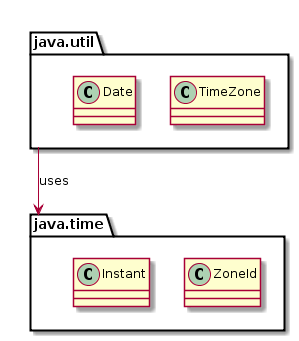
And again there is a nuance: in the case when we drive time in java.util.Date and vice versa, accuracy is irretrievably lost, because the old API operates in milliseconds, and the new one operates in nanoseconds. This is not critical as long as we have a single millisecond source of current time in the form of java.lang.System # currentTimeMillis, but in the future this may become a problem, especially for tests.
I still have a mixed feeling from the new API. On the one hand, there are significant improvements, on the other hand, we got two main problems: the ability to perform unexpectedly incorrect time shifts when using classes other than ZonedDateTime, and the ability to unexpectedly get an exception in runtime when the time zone is not available in operations. In addition, the new API is somewhat more complicated than the old. How critical this is will be shown by mass practice.
In the article I will try not to slip into the banal translation of the staff documentation, I would like to concentrate more on what seemed to me especially important.
History
As for working with time, there have been complaints about the standard Java library for a long time. The criticized version of the API was developed a long time ago and serious errors were made in its design. As an alternative, many used the third-party Joda-time library. I myself am not a very big fan of Joda-time for several reasons:
- all the same, classes of the standard library cannot be avoided, in 99% of cases their functionality copes with the task, and I don’t want to multiply entities beyond the need;
- The joda-time library does not use the standard database of time zones from the JVM, so the next time the legislators maneuver, we have to remember that tzdata needs to be updated not only in the JDK, but also in the joda-time library .
Comparison
Probably it’s worth starting with what didn’t suit many in the old API. And then, in order not to lose time, I will immediately indicate that the new API has changed for the better.
Breakdown of classes into packages:
- In the old API, classes for working over time are seated in the java.util and java.sql packages - among a large number of other classes. In addition, there are also classes java.util.concurrent.TimeUnit and java.text.DateFormat with descendants.
- In the new API for working with time, a separate java.time package is allocated
Class Names:
- The class names in the old API do not reflect the essence of what is happening. In the old API, there are two classes that are able to indicate a point on the time axis: java.util.Date and java.util.Calendar. The java.util.Date class indicates the time in milliseconds by Unix-time, and not the date at all (it is named most likely for the same reasons that the / bin / date utility prints time on the command line). The java.util.Calendar class is also not a calendar at all, it has a state in the form of a time zone, calendar and time fields.
- In the new API, class names are given more meaningfully. There are classes similar to those already mentioned: java.time.Instant and java.time.ZonedDateTime. There are also many other classes for more specialized use.
Immutability and thread safety:
- The java.util.Date class is not immutable and is burdened by a large number of unnecessary methods, which, although already marked as obsolete, are unlikely to be deleted in the foreseeable future. The mutability of java.util.Date forces some to clone the instances of java.util.Date - so that the enemy does not get through:
public class UserBean {
    private final Date created;
    public UserBean(Date created) {
        this.created = (Date) created.clone();
    }
}
The java.util.Calendar class is also mutable. Although this does not cause any particular problems, since most understand that he has an internal state that is changing, and passing it by arguments is somehow not very accepted.
Since classes in the old API are mutable, use them in a multi-threaded environment with caution. In particular, java.util.Date can be considered "efficiently" thread safe if you do not call its obsolete methods. - All classes in the new API are immutable and, as a result, thread safe
Accuracy:
- The accuracy of the representation in time is one millisecond. For most practical tasks this is more than enough, but sometimes you want to have higher accuracy.
- In the new API, time representations are one nanosecond, which is a million times more accurate.
Storing time and date stamps:
- Classes for time and date stamps (java.sql.Date and java.sql.Time) are not a pure representation of time and date stamps, since they are inherited from java.util.Date and somehow store the full Unix-time value, ignoring some of this values.
- In the new API, the corresponding classes java.time.LocalDate and java.time.LocalTime store pure tuples (yyyy, MM, dd) and (HH, mm, dd), respectively, and there is no unnecessary information or logic in these classes. Also introduced is the java.time.LocalDateTime class which stores both tuples.
Time Zone Indication:
- In the old API, many actions where you need to specify a time zone can be performed without specifying it. In this case, the default time zone is taken, and the programmer may not even realize that he missed something.
- In the new API, all actions where you need to specify a time zone require it explicitly: either as a method argument, or the time zone is displayed directly in the method name. In other words, the default time zone is not used anywhere by default.
Testing:
- The old API is very difficult to use in tests in which you need to test the behavior of logic over time (this is described in detail in the previous article).
- The new API introduced a special abstract class java.time.Clock, a single instance of which can be injected into the context or simply passed to your logic. By overriding this class for tests, you can control the flow of time for your code during its execution.
Month numbering:
- In the old API, the month numbers go from 0, which is very unintuitive.
- In the new API, the month numbers go from 1. A new java.time.Month enumeration has appeared .
Tagging:
- In java.util.Calendar, set year-month-day-hour-minute-second, but to reset the milliseconds you had to make a separate call.
- In java.time.ZonedDateTime, all fields are set at once, including nanoseconds.
Duration Designation:
- There are no classes in the old API for determining duration and time spans. Usually a simple long is used and the duration is stored in milliseconds.
- The new API defines special classes for duration and periods.
Fears
It’s also probably worth talking about what I’m definitely not going to call “deterioration”, but carefully call it “fears”:
- if earlier there were two actively used classes: java.util.Date and java.util.Calendar, now there are much more classes, plus a hierarchy of interfaces and abstract classes has been added to them.
- partly because of the large number of new classes, there were some nuances of work that I managed to find in a few hours of research and which we will talk about later.
- the new API does not control the correct operation in compile-time. Many problems with the lack of a time zone will appear only in runtime - as will be seen later in the examples. I would prefer a less flexible but more strict contract.
- in the course of work, a larger number of objects are generated. For example, getting the current time point through Instance.now (), in addition to the java.time.Instance instance itself, also creates java.time.Clock for each request, although it doesn’t need it at all - in the current implementation, calling System.currentTimeMillis ( ) Also, intermediate objects are created during many other actions. But I don’t think that for a typical backend this will present any kind of problem - neither in memory consumption, nor in execution time. Hardcore workers still store time in long, or even pack in int.
- the problem (is this a problem?) with regard to leap second did not solve in any way. In fact, the new library still does not go a step away from Unix-time and relies on an external translation of the second hand back. The past at the same time still loses a second every time and moves forward. We never got a library for accurate scientific calculations.
I’ll tell you more about these and other cases that alerted me in the examples.
Time zones
Let's start as usual with time zones. The new java.time.ZoneId class designates a time zone. Its two subclasses java.time.ZoneRegion and java.time.ZoneOffset implement two types of time zones: a geographical time zone and a time zone by a simple offset relative to UTC, UT or GMT. The rules for translating arrows are placed in separate java.time.zone.ZoneRules class , an instance of which is available through the java.time.ZoneId # getRules method.
In general, apart from the specified refactoring, I did not find any significant fundamental changes here, except that the rules for translating arrows now provide more methods for requesting information. Therefore, everything written in the old article The same is true for new classes of time zones, except that the methods differ somewhat in name.
    @Test
    public void testZoneId() throws Exception {
        // case-1
        ZoneId zid1 = ZoneId.of("Europe/Moscow");
        Assert.assertEquals("ZoneRegion", zid1.getClass().getSimpleName());
        // case-2
        ZoneId zid2 = ZoneId.of("UTC+4");
        Assert.assertEquals("ZoneRegion", zid2.getClass().getSimpleName());
        // case-3
        ZoneId zid3 = ZoneId.of("+03:00:00");
        Assert.assertEquals("ZoneOffset", zid3.getClass().getSimpleName());
        // case-4
        ZoneId zid4 = ZoneId.ofOffset("UTC", ZoneOffset.of("+03:00:00"));
        Assert.assertEquals("ZoneRegion", zid4.getClass().getSimpleName());
    }
It is not very clear why case-4, which actually requests the same as case-3, as a result creates java.time.ZoneRegion, and not java.time.ZoneOffset.
    @Test
    public void testZoneUTC() throws Exception {
        ZoneId zid1 = ZoneOffset.UTC;
        Assert.assertEquals("ZoneOffset", zid1.getClass().getSimpleName());
        ZoneId zid2 = ZoneId.of("Z");
        Assert.assertEquals("ZoneOffset", zid2.getClass().getSimpleName());
        Assert.assertSame(ZoneOffset.UTC, zid2);
        ZoneId zid3 = ZoneId.of("UTC");
        Assert.assertEquals("ZoneRegion", zid3.getClass().getSimpleName());
    }
A special constant java.time.ZoneOffset # UTC has been set up for the UTC time zone, but nevertheless, a request for ZoneId.of ("UTC") in the new API already issues an object of the java.util.ZoneRegion class, and not this constant.
Clock
" Time is a clock " - as some physicists claim. And that phrase is key to the new API, where the java.time.Clock class is the cornerstone. And just like some of our watches, time for us can be: constant (inactive), late, running with varying degrees of accuracy, moving arrows differently in different time zones. In general, in the new API, you can use (or define yourself) almost any course of time, including for testing tests.
A standard java.time.Clock instance can be created only by factory static methods (the class itself is abstract).
The standard instance of java.time.Clock always knows about the time zone in which it was created (although this is also unnecessary).
Let's go through the factory methods:
- java.time.Clock # systemDefaultZone - the method creates the system clock in the default time zone.
- java.time.Clock # systemUTC - the method creates a system clock in the UTC time zone.
- java.time.Clock # system - the method creates a system clock in the specified time zone.
- java.time.Clock # fixed - the method creates clocks of constant time, that is, the clock does not go, but stands still.
- java.time.Clock # offset - the method creates a proxy over the specified hours, which shifts the time by the specified amount.
- java.time.Clock # tickSeconds - the method creates a system clock in the specified time zone, the value of which is rounded to the nearest whole second.
- java.time.Clock # tickMinutes - the method creates a system clock in the specified time zone, the value of which is rounded to the nearest minute.
- java.time.Clock # tick - the method creates a proxy over the specified hours, which rounds the time values to the specified period.
- java.time.Clock # withZone - the method creates a copy of the current clock in a different time zone.
You can override java.time.Clock and write your own logic for issuing time, for example, a clock that gives a random time for each request, why not?
The java.time.Clock object has only three working methods:
- java.time.Clock # getZone - request the time zone in which the clock works.
- java.time.Clock # millis - request the current time in milliseconds by Unix-time
- java.time.Clock # instant - request the current time in the most general sense (in fact - in nanoseconds by Unix-time)
Now a little criticism:
- I would get a clean java.time.Clock interface and a separate java.time.Clocks factory - but I do not insist.
- For some reason, a time zone is necessarily imposed on the watch. The watch itself does not need it at all: neither java.time.Clock # millis, nor java.time.Clock # instant use a time zone. The time zone of the clock is requested in the factory methods {Zoned, Local, Offset} DateTime, but it was there that it could be passed as a separate parameter in the method, and not stored in ballast in java.time.Clock.
- Unfortunately, there is no MockClock class for manual time management for tests; you have to write it yourself - this is not a problem, but it would be better if it were immediately.
- The watch does not have the java.time.Clock # ticks method for measuring timeless nanosecond ticks (analogous to java.lang.System # nanoTime). On the one hand, the absence of such a method is understandable, because it does not apply to calculating time. But on the other hand, this applies to measuring the duration of operations. Therefore, for managing non-time ticks (and measuring duration, respectively) in tests, it would be nice if the method for ticks were also in this interface, if only because manual advancement of time forward in MockClock by default would advance both time and ticks at the same time .
Instant
java.time.Instant is the new java.util.Date, only immutable, with nanosecond precision and the correct name. Inside, it stores Unix-time in the form of two fields: long with the number of seconds, and int with the number of nanoseconds inside the current second.
The value of both fields can be requested directly, and you can also be asked to calculate the more familiar Unix-time representation of milliseconds for the old API:
    @Test
    public void testInstantFields() throws Exception {
        Instant instant = Clock.systemDefaultZone().instant();
        System.out.println(instant.getEpochSecond());
        System.out.println(instant.getNano());
        System.out.println(instant.toEpochMilli());
    }
Like java.util.Date (if used correctly), the java.time.Instant class object knows nothing about the time zone.
Separately, it is worth mentioning the java.time.Instant.toString () method. If earlier java.util.Date.toString () worked taking into account the current locale and the default time zone, then the new java.time.Instant.toString () always generates a text representation in the UTC time zone and the same ISO-8601 format - this applies and outputting variables to the IDE when debugging:
    @Test
    public void testInstantString() throws Exception {
        Instant instant1 = Clock.system(ZoneId.of("Europe/Paris")).instant();
        System.out.println(instant1.toString());
        Instant instant2 = Clock.systemUTC().instant();
        System.out.println(instant2.toString());
        Instant instant3 = Clock.systemDefaultZone().instant();
        System.out.println(instant3.toString());
    }
2016-01-06T15: 22: 53.403Z
2016-01-06T15: 22: 53.417Z
2016-01-06T15: 22: 53.423Z
Basic interfaces
Let's take a look at the base interface java.time.temporal.TemporalAccessor . The TemporalAccessor interface is a reference for requesting separate partial information on the current point or label and it is implemented by all temporary classes of the new API.
Let's ask the Unix-time value from java.time.Instant:
    @Test(expected = DateTimeException.class)
    public void testTemporalAccessor2() throws Exception {
        TemporalAccessor ta = Clock.systemUTC().instant();
        // java.time.DateTimeException: Invalid value for InstantSeconds \
        //               (valid values -9223372036854775808 - 9223372036854775807): 1451983908
        System.out.println(ta.get(ChronoField.INSTANT_SECONDS));
    }
We get an exception with a completely inexplicable message:
java.time.DateTimeException: Invalid value for InstantSeconds \
(valid values -9223372036854775808 - 9223372036854775807): 1451983908
Having made a little money, the reason for the exception becomes clear: the result theoretically may not fit in the int range (although at the moment it fits). The INSTANT_SECONDS field must be requested as long. We will correct the request, along the way, we will request additional meta-information:
    @Test
    public void testTemporalAccessor3() throws Exception {
        TemporalAccessor ta = Clock.systemUTC().instant();
        System.out.println(ta.getLong(ChronoField.INSTANT_SECONDS));
        ValueRange vr = ta.range(ChronoField.INSTANT_SECONDS);
        System.out.println(vr.getMinimum());
        System.out.println(vr.getMaximum());
        System.out.println(ta.isSupported(ChronoField.INSTANT_SECONDS));
        System.out.println(ta.isSupported(ChronoField.CLOCK_HOUR_OF_DAY));
    }
1452094053
-9223372036854775808
9223372036854775807
true
false
The CLOCK_HOUR_OF_DAY field is not supported by the Instant type. This is quite expected, because to find out the hour of the day by time point, we need to specify a time zone, which is not in java.time.Instant. Let's try to request this value all the same:
    @Test(expected = UnsupportedTemporalTypeException.class)
    public void testTemporalAccessor1() throws Exception {
        TemporalAccessor ta = Clock.systemUTC().instant();
        // java.time.temporal.UnsupportedTemporalTypeException: Unsupported field: ClockHourOfDay
        System.out.println(ta.getLong(ChronoField.CLOCK_HOUR_OF_DAY));
    }
Everything is correct - when requesting an hour of the day, we get an exception. It’s great that the request method did not use the default time zone (which is not in the new API).
In addition to querying individual fields, you can query values using more complex algorithm-strategies inheriting the java.time.TemporalQuery interface :
    @Test
    public void testTemporalAccessor4() throws Exception {
        TemporalAccessor ta = Clock.systemUTC().instant();
        ZoneId zoneId1 = ta.query(TemporalQueries.zone());
        ZoneId zoneId2 = TemporalQueries.zone().queryFrom(ta);
        Assert.assertEquals(zoneId1, zoneId2);
        TemporalUnit unit1 = ta.query(TemporalQueries.precision());
        TemporalUnit unit2 = TemporalQueries.precision().queryFrom(ta);
        Assert.assertEquals(unit1, unit2);
    }
java.time.temporal.Temporal - the interface is a descendant of the TemporalAccessor interface. Introduces the operations of shifting the time point / mark forward and backward, the operation of replacing part of the temporal information, as well as the operation of calculating the distance to another time point / mark. It is implemented by almost all the "full" time classes of the new API.
We try to move the label a day ahead and calculate the difference:
    @Test
    public void testTemporal1() throws Exception {
        Temporal t1 = Clock.systemUTC().instant();
        Temporal t2 = t1.plus(1, ChronoUnit.DAYS);
        Assert.assertEquals(Duration.ofDays(1).getSeconds(),
                t2.getLong(ChronoField.INSTANT_SECONDS) - t1.getLong(ChronoField.INSTANT_SECONDS));
        Assert.assertEquals(24, t1.until(t2, ChronoUnit.HOURS));
        Assert.assertEquals(24, Duration.between(t1, t2).get(ChronoUnit.HOURS));
    }
Since all classes have finally become immutable, you should not forget to assign the results of operations to another variable, since the original does not change during the operation - everything is the same as java.lang.String or java.math.BigDecimal.
Let's try changing the hour of the day in java.time.Instant:
    @Test(expected = UnsupportedTemporalTypeException.class)
    public void testTemporal2() throws Exception {
        Temporal t = Clock.systemUTC().instant();
        // java.time.temporal.UnsupportedTemporalTypeException: Unsupported field: HourOfDay
        t.with(ChronoField.HOUR_OF_DAY, 2);
    }
We are expected to get our hands on it, since this operation requires a time zone.
java.time.temporal.TemporalAdjuster - interface of a strategy for correcting a time point / mark, for example, moving on the first day of the current code. Previously, you had to write your own helper classes for working with java.util.Calendar fields - now all the code can be written in the form of a strategy, if the necessary one is not already in the standard delivery:
    @Test
    public void testTemporalAdjuster() throws Exception {
        ZonedDateTime zdt = ZonedDateTime.of(2005, 10, 30, 0, 0, 0, 0, ZoneId.of("Europe/Moscow"));
        ZonedDateTime zdt1 = zdt.with(TemporalAdjusters.firstDayOfYear());
        ZonedDateTime zdt2 = (ZonedDateTime) TemporalAdjusters.firstDayOfYear().adjustInto(zdt);
        Assert.assertEquals(zdt1, zdt2);
        Assert.assertEquals(2005, zdt1.get(ChronoField.YEAR));
        Assert.assertEquals(1, zdt1.get(ChronoField.MONTH_OF_YEAR));
        Assert.assertEquals(1, zdt1.get(ChronoField.DAY_OF_MONTH));
    }
Now you can go to the temporary classes.
LocalTime, LocalDate, LocalDateTime
java.time.LocalTime is a tuple (hour, minutes, seconds, nanoseconds)
java.time.LocalDate is a tuple (year, month, day of the month)
java.time.LocalDateTime are both tuples together
I would also refer to these classes and specific classes for storing part of the information: java.time.MonthDay , java.time.Year , java.time.YearMonth
All these classes have in common is that they contain timestamps or parts of them, but the time points on the time axis define by themselves not able (even LocalDateTime) - since none of them has a time zone or even an offset.
These classes, like all others, support the java.lang.Comparable interface, but you need to understand that this is a comparison of time stamps, not time points:
    @Test
    public void testLocalDateTime() throws Exception {
        ZonedDateTime zdt1 = ZonedDateTime.of(2015, 1, 10, 15, 0, 0, 0, ZoneId.of("Europe/Moscow"));
        ZonedDateTime zdt2 = ZonedDateTime.of(2015, 1, 10, 14, 0, 0, 0, ZoneId.of("Europe/London"));
        Assert.assertEquals(-1, zdt1.compareTo(zdt2));
        LocalDateTime ldt1 = zdt1.toLocalDateTime();
        LocalDateTime ldt2 = zdt2.toLocalDateTime();
        Assert.assertEquals(+1, ldt1.compareTo(ldt2));
    }
I must say that despite the inevitable parallels in use between java.time.LocalTime and java.sql.Time, as well as between java.time.LocalDate and java.sql.Date, these are completely different classes. In the old API, the classes java.sql.Time and java.sql.Date are the heirs of java.util.Date, which means that their interpretation (getting the hour value for example) depends on the time zone in which the object of this class was created and on the time the zone in which this object will be read. In the new API, the java.time.LocalTime and java.time.LocalDate classes are honest tuples of values and the time zone is not involved in writing and reading the hour value.
However, a time zone is necessary when creating them from a time point, since the interpretation of days-hours depends on it:
    @Test(expected = DateTimeException.class)
    public void testLocalDateTimeCreate1() throws Exception {
        Clock clock = Clock.system(ZoneId.of("Europe/Moscow"));
        // java.time.DateTimeException: Unable to obtain LocalDateTime \
        //        from TemporalAccessor: 2016-01-11T15:15:03.180Z of type java.time.Instant
        LocalDateTime ldt = LocalDateTime.from(clock.instant());
    }
An exception is thrown due to the fact that there is simply no place to take the time zone (in Instant it is not, but we do not take the zone by default). But it can be obtained either from the java.time.Clock clock, or transferred additionally:
    @Test
    public void testLocalDateTimeCreate2() throws Exception {
        Clock clock = Clock.system(ZoneId.of("Europe/Moscow"));
        LocalDateTime ldt1 = LocalDateTime.ofInstant(clock.instant(), ZoneId.of("UTC"));
        System.out.println(ldt1);
        LocalDateTime ldt2 = LocalDateTime.now(clock);
        System.out.println(ldt2);
    }
Now everything works, but the ease with which you can make a mistake is somewhat alarming.
In the comments to the previous article , they mentioned that real paranoids should also indicate a calendar when operations with calendar values (which includes creating objects of all time classes except Instant). The new API has several calendars called chronologies:
    @Test
    public void testChronology() throws Exception {
        Clock clock = Clock.system(ZoneId.of("Europe/Moscow"));
        ZonedDateTime zdt = ZonedDateTime.now(clock);
        ChronoLocalDateTime dt1 = IsoChronology.INSTANCE.localDateTime(zdt);
        System.out.println(dt1); // 2016-01-11T18:48:15.145
        ChronoLocalDateTime dt2 = JapaneseChronology.INSTANCE.localDateTime(zdt);
        System.out.println(dt2); // Japanese Heisei 28-01-11T18:48:15.145
        ChronoLocalDateTime dt3 = ThaiBuddhistChronology.INSTANCE.localDateTime(zdt);
        System.out.println(dt3); // ThaiBuddhist BE 2559-01-11T18:48:15.145
    }
In general, it is difficult to imagine a case where an IsoChronology chronology other than ISO-8601 (which is almost equivalent to the Gregorian calendar) may be required , but, if anything, the new API supports it.
ZonedDateTime
java.time.ZonedDateTime - an analogue of java.util.Calendar. This is the most powerful class with complete information about the time context, includes the time zone, so this class conducts all operations with shifts correctly.
Let's try to create a ZonedDateTime from LocalDateTime:
    @Test(expected = DateTimeException.class)
    public void testZoned1() throws Exception {
        LocalDateTime ldt = LocalDateTime.of(2015, 1, 10, 0, 0, 0, 0);
        // java.time.DateTimeException: Unable to obtain ZonedDateTime from TemporalAccessor: 2015-01-10T00:00 of type java.time.LocalDateTime
        ZonedDateTime zdt = ZonedDateTime.from(ldt);
    }
Immediately we get hands on the fact that the operation (in LocalDateTime) does not have a time zone, and the new API again refuses to use the default time zone (this is very good).
The correct option:
    @Test
    public void testZoned2() throws Exception {
        LocalDateTime ldt = LocalDateTime.of(2015, 1, 10, 0, 0, 0, 0);
        ZonedDateTime zdt = ZonedDateTime.of(ldt, ZoneId.of("Europe/Moscow"));
    }
Let's see how strict ZonedDateTime is with respect to incorrectly specified dates. There is a lenient switch in java.util.Calendar, which can be set to both "strict" and "soft" mode. There is no such switch in the new API.
February 29th not in a leap year will not pass:
    @Test(expected = DateTimeException.class)
    public void testLenient2() throws Exception {
        // java.time.DateTimeException: Invalid date 'February 29' as '2005' is not a leap year
        ZonedDateTime.of(2005, 2, 29, 2, 30, 0, 0, ZoneId.of("Europe/Moscow"));
    }
The 60th second cannot be specified:
    @Test(expected = DateTimeException.class)
    public void testLenient3() throws Exception {
        // java.time.DateTimeException: Invalid value for SecondOfMinute (valid values 0 - 59): 60
        ZonedDateTime.of(2005, 2, 20, 2, 30, 60, 0, ZoneId.of("Europe/Moscow"));
    }
But the indication of the label at the time the hands are switched to summer time passes successfully, and the result differs from the expected one. In strict mode, java.util.Calendar did not miss this (see the previous article ).
    @Test
    public void testLenient1() throws Exception {
        ZonedDateTime zdt = ZonedDateTime.of(2005, 3, 27, 2, 30, 0, 0, ZoneId.of("Europe/Moscow"));
        Assert.assertEquals(3, zdt.getLong(ChronoField.HOUR_OF_DAY));
        Assert.assertEquals(30, zdt.getLong(ChronoField.MINUTE_OF_HOUR));
    }
I won’t write anything about operations in ZonedDateTime - you can see the documentation.
OffsetTime, OffsetDateTime
java.time.OffsetTime is LocalTime + ZoneOffset
java.time.OffsetDateTime is LocalDateTime + ZoneOffset I
must say that just as the offset is not a time zone (the time zone is a history of offsets, plus even more information), OffsetDateTime also stores less information than ZonedDateTime. OffsetDateTime can fully indicate the time point on the time axis, but it is not able to produce completely correct shifts, since this class does not know anything about future and past transfers of arrows.
These classes can be used if only the current user offset is known by the situation (for example, via JavaScript) They do not allow completely correct shift operations, so it is better to use ZonedDateTime - if there is a way to find out the user's full time zone. On the other hand, between two instances of OffsetDateTime you can always successfully and correctly calculate the difference in seconds.
Time modifications
Of all the classes of the new API, only three uniquely determine the time point on the time axis: java.time.Instant, java.time.ZonedDateTime and java.time.OffsetTime.
Shift and time modification operations are generally performed correctly only in java.time.ZonedDateTime, since only he knows about time zones.
Let's run an example with the calculation of elapsed hours on the day the hands are switched to winter time:
    @Test
    public void testWinterDay() throws Exception {
        ZonedDateTime zdt1 = ZonedDateTime.of(2005, 10, 30, 0, 0, 0, 0, ZoneId.of("Europe/Moscow"));
        // case #1 - ok
        ZonedDateTime zdt2 = zdt1.plusDays(1);
        Assert.assertEquals(25, Duration.between(zdt1, zdt2).toHours());
        // case #2 - ok
        ZonedDateTime zdt3 = zdt1.plus(1, ChronoUnit.DAYS);
        Assert.assertEquals(25, Duration.between(zdt1, zdt3).toHours());
        // case #3 - ok
        OffsetDateTime odt1 = zdt1.toOffsetDateTime();
        OffsetDateTime odt2 = zdt2.toOffsetDateTime();
        Assert.assertEquals(25, Duration.between(odt1, odt2).toHours());
        // case #4 - ???
        OffsetDateTime odt3 = zdt1.toOffsetDateTime();
        OffsetDateTime odt4 = odt3.plus(1, ChronoUnit.DAYS);
        Assert.assertEquals(24, Duration.between(odt3, odt4).toHours());
        // case #5 - ok
        Instant instant1 = Instant.from(zdt1);
        Instant instant2 = Instant.from(zdt2);
        Assert.assertEquals(25, Duration.between(instant1, instant2).toHours());
        // case #6 - ???
        Instant instant3 = Instant.from(zdt1);
        Instant instant4 = instant3.plus(1, ChronoUnit.DAYS);
        Assert.assertEquals(24, Duration.between(instant3, instant4).toHours());
        // case #7 - ???
        LocalDateTime localDateTime1 = LocalDateTime.from(zdt1);
        LocalDateTime localDateTime2 = localDateTime1.plus(1, ChronoUnit.DAYS);
        Assert.assertEquals(24, Duration.between(localDateTime1, localDateTime2).toHours());
        // case #8 - ???
        LocalDateTime localDateTime3 = LocalDateTime.from(zdt1);
        LocalDateTime localDateTime4 = LocalDateTime.from(zdt2);
        Assert.assertEquals(24, Duration.between(localDateTime3, localDateTime4).toHours());
    }
Cases case # 1 and case # 2 are executed on the full-fledged ZonedDateTime class and give the correct result, since on this day the arrows moved back, as a result, it turns out 25 hours.
Case case # 3 shows that OffsetDateTime fully stores information about a point on the time axis, but case # 4 shows that with the loss of the time zone, this class performs calculations differently.
The same is with case # 5 and case # 6 - despite the fact that Instant fully defines a point on the time axis, it performs calculations without a time zone.
Cases case # 7 and case # 8 - show that LocalDateTime can neither fully reflect the time point nor perform calculations without a time zone.
By no means do I want to say that these examples show errors in the new API (if someone thought so). All effects are expected and explainable. Another thing strains - how much this behavior will be realized by an army of Java developers. In the old API, such potential problems were impossible, since only one java.util.Calendar class was involved in all the calculations, and the only thing that could be done incorrectly in it was to forget to explicitly specify the time zone.
Perhaps it was worth banning most operations over time in all classes except ZonedDateTime, since only he is one in the course of arrow translations. Perhaps it was worthwhile to prohibit the calculation of Duration using LocalDateTime, since without a time zone it does not define a time point. I am not ready now to somehow seriously discuss the possibility or impossibility of such solutions, but I have a sense of danger from the new API.
Period, Duration
There are two classes in the new API for determining duration.
java.time.Period - description of the calendar duration (period) in the form of a tuple (year, month, day).
java.time.Duration - A description of the exact duration as an integer number of seconds and fractions of the current second in the form of nanoseconds.
The difference between the two can be shown in the example with the day the hands are switched to winter time. Due to the movement of the hands back, this calendar day consists of 25 hours.
    @Test
    public void testDuration() throws Exception {
        Period period = Period.of(0, 0, 1);
        Duration duration = Duration.of(1, ChronoUnit.DAYS);
        ZonedDateTime zdt1 = ZonedDateTime.of(2005, 10, 30, 0, 0, 0, 0, ZoneId.of("Europe/Moscow"));
        ZonedDateTime ztd2 = zdt1.plus(period);
        Assert.assertEquals(ZonedDateTime.of(2005, 10, 31, 0, 0, 0, 0, ZoneId.of("Europe/Moscow")),
                ztd2);
        ZonedDateTime ztd3 = zdt1.plus(duration);
        Assert.assertEquals(ZonedDateTime.of(2005, 10, 30, 23, 0, 0, 0, ZoneId.of("Europe/Moscow")),
                ztd3);
    }
When adding Period.of (0, 0, 1), we correctly move to the next calendar day. In the case of adding Duration.of (1, ChronoUnit.DAYS), we actually add 24 hours and do not move on to the next calendar day.
Formatting and Parsing
In the old API, it was always a surprise that java.text.SimpleDateFormat was not thread safe. Intuitive thread-safety was expected, since SimpleDateFormat did not seem to have to store any state.
The new API resolved this issue.
java.time.format.DateTimeFormatter - the class defines formatting and parsing settings.
    @Test
    public void testFormat() throws Exception {
        DateTimeFormatter formatter = DateTimeFormatter.ofPattern("yyyy/MM/dd HH:mm:dd z", Locale.ENGLISH);
        ZonedDateTime zdt1 = ZonedDateTime.of(2005, 10, 30, 0, 0, 0, 0, ZoneId.of("Europe/Moscow"));
        String text = zdt1.format(formatter);
        System.out.println(text);
        TemporalAccessor ta = formatter.parse(text); // java.time.format.Parsed
        ZonedDateTime zdt2 = ZonedDateTime.from(ta);
        Assert.assertEquals(zdt1, zdt2);
    }
If you look in the JavaDoc, you can see that the new API has added more options for formatting. It is also interesting that parsing does not return a specific time class, but an abstract java.time.Temporal (java.time.format.Parsed as an implementation), and from it, as from a bag with spare parts, we can assemble an object of the class that we needed.
Class diagram
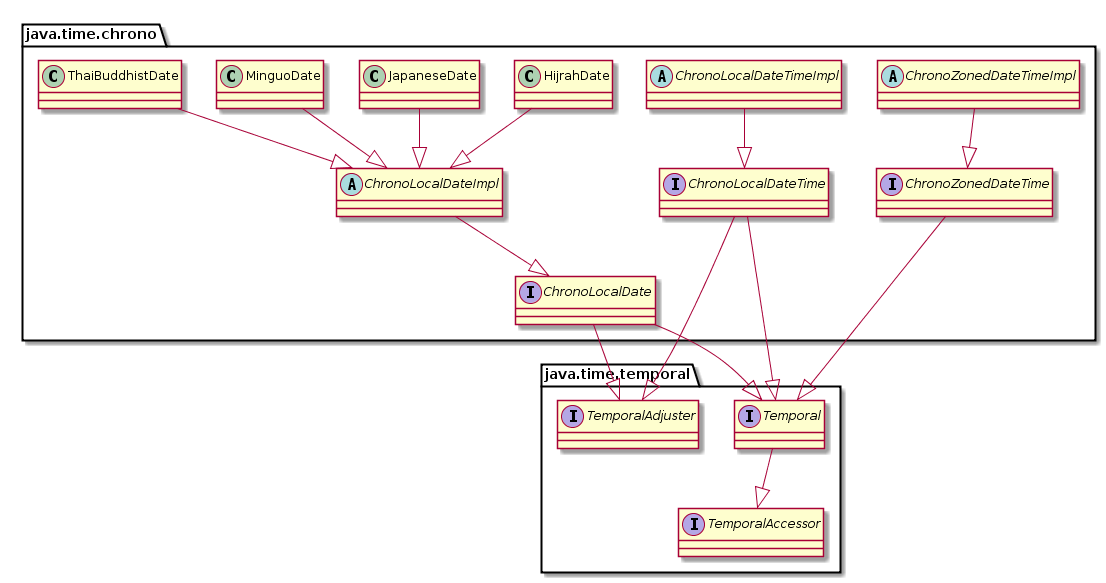
I will give the class diagram of the new API. Some minor classes are not given, as well as the implementation of such interfaces as java.util.Serializable and java.lang.Comparable.
Basic interfaces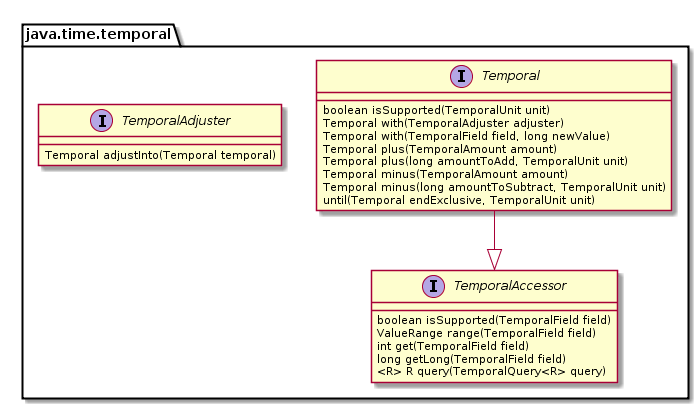
Era
Time zone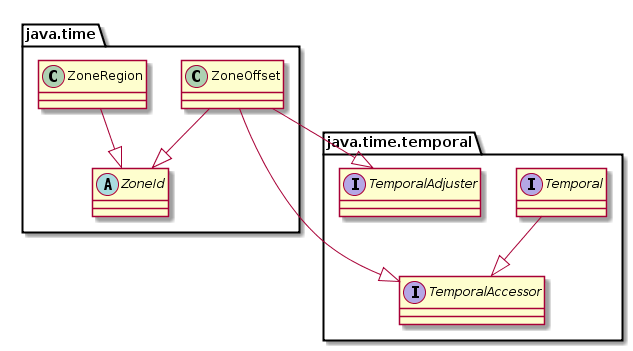
Durations and periods
Chronology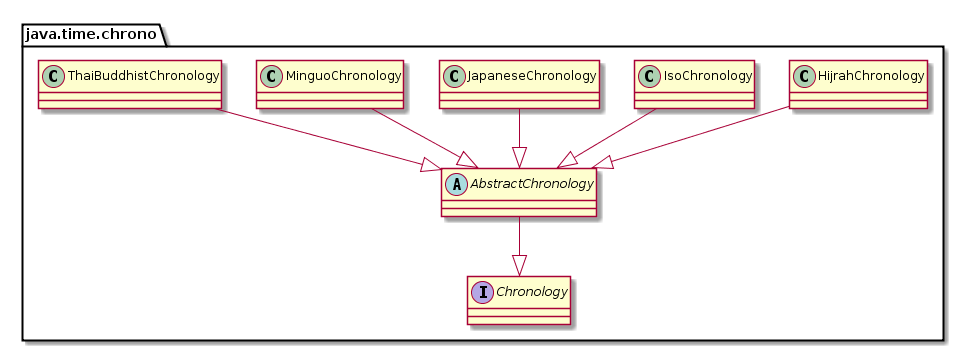
Temporary classes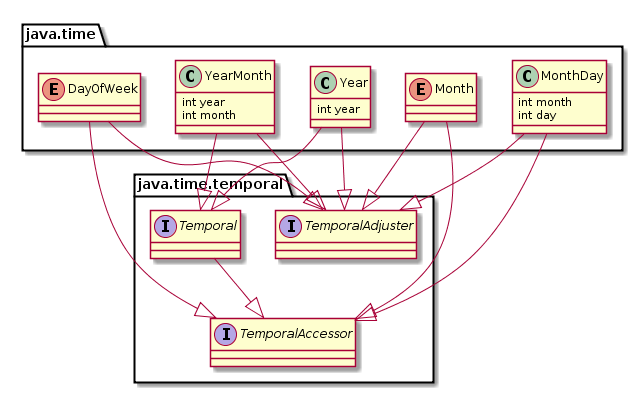

Compatibility
Several methods have been implemented to exchange information between the old and new APIs. Moreover, it was implemented competently enough: the old API knows about the new API, but the new API does not know anything about the old API at all. Purely theoretically, this will allow someday to throw out all the old classes, but I doubt that this will happen in our lifetime.
    @Test
    public void testTimeZoneCompat() throws Exception {
        ZoneId zoneId1 = ZoneId.of("Europe/Moscow");
        TimeZone timeZone = TimeZone.getTimeZone(zoneId1);
        ZoneId zoneId2 = timeZone.toZoneId();
        Assert.assertEquals(zoneId1, zoneId2);
    }
    @Test
    public void testDateCompat() throws Exception {
        Instant instant1 = Clock.systemUTC().instant();
        Date date = Date.from(instant1);
        Instant instant2 = date.toInstant();
        Assert.assertEquals(instant1, instant2);
    }
And again there is a nuance: in the case when we drive time in java.util.Date and vice versa, accuracy is irretrievably lost, because the old API operates in milliseconds, and the new one operates in nanoseconds. This is not critical as long as we have a single millisecond source of current time in the form of java.lang.System # currentTimeMillis, but in the future this may become a problem, especially for tests.
conclusions
I still have a mixed feeling from the new API. On the one hand, there are significant improvements, on the other hand, we got two main problems: the ability to perform unexpectedly incorrect time shifts when using classes other than ZonedDateTime, and the ability to unexpectedly get an exception in runtime when the time zone is not available in operations. In addition, the new API is somewhat more complicated than the old. How critical this is will be shown by mass practice.