How to migrate to Oracle Java Cloud in 1.5 hours?
Today, all the major software developers offer public cloud services. Oracle did not immediately join this race, but today it has already caught up and overtakes the rest of the market players. Silicon Valley legend, one of the founders of Oracle Corporation, Larry Ellison recently said that Oracle’s cloud services are now showing the same performance growth as Oracle Database’s sales in the best of times. So now all the company's attention is focused on the clouds.

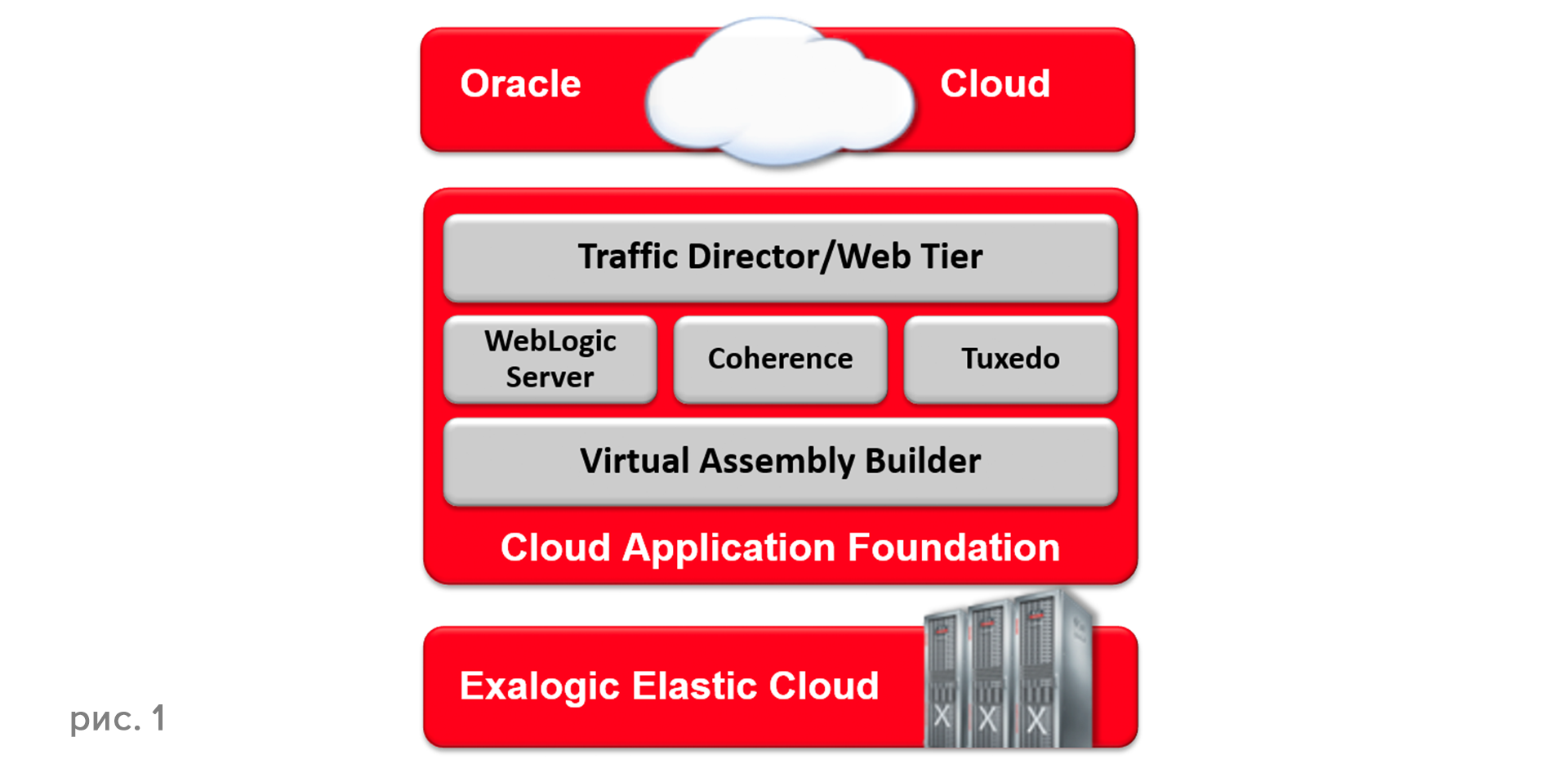
What is Oracle public cloud today? This is a fully integrated service that covers the entire planet in terms of hosting cloud data centers, and in terms of accessibility, and ... includes the best Oracle solutions. The cloud platform is built (see Figure 1) on the Oracle Exalogic and Oracle Exadata engineering systems and includes the Oracle Database, the world's leading WebLogic Server application server version 12.1.3, - the agenda is 12.2.1, the latest and most advanced release Application Server from Oracle, as well as In-Memory Data Grid (IMDG) Coherence and other solutions. Traffic balancing is performed using Oracle Traffic Director.
Java Cloud Service (JCS) is a fully functional Internet resource with Oracle DataBase, WebLogic, Coherence with access to virtual machines through various protocols, including SSH. JCS exists in two versions. The full version, which includes everything you need for a full-fledged work, is based on Oracle Linux with the option to select Standard Edition (SE), Enterprise Edition (EE) and Suite. The Virtual Image version does not provide access to the virtual machine.
The service allows you to implement any Java Enterprise Edition applications and build complex three-layer domains in both test and cluster solutions. Lifecycle management is fully automated. A variety of developer tools - JDeveloper, Eclipse, NetBeans - are integrated with the cloud service.
What is the Java Cloud Service for? The main application of Java Cloud Service is development, testing, implementation in the cloud. The cloud is perfect for testing, because the cloud does not need its own resources, it does not need administration, you do not need to buy licenses, you only need space on the cloud to host the application and test it. Another area of service application is application migration to the clouds. Due to the lack of costs for data centers and the content of a three-layer architecture, migration can significantly reduce costs: you do not need to manage the structure and regulations, backup and recovery, manage load balancing, updates, etc.
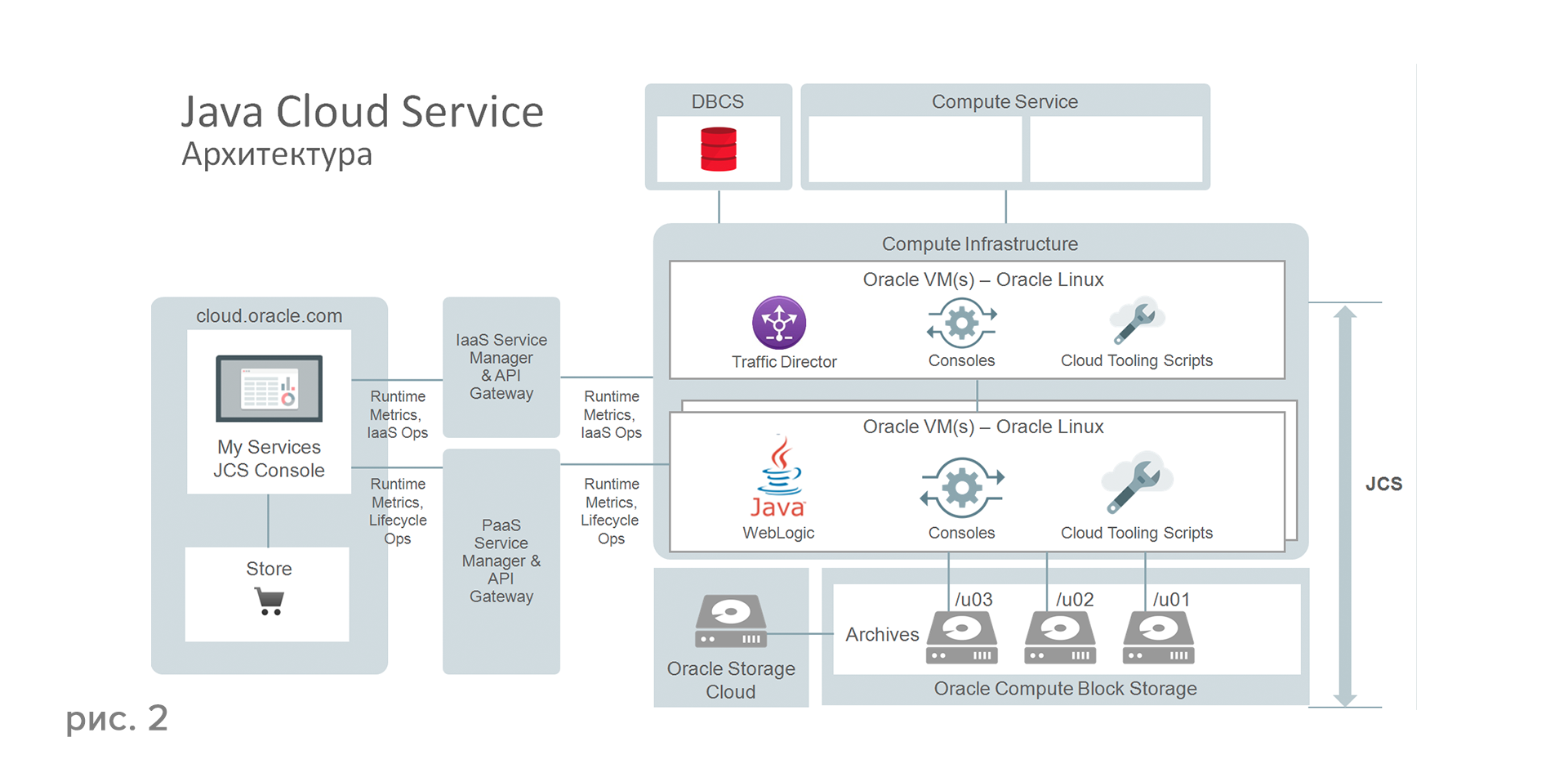
Figure 2 shows the architecture of the Java Cloud Service cloud. At the very top is the Load Balancer Cluster, which is introduced by Oracle Traffic Director. The center and main foundation of all applications is the WebLogic application server (11g or 12s). Coherence is a cache solution to speed up transactions, you can use it in your solution if necessary.
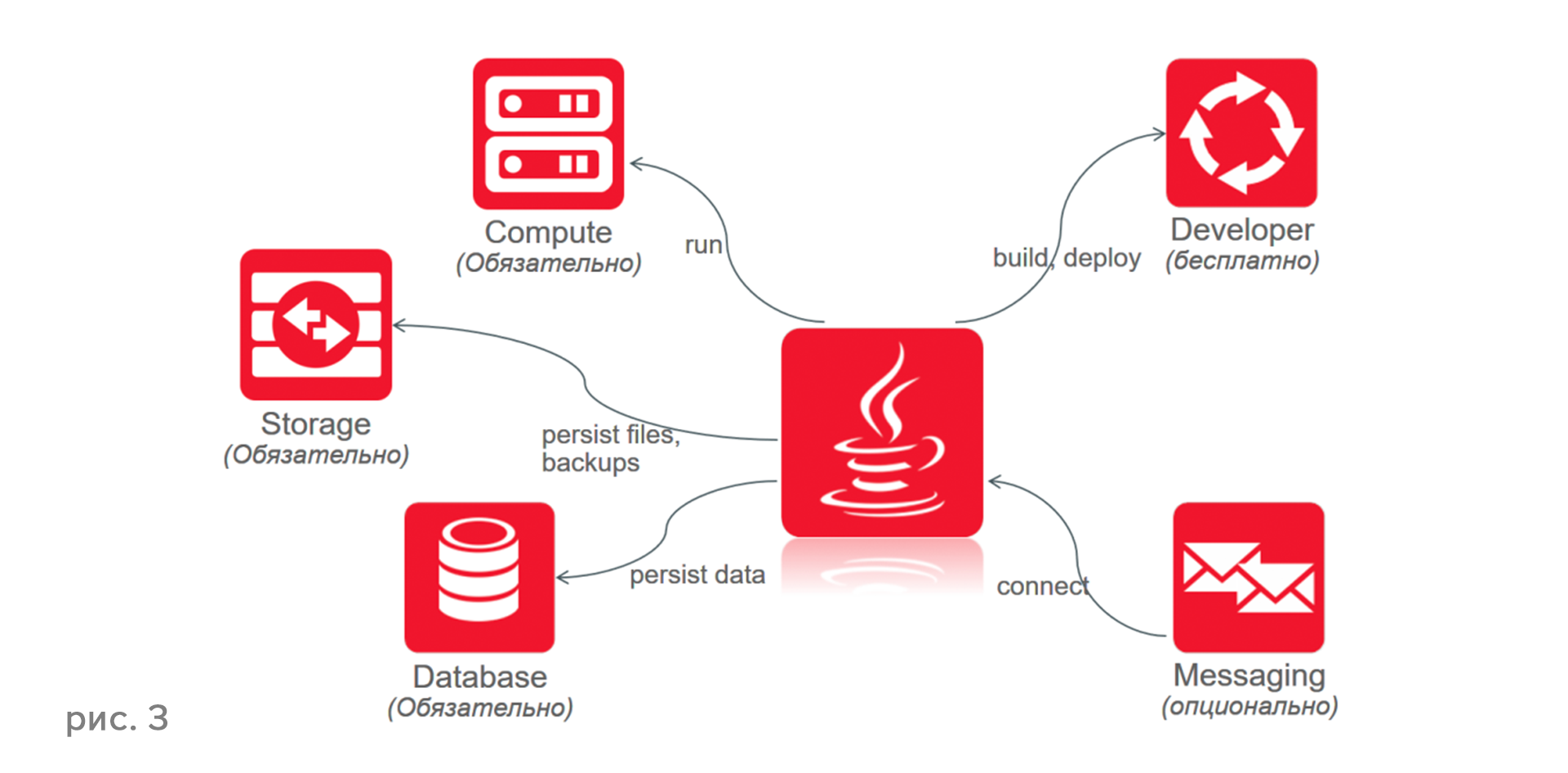
When creating a cloud, the sequence of actions is important. For example, you cannot create a cloud without a database. You can’t do without Storage - this is the place where backups will be stored, etc. You can’t create a cloud without the Compute service, which will do the calculations. Thus, you must first create Storage, Database and Compute. Everything else (Figure 3) is optional.
All work on changing and modifying all resources is done automatically. You see the appearance of a new system update and decide which changes to accept and which not, which to roll back, etc. Thus, administration comes down to using the console. Backup and recovery are performed in the same way, you can change the depth of backup, configuration, log, perform recovery with a fairly deep retrospective.
Oracle Developer Cloud Service is a full-fledged cloud development platform, managing all application life cycles, projects and development teams.
What is it for? In order not to purchase software and equipment for a new project, not to hire administrators to manage projects and teams, not to engage in integration with development environments. Developer Cloud Service (Figure 4) is a development platform that includes tools for managing the application life cycle, managing project and development teams, and managing deployment and deployment. The solution for iTracking and targeted project management is built directly into the Developer Cloud.

The advantages of the Developer Cloud Service speak for themselves: the intuitively simple installation of all components, the quick adaptation of the development team to the new environment and lower management costs lead to increased development team efficiency and simplified team management.
We list the key steps that need to be completed in order to migrate the application in an hour and a half.
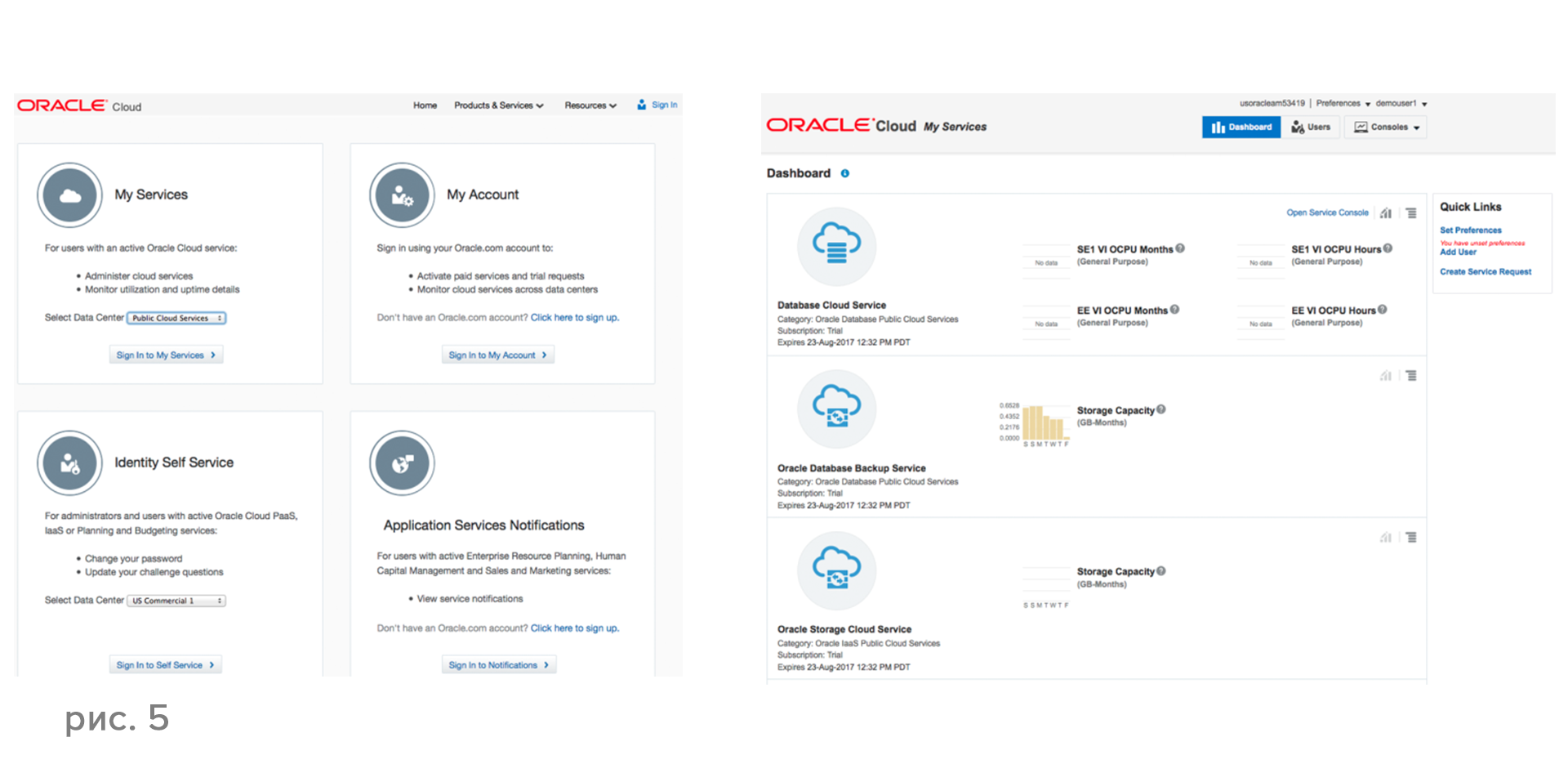
Figure 5, left, displays the Oracle Cloud start page. On this page you select your data center. Figure 5, on the right, is the first control page called the Dashboard. There are several options for creating a new WebLogic domain - you can choose between creating an Oracle Cloud Virtual Image or a full-fledged Oracle Java Cloud Service and select the billing options you need, the version of WebLogic, accept or refuse Coherence, the number of managed servers, memory sizes for them, etc. e. After you answer all the questions, a WebLogic domain will be created.
It will take you about 40 minutes to create the database. Once you have created the database, approximately 20 minutes will be required to create a full WebLogic domain with a full set of resources and tools. Depending on the complexity of the application and the amount of database data, it takes about 30 minutes to deploy the application - as a result, as promised in the title of the article, a full migration to the cloud will take you about 1.5 hours.
You are also provided with Enterprise Manager, a standard tool for monitoring the management, monitoring, and execution of all necessary administrative functions. In fact, migrating to the cloud, you get a complete set of infrastructure tools similar to the one you build yourself in the data centers - including managing users that you can add, delete, etc.
Today, all the major software developers offer cloud services. According to recent studies, in the next five years, approximately 80% of all IT services will migrate to the clouds! Therefore, competition in this market is growing exponentially. This will lead to a change in the competitive environment among users, because those who migrate to the cloud earlier than others and learn how to take advantage of cloud technologies will free up the money that they have to spend on supporting applications in the data centers and get serious competitive advantages. Therefore, you need to prepare for these changes and test the opportunities provided by the latest cloud platforms right now.
What is Oracle public cloud today? This is a fully integrated service that covers the entire planet in terms of hosting cloud data centers, and in terms of accessibility, and ... includes the best Oracle solutions. The cloud platform is built (see Figure 1) on the Oracle Exalogic and Oracle Exadata engineering systems and includes the Oracle Database, the world's leading WebLogic Server application server version 12.1.3, - the agenda is 12.2.1, the latest and most advanced release Application Server from Oracle, as well as In-Memory Data Grid (IMDG) Coherence and other solutions. Traffic balancing is performed using Oracle Traffic Director.
Java Cloud Service
Java Cloud Service (JCS) is a fully functional Internet resource with Oracle DataBase, WebLogic, Coherence with access to virtual machines through various protocols, including SSH. JCS exists in two versions. The full version, which includes everything you need for a full-fledged work, is based on Oracle Linux with the option to select Standard Edition (SE), Enterprise Edition (EE) and Suite. The Virtual Image version does not provide access to the virtual machine.
The service allows you to implement any Java Enterprise Edition applications and build complex three-layer domains in both test and cluster solutions. Lifecycle management is fully automated. A variety of developer tools - JDeveloper, Eclipse, NetBeans - are integrated with the cloud service.
What is the Java Cloud Service for? The main application of Java Cloud Service is development, testing, implementation in the cloud. The cloud is perfect for testing, because the cloud does not need its own resources, it does not need administration, you do not need to buy licenses, you only need space on the cloud to host the application and test it. Another area of service application is application migration to the clouds. Due to the lack of costs for data centers and the content of a three-layer architecture, migration can significantly reduce costs: you do not need to manage the structure and regulations, backup and recovery, manage load balancing, updates, etc.
Figure 2 shows the architecture of the Java Cloud Service cloud. At the very top is the Load Balancer Cluster, which is introduced by Oracle Traffic Director. The center and main foundation of all applications is the WebLogic application server (11g or 12s). Coherence is a cache solution to speed up transactions, you can use it in your solution if necessary.
When creating a cloud, the sequence of actions is important. For example, you cannot create a cloud without a database. You can’t do without Storage - this is the place where backups will be stored, etc. You can’t create a cloud without the Compute service, which will do the calculations. Thus, you must first create Storage, Database and Compute. Everything else (Figure 3) is optional.
All work on changing and modifying all resources is done automatically. You see the appearance of a new system update and decide which changes to accept and which not, which to roll back, etc. Thus, administration comes down to using the console. Backup and recovery are performed in the same way, you can change the depth of backup, configuration, log, perform recovery with a fairly deep retrospective.
Developer cloud service
Oracle Developer Cloud Service is a full-fledged cloud development platform, managing all application life cycles, projects and development teams.
What is it for? In order not to purchase software and equipment for a new project, not to hire administrators to manage projects and teams, not to engage in integration with development environments. Developer Cloud Service (Figure 4) is a development platform that includes tools for managing the application life cycle, managing project and development teams, and managing deployment and deployment. The solution for iTracking and targeted project management is built directly into the Developer Cloud.
The advantages of the Developer Cloud Service speak for themselves: the intuitively simple installation of all components, the quick adaptation of the development team to the new environment and lower management costs lead to increased development team efficiency and simplified team management.
How to Build Oracle Java Cloud Service
We list the key steps that need to be completed in order to migrate the application in an hour and a half.
- Subscribe to the trial version of Public Cloud.
- Install CloudBerry Explorer for OpenStack Storage to create containers.
- Create an SSL Key for accessing cloud virtual machines.
- Using CloudBerry Explorer for OpenStack Storage, create two containers:
- container for the weblogic domain ,
- container for databases .
- Boot into the cloud through the console.
- Create a database.
- Create a WebLogic domain.
Figure 5, left, displays the Oracle Cloud start page. On this page you select your data center. Figure 5, on the right, is the first control page called the Dashboard. There are several options for creating a new WebLogic domain - you can choose between creating an Oracle Cloud Virtual Image or a full-fledged Oracle Java Cloud Service and select the billing options you need, the version of WebLogic, accept or refuse Coherence, the number of managed servers, memory sizes for them, etc. e. After you answer all the questions, a WebLogic domain will be created.
It will take you about 40 minutes to create the database. Once you have created the database, approximately 20 minutes will be required to create a full WebLogic domain with a full set of resources and tools. Depending on the complexity of the application and the amount of database data, it takes about 30 minutes to deploy the application - as a result, as promised in the title of the article, a full migration to the cloud will take you about 1.5 hours.
You are also provided with Enterprise Manager, a standard tool for monitoring the management, monitoring, and execution of all necessary administrative functions. In fact, migrating to the cloud, you get a complete set of infrastructure tools similar to the one you build yourself in the data centers - including managing users that you can add, delete, etc.
Conclusion
Today, all the major software developers offer cloud services. According to recent studies, in the next five years, approximately 80% of all IT services will migrate to the clouds! Therefore, competition in this market is growing exponentially. This will lead to a change in the competitive environment among users, because those who migrate to the cloud earlier than others and learn how to take advantage of cloud technologies will free up the money that they have to spend on supporting applications in the data centers and get serious competitive advantages. Therefore, you need to prepare for these changes and test the opportunities provided by the latest cloud platforms right now.