 April 29, 2016 at 19:14
Animator - what is it? Why is it needed? Why should it be used instead of Animation?
Hello! My name is Danil Perevalov, I work as an Android developer at Live Typing, and today I have the honor to open our blog on Habré. Debut material on Animator class types. The article will be useful to those who are just faced with the creation of animations, and those who do not have enough knowledge of the subject. Those who have been familiar with the topic for a long time, we are urged to share their experiences in the comments.
A bit of history. Since the launch of the Android platform, the View Animation framework has existed. He intended, as the name implies, for animations. But the performance of the devices at the end of the zero was so low that no one really thought about beautiful animations, so the framework was not convenient and flexible. It had only four types of animation (TranslateAnimation, AlphaAnimation, ScaleAnimation, RotateAnimation), a class that allows them to be combined (AnimationSet), and the ability to work only with classes inherited from View.
Android 3.0 introduces a much more flexible Property Animation framework. It can change any available property, and can also work with any classes. Its main tool is Animator.
Animator is a type of class designed to change the values of a selected object relative to time. Roughly speaking, this is a tool for controlling a stream of a given duration, which changes a specific property from an initial value to an end value. Such a smoothly changing property in animation can be, for example, transparency.
The ideological difference between Animator classes and View Animation is that View Animation changes the "presentation" of the object without changing the object itself (the exception is using setFillAfter (true), but with this flag the object changes at the end of the animation). Animator is intended to change the properties of the object itself.
ValueAnimator (inherited from Animator)
In the simplest case, we set this class the type of variable value, the initial value and the final value, and start it. In response, we will receive events at the beginning, end, repetition and cancellation of the animation and two more events that are set separately to pause and change the value. The event of change is perhaps the most important: the changed value will come into it, with the help of which we will change the properties of objects.
Look at changing alpha with it:
ObjectAnimator, inherited from ValueAnimator
This is a class designed to simplify the work with ValueAnimator. With it, you do not need to manually change any value according to the change event - you simply give the Animator an object and specify the field that you want to change, for example, scaleX. Using Java Refliction, it searches for the setter for this field (in this case, setScaleX. Next, Animator will change the value of this field
on its own . Using ObjectAnimator, changing alpha will look like this:
The View class has several properties specifically designed for animating with Animator:
AnimatorSet (inherited from Animator)
This is a class that allows you to combine animations in various ways: run simultaneously or sequentially, add delays, etc.
ViewPropertyAnimator
This is a separate class. It is not inherited from Animator, but it has the same logic as ObjectAnimator for View, and is designed to easily animate any View without unnecessary troubles.
This is how you can change alpha with it:
Около года назад передо мной встала задача сделать анимацию при клике на элемент. Вот такую:
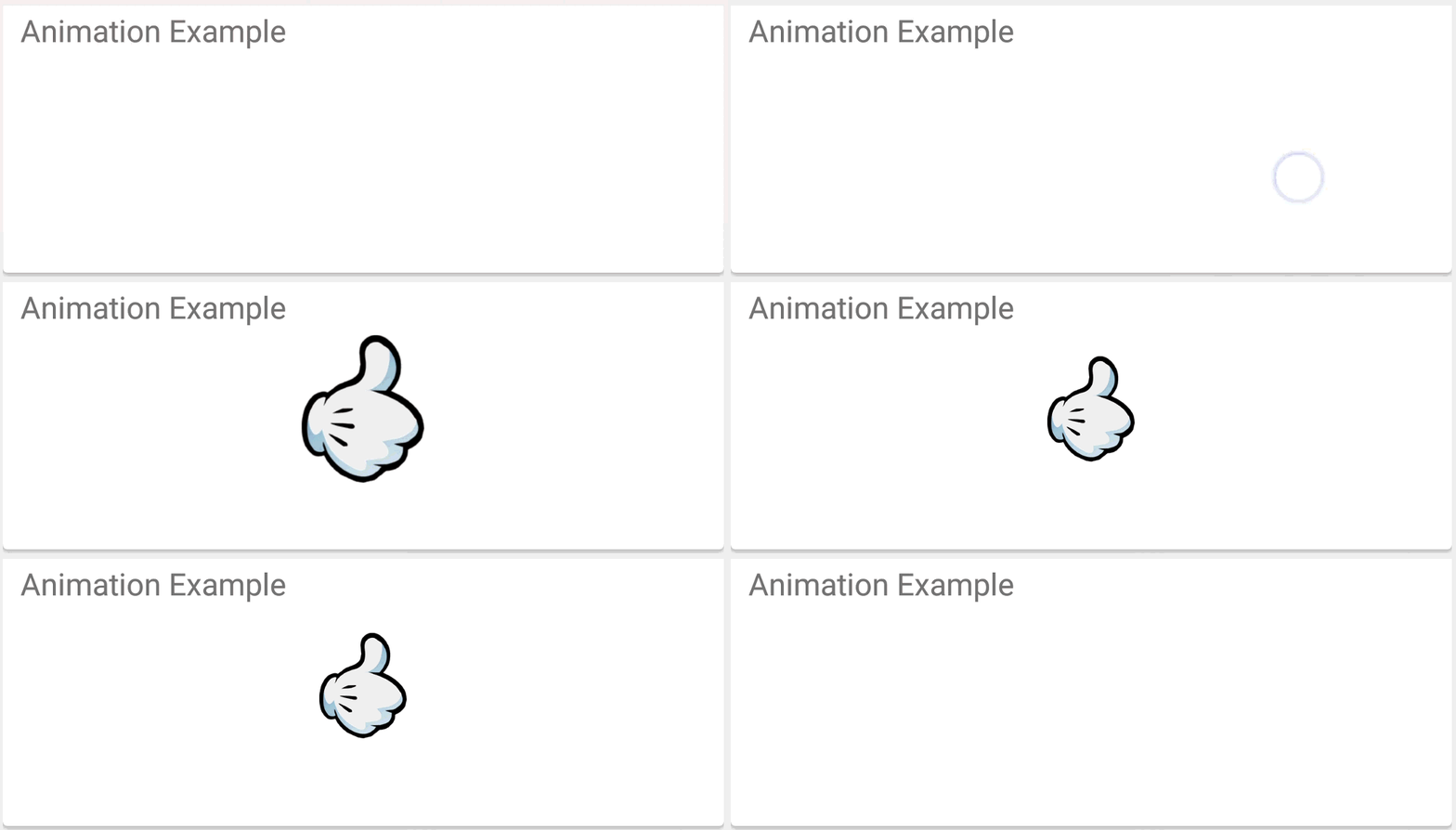
Не то чтобы я не делал анимаций прежде, но на аутсорсе они редко нужны. Поэтому я загуглил Animation Android. Первые пять ссылок довольно подробно описывали, как делаются анимации, и я приступил. Вот первый результат:
Ссылка на код
Код получился малопонятным, что подтолкнуло меня к поискам иного подхода в составлении последовательности анимаций. Решение было найдено на StackOveflow. Идея такая: помещать в последовательности анимаций каждую последующую анимацию в AnimationSet со сдвигом, равным сумме длительностей предыдущих анимаций. Получилось гораздо лучше, чем было:

Link to the code
The code has become clearer and more readable, but there is one “but”: it is rather inconvenient to follow the shift of each animation even in such a simple sequence. If you add a few more steps, it will become an almost impossible task. Another important disadvantage of this approach was the strange behavior of the animation: the size of the animated object, for some reason unknown to me, was larger than with the usual sequence of animations. Attempts to figure it out did not lead to anything, but I didn’t go deeper anymore - I still didn’t like the approach. But I decided to develop this idea and break each step into a separate AnimatorSet. Here's what happened:

Link to code
Incorrect animation, poor approach, everything is bad. Once again I turned to Google, and came across the fact that Animation is already a Legacy code, that is, it is outdated and not supported, although it is used.
I realized that you need to do animations in a completely different way. And on the expanses of Android Developers, I came across Animator. An attempt to make an animation with it looked like this:

Link to code
Animation worked flawlessly, which means that searches can be considered completed. The only thing when working with Animator is to remember whether some Animator is already running for a particular view, because otherwise the old one will continue to execute as if nothing had happened.
I started looking for something else interesting to do with Animator. A flight of thought led me to the following:

When a button is pressed, four Animators are executed simultaneously:
1) move down the list footer;
2) moves down the buttons;
3) scroll ScrollView to the bottom;
4) imposes alpha effect on recyclerView.
Link to the full code
This is a brief overview of Animator. If you are aware of some interesting tricks related to Animator, complete the article with your comments.
Link to the project on Github: github.com/princeparadoxes/AnimationVsAnimator
What is an animator?
A bit of history. Since the launch of the Android platform, the View Animation framework has existed. He intended, as the name implies, for animations. But the performance of the devices at the end of the zero was so low that no one really thought about beautiful animations, so the framework was not convenient and flexible. It had only four types of animation (TranslateAnimation, AlphaAnimation, ScaleAnimation, RotateAnimation), a class that allows them to be combined (AnimationSet), and the ability to work only with classes inherited from View.
Android 3.0 introduces a much more flexible Property Animation framework. It can change any available property, and can also work with any classes. Its main tool is Animator.
Animator is a type of class designed to change the values of a selected object relative to time. Roughly speaking, this is a tool for controlling a stream of a given duration, which changes a specific property from an initial value to an end value. Such a smoothly changing property in animation can be, for example, transparency.
The ideological difference between Animator classes and View Animation is that View Animation changes the "presentation" of the object without changing the object itself (the exception is using setFillAfter (true), but with this flag the object changes at the end of the animation). Animator is intended to change the properties of the object itself.
Classes inherited from Animator
ValueAnimator (inherited from Animator)
In the simplest case, we set this class the type of variable value, the initial value and the final value, and start it. In response, we will receive events at the beginning, end, repetition and cancellation of the animation and two more events that are set separately to pause and change the value. The event of change is perhaps the most important: the changed value will come into it, with the help of which we will change the properties of objects.
Look at changing alpha with it:
ValueAnimator animator = ValueAnimator.ofFloat(0, 1);
animator.addUpdateListener(new ValueAnimator.AnimatorUpdateListener() {
   @Override
   public void onAnimationUpdate(ValueAnimator animation) {
       view.setAlpha((Float) animation.getAnimatedValue());
   }
});
animator.start();
ObjectAnimator, inherited from ValueAnimator
This is a class designed to simplify the work with ValueAnimator. With it, you do not need to manually change any value according to the change event - you simply give the Animator an object and specify the field that you want to change, for example, scaleX. Using Java Refliction, it searches for the setter for this field (in this case, setScaleX. Next, Animator will change the value of this field
on its own . Using ObjectAnimator, changing alpha will look like this:
ObjectAnimator.ofFloat(view, View.ALPHA, 0, 1).start();
The View class has several properties specifically designed for animating with Animator:
- transparency (View.ALPHA)
- scale (View.SCALE_X, View.SCALE_Y)
- rotation (View.ROTATION, View.ROTATION_X, View.ROTATION_Y)
- position (View.X, View.Y, View.Z)
- position of the displayed part (View.TRANSLATION_X, View.TRANSLATION_Y, View.TRANSLATION_Z)
AnimatorSet (inherited from Animator)
This is a class that allows you to combine animations in various ways: run simultaneously or sequentially, add delays, etc.
ViewPropertyAnimator
This is a separate class. It is not inherited from Animator, but it has the same logic as ObjectAnimator for View, and is designed to easily animate any View without unnecessary troubles.
This is how you can change alpha with it:
view.animate().alphaBy(0).alpha(1).start();
How we started using Animator
Около года назад передо мной встала задача сделать анимацию при клике на элемент. Вот такую:
Не то чтобы я не делал анимаций прежде, но на аутсорсе они редко нужны. Поэтому я загуглил Animation Android. Первые пять ссылок довольно подробно описывали, как делаются анимации, и я приступил. Вот первый результат:
Код Animation
 public static void likeAnimation(@DrawableRes int icon,
                                     final ImageView imageView) {
        imageView.setImageResource(icon);
        imageView.setVisibility(View.VISIBLE);
        AlphaAnimation showAlphaAnimation = new AlphaAnimation(0.0f, 1.0f);
        showAlphaAnimation.setDuration(SHOW_DURATION);
        ScaleAnimation showScaleAnimation = new ScaleAnimation(0.2f, 1.4f, 0.2f, 1.4f,
                android.view.animation.Animation.RELATIVE_TO_SELF, 0.5f,
                android.view.animation.Animation.RELATIVE_TO_SELF, 0.5f);
        showScaleAnimation.setDuration(SHOW_DURATION);
        AnimationSet showAnimationSet = new AnimationSet(false);
        showAnimationSet.addAnimation(showAlphaAnimation);
        showAnimationSet.addAnimation(showScaleAnimation);
        showAnimationSet.setAnimationListener(new OnEndAnimationListener() {
            @Override
            public void onAnimationEnd(android.view.animation.Animation animation) {
                ScaleAnimation toNormalScaleAnimation = new ScaleAnimation(1.4f, 1.0f, 1.4f, 1.0f,
                        android.view.animation.Animation.RELATIVE_TO_SELF, 0.5f,
                        android.view.animation.Animation.RELATIVE_TO_SELF, 0.5f);
                toNormalScaleAnimation.setDuration(TO_NORMAL_DURATION);
                toNormalScaleAnimation.setAnimationListener(new OnEndAnimationListener() {
                    @Override
                    public void onAnimationEnd(android.view.animation.Animation animation) {
                        AlphaAnimation hideAlphaAnimation = new AlphaAnimation(1.0f, 0.0f);
                        hideAlphaAnimation.setDuration(HIDE_DURATION);
                        ScaleAnimation hideScaleAnimation = new ScaleAnimation(1.0f, 0.2f, 1.0f, 0.2f,
                                android.view.animation.Animation.RELATIVE_TO_SELF, 0.5f,
                                android.view.animation.Animation.RELATIVE_TO_SELF, 0.5f);
                        hideScaleAnimation.setDuration(HIDE_DURATION);
                        AnimationSet hideAnimationSet = new AnimationSet(false);
                        hideAnimationSet.setStartOffset(HIDE_DELAY);
                        hideAnimationSet.addAnimation(hideAlphaAnimation);
                        hideAnimationSet.addAnimation(hideScaleAnimation);
                        hideAnimationSet.setAnimationListener(new OnEndAnimationListener() {
                            @Override
                            public void onAnimationEnd(android.view.animation.Animation animation) {
                                imageView.setVisibility(View.GONE);
                            }
                        });
                        imageView.startAnimation(hideAnimationSet);
                    }
                });
                imageView.startAnimation(toNormalScaleAnimation);
            }
        });
        imageView.startAnimation(showAnimationSet);
    }
Ссылка на код
Код получился малопонятным, что подтолкнуло меня к поискам иного подхода в составлении последовательности анимаций. Решение было найдено на StackOveflow. Идея такая: помещать в последовательности анимаций каждую последующую анимацию в AnimationSet со сдвигом, равным сумме длительностей предыдущих анимаций. Получилось гораздо лучше, чем было:
AnimationSet
 public static void likeAnimation(@DrawableRes int icon,
                                     final ImageView imageView) {
        imageView.setImageResource(icon);
        imageView.setVisibility(View.VISIBLE);
        AnimationSet animationSet = new AnimationSet(false);
        animationSet.addAnimation(showAlphaAnimation());
        animationSet.addAnimation(showScaleAnimation());
        animationSet.addAnimation(toNormalScaleAnimation());
        animationSet.addAnimation(hideAlphaAnimation());
        animationSet.addAnimation(hideScaleAnimation());
        animationSet.setAnimationListener(new OnEndAnimationListener() {
            @Override
            public void onAnimationEnd(Animation animation) {
                imageView.setVisibility(View.GONE);
            }
        });
        imageView.startAnimation(animationSet);
    }
    private static Animation showAlphaAnimation() {
        AlphaAnimation showAlphaAnimation = new AlphaAnimation(0.0f, 1.0f);
        showAlphaAnimation.setDuration(SHOW_DURATION);
        return showAlphaAnimation;
    }
    private static Animation showScaleAnimation() {
        ScaleAnimation showScaleAnimation = new ScaleAnimation(
                0.2f, 1.4f, 0.2f, 1.4f,
                Animation.RELATIVE_TO_SELF, 0.5f,
                Animation.RELATIVE_TO_SELF, 0.5f);
        showScaleAnimation.setDuration(SHOW_DURATION);
        return showScaleAnimation;
    }
    private static Animation toNormalScaleAnimation() {
        ScaleAnimation toNormalScaleAnimation = new ScaleAnimation(
                1.4f, 1.0f, 1.4f, 1.0f,
                Animation.RELATIVE_TO_SELF, 0.5f,
                Animation.RELATIVE_TO_SELF, 0.5f);
        toNormalScaleAnimation.setDuration(TO_NORMAL_DURATION);
        toNormalScaleAnimation.setStartOffset(SHOW_DURATION);
        return toNormalScaleAnimation;
    }
    private static Animation hideAlphaAnimation() {
        AlphaAnimation hideAlphaAnimation = new AlphaAnimation(1.0f, 0.0f);
        hideAlphaAnimation.setDuration(HIDE_DURATION);
        hideAlphaAnimation.setStartOffset(SHOW_DURATION + TO_NORMAL_DURATION + HIDE_DELAY);
        return hideAlphaAnimation;
    }
    private static Animation hideScaleAnimation() {
        ScaleAnimation hideScaleAnimation = new ScaleAnimation(
                1.0f, 0.2f, 1.0f, 0.2f,
                Animation.RELATIVE_TO_SELF, 0.5f,
                Animation.RELATIVE_TO_SELF, 0.5f);
        hideScaleAnimation.setDuration(HIDE_DURATION);
        hideScaleAnimation.setStartOffset(SHOW_DURATION + TO_NORMAL_DURATION + HIDE_DELAY);
        return hideScaleAnimation;
    }
Link to the code
The code has become clearer and more readable, but there is one “but”: it is rather inconvenient to follow the shift of each animation even in such a simple sequence. If you add a few more steps, it will become an almost impossible task. Another important disadvantage of this approach was the strange behavior of the animation: the size of the animated object, for some reason unknown to me, was larger than with the usual sequence of animations. Attempts to figure it out did not lead to anything, but I didn’t go deeper anymore - I still didn’t like the approach. But I decided to develop this idea and break each step into a separate AnimatorSet. Here's what happened:
AnimatorSet in AnimatorSet
public static void likeAnimation(@DrawableRes int icon,
                                     final ImageView imageView) {
        imageView.setImageResource(icon);
        imageView.setVisibility(View.VISIBLE);
        AnimationSet animationSet = new AnimationSet(false);
        animationSet.addAnimation(showAnimationSet());
        animationSet.addAnimation(toNormalAnimationSet());
        animationSet.addAnimation(hideAnimationSet());
        animationSet.setAnimationListener(new OnEndAnimationListener() {
            @Override
            public void onAnimationEnd(Animation animation) {
                imageView.setVisibility(View.GONE);
            }
        });
        imageView.startAnimation(animationSet);
    }
    private static AnimationSet showAnimationSet() {
        AlphaAnimation showAlphaAnimation = new AlphaAnimation(0.0f, 1.0f);
        ScaleAnimation showScaleAnimation = new ScaleAnimation(
                0.2f, 1.4f, 0.2f, 1.4f,
                Animation.RELATIVE_TO_SELF, 0.5f,
                Animation.RELATIVE_TO_SELF, 0.5f);
        AnimationSet set = new AnimationSet(false);
        set.addAnimation(showAlphaAnimation);
        set.addAnimation(showScaleAnimation);
        set.setDuration(SHOW_DURATION);
        return set;
    }
    private static AnimationSet toNormalAnimationSet() {
        ScaleAnimation toNormalScaleAnimation = new ScaleAnimation(
                1.4f, 1.0f, 1.4f, 1.0f,
                Animation.RELATIVE_TO_SELF, 0.5f,
                Animation.RELATIVE_TO_SELF, 0.5f);
        AnimationSet set = new AnimationSet(false);
        set.addAnimation(toNormalScaleAnimation);
        set.setDuration(TO_NORMAL_DURATION);
        set.setStartOffset(SHOW_DURATION);
        return set;
    }
    private static AnimationSet hideAnimationSet() {
        AlphaAnimation hideAlphaAnimation = new AlphaAnimation(1.0f, 0.0f);
        ScaleAnimation hideScaleAnimation = new ScaleAnimation(
                1.0f, 0.2f, 1.0f, 0.2f,
                Animation.RELATIVE_TO_SELF, 0.5f,
                Animation.RELATIVE_TO_SELF, 0.5f);
        AnimationSet set = new AnimationSet(false);
        set.setDuration(HIDE_DURATION);
        set.addAnimation(hideAlphaAnimation);
        set.addAnimation(hideScaleAnimation);
        set.setStartOffset(SHOW_DURATION + TO_NORMAL_DURATION + HIDE_DELAY);
        return set;
    }
Link to code
Incorrect animation, poor approach, everything is bad. Once again I turned to Google, and came across the fact that Animation is already a Legacy code, that is, it is outdated and not supported, although it is used.
I realized that you need to do animations in a completely different way. And on the expanses of Android Developers, I came across Animator. An attempt to make an animation with it looked like this:
Animator
public static void likeAnimation(@DrawableRes int icon,
                                     final ImageView view) {
        if (view != null && !isAnimate) {
            AnimatorSet set = new AnimatorSet();
            set.playSequentially(
                    showAnimatorSet(view),
                    toNormalAnimatorSet(view),
                    hideAnimatorSet(view));
            set.addListener(getLikeEndListener(view, icon));
            set.start();
        }
        view.animate().alphaBy(0).alpha(1).start();
    }
    private static AnimatorListenerAdapter getLikeEndListener(final ImageView view, final int icon) {
        return new AnimatorListenerAdapter() {
            @Override
            public void onAnimationStart(Animator animation) {
                super.onAnimationStart(animation);
                isAnimate = true;
                view.setVisibility(View.VISIBLE);
                view.setImageResource(icon);
                view.setLayerType(View.LAYER_TYPE_HARDWARE, null);
            }
            @Override
            public void onAnimationEnd(Animator animation) {
                super.onAnimationEnd(animation);
                isAnimate = false;
                view.setVisibility(View.GONE);
                view.setImageDrawable(null);
                view.setLayerType(View.LAYER_TYPE_NONE, null);
            }
        };
    }
    private static AnimatorSet showAnimatorSet(View view) {
        AnimatorSet set = new AnimatorSet();
        set.setDuration(SHOW_DURATION).playTogether(
                ObjectAnimator.ofFloat(view, View.ALPHA, 0f, 1f),
                ObjectAnimator.ofFloat(view, View.SCALE_X, 0.2f, 1.4f),
                ObjectAnimator.ofFloat(view, View.SCALE_Y, 0.2f, 1.4f)
        );
        return set;
    }
    private static AnimatorSet toNormalAnimatorSet(View view) {
        AnimatorSet set = new AnimatorSet();
        set.setDuration(TO_NORMAL_DURATION).playTogether(
                ObjectAnimator.ofFloat(view, View.SCALE_X, 1.4f, 1f),
                ObjectAnimator.ofFloat(view, View.SCALE_Y, 1.4f, 1f)
        );
        return set;
    }
    private static AnimatorSet hideAnimatorSet(View view) {
        AnimatorSet set = new AnimatorSet();
        set.setDuration(HIDE_DURATION).playTogether(
                ObjectAnimator.ofFloat(view, View.ALPHA, 1f, 0f),
                ObjectAnimator.ofFloat(view, View.SCALE_X, 1f, 0.2f),
                ObjectAnimator.ofFloat(view, View.SCALE_Y, 1f, 0.2f)
        );
        set.setStartDelay(HIDE_DELAY);
        return set;
    }
Link to code
Animation worked flawlessly, which means that searches can be considered completed. The only thing when working with Animator is to remember whether some Animator is already running for a particular view, because otherwise the old one will continue to execute as if nothing had happened.
Deeper in Animator
I started looking for something else interesting to do with Animator. A flight of thought led me to the following:
When a button is pressed, four Animators are executed simultaneously:
Simultaneous start
      AnimatorSet showHideSet = new AnimatorSet();
      showHideSet.playTogether(
                ScrollAnimatorUtils.translationYAnimator(translationY, footerButtons),
                ScrollAnimatorUtils.translationYAnimator(translationY, footerText),
                ScrollAnimatorUtils.scrollAnimator(startScroll, endScroll, scrollView),
                ScrollAnimatorUtils.alphaAnimator(1, 0, recyclerView)
        );
        showHideSet.start();
1) move down the list footer;
2) moves down the buttons;
translationYAnimator
 public static Animator translationYAnimator(final float start, int end, final View view, int duration) {
        ObjectAnimator animator = ObjectAnimator.ofFloat(view, View.TRANSLATION_Y, end);
        animator.setDuration(duration);
        animator.addListener(new AnimatorListenerAdapter() {
            @Override
            public void onAnimationEnd(Animator animation) {
                super.onAnimationEnd(animation);
                view.setTranslationY(start);
            }
        });
        return animator;
    }
3) scroll ScrollView to the bottom;
scrollAnimator
public static Animator scrollAnimator(int start, int end, final View view, int duration) {
        ValueAnimator scrollAnimator = ValueAnimator.ofInt(start, end);
        scrollAnimator.addUpdateListener(new ValueAnimator.AnimatorUpdateListener() {
            @Override
            public void onAnimationUpdate(ValueAnimator valueAnimator) {
                view.scrollTo(0, (int) valueAnimator.getAnimatedValue());
            }
        });
        scrollAnimator.setDuration(duration);
        scrollAnimator.addListener(getLayerTypeListener(view));
        return scrollAnimator;
    }
4) imposes alpha effect on recyclerView.
alphaAnimator
public static Animator alphaAnimator(int start, int end, View view, int duration) {
        ValueAnimator alphaAnimator = ObjectAnimator.ofFloat(view, View.ALPHA, start, end);
        alphaAnimator.setDuration(duration);
        alphaAnimator.addListener(getLayerTypeListener(view));
        return alphaAnimator;
    }
Link to the full code
This is a brief overview of Animator. If you are aware of some interesting tricks related to Animator, complete the article with your comments.
Link to the project on Github: github.com/princeparadoxes/AnimationVsAnimator









