How I debugged python httplib and httplib2
It took me once in my project to implement work with file storage using the HTTP REST API. The project is being developed in python, in addition, an http client using the httplib2 library has already been implemented, so it was decided to expand the functionality of the http client and work with file storage through the same library. The problem occurred while uploading files to the server. The first PUT request is executed, then all subsequent requests refuse to be executed - 500 Internal Server Error .
I look at Wireshark and it turns out that after the first request, the server sends connection: keep-alive in the response headers and after 5 seconds closes the connection. It's simple - this is a keep-alive timeout set on the server.
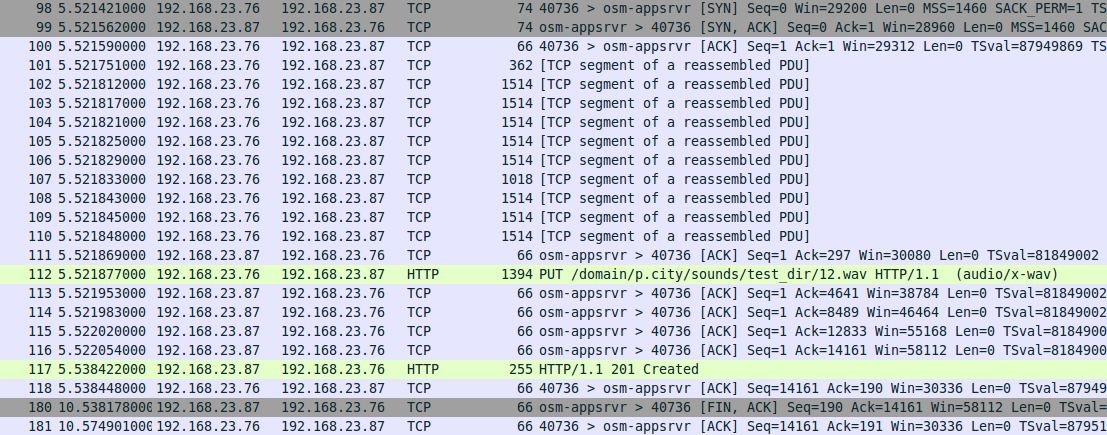
And here is how it looks on the client:
I include debug logs for httplib2:
I execute a PUT request on the client:
Repeated PUT request:
Here we see that httplib2 honestly, as prescribed by the server, does not re-establish the connection and sends a new request to the same socket without receiving a response, reconnects and sends a second request. But this repeated request is no longer processed by the server, and an error of 500 is returned.
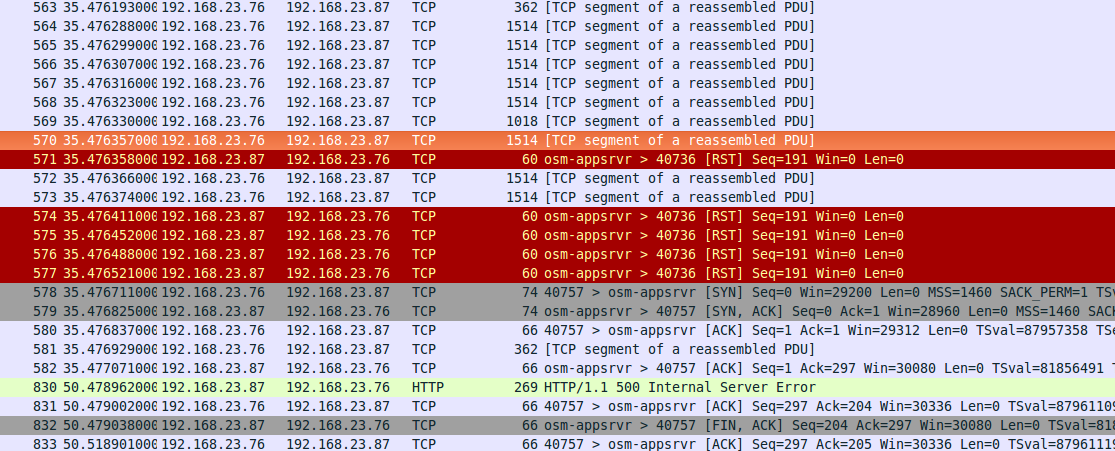
In this case, if you compare the Wireshark logs for two requests, it can be seen that after the connection is reinstalled, the file is not sent and the request is interrupted and not completely sent.
Immediately, it was chosen to set the connection: close header in the response on the server as a temporary solution . This option turned out to be working: it’s nice to feel that you are on the right track, and the solution is close.
But not as close as I thought then. After studying the source code of httplib (which extends httplib2), a simpler solution was chosen and a pull-request for httplib was created:

During a detailed review of the pull- request, together with the support guys, it turned out that the problem was at the junction of the httplib library and the httplib2 library:
If you re-send the request, you need to start reading the file again. It remains to choose the culprit andexecute to select a preventive measure. In the httplib library, when sending a file, it is assumed that if the object has a read () method, then it can be read and transferred. Can one also assume that the same object has the tell () and seek () methods and makes the cursor return to the beginning of the file. And if so, then this logic should still be rendered in httplib2. As a result, pull-request was created for httplib2. At the moment, the problem found does not have a final solution, but there is a great desire to bring it to the victorious finale.
Hope this post is helpful. Thanks for attention.
I look at Wireshark and it turns out that after the first request, the server sends connection: keep-alive in the response headers and after 5 seconds closes the connection. It's simple - this is a keep-alive timeout set on the server.
And here is how it looks on the client:
I include debug logs for httplib2:
httplib2.debuglevel = 4
I execute a PUT request on the client:
res = rq.request(url, 'PUT', mediafile, h)
connect: (system.restfs.test, 9990) ************
send: 'PUT /domain/p.city/sounds/test_folder/12.wav HTTP/1.1\r\nHost: system.restfs.test:9990\r\nContent-Length: 13864\r\ncontent-type: audio/x-wav\r\naccept-encoding: gzip, deflate\r\nuser-agent: Python-httplib2/0.8 (gzip)\r\n\r\n'
send: <open file '/home/mixo/\xd0\x97\xd0\xb0\xd0\xb3\xd1\x80\xd1\x83\xd0\xb7\xd0\xba\xd0\xb8/12.wav', mode 'r' at 0x7fca638c4db0>
sendIng a read()able
reply: 'HTTP/1.1 201 Created\r\n'
header: connection: keep-alive
header: server: Cowboy
header: date: Fri, 11 Dec 2015 05:14:09 GMT
header: content-length: 0
header: content-type: audio/x-wav
Repeated PUT request:
res = rq.request(url, 'PUT', mediafile, h)
send: 'PUT /domain/p.city/sounds/test_folder/12.wav HTTP/1.1\r\nHost: system.restfs.test:9990\r\nContent-Length: 13864\r\ncontent-type: audio/x-wav\r\naccept-encoding: gzip, deflate\r\nuser-agent: Python-httplib2/0.8 (gzip)\r\n\r\n'
send: <open file '/home/mixo/\xd0\x97\xd0\xb0\xd0\xb3\xd1\x80\xd1\x83\xd0\xb7\xd0\xba\xd0\xb8/12.wav', mode 'r' at 0x7f167a933030>
sendIng a read()able
reply: ''
connect: (system.restfs.test, 9990) ************
send: 'PUT /domain/p.city/sounds/test_folder/12.wav HTTP/1.1\r\nHost: system.restfs.test:9990\r\nContent-Length: 13864\r\ncontent-type: audio/x-wav\r\naccept-encoding: gzip, deflate\r\nuser-agent: Python-httplib2/0.8 (gzip)\r\n\r\n'
send: <open file '/home/mixo/\xd0\x97\xd0\xb0\xd0\xb3\xd1\x80\xd1\x83\xd0\xb7\xd0\xba\xd0\xb8/12.wav', mode 'r' at 0x7f167a933030>
sendIng a read()able
reply: 'HTTP/1.1 500 Internal Server Error\r\n'
header: connection: keep-alive
header: server: Cowboy
header: date: Fri, 11 Dec 2015 05:26:27 GMT
header: content-length: 0
header: content-type: audio/x-wav
Here we see that httplib2 honestly, as prescribed by the server, does not re-establish the connection and sends a new request to the same socket without receiving a response, reconnects and sends a second request. But this repeated request is no longer processed by the server, and an error of 500 is returned.
In this case, if you compare the Wireshark logs for two requests, it can be seen that after the connection is reinstalled, the file is not sent and the request is interrupted and not completely sent.
Immediately, it was chosen to set the connection: close header in the response on the server as a temporary solution . This option turned out to be working: it’s nice to feel that you are on the right track, and the solution is close.
But not as close as I thought then. After studying the source code of httplib (which extends httplib2), a simpler solution was chosen and a pull-request for httplib was created:
During a detailed review of the pull- request, together with the support guys, it turned out that the problem was at the junction of the httplib library and the httplib2 library:
- httplib sends a request and reads the file in BODY;
- httplib2 re-establishes a connection to the server and sends the request again, but the file has already been read and the cursor is at the end of the file.
If you re-send the request, you need to start reading the file again. It remains to choose the culprit and
Hope this post is helpful. Thanks for attention.