December 7, 2015 at 11:22
Under the hood of Redis: Hash Table (Part 2) and List
In the first part, I said that the hash table is a little LIST , SET and SORTED SET . Judge for yourself - LIST consists of ziplist / linkedlist, SET consists of dict / intset, and SORTED SET is ziplist / skiplist. We have already examined the dictionary (dict), and in the second part of the article we will consider the ziplist structure - the second most often applicable structure under the hood of Redis. Let's look at the LIST- The second part of his “kitchen” is a simple implementation of a linked list. This is useful to us to carefully consider the often mentioned advice on optimizing hash tables by replacing them with lists. Let's calculate how much memory is required for overhead when using these structures, what price you pay for saving memory. To summarize when working with hash tables, when using encoding in ziplist.
Last time, we ended up storing that 1,000,000 keys stored using ziplist took 16 mb of RAM, while in dict the same data required 104 mb (ziplist is 6 times smaller!). Let's figure it out at what cost:

So ziplist is a doubly linked list. Unlike a regular linked list, here the links in each node point to the previous and next node in the list. On a doubly linked list, you can effectively move in any direction - both to the beginning and to the end. In this list, it is easier to delete and rearrange elements, since the addresses of those elements of the list whose pointers are directed to the variable element are easily accessible. Redis developers position their implementation as memory efficient. The list can store strings and integers, while the numbers are stored in the form of numbers, not redisObject with a value. And if you want to save the string “123” it will be saved as the number 123, and not a sequence of characters `1`,` 2`, `3`.
The key and values are stored as located one after another in the list. Operations on the list are a search for the key, through enumeration and work with the value, which is located in the next element of the list. Theoretically, insert and change operations are performed for constant O (1) . In fact, any such operation in the implementation of Redis requires allocation and redistribution of memory, and the real complexity directly depends on the amount of memory used already. In this case, remember O (1) as an ideal case and O (n) as the worst.
Let's calculate its size.
With the header, everything is simple - this is ZIPLIST_HEADER_SIZE (constant, defined in ziplist.c and equal to sizeof (uint32_t) * 2 + sizeof (uint16_t) + 1 ). The size of the element is 5 * size_of (unsigned int) + 1 + 1 at least 1 byte per value . General overhead for storing data in this encoding for n elements (excluding value):
Each element begins with a fixed header, consisting of several pieces of information. The first is the size of the previous item and is used to go backward through a doubly linked list. Second, the encoding with the optional length of the structure itself in bytes. The length of the previous element works as follows: if the length does not exceed 254 bytes (it is the constant ZIP_BIGLEN) then 1 byte will be used to store the length of the value. If the length is greater than or equal to 254, 5 bytes will be used. In this case, the first byte will be set to the constant value ZIP_BIGLEN, so that we understand that we have a long value. The remaining 4 bytes store the length of the previous value. The third is the header, which depends on the value contained in the node. If the string value is the first 2 bits of the header, the header fields will store the encoding type for the string length, followed by a number with the string length. If significant - integer, the first 2 bits will be set to one. For numbers, 2 more bits are used, which determine what dimension the whole is stored in it.
Check and look at the back of the coin. We will use LUA, so you do not need anything other than Redis to repeat this test yourself. First, let's see what happens when using dict.
We execute
and
In the case of encoding: hashtable (dict) spent ~ 516 kb of memory and 18.9 ms to save 10,000 values, 7.5 ms to read them. With encoding: ziplist we get ~ 81 kb of memory and 710 ms to save, 705 ms to read. For the test, 10,000 entries received:
At the same time, it is important to understand that the drop in productivity is not linear, and already for 1,000,000 you risk simply not waiting for the results. Who will add 10,000 items to ziplist? This, unfortunately, is one of the first recommendations from most consultants. When is the game still worth the candle? I would say that while the number of elements lies in the range of 1 - 3500 elements, you can choose, remembering that from memory, ziplist always wins from 6 times or more. All that is more - measure on your real data, but this will no longer have anything to do with loaded real-time systems. Here's what happens with read / write performance depending on the size of the hash on the dict and ziplist ( gist per test ):
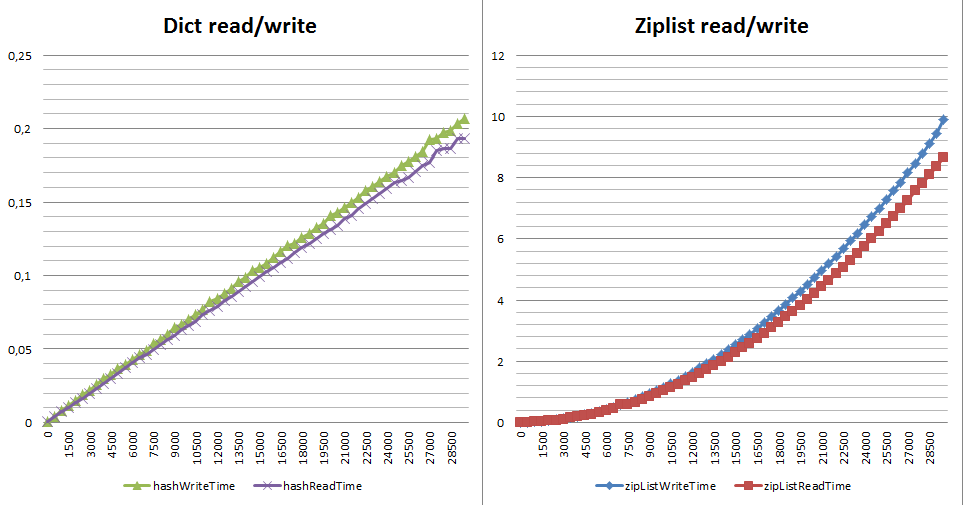
Why is that? The ziplist’s monstrous price for inserting, changing the length of elements and deleting is either realloc (all work falls on the shoulders of the allocator) or a complete rebuild of the list from n + 1 from the changed element to the end of the list. Rebuilding is a lot of small-fragment realloc, memmove, memcpy (see __ziplistCascadeUpdate in ziplist.c).
Why is it important to talk about LIST in an article about HASH? The point is one very important tip about optimizing structured data. It seems he went from DataDog , I ’m hard to say for sure. The translation sounds like this (original) :
And this is very useful advice. Obviously, the list (LIST) will help you save a lot - at least 2 times.
We've figured out the ziplist , let's watch REDIS_ENCODING_LINKEDLIST . In the Redis implementation, this is a very simple (~ 270 lines of code) non-sorted, simply-linked list ( just like on Wikipedia ). With all its advantages and disadvantages:
Nothing complicated - every LIST in this encoding is 5 pointers and 1 unsigned long. So the overhead is 5 * size_of (pointer) + 8 bytes . And each node is 3 pointers. The overhead for storing data in this encoding for n elements is:
There is no realloc in the linkedlist implementation - only memory allocation for the fragment you need, in the values - redisObejct without any tricks and optimizations. According to the memory overhead, the difference in official expenses between ziplist and linkedlist is about 15%. If we consider the service data plus the values - at times (from 2 and above), depending on the type of value. So for a list of 10,000 elements consisting only of numbers in a ziplist, you will spend about 41 kb of memory, in a linkedlist - 360 kb of real memory:
Let's look at the difference in performance when writing and receiving an item through LPOP (read and delete). Why not LRANGE - its complexity is designated as O (S + N) and for both implementations of the list this time is constant. With LPOP, however, everything is not quite as written in the documentation - complexity is indicated as O (1). But what happens if I need to read sequentially to read everything:
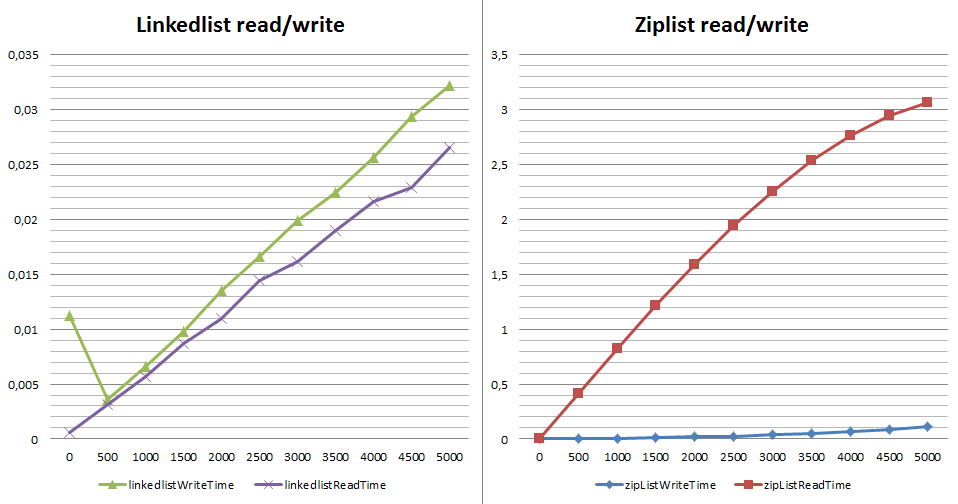
What is wrong with read speed when using ziplist? Each `LPOP` is an extraction of an element from the beginning of the list with its complete rebuilding. By the way, if we use RPOP for reading, instead of LPOP, the situation will not change much (hello to realloc from the list update function in ziplist.c). Why is it important? RPOPLPUSH Commands /BRPOPLPUSH is a popular Redis queuing solution (e.g. Sidekiq, Resque). When in such a queue with ziplist encoding it has a large number of values (from several thousand), the receipt of one element is no longer constant and the system begins to “fever”.
In conclusion, it was time to formulate several conclusions:
Table of contents:
Materials used in writing the article:
Last time, we ended up storing that 1,000,000 keys stored using ziplist took 16 mb of RAM, while in dict the same data required 104 mb (ziplist is 6 times smaller!). Let's figure it out at what cost:
So ziplist is a doubly linked list. Unlike a regular linked list, here the links in each node point to the previous and next node in the list. On a doubly linked list, you can effectively move in any direction - both to the beginning and to the end. In this list, it is easier to delete and rearrange elements, since the addresses of those elements of the list whose pointers are directed to the variable element are easily accessible. Redis developers position their implementation as memory efficient. The list can store strings and integers, while the numbers are stored in the form of numbers, not redisObject with a value. And if you want to save the string “123” it will be saved as the number 123, and not a sequence of characters `1`,` 2`, `3`.
In the 1.x branch of Redis, instead of dict, the dictionary used zipmap - a straightforward (~ 140 lines) implementation of a linked list, optimized to save memory, where all operations occupy O (n). This structure is not used in Redis (although it is in its source code and is kept up to date), while part of the zipmap ideas formed the basis of the ziplist.
The key and values are stored as located one after another in the list. Operations on the list are a search for the key, through enumeration and work with the value, which is located in the next element of the list. Theoretically, insert and change operations are performed for constant O (1) . In fact, any such operation in the implementation of Redis requires allocation and redistribution of memory, and the real complexity directly depends on the amount of memory used already. In this case, remember O (1) as an ideal case and O (n) as the worst.
+-------------+------+-----+-------+-----+-------+-----+
| Total Bytes | Tail | Len | Entry | ... | Entry | End |
+-------------+------+-----+-------+-----+-------+-----+
                                ^
                                |
+-------------------+--------------+----------+------+-------------+----------+-------+
| Prev raw len size | Prev raw len | Len size |  Len | Header size | Encoding | Value |
+-------------------+--------------+----------+------+-------------+----------+-------+
Look at this structure in source
#define ZIPLIST_HEADER_SIZE  (sizeof(uint32_t)*2+sizeof(uint16_t))
typedef struct zlentry {
    unsigned int prevrawlensize, prevrawlen;
    unsigned int lensize, len;
    unsigned int headersize;
    unsigned char encoding;
    unsigned char *p;
} zlentry;
Let's calculate its size.
The answer to the question how much memory will actually be used depends on the operating system, the compiler, the type of your process and the allocator used (in redis, jemalloc by default). I give all further calculations for redis 3.0.5 assembled on a 64 bit server running centos 7.
With the header, everything is simple - this is ZIPLIST_HEADER_SIZE (constant, defined in ziplist.c and equal to sizeof (uint32_t) * 2 + sizeof (uint16_t) + 1 ). The size of the element is 5 * size_of (unsigned int) + 1 + 1 at least 1 byte per value . General overhead for storing data in this encoding for n elements (excluding value):
12 + 21 * n
Each element begins with a fixed header, consisting of several pieces of information. The first is the size of the previous item and is used to go backward through a doubly linked list. Second, the encoding with the optional length of the structure itself in bytes. The length of the previous element works as follows: if the length does not exceed 254 bytes (it is the constant ZIP_BIGLEN) then 1 byte will be used to store the length of the value. If the length is greater than or equal to 254, 5 bytes will be used. In this case, the first byte will be set to the constant value ZIP_BIGLEN, so that we understand that we have a long value. The remaining 4 bytes store the length of the previous value. The third is the header, which depends on the value contained in the node. If the string value is the first 2 bits of the header, the header fields will store the encoding type for the string length, followed by a number with the string length. If significant - integer, the first 2 bits will be set to one. For numbers, 2 more bits are used, which determine what dimension the whole is stored in it.
Decoding of the title, for those who want to get confused
| How lies | What lies | |
|---|---|---|
| | 00pppppp | | 1 | A string whose value is less than or equal to 63 bytes (i.e. sds with REDIS_ENCODING_EMBSTR , see the first part of the series ) |
| | 01pppppp | B 1 byte | | 2 | A string whose value is less than or equal to 16383 bytes (14 bits) |
| 5 | A string whose value is greater than or equal to 16384 bytes | |
| | 11000000 | | 1 | Integer, int16_t ( 2 bytes ) |
| | 11010000 | | 1 | Integer, int32_t ( 4 bytes ) |
| | 11100000 | | 1 | Integer, int64_t ( 8 bytes ) |
| | 11110000 | | 1 | A signed integer that will fit into 24 bits ( 3 bytes ) |
| | 11111110 | | 1 | A signed integer that will fit into 8 bits ( 1 byte ) |
| | 1111xxxx | | 1 | Where xxxx lies between 0000 and 1101 means an integer that will fit into 4 bits. Without a signed integer from 0 to 12. The decoded value in fact is from 1 to 13, because 0000 and 1111 are already taken and we always subtract 1 from the decoded value to get the desired one. |
| | 11111111 | | 1 | List end marker |
Check and look at the back of the coin. We will use LUA, so you do not need anything other than Redis to repeat this test yourself. First, let's see what happens when using dict.
We execute
multi
time
eval "for i=0,10000,1 do redis.call('hset', 'test', i, i) end" 0
time
and
multi
time
eval "for i=0,10000,1 do redis.call('hget', 'test', i) end" 0
time
Conclusion from redis = cli
config set hash-max-ziplist-entries 1
+OK
config set hash-max-ziplist-value 1000000
+OK
flushall
+OK
info memory
$225
# Memory
used_memory:508536
multi
+OK
time
+QUEUED
eval "for i=0,10000,1 do redis.call('hset', 'test', i, i) end" 0
+QUEUED
time
+QUEUED
exec
*3
*2
$10
1449161639
$6
948389
$-1
*2
$10
1449161639
$6
967383
debug object test
+Value at:0x7fd9864d6470 refcount:1 encoding:hashtable serializedlength:59752 lru:6321063 lru_seconds_idle:23
info memory
$226
# Memory
used_memory:1025432
multi
+OK
time
+QUEUED
eval "for i=0,10000,1 do redis.call('hget', 'test', i) end" 0
+QUEUED
time
+QUEUED
exec
*3
*2
$10
1449161872
$6
834303
$-1
*2
$10
1449161872
$6
841819
flushall
+OK
info memory
$226
# Memory
used_memory:510152
config set hash-max-ziplist-entries 100000
+OK
multi
+OK
time
+QUEUED
eval "for i=0,10000,1 do redis.call('hset', 'test', i, i) end" 0
+QUEUED
time
+QUEUED
exec
*3
*2
$10
1449162574
$6
501852
$-1
*2
$10
1449162575
$6
212671
debug object test
+Value at:0x7fd9864d6510 refcount:1 encoding:ziplist serializedlength:59730 lru:6322040 lru_seconds_idle:19
info memory
$226
# Memory
used_memory:592440
multi
+OK
time
+QUEUED
eval "for i=0,10000,1 do redis.call('hget', 'test', i) end" 0
+QUEUED
time
+QUEUED
exec
*3
*2
$10
1449162616
$6
269561
$-1
*2
$10
1449162616
$6
975149
In the case of encoding: hashtable (dict) spent ~ 516 kb of memory and 18.9 ms to save 10,000 values, 7.5 ms to read them. With encoding: ziplist we get ~ 81 kb of memory and 710 ms to save, 705 ms to read. For the test, 10,000 entries received:
The memory gain is 6 times at the cost of subsidence in writing speed of 37.5 times and 94 times in reading.
At the same time, it is important to understand that the drop in productivity is not linear, and already for 1,000,000 you risk simply not waiting for the results. Who will add 10,000 items to ziplist? This, unfortunately, is one of the first recommendations from most consultants. When is the game still worth the candle? I would say that while the number of elements lies in the range of 1 - 3500 elements, you can choose, remembering that from memory, ziplist always wins from 6 times or more. All that is more - measure on your real data, but this will no longer have anything to do with loaded real-time systems. Here's what happens with read / write performance depending on the size of the hash on the dict and ziplist ( gist per test ):
Why is that? The ziplist’s monstrous price for inserting, changing the length of elements and deleting is either realloc (all work falls on the shoulders of the allocator) or a complete rebuild of the list from n + 1 from the changed element to the end of the list. Rebuilding is a lot of small-fragment realloc, memmove, memcpy (see __ziplistCascadeUpdate in ziplist.c).
Why is it important to talk about LIST in an article about HASH? The point is one very important tip about optimizing structured data. It seems he went from DataDog , I ’m hard to say for sure. The translation sounds like this (original) :
You store your users data in Redis, for example, `hmset user: 123 id 123 firstname Ivan lastname Ivanov location Tomsk twitter ivashka`. Now, if you create another user, you will waste memory on field names - id, firstname, lastname, etc. If there are a lot of such users, this is a lot of thrown out memory (we already have how many - for this set of fields, 384 bytes per user).
So if you have
- You have many objects, say from 50,000 and higher.
- Your objects have a regular structure (in fact, always all fields)
You can use the concept of named python tuples - a linear list with read-only access, around which to build a hash table "hands". Roughly speaking, “fisrtname” is the value at the 0 index of the list, “lastname” at the first, etc. Then the creation of the user will look like `lpush user: 123 Ivan Ivanov Tomsk ivashka`.
And this is very useful advice. Obviously, the list (LIST) will help you save a lot - at least 2 times.
As in HASH, using list-max-ziplist-entries / list-max-ziplist-val you control which internal data type a particular list key will be presented. For example, with list-max-ziplist-entries = 100, your LIST will be represented as REDIS_ENCODING_ZIPLIST , while there will be less than 100 elements in it. As soon as there are more elements, it will be converted to REDIS_ENCODING_LINKEDLIST . Setting list-max-ziplist-val works similarly to hash-max-ziplist-val (see the first part ).
We've figured out the ziplist , let's watch REDIS_ENCODING_LINKEDLIST . In the Redis implementation, this is a very simple (~ 270 lines of code) non-sorted, simply-linked list ( just like on Wikipedia ). With all its advantages and disadvantages:
typedef struct listNode {
    struct listNode *prev;
    struct listNode *next;
    void *value;
} listNode;
typedef struct list {
    listNode *head;
    listNode *tail;
    void *(*dup)(void *ptr);
    void (*free)(void *ptr);
    int (*match)(void *ptr, void *key);
    unsigned long len;
} list;
Nothing complicated - every LIST in this encoding is 5 pointers and 1 unsigned long. So the overhead is 5 * size_of (pointer) + 8 bytes . And each node is 3 pointers. The overhead for storing data in this encoding for n elements is:
5 * size_of (pointer) + 8 + n * 3 * size_of (pointer)
There is no realloc in the linkedlist implementation - only memory allocation for the fragment you need, in the values - redisObejct without any tricks and optimizations. According to the memory overhead, the difference in official expenses between ziplist and linkedlist is about 15%. If we consider the service data plus the values - at times (from 2 and above), depending on the type of value. So for a list of 10,000 elements consisting only of numbers in a ziplist, you will spend about 41 kb of memory, in a linkedlist - 360 kb of real memory:
config set list-max-ziplist-entries 1
+OK
flushall
+OK
info memory
$226
# Memory
used_memory:511544
eval "for i=0,10000,1 do redis.call('lpush', 'test', i) end" 0
$-1
debug object test
+Value at:0x7fd9864d6530 refcount:1 encoding:linkedlist serializedlength:29877 lru:6387397 lru_seconds_idle:5
info memory
$226
# Memory
used_memory:832024
config set list-max-ziplist-entries 10000000
+OK
flushall
+OK
info memory
$226
# Memory
used_memory:553144
eval "for i=0,10000,1 do redis.call('lpush', 'test', i) end" 0
$-1
info memory
$226
# Memory
used_memory:594376
debug object test
+Value at:0x7fd9864d65e0 refcount:1 encoding:ziplist serializedlength:79681 lru:6387467 lru_seconds_idle:16
Let's look at the difference in performance when writing and receiving an item through LPOP (read and delete). Why not LRANGE - its complexity is designated as O (S + N) and for both implementations of the list this time is constant. With LPOP, however, everything is not quite as written in the documentation - complexity is indicated as O (1). But what happens if I need to read sequentially to read everything:
What is wrong with read speed when using ziplist? Each `LPOP` is an extraction of an element from the beginning of the list with its complete rebuilding. By the way, if we use RPOP for reading, instead of LPOP, the situation will not change much (hello to realloc from the list update function in ziplist.c). Why is it important? RPOPLPUSH Commands /BRPOPLPUSH is a popular Redis queuing solution (e.g. Sidekiq, Resque). When in such a queue with ziplist encoding it has a large number of values (from several thousand), the receipt of one element is no longer constant and the system begins to “fever”.
In conclusion, it was time to formulate several conclusions:
- You will not be able to use ziplist in hash tables with a large number of values (from 1000) if performance is still important to you with a large recording volume.
- If the data in your hash table has regular structures - forget about the hash of the table and proceed to storing the data in lists.
- Whatever type of encoding you use, Redis is ideal for numbers, acceptable for lines with a length of up to 63 bytes, and is not unique when storing larger lines.
- If your system has a lot of lists, remember that while they are small (up to list-max-ziplist-entries), you spend a little memory and everything, in general, is acceptable in performance, but as soon as they begin to grow, memory can grow sharply from 2 times and higher abruptly, and the process of changing the encoding will take a significant time (re-creation with sequential insertion + deletion).
- Be careful with the list view (list-max- * settings) if you use the list to queue or active write / read with deletion. Or else, if you use Redis to build queues based on lists, set list-max-ziplist-entries = 1 (anyway, spend just a little more memory)
- Redis never gives up memory already allocated by the system. Consider the overhead of service information and the resizing strategy - with active recording, you can greatly increase memory fragmentation due to this feature and spend up to 2 times more RAM than you expect. This is especially important when you run N Redis instances on the same physical server.
- If it is important for you to store data that is heterogeneous in terms of volume and access speed on one Redis, consider adding a little Redis code and switching to setting list-max- * parameters for each key, instead of a server.
- Encodings of the same type of data on the master / slave may vary, which allows you to more flexibly approach the requirements - for example, quickly and with a large consumption of memory for reading, slower and more economically in memory on the slave or vice versa.
- The overhead when using ziplist is minimal, storing lines is cheaper in ziplist than in any other structure (zlentry overhead is only 21 bytes per line, while the traditional representation of redisObject + sds line is 56 bytes).
Table of contents:
- Under the hood of Redis: Lines
- Under the hood of Redis: a hash table (part 1)
- Under the hood of Redis: Hash Table (Part 2) and List
Materials used in writing the article: