 December 4, 2015 at 10:05
Cross-compiling and building a package for Synology DSM
At the new place of work, I was tasked with launching the product on NAS from the manufacturers Synology and QNAP. The product is written in C ++ using C ++ 11, Boost, and Qt5. For lack of a free web developer, the interface was written in Wt , which in turn uses CMake for assembly. Under the cut will be the assembly of this zoo and the creation of a simple package.
The main source of information is the official DSM Developer Guide , which
outlines how to work with the toolchain (installation, compilation of open source projects, packaging). Because A budget version of the DS 114 was purchased , which has a Marvell Armada 370 and a DSM 5.2 firmware version under the hood, then everything will be assembled under arm.
To prepare the environment I will usepackage toolkit , which can be downloaded from the Synology Open Source Project project page . This is a little more convenient, because devices in different price categories come with different processors, which requires downloading several sets of tools.
See the What kind of CPU does my NAS have page for more details .
unpack package toolkit pump out the environment and tools
Boost is surprisingly easy to build. In the file ~ / user-config.jam we register and collect:
To configure CMake, I use the toolchain-file toolchain-arm-marvell.cmake
Further:
I am collecting an example that I will package:
I check the received file:
In the Qt source directory, go to qtbase / mkspecs / devices .
Create the armada370 directory, with the contents of
qmake.conf
-mfpu = vfpv3-d16 is fpu optimization , and DISTRO_OPTS is responsible for hard-float / soft-float.
qplatformdefs.h is standard from the configuration for other ARMs.
When calling configure, you must pass:
The package has the extension spk, represents from a file archive. The structure of the minimal package looks like:

INFO - a text file with a description of the package:
scripts - scripts executed at different stages of installing / uninstalling the package, and a script to run the daemon;
package.tgz - compressed archive containing executable files, libraries, resources, etc.
The composer.skp package compiled has the structure:
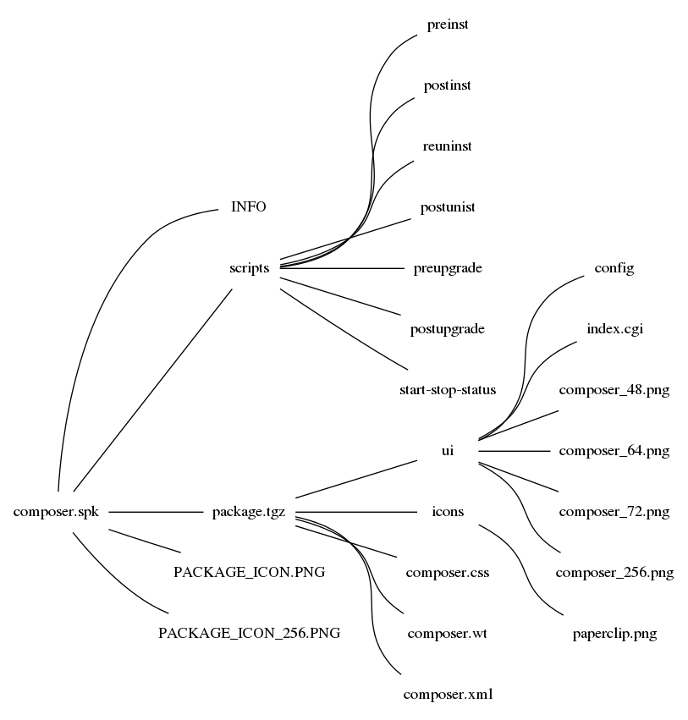
composer.wt , composer.xml , composer.css and paperclip.png taken from the Wt example and are not of interest.
dsmuidir is an optional variable needed to automatically create a link from / volumeX / @ appstore / [packge name] / [dsmuidir] to / usr / syno / synoman / webman / 3rdparty / [package name] . / volumeX / @ appstore / [packge name] , where X = 1,2..N is the path where the installed application will be located. / usr / syno / synoman / webman / 3rdparty / [package name] path for integration into the DSM UI.
To integrate into the DSM UI, you need to create the directory / usr / syno / synoman / webman / 3rdparty / [package name] and place the config file with approximate contents there:
composer_ {0} .png - the placeholder is replaced by composer_48.png / composer_64.png / composer_72.png / composer_256.png.
url - the path to html / cgi that will open in a new window, when you click on the application. In / usr / syno / synoman / webman / 3rdparty / [package name] html, js, css, cgi, images are allowed. But slipping php did not work.
A simple cgi script redirecting to an application written in Wt.
Start stop application.
In the case of Synology, the use of the toolchain has its pros and cons.
Possible advantages:
Possible cons:
The QNAP toolchain turned out to be ancient and had to be bypassed, but that's a different story.
The main source of information is the official DSM Developer Guide , which
outlines how to work with the toolchain (installation, compilation of open source projects, packaging). Because A budget version of the DS 114 was purchased , which has a Marvell Armada 370 and a DSM 5.2 firmware version under the hood, then everything will be assembled under arm.
To prepare the environment I will usepackage toolkit , which can be downloaded from the Synology Open Source Project project page . This is a little more convenient, because devices in different price categories come with different processors, which requires downloading several sets of tools.
See the What kind of CPU does my NAS have page for more details .
unpack package toolkit pump out the environment and tools
$ mkdir -p ~/synology/toolkit

$ tar xvf pkgscripts.tgz -C ~/synology/toolkit
$ cd ~/synology/toolkit/pkgscripts/

$ sudo ./EnvDeploy -v 5.2 -p armada370
Boost
Boost is surprisingly easy to build. In the file ~ / user-config.jam we register and collect:
using gcc : arm : arm-marvell-linux-gnueabi-g++ ;
$ ./bootstrap.sh --prefix=/home/dmitry/synology/toolkit/build_env/ds.armada370-5.2/usr/local/arm-marvell-linux-gnueabi/arm-marvell-linux-gnueabi/libc
$ export PATH=~/synology/toolkit/build_env/ds.armada370-5.2/usr/local/arm-marvell-linux-gnueabi/bin:$PATH
$ ./b2 toolset=gcc-arm link=static threading=multi install
Webtoolkit
To configure CMake, I use the toolchain-file toolchain-arm-marvell.cmake
SET(CMAKE_SYSTEM_NAME Linux)
SET(CMAKE_SYSTEM_VERSION 1)
SET(CMAKE_C_COMPILER   /home/dmitry/synology/toolkit/build_env/ds.armada370-5.2/usr/local/arm-marvell-linux-gnueabi/bin/arm-marvell-linux-gnueabi-gcc)
SET(CMAKE_CXX_COMPILER /home/dmitry/synology/toolkit/build_env/ds.armada370-5.2/usr/local/arm-marvell-linux-gnueabi/bin/arm-marvell-linux-gnueabi-g++)
SET(CMAKE_LINKER /home/dmitry/synology/toolkit/build_env/ds.armada370-5.2/usr/local/arm-marvell-linux-gnueabi/bin/arm-marvell-linux-gnueabi-ld.gold)
SET(CMAKE_FIND_ROOT_PATH /home/dmitry/synology/toolkit/build_env/ds.armada370-5.2/usr/local/arm-marvell-linux-gnueabi/arm-marvell-linux-gnueabi/libc)
SET(CMAKE_FIND_ROOT_PATH_MODE_PROGRAM NEVER)
SET(CMAKE_FIND_ROOT_PATH_MODE_LIBRARY ONLY)
SET(CMAKE_FIND_ROOT_PATH_MODE_INCLUDE ONLY)
SET(CMAKE_FIND_ROOT_PATH_MODE_PACKAGE ONLY)
Further:
$ tar xvf wt-3.3.4.tar.gz
$ cd wt-3.3.4
$ mkdir build
$ cd build
$ cmake -DCMAKE_TOOLCHAIN_FILE=~/toolchain-arm-marvell.cmake \
		-DCMAKE_BUILD_TYPE=Release \
		-DSHARED_LIBS=OFF \
		-DCMAKE_INSTALL_PREFIX=/home/dmitry/synology/toolkit/build_env/ds.armada370-5.2/usr/local/arm-marvell-linux-gnueabi/arm-marvell-linux-gnueabi/libc \
		..
$ make
$ make install
I am collecting an example that I will package:
$ cd examples/composer
$ make
I check the received file:
$ file Home.wt
Home.wt: ELF 32-bit LSB  executable, ARM, EABI5 version 1 (SYSV), dynamically linked (uses shared libs), for GNU/Linux 2.6.16, BuildID[sha1]=228a30c3dab0572993e41468aa0862fc93e11487, not stripped
Qt5
In the Qt source directory, go to qtbase / mkspecs / devices .
Create the armada370 directory, with the contents of
qmake.conf
include(../common/linux_device_pre.conf)
QMAKE_INCDIR         += $$[QT_SYSROOT]/usr/include
QMAKE_LIBDIR          += $$[QT_SYSROOT]/lib
QMAKE_CC                = $${CROSS_COMPILE}gcc
QMAKE_CXX              = $${CROSS_COMPILE}g++
QMAKE_LINK             = $${CROSS_COMPILE}g++
QMAKE_LINK_SHLIB = $${CROSS_COMPILE}g++
QMAKE_AR                = $${CROSS_COMPILE}ar cqs
QMAKE_OBJCOPY    = $${CROSS_COMPILE}objcopy
QMAKE_NM               = $${CROSS_COMPILE}nm -P
QMAKE_STRIP          = $${CROSS_COMPILE}strip
QMAKE_CFLAGS      += -march=armv7-a -mfpu=vfpv3-d16
QMAKE_CXXFLAGS += $$QMAKE_CFLAGS
DISTRO_OPTS += hard-float
QT_QPA_DEFAULT_PLATFORM = eglfs
include(../common/linux_arm_device_post.conf)
load(qt_config)
-mfpu = vfpv3-d16 is fpu optimization , and DISTRO_OPTS is responsible for hard-float / soft-float.
qplatformdefs.h is standard from the configuration for other ARMs.
When calling configure, you must pass:
- -device armada370
- -device-option CROSS_COMPILE = arm-marvell-linux-gnueabi-
- -sysroot ... / arm-marvell-linux-gnueabi / arm-marvell-linux-gnueabi / libc
Collected in chroot'e
conf.sh:
#!/bin/bash
CFG=''
CFG+=' -opensource'
CFG+=' -confirm-license'
CFG+=' -v'
CFG+=' -static'
CFG+=' -device armada370'
CFG+=' -make libs'
CFG+=' -device-option CROSS_COMPILE=/usr/local/arm-marvell-linux-gnueabi/bin/arm-marvell-linux-gnueabi- '
CFG+=' -sysroot /usr/local/arm-marvell-linux-gnueabi/arm-marvell-linux-gnueabi/libc'
CFG+=' -release'
CFG+=' -nomake tools'
CFG+=' -nomake examples'
CFG+=' -no-compile-examples'
CFG+=' -no-dbus'
CFG+=' -no-gui'
CFG+=' -no-widgets'
CFG+=' -qt-sql-sqlite'
CFG+=' -D QT_NO_GRAPHICSVIEW'
CFG+=' -D QT_NO_GRAPHICSEFFECT'
CFG+=' -D QT_NO_STYLESHEET'
CFG+=' -D QT_NO_STYLE_CDE'
CFG+=' -D QT_NO_STYLE_CLEANLOOKS'
CFG+=' -D QT_NO_STYLE_MOTIF'
CFG+=' -D QT_NO_STYLE_PLASTIQUE'
CFG+=' -no-qml-debug'
CFG+=' -no-alsa'
CFG+=' -no-cups'
CFG+=' -no-dbus'
CFG+=' -no-directfb'
CFG+=' -no-evdev'
CFG+=' -no-gtkstyle'
CFG+=' -no-kms'
CFG+=' -no-libudev'
CFG+=' -no-linuxfb'
CFG+=' -no-mtdev'
CFG+=' -no-nis'
CFG+=' -no-pulseaudio'
CFG+=' -no-sm'
CFG+=' -no-xcb'
CFG+=' -no-xcb-xlib'
CFG+=' -no-xinerama'
CFG+=' -no-xinput2'
CFG+=' -no-xkb'
CFG+=' -no-xrender'
CFG+=' -no-icu'
CFG+=' -no-use-gold-linker'
CFG+=' -no-eglfs'
CFG+=' -no-cups'
CFG+=' -no-fontconfig'
CFG+=' -no-sse2'
CFG+=' -no-sse3'
CFG+=' -no-sse4.1'
CFG+=' -no-avx'
CFG+=' -no-opengl'
cd qtbase
./configure $CFG "$@"
$ sudo chroot ~/synology/toolkit/build_env/ds.armada370-5.2/
$ cd /root/qt-everywhere-opensource-src-5.5.0/
$ ./conf.sh
$ cd qtbase
$ make
$ make install
Packaging
The package has the extension spk, represents from a file archive. The structure of the minimal package looks like:
INFO - a text file with a description of the package:
scripts - scripts executed at different stages of installing / uninstalling the package, and a script to run the daemon;
package.tgz - compressed archive containing executable files, libraries, resources, etc.
The composer.skp package compiled has the structure:
composer.wt , composer.xml , composer.css and paperclip.png taken from the Wt example and are not of interest.
INFO
package="composer"
displayname="Mail composer"
version="1.0.0"
arch="armada370"
description="This example implements a GMail-like mail composer and shows among other things how to upload files asynchronously, showing a cross-browser upload progress bar and with support for multiple files."
maintainer="Wt"
dsmuidir=ui
dsmuidir is an optional variable needed to automatically create a link from / volumeX / @ appstore / [packge name] / [dsmuidir] to / usr / syno / synoman / webman / 3rdparty / [package name] . / volumeX / @ appstore / [packge name] , where X = 1,2..N is the path where the installed application will be located. / usr / syno / synoman / webman / 3rdparty / [package name] path for integration into the DSM UI.
config
To integrate into the DSM UI, you need to create the directory / usr / syno / synoman / webman / 3rdparty / [package name] and place the config file with approximate contents there:
{
	".url": {
		"eu.webtoolkit.composer": {
			"type": "url",
			"allUsers": true,
			"title": "Mail composer",
			"desc":"This example implements a GMail-like mail composer and shows among other things how to upload files asynchronously, showing a cross-browser upload progress bar and with support for multiple files.",
			"icon":"composer_{0}.png",
			"url": "3rdparty/composer/index.cgi"
		}
	}
}
composer_ {0} .png - the placeholder is replaced by composer_48.png / composer_64.png / composer_72.png / composer_256.png.
url - the path to html / cgi that will open in a new window, when you click on the application. In / usr / syno / synoman / webman / 3rdparty / [package name] html, js, css, cgi, images are allowed. But slipping php did not work.
index.cgi
#!/bin/sh
if [ `ifconfig | grep bond0 | awk '{print $1}'` ]
then
IP_ADDR=`ifconfig bond0 | grep "inet addr" | awk '{print $2}' | awk -F: '{print $2}'`
else
IP_ADDR=`ifconfig eth0 | grep "inet addr" | awk '{print $2}' | awk -F: '{print $2}'`
fi
echo Location: http://$IP_ADDR:8585
echo ""
exit
A simple cgi script redirecting to an application written in Wt.
start-stop-status
#!/bin/sh
case $1 in
	start)
		${SYNOPKG_PKGDEST}/composer.wt --docroot=${SYNOPKG_PKGDEST} --approot=${SYNOPKG_PKGDEST} --http-address=0.0.0.0 --http-port=8585 &
		exit 0
	;;
	stop)
		pkill composer.wt
		exit 0
	;;
	restart)
		exit 0;
	;;
	status)
		if [ "$?" = "0" ]; then
			exit 0
		else
			exit 1
		fi
	;;
	log)
		exit 0
	;;
esac
Start stop application.
conclusions
In the case of Synology, the use of the toolchain has its pros and cons.
Possible advantages:
- no need to collect and put the necessary system libraries;
- You can enable additional cpu optimizations.
Possible cons:
- You may have to do builds for each toolchain.
The QNAP toolchain turned out to be ancient and had to be bypassed, but that's a different story.









