November 10, 2015 at 08:59
Data ONTAP 8.3 ADP: FlashPool StoragePools
Data ONTAP 8.3 cDOT is one of NetApp's largest releases. One of the key features of the release is Advanced Drive Partitioning (ADP) technology, in a previous article I examined the application of this technology for Root-Data Partitioning , in the same I suggest considering the internal device StoragePools. More on what 's new in cDOT 8.3 here .
StoragePools is similar to Root-Data Partitioning, which also uses partitioning, providing a new way to allocate SSD cache for hybrid aggregates.
StoragePool technology was developed specifically for hybrid units to more efficiently distribute SSD cache between them. For example, you have only 4 SSDs installed in your system, and you want to make a cache for 2, 3, or even 4 units, here ADP will come to your aid.
So, first you need to create StoragePool and add a set of SSD disks there.
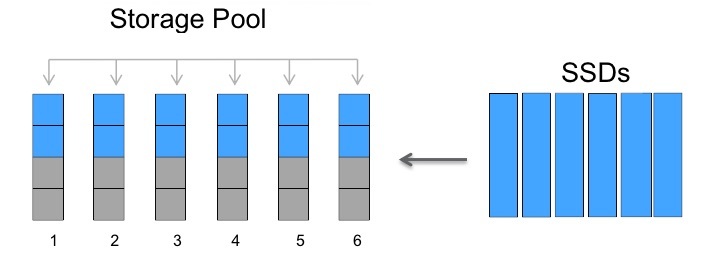
All disks in StoragePool will be split into even 4p parts. This is not configured anywhere, the system will always break them into even 4p parts. You can have multiple StoragePools. By creating StoragePool, by default, partitions will be equally divided between two nodes of the HA system, but this can be changed.
The set of the first (P1), second (P2), third (P3) and fourth (P4) partitions of StoragePool disks is called the Allocation Unit, respectively (AU1, AU2, AU3, AU4).


then you can collect RAID4 (and lose 1 Parity disk) or collect RAID-DP (and lose 2 Parity drives)
Since there are very few disks, in the case of RAID-DP it is allowed not to have a Spare disk
For RAID-4 you need to have one Spare disk
Hot- Spare disk is always highly recommended in all configurations.
When choosing between RAID4 (with Spare disk) and RAID-DP (without Spare disk), NetApp prefers RAID4.
In production systems with four SSDs, as a rule, it is RAID4 with a Spare disk that is used (we lose two of the four disks) . You can also build RAID-DP with a Spare disk on four disks and lose 3 of 4 disks.
It is important to note that if any one (all) RAID4 or RAID-DP group fails in the unit (whether it is SSD, AU or HDD), the entire unit will go into the Degraded and Offline state. In this connection, NetApp always recommends using Spare disks and the level of protection that meets your expectations for red groups.
Before buying SSD disks for FlashPool, you can estimate how many disks and what capacity can increase the throughput and response speed, based on the number of cache hit hits that could be if there was a cache.
If the SSD fails, all raids of the group (AU) that use its partitions will be affected, as a result, all units that use these AUs. In this connection, it is recommended to always have a Spare disk, in other matters this recommendation has always been.
StoragePools is another technology under the hood of cDOT that is designed to be as simple as possible to use it. Just like Root-Data Partitioning, it just is and just works. In general, the technology copes with its task perfectly - it is more flexible to allocate SSD cache for hybrid units. It indirectly allows you to save on SSDs, so before you had to buy at least 4x SSD for each hybrid unit, now you can use one set of 4 SSDs for 4 units. Understanding the intricacies of StoragePool, you can more rationally distribute the cache by allocating it in portions to the aggregates: for example, first give one AU for the unit, and then add it if necessary.
The ADP FAQ is available at Fieldportal .
Please send messages about errors in the text to the LAN.
Comments, additions and questions on the opposite article, please comment .
StoragePools is similar to Root-Data Partitioning, which also uses partitioning, providing a new way to allocate SSD cache for hybrid aggregates.
Hybrid unit
StoragePool technology was developed specifically for hybrid units to more efficiently distribute SSD cache between them. For example, you have only 4 SSDs installed in your system, and you want to make a cache for 2, 3, or even 4 units, here ADP will come to your aid.
So, first you need to create StoragePool and add a set of SSD disks there.
All disks in StoragePool will be split into even 4p parts. This is not configured anywhere, the system will always break them into even 4p parts. You can have multiple StoragePools. By creating StoragePool, by default, partitions will be equally divided between two nodes of the HA system, but this can be changed.
The set of the first (P1), second (P2), third (P3) and fourth (P4) partitions of StoragePool disks is called the Allocation Unit, respectively (AU1, AU2, AU3, AU4).
- Now we can assemble individual Raid Groups (RGs) from Allocation Units (AUs).
- Allocation Units are created only from SSDs.
- A raid group already containing an AU can consist of only one AU.
- Several raids of groups consisting of AU can coexist in one unit or live in several different units, units can live on the first and / or second node.
- AU is used entirely to create a raid group.
- You can use any available number of AUs or not.
- As long as the RAID group is no more than 14 Disks, it can be converted RAID4 to RAID-DP and vice versa on the go.
- As an exception to the rule, an SSD as a cache (a hybrid unit, also called FlashPool) can be added to an aggregate consisting of HDD disks. As a rule, NetApp does not allow combining multi-disc drives *.
- As an exception to the rule, for SSD raid groups it is allowed to have a different type of security (RAID4 or RAID-DP) from the one configured for the HDD. As a rule, all raids of a group should have the same type of security. In our case, the recommendation acts in this way: all RAID groups consisting of HDDs must have the same type of protection, and RAID groups consisting of SSD / AUs may have a different type of protection from HDDs, but must have the same type of security in SSD / AU raid groups .
RAID and Spare Recommendations
If you have only 4 discs
then you can collect RAID4 (and lose 1 Parity disk) or collect RAID-DP (and lose 2 Parity drives)
Since there are very few disks, in the case of RAID-DP it is allowed not to have a Spare disk
For RAID-4 you need to have one Spare disk
Hot- Spare disk is always highly recommended in all configurations.
When choosing between RAID4 (with Spare disk) and RAID-DP (without Spare disk), NetApp prefers RAID4.
The preference for RAID4 on a small number of SSDs is due to several reasons:
- SSDs are actually more reliable than regular drives, so in small quantities SSD RAID4 is more reliable than HDDs in the same RAID
- SSD disks are much faster to recover, which is why a second disk failure during the reconstruction process is much less likely to be compared to HDD
- Since SSDs have a limited number of rewrite cycles, the Spare disk will not be used at all (and will not utilize rewrite cycles)
- If the number of SSDs exceeds 7 drives, it is recommended to use (convert group to) RAID-DP
In production systems with four SSDs, as a rule, it is RAID4 with a Spare disk that is used (we lose two of the four disks) . You can also build RAID-DP with a Spare disk on four disks and lose 3 of 4 disks.
It is important to note that if any one (all) RAID4 or RAID-DP group fails in the unit (whether it is SSD, AU or HDD), the entire unit will go into the Degraded and Offline state. In this connection, NetApp always recommends using Spare disks and the level of protection that meets your expectations for red groups.
Example of converting RAID-DP to RAID4 for SSD cache (AU)
storage aggregate modify -aggregate aggr_name -hybrid-enabled true
storage pool show-available-capacity
storage aggregate add aggr_name -storage-pool sp_name -allocation-units number_of_units
storage aggregate modify -aggregate aggr_name -raidtype raid4 -disktype SSD
storage aggregate show-status test
Aggregate test (online, mixed_raid_type, hybrid) (block checksums)
  Plex /test/plex0 (online, normal, active, pool0)
    RAID Group /test/plex0/rg0 (normal, block checksums, raid-dp)
                                                              Usable Physical
     Position Disk                        Pool Type     RPM     Size     Size Status
     -------- --------------------------- ---- ----- ------ -------- -------- ----------
     dparity  1.2.3                        0   BSAS    7200  827.7GB  828.0GB (normal)
     parity   1.2.4                        0   BSAS    7200  827.7GB  828.0GB (normal)
     data     1.2.5                        0   BSAS    7200  827.7GB  828.0GB (normal)
     data     1.2.6                        0   BSAS    7200  827.7GB  828.0GB (normal)
     data     1.2.8                        0   BSAS    7200  827.7GB  828.0GB (normal)
    RAID Group /test/plex0/rg1 (normal, block checksums, raid4)
                                                              Usable Physical
     Position Disk                        Pool Type     RPM     Size     Size Status
     -------- --------------------------- ---- ----- ------ -------- -------- ----------
     parity   1.3.3                        0   SSD        -  82.59GB  82.81GB (normal)
     data     1.4.0                        0   SSD        -  82.59GB  82.81GB (normal)
     data     1.4.1                        0   SSD        -  82.59GB  82.81GB (normal)
     data     1.4.2                        0   SSD        -  82.59GB  82.81GB (normal)
Advanced Workload Analyzer (AWA)
Before buying SSD disks for FlashPool, you can estimate how many disks and what capacity can increase the throughput and response speed, based on the number of cache hit hits that could be if there was a cache.
AWA Output Example
### FP AWA Stats ###
Host lada66a Memory 93788 MB
ONTAP Version NetApp Release Rfullsteam_awarc_2662016_1501071654: Wed
Jan 7 17:43:42 PST 2015
Basic Information
Aggregate lada66a_aggr1
Current-time Fri Jan 9 16:14:29 PST 2015
Start-time Fri Jan 9 12:30:16 PST 2015
Total runtime (sec) 13452
Interval length (sec) 600
Total intervals 24
In-core Intervals 1024
Summary of the past 20 intervals
max
------------
Read Throughput (MB/s): 134.059
Write Throughput (MB/s): 1333.279
Cacheable Read (%): 27
Cacheable Write (%): 22
Max Projected Cache Size (GiB): 216.755
Summary Cache Hit Rate vs. Cache Size
Referenced Cache Size (GiB): 216.755
Referenced Interval: ID 22 starting at Fri Jan 9 16:04:38 PST 2015
Size 20% 40% 60% 80% 100%
Read Hit (%) 1 3 6 11 21
Write Hit (%) 5 11 13 14 23
AWA Summary for top 8 volumes
Vol interval len (sec) 19200
In-core volume intervals 8
Volume #1 lada66a_vol8
Summary of the past 32 intervals
max
------------
Read Throughput (MB/s): 1.751
Write Throughput (MB/s): 18.802
Cacheable Read (%): 11
Cacheable Write (%): 16
Max Projected Cache Size (GiB): 29.963
Projected Read Hit (%): 31
Projected Write Hit (%): 16
Volume #2 lada66a_vol7
Summary of the past 32 intervals
max
------------
Read Throughput (MB/s): 1.640
Write Throughput (MB/s): 17.691
Cacheable Read (%): 14
Cacheable Write (%): 13
Max Projected Cache Size (GiB): 28.687
Projected Read Hit (%): 29
Projected Write Hit (%): 13
disadvantages
If the SSD fails, all raids of the group (AU) that use its partitions will be affected, as a result, all units that use these AUs. In this connection, it is recommended to always have a Spare disk, in other matters this recommendation has always been.
conclusions
StoragePools is another technology under the hood of cDOT that is designed to be as simple as possible to use it. Just like Root-Data Partitioning, it just is and just works. In general, the technology copes with its task perfectly - it is more flexible to allocate SSD cache for hybrid units. It indirectly allows you to save on SSDs, so before you had to buy at least 4x SSD for each hybrid unit, now you can use one set of 4 SSDs for 4 units. Understanding the intricacies of StoragePool, you can more rationally distribute the cache by allocating it in portions to the aggregates: for example, first give one AU for the unit, and then add it if necessary.
The ADP FAQ is available at Fieldportal .
Please send messages about errors in the text to the LAN.
Comments, additions and questions on the opposite article, please comment .