How ABBYY Cloud OCR SDK Helps You Find Cheap Flights
 As our regular readers know, some time ago we launched the ABBYY Cloud OCR SDK , a recognition service for developers, the “cloud brother” of the ABBYY FineReader Engine . The service works so simply that your editor (tm) rarely succeeds in persuading developers to write a post about him on Habr - technical details are not enough for the whole article. Here is perhaps the very first post about beta testing .
 Today we will tell you how one of our customers, Aviasales, uses the service. This is one of the largest airline search engines in the world (the company operates under the name JetRadar in foreign markets), about 10 million people use it per month, and the number of search sessions per day approaches one million. For quite some time now, Aviasales
I must say that "mobile travelers" are different from those who plan their trips on a computer. Often, airline tickets are searched and paid on the run, so entering passport data is slower. It takes 3 to 5 minutes to fill in the standard fields and in a more comfortable environment. And this is not counting the usual mistakes like confused names and surnames or an incorrectly specified passport validity period.
In general, Aviasales developers decided to add the function of recognizing passport data from photographs into the mobile application and, having analyzed the offers available at that time in the market, turned to us with this task. Passport data can recognize several of our products, partners settled on the ABBYY Cloud OCR SDK web service. You can read about how our technology works.here .
Thanks to the Cloud OCR SDK web API, adding recognition functionality to the mobile version of Aviasales was easy. Since the application only needs to be able to send HTTP requests, recognition can be screwed to the application on any platform - for starters, our partners added it to the mobile version of Aviasales for iOS, the plans are Android. Since the recognition process itself occurs on the service side, this functionality does not increase the size of the distribution kit and does not drop the battery.
Briefly, the process is as follows: in the Aviasales application, when filling out passenger data, you can take a photo of your passport or select a photo from the gallery, the file with the image of the passport page is sent to our service, it recognizes the machine-readable zone (MRZ) and returns it as XML(last name, first name, passport number, date of issue and expiration). The application parses the response and saves the data in iCloud so that you can then use autocomplete with every purchase. Since MRZ has a single international format, recognition works on passports of all countries in which this line is.
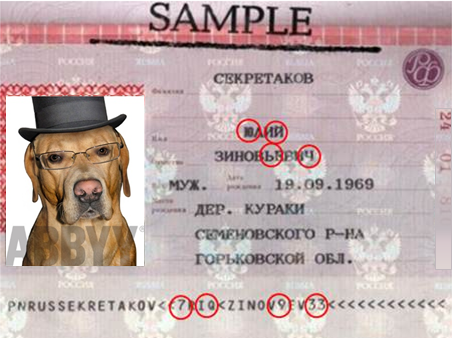
Some difficulties arose at first with the recognition of Russian internal passports. The data of the internal, general civil passport is needed to purchase tickets for domestic flights, while the name and surname of the passenger on the ticket must be written in Latin. The Latin spelling of the name and surname is still taken from the machine-readable line (MRZ), which appeared in Russian internal passports in 2011. The problem was that the information in this line is encoded in a special way: some letters of the Russian alphabet are replaced by numbers or letters of the Latin alphabet (this encoding is called “modernized clair”). For example, the letter Yu turns into 7, and Y into Q. And that is how ABBYY technology recognized these characters. This problem was simply solved: Aviasales developers wrote
For the user, the new functionality looks like this: you need to go to the "Passengers" section and click on the "New Passenger" button. A window with a form will open, in the upper right corner of which there is a camera icon. By clicking on this icon and taking a picture of your passport (you can simply select a photo from the phone’s memory), you need to wait a couple of seconds, and then the passport data will appear in the appropriate fields. The passenger can only check the data and click on the "Add" button so that the program remembers it.


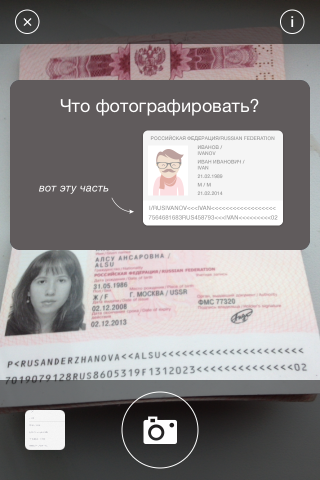
Yes, this is our girl and she does not mind her passport being shown here
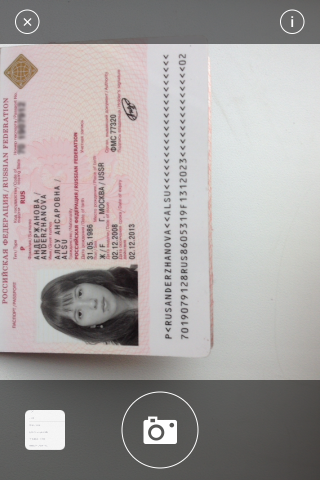


Colleagues from Aviasales have implemented several small but pleasant details in the application, among which there is a notification to the user about the expiration of the document - a few months before this deadline.
Passport data is stored in iCloud for synchronization between user devices. It is absolutely safe; data is not transmitted or stored on Aviasales servers. When the client goes from the Aviasales page to the website of the airline ticket agency, he is invited to click on the "fill" button so that he does not enter all the data manually. But the substitution in the form when filling out on partner sites occurs only at the request of the user and is approved by him every time.
In conclusion, we say that Aviasales developers integrated the function of extracting data from a passport photo in just 2 weeks.
Aviasales colleagues say that autocomplete increases the chance to “catch” a cheap ticket until someone else intercepts it. We did not check, but, purely theoretically, several minutes of handicap in some situations can really play a role, given the fact that the cost of tickets can change every 15 minutes.
Of course, scanning documents is, as they say on the Internet now, a wow service and not everyone uses it, but in the first 4 months after the auto-completion function appeared, more than 10 thousand travelers took advantage of it - not so few. For the user, filling out a form with a large number of fields is usually not a very pleasant experience. And when it is possible to just take a picture, and the data will be filled in by itself, this is in order to nevertheless add your data to the application.