Porting C ++ applications to nanoCAD platform, using project properties pages
In a previous article, we wrote about creating cross-CAD platform applications from existing applications that work only on the AutoCAD platform. In this article, we will go into more detail and talk about how to set up an ObjectARX application project for AutoCAD and build an NRX application for nanoCAD.
Recall that to convert an ObjectARX application to an NRX application, you need to copy the existing project configuration and replace the paths to the headers, libraries, and also specify constants for conditional compilation. This process is described in the nanoCAD SDK documentation.
Below we will talk about what the developer’s documentation does not yet have - about using property pages to minimize the number of changes needed to create a configuration for nanoCAD in the project. As a result of the configuration, the application can be assembled for both platforms, nanoCAD and AutoCAD, while the changes will be made only to the project files, the source texts, .h and .cpp files will remain unchanged.
Let's start by setting an environment variable that points to the location of the nanoCAD SDK. The variable can be defined on the system, or it can be set in a .bat file before starting Visual Studio 2008.
Why is Visual Studio 2008 and not 2010/2012/2013/2015?
nanoCAD 3.0 - 7.0 are built on Visual Studio 2008, so applications should be built with the same compiler.
StartVS90_NCadSDK.bat:
set NCadSDK=c:\Program Files (x86)\Nanosoft\nanoCAD Plus 7.0\SDK
call "%VS90COMNTOOLS%vsvars32.bat"
devenv.exe
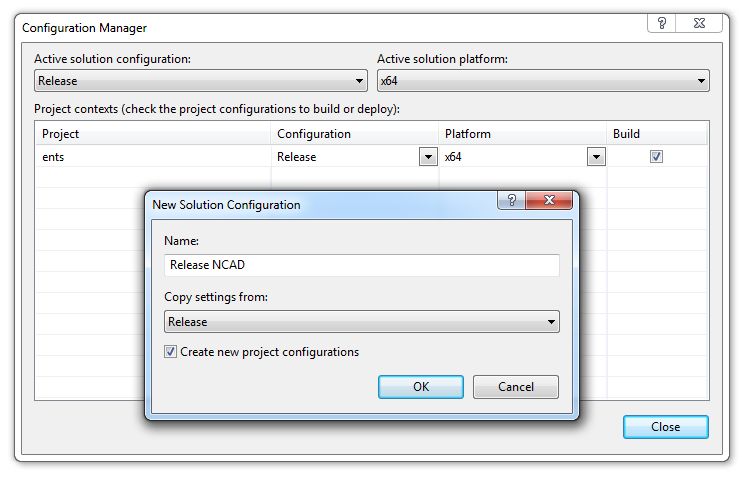
After starting Visual Studio, create a new project configuration. You can create a configuration from scratch, or copy one of the existing configurations. For example, the Release configuration can be copied to the new Release NCAD configuration.
In order not to manually configure the compiler and linker parameters, we will connect the property page, .vsprops file in which these parameters are already configured. Property pages are added in the property manager window (View -> Property manager).

The NRX SDK includes property pages for debugging and release configurations:
- rxsdk_debugcfg.vsprops - properties for the debug configuration of the project;
- rxsdk_releasecfg.vsprops - properties for the release configuration of the project;
They are located in the directory
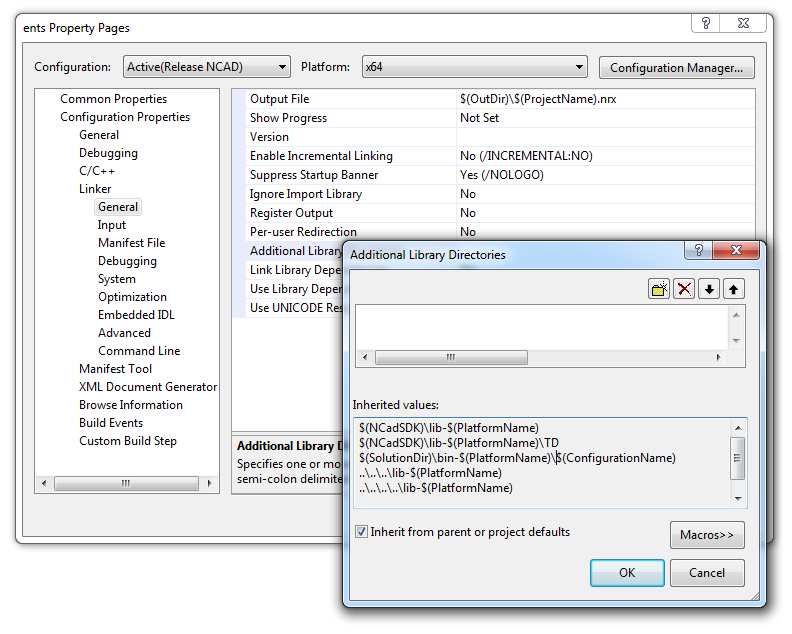
After adding the property page, the following settings appear in the project:

Here, in fact, is all that needs to be done to port a simple application. The assembled NRX module is loaded into nanoCAD using the APPLOAD command. For automatic loading, applications can be added to the "Startup Suitcase" located in the same place in the APPLOAD command dialog.

You can also discuss the article on our forum .
Translation of the article into English: Porting C ++ applications to nanoCAD: using project property pages