 September 17, 2015 at 16:57
How to optimize the online store. Part 1. Automatic dialing of incoming leads
A week after the previous article , where I talked about building a bot for Telegram, an online watch store turned to me for advice, which by that time had already built some processes for its needs. When the business grew, they faced the problem of processing a large number of incoming applications, and it depends on the quick reaction to the application whether a person will buy a product or not.
Here I will describe their case of optimization of the processes of the online store using Corezoid.com and I will give open access to a link to the process template described below.
What you need to do:
1) Add a lead to CRM (in this case, Bitrix24) with filling in all the necessary additional fields.
2) Notify sellers of the lead or error.
3) Notify the client of a successfully accepted order, as well as talk about an additional promotion (try to warm up the client, increase the average check).
At the entrance we have:
1) The name and phone number of the client who is interested in our product.
2) The client city defined by ip.
3) Client timezone.
4) The identifier of the partner (ref-link in cookies) from which the application came.
The solution was a bunch of APIs for several services through Corezoid.com, namely: Bitrix24 (CRM system) + VoxImplant (service for implementing callbacks) + Telegram (messenger).
To send a lead for processing in Corezoid, you need to make an API request from a php script that receives data from a web form on the site. On their example, it looks like this:
The $ data object is formed from the data that must be transferred to Corezoid for processing.
The $ ops object includes the parameter ref (referense) - a unique id under which the application will be fixed in Corezoid. If at the moment there is already an application in the process of working with the same ref, then the second one will not be added. In this example, they use the client IP address as ref.
The conv_id parameter is responsible for the formation of a task in a specific process (ID Process).
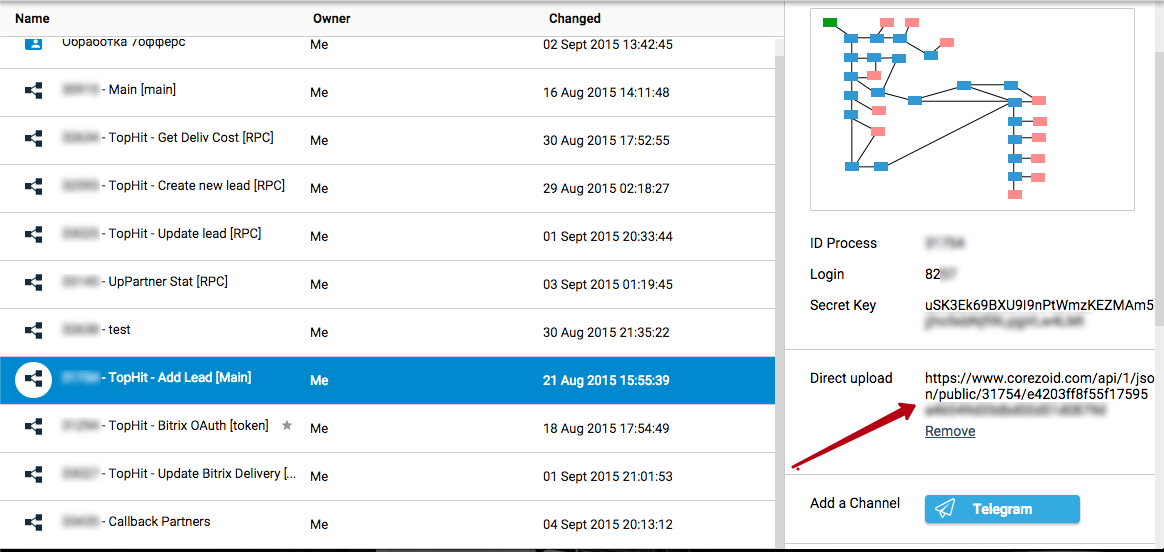
The URL to which we will send the data and the conv_id of the process, we take from the property in the admin panel:
Processing the application
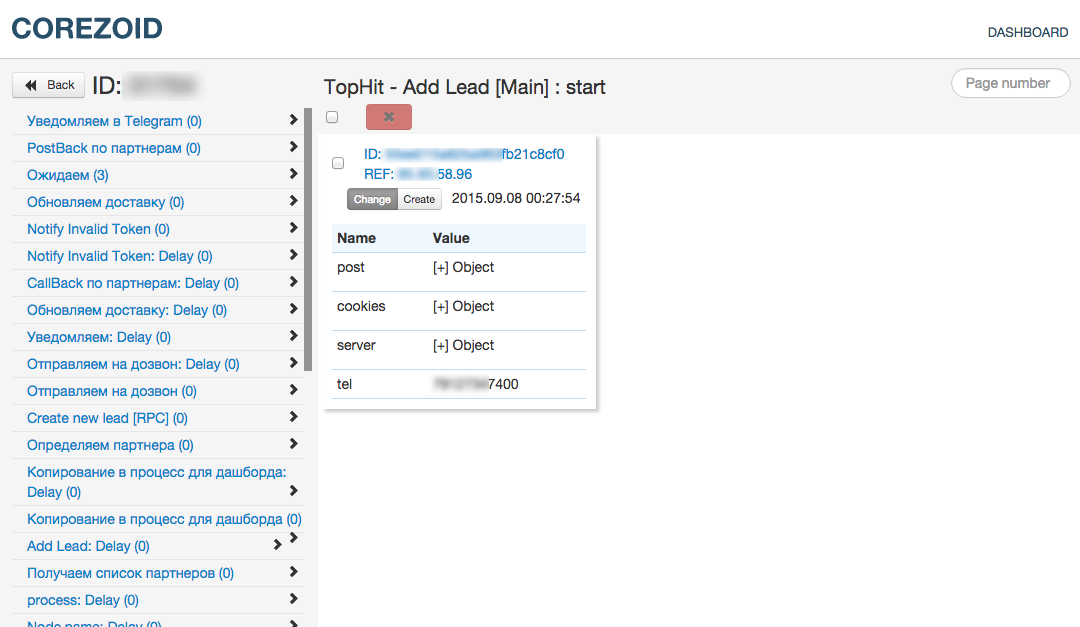
First, the application gets to the start node. It differs from all in green. You can view this application and see the data received at the entrance.
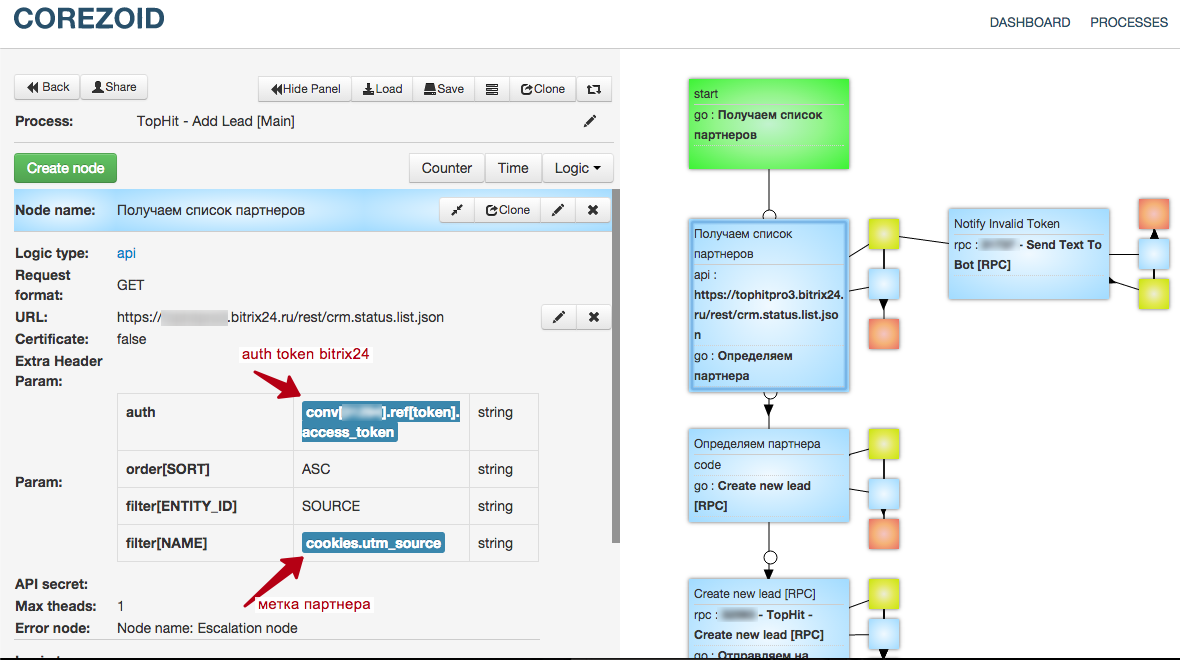
Since the store is actively using the affiliate sales scheme, the first step is to determine which partner the order came from.
Through the Bitrix24 API, we get the ID and data of this partner.
For authorization in the API, we substitute the “auth” parameter with a construct that allows you to dynamically obtain the “access_token” value from the process of its generation and updating. A detailed description of this process is in the documentation on Corezoid.com
In this example, data on the partner’s label is stored in the cookie object in the utm_source parameter, which the company monitors after clicking on the affiliate link. We pass the value of this parameter to the API.
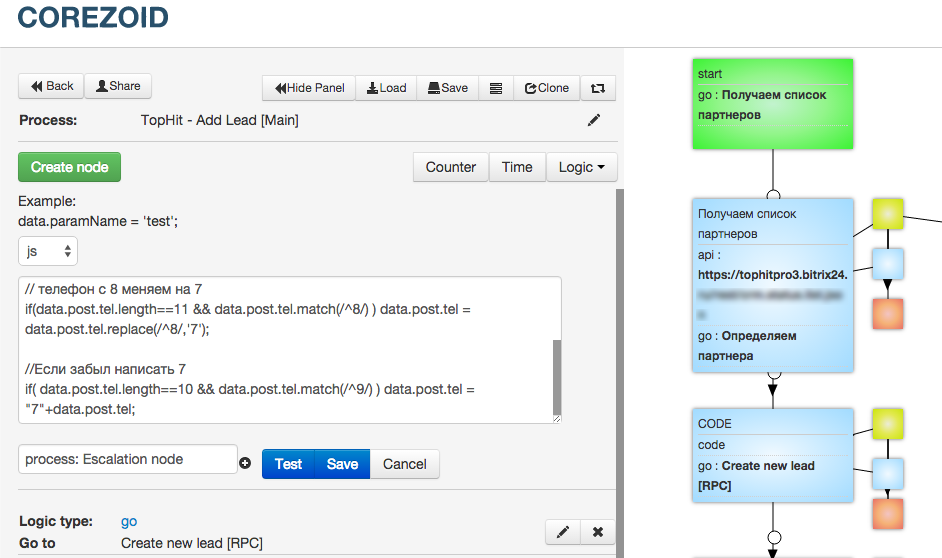
The next step is behind the CODE logic in which the store processes the phone. Processing consists in the automatic replacement of the first digit 8 to 7, and if the client entered only 10 digits and the first starts at 9, then add 7 to the beginning, so that the phone is correctly processed by the dialer script.
The next step, they send an application to a separate RPC process “Create new lead [RPC]”. It creates a lead in CRM and returns a lead ID. The Corezoid documentation has a detailed description of this process .
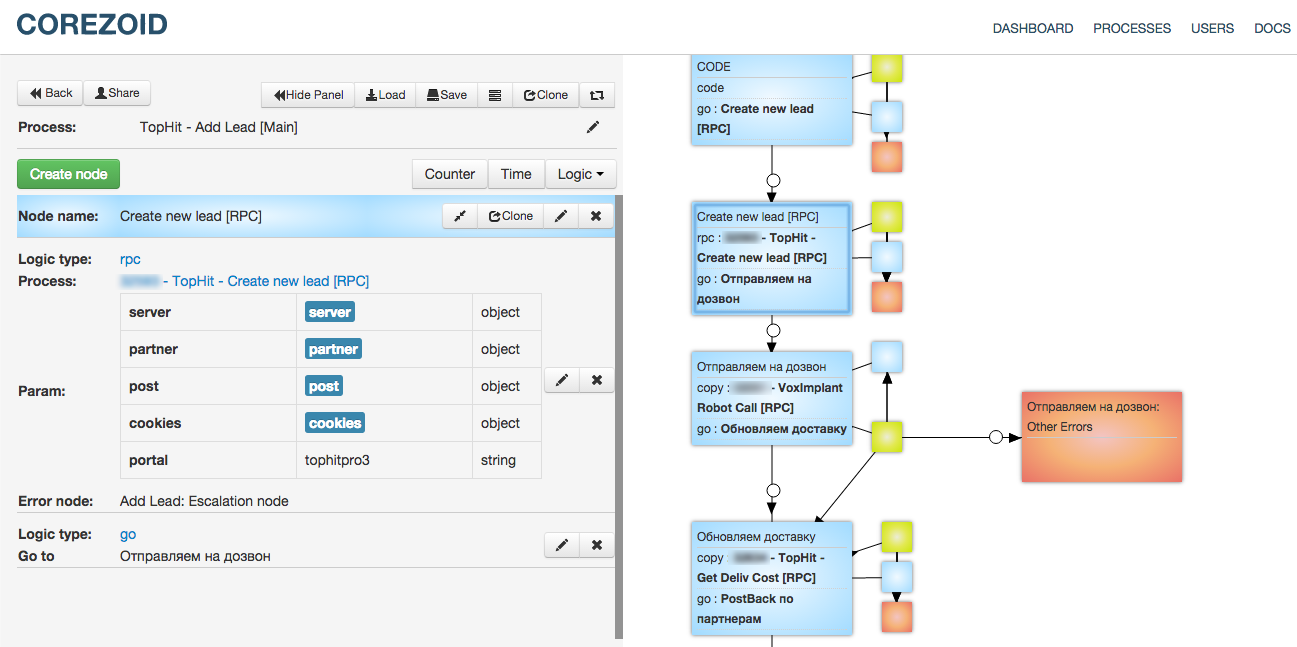
If the lead is successfully created, id will return to the lead_id variable.
The next step is the application is copied into the process, which will be dialed to the customer. After copying, it will immediately proceed to the next step, without waiting for the return of any values from the VoxImplant Robot Call process. This is the main difference from an RPC request when data is expected to return from another process.
The dialer logic first of all adds a variable with the length of the phone through the CODE logic. If the phone is longer than 11 digits, then it is sent to the final node, since the phone is too long.
The next block receives the current time by MSC in the timenow variable.
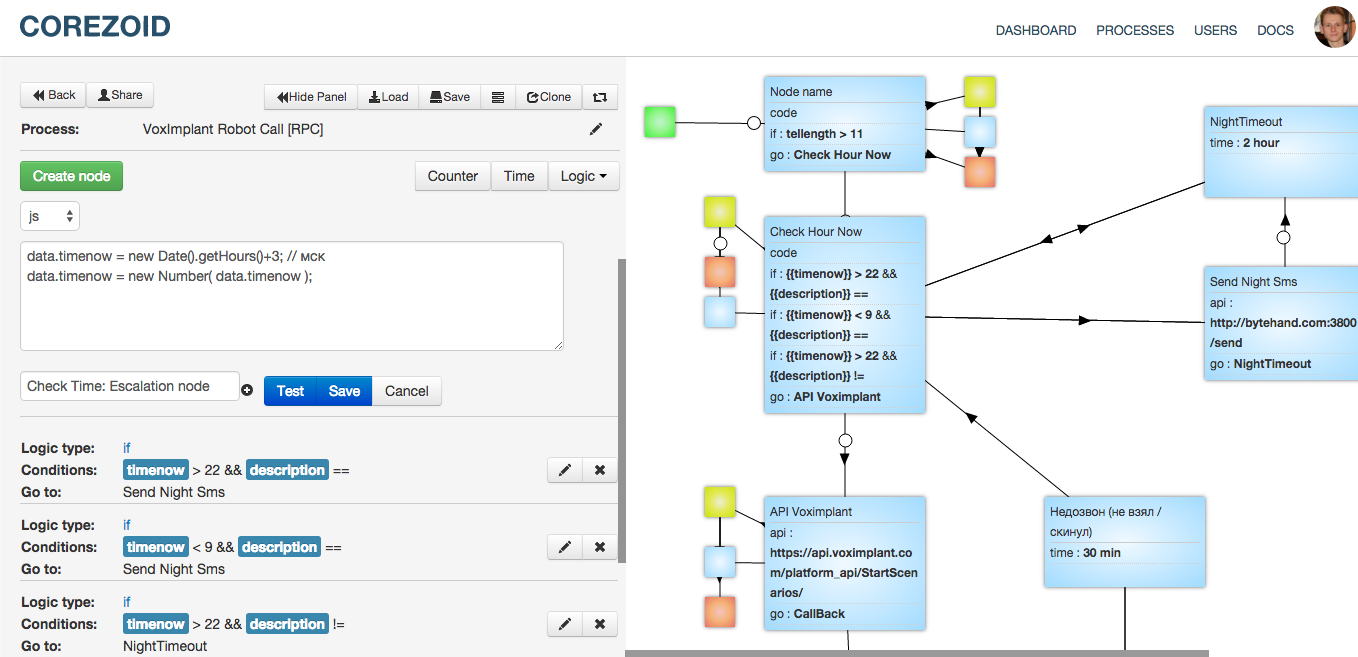
This is necessary so that if the lead arrives at night or early in the morning, the store does not bother the customer with a night call, but simply sends an SMS about the successfully received order and the message that they will call back during business hours.
After the CODE logic in the same block, the time of day and the fact of sending SMS to the client are checked. If the message was not sent and the time is not working, then the application goes to the Send Night SMS block. Then the store sends SMS to the client through the API logic and receives a response to the description variable. Then they go "to sleep" in a timeout for 2 hours.

An application hanging in a timeout looks like this:

If it’s working time, then you need to call the client and inform about the successfully accepted order, and tell about the additional promotion.
This task was implemented through the API logic, which runs the script on the VoxImplant service.
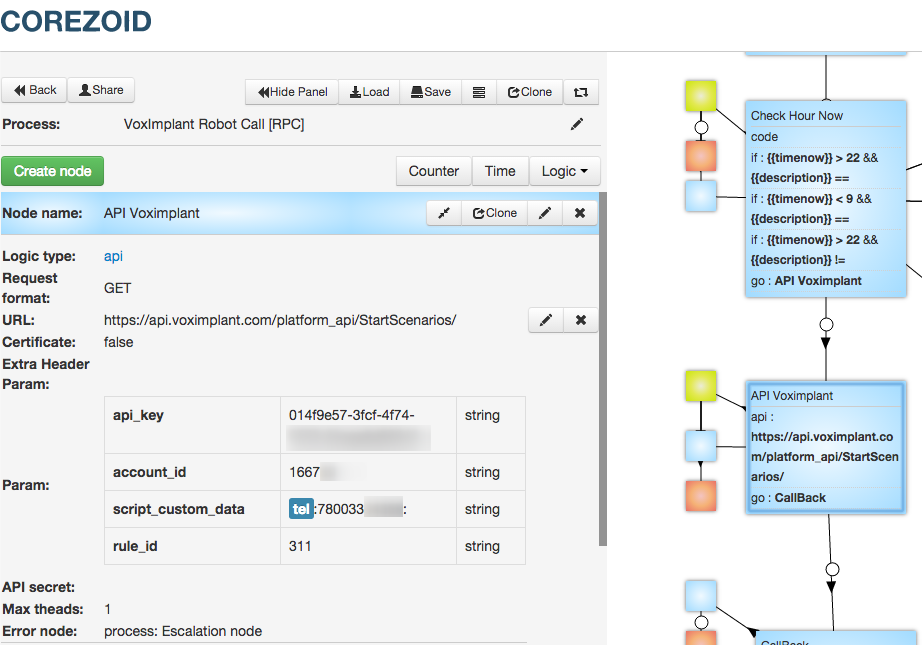
VoxImplant makes a call to the client and loses to him the prepared record of the successfully accepted order. Additionally, the function of determining an answering machine is built into the code.
{script code}
Next, the application goes into the Callback logic in Corezoid, which expects a response from VoxImplant with the results of the call. If we did not wait for an answer, something went wrong and the application “falls” into manual processing. If everything is ok, and VoxImplant sent the results, then we enter the process of distributing the results.
If the number is incorrect, then the application goes to the final node, it makes no sense to call and send SMS to this number. If the client did not pick up the phone or his phone is now turned off, then our application goes into the “Callback” status and takes a timeout of half an hour.
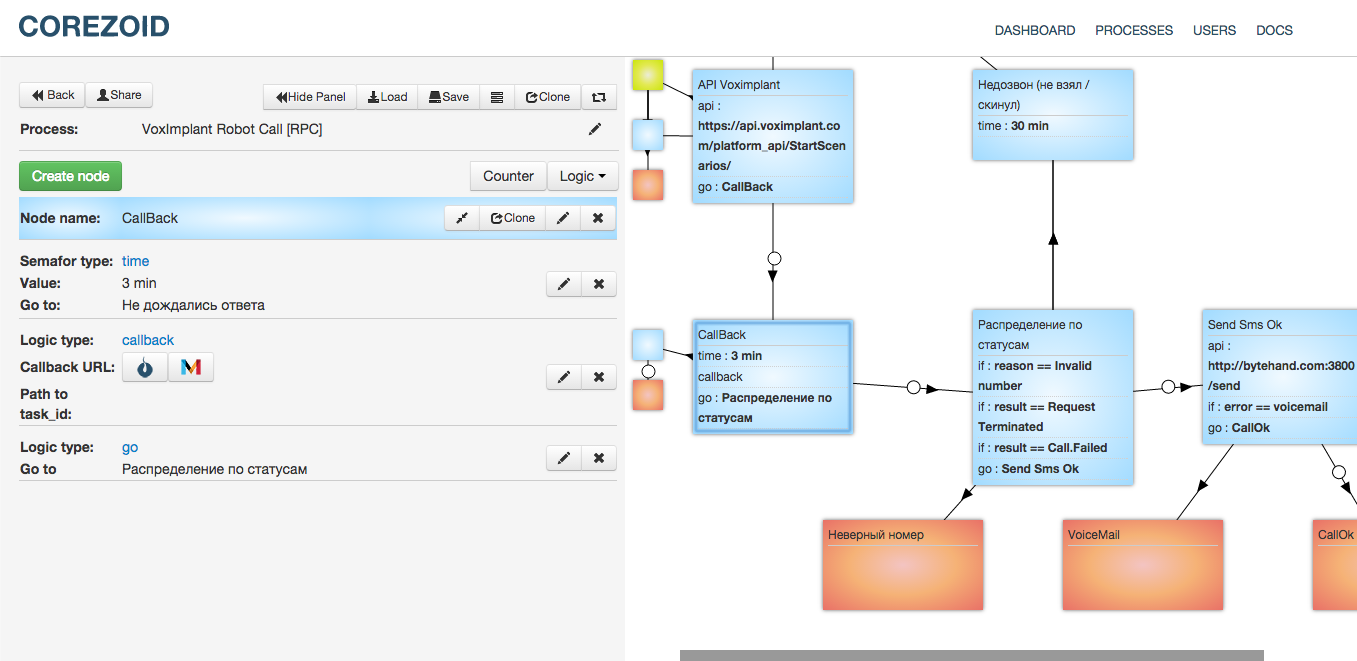
If the customer has successfully reached the customer, we additionally inform via SMS that his order has been successfully accepted and close the application. When VoxImplant determines an answering machine, the store also sends SMS to the customer, but they do not call further, because it is not known when the customer will pick up the phone and the store will spend money on every call. In addition to the logic, you can embed a limit on the number of dialers, as well as updating the lead in CRM with call status.
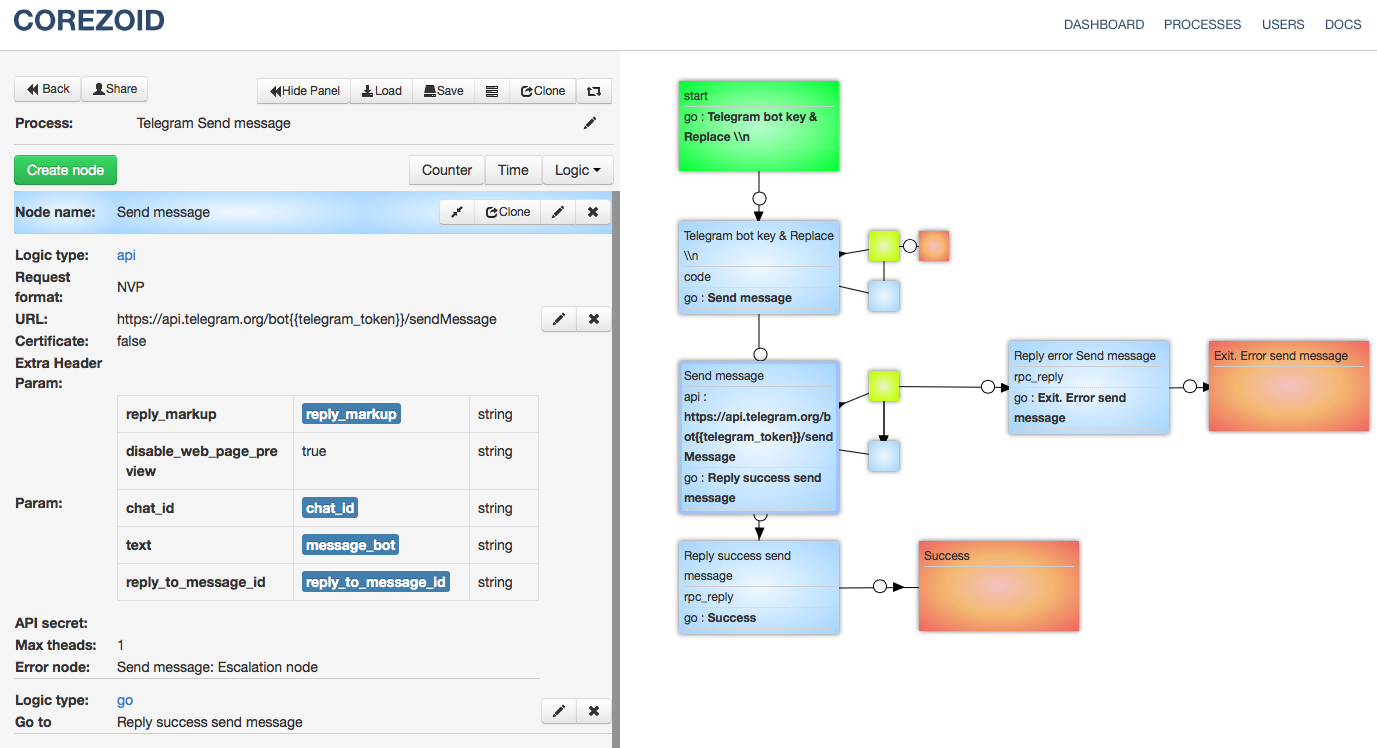
The process also provides for a notification in Telegram to the seller if, in the main process, upon receipt of the list of partners there will be an invalid token and you need to process the application manually. And notification of a successfully added lead. And in the process for the dashboard, using the IF logic, the orders are distributed among the nodes according to the criteria that determine the partner or site and the total amount of orders from each partner.
In the following articles, I will describe other cases of using Corezoid in the online store and share templates:
About what is most interesting, write in the comments.
The template described in the article is available here . And you can implement your own cases of combining different services into a single ecosystem on Corezoid.com .
Have questions?
You can contact me on Telegram or by e-mail.
Here I will describe their case of optimization of the processes of the online store using Corezoid.com and I will give open access to a link to the process template described below.
What you need to do:
1) Add a lead to CRM (in this case, Bitrix24) with filling in all the necessary additional fields.
2) Notify sellers of the lead or error.
3) Notify the client of a successfully accepted order, as well as talk about an additional promotion (try to warm up the client, increase the average check).
At the entrance we have:
1) The name and phone number of the client who is interested in our product.
2) The client city defined by ip.
3) Client timezone.
4) The identifier of the partner (ref-link in cookies) from which the application came.
The solution was a bunch of APIs for several services through Corezoid.com, namely: Bitrix24 (CRM system) + VoxImplant (service for implementing callbacks) + Telegram (messenger).
To send a lead for processing in Corezoid, you need to make an API request from a php script that receives data from a web form on the site. On their example, it looks like this:
$data = (object) array('server'=>$_SERVER,'cookies'=>$_COOKIE,'post'=>$_POST );
$full = (object) array('ops'=> array( (object) array( 'ref'=>$ip,'type'=>'create','obj'=>'task','conv_id'=>'31754','data'=> $data)) );
$cmd = ( json_encode( $full ) );
$str = "curl 'https://www.corezoid.com/api/1/json/public/31754/e4203ff8f55f17595a46549d35dbd00d51d0879d' -H 'Accept: application/json, text/javascript, */*; q=0.01' --data '".$cmd."' --compressed";
$res = shell_exec($str);
The $ data object is formed from the data that must be transferred to Corezoid for processing.
The $ ops object includes the parameter ref (referense) - a unique id under which the application will be fixed in Corezoid. If at the moment there is already an application in the process of working with the same ref, then the second one will not be added. In this example, they use the client IP address as ref.
The conv_id parameter is responsible for the formation of a task in a specific process (ID Process).
The URL to which we will send the data and the conv_id of the process, we take from the property in the admin panel:
Processing the application
First, the application gets to the start node. It differs from all in green. You can view this application and see the data received at the entrance.
Since the store is actively using the affiliate sales scheme, the first step is to determine which partner the order came from.
Through the Bitrix24 API, we get the ID and data of this partner.
For authorization in the API, we substitute the “auth” parameter with a construct that allows you to dynamically obtain the “access_token” value from the process of its generation and updating. A detailed description of this process is in the documentation on Corezoid.com
In this example, data on the partner’s label is stored in the cookie object in the utm_source parameter, which the company monitors after clicking on the affiliate link. We pass the value of this parameter to the API.
The next step is behind the CODE logic in which the store processes the phone. Processing consists in the automatic replacement of the first digit 8 to 7, and if the client entered only 10 digits and the first starts at 9, then add 7 to the beginning, so that the phone is correctly processed by the dialer script.
The next step, they send an application to a separate RPC process “Create new lead [RPC]”. It creates a lead in CRM and returns a lead ID. The Corezoid documentation has a detailed description of this process .
If the lead is successfully created, id will return to the lead_id variable.
The next step is the application is copied into the process, which will be dialed to the customer. After copying, it will immediately proceed to the next step, without waiting for the return of any values from the VoxImplant Robot Call process. This is the main difference from an RPC request when data is expected to return from another process.
The dialer logic first of all adds a variable with the length of the phone through the CODE logic. If the phone is longer than 11 digits, then it is sent to the final node, since the phone is too long.
The next block receives the current time by MSC in the timenow variable.
This is necessary so that if the lead arrives at night or early in the morning, the store does not bother the customer with a night call, but simply sends an SMS about the successfully received order and the message that they will call back during business hours.
After the CODE logic in the same block, the time of day and the fact of sending SMS to the client are checked. If the message was not sent and the time is not working, then the application goes to the Send Night SMS block. Then the store sends SMS to the client through the API logic and receives a response to the description variable. Then they go "to sleep" in a timeout for 2 hours.
An application hanging in a timeout looks like this:
If it’s working time, then you need to call the client and inform about the successfully accepted order, and tell about the additional promotion.
This task was implemented through the API logic, which runs the script on the VoxImplant service.
VoxImplant makes a call to the client and loses to him the prepared record of the successfully accepted order. Additionally, the function of determining an answering machine is built into the code.
{script code}
Next, the application goes into the Callback logic in Corezoid, which expects a response from VoxImplant with the results of the call. If we did not wait for an answer, something went wrong and the application “falls” into manual processing. If everything is ok, and VoxImplant sent the results, then we enter the process of distributing the results.
If the number is incorrect, then the application goes to the final node, it makes no sense to call and send SMS to this number. If the client did not pick up the phone or his phone is now turned off, then our application goes into the “Callback” status and takes a timeout of half an hour.
If the customer has successfully reached the customer, we additionally inform via SMS that his order has been successfully accepted and close the application. When VoxImplant determines an answering machine, the store also sends SMS to the customer, but they do not call further, because it is not known when the customer will pick up the phone and the store will spend money on every call. In addition to the logic, you can embed a limit on the number of dialers, as well as updating the lead in CRM with call status.
The process also provides for a notification in Telegram to the seller if, in the main process, upon receipt of the list of partners there will be an invalid token and you need to process the application manually. And notification of a successfully added lead. And in the process for the dashboard, using the IF logic, the orders are distributed among the nodes according to the criteria that determine the partner or site and the total amount of orders from each partner.
In the following articles, I will describe other cases of using Corezoid in the online store and share templates:
- organization of an affiliate program (Bitrix24 + Corezoid + Google Sheets);
- automation of the courier service (MoySklad + Corezoid + Telegram);
- Checking the status of the invoice (Cdek + Corezoid + Telegram);
- The bot is the controller for the execution of business processes (Telegram + Corezoid + Bitrix).
About what is most interesting, write in the comments.
The template described in the article is available here . And you can implement your own cases of combining different services into a single ecosystem on Corezoid.com .
Have questions?
You can contact me on Telegram or by e-mail.









