 August 24, 2015 at 14:51
Writing API documentation using RAML
- Tutorial
Convenience of working with any API largely depends on how its documentation is written and arranged. Now we are working on standardization and unification of the descriptions of all our APIs, and documentation issues are especially relevant for us.
After a long search, we decided to draw up documentation in the RAML format . This is the name of the specialized language for describing the REST API. We will talk about its capabilities and advantages in this article.
Why RAML
How do I need to document an API? This question is not as simple as it might seem at first glance.
The first and easiest option that comes to mind is to present the description to the API in the form of a plain text document. So do many (including very well-known companies). We also used this method more than once. For all its simplicity, it has the following disadvantages:
- textual documentation is difficult to keep up to date;
- often verbal descriptions of the API are not clear enough;
- the scope of the use of “verbal” documentation is very limited (for example, it is not possible to generate an interactive test page on its basis).
To simplify the documentation process, you can use specialized tools and services. Typically, they generate documentation based on the description in some standardized format — usually JSON or Markdown.
None of these formats are suitable for writing documentation. JSON was originally created for sharing data on the web. When using it for other purposes, one has to resort to help of “crutches” - for example, custom fields starting with the $ sign. In addition, to write descriptions in JSON format manually is quite a routine and tedious matter (especially when it comes to descriptions of large size).
The difficulties described above were highlighted by many users of the popular Swagger tool.. Soon, Swagger developers decided to simplify the work of writing specifications and created a proprietary editor with support for the YAML format.
Of course, YAML is much more convenient than JSON. But its use is fraught with certain difficulties. The fact is that there are always duplicate elements in the API descriptions (for example, a response scheme that can be the same for different types of HTTP requests), which must be manually entered each time. Now, if it were possible to register them once and for all in a separate file and refer to it if necessary ... But, alas, so far there is no such possibility.
As for the Markdown format (it is used, for example, in the BluePrint API), it is intended primarily for the design of the text, and not for use as a basis for generating. Adapting it to API documentation is very difficult. For the same reason, attempts to create an XML-based API description format did not lead to any noticeable results - for example, the WADL (Web Application Desription Language), developed by Sun Microsystems back in 2009, but which was not widely used.
The creators of the RAML project (this abbreviation stands for RESTful API Modeling Language - a language for modeling the REST API) made an attempt to develop a language intended solely for describing the API and to correct shortcomings inherent in other formats. The first version of the RAML specification was published in 2013. The main developer of RAML is MuleSoft; Representatives of such well-known companies as Cisco, PayPal, ВoxInc also take part in the project. and others.
The undoubted advantages of RAML are:
- simple and logical syntax based on the YAML format;
- support for inheritance and the ability to connect external specification files.
An additional plus is the presence of a large number of converters, parsers and generators of interactive documentation. We will talk about some of them below, but for now let's move on to an overview of the features of RAML syntax.
A brief introduction to RAML
Document structure
The RAML specification file consists of the following structural elements:
- introductory part ("cap");
- security scheme;
- description of profiles;
- description of objects and methods;
- description of the answers.
Let's consider these elements in more detail.
Introduction
Each RAML document begins with an introductory part, which includes four required elements:
- RAML version;
- name of the document;
- The URI by which the API is available;
- API version described in the documentation.
It looks like this:
#% RAML 0.8
title: Example API
baseUri: http://api.example.com/{version}
version: v1
The prologue may also include various additional information - for example, information about the protocol used to communicate with the API:
protocols: [http, https]
You can also enter metadata of the documentation file in the introductory part:
documentation
    - title: Home
        content: |
                  API Test Documentation
Security schemes
To start working with any API, you need to go through the authorization procedure. It can be implemented in various ways: through OAuth, using tokens, or through simple HTTP authentication. RAML uses security schemes to describe this procedure.
As an example, consider authorization using the OAuth2 protocol:
#% RAML 0.8
title: Example API
version: 1
baseUri: https://api.example.com/{version}
securedBy: [oauth_2_0]
securitySchemes:
    - oauth_2_0:
               type: OAuth 2.0
        describedBy:
            headers:
                Authorization:
                         type: string
            queryParameters:
                access_token:
                      type: string
            responses:
                401:
                    description: |
                        Bad or expired token.
                 403:
                    description: |
                        Bad OAuth request
        settings:
          authorizationUri: https://example.com/oauth/authorize
          accessTokenUri: https://example.com/oauth/token
          authorizationGrants: [code, token]
The above fragment contains the following information:
- the type parameter indicates that the API uses OAuth2 authorization;
- further it is indicated that authorization data can be transferred either in the Authorization header or in the access_token query parameter;
- after this are possible response codes and their descriptions;
- at the end of the section, in the settings section, URLs for authorization, URLs for receiving a token, and also authorization grants parameters are required for authentication.
For convenience, security schemes can be saved in separate .raml or .yml files, and then access them if necessary:
#% RAML 0.8
title: Example API
version: 1
baseUri: https://api.example.com/{version}
securedBy: [oauth_2_0]
securitySchemes:
    - oauth_2_0:! include oauth_2_0.yml
This helps speed up the documentation process, avoid unnecessary repetition and make documentation less cumbersome.
Read more about security schemes and see specific examples here (Security section).
Objects and Methods
The following are the main objects and their paths, as well as the HTTP methods that are used with these objects:
/ document
 get:
 put:
 post:
  / {documentId}
   get:
   delete:
The above example describes the API with which you can work with documents. We can download documents to the local machine (GET), modify existing documents (PUT) and upload new ones (POST). With each individual document ({documentId}) we can also perform the following operations: upload to the local machine (GET) and delete (DELETE).
The HTTP headers used with one method or another are described using the headers property, for example:
/ documents
   get
     headers:
        X-Auth-Token:
        required: true
Note the required property: it indicates whether the title is required (true) or optional (false).
Numerous additional parameters can be used in the description of objects and methods. Consider the following example:
/ document
      / {documentId}
              uriParameters:
                       id:
                        description: document identification number
                        type: string
                        pattern: ^ [a-zA-Z] {2} \ - [0-9a-zA-Z] {3} \ - \ d {2} \ - \ d {5} $
Here we indicate that each of the documents that can be accessed through the API has its own identification code in the form of a string (type: string), and we also describe the format of this code using regular expressions.
The description, type, and pattern properties can also be used in method descriptions, for example:
/ documents
   get:
        description: Retrieve a list of documents
   post:
         description: Add a new document
   body:
          application / x-www-form-urlencoded
                 formParameters:
                         id:
                           description: document identification number
                           type: string
                           pattern: [a-zA-Z] {2} \ - [0-9a-zA-Z] {3} \ - \ d {2} \ - \ d {5} $
                         name:
                             description: the name of the document
                             type: string
                             required: true
                          author:
                                description: The name of the author
                                type: string
                                 required: true
In the description of the POST method, we specify the parameters that must be passed in the request body to add a new document: ID, name and author name. Each of these parameters is a string (type: string). Pay attention to the required property: it indicates whether the parameter is required (true) or optional (false).
An individual security scheme can be prescribed for each method:
/ documents
  get
      [securedBy: oauth_2_0]
Query Parameters
For each method in the documentation, you can specify the query parameters that will be used in the request. The following characteristics are indicated for each query parameter: name, type, description and example:
 / document:
     get:
       queryParameters:
         author:
           displayName: Author
           type: string
           description: The author's full name
           example: Ivan Petrov
           required: false
         name:
           displayName: Document Name
           type: string
           description: The name of the document
           example: Delivery contract
           required: false
         signingDate:
           displayName: signingDate
           type: date
           description: The date when the document was signed
           example: 2015-07-15
           required: false
Profiles
To avoid unnecessary repetitions in the descriptions, RAML uses traits, which are written in the introductory part of the document:
#% RAML 0.8
title: Example API
baseUri: http://api.example.com/{version}
version: v1
traits:
 - searchable:
    queryParameters:
         author:
           displayName: Author
           type: string
           description: The author's full name
           example: Ivan Petrov
           required: false
         name:
           displayName: Document Name
           type: string
           description: The name of the document
           example: Delivery contract
           required: false
         signingDate:
           displayName: signingDate
           type: date
           description: The date when the document was signed
           example: 2015-07-15
           required: false
In the future, the profile can be accessed when describing any methods:
/ document:
     get:
            is: [searchable]
You can read more about profiles and the features of their use in the official documentation (Traits section).
Answer Description
The description of the answer must indicate its code. You can also add a schema to the description - an enumeration of the parameters included in the response and their types. You can also give an example of a specific answer (example).
 / documents:
   / {documentId}:
     get:
       description: Retrieve document information
       responses:
         200:
          body:
           application / json:
             schema |
               {"$ schema": “http://json-schema.org/schema”,
                "type": "object"
                "description": "a document"
                "properties": {
                     "id": {"type": "string"}
                     "name": {"type": "string"}
                     "author": {"type": "string"}
                     "signingDate": {"type": "date"}
               example: |
               {"data:" {
                  "id": "DOC3456"
                  "name": "New Delivery Contract"
                  "author": "Ivan Petrov"
                  "signingDate": "2015-05-20"
                },
                "success": true
                "status": 200
              }
You can save response schemes in separate .yml or .raml files and access them in other parts of the documentation:
schemas:
 -! include document-schema.yaml
/ articles:
 get:
  responses:
   200:
    body:
     application / json:
      schema: document
Visualization and documentation generation
RAML2HTML and other converters
Despite the fact that RAML is a relatively new format, a sufficient number of converters and parsers have already been developed for it. An example is ram2htmtl , which generates a static HTML page based on a description in RAML format.
It is installed using the npm package manager:
$ npm -ig raml2html
To convert a RAML file to HTML, just run a simple command:
$ raml2html api.raml> index.html
The ability to create custom templates for HTML files is supported (for more details, see the documentation on GitHub at the link above).
Among other converters, we also recommend paying attention to RAML2Wiki and RAML2Swagger .
API Designer
Mulesoft (one of the active participants in the RAML project) has created a special online tool with which you can simplify the work of writing documentation and subsequent testing of the API. It is called the API Designer .
To start using it, you must first register on the site. After that, you can get to work. The API designer provides, firstly, a convenient interactive editor for writing documentation online, and secondly, a testing platform.
It looks like this:
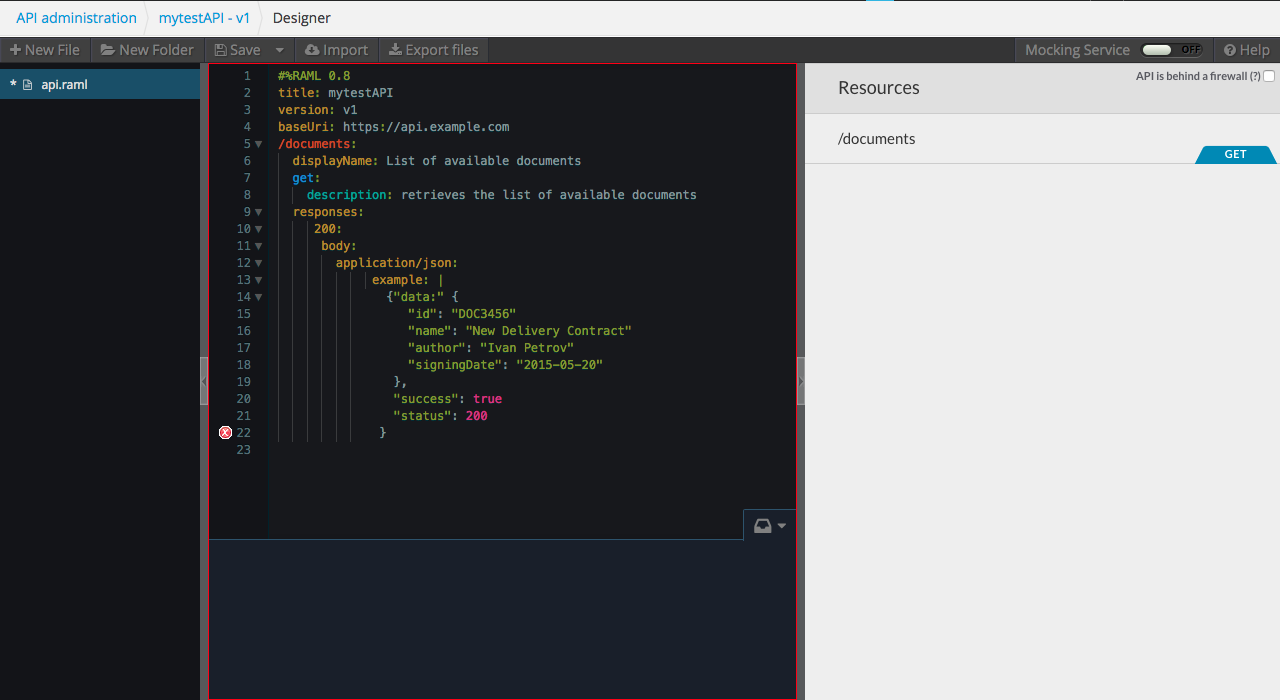
Interactive documentation is automatically generated on the right side of the page. You can also test the API here: for this, simply expand the description of the desired request and click the Try it button.
The Designer API also allows you to load RAML files from the local machine. Import of API description files for Swagger is supported.
In addition, the Designer API stores statistics on test requests to the API.
API console
API console is a useful tool developed by the same company MuleSoft. With its help, you can generate documentation for the API directly in the browser. Specification files can be downloaded from the local machine or you can specify a link to an external source:

The API Console includes several sample files, which are API descriptions of popular web services: Twitter, Instagram, Box.Com, LinkedIn. We tried to generate documentation based on one of the bottom ones - it looks pretty nice: The

documentation received at the output is interactive: you can not only read the API description in it, but also perform test requests.
Conclusion
In this article, we examined the main features of RAML. Its undoubted advantages are simplicity and logic. We hope that in the near future RAML will become even more widespread and will take its rightful place among the tools for documenting the API.
If you have any questions, welcome to comment. We will also be glad if you share your own experience in using RAML in practice.
If you for one reason or another can not leave comments here - welcome to our blog .
Only registered users can participate in the survey. Please come in.
How do you describe the API documentation?
- 22.3% Plain text 69
- 28.4% Markdown 88
- 13.5% JSON 42
- 8.4% YAML 26
- 18.1% RAML 56
- 9% Wrote their option in the comments 28









