August 3, 2015 at 10:33
We clean the Internet from annoying ads (AD Blocker for MikroTik)

This article is the logical conclusion of a small discussion with Comrade. vvzvlad , which unfolded under the topic "We clean the home Internet from very annoying ads (Ad's blocker for OpenWRT ) ", where the author successfully merges the advertising host files using wget , sed and cron on OpenWRT , parses and submits dnsmasq to the dns server .
Forwarding the client when requesting an “advertising” domain, for example, to loopback ( 127.0.0.1 - 127.255.255.255 ), instead of the advertisement cotent, the client will receive a beneficial “nothing” (of course, provided that we do not have a local web server that listens on the localhost ) The filtering mechanism is quite old and not without flaws. For example, you cannot specify host masks (* .ad-domain.tld) or “cut” ads whose banners are hosted on the requested resources. But it is not tied to any protocol and is quite simple to operate. Moreover, if you use it, for example, on a home or office router that is used as a DNS server, the advertisement will be successfully cut on all gadgets where the IP of our hardware is registered first as the DNS server.
But what if instead of a router with custom firmware we use ... MikroTik ( RouterOS ), the functionality of which imposes some limitations? Under the cut, you will learn how to successfully " convert " the host file into a format suitable for it, how to automate this business, and how a bonus service was created for habra-humans just to automate this process ( small, absolutely free and with open source ) .
Customize MikroTik
Setting up the hardware itself is unlikely to cause any difficulties. Specify the IP of the router as the first DNS server in DHCP - “IP” → “DHCP Server” → “Networks” →% default config%. The first to prescribe the IP of MikroTik itself, click "OK":
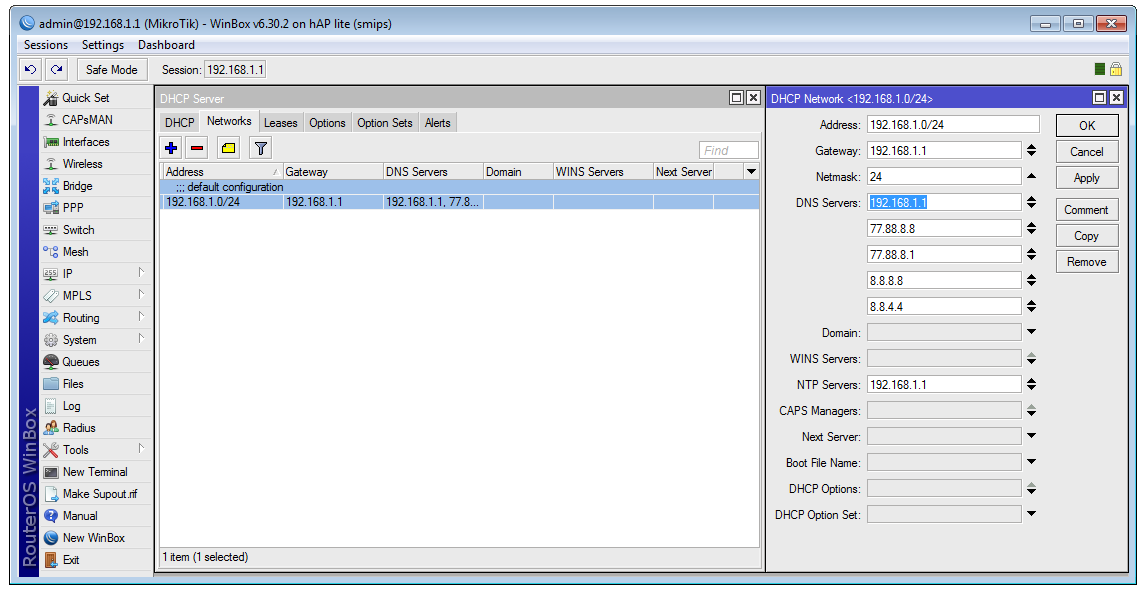
The DNS server works out of the box, and you can even not change its stock settings:
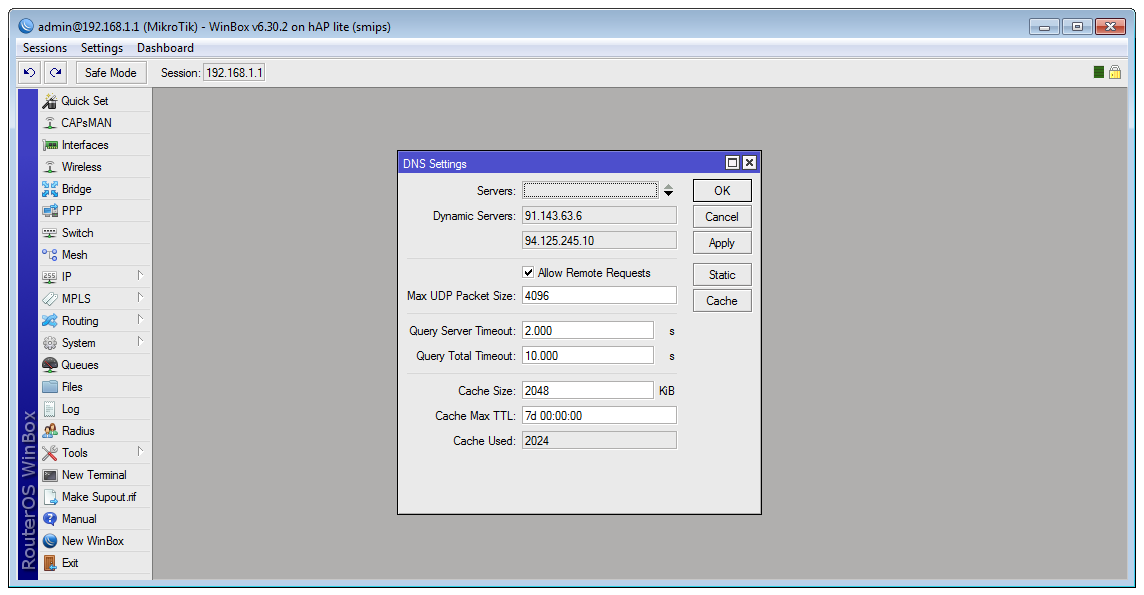
The only button that is of interest to us is “Static” (“Static Routes”), in which we should register “advertising” domains, indicating where to redirect such requests.
Convert Host File
The host file has the format:
# Any comments
127.0.0.1 localhost
127.0.0.1 domain-a.tld
127.0.0.1 domain-b.tld
Script format for MikroTik using static DNS routes:
# Any comments
/ip dns static
add address=127.0.0.1 name=localhost
add address=127.0.0.1 name=domain-a.tld
add address=127.0.0.1 name=domain-b.tld
To get the actual lists of the first and convert them to the second, we will execute simple commands in the shell on, for example, the desktop ( bash ):
- Download the lists and carefully fold them under the names
./hosts_list.1,./hosts_list.2etc.:$ src=('http://pgl.yoyo.org/adservers/serverlist.php?hostformat=hosts&showintro=0&mimetype=plaintext' 'https://adaway.org/hosts.txt'); i=0; for file in ${src[*]}; do i=$((i+1)); wget --no-check-certificate -O "./hosts_list.$i" "$file"; done; - We eat everything that starts with '
127.0.0.1', delete comments, leave only domain names, remove duplicates, remove blank lines and arrange each domain as an import command:$ in="./hosts_list.*" && out="./adblock_dns.rsc" && host='127.0.0.1'; echo "/ip dns static" > $out && grep '127.0.0.1 ' $in | grep -v '^#' | cut -d' ' -f 2 | sort -u | grep . | sed "s/^/add address=$host name=/" >> $out && rm -f $in; wc -l $out;Yes, it would be necessary to use the regular routine and generally redo everything, but the most important thing is that I conveyed my thought to you, then it's up to you
At the output, we get a file
adblock_dns.rscthat will not be superfluous to additionally check for correct content.Import into MikroTik
In order to import the received file, we cling to the router via ftp, upload, then we cling to
adblock_dns.rscssh or open a terminal in which we execute:- We make a backup copy ( it is better to save the resulting backup on our machine ):
/system backup save - If you do not have important routes in the table , then we can bang all available records:
/ip dns static remove [/ip dns static find] - Import the downloaded file:
/import adblock_dns.rsc - We clean for ourselves:
/file remove adblock_dns.rsc
Now you can ( optionally ) restart MikroTik, check the correctness of receiving DNS server addresses via DHCP and try to open some resource that was previously flooded with advertising - it should become noticeably smaller.
It is empirically proven that when importing ~ 5500 records, Mikrotik hAP lite (650MHz @ RAM 32 Mb) gets up almost a bit when trying to open the static route table in the GUI. Reboot helps
Automation
One of the simplest automation options is a script on the bash that maintains the crown up-to-date
adblock_dns.rscand is publicly available via, say, ftp. Its basis has already been described above, it remains only to issue it at your discretion ( you need a separate car ). Another option is to use MetaRouter on the very or neighboring MikroTik, on which the same OpenWRT is installed (we get rid of the need for a separate machine; this option is not detailed in the absence of a decent MikroTik at hand ).
The second script ( on MikroTik ) takes it (
adblock_dns.rsc), makes a backup and, if the file was downloaded successfully, and the backup was saved successfully, it imports it, previously ( attention ) banging all the available routes::local hostScriptUrl "ftp://user:login@ftp_host:21/adblock_dns.rsc";
:local scriptName "adblock_dns.rsc";
:local backupFileName "before_stopad";
:local logPrefix "[StopAD]";
do {
/tool fetch mode=ftp url=$hostScriptUrl dst-path=("./".$scriptName);
:if ([:len [/file find name=$scriptName]] > 0) do={
/system backup save name=$backupFileName;
:delay 1s;
:if ([:len [/file find name=($backupFileName.".backup")]] > 0) do={
/ip dns static remove [/ip dns static find];
/import file-name=$scriptName;
/file remove $scriptName;
:log info "$logPrefix AD block script imported, backup file (\"$backupFileName.backup\") created";
} else={
:log warning "$logPrefix Backup file not created, importing AD block script stopped";
}
} else={
:log warning "$logPrefix Backup file not downloaded, script stopped";
}
} on-error={
:log warning "$logPrefix AD block script download FAILED";
};
Bonus for Habralyudov
But what if you have MikroTik at your home / office / garage and you want to either just cut ads, or automate updating hosts, without raising any meta-routers and hosts with ftp files, so that it’s simple and without troubles?
That's right, you need someone to pick it up for you. And as a bonus - such a thing has already been raised.
The meaning is as follows - you just need to go to the desired page, specify your settings and get the URL where the script with the settings you specified will be available. The source code of the finished script for you will also be provided there. Features that are currently implemented:
- Select from a list of public host files ( thanks AdAway for Android );
- Want to indicate your sources? No problem! ( you can, for example, specify three public host files and two of your own located on the same gist.github.com , thus obtaining a rather convenient means of managing static routes on wards routers );
- Configurable address ( IP v4 ) redirection;
- Indication of the limit ( limit ) of the number of entries in the final script ( in order to "accidentally" not put a "weak" piece of iron );
- Indication of your routes ( they will simply be added first to the generated script );
- Ability to specify exceptions - the necessary domains will never be “blocked”;
- Quite convenient generation of ready-made script for MikroTik;
The parser is written in PHP ( requires php5-curl ), the MIT license , the sources are available at mikrotik-hosts-parser . How long the service will live - I can’t presume to guess, but I hope that for a long time. A site resistant to habraeffect was kindly provided by comrade drakmail , for which thanks to him and the cgood.ru team .
Link: MikroTik DNS Stop AD
ATTENTION! If you previously used the script from the link above, and it suddenly stopped working for you - you know, the reason for updating it. First of all, try everything there, just take its updated edition, after that everything should work successfully. I apologize for any inconvenience!
Diclamer: 1. The cgood.ru team is not related to the service. 2. It is not good to allow someone to execute code on your routers. Therefore, I urge you to use it solely for educational purposes. If you like everything, make a fork, a mood for yourself and use your health. No one bears responsibility for possible interruptions in work, the Habra effect or errors of error. 3. I will make every effort to ensure that everything works as it should for the longest possible time, but you need to understand the degree of responsibility.
If you find errors in the service or typos in the text - please report it in PM. Thanks in advance!
UPDATE!
The script source has been rewritten a little more than completely. Now this is a full-fledged application on Lumen, and all-all sources are in the repository.
"Stopad.generate.club" lay down forever, unfortunately. But it is not all that bad! 2 mirrors are raised (one of the cgood.ru team; quite powerful), the second - on my modest VDS-ke. The fact that mine is true is more than modest; use it with caution.
Links :
New address (from the cgood.ru team): stopad.cgood.ru
Reserve site: stopad.kplus.pro