 July 30, 2015 at 13:11
Corporate Cisco Jabber: version 11 is very happy
Who is Jabber, I think, no need to tell. We need to talk about the corporate environment, where it’s damn important to support telepresence devices, work normally with VDI, for mobile employees - to be in touch, to quickly schedule complex meetings and conferences. And, in general, comply with a bunch of security policies and rules.
In June, Cisco UC 11 was released. During this time, the good old Jabber has changed quite a lot and acquired many useful features.
In short - all the main desktop and mobile operating systems except Linux, unification of the interface even with Cisco TelePresence hardware devices, safe access for mobile users (launched Jabber - an encrypted channel has risen), a kind of p2p analog for VDI stations without extra throws from the terminal to the server, easy guest access for those who only have a browser. Now let's get more detailed.
All devices
Cisco has made the client available on virtually any device: Windows and OS X, iOS, Android, as well as browsers and VDI thin clients. No support for Linux, Windows Phone. Such a variety provides maximum customer accessibility for users, and also gives them great flexibility and the ability to use their "favorite" device for communication.
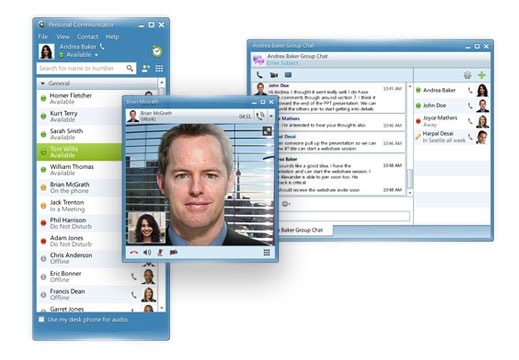
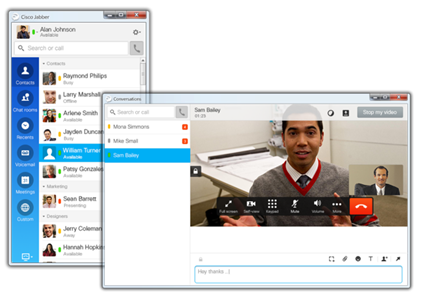
You can start looking for differences in the new and old interface. Upper old, new below.
Licensing for an inhomogeneous device fleet is easier and more intuitive.
At the time of the transition from Personal Communicator (Jabber's predecessor) to Jabber, the design became almost the same on all devices. Even at TelePresence subscriber terminals (personal and group), providing high quality communication, you can see the familiar interface. This helps users quickly get comfortable and start using services.
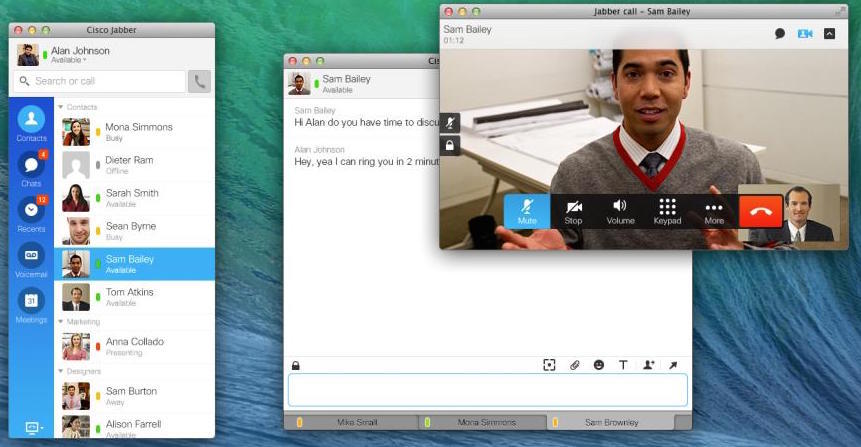
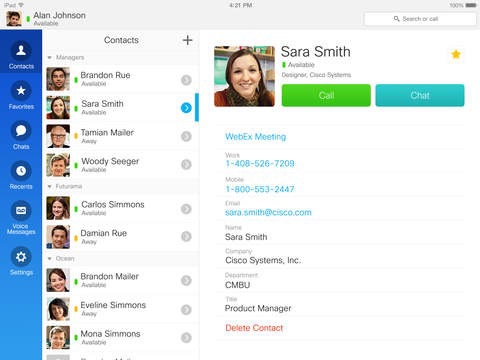
With so many devices and platforms on which UC services are available, it was previously quite difficult to navigate among applications. At the same time, there were Personal Communicator, Jabber for Mac, Jabber Voice, Jabber IM, Jabber Video for TelePresence and other clients. Now everything has become logical and simple, all clients are called Jabber for XXX. Functionality was almost completely unified.
All devices support basic functions:
- HD audio and video calls.
- View content.
- Voice mail.
- Individual and group chat.
- Lists of contacts and address book with support for user photos.
- Presence Statuses.
Demonstration of content does not work on mobile devices yet. Remote computer management only works under Win.
UC Outside Office
Even 2-3 years ago, providing mobile and remote employees with access to corporate communications services was not easy. It was necessary to make a choice between using VPN connections or limiting functionality. At first glance, building a VPN tunnel does not seem like such a difficult task, but in practice it created a lot of barriers and problems: organizational (different departments are usually responsible for VPN and UC), technical (associated with the use of equipment with encryption in the Russian Federation) and user . The latter, moreover, could nullify all efforts from overcoming the rest, because it is simply inconvenient - to establish a VPN connection each time when you go outside the office. With any choice, the solution turned out to be more expensive and more complicated.
The Mobile and Remote Access (MRA) feature has appeared, and with it life has become much better. The name of the function speaks for itself: it allows you to safely access UC services for mobile and remote users. Users can use Jabber anywhere, without having to think about their location and change any settings. You just need to run the application, and Jabber itself will find the right server to connect. This feature is even more attractive because it is absolutely free. Edge server software that runs Jabber outside the corporate network costs $ 0, and Jabber clients do not require a license to make internal calls. Perhaps this is one of the most useful and sought-after features that today is implemented in every project where there is Jabber.
Guest Access
When someone outside the company is to participate in the conference, there is usually no problem if it is a large company that uses a standard (H.323 / SIP) corporate communication solution. But in the case of small companies or individuals, there is a chance not to connect. Previously, a standard way out of this situation could be a proposal to transfer video conferencing to a Skype-like service, but such a solution was not suitable for all scenarios and could violate corporate policies.
At the end of 2013, the Jabber Guest solution appeared, which allows you to simply send a link in any way to a remote party or place it on a site. The remote subscriber can connect via the link using a browser or mobile device, while the employee can use the usual means of communication. This feature is ideal for HR personnel, communicating with individuals, small companies or attracting third-party experts.
Clouds and VDI
Jabber can be shared with Cisco WebEx Cloud Services and the recently introduced Collaboration Meeting Rooms (CMR) Cloud, powered by the same WebEx Cloud. Sharing Jabber with these services is the ability to use the client to participate in cloud events, as well as initiate them with one click. The latest version of Jabber gives you the opportunity to start a session in WebEx or CMR directly from the chat window, bypassing the planning stages, inviting participants, etc.
With VDI, the old pain is that a workstation with an operating system is located in the data center, and peripheral equipment (monitor, web-camera, microphone, speakers) at the workplace are connected to the thin client, there is a significant delay in transmitting voice and video to data center and back. Standard applications of the videoconferencing and UC simply can not work in such conditions. However, for Jabber there is a special layer installed on the thin client, which allows to circumvent this limitation. Audio and video data are transferred directly between the thin client and the remote subscriber, bypassing the workstation in the data center.
This solution was used in one of our office building equipment projects where Jabber clients were used at employees' workplaces instead of telephones and as a personal unified communications client.
Embedded Jabber
Jabber can be registered in the operating system to handle clicks on certain links. This allows you to make a call using Jabber directly from your browser or email client.
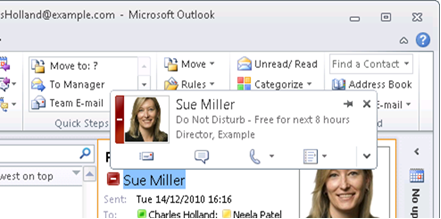
Integration of Jabber with MS Exchange allows you to make calls or open a chat window directly from the Outlook interface, as well as see the user's presence status.
Using the Jabber SDK, Jabber functionality can be added to any web application, for example, a corporate information system, social network or website, or create a specialized client with limited functionality. We used the SDK to create a prototype primitive client with the ability to make calls to pre-configured numbers. Such a simple solution, for example, can be used in public places for emergency communications or as part of information kiosks.
What is missing Jabber
With all the rich functionality of the client, there are still functions that I would like to see on board, for example, recording calls with one button with the possibility of subsequent access to the recording via the portal or the ability to transfer content in a VDI environment even if instead of the main video (at the moment this is not possible )
Experience with our customers has shown that Jabber also lacks popularity in the Russian Federation. Many have heard, are familiar with or are already using Lync (the new name is Skype for Business), and you often have to talk about Jabber. In my opinion, Jabber is a worthy competitor and an alternative to Microsoft Lync.









