
We write and listen to conversations in 3CX
- Tutorial
Recording conversations is one of the most requested features in the telephone exchange. In 3CX, this feature is already built-in and is available to 100% of subscribers for any commercial license.
How to record?
3CX writes all calls to a specific subscriber, the system does not distinguish incoming / outgoing / external / internal. To enable - put in the admin daw.
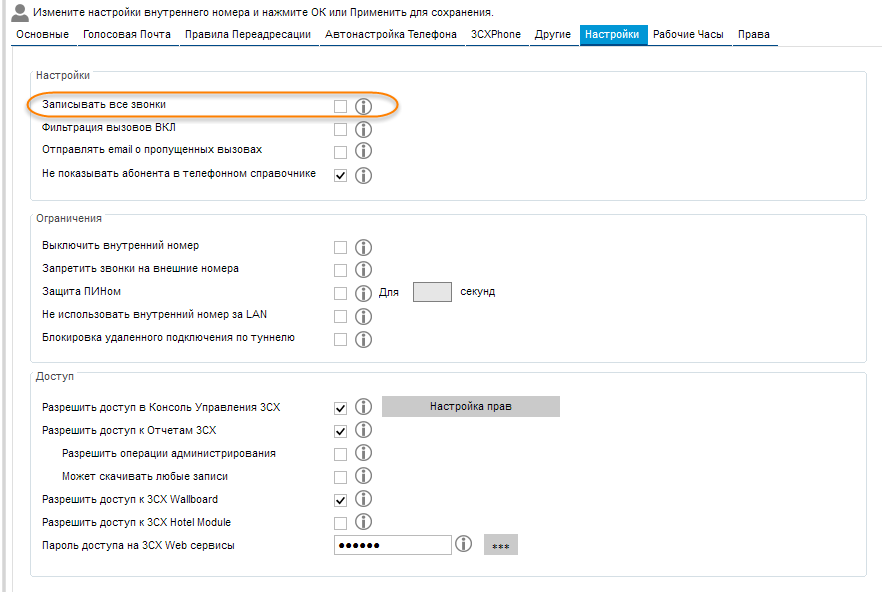
Additionally, you can configure the path for recording.

Of course, in addition to the total recording of everything, there is a recording on request. To do this, use 3CX Phone (only in softphone mode). In the application, just press REC. Recording during a conversation can be turned on and off without restrictions.

The recording itself is carried out as follows, along the specified path, folders with internal numbers (for example, 100) are automatically created and conversation recording files are added to it.
The file format is wav, the name consists of the following components
DisplayName_Ext_DialedNum_YearMonthDayHourMinuteSecond.wav , where
By the way, there is an alternative way to search for records with third-party utilities, described here .
How to listen?
There are two ways to listen to calls:
1. Through the general statistics
2. Through the softphone
Entries in statistics
It is enough to follow the link of the form

Access rights are set in the user settings.

Filter select the calls of interest. Record files will be available in the right column as downloadable files.
Records in the softphone

Only records of a specific subscriber are displayed here. You can download the file or listen via phone.
How to administer?
You can administer (or rather delete) a record at the admin level, or you can give this opportunity to a subscriber.
As previously mentioned, entries are stored as files in a dedicated folder. The easiest way is to delete these files, however in this case there will be links to them in the database.
The second way is to allow the subscriber to delete statistics records.

The third option is through 3CX Phone.

In this case, the subscriber must have the appropriate rights.
Further it will be even more convenient
In 3CX Phone System v 14 , the final release that we are waiting for the other day, in the settings we added a quota for sound files, now you can set the statute of limitations:

Setting the statute of limitations:
All files older than the specified time will be automatically deleted.
Sound File Management (Recording Management)

A sound file management manager where you can manually download a file or delete it manually.
The recording opportunities do not end there and if you lack the current functionality, you can make a customized system from open-sorce components. In a nutshell, this is the OrkAudio, MySQL, and Apache writer. Recording is based on the principle of traffic sniffer from the PBX port. Detailed instructions on how to set up are here .
That's all, good luck!
How to record?
3CX writes all calls to a specific subscriber, the system does not distinguish incoming / outgoing / external / internal. To enable - put in the admin daw.
Additionally, you can configure the path for recording.
Of course, in addition to the total recording of everything, there is a recording on request. To do this, use 3CX Phone (only in softphone mode). In the application, just press REC. Recording during a conversation can be turned on and off without restrictions.
The recording itself is carried out as follows, along the specified path, folders with internal numbers (for example, 100) are automatically created and conversation recording files are added to it.
The file format is wav, the name consists of the following components
DisplayName_Ext_DialedNum_YearMonthDayHourMinuteSecond.wav , where
- DisplayName - caller name
- Ext– extension number
- DialedNum - number from where or where you called
- YearMonthDayHourMinuteSecond - call duration
By the way, there is an alternative way to search for records with third-party utilities, described here .
How to listen?
There are two ways to listen to calls:
1. Through the general statistics
2. Through the softphone
Entries in statistics
It is enough to follow the link of the form
IP_АДРЕС_АТС:5000/reports. To access, you need either the administrator password or rights to access statistics. Access rights are set in the user settings.
Filter select the calls of interest. Record files will be available in the right column as downloadable files.
Records in the softphone
Only records of a specific subscriber are displayed here. You can download the file or listen via phone.
How to administer?
You can administer (or rather delete) a record at the admin level, or you can give this opportunity to a subscriber.
As previously mentioned, entries are stored as files in a dedicated folder. The easiest way is to delete these files, however in this case there will be links to them in the database.
The second way is to allow the subscriber to delete statistics records.
The third option is through 3CX Phone.
In this case, the subscriber must have the appropriate rights.
Further it will be even more convenient
In 3CX Phone System v 14 , the final release that we are waiting for the other day, in the settings we added a quota for sound files, now you can set the statute of limitations:
Setting the statute of limitations:
- Automatically delete all recording older than (deletion of recording files of conversations older than the specified time), a value from 1 to 30 days is indicated.
- Automatically delete all voice mails older than (value delete from 1 to 30 days is indicated.
All files older than the specified time will be automatically deleted.
Sound File Management (Recording Management)
A sound file management manager where you can manually download a file or delete it manually.
The recording opportunities do not end there and if you lack the current functionality, you can make a customized system from open-sorce components. In a nutshell, this is the OrkAudio, MySQL, and Apache writer. Recording is based on the principle of traffic sniffer from the PBX port. Detailed instructions on how to set up are here .
That's all, good luck!