Azure Pack in the Cloud: why and how we did it
In February 2015, we launched the new AzuRus IaaS platform, designed to host IT infrastructures with a Microsoft-Azure-like management interface.
In this article, we want to share the experience of implementing and operating the Azurus platform with the Azure Pack management interface.
Traditionally, the cloud’s IaaS platform platform is based on the Microsoft product stack: Hyper-V virtualization and all the necessary “kit” for Microsoft System Center. As a provisioning system, we used some of our own development, the development of which took a lot of effort. We have been following the development of the Azure Pack since its inception and the dynamics of its development were impressive. The second reason for introducing Azure Pack is that many specialists and developers have experience working with the interface of the Microsoft Azure management portal, which, of course, greatly simplifies the use of Cloud services for them. The appearance of the COSN Russia program and the postponement of the effective date of 242-ФЗ to September 1, 2015, which intensified the migration to Russia from foreign hosting services, accelerated the decision on the need to implement the Azure Pack.
Functionally, Azure Pack very well solves the main tasks of the Cloud Library - the deployment and maintenance (of elements) of IT infrastructure of enterprises, that is, a modern IaaS platform with maximum self-service. The Azure Pack provides a really good balance between the ease of deploying IT infrastructures, the convenient Azure management web interface accessible from any browser, the ability to create virtual networks and build Site-to-Site VPN connections, and the ability to delegate technical management functions by adding Administrators to manage virtual resources. Special functionality enables partners to manage all cloud resources from a single management interface.
In addition, this platform is characterized by reliability, speed and Azure Pack allows you to conduct activities to meet the requirements of the law on the protection of personal data.
It must be said right away that even at the planning stage a lot of questions arose - how to integrate, how to use it correctly, what to consider and how to solve the possible difficulties of integrating the product with its infrastructure. We turned to Microsoft for help - and at all stages of the implementation, Microsoft Consulting specialists provided significant assistance to us. Together with them, both the main architectural aspects and important technical details were worked out.
How exactly, together with the Microsoft Consulting team, we managed to wrap this up in a single solution, we will go further.
The entire deployment was first performed in the sandbox, where we explored all the features, pros and cons of the Azure Pack and made the integration. Fundamentally, there were no special difficulties with the deployment of the solution. The entire set of necessary services is deployed quickly enough and without problems. The main task was to solve the problem taking into account resources and billing.
It should be said that for billing and accounting for resources and finances, we have a control panel of our own design, and it was necessary to link two different management tools.
Here, some features had to be taken into account:
Firstly, Azure Pack itself does not create any clouds (subscriptions) and cannot delete neither the clouds themselves nor the resources inside them. Everything is tied to already created resources in VMM.
Therefore, this moment had to be taken into account when integrating with the control panel - the clouds are created from our panel, and then are “tied” into the Azure Pack interface.
Secondly, there is no complete and sufficient documentation for the solution, especially regarding automation. As a result, for integration with billing and the control panel, we decided not to use the API, and we use powershell scripts that allow us to create and manage resources.
Thirdly, there is no full-time functionality in Azure Pack to work with the library.
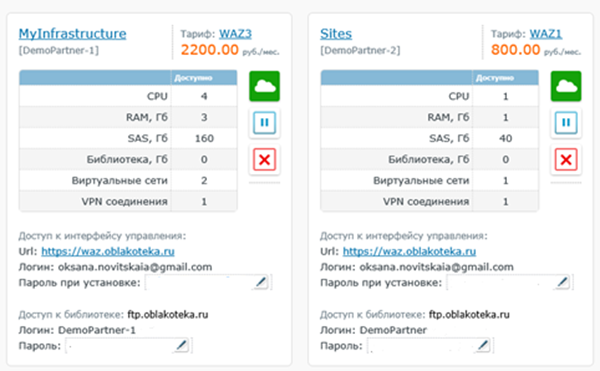
Therefore, we realized the possibility of using our own library as follows: as part of the tariff plans, FTP access is created to our own isolated library, which is then used by the Azure Pack user account. This gives you the opportunity to upload your images or templates and then use them.
To integrate with the Azure Pack management interface, a proprietary Web service has been developed that links three elements - our panel, Azure Pack and VMM.
So at the output of our control panel, a cloud (subscription) is obtained, and further management of resources within the subscription is transferred to the Azure Pack interface. By the way, in the end we came to the concept of “one cloud = one plan = one subscription”. This allows us to keep records and limit the set of resources provided for use by end customers.
Of the technical features, the following should be noted:
The cloud library is primarily a platform for partners: integrators and outsourcers that serve dozens of IT infrastructures for end customers. It is always very important for us to add elements of mass service so that the partner ideally can serve “all customers with one click”. Azure Pack is perfect for this. By assigning the same administrator or co-administrator to the client cloud (subscription), the Azure Pack management portal allows the administrator partner to see all the services of all clients in a single list and, accordingly, perform manipulations without constant re-authorization.
Azure Pack has a small set of restrictions that we had to face and look for ways to get around them. I would like to note them:
In this article, we want to share the experience of implementing and operating the Azurus platform with the Azure Pack management interface.
Why Azure Pack
Traditionally, the cloud’s IaaS platform platform is based on the Microsoft product stack: Hyper-V virtualization and all the necessary “kit” for Microsoft System Center. As a provisioning system, we used some of our own development, the development of which took a lot of effort. We have been following the development of the Azure Pack since its inception and the dynamics of its development were impressive. The second reason for introducing Azure Pack is that many specialists and developers have experience working with the interface of the Microsoft Azure management portal, which, of course, greatly simplifies the use of Cloud services for them. The appearance of the COSN Russia program and the postponement of the effective date of 242-ФЗ to September 1, 2015, which intensified the migration to Russia from foreign hosting services, accelerated the decision on the need to implement the Azure Pack.
Azure Pack Functionality
Functionally, Azure Pack very well solves the main tasks of the Cloud Library - the deployment and maintenance (of elements) of IT infrastructure of enterprises, that is, a modern IaaS platform with maximum self-service. The Azure Pack provides a really good balance between the ease of deploying IT infrastructures, the convenient Azure management web interface accessible from any browser, the ability to create virtual networks and build Site-to-Site VPN connections, and the ability to delegate technical management functions by adding Administrators to manage virtual resources. Special functionality enables partners to manage all cloud resources from a single management interface.
In addition, this platform is characterized by reliability, speed and Azure Pack allows you to conduct activities to meet the requirements of the law on the protection of personal data.
It must be said right away that even at the planning stage a lot of questions arose - how to integrate, how to use it correctly, what to consider and how to solve the possible difficulties of integrating the product with its infrastructure. We turned to Microsoft for help - and at all stages of the implementation, Microsoft Consulting specialists provided significant assistance to us. Together with them, both the main architectural aspects and important technical details were worked out.
How exactly, together with the Microsoft Consulting team, we managed to wrap this up in a single solution, we will go further.
Deployment and Integration
The entire deployment was first performed in the sandbox, where we explored all the features, pros and cons of the Azure Pack and made the integration. Fundamentally, there were no special difficulties with the deployment of the solution. The entire set of necessary services is deployed quickly enough and without problems. The main task was to solve the problem taking into account resources and billing.
It should be said that for billing and accounting for resources and finances, we have a control panel of our own design, and it was necessary to link two different management tools.
Here, some features had to be taken into account:
Firstly, Azure Pack itself does not create any clouds (subscriptions) and cannot delete neither the clouds themselves nor the resources inside them. Everything is tied to already created resources in VMM.
Therefore, this moment had to be taken into account when integrating with the control panel - the clouds are created from our panel, and then are “tied” into the Azure Pack interface.
Secondly, there is no complete and sufficient documentation for the solution, especially regarding automation. As a result, for integration with billing and the control panel, we decided not to use the API, and we use powershell scripts that allow us to create and manage resources.
Thirdly, there is no full-time functionality in Azure Pack to work with the library.
Therefore, we realized the possibility of using our own library as follows: as part of the tariff plans, FTP access is created to our own isolated library, which is then used by the Azure Pack user account. This gives you the opportunity to upload your images or templates and then use them.
To integrate with the Azure Pack management interface, a proprietary Web service has been developed that links three elements - our panel, Azure Pack and VMM.
So at the output of our control panel, a cloud (subscription) is obtained, and further management of resources within the subscription is transferred to the Azure Pack interface. By the way, in the end we came to the concept of “one cloud = one plan = one subscription”. This allows us to keep records and limit the set of resources provided for use by end customers.
Technical details
Of the technical features, the following should be noted:
- Azure Pack does not know how to create virtual networks based on VLAN and normally works only with HVGRE virtual networks, so for deployment we had to configure network virtualization (with logical networks and gateways) and reconfigure VMM to work with them.
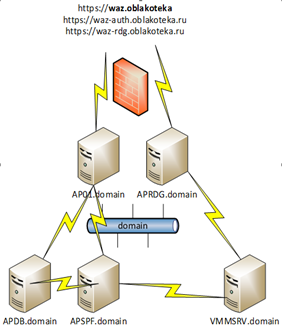
- A quick deployment of Azure Pack can be done on the same server, but we preferred to distribute the roles across different servers for the purpose of further scalability. It turned out like this:
- And one more feature: already during full operation it turned out that there is a limit on the number of displayed objects in the Azure Pack interface. SPF limits the number of displayed objects to 500, and since Azure Pack works with clouds through SPF, some of the objects simply were not displayed.
We encountered this in the administrative management interface, there is no information in the documentation, but in the end the problem is fixed by changing the parameter in the two Web.config configuration files in the line
Functionality for partners
The cloud library is primarily a platform for partners: integrators and outsourcers that serve dozens of IT infrastructures for end customers. It is always very important for us to add elements of mass service so that the partner ideally can serve “all customers with one click”. Azure Pack is perfect for this. By assigning the same administrator or co-administrator to the client cloud (subscription), the Azure Pack management portal allows the administrator partner to see all the services of all clients in a single list and, accordingly, perform manipulations without constant re-authorization.
What else did we have to face
Azure Pack has a small set of restrictions that we had to face and look for ways to get around them. I would like to note them:
- Fixed configurations of virtual machines - since the deployment of virtual machines is carried out only from templates, flexibility is determined only by the set of configurations that are defined as hardware profiles for virtual machines. Unfortunately, there is no “assemble your virtual machine” functionality. In this regard, the number of templates issued to the list is equal to the Cartesian product of the sets of parameters: vCPU, RAM, type of storage, OS, that is, if done relatively flexibly, then several hundred. Of course, we cut off many branches, but still we had to prepare and maintain a large set of more or less standard configurations to satisfy the most common customer needs. And we keep this set open, that is, we expand upon the requests of end customers.
- Snapshots do not work (they are called checkpoints in Azure Pack) - We plan to introduce this, of course, very important and necessary function in the near future (since such an opportunity has already appeared in UR6).
- There is no way to connect and manage resources in the clouds in different locations - unfortunately, there is no connection functionality in a single interface to private clouds and clouds hosted by other providers. Accordingly, there is no way to quickly transfer virtual machines, say, from the main site to the backup one. We expect this functionality to appear in the future.
Nevertheless, summing up, we can say that, of course, Azure Pack as a cloud management tool is a very nice and pleasant thing that allows you to perform a large set of typical operations and save significant time on deployment and configuration of infrastructures. It’s not very difficult, at the same time it’s quite functional, and already familiar to many specialists, solution. Easy installation and integration allows you to quickly and without additional costs to get a ready-made management interface.
Given the constant refinement of the necessary functionality and development plans, the solution is a very promising product and, of course, deserves the attention of providers of IaaS infrastructure hosting services or for private cloud administrators.









