
Blend4Web: review of the latest domestic software industry
When you do a business for a long time and it seems that you know everything, suddenly Something appears that causes research itching. So it happened with me.
Resting from Unity and lazily watching the next lesson from 3D masters, I came across a video kindly suggested by YouTube. A simple cube cut by drawings was gradually filled with a certain energy. Glow effect in the style of Sci-Fi - just 6 seconds of video and a straightforward title about the release of some Blend4Web. The association with my beloved Blender came about instantly, as did the desire to get to know this “beast” better.

Oddly enough, the site that opened was in Russian, which could not please. English is familiar to me, but native is always closer. “Or maybe the Slavs were also developed,” I thought and guessed. But the most interesting thing turned out further - Blend4Web turned out to be nothing more than a WebGL engine integrated with Blender. It was of little interest to the inveterate Unity user, but the notorious blender (hey, you don’t need to invent a rhyme) could not pass by. And so the acquaintance with this amazing brainchild of our programmers began.
WebGL is a mega-popular, promising and ... just as slow technology. At least on my weak tablet, any WebGL applications running in the browser looked like an attraction of turtles. In fairness, I will say that this is not a Blend4Web or Unity problem. Weak hardware + universal libraries always lead to this result. It’s just that my personal experience as a developer says that you need to test games on a weak device and, of course, the native one is always a cut above the universal solution. But with WebGL, the bright future of the Internet is clearly visible ...
There is a large number of demos on the Blend4Web developers site . And if you run them on normal hardware, you will see very interesting real-time effects displayed directly in the browser.
I was struck by a rich set of visual effects. Photorealistic materials, high-quality lighting and shadows, refraction and reflections, post-processing of the image - the list is large. Each demo is presented with something unique. You can see not only the visual power of the engine, but also the love of developers for their offspring. This is a must see.
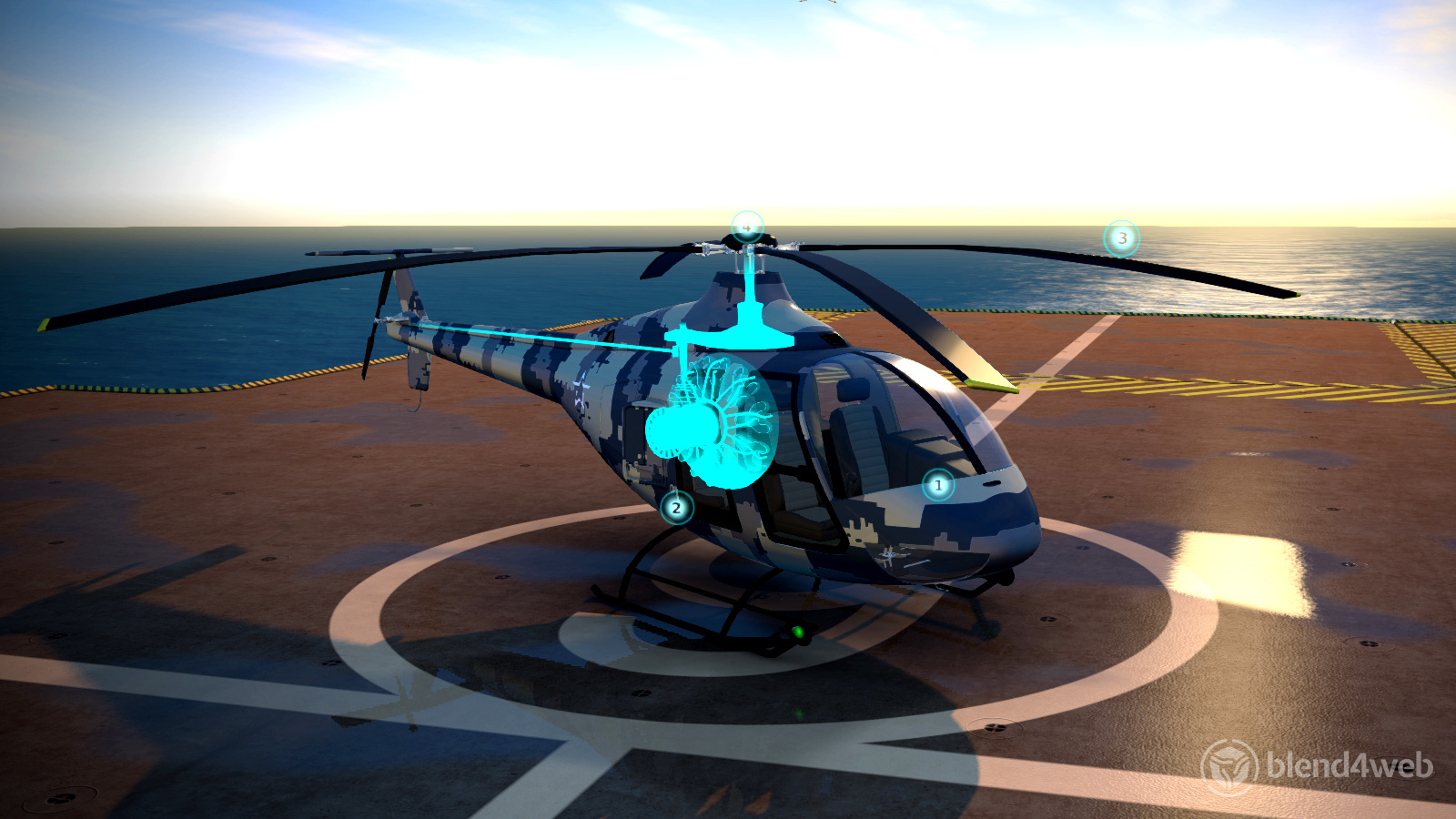
fig. 2
In Blender or another 3D-modeling program, creating such a scene will not pose any special problems, and if you know any engine, then implement a real-time application. However, the developers of Blend4Web claim that the scenes created in Blender are almost completely transferred to the WebGL platform: models, animation, particle systems, physics settings, shaders, and much more. Add a programming language to the visual capabilities and get an interactive application that runs in a browser without any plug-ins. Such versatility is worth a lot.
Someone can say, why the whole thing, if my favorite Unity or Unreal, or something else, knows how to perfectly export games for WebGL. That's right, but who said that Blend4Web is only suitable for games? Certainly not me ...
When I first watched the demo, it struck me that they all spin in some kind of universal-looking player, where there are buttons for settings, controls and sharing in popular social networks.
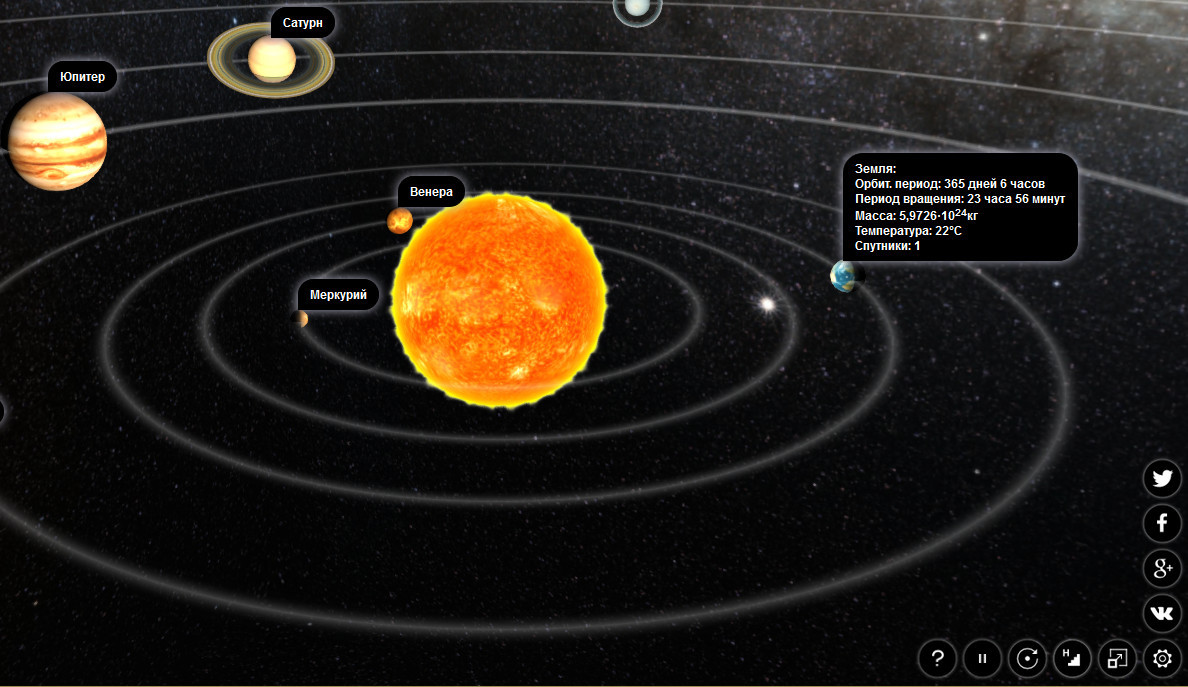
fig. 3
It turned out that the lion's share of the engine’s capabilities is configured directly in Blender without a single line of code. So, for example, having connected the plug-in downloaded from the developers site to Blender, I exported the standard default scene with just a few clicks of the mouse. The export resulted in a single html file with the same universal player. In total, without the slightest effort, I have a WebGL application in which I can examine my inconspicuous cube from all sides (in Blender, a cube is created in the zero scene by default). As you understand, such a file can be uploaded to the server as a separate page or displayed in an iframe container, or sent to the customer for viewing - the options for the artist are extensive. And this can be done with almost any complexity scene! It’s clear,
However, if everything were limited only to such a primitive viewing, then the future of Blend4Web would be unenviable. But everything turned out to be much cooler ...
Even when viewing the download page on the developers website, I noticed that there are two options to choose from: a plug-in for Blender and a full SDK. So the developers took care of future users. If in a simple way, the first option is for designers, and the second is addressed to programmers.
Probably, it is here that the strengths and weaknesses of the engine are hidden. The Blender plugin allows non-programmers to create an interactive scene without any problems. But this scene will be limited only by built-in capabilities. I note that the set of functions is really solid and covers a lot of tasks, but when something is missing, you can safely install a full-fledged SDK and perform a lower-level work. You will have to pay for it by studying the API of the engine.
But I was most interested in the part that allows you to create an application without programming. How intuitively this process is going on, what difficulties the neophyte may face, and in general what this whole system is capable of!
Of course, the newcomer from me is still the one. Long-term use of Blender, several released commercial games on Unity - all this gives an unconditional head start. And, nevertheless, I had to sit a lot, trying to create the planned scenes. So it was not possible to completely dispense with the documentation and tutorials. Blend4Web technology turned out to be quite mature and requires a respectful student attitude ...
Blend4Web settings very organically fit into the Blender panel. This screenshot, for example, shows additional options with respect to the standard Blender camera. Even the uninitiated in the wisdom of the engine will realize that the camera’s behavior in the player is adjusted here.

fig. 4
Similar nuances can be found in almost every panel of the program. By the way, about the documentation - it is detailed and written in Russian, which further reduces the threshold for mastering the engine.
The first thing that pleased me was the neat work of the engine with the technical capabilities of Blender. So, for example, to create a chain, I created one link and multiplied it using the Array modifier. After exporting, the player displayed my chain in an undistorted form, using a modifier. This approach allows you to less optimize the scene for a specific engine. Blend4Web understands Blender perfectly and tries to visualize everything correctly.
The same applies to material settings. Almost everything that Blender can do is also able to show the engine. Simply put, by creating a model with complex materials, you are most likely to see it in your browser unchanged. So, experimenting with a chain, I easily achieved the effect of a chromed metal, with a hard reflection and some degree of specularity. Yes, yes, to my surprise, the standard Blender shaders render correctly in WebGL. True, they are not all supported. So, for example, I was not able to see the work of the diffuse shader Minnaert. It was only later that I found in the documentation that it is not yet supported. But the most surprising thing in these experiments was the correct operation of shader nodes.
Nodes are a special Blender song. Using the visual editor, you can create stunning material that correctly displays in the browser window! Blend4Web supports almost all standard editor nodes, with a few exceptions. True, not all of them are suitable for working in real time, and this must be taken into account. By the way, in addition to standard nodes, developers offer their own, optimized for the real-time engine.
I tried to play a little with the animation. The Blend4Web developers website stated that the main types of Blender animations are supported. Inspired by the work with materials, I quickly created the simplest movement of the pendulum. He clicked the export button and stupidly stared at the unwavering chain in the browser. Frankly, I did not manage to start the animation right away. Oddly enough, reading the documentation helped :) Therefore, I will immediately warn the neophytes. Blend4Web perfectly understands the settings for the scene, objects and materials, but by default it won’t do anything. Everything must be turned on manually. So, for example, for the same animation you need to check the corresponding place in the object settings (see Fig. 5). This applies to all (!) More or less complex aspects of the work. In most cases, a forced notification of the engine is required: “Yes, I want this to work!”
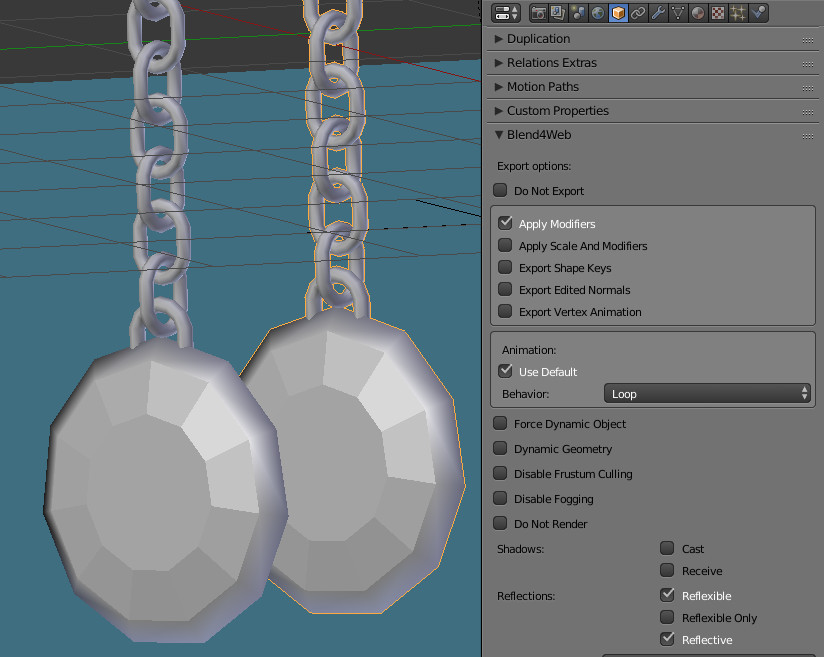
fig. 5
At first glance - this seems like an excess. For example, to display the specularity of a material, you need to not only configure it in the materials panel, but also enable the “Render Reflection” option in the Scene panel (global activation), set the corresponding checkboxes for specific objects (Object Data). As a result, one small function required manipulation in three different Blender panels. This approach looks extremely inconvenient and resembles setting up the built-in Blender Game Engine (real-time Blender engine).
Perhaps this is due to the modularity of Blend4Web. As I understand it, by enabling or disabling global functions (physics, post-processing, some complex visualization algorithms), you can change the size of the executed code. Or is it a problem of integrating Blender core code and engine. In any case, this approach is not very usable, especially for beginners. I would like something more simple or automated. Suppose, if the user turned on reflection in the material settings (Material -> Mirror), then the corresponding global engine functions and local settings of the current object are automatically turned on. Or maybe I'm just spoiled by Unity ...
All of the above applies only to the visual side of the engine. However, interactivity is not created by a beautiful picture.
I already wrote that Blend4Web allows you to add interactivity in two ways: simple, when using the Blender plug-in, and more complex, by writing JavaScript code. In this article I will focus only on the use of the plugin. Personally, I got the opinion that developers are more positioning Blend4Web as a framework for designers.
So, the developers offer some set of ready-made modules for certain tasks. For example, if you return to the same camera (see Fig. 4), then, by default, it rotates around a certain point, uses the scale and allows you to move (pan). Here, in the camera panel, you can configure the “snap”, rotation and movement limiters, and most importantly, completely change the style of behavior (static, with reference to the object, the so-called FPS camera, etc.). When you select the desired style from the menu, the parameters themselves change. It is convenient, but it is not possible to cover the whole range of tasks.
The same goes for other modules. Consider, for example, physics. By default, the engine is able to use the built-in physics settings of Blender (of course, with some restrictions). But you can simplify your life by using the Blend4Web blanks (Figure 6). Here, in total, 3 models of behavior are offered: swimming, transport, character. Having prepared the model accordingly (everything is described in the documentation in detail), we get the already configured physics at the output. Conveniently, you will not say anything.

fig. 6
A similar approach is applied everywhere. Do you need water? No problem - check the options. Too lazy to create skyboh? Use the procedural function. Thinking of a football field? Turn on Dynamic Grass. And all that sort of thing.
This of course makes it easier to customize the behavior of objects, but in no way gives interactivity. What I mean? Yes, even the simplest event model. Clicked the mouse - the wheel spun.
Initially, I thought that Blend4Web allows you to use the Blender Engine's visual logic editor. This would be logical given the tight integration of the engine with Blender. However, this is not. Developers suggest writing code using the API, where there are many useful features, or use NLA. A knowledgeable Blender user will exclaim: “And what does the animation editor have to do with it?” The trick is that the developers of the engine adapted it to create primitive logic!
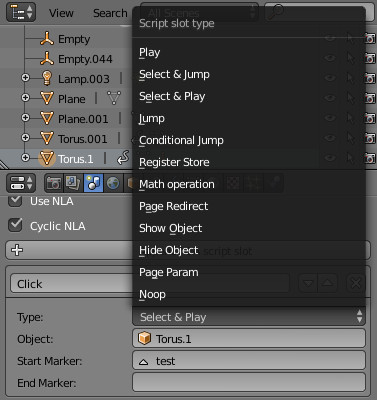
fig. 7
If you look closely at the settings of the Scene panel, you can see the new Append NLA script slot function. In Figure 7, just one of these slots is visible, as well as an open menu of its possible values. Suppose I want to enable animation of an object when I click on another object. The logic creation algorithm is as follows:
This could be done faster using the special “Select and Play” command, but the meaning, I think, is clear. Doesn’t resemble anything? That's right, a stripped down version of the logic editor of Blender itself.
Such a slot system is good for relatively simple logic, but it is unrealistic to use it for something more heavyweight. Bottom line: use normal scripts!
I worked with Blend4Web quite a bit and I have no right, and I can not make an objective decision. But I will express my subjective opinion.
Pros:
Cons (and where without them):
And now to summarize. I considered only that part of the engine, which allows NOT the programmer to work, which, of course, imposes certain restrictions on the complexity of the application.
In my opinion, using the Blend4Web plugin, you can quickly and efficiently prepare viewing a three-dimensional object, an interactive presentation, surround your site with three-dimensional elements (see the logo on the developer's website), and create a simple game. Many of the things that are traditionally done on a flash can be perfectly done for WebGL. Blender is a great tool for creating 3D, and Blend4Web is a great solution for real time in the browser.
However, the creation of more complex projects (gaming) makes me doubt. Although there are several tutorials on creating a game on the developers website, the complexity of this is still too high.
I am not going to compare Unity (this is my main development environment for games) and Blend4Web. Maybe in the following articles, when I myself will really understand the capabilities of the experimental ...
Resting from Unity and lazily watching the next lesson from 3D masters, I came across a video kindly suggested by YouTube. A simple cube cut by drawings was gradually filled with a certain energy. Glow effect in the style of Sci-Fi - just 6 seconds of video and a straightforward title about the release of some Blend4Web. The association with my beloved Blender came about instantly, as did the desire to get to know this “beast” better.
Oddly enough, the site that opened was in Russian, which could not please. English is familiar to me, but native is always closer. “Or maybe the Slavs were also developed,” I thought and guessed. But the most interesting thing turned out further - Blend4Web turned out to be nothing more than a WebGL engine integrated with Blender. It was of little interest to the inveterate Unity user, but the notorious blender (hey, you don’t need to invent a rhyme) could not pass by. And so the acquaintance with this amazing brainchild of our programmers began.
WebGL is a mega-popular, promising and ... just as slow technology. At least on my weak tablet, any WebGL applications running in the browser looked like an attraction of turtles. In fairness, I will say that this is not a Blend4Web or Unity problem. Weak hardware + universal libraries always lead to this result. It’s just that my personal experience as a developer says that you need to test games on a weak device and, of course, the native one is always a cut above the universal solution. But with WebGL, the bright future of the Internet is clearly visible ...
There is a large number of demos on the Blend4Web developers site . And if you run them on normal hardware, you will see very interesting real-time effects displayed directly in the browser.
I was struck by a rich set of visual effects. Photorealistic materials, high-quality lighting and shadows, refraction and reflections, post-processing of the image - the list is large. Each demo is presented with something unique. You can see not only the visual power of the engine, but also the love of developers for their offspring. This is a must see.
fig. 2
In Blender or another 3D-modeling program, creating such a scene will not pose any special problems, and if you know any engine, then implement a real-time application. However, the developers of Blend4Web claim that the scenes created in Blender are almost completely transferred to the WebGL platform: models, animation, particle systems, physics settings, shaders, and much more. Add a programming language to the visual capabilities and get an interactive application that runs in a browser without any plug-ins. Such versatility is worth a lot.
Someone can say, why the whole thing, if my favorite Unity or Unreal, or something else, knows how to perfectly export games for WebGL. That's right, but who said that Blend4Web is only suitable for games? Certainly not me ...
When I first watched the demo, it struck me that they all spin in some kind of universal-looking player, where there are buttons for settings, controls and sharing in popular social networks.
fig. 3
It turned out that the lion's share of the engine’s capabilities is configured directly in Blender without a single line of code. So, for example, having connected the plug-in downloaded from the developers site to Blender, I exported the standard default scene with just a few clicks of the mouse. The export resulted in a single html file with the same universal player. In total, without the slightest effort, I have a WebGL application in which I can examine my inconspicuous cube from all sides (in Blender, a cube is created in the zero scene by default). As you understand, such a file can be uploaded to the server as a separate page or displayed in an iframe container, or sent to the customer for viewing - the options for the artist are extensive. And this can be done with almost any complexity scene! It’s clear,
However, if everything were limited only to such a primitive viewing, then the future of Blend4Web would be unenviable. But everything turned out to be much cooler ...
Even when viewing the download page on the developers website, I noticed that there are two options to choose from: a plug-in for Blender and a full SDK. So the developers took care of future users. If in a simple way, the first option is for designers, and the second is addressed to programmers.
Probably, it is here that the strengths and weaknesses of the engine are hidden. The Blender plugin allows non-programmers to create an interactive scene without any problems. But this scene will be limited only by built-in capabilities. I note that the set of functions is really solid and covers a lot of tasks, but when something is missing, you can safely install a full-fledged SDK and perform a lower-level work. You will have to pay for it by studying the API of the engine.
But I was most interested in the part that allows you to create an application without programming. How intuitively this process is going on, what difficulties the neophyte may face, and in general what this whole system is capable of!
Of course, the newcomer from me is still the one. Long-term use of Blender, several released commercial games on Unity - all this gives an unconditional head start. And, nevertheless, I had to sit a lot, trying to create the planned scenes. So it was not possible to completely dispense with the documentation and tutorials. Blend4Web technology turned out to be quite mature and requires a respectful student attitude ...
Blend4Web settings very organically fit into the Blender panel. This screenshot, for example, shows additional options with respect to the standard Blender camera. Even the uninitiated in the wisdom of the engine will realize that the camera’s behavior in the player is adjusted here.
fig. 4
Similar nuances can be found in almost every panel of the program. By the way, about the documentation - it is detailed and written in Russian, which further reduces the threshold for mastering the engine.
The first thing that pleased me was the neat work of the engine with the technical capabilities of Blender. So, for example, to create a chain, I created one link and multiplied it using the Array modifier. After exporting, the player displayed my chain in an undistorted form, using a modifier. This approach allows you to less optimize the scene for a specific engine. Blend4Web understands Blender perfectly and tries to visualize everything correctly.
The same applies to material settings. Almost everything that Blender can do is also able to show the engine. Simply put, by creating a model with complex materials, you are most likely to see it in your browser unchanged. So, experimenting with a chain, I easily achieved the effect of a chromed metal, with a hard reflection and some degree of specularity. Yes, yes, to my surprise, the standard Blender shaders render correctly in WebGL. True, they are not all supported. So, for example, I was not able to see the work of the diffuse shader Minnaert. It was only later that I found in the documentation that it is not yet supported. But the most surprising thing in these experiments was the correct operation of shader nodes.
Nodes are a special Blender song. Using the visual editor, you can create stunning material that correctly displays in the browser window! Blend4Web supports almost all standard editor nodes, with a few exceptions. True, not all of them are suitable for working in real time, and this must be taken into account. By the way, in addition to standard nodes, developers offer their own, optimized for the real-time engine.
I tried to play a little with the animation. The Blend4Web developers website stated that the main types of Blender animations are supported. Inspired by the work with materials, I quickly created the simplest movement of the pendulum. He clicked the export button and stupidly stared at the unwavering chain in the browser. Frankly, I did not manage to start the animation right away. Oddly enough, reading the documentation helped :) Therefore, I will immediately warn the neophytes. Blend4Web perfectly understands the settings for the scene, objects and materials, but by default it won’t do anything. Everything must be turned on manually. So, for example, for the same animation you need to check the corresponding place in the object settings (see Fig. 5). This applies to all (!) More or less complex aspects of the work. In most cases, a forced notification of the engine is required: “Yes, I want this to work!”
fig. 5
At first glance - this seems like an excess. For example, to display the specularity of a material, you need to not only configure it in the materials panel, but also enable the “Render Reflection” option in the Scene panel (global activation), set the corresponding checkboxes for specific objects (Object Data). As a result, one small function required manipulation in three different Blender panels. This approach looks extremely inconvenient and resembles setting up the built-in Blender Game Engine (real-time Blender engine).
Perhaps this is due to the modularity of Blend4Web. As I understand it, by enabling or disabling global functions (physics, post-processing, some complex visualization algorithms), you can change the size of the executed code. Or is it a problem of integrating Blender core code and engine. In any case, this approach is not very usable, especially for beginners. I would like something more simple or automated. Suppose, if the user turned on reflection in the material settings (Material -> Mirror), then the corresponding global engine functions and local settings of the current object are automatically turned on. Or maybe I'm just spoiled by Unity ...
All of the above applies only to the visual side of the engine. However, interactivity is not created by a beautiful picture.
I already wrote that Blend4Web allows you to add interactivity in two ways: simple, when using the Blender plug-in, and more complex, by writing JavaScript code. In this article I will focus only on the use of the plugin. Personally, I got the opinion that developers are more positioning Blend4Web as a framework for designers.
So, the developers offer some set of ready-made modules for certain tasks. For example, if you return to the same camera (see Fig. 4), then, by default, it rotates around a certain point, uses the scale and allows you to move (pan). Here, in the camera panel, you can configure the “snap”, rotation and movement limiters, and most importantly, completely change the style of behavior (static, with reference to the object, the so-called FPS camera, etc.). When you select the desired style from the menu, the parameters themselves change. It is convenient, but it is not possible to cover the whole range of tasks.
The same goes for other modules. Consider, for example, physics. By default, the engine is able to use the built-in physics settings of Blender (of course, with some restrictions). But you can simplify your life by using the Blend4Web blanks (Figure 6). Here, in total, 3 models of behavior are offered: swimming, transport, character. Having prepared the model accordingly (everything is described in the documentation in detail), we get the already configured physics at the output. Conveniently, you will not say anything.
fig. 6
A similar approach is applied everywhere. Do you need water? No problem - check the options. Too lazy to create skyboh? Use the procedural function. Thinking of a football field? Turn on Dynamic Grass. And all that sort of thing.
This of course makes it easier to customize the behavior of objects, but in no way gives interactivity. What I mean? Yes, even the simplest event model. Clicked the mouse - the wheel spun.
Initially, I thought that Blend4Web allows you to use the Blender Engine's visual logic editor. This would be logical given the tight integration of the engine with Blender. However, this is not. Developers suggest writing code using the API, where there are many useful features, or use NLA. A knowledgeable Blender user will exclaim: “And what does the animation editor have to do with it?” The trick is that the developers of the engine adapted it to create primitive logic!
fig. 7
If you look closely at the settings of the Scene panel, you can see the new Append NLA script slot function. In Figure 7, just one of these slots is visible, as well as an open menu of its possible values. Suppose I want to enable animation of an object when I click on another object. The logic creation algorithm is as follows:
- Slot 1: “Select and Jump”. Action: if the desired object is selected, then go to the specified slot (Slot 2).
- Slot 2: “Play”. Action: plays the animation.
This could be done faster using the special “Select and Play” command, but the meaning, I think, is clear. Doesn’t resemble anything? That's right, a stripped down version of the logic editor of Blender itself.
Such a slot system is good for relatively simple logic, but it is unrealistic to use it for something more heavyweight. Bottom line: use normal scripts!
conclusions
I worked with Blend4Web quite a bit and I have no right, and I can not make an objective decision. But I will express my subjective opinion.
Pros:
- Blend4Web is an interesting open system with great potential. The developers are surprisingly prolific and every month they steadily release a new version with even more cool features (Really! The name of the version is the display of the year and month of release). The commercial version of the engine is basically no different from the free one.
- The site has good documentation, examples and everything is in Russian (there is an English equivalent). The engine itself is perfectly integrated with Blender, the standard settings are easily exported to the engine.
- Different workpieces are available to simplify customizing the visualization or behavior of objects.
- There is an embryonic visual programming system.
- Different options for export and implementation in html. Read the instructions on this topic - there are many interesting ideas.
- The visual part of the engine is very impressive.
Cons (and where without them):
- NLA logical slots are only suitable for simple logic.
- An overly complicated activation system for some functions can lead to a dead end. I forgot to tick and shovel all the panels. A little more automation on the part of the plugin would be quite nice.
And now to summarize. I considered only that part of the engine, which allows NOT the programmer to work, which, of course, imposes certain restrictions on the complexity of the application.
In my opinion, using the Blend4Web plugin, you can quickly and efficiently prepare viewing a three-dimensional object, an interactive presentation, surround your site with three-dimensional elements (see the logo on the developer's website), and create a simple game. Many of the things that are traditionally done on a flash can be perfectly done for WebGL. Blender is a great tool for creating 3D, and Blend4Web is a great solution for real time in the browser.
However, the creation of more complex projects (gaming) makes me doubt. Although there are several tutorials on creating a game on the developers website, the complexity of this is still too high.
I am not going to compare Unity (this is my main development environment for games) and Blend4Web. Maybe in the following articles, when I myself will really understand the capabilities of the experimental ...