We write Beethoven in Javascript or a little about MIDI.js
How to play notes in a browser? How to reduce any longest work to 107 separate notes (which can also be cached) and a kilobyte-other text? A bit of musical theory, js-library and MIDI under the cut.
Foreword I do not pretend to deep knowledge in musical notation. But this should not prevent the reader from understanding musical notation and do something at least similar to the scale recorded by the composer in notes. Many terms and concepts are deliberately simplified. Indications of grammatical, syntactic and other errors in the text are welcome in private messages.
For the impatient, you can immediately get acquainted with the result (7 measures of the moonlight sonata). Works on the latest Chrome and Firefox on Ubuntu 14.04. Most likely, it will not work on mobile devices.
How to play music in a browser? The first thing that comes to mind is to find a solution that implements the basic functions. Search githabu gives midi.js . The solution is convenient. MIT License. Examples work. Take it!
Got a copy in the local environment. In the examples directory, see Basic.html. We copy there as Betchoven.html and we will change the contents. The lines of interest to us are:
You need to write something relatively simple and slow. For example, the first part of Beethoven's Moonlight Sonata (Piano Sonata No. 14 in C Sharp Minor, Op. 27, No. 2, as the wiki suggests). Find the notes.
I will sign the minimum necessary for understanding this musical notation.
Sheet music on the piano. The first picture shows the piano layout.
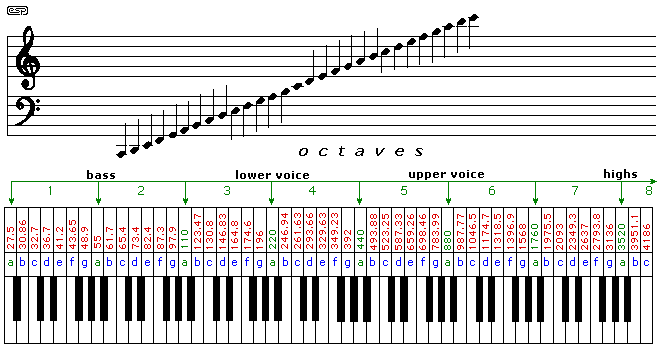
The octave layout is not entirely correct - the first two notes on the left are octave 0 in simplified notation. From the first note To (marked as C), octave 1 begins.
Pressing the piano key with this layout will play the corresponding sound:
from the controctive La - La sharp (C-flat) - C
to the Fifth octave. Where whole notes (Do, Re, ..) are white keys, half tones (with sharps and flats) are black.
In foreign literature, another, simplified notation is often used, which we will eventually use:
notes are denoted by the Latin letters C (Do), D (Pe), E (Mi), F (Fa), G (Salt), A (A ), B (C). The octaves are simply numbered from 0 to 8. Accordingly, on the piano you will see notes symbols
from A0 - A0♯ (B0 ♭) - B0 - C1
to C8. Black keys may not be indicated, as in the picture above. On black are intermediate sounds (midtones) - notes with sharps and flats.
For each note and each semitone between them depicted on this layout there is a corresponding note number in MIDI (from 21 to 108). The ratio will be seen later.
Above the piano, two staves can be seen (twice in five lines). Upper - violin, denotes higher octaves, Lower - bass, lower. The squiggles at the beginning of the lines are the signs of the treble and bass keys, respectively. Note that the first line of the treble clef indicates the Mi (E) note of the first (4) octave, and the first bass note - the Salt (G) note is large (2).
Following the key on the musical notation we see 4 sharps. This is the key to tonality. In this case, it is called C sharp minor.
To play correctly in this key, instead of the notes on the lines of which sharps are drawn, play the sharps (next key on the right) of these notes. Sharp pieces are drawn on notes C, D, F, G. I will not describe the principles of tonality construction - now they are not so important and there is a lot of information on the network. Those wishing to google it.
Therefore, if we see notes C1, D1, .. G7, mentally change them to the nearest right C1♯, D1♯, ... G7♯ and after that we look for the corresponding number in MIDI numbering.
If these signs are not at the beginning of the line, but somewhere in a “random” place, then they temporarily, until the end of the current measure (bars are separated by a vertical bar) change the note as follows:
- The alteration of this note in this octave, set by the key, is canceled. For example, the note C3 ♮ and all subsequent C3 to the end of the measure (the nearest vertical bar) will be played as C3;
-♯ raises the note by a half tone. A3♯ and all subsequent A3s until the end of the measure are played as A3♯;
- ♭ lowers the note by half a tone. D3 ♭ and all subsequent D3 will be played as C3♯ (aka D3 ♭).
The thoughtful reader has already noticed that in some cases “temporary sharp and flat” do not make sense. For example, in the key of the moonlight sonata with notes C, D, F, G, you can put and do not put a sharp. None of this will change. Yes, there are double sharps for such cases, but they are beyond the scope of this article.
A note in musical notation can have a hollow or filled circle (head), have a vertical stick (calm) and a flag. This determines the relative duration of the note. In our case, one whole note takes an entire beat, half a half-beat, and so on. I bring a picture for clarity.
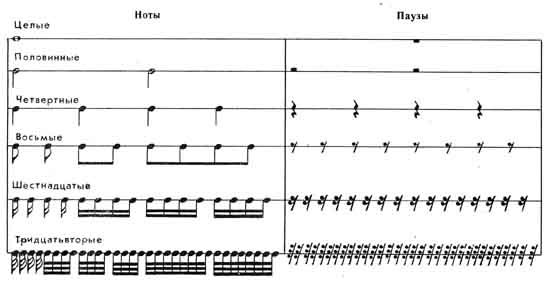
Another nuance is the points. The point immediately after the note means that this note sounds one and a half specified duration. For example, 1/8 with a dot sounds throughout 1/8 + 1/16 = 3/16 of the beat. I’ll make a reservation for connoisseurs right away, I didn’t translate Adagio into beats per minute, and even if I did, then what to do with this 60-80 is not very clear. Therefore, the duration of the measure is selected by ear.
Using the knowledge gained, we will calculate the notes and translate them into MIDI according to the following picture:
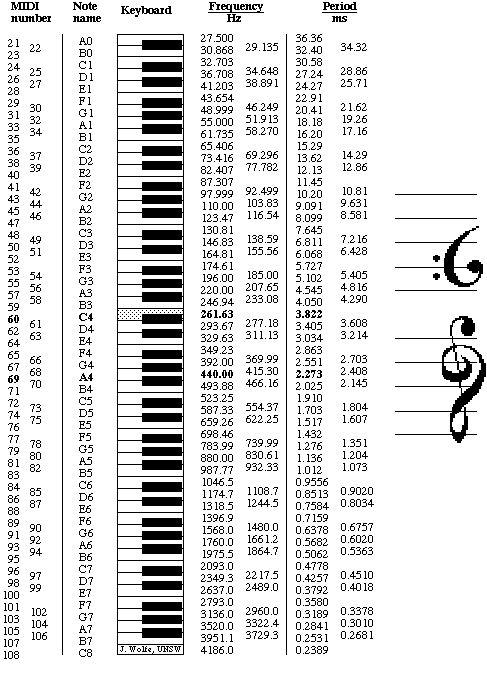
C2 -> 37 (one and a half tones higher because the key is C sharp minor)
C3 -> 49
G3 -> 56 and so on.
We get a somewhat clumsy, but working implementation of the first measure:
This is only the beginning, but an untrained person may already get tired of counting tonality and temporary alterations. And the code sheets are long. And this is just the first beat. Of course, an OOP-focused eye will immediately find targets for refactoring. At the same time, the task of calculating sound can be easily transferred to javascript.
We describe the tonality. Key is a vague term. But in our concrete example, the key is simply the necessary alteration of the notes in that key. As you remember, in the key of C sharp minor we see notes C1, D1, .. G7, and substitute C1♯, D1♯, ... G7♯ in their place. I simply indicated a shift for each of these notes (+1 or just 1). 4 - the number of sharps. Flats would be designated as -4. Connoisseurs will understand that in this narrow case there is no difference between the parallel keys of C sharp minor and E major. The same sharp with the same notes.
The code for the article should not be cluttered, so there is no JSDoc, there were no JSHint checks and other things, but there are comments translated into Russian.
Now create an object to play:
Now let’s release the note count and improve the code a bit more:
Well, the musical notation itself:
The resulting result can be heard here and see here . For example, I made 7 measures out of 19.
UPD Corrected about octaves, notation and duration according to lair comment
Foreword I do not pretend to deep knowledge in musical notation. But this should not prevent the reader from understanding musical notation and do something at least similar to the scale recorded by the composer in notes. Many terms and concepts are deliberately simplified. Indications of grammatical, syntactic and other errors in the text are welcome in private messages.
For the impatient, you can immediately get acquainted with the result (7 measures of the moonlight sonata). Works on the latest Chrome and Firefox on Ubuntu 14.04. Most likely, it will not work on mobile devices.
How to play music in a browser? The first thing that comes to mind is to find a solution that implements the basic functions. Search githabu gives midi.js . The solution is convenient. MIT License. Examples work. Take it!
$ git clone https://github.com/mudcube/MIDI.js.git
Got a copy in the local environment. In the examples directory, see Basic.html. We copy there as Betchoven.html and we will change the contents. The lines of interest to us are:
    var delay = 0; // play one note every quarter second
    var note = 50; // the MIDI note
    var velocity = 127; // how hard the note hits
    // play the note
    MIDI.setVolume(0, 127);
    MIDI.noteOn(0, note, velocity, delay);
    MIDI.noteOff(0, note, delay + 0.75);
You need to write something relatively simple and slow. For example, the first part of Beethoven's Moonlight Sonata (Piano Sonata No. 14 in C Sharp Minor, Op. 27, No. 2, as the wiki suggests). Find the notes.
Let there be such:
I will sign the minimum necessary for understanding this musical notation.
A small digression into theory
Sheet music on the piano. The first picture shows the piano layout.
The octave layout is not entirely correct - the first two notes on the left are octave 0 in simplified notation. From the first note To (marked as C), octave 1 begins.
Pressing the piano key with this layout will play the corresponding sound:
from the controctive La - La sharp (C-flat) - C
to the Fifth octave. Where whole notes (Do, Re, ..) are white keys, half tones (with sharps and flats) are black.
In foreign literature, another, simplified notation is often used, which we will eventually use:
notes are denoted by the Latin letters C (Do), D (Pe), E (Mi), F (Fa), G (Salt), A (A ), B (C). The octaves are simply numbered from 0 to 8. Accordingly, on the piano you will see notes symbols
from A0 - A0♯ (B0 ♭) - B0 - C1
to C8. Black keys may not be indicated, as in the picture above. On black are intermediate sounds (midtones) - notes with sharps and flats.
For each note and each semitone between them depicted on this layout there is a corresponding note number in MIDI (from 21 to 108). The ratio will be seen later.
Above the piano, two staves can be seen (twice in five lines). Upper - violin, denotes higher octaves, Lower - bass, lower. The squiggles at the beginning of the lines are the signs of the treble and bass keys, respectively. Note that the first line of the treble clef indicates the Mi (E) note of the first (4) octave, and the first bass note - the Salt (G) note is large (2).
Tonality
Following the key on the musical notation we see 4 sharps. This is the key to tonality. In this case, it is called C sharp minor.
To play correctly in this key, instead of the notes on the lines of which sharps are drawn, play the sharps (next key on the right) of these notes. Sharp pieces are drawn on notes C, D, F, G. I will not describe the principles of tonality construction - now they are not so important and there is a lot of information on the network. Those wishing to google it.
Therefore, if we see notes C1, D1, .. G7, mentally change them to the nearest right C1♯, D1♯, ... G7♯ and after that we look for the corresponding number in MIDI numbering.
Alteration Signs (♯, ♮, ♭)
If these signs are not at the beginning of the line, but somewhere in a “random” place, then they temporarily, until the end of the current measure (bars are separated by a vertical bar) change the note as follows:
- The alteration of this note in this octave, set by the key, is canceled. For example, the note C3 ♮ and all subsequent C3 to the end of the measure (the nearest vertical bar) will be played as C3;
-♯ raises the note by a half tone. A3♯ and all subsequent A3s until the end of the measure are played as A3♯;
- ♭ lowers the note by half a tone. D3 ♭ and all subsequent D3 will be played as C3♯ (aka D3 ♭).
The thoughtful reader has already noticed that in some cases “temporary sharp and flat” do not make sense. For example, in the key of the moonlight sonata with notes C, D, F, G, you can put and do not put a sharp. None of this will change. Yes, there are double sharps for such cases, but they are beyond the scope of this article.
Duration
A note in musical notation can have a hollow or filled circle (head), have a vertical stick (calm) and a flag. This determines the relative duration of the note. In our case, one whole note takes an entire beat, half a half-beat, and so on. I bring a picture for clarity.
Another nuance is the points. The point immediately after the note means that this note sounds one and a half specified duration. For example, 1/8 with a dot sounds throughout 1/8 + 1/16 = 3/16 of the beat. I’ll make a reservation for connoisseurs right away, I didn’t translate Adagio into beats per minute, and even if I did, then what to do with this 60-80 is not very clear. Therefore, the duration of the measure is selected by ear.
Using the knowledge gained, we will calculate the notes and translate them into MIDI according to the following picture:
C2 -> 37 (one and a half tones higher because the key is C sharp minor)
C3 -> 49
G3 -> 56 and so on.
We get a somewhat clumsy, but working implementation of the first measure:
window.onload = function () {
	MIDI.loadPlugin({
		soundfontUrl: "./soundfont/",
		instrument: "acoustic_grand_piano",
		onprogress: function(state, progress) {
			console.log(state, progress);
		},
		onsuccess: function() {
  			play();
		}
	});
};
function play() {
	var delay = 0; // play one note every quarter second
	var velocity = 127; // how hard the note hits
	var gap = 0.6;
	var duration = 0.4;
	MIDI.setVolume(0, 80);
	// первый такт
	delay += gap;
	MIDI.noteOn(0, 49, velocity, delay);
	MIDI.noteOff(0, 49, delay + 4 * gap);
	MIDI.noteOn(0, 37, velocity, delay);
	MIDI.noteOff(0, 37, delay + 4 * gap);
	MIDI.noteOn(0, 56, velocity, delay);
	MIDI.noteOff(0, 56, delay + duration);
	delay += gap;
	MIDI.noteOn(0, 61, velocity, delay);
	MIDI.noteOff(0, 61, delay + duration);
	delay += gap;
	MIDI.noteOn(0, 64, velocity, delay);
	MIDI.noteOff(0, 64, delay + duration);
	delay += gap;
	MIDI.noteOn(0, 56, velocity, delay);
	MIDI.noteOff(0, 56, delay + duration);
	delay += gap;
	MIDI.noteOn(0, 61, velocity, delay);
	MIDI.noteOff(0, 61, delay + duration);
	delay += gap;
	MIDI.noteOn(0, 64, velocity, delay);
	MIDI.noteOff(0, 64, delay + duration);
	delay += gap;
	MIDI.noteOn(0, 56, velocity, delay);
	MIDI.noteOff(0, 56, delay + duration);
	delay += gap;
	MIDI.noteOn(0, 61, velocity, delay);
	MIDI.noteOff(0, 61, delay + duration);
	delay += gap;
	MIDI.noteOn(0, 64, velocity, delay);
	MIDI.noteOff(0, 64, delay + duration);
	delay += gap;
	MIDI.noteOn(0, 56, velocity, delay);
	MIDI.noteOff(0, 56, delay + duration);
	delay += gap;
	MIDI.noteOn(0, 61, velocity, delay);
	MIDI.noteOff(0, 61, delay + duration);
	delay += gap;
	MIDI.noteOn(0, 64, velocity, delay);
	MIDI.noteOff(0, 64, delay + duration);
}
This is only the beginning, but an untrained person may already get tired of counting tonality and temporary alterations. And the code sheets are long. And this is just the first beat. Of course, an OOP-focused eye will immediately find targets for refactoring. At the same time, the task of calculating sound can be easily transferred to javascript.
We describe the tonality. Key is a vague term. But in our concrete example, the key is simply the necessary alteration of the notes in that key. As you remember, in the key of C sharp minor we see notes C1, D1, .. G7, and substitute C1♯, D1♯, ... G7♯ in their place. I simply indicated a shift for each of these notes (+1 or just 1). 4 - the number of sharps. Flats would be designated as -4. Connoisseurs will understand that in this narrow case there is no difference between the parallel keys of C sharp minor and E major. The same sharp with the same notes.
The code for the article should not be cluttered, so there is no JSDoc, there were no JSHint checks and other things, but there are comments translated into Russian.
var keys = {
    4 : {
        C : 1,
        D : 1,
        F : 1,
        G : 1
    }
};
Now create an object to play:
var player = {
    // длительность такта
    barDuration : 8,
    // шкала времени
    timeline : 0,
    // не очень важный параметр
    velocity : 127,
    // укажем тональность
    key : keys[4],
    // временные изменения тональности по тексту
    tempAlts : {},
    // параметры - нота как строка, длительность, надо ли сдвигать координату времени
    play : function(noteString, duration, moveTime) {
        // подсчет ноты будет ниже
        var noteInt = this.calcNote(noteString);
        MIDI.noteOn(0, noteInt, this.velocity, this.timeline);
        // звучание ноты заканчивается через длительность такта * длительность ноты в такте
        MIDI.noteOff(0, noteInt, this.velocity, this.timeline + this.barDuration * duration);
        if (typeof moveTime !== 'undefined' && moveTime === true) {
            this.move(duration);
        }
    },
    move : function(duration) {
        this.timeline += this.barDuration * duration;
        // в конце каждого такта временные диезы, бемоли и бекары отменяются.
        if (this.timeline % this.barDuration === 0) {
            this.tempAlts = {};}
    },
};
Now let’s release the note count and improve the code a bit more:
var player = {
    barDuration : 8,
    timeline : 0,
    velocity : 127,
    key : keys[4],
    tempAlts : {},
    play : function(noteString, duration, moveTime) {
        var noteInt = this.calcNote(noteString);
        MIDI.noteOn(0, noteInt, this.velocity, this.timeline);
        MIDI.noteOff(0, noteInt, this.velocity, this.timeline + this.barDuration * duration);
        if (typeof moveTime !== 'undefined' && moveTime === true) {
            this.move(duration);
        }
    },
    move : function(duration) {
        this.timeline += this.barDuration * duration;
        if (this.isEndOfBar()) {
            this.tempAlts = {};}
    },
    calcNote : function(noteString) {
        var note = noteString[0];
        var noteWithOctave = noteString.substring(0,2);
        // есть ли временные знаки альтерации при ноте
        var altering = this.getAltering(noteString);
        // установим временные диезы, бемоли, бекары
        if (altering) {
            this.setTempAltering(noteWithOctave, altering);
        }
        // если временных альтераций нет - возвращаем номер ноты в MIDI + сдвиг по тональности
        if (this.tempAlts[noteWithOctave] !== undefined) {
            return MIDI.keyToNote[noteWithOctave] + this.tempAlts[noteWithOctave];
        }
        // если временные альтерации есть - возвращаем номер ноты в MIDI + сдвиг по временной альтерации
        // тональность здесь не учавствует
        return MIDI.keyToNote[noteWithOctave] +
                (this.key[note] !== undefined ? this.key[note] : 0);
    },
    isEndOfBar : function() {
        return !!(this.timeline % this.barDuration === 0)
    },
    // получить знак альтерации при ноте или false
    getAltering : function(noteString) {
        var altering = noteString[2];
        return altering !== undefined ? altering : false;
    },
    setTempAltering : function(noteWithOctave, altering) {
        switch (altering) {
            // знак бемоля при ноте временно понижает ноту на 1 полутон и так далее
            case 'b': this.tempAlts[noteWithOctave] = -1; break;
            // бекар обозначил как "%"
            case '%': this.tempAlts[noteWithOctave] = 0;  break;
            case '#': this.tempAlts[noteWithOctave] = 1;  break;
        }
    }
}
Well, the musical notation itself:
    player.play('C2', 1);
    player.play('C1', 1);
    player.play('G3', 1/12, true);
    player.play('C4', 1/12, true);
    player.play('E4', 1/12, true);
    player.play('G3', 1/12, true);
    player.play('C4', 1/12, true);
    player.play('E4', 1/12, true);
    player.play('G3', 1/12, true);
    player.play('C4', 1/12, true);
    player.play('E4', 1/12, true);
    player.play('G3', 1/12, true);
    player.play('C4', 1/12, true);
    player.play('E4', 1/12, true);
    ...
The resulting result can be heard here and see here . For example, I made 7 measures out of 19.
UPD Corrected about octaves, notation and duration according to lair comment









