April 2, 2015 at 15:20
Asynchronous operation with Tarantool in Python
There are already articles on Habr about NoSQL DBMS Tarantool and how it is used in Mail.Ru Group (and not only). However, there are no recipes for how to work with Tarantool in Python. In my article I want to talk about how we prepare Tarantool Python in our projects, what problems and difficulties arise, pluses, minuses, pitfalls and, of course, “what's the catch”. So, first things first.

Tarantool is an Application Server for Lua. He knows how to store data on disk, provides quick access to them. Tarantool is used in tasks with large data flows per unit time. If we talk about numbers, then these are tens and hundreds of thousands of operations per second. For example, in one of my projects, more than 80,000 requests per second are generated (fetch, insert, update, delete), while the load is evenly distributed across 4 servers with 12 Tarantool instances. Not all modern DBMSs are ready to work with such loads. In addition, with so much data, waiting for the request to complete is very expensive, so the programs themselves must quickly switch from one task to another. For efficient and uniform loading of the CPU of the server (all its cores), Tarantool and asynchronous programming techniques are needed.
Before talking about asynchronous Python code, you need a good understanding of how regular synchronous Python code interacts with Tarantool. I will use Tarantool 1.6 version under the CentOS, its installation is simple and trivial detail painted on the project site, where you can also find an extensive user guide . I want to note that recently, with the advent of good documentation, it has become much easier to understand how to start and use the Tarantool instance. A useful article “ Tarantool 1.6 - let's get started ” just recently appeared on Habré .
So, Tarantool is installed, running and ready to go. To work with Python 2.7, we take the tarantool-python connector from pypi :
This is still enough to solve our problems. And what are they? In one of my projects, there was a need to “add up” the data stream in Tarantool for further processing, while the size of one data packet is approximately 1.5 KB. Before proceeding with the solution of the problem, you should study the issue well and test the selected approaches and tools. The performance testing script looks elementary and is written in a couple of minutes:
It's simple: in a cycle, we sequentially make 100 thousand inserts in Tarantool. On my virtual machine, this code runs on average in 32 seconds, that is, about three thousand inserts per second. The program is simple, and if the resulting performance is enough, then you can do nothing more, because, as you know, "premature optimization is evil." However, this was not enough for our project, besides Tarantool itself can show much better results.
Before taking rash steps, we’ll try to carefully study our code and how it works. Thanks to my colleague Dreadatour for his series of articles on profiling Python code.
Before starting the profiler, it’s useful to understand how the program works, but the best tool for profiling is the head of the developer. The script itself is simple, there is nothing special to study there, we will try to “dig deeper”. If you look at the implementation of the connector driver, you can understand that the request is packaged using the msgpack library , sent to the socket by calling sendall, and then the length of the response and the response itself are subtracted from the socket. Already more interesting. How many operations with the Tarantool socket will be done as a result of the execution of this code? In our case, for one tnt.insert request , one socket.sendall call (send data) and two socket.recv calls (get the length of the response and the response itself) will be made . The gaze method says that to insert a hundred thousand records, 200k + 100k = 300k read / write system calls will be made. And the profiler (I used cProfile and kcachegrind to interpret the results) confirms our conclusions:
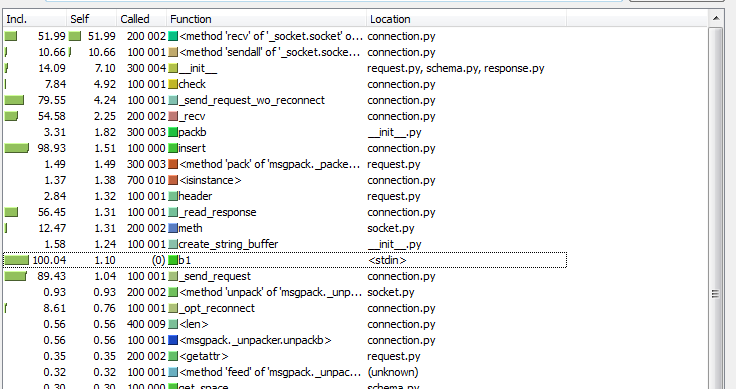
What can be changed in this scheme? First of all, of course, I want to reduce the number of system calls, that is, operations with the Tarantool socket. This can be done by grouping the tnt.insert requests in a “bundle” and calling socket.sendall for all requests at once. In the same way, you can read from the socket a "packet" of responses from Tarantool for one socket.recv. With the usual, classical programming style, this is not so simple: you need a buffer for data, a delay to accumulate data in the buffer, and you also need to return query results in turn without delay. But what if there were a lot of requests and suddenly there were very few? There will again be delays that we seek to avoid. In general, we need a fundamentally new approach, but most importantly - I want to leave the code of the original task as simple as it was originally. Asynchronous frameworks come to the rescue for solving our problem.
I had to deal with several asynchronous frameworks: twisted , tornado , gevent and others. The question of comparison and benchmarks of these tools has been raised more than once on Habré, for example: once and twice .
My choice fell on gevent. The main reason is the efficiency of work with I / O operations and the simplicity of writing code. A good tutorial on using this library can be found here . And in this tutorial there is a classic example of a quick crawler:
On my virtual machine for this test, the following results were obtained:
Nice performance boost! To make synchronous code work asynchronously using gevent, we needed to wrap the fetch function call in gevent.spawn , as if parallelizing the downloading of the URLs themselves. It was also necessary to execute monkey.patch_socket () , after which all calls for working with sockets become cooperative. Thus, while one URL is being downloaded and the program is waiting for a response from the remote service, the gevent engine switches to other tasks and instead of useless waiting, tries to download other available documents. In the bowels of Python, all gevent threads are executed sequentially, but due to the fact that there are no expectations ( wait system calls ), the final result is faster.
It looks good, and most importantly - this approach is very well suited for our task. However, the tarantool-python driver does not know how to work with gevent out of the box, and I had to write the gtarantool connector on top of it.
The gtarantool connector works with gevent and Tarantool 1.6 and is now available on pypi:
Meanwhile, a new solution to our problem takes the following form:
What has changed compared to synchronous code? We split the insertion of 100k entries between ten asynchronous green threads, each of which makes about 10k calls to tnt.insert in a loop , all through a single connection to Tarantool. The program execution time was reduced to 12 seconds, which is almost 3 times more efficient than the synchronous version, and the number of data inserts in the database increased to 8 thousand per second. Why is such a scheme faster? What is the trick?
The gtarantool connector internally uses a buffer of requests to the Tarantool socket and separate "green threads" to read / write to this socket. We try to look at the results in the profiler (this time I used the Greenlet Profiler - this is the adapted yappi profiler for greenlets):

Analyzing the results in kcachegrind, we see that the number of socket.recv calls decreased from 100k to 10k, and the number of socket.send calls fell from 200k to 2.5k. Actually, this makes working with Tarantool more efficient: fewer heavy system calls due to lighter and “cheaper” greenlets. And the most important and pleasant thing is that the source program code remained, in fact, “synchronous”. There are no ugly twisted-callbacks in it.
We successfully use this approach in our project. What else is the profit:
One of the differences between the various asynchronous frameworks is the ability to work under Python 3. For example, gevent does not support it. Moreover, the tarantool-python library will also not work under Python 3 (we have not yet managed to port it). Well, how so?
The path of the Jedi is thorny. I really wanted to compare asynchronous work with tarantool from under the second and third versions of Python, and then I decided to rewrite everything in Python 3.4. After Python 2.7, it was a little unusual to write code:
But the addiction was successful, and now I try to immediately write code for Python 2.7 so that it works without changes in Python 3.
The tarantool-python connector had to be slightly modified:
The fork of the synchronous connector working under Python 3.4 turned out . After a thorough check, this code will probably be poured into the main branch of the library, but for now you can install it directly from Github:
The first benchmark results did not cause enthusiasm. The usual synchronous version of inserting 100k records, 1.5 Kbytes in size, began to execute on average a little more than a minute - twice as long as the same code under the second version of Python! Profiling comes to the rescue:

Wow! So where did 400k socket.recv calls come from ? Where did 200k socket.sendall calls come from ? I had to dive into the tarantool-python connector code again: as it turned out, this is the result of the Python strings and bytes as dict keys. For example, you can compare this code:
Python 3.4:
Python 2.7:
Such trifles are a vivid example of the complexity of porting code to Python 3, and even tests here do not always help, because formally everything works, but it works twice as slow, and for our realities this is a significant difference. We fix the code, add a "couple of bytes" to the connector (a link to changes in the connector code , as well as another change ) - there is a result!

Well, now not bad! The synchronous version of the connector began to cope with the task in an average of 35 seconds, which is slightly slower than Python 2.7, but you can already live with it.
Asyncio is a Coroutine for Python 3 out of the box. There is documentation , there are examples, there are ready-made libraries for asyncio and Python 3. At first glance, everything is quite complicated and confusing (at least in comparison with gevent), but upon further examination everything falls into place. And so, after some effort, I wrote a version of the Tarantool connector for asyncio - aiotarantool .
This connector is also available through pypi:
I want to note that the code of our original task on asyncio has become a bit more complicated than its original version. The yield from constructions appeared, @ asyncio.coroutine decorators appeared , but in general I like it, and there are not many differences from gevent:
This option copes with the task, on average, in 13 seconds (it turns out about 7.5k inserts per second), which is slightly slower than the versions in Python 2.7 and gevent, but much better than all synchronous versions. There is one small, but very important difference in aiotarantool from other libraries available on asyncio.org : the tarantool.connect call is made outside of asyncio.event_loop . In fact, this call does not create a real connection: it will be made later, inside one of the coroutines during the first call from yield from tnt.insert . This approach seemed to me easier and more convenient when programming on asyncio.
By tradition, profiling results (I used yappi profiler, but there is a suspicion that it does not quite correctly calculate the number of function calls when working with asyncio):

As a result, we see 5k calls to StreamReader.feed_data and StreamWriter.write , which is undoubtedly much better than 200k calls to socket.recv and 100k calls to socket.sendall in the synchronous version.
I present the results of a comparison of the considered options for working with Tarantool. Benchmark code can be found in the tests directory of the gtarantool and aiotrantool libraries . In the benchmark, you insert, search, modify and delete 100,000 records of 1.5 KB in size. Each test was run ten times, the tables show the average rounded value, since it is not the exact numbers that are important (they depend on the specific iron), but their ratio.
Compare:
Test execution time, in seconds (less is better):
The number of operations per second (more is better):
Gtarantool performance is slightly better than aiotarantool. We have been using gtarantool for a long time, it is a proven solution for heavy loads, but gevent is not supported in Python 3. In addition, remember that gevent is a third-party library that requires compilation during installation. Asyncio is attractive for its speed and novelty; it comes out of the box in Python 3, and it lacks “crutches” in the form of “monkey.patch”. But under the real load, aiotarantool in our project has not yet worked. Everything is ahead!
For the most efficient use of the resources of our server, let's try to complicate the code of our benchmark a little. Let's do the simultaneous deletion, insertion, modification and selection of data (a fairly common load profile) in one Python process, and we will create several such processes themselves, say, 22 (magic number). If there are 24 cores in total, then we leave one core to the system (just in case), give one core to Tarantool (enough for it!), And take the remaining 22 for Python processes. We will do comparisons on both gevent and asyncio, benchmark code can be found here for gtarantool, and here for aiotarantool.
It is very important to clearly and beautifully display the results for their subsequent comparison. It's time to evaluate the capabilities of the new version of Tarantool 1.6: in fact, it is an interpreter of Lua, which means that we can run absolutely any Lua code directly in the database. We are writing the simplest program, and our Tarantool is already able to send any of its statistics to graphite . Add the code to our Tarantool launch init script (in a real project, of course, it’s better to put such things in a separate module):
Launch Tarantool and automatically get graphs with statistics. Cool? I really liked this feature!
Now we will carry out two benchmarks: in the first we will perform simultaneous deletion, insertion, modification and selection of data. In the second benchmark, we will only perform sampling. On all graphs, the abscissa shows time, and the ordinate shows the number of operations per second:
Let me remind you that the Tarantool process used only one core. In the first benchmark, the load on the CPU (this core) was 100%, and in the second test, the Tarantool process utilized its core only by 60%.
The results obtained allow us to conclude that the techniques discussed in the article are suitable for working with heavy loads in our projects.
The examples in the article are, of course, artificial. These tasks are a little more complicated and diverse, but their solutions in the general case look exactly as shown in the above code. Where can this approach be applied? Where “a lot, a lot of requests per second” is required: in this case, asynchronous code is required to work effectively with Tarantool. Coroutines are effective where there is an expectation of events (system calls), and the crawler is a classic example of such a task.
Writing code on asyncio or gevent is not as difficult as it seems, but you need to pay a lot of attention to code profiling: asynchronous code often does not work at all as expected.
Tarantool and its protocol are very well suited for working with an asynchronous development style. One has only to plunge into the world of Tarantool and Lua, and one can endlessly be surprised at their powerful capabilities. Python code can work effectively with Tarantool, and Python 3 has good potential for developing on asyncio coroutines.
I hope that the material in this article will benefit the community and add to the knowledge base about Tarantool and asynchronous programming. I think that asyncio and aiotarantool will reach use in production and in our projects, and I will have something else to share with Habr’s readers.
And, of course, the version of connectors for Tarantool:
It's time to try them on your own!
Tarantool is an Application Server for Lua. He knows how to store data on disk, provides quick access to them. Tarantool is used in tasks with large data flows per unit time. If we talk about numbers, then these are tens and hundreds of thousands of operations per second. For example, in one of my projects, more than 80,000 requests per second are generated (fetch, insert, update, delete), while the load is evenly distributed across 4 servers with 12 Tarantool instances. Not all modern DBMSs are ready to work with such loads. In addition, with so much data, waiting for the request to complete is very expensive, so the programs themselves must quickly switch from one task to another. For efficient and uniform loading of the CPU of the server (all its cores), Tarantool and asynchronous programming techniques are needed.
How does the tarantool-python connector work?
Before talking about asynchronous Python code, you need a good understanding of how regular synchronous Python code interacts with Tarantool. I will use Tarantool 1.6 version under the CentOS, its installation is simple and trivial detail painted on the project site, where you can also find an extensive user guide . I want to note that recently, with the advent of good documentation, it has become much easier to understand how to start and use the Tarantool instance. A useful article “ Tarantool 1.6 - let's get started ” just recently appeared on Habré .
So, Tarantool is installed, running and ready to go. To work with Python 2.7, we take the tarantool-python connector from pypi :
$ pip install tarantool-pythonThis is still enough to solve our problems. And what are they? In one of my projects, there was a need to “add up” the data stream in Tarantool for further processing, while the size of one data packet is approximately 1.5 KB. Before proceeding with the solution of the problem, you should study the issue well and test the selected approaches and tools. The performance testing script looks elementary and is written in a couple of minutes:
import tarantool
import string
mod_len = len(string.printable)
data = [string.printable[it] * 1536
        for it in range(mod_len)]
tnt = tarantool.connect("127.0.0.1", 3301)
for it in range(100000):
    r = tnt.insert("tester", (it, data[it % mod_len]))
It's simple: in a cycle, we sequentially make 100 thousand inserts in Tarantool. On my virtual machine, this code runs on average in 32 seconds, that is, about three thousand inserts per second. The program is simple, and if the resulting performance is enough, then you can do nothing more, because, as you know, "premature optimization is evil." However, this was not enough for our project, besides Tarantool itself can show much better results.
Profile the code
Before taking rash steps, we’ll try to carefully study our code and how it works. Thanks to my colleague Dreadatour for his series of articles on profiling Python code.
Before starting the profiler, it’s useful to understand how the program works, but the best tool for profiling is the head of the developer. The script itself is simple, there is nothing special to study there, we will try to “dig deeper”. If you look at the implementation of the connector driver, you can understand that the request is packaged using the msgpack library , sent to the socket by calling sendall, and then the length of the response and the response itself are subtracted from the socket. Already more interesting. How many operations with the Tarantool socket will be done as a result of the execution of this code? In our case, for one tnt.insert request , one socket.sendall call (send data) and two socket.recv calls (get the length of the response and the response itself) will be made . The gaze method says that to insert a hundred thousand records, 200k + 100k = 300k read / write system calls will be made. And the profiler (I used cProfile and kcachegrind to interpret the results) confirms our conclusions:
What can be changed in this scheme? First of all, of course, I want to reduce the number of system calls, that is, operations with the Tarantool socket. This can be done by grouping the tnt.insert requests in a “bundle” and calling socket.sendall for all requests at once. In the same way, you can read from the socket a "packet" of responses from Tarantool for one socket.recv. With the usual, classical programming style, this is not so simple: you need a buffer for data, a delay to accumulate data in the buffer, and you also need to return query results in turn without delay. But what if there were a lot of requests and suddenly there were very few? There will again be delays that we seek to avoid. In general, we need a fundamentally new approach, but most importantly - I want to leave the code of the original task as simple as it was originally. Asynchronous frameworks come to the rescue for solving our problem.
Gevent and Python 2.7
I had to deal with several asynchronous frameworks: twisted , tornado , gevent and others. The question of comparison and benchmarks of these tools has been raised more than once on Habré, for example: once and twice .
My choice fell on gevent. The main reason is the efficiency of work with I / O operations and the simplicity of writing code. A good tutorial on using this library can be found here . And in this tutorial there is a classic example of a quick crawler:
import time
import gevent.monkey
gevent.monkey.patch_socket()
import gevent
import urllib2
import json
def fetch(pid):
    url = 'http://json-time.appspot.com/time.json'
    response = urllib2.urlopen(url)
    result = response.read()
    json_result = json.loads(result)
    return json_result['datetime']
def synchronous():
    for i in range(1,10):
        fetch(i)
def asynchronous():
    threads = []
    for i in range(1,10):
        threads.append(gevent.spawn(fetch, i))
    gevent.joinall(threads)
t1 = time.time()
synchronous()
t2 = time.time()
print('Sync:', t2 - t1)
t1 = time.time()
asynchronous()
t2 = time.time()
print('Async:', t2 - t1)
On my virtual machine for this test, the following results were obtained:
Sync: 1.529
Async: 0.238
Nice performance boost! To make synchronous code work asynchronously using gevent, we needed to wrap the fetch function call in gevent.spawn , as if parallelizing the downloading of the URLs themselves. It was also necessary to execute monkey.patch_socket () , after which all calls for working with sockets become cooperative. Thus, while one URL is being downloaded and the program is waiting for a response from the remote service, the gevent engine switches to other tasks and instead of useless waiting, tries to download other available documents. In the bowels of Python, all gevent threads are executed sequentially, but due to the fact that there are no expectations ( wait system calls ), the final result is faster.
It looks good, and most importantly - this approach is very well suited for our task. However, the tarantool-python driver does not know how to work with gevent out of the box, and I had to write the gtarantool connector on top of it.
Gevent and Tarantool
The gtarantool connector works with gevent and Tarantool 1.6 and is now available on pypi:
$ pip install gtarantoolMeanwhile, a new solution to our problem takes the following form:
import gevent
import gtarantool
import string
mod_len = len(string.printable)
data = [string.printable[it] * 1536
        for it in range(mod_len)]
cnt = 0
def insert_job(tnt):
    global cnt
    for i in range(10000):
        cnt += 1
        tnt.insert("tester", (cnt, data[it % mod_len]))
tnt = gtarantool.connect("127.0.0.1", 3301)
jobs = [gevent.spawn(insert_job, tnt)
        for _ in range(10)]
gevent.joinall(jobs)
What has changed compared to synchronous code? We split the insertion of 100k entries between ten asynchronous green threads, each of which makes about 10k calls to tnt.insert in a loop , all through a single connection to Tarantool. The program execution time was reduced to 12 seconds, which is almost 3 times more efficient than the synchronous version, and the number of data inserts in the database increased to 8 thousand per second. Why is such a scheme faster? What is the trick?
The gtarantool connector internally uses a buffer of requests to the Tarantool socket and separate "green threads" to read / write to this socket. We try to look at the results in the profiler (this time I used the Greenlet Profiler - this is the adapted yappi profiler for greenlets):
Analyzing the results in kcachegrind, we see that the number of socket.recv calls decreased from 100k to 10k, and the number of socket.send calls fell from 200k to 2.5k. Actually, this makes working with Tarantool more efficient: fewer heavy system calls due to lighter and “cheaper” greenlets. And the most important and pleasant thing is that the source program code remained, in fact, “synchronous”. There are no ugly twisted-callbacks in it.
We successfully use this approach in our project. What else is the profit:
- We abandoned forks. You can use multiple Python processes, and use a single gtarantool connection (or connection pool) in each process.
- Inside greenlets, switching is much faster and more efficient than switching between Unix processes.
- Reducing the number of processes has greatly reduced memory consumption.
- Reducing the number of operations with the Tarantool socket increased the efficiency of working with Tarantool itself, it began to consume less CPU.
What about Python 3 and Tarantool?
One of the differences between the various asynchronous frameworks is the ability to work under Python 3. For example, gevent does not support it. Moreover, the tarantool-python library will also not work under Python 3 (we have not yet managed to port it). Well, how so?
The path of the Jedi is thorny. I really wanted to compare asynchronous work with tarantool from under the second and third versions of Python, and then I decided to rewrite everything in Python 3.4. After Python 2.7, it was a little unusual to write code:
- print “foo” doesn't work
- all strings are objects of class str
- no type long
- ...
But the addiction was successful, and now I try to immediately write code for Python 2.7 so that it works without changes in Python 3.
The tarantool-python connector had to be slightly modified:
- StandartError replaced by Exception
- basestring replaced by str
- xrange replaced by range
- long - deleted
The fork of the synchronous connector working under Python 3.4 turned out . After a thorough check, this code will probably be poured into the main branch of the library, but for now you can install it directly from Github:
$ pip install git+https://github.com/shveenkov/tarantool-python.git@for_python3.4The first benchmark results did not cause enthusiasm. The usual synchronous version of inserting 100k records, 1.5 Kbytes in size, began to execute on average a little more than a minute - twice as long as the same code under the second version of Python! Profiling comes to the rescue:
Wow! So where did 400k socket.recv calls come from ? Where did 200k socket.sendall calls come from ? I had to dive into the tarantool-python connector code again: as it turned out, this is the result of the Python strings and bytes as dict keys. For example, you can compare this code:
Python 3.4:
>>> a=dict()
>>> a[b"key"] = 1
>>> a["key"]
Traceback (most recent call last):
  File "", line 1, in
KeyError: 'key'
Python 2.7:
>>> a=dict()
>>> a[b"key"] = 1
>>> a["key"]
1
Such trifles are a vivid example of the complexity of porting code to Python 3, and even tests here do not always help, because formally everything works, but it works twice as slow, and for our realities this is a significant difference. We fix the code, add a "couple of bytes" to the connector (a link to changes in the connector code , as well as another change ) - there is a result!
Well, now not bad! The synchronous version of the connector began to cope with the task in an average of 35 seconds, which is slightly slower than Python 2.7, but you can already live with it.
Moving to asyncio in Python 3
Asyncio is a Coroutine for Python 3 out of the box. There is documentation , there are examples, there are ready-made libraries for asyncio and Python 3. At first glance, everything is quite complicated and confusing (at least in comparison with gevent), but upon further examination everything falls into place. And so, after some effort, I wrote a version of the Tarantool connector for asyncio - aiotarantool .
This connector is also available through pypi:
$ pip install aiotarantoolI want to note that the code of our original task on asyncio has become a bit more complicated than its original version. The yield from constructions appeared, @ asyncio.coroutine decorators appeared , but in general I like it, and there are not many differences from gevent:
import asyncio
import aiotarantool
import string
mod_len = len(string.printable)
data = [string.printable[it] * 1536
        for it in range(mod_len)]
cnt = 0
@asyncio.coroutine
def insert_job(tnt):
    global cnt
    for it in range(10000):
        cnt += 1
        args = (cnt, data[it % mod_len])
        yield from tnt.insert("tester", args)
loop = asyncio.get_event_loop()
tnt = aiotarantool.connect("127.0.0.1", 3301)
tasks = [asyncio.async(insert_job(tnt))
         for _ in range(10)]
loop.run_until_complete(asyncio.wait(tasks))
loop.close()
This option copes with the task, on average, in 13 seconds (it turns out about 7.5k inserts per second), which is slightly slower than the versions in Python 2.7 and gevent, but much better than all synchronous versions. There is one small, but very important difference in aiotarantool from other libraries available on asyncio.org : the tarantool.connect call is made outside of asyncio.event_loop . In fact, this call does not create a real connection: it will be made later, inside one of the coroutines during the first call from yield from tnt.insert . This approach seemed to me easier and more convenient when programming on asyncio.
By tradition, profiling results (I used yappi profiler, but there is a suspicion that it does not quite correctly calculate the number of function calls when working with asyncio):
As a result, we see 5k calls to StreamReader.feed_data and StreamWriter.write , which is undoubtedly much better than 200k calls to socket.recv and 100k calls to socket.sendall in the synchronous version.
Comparison of approaches
I present the results of a comparison of the considered options for working with Tarantool. Benchmark code can be found in the tests directory of the gtarantool and aiotrantool libraries . In the benchmark, you insert, search, modify and delete 100,000 records of 1.5 KB in size. Each test was run ten times, the tables show the average rounded value, since it is not the exact numbers that are important (they depend on the specific iron), but their ratio.
Compare:
- synchronous tarantool-python under Python 2.7;
- synchronous tarantool-python under Python 3.4;
- asynchronous version with gtarantool for Python 2.7;
- asynchronous version with aiotarantool under Python 3.4.
Test execution time, in seconds (less is better):
| Operation (100k entries) | tarantool-python 2.7 | tarantool-python 3.4 | gtarantool (gevent) | aiotarantool (asyncio) |
|---|---|---|---|---|
| insert | 34 | 38 | eleven | thirteen |
| select | 23 | 23 | 10 | thirteen |
| update | 34 | 33 | 10 | 14 |
| delete | 35 | 35 | 10 | thirteen |
| Operation (100k entries) | tarantool-python 2.7 | tarantool-python 3.4 | gtarantool (gevent) | aiotarantool (asyncio) |
|---|---|---|---|---|
| insert | 3000 | 2600 | 9100 | 7700 |
| select | 4300 | 4300 | 10,000 | 7700 |
| update | 2900 | 3000 | 10,000 | 7100 |
| delete | 2900 | 2900 | 10,000 | 7700 |
Squeeze the maximum out of the server
For the most efficient use of the resources of our server, let's try to complicate the code of our benchmark a little. Let's do the simultaneous deletion, insertion, modification and selection of data (a fairly common load profile) in one Python process, and we will create several such processes themselves, say, 22 (magic number). If there are 24 cores in total, then we leave one core to the system (just in case), give one core to Tarantool (enough for it!), And take the remaining 22 for Python processes. We will do comparisons on both gevent and asyncio, benchmark code can be found here for gtarantool, and here for aiotarantool.
It is very important to clearly and beautifully display the results for their subsequent comparison. It's time to evaluate the capabilities of the new version of Tarantool 1.6: in fact, it is an interpreter of Lua, which means that we can run absolutely any Lua code directly in the database. We are writing the simplest program, and our Tarantool is already able to send any of its statistics to graphite . Add the code to our Tarantool launch init script (in a real project, of course, it’s better to put such things in a separate module):
fiber = require('fiber')
socket = require('socket')
log = require('log')
local host = '127.0.0.1'
local port = 2003
fstat = function()
    local sock = socket('AF_INET', 'SOCK_DGRAM', 'udp')
    while true do
        local ts = tostring(math.floor(fiber.time()))
        info = {
            insert = box.stat.INSERT.rps,
            select = box.stat.SELECT.rps,
            update = box.stat.UPDATE.rps,
            delete = box.stat.DELETE.rps
        }
        for k, v in pairs(info) do
            metric = 'tnt.' .. k .. ' ' .. tostring(v) .. ' ' .. ts
            sock:sendto(host, port, metric)
        end
        fiber.sleep(1)
        log.info('send stat to graphite ' .. ts)
    end
end
fiber.create(fstat)
Launch Tarantool and automatically get graphs with statistics. Cool? I really liked this feature!
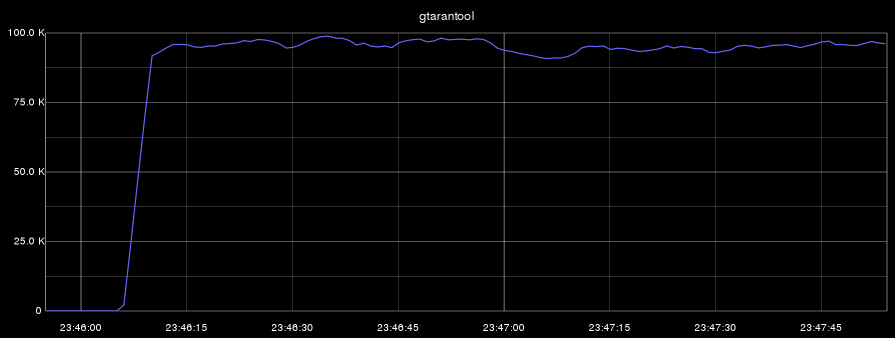
Now we will carry out two benchmarks: in the first we will perform simultaneous deletion, insertion, modification and selection of data. In the second benchmark, we will only perform sampling. On all graphs, the abscissa shows time, and the ordinate shows the number of operations per second:
- gtarantool (insert, select, update, delete):

- aiotarantool (insert, select, update, delete):

- gtarantool (select only):
- aiotarantool (select only):
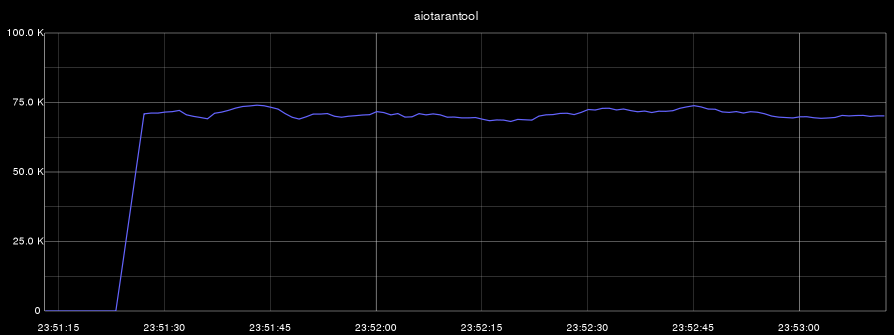
Let me remind you that the Tarantool process used only one core. In the first benchmark, the load on the CPU (this core) was 100%, and in the second test, the Tarantool process utilized its core only by 60%.
The results obtained allow us to conclude that the techniques discussed in the article are suitable for working with heavy loads in our projects.
conclusions
The examples in the article are, of course, artificial. These tasks are a little more complicated and diverse, but their solutions in the general case look exactly as shown in the above code. Where can this approach be applied? Where “a lot, a lot of requests per second” is required: in this case, asynchronous code is required to work effectively with Tarantool. Coroutines are effective where there is an expectation of events (system calls), and the crawler is a classic example of such a task.
Writing code on asyncio or gevent is not as difficult as it seems, but you need to pay a lot of attention to code profiling: asynchronous code often does not work at all as expected.
Tarantool and its protocol are very well suited for working with an asynchronous development style. One has only to plunge into the world of Tarantool and Lua, and one can endlessly be surprised at their powerful capabilities. Python code can work effectively with Tarantool, and Python 3 has good potential for developing on asyncio coroutines.
I hope that the material in this article will benefit the community and add to the knowledge base about Tarantool and asynchronous programming. I think that asyncio and aiotarantool will reach use in production and in our projects, and I will have something else to share with Habr’s readers.
Links that were used when writing the article:
- tarantool.org
- habrahabr.ru/company/mailru/blog/252065 - Tarantool 1.6 first-person
- habrahabr.ru/post/254533 - Tarantool 1.6 - let's get started
- emptysqua.re/blog/greenletprofiler - profiler for gevent
- code.google.com/p/yappi - another profiler
- habrahabr.ru/company/mailru/blog/202832 - article on profiling Python code
- docs.python.org/3/library/asyncio.html - asyncio documentation
- asyncio.org - examples of ready-made libraries
- www.gevent.org - gevent
And, of course, the version of connectors for Tarantool:
It's time to try them on your own!