March 29, 2015 at 14:41
New in Wolfram Language: TimelinePlot function for creating a timeline
- Transfer
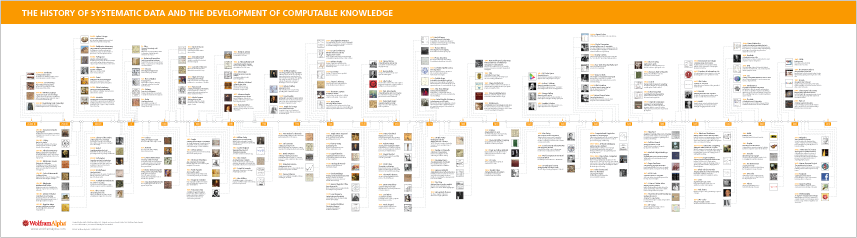
A few years ago, we created a site dedicated to the chronology of the emergence and development of various systematized data and calculated knowledge that you can watch online . I wrote a code that posts events along the timeline, and then our designers did a serious job regarding the design of the resulting material (fonts, headings, colors, etc.) and brought the quality to a commercial level.
In general, last year we added the NumberLinePlot function to the Wolfram Language to visualize points, areas, and inequalities. As soon as users started working with NumberLinePlot , we began to receive requests for the introduction of a similar function, but with dates and times, so we decided that it was time forTimelinePlot .
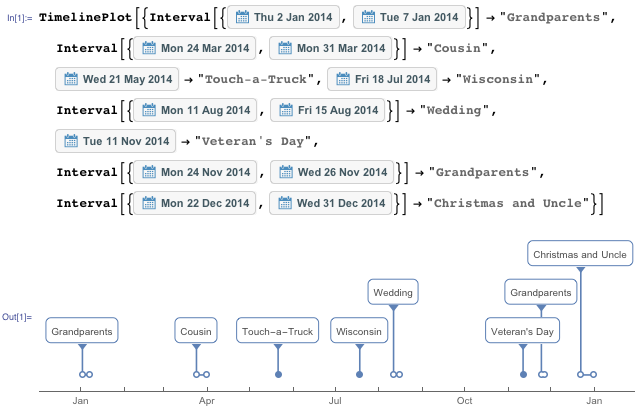
One of the differences between TimelinePlot and NumberLinePlot is the importance of labels and how often they are used. Our task was to create a system that would easily include tags and automatically place them on the chronological line. You can use rules for tags, and the tags will be positioned so as to avoid overlapping each other. It was important to learn how to automatically create labels so that they do not differ in quality from what our designers created manually. Last year I went on vacation with my family and made notes: where we moved, whom we visited and what we did. The following is an example of how you can work with this data in Wolfram Language:
It turns out that the many objects Wolfram Language knows about have at least one date associated with them, so creating chronological lines from them is very easy. One of my favorite examples, which is not so difficult to implement, is the Star Trek release chronology:

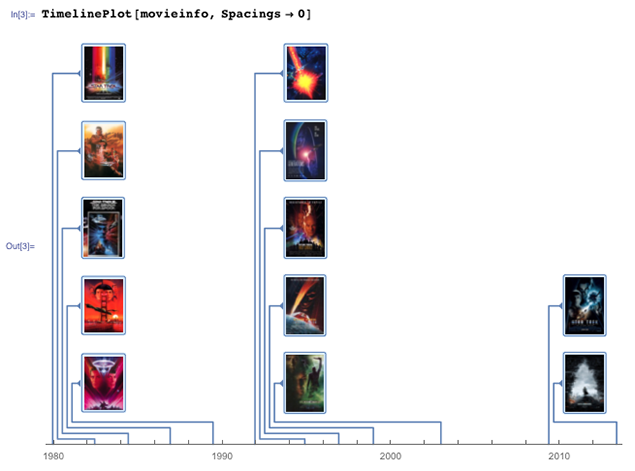
In this example, the labels are on top of each other because the page width is not very large. This is not very convenient, so try to arrange the chronological line vertically:

You can also try to arrange the astrological line horizontally, but without arranging the columns:

In addition to creating excellent posters and chronologies of movie exits, TimelinePlotalso useful for tracking flight schedules, keeping a diary, schedules of historical events, chronologies of the lives of famous people, planning conferences, events and much more.
The TimelinePlot feature will be added in the next Wolfram Language release (Mathematica 10.1, which is coming soon) ... stay tuned!
In general, last year we added the NumberLinePlot function to the Wolfram Language to visualize points, areas, and inequalities. As soon as users started working with NumberLinePlot , we began to receive requests for the introduction of a similar function, but with dates and times, so we decided that it was time forTimelinePlot .
One of the differences between TimelinePlot and NumberLinePlot is the importance of labels and how often they are used. Our task was to create a system that would easily include tags and automatically place them on the chronological line. You can use rules for tags, and the tags will be positioned so as to avoid overlapping each other. It was important to learn how to automatically create labels so that they do not differ in quality from what our designers created manually. Last year I went on vacation with my family and made notes: where we moved, whom we visited and what we did. The following is an example of how you can work with this data in Wolfram Language:
It turns out that the many objects Wolfram Language knows about have at least one date associated with them, so creating chronological lines from them is very easy. One of my favorite examples, which is not so difficult to implement, is the Star Trek release chronology:
In this example, the labels are on top of each other because the page width is not very large. This is not very convenient, so try to arrange the chronological line vertically:
You can also try to arrange the astrological line horizontally, but without arranging the columns:
In addition to creating excellent posters and chronologies of movie exits, TimelinePlotalso useful for tracking flight schedules, keeping a diary, schedules of historical events, chronologies of the lives of famous people, planning conferences, events and much more.
The TimelinePlot feature will be added in the next Wolfram Language release (Mathematica 10.1, which is coming soon) ... stay tuned!