Concurrent programming with CUDA. Part 2: GPU hardware and parallel communication patterns
- Tutorial
Content
Part 1: Introduction.
Part 2: GPU hardware and parallel communication patterns.
Part 3: Fundamental GPU algorithms: reduce, scan, and histogram.
Part 4: Fundamental GPU algorithms: compact, segmented scan, sorting. Practical application of some algorithms.
Part 5: Optimization of GPU programs.
Part 6: Examples of parallelization of sequential algorithms.
Part 7: Additional topics of parallel programming, dynamic parallelism.
Parallel Communication Templates

What are parallel computing? Nothing but a multitude of threads solving a specific problem cooperatively . The key word here is “cooperative” - to achieve cooperation, certain communication mechanisms between the flows must be applied. When using CUDA, communication is carried out through memory: streams can read input data, change output data or exchange “intermediate” results.
Depending on how the flows communicate through memory, different patterns of parallel communication are distinguished .
In the previous part, the task of converting a color image to shades of gray was considered as a simple example of using CUDA. For this, the intensity of each pixel of the output image in shades of gray was calculated by the formula I = A * pix.R + B * pix.G + C * pix.B , where A, B, C are constants, pix is the corresponding pixel of the original image. Graphically, this process is as follows:

If we ignore the method of calculating the output value, we get the first parallel communication template - map : the same function is performed on each input data element with index i , and the result is stored in the output data array under same index i. The map template is very effective on the GPU, and besides, it is simply expressed in the framework of CUDA - just run one stream for each input element (as was done in the previous part for the image conversion task). However, only a small part of the tasks can be solved using only this template.
If several input elements are used to calculate the output value with index i , then such a template is called gather , and it may look like this:

Or like this:
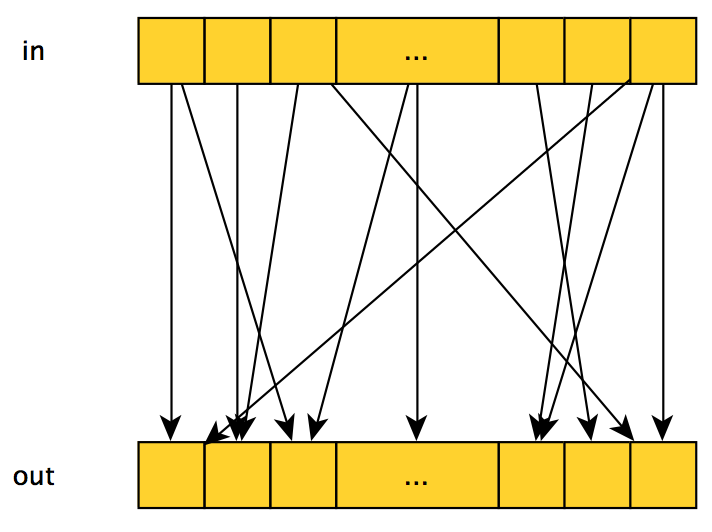
The effectiveness of the implementation of this template on CUDA depends on which input values are used to calculate the output and their number - best when a small number of consecutive elements are used.
Reverse patternscatter - each input element affects several (or one) output elements, graphically looks the same as gather , but the meaning is different: now we are “repelled” not from the output elements for which we calculate their value, but from the input ones that affect values of specific output elements. Quite often, the same problem can be solved within the framework of both the gather template and the scatter . For example, if we want to average 3 neighboring input elements and write them to the output array, then we can:
- run on a stream for each output element, where each stream will average the values of 3 neighboring input elements - gather ;
- or run a stream on each input element, where each stream will add 1/3 of the value of its input element to the value of the corresponding output element - scatter .
As you probably guessed, when using the scatter approach , the synchronization problem arises, since several threads may try to modify the same output element at the same time.
It is also worth highlighting a subspecies of the gather - stencil template: in this template, a restriction is placed on the input elements that participate in the calculation of the output element - namely, it can only be neighboring elements. In the case of 2D / 3D images, various types of this template can be used, for example, von Neumann's
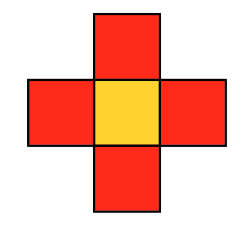
two-dimensional stencil : or Moore's two-dimensional stencil:
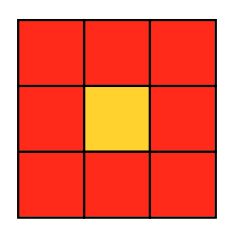
Due to this limitation, the stencil templateit is usually quite efficiently implemented within the framework of CUDA: it is enough to run one stream per output element, while the stream will read the input elements it needs. With this organization of calculations, efficiency is ensured by two factors:
- All the data needed for one stream is grouped in memory (in the case of a one-dimensional array, it is a solid “piece” of memory, in the 2D case, several pieces of memory located at the same distance from each other).
- The value of some input element is read several times from neighboring streams (the specific number of readings depends on the selected mask) - it becomes possible to "reuse" the data provided to us by CUDA - this will be discussed later in the article.
GPU hardware
Consider the high-level GPU hardware structure:
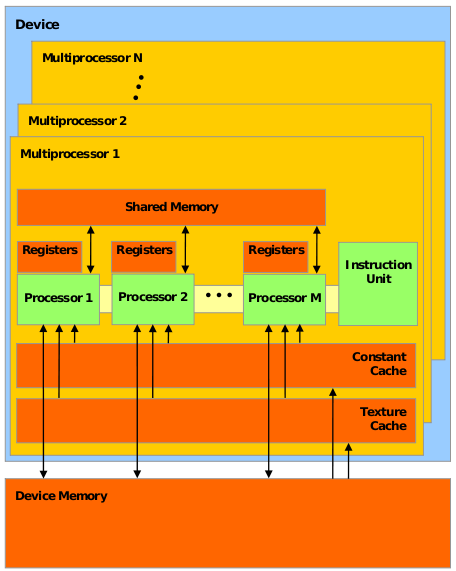
- A CUDA-compatible GPU consists of several (usually dozens) streaming multiprocessors (streaming multiprocessors), hereinafter referred to as SM .
- Each SM , in turn, consists of several dozen simple / streaming processors (SP) (regular / stream processors), or more precisely, CUDA cores ( CUDA cores ). These guys are more like the usual CPU - they have their registers, cache, etc. Each SM also has its own shared memory (shared memory) - a kind of additional cache that is accessible to all SPs, and can be used both as a cache for frequently used data and for “communication” between threads of one CUDA block.
- The GPU also has its own memory, called device memory , common to all CUDA streams - it is with it that the cudaMalloc and cudaMemcpy functions work
(also schoolchildren and GPU manufacturers like to measure it by size).
Compliance with the CUDA model and GPU hardware. CUDA Warranties
According to the CUDA model, a programmer splits a task into blocks, and blocks into threads. How are these software entities mapped to the GPU hardware blocks described above?
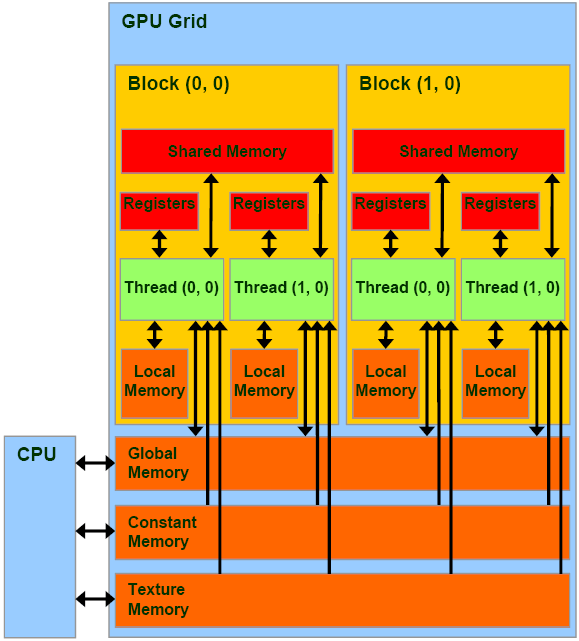
- Each block will be fully executed on the allocated SM .
- The distribution of blocks by SM is a GPU, not a programmer.
- All flows of block X will be divided into groups called warps (usually they say warps) and executed on SM . The size of these groups depends on the GPU model, for example, for models with Fermi microarchitecture it is 32. All threads from one warp are executed simultaneously, occupying a certain part of SM resources . Moreover, they either execute the same instruction (but on different data), or are idle.
Based on all this, CUDA provides the following guarantees:
- All threads in a specific block will be executed on any one SM .
- All threads of a particular kernel will be executed before the next kernel starts.
CUDA does not warrant that:
- Some block X will be executed before / after / simultaneously with some block Y .
- Some block X will be formed at some specific SM Z .
Synchronization
So, we list the main synchronization mechanisms provided by CUDA:
- A barrier is a point in the kernel code, upon reaching which a thread can "go" further only if all threads from its block have reached this point. Once again: the barrier allows you to synchronize only the flows of one block , and not all flows in principle! The restriction is quite natural, because the number of blocks set by the programmer can significantly exceed the number of available SMs .
- Atomic operations - similar to atomic operations of the CPU, a complete list of available operations can be found here .
- __threadfence is not quite a primitive of synchronization: upon reaching this instruction, a thread can continue execution only after all its memory manipulations become visible to other threads - in fact, it forces the thread to execute flush cache.
Key Principles for Using CUDA Effectively
- The principle of increasing the ratio (time of useful work) / (time of operations with memory) was discussed in a previous article. The value of a fraction can be increased in two ways - increase the numerator, decrease the denominator: that is, you need to either do more work or spend less time on memory operations. In addition to the obvious solution - to reduce the number of memory accesses as much as possible, the following principles of effective work with memory are used:
- Moving frequently accessed data in the faster memory: thread local storage > total memory block >> shared memory device >> memory of the host. Thus, if several threads use the same data in the same block, it most likely makes sense to move them to the shared memory of the block.
- Sequential access to memory: since the flows in blocks are actually executed in warp groups, provided that the threads in one warp work with data located in memory sequentially, CUDA can read one large piece of memory in one instruction. Otherwise, if the streams in the warp access data scattered in memory, the number of memory accesses increases.
- Reducing the divergence of flows: a feature of CUDA is that flows in one warp always either execute the same instruction or are idle. Thus, if there is a code in the kernel code of the form
if (threadIdx.x % 2 == 0)
{
  ...
}
...
, then half of the warp threads (those with an odd index) will wait until the second half executes the code inside the if-a. Therefore, such situations should be avoided.
We write the second program on CUDA
Let's move on to practice. As an example illustrating the theory presented, we write a program that performs Gaussian image blur . The principle of operation is as follows: the value of the channels R, G, B of the pixel in the output blurred image is calculated as the weighted sum of the values of the channels R, G, B (respectively) of all pixels of the original image in a certain template:
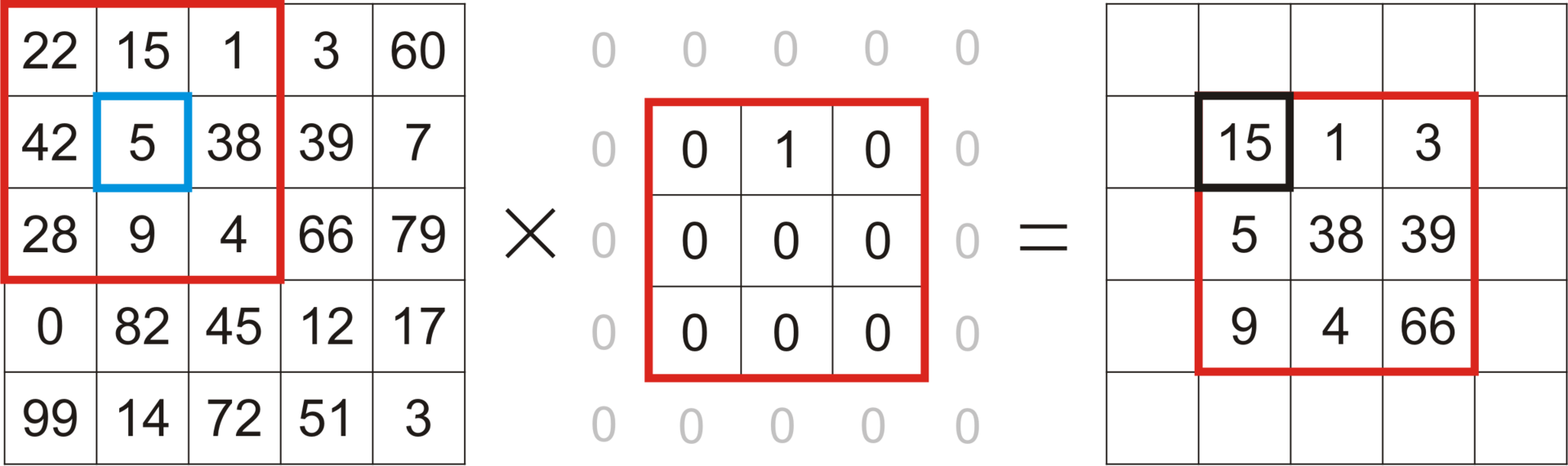
The values of the weights are calculated using the Gaussian 2D distribution, but how exactly being done is not too important for our task.
As you can see from the description of the task, for the implementation of this algorithm it is quite natural to choose the stencil template- after all, each pixel of the output image is calculated based on the corresponding neighboring pixels of the original image.
Let's start with the skeleton of the program:
main.cpp
#include<chrono>#include<iostream>#include<cstring>#include<string>#include<opencv2/core/core.hpp>#include<opencv2/highgui/highgui.hpp>#include<opencv2/opencv.hpp>#include<vector_types.h>#include"openMP.hpp"#include"CUDA_wrappers.hpp"#include"common/image_helpers.hpp"voidprepareFilter(float **filter, int *filterWidth, float *filterSigma){
  staticconstint blurFilterWidth = 9;
  staticconstfloat blurFilterSigma = 2.;
  *filter = newfloat[blurFilterWidth * blurFilterWidth];
  *filterWidth = blurFilterWidth;
  *filterSigma = blurFilterSigma;
  float filterSum = 0.f;
  constint halfWidth = blurFilterWidth/2;
  for (int r = -halfWidth; r <= halfWidth; ++r)
  {
    for (int c = -halfWidth; c <= halfWidth; ++c)
    {
      float filterValue = expf( -(float)(c * c + r * r) / (2.f * blurFilterSigma * blurFilterSigma));
      (*filter)[(r + halfWidth) * blurFilterWidth + c + halfWidth] = filterValue;
      filterSum += filterValue;
    }
  }
  float normalizationFactor = 1.f / filterSum;
  for (int r = -halfWidth; r <= halfWidth; ++r)
  {
    for (int c = -halfWidth; c <= halfWidth; ++c)
    {
      (*filter)[(r + halfWidth) * blurFilterWidth + c + halfWidth] *= normalizationFactor;
    }
  }
}
voidfreeFilter(float *filter){
  delete[] filter;
}
intmain( int argc, char** argv ){
  usingnamespace cv;
  usingnamespacestd;
  usingnamespacestd::chrono;
  if( argc != 2)
  {
    cout <<" Usage: blur_image imagefile" << endl;
    return-1;
  }
  Mat image, blurredImage, referenceBlurredImage;
  uchar4 *imageArray, *blurredImageArray;
  prepareImagePointers(argv[1], image, &imageArray, blurredImage, &blurredImageArray, CV_8UC4);
  int numRows = image.rows, numCols = image.cols;
  float *filter, filterSigma;
  int filterWidth;
  prepareFilter(&filter, &filterWidth, &filterSigma);
  cv::Size filterSize(filterWidth, filterWidth);
  auto start = system_clock::now();
  cv::GaussianBlur(image, referenceBlurredImage, filterSize, filterSigma, filterSigma, BORDER_REPLICATE);
  auto duration = duration_cast<milliseconds>(system_clock::now() - start);
  cout<<"OpenCV time (ms):" << duration.count() << endl;
  start = system_clock::now();
  BlurImageOpenMP(imageArray, blurredImageArray, numRows, numCols, filter, filterWidth);
  duration = duration_cast<milliseconds>(system_clock::now() - start);
  cout<<"OpenMP time (ms):" << duration.count() << endl;
  cout<<"OpenMP similarity:" << getEuclidianSimilarity(referenceBlurredImage, blurredImage) << endl;
  for (int i=0; i<4; ++i)
  {
    memset(blurredImageArray, 0, sizeof(uchar4)*numRows*numCols);
    start = system_clock::now();
    BlurImageCUDA(imageArray, blurredImageArray, numRows, numCols, filter, filterWidth);
    duration = duration_cast<milliseconds>(system_clock::now() - start);
    cout<<"CUDA time full (ms):" << duration.count() << endl;
    cout<<"CUDA similarity:" << getEuclidianSimilarity(referenceBlurredImage, blurredImage) << endl;
  }
  freeFilter(filter);
  return0;
}
The points:
- We read the image file, prepare pointers to the original image and the resulting blurred image. The prepareImagePointers function remains the same, if necessary, you can see its source code on bitbucket.
- We are preparing a Gaussian filter - that is, a set of our scales. We also remember the used filter parameters, so that later they are transferred to OpenCV and get a sample of a blurred image to check the correct operation of our algorithms.
- We call the Gaussian blur function from OpenCV, save the resulting sample, measure the time spent.
- We call the Gaussian blur function written using OpenMP, measure the time spent, compare the result with the sample. The image similarity calculation function getEuclidianSimilarity is as follows:getEuclidianSimilarity
doublegetEuclidianSimilarity(const cv::Mat& a, const cv::Mat& b){
  double errorL2 = cv::norm(a, b, cv::NORM_L2);
  double similarity = errorL2 / (double) (a.rows * a.cols);
  return similarity;
}
In fact, it finds the average sum of squares of the differences in the values of all channels of all pixels of two images. - We call the CUDA version of the Gaussian blur 4 times, each time measuring the time spent and comparing the result with the sample. Why call 4 times? The fact is that during the very first call, a certain time will be spent on initialization - therefore, it is better to start several times and measure the time spent on subsequent calls.
OpenMP implementation of the algorithm:
openMP.hpp
#include<stdio.h>#include<omp.h>#include<vector_types.h>#include<vector_functions.h>voidBlurImageOpenMP(const uchar4 * const imageArray,
					 uchar4 * const blurredImageArray,
					 constlong numRows,
					 constlong numCols,
					 constfloat * const filter,
					 constsize_t filterWidth){
	usingnamespacestd;
	constlong halfWidth = filterWidth/2;
    #pragma omp parallel for collapse(2)for (long row = 0; row < numRows; ++row)
    {
        for (long col = 0; col < numCols; ++col)
        {
    	  float resR=0.0f, resG=0.0f, resB=0.0f;
		  for (long filterRow = -halfWidth; filterRow <= halfWidth; ++filterRow)
		  {
		    for (long filterCol = -halfWidth; filterCol <= halfWidth; ++filterCol)
		    {
		      //Find the global image position for this filter position//clamp to boundary of the imageconstlong imageRow = min(max(row + filterRow, static_cast<long>(0)), numRows - 1);
		      constlong imageCol = min(max(col + filterCol, static_cast<long>(0)), numCols - 1);
		      const uchar4 imagePixel = imageArray[imageRow*numCols+imageCol];
		      constfloat filterValue = filter[(filterRow+halfWidth)*filterWidth+filterCol+halfWidth];
		      resR += imagePixel.x*filterValue;
		      resG += imagePixel.y*filterValue;
		      resB += imagePixel.z*filterValue;
		    }
		  }
		  blurredImageArray[row*numCols+col] = make_uchar4(resR, resG, resB, 255);
        }
    }
}
For all 3 channels of each pixel of the source image, we consider the described weighted sum, the result is written to the corresponding position of the output image.
CUDA option:
CUDA.cu
#include<iostream>#include<cuda.h>#include"CUDA_wrappers.hpp"#include"common/CUDA_common.hpp"
__global__
voidgaussian_blur(const uchar4* const d_image,
                   uchar4* const d_blurredImage,
                   constint numRows,
                   constint numCols,
                   constfloat * const d_filter,
                   constint filterWidth){
  constint row = blockIdx.y*blockDim.y+threadIdx.y;
  constint col = blockIdx.x*blockDim.x+threadIdx.x;
  if (col >= numCols || row >= numRows)
    return;
  constint halfWidth = filterWidth/2;
  extern __shared__ float shared_filter[];
  if (threadIdx.y < filterWidth && threadIdx.x < filterWidth)
  {
    constint filterOff = threadIdx.y*filterWidth+threadIdx.x;
    shared_filter[filterOff] = d_filter[filterOff];
  }
  __syncthreads();
  float resR=0.0f, resG=0.0f, resB=0.0f;
  for (int filterRow = -halfWidth; filterRow <= halfWidth; ++filterRow)
  {
    for (int filterCol = -halfWidth; filterCol <= halfWidth; ++filterCol)
    {
      //Find the global image position for this filter position//clamp to boundary of the imageconstint imageRow = min(max(row + filterRow, 0), numRows - 1);
      constint imageCol = min(max(col + filterCol, 0), numCols - 1);
      const uchar4 imagePixel = d_image[imageRow*numCols+imageCol];
      constfloat filterValue = shared_filter[(filterRow+halfWidth)*filterWidth+filterCol+halfWidth];
      resR += imagePixel.x * filterValue;
      resG += imagePixel.y * filterValue;
      resB += imagePixel.z * filterValue;
    }
  }
  d_blurredImage[row*numCols+col] = make_uchar4(resR, resG, resB, 255);
}
voidBlurImageCUDA(const uchar4 * const h_image,
                   uchar4 * const h_blurredImage,
                   constsize_t numRows,
                   constsize_t numCols,
                   constfloat * const h_filter,
                   constsize_t filterWidth){
  uchar4 *d_image, *d_blurredImage;
  cudaSetDevice(0);
  checkCudaErrors(cudaGetLastError());
  constsize_t numPixels = numRows * numCols;
  constsize_t imageSize = sizeof(uchar4) * numPixels;
  //allocate memory on the device for both input and output
  checkCudaErrors(cudaMalloc(&d_image, imageSize));
  checkCudaErrors(cudaMalloc(&d_blurredImage, imageSize));
  //copy input array to the GPU
  checkCudaErrors(cudaMemcpy(d_image, h_image, imageSize, cudaMemcpyHostToDevice));
  float *d_filter;
  constsize_t filterSize = sizeof(float) * filterWidth * filterWidth;
  checkCudaErrors(cudaMalloc(&d_filter, filterSize));
  checkCudaErrors(cudaMemcpy(d_filter, h_filter, filterSize, cudaMemcpyHostToDevice));
  dim3 blockSize;
  dim3 gridSize;
  int threadNum;
  cudaEvent_t start, stop;
  cudaEventCreate(&start);
  cudaEventCreate(&stop);
  threadNum = 32;
  blockSize = dim3(threadNum, threadNum, 1);
  gridSize = dim3(numCols/threadNum+1, numRows/threadNum+1, 1);
  cudaEventRecord(start);
  gaussian_blur<<<gridSize, blockSize, filterSize>>>(d_image,
                                                     d_blurredImage,
                                                     numRows,
                                                     numCols,
                                                     d_filter,
                                                     filterWidth);
  cudaEventRecord(stop);
  cudaEventSynchronize(stop);
  cudaDeviceSynchronize(); checkCudaErrors(cudaGetLastError());
  float milliseconds = 0;
  cudaEventElapsedTime(&milliseconds, start, stop);
  std::cout << "CUDA time kernel (ms): " << milliseconds << std::endl;
  checkCudaErrors(cudaMemcpy(h_blurredImage, d_blurredImage, sizeof(uchar4) * numPixels, cudaMemcpyDeviceToHost));
  checkCudaErrors(cudaFree(d_filter));
  checkCudaErrors(cudaFree(d_image));
  checkCudaErrors(cudaFree(d_blurredImage));
}
- Allocate memory on the device for the source image, output image, filter. Copy the corresponding data from the host memory to the allocated device memory.
- We call the kernel. Pay attention to the new 3rd parameter when invoking the kernel: <<< gridSize, blockSize, filterSize >>> - it sets the size of the shared memory that each block needs. In this task, it was possible to implement the use of the block’s shared memory in two ways: either move the filter data to the block’s shared memory, or move there a “piece” of the image that is needed only for this block, since this data is needed by several block flows at once. However, the second option is somewhat more complicated - you need to consider that the piece of the input image that is needed for each block is somewhat larger than the block itself - after all, we perform the gather operation, which means that each stream calculates the values of one pixel of the output image using several neighboring pixels of the original image:

Therefore, I settled on the first option, which means that each block needs exactly sizeof (float) * filterWidth * filterWidth memory to store all filter values. Moving the filter weights from the device’s memory to the block’s shared memory occurs as follows:Hidden textextern __shared__ float shared_filter[]; if (threadIdx.y < filterWidth && threadIdx.x < filterWidth) { constint filterOff = threadIdx.y*filterWidth+threadIdx.x; shared_filter[filterOff] = d_filter[filterOff]; } __syncthreads();
Here __shared__ in the declaration of the array of filter weights says that this data should be placed in the shared memory of the block; extern means that the size of the allocated memory will be set at the kernel call point; __syncthreads is a barrier that guarantees that all filter weights will be transferred to the shared memory of a block before any of the threads of this block continues to execute. Further, all readings of the filter weights are carried out already from the general memory of the block. - Copy the output image from the device’s memory to the host’s memory, free the allocated memory.
Compile, run (input image size - 557x313):
OpenCV time (ms):2
OpenMP time (ms):11
OpenMP similarity:0.00287131
CUDA time kernel (ms): 2.93245
CUDA time full (ms):32
CUDA similarity:0.00287131
CUDA time kernel (ms): 2.93402
CUDA time full (ms):4
CUDA similarity:0.00287131
CUDA time kernel (ms): 2.93267
CUDA time full (ms):4
CUDA similarity:0.00287131
CUDA time kernel (ms): 2.93312
CUDA time full (ms):4
CUDA similarity:0.00287131
As you can see, if you do not take into account the very first launch of the CUDA option, we got almost a 3-fold time gain in comparison with the OpenMP option, although we did not catch up with the OpenCV option - which, by the way, uses OpenCL .
The configuration of the machine on which the tests were carried out:
Hidden text
Процессор: Intel® Core(TM) i7-3615QM CPU @ 2.30GHz.
GPU: NVIDIA GeForce GT 650M, 1024 MB, 900 MHz.
RAM: DD3, 2x4GB, 1600 MHz.
OS: OS X 10.9.5.
Компилятор: g++ (GCC) 4.9.2 20141029.
CUDA компилятор: Cuda compilation tools, release 6.0, V6.0.1.
Поддерживаемая версия OpenMP: OpenMP 4.0.
GPU: NVIDIA GeForce GT 650M, 1024 MB, 900 MHz.
RAM: DD3, 2x4GB, 1600 MHz.
OS: OS X 10.9.5.
Компилятор: g++ (GCC) 4.9.2 20141029.
CUDA компилятор: Cuda compilation tools, release 6.0, V6.0.1.
Поддерживаемая версия OpenMP: OpenMP 4.0.
That's it for today, in the next part we’ll look at some fundamental GPU algorithms.
All source code is available on bitbucket .









