Router ASUS RT-AC56U. Experience installing third-party firmware TomatoUSB (build by Shibby)
I want to tell the owners of the RT-AC56U / RT-AC68U routers about the prerequisites and personal experience of switching to TomatoUSB (Shibby). At first, there will be a little bit about the choice of device and the subjective sensations from using other firmware, so if you are only interested in learning about TomatoUSB (Shibby), go straight down .
The whole story began with the desire to "feel" the frequency of 5Ghz and the modern standard 802.11ac. The choice of device was due to a combination of optimal characteristics for me.
Pros loom mostly from a comparison with the AC68U. The Odnoklassniki from the same Netgear either do not have USB 3.0, or half as much RAM (128 versus 256) and at the same time they are usually more expensive and do not matter well with alternative firmware.
The conditional minus is the lack of external antennas. This hinders someone, but I have a small apartment, and accordingly, the radius of coverage is sufficient. In addition, as I later noted, the 2.4Ghz radius is not less than that of my previous router with horns. This is by the way, about the quality of the built-in antennas.
And now, the piece of iron is bought, delivered, turned on. The native firmware was not destined to live a day, because the voting among the owners launched on forum.ixbt.com speaks for itself:

The only (so far) vote for Tomato firmware is mine, but more on that later.
It is set without any “dancing with a tambourine" - through the web-interface we indicate the file with the latest firmware, and click "Upload / Download". The creator of the firmware - Merlin seems to work quite closely with ASUS itself. Many of the "chips" of its assembly have migrated to the proprietary firmware, for example, OpenVPN server. In addition, Merlin, as an exemplary employee, adheres to the letter of the law. After ASUS limited the use of signal power and the choice of available channels, he immediately did the same in his assembly. No requests to unlock channels will be granted
Since the interface of Merlin’s firmware is one-on-one, like on the proprietary one, and the stability of the latter has now grown significantly (we will not consider security holes), I will have to speak about its advantages in the language of subjective feelings. AsusWRT-Merlin pleases with just a few amenities: options and features added by the Canadian developer. Personally, I liked most of all the ability to format the JFFS partition and “pour” my shell scripts there. Here you will be triggered by an event, and replaced by built-in .conf files, and, attention: editing .conf files that the system generates automatically, just before starting the corresponding service (daemon).
What subjectively did not like? All of the above, will be primarily a claim to proprietary firmware, and partly to Merlin too.
Pretty bulky and slow interface. It is certainly beautiful, decorated in dark colors, and, in some ways, comfortable. But it is sooooo heavy. An ordinary user may not pay attention to this - configured through the "Wizard" and forgot. But any hacker, system administrator, designer, and indeed a person prone to perfectionism, will note this unfortunate fact. The strict uniformity of the web muzzle settings will not please you either.
The built-in system for providing access via smb (cifs) and ftp is designed, let's say, for a specifically inexperienced user. By default, the entire disk is shared (/ mnt / sda1), and individual access to the first level folders is configured, if necessary. At the same time, all information about access control is stored in hidden text files in the root of the connected drive. Apparently, smb.conf is generated based on information from these files. For all the initially seemingly advanced features, the system will not let you share the same JFFS without its additions to smb.conf. You have to first copy the scripts to sda1, and only then, through bash, copy to JFFS. Alternatively, you can mount JFFS itself in sda1 - that’s another crutch.
An attempt to disable Samba and install its service with its settings initially failed, because with the disconnect option, for some reason, the smbd kill command is triggered, which grabs my service too. Attempting to install optware in the manner that Merlin provides led to erasing the mapped drive (sda1 and the mounted JFFS!) Without warning.
With feeling dissatisfaction started lung scour the web and stumbled upon the demo TomatoUSB in Shibby modification.
Frankly, I was primarily fascinated by the speed of the interface and its dry, logical professionalism. This “fork” of TomatoUSB firmware is assembled by Michal Rupental (aka Shibby), a system administrator from Poland. There is very little installation information, and all of it is mostly in overseas.
The native site is here: http://tomato.groov.pl , and the firmware branch for Broadcom ARM devices, respectively, here http://tomato.groov.pl/download/K26ARM/ . At the moment I have this assembly installed .
Set as usual, through the Web-based interface, but before installing the need to ALWAYS run nvram cleaning. We go through Telnet (or SSH) and give the command nvram erase , then nvram commit . After that, you can safely select the firmware file in the web face and click “Upload”. True, there are recommendations on the Web to roll back to the stock firmware first, and only then to sew TomatoUSB. It is also worth noting that the username will change to “root”, but the default password will remain on the drain!
After waiting for the completion of sending and rebooting (first boot, patience - it can take quite a while), you may experience a slight shock from performance compared to the stock firmware. And if you run around the menu and study the settings, you will understand that the system is a real “rough diamond”.
How, for example, do you have the opportunity to launch your Web server in a couple of clicks?

Native scripts are optional here in JFFS. You can simply enter it into the corresponding window of the interface.
JFFS itself is available after formatting, and it can be easily shared, as well as the root system - without crutches.
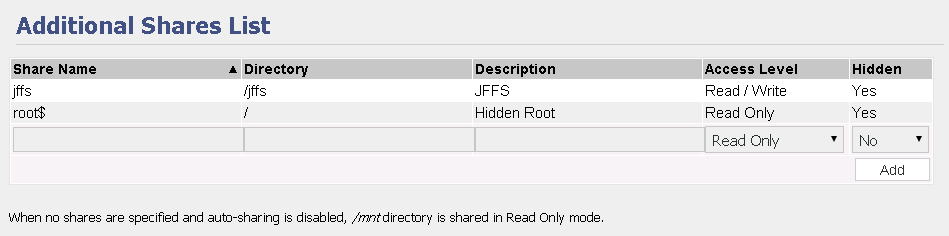
Run after mounting makes it possible to mount the / opt directory if an installed optware is detected on the external device when it is connected.

By the way, optware is installed here from the command line - as expected:
The list of "features" that seemed interesting to me. They do not necessarily exist only in this firmware.
This firmware also has its own “jambs”.
Finally , let me remind you: “shake” properly - more accurately, the less often “sew” - the more pleasant . I wish you not to “brick up” the smart device, because the responsibility for your actions rests solely with you. Good luck
The whole story began with the desire to "feel" the frequency of 5Ghz and the modern standard 802.11ac. The choice of device was due to a combination of optimal characteristics for me.
RT-AC56U Pros
Pros loom mostly from a comparison with the AC68U. The Odnoklassniki from the same Netgear either do not have USB 3.0, or half as much RAM (128 versus 256) and at the same time they are usually more expensive and do not matter well with alternative firmware.
- AC56U is significantly cheaper than its older brother AC68U
- The AC56U uses the same hardware platform (BCM4708) as the AC68U (with the exception of the radio), which means comparable performance
- AC56U has only two channels on each 2x frequency range (2.4Ghz + 5Ghz), unlike the three-channel AC68U, but for home use of three antennas it is not required: all mobile gadgets have one antenna on board, and two USB whistles, so everything fits together
RT-AC56U Cons
The conditional minus is the lack of external antennas. This hinders someone, but I have a small apartment, and accordingly, the radius of coverage is sufficient. In addition, as I later noted, the 2.4Ghz radius is not less than that of my previous router with horns. This is by the way, about the quality of the built-in antennas.
Pre-installed (stock) firmware
And now, the piece of iron is bought, delivered, turned on. The native firmware was not destined to live a day, because the voting among the owners launched on forum.ixbt.com speaks for itself:
The only (so far) vote for Tomato firmware is mine, but more on that later.
Firmware AsusWRT- Merlin
It is set without any “dancing with a tambourine" - through the web-interface we indicate the file with the latest firmware, and click "Upload / Download". The creator of the firmware - Merlin seems to work quite closely with ASUS itself. Many of the "chips" of its assembly have migrated to the proprietary firmware, for example, OpenVPN server. In addition, Merlin, as an exemplary employee, adheres to the letter of the law. After ASUS limited the use of signal power and the choice of available channels, he immediately did the same in his assembly. No requests to unlock channels will be granted
Since the interface of Merlin’s firmware is one-on-one, like on the proprietary one, and the stability of the latter has now grown significantly (we will not consider security holes), I will have to speak about its advantages in the language of subjective feelings. AsusWRT-Merlin pleases with just a few amenities: options and features added by the Canadian developer. Personally, I liked most of all the ability to format the JFFS partition and “pour” my shell scripts there. Here you will be triggered by an event, and replaced by built-in .conf files, and, attention: editing .conf files that the system generates automatically, just before starting the corresponding service (daemon).
What subjectively did not like? All of the above, will be primarily a claim to proprietary firmware, and partly to Merlin too.
Pretty bulky and slow interface. It is certainly beautiful, decorated in dark colors, and, in some ways, comfortable. But it is sooooo heavy. An ordinary user may not pay attention to this - configured through the "Wizard" and forgot. But any hacker, system administrator, designer, and indeed a person prone to perfectionism, will note this unfortunate fact. The strict uniformity of the web muzzle settings will not please you either.
The built-in system for providing access via smb (cifs) and ftp is designed, let's say, for a specifically inexperienced user. By default, the entire disk is shared (/ mnt / sda1), and individual access to the first level folders is configured, if necessary. At the same time, all information about access control is stored in hidden text files in the root of the connected drive. Apparently, smb.conf is generated based on information from these files. For all the initially seemingly advanced features, the system will not let you share the same JFFS without its additions to smb.conf. You have to first copy the scripts to sda1, and only then, through bash, copy to JFFS. Alternatively, you can mount JFFS itself in sda1 - that’s another crutch.
An attempt to disable Samba and install its service with its settings initially failed, because with the disconnect option, for some reason, the smbd kill command is triggered, which grabs my service too. Attempting to install optware in the manner that Merlin provides led to erasing the mapped drive (sda1 and the mounted JFFS!) Without warning.
Firmware TomatoUSB (build by Shibby)
With feeling dissatisfaction started lung scour the web and stumbled upon the demo TomatoUSB in Shibby modification.
Frankly, I was primarily fascinated by the speed of the interface and its dry, logical professionalism. This “fork” of TomatoUSB firmware is assembled by Michal Rupental (aka Shibby), a system administrator from Poland. There is very little installation information, and all of it is mostly in overseas.
The native site is here: http://tomato.groov.pl , and the firmware branch for Broadcom ARM devices, respectively, here http://tomato.groov.pl/download/K26ARM/ . At the moment I have this assembly installed .
Set as usual, through the Web-based interface, but before installing the need to ALWAYS run nvram cleaning. We go through Telnet (or SSH) and give the command nvram erase , then nvram commit . After that, you can safely select the firmware file in the web face and click “Upload”. True, there are recommendations on the Web to roll back to the stock firmware first, and only then to sew TomatoUSB. It is also worth noting that the username will change to “root”, but the default password will remain on the drain!
After waiting for the completion of sending and rebooting (first boot, patience - it can take quite a while), you may experience a slight shock from performance compared to the stock firmware. And if you run around the menu and study the settings, you will understand that the system is a real “rough diamond”.
How, for example, do you have the opportunity to launch your Web server in a couple of clicks?
Native scripts are optional here in JFFS. You can simply enter it into the corresponding window of the interface.
JFFS itself is available after formatting, and it can be easily shared, as well as the root system - without crutches.
Run after mounting makes it possible to mount the / opt directory if an installed optware is detected on the external device when it is connected.
By the way, optware is installed here from the command line - as expected:
- mkdir / mnt / sda1 / opt # created a directory
- mount -o bind / mnt / sda1 / opt / opt # mounted / opt
- optware-install.sh # installed
The list of "features" that seemed interesting to me. They do not necessarily exist only in this firmware.
- Captive portal (in the light of recent developments in the field of legislation - a very useful thing)
- Built-in Transmission 2.84
- Custom path to save logs
- Monitor and stop the disk when idle
- UPS support
- DNScrypt-proxy - secure DNS access
- Tor
- NGinX web server (naturally with php)
- Detailed QOS (autographically defined classes, graphics - all matters)
- Bandwidth monitoring and control
- OpenVPN / PPTP servers and clients (there are also in stock, but it’s good that here too)
- Removable themes for WEB-GUI
- Optware repository support
- Scripting by event and schedule from WEB-GUI
- JFFS Section
- IPTV directly or through built-in Udpxy
This firmware also has its own “jambs”.
- All LEDs (except Power) do not light up after flashing. On ac68u, this is a complete order.
- Could not restore saved configuration from WEB-GUI. It turned out only in the console via nvram restore.
Finally , let me remind you: “shake” properly - more accurately, the less often “sew” - the more pleasant . I wish you not to “brick up” the smart device, because the responsibility for your actions rests solely with you. Good luck









