August 6, 2014 at 09:13
Infobox Jelastic 2 Cloud Hosting Release
We are pleased to inform you about the availability of the new major version of the cloud hosting Infobox Jelastic 2 , created by developers for developers! We also announce the long-awaited support for Python and announce the work on Node.JS and .NET (Mono framework) for Jelastic.
Now you can develop in Java, PHP, Ruby and Python and run your applications, services and sites in Jelastic without the need to configure servers, install and support software stacks. The developer has more time to work on key tasks. SQL and NoSQL databases
are available on Infobox Jelastic (yes, there is MongoDB too),

load balancer , cache , VDS and built-in build server. In the new version, I especially want to note the support of Redis and Cassandra . Adding technology to the environment takes 1 click and you can immediately get to work.
Jelastic supports autoscaling (including for Java), allowing you to pay only for used resources and withstand peak load growth during work.
Using the platform as a Jelastic service, you do not lose control of your application. In each container that runs a particular component of the software stack, you can connect via ssh for more fine-tuning if necessary. Jelastic automates the work of standard development platforms, so when using the service you don’t get into Vendor – lock and you can always run developed applications for Jelastic on your servers if necessary.
We at Infobox not only deployed Jelastic 2 on our own cluster, but also significantly modified it, paying attention to every little thing, to provide a better experience. We also added new applications and CMS to the Jelastic Marketplace and optimized installation performance, making it possible to use the service for serious tasks.
Under cat you will learn about new features and improvements.Infobox Jelastic 2 for developers and you can get 300 rubles to your account.
SSH (Secure Shell Handler) is a protocol used to securely connect to remote containers and execute the required commands. Using SSH is quite safe: the connection between the client and server is checked using a digital certificate and the data transmitted via SSH is encrypted.
To support the organization in SSH Jelastic : new infrastructure component was added Gateway SSH (SSH Gateway). This technology accepts user connections from the Internet and transfers connections to the appropriate containers on the internal network.
The authentication process in the SSH gateway is divided into two independent steps:
Both steps of the authentication procedure are based on the standard SSH protocol using public / private key pairs.
Using the SSH gateway in Jelastic, you can simply access:
Access to the whole account:
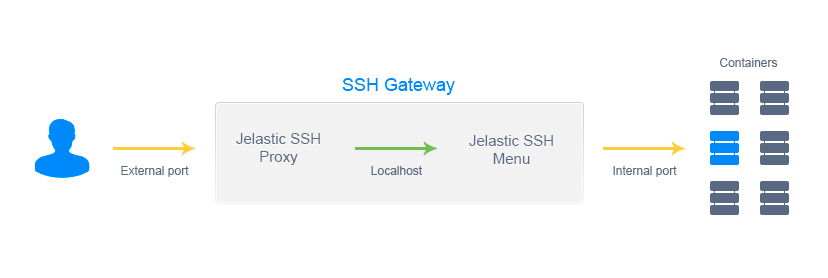
Access to a separate container directly:
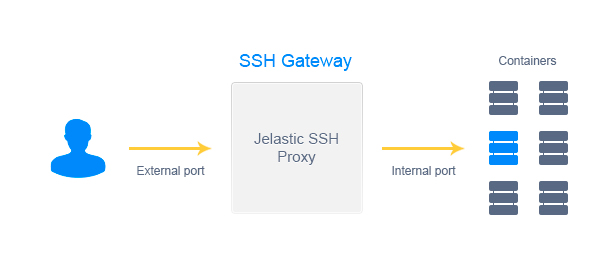
When you access the containers through SSH, you get the necessary rights and can additionally manage the main services using the sudo command .
We also provide SFTP (Secure File Transfer Protocol) support by implementing a multi-threaded daemon to handle SFTP connections. It will allow you to access, manage and transfer files directly to the container through the SSH gateway, ensuring data security.
Another secure network protocol available is FISH (Files transferred over Shell protocol). It is supported by many popular FTP clients and file managers (e.g. Midnight Commander, Konqueror, Iftp, Krusader, etc.) and provides access and secure management of the container file system using RSH commands.
The Jelastic Cloud API will allow developers to automate the set of actions required to ensure the application life cycle and expand the functionality of the platform through interaction with third-party services. Using the API, you can programmatically create environments, deploy applications, and perform other tasks that are available through the Jelastic control panel, but not limited to it.
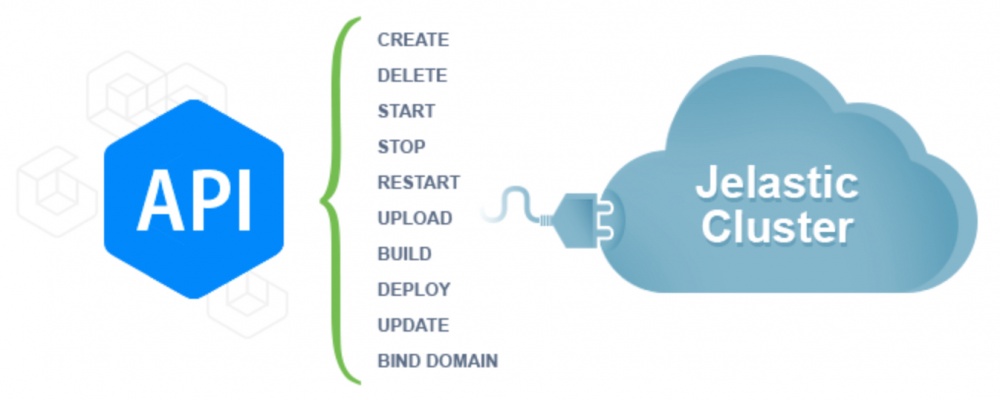
The Jelastic API follows REST principles. The REST API defines a set of functionality that can be requested by developers through a request-response. Interaction is performed using the HTTP protocol.. The advantage of this method is its excellent extensibility. The REST API can be used with almost any programming language. All calls to the API are HTTP GET or POST requests to the URL with a set of parameters (API address for Infobox Jelastic ):
Each request must contain a set of required parameters. There are additional parameters required for a specific function. The text value of the parameter must be represented in UTF-8 encoding. The sequence of parameters is not important.
The response to all API functions is provided in JSON format .
API documentation is available here .
Jelastic supports the OpenShift cartridge model, making it easier for independent vendors (ISVs) to provide services across multiple platforms and span a wide range of cloud ecosystems and application stores.
Cartridge standardization is an important element of the next generation of cloud platforms, allowing ISVs to focus on solving user problems instead of having to support multiple platforms. As a result, we get the widest selection of tools and applications.
Jelastic cartridges provide an extension to the OpenShift specification with the addition of a Jelastic configuration to describe more complex functionality. They allow you to integrate application servers, databases and services into the platform and make them available to PaaS developers.
The functionality of the cartridges allowed us to add the following technologies available in 1 click to Infobox Jelastic:
And of course Python 3.4, 3.3, and 2.7 were added with Apache + mod_wsgi, which our users requested. In the future we will talk in more detail about these technologies.
The list of available software in the Infobox Jelastic app store has expanded significantly .
In the second version of Infobox, Jelastic is now ready for production using the Ruby platform. In the test version, Ruby was present in Jelastic for more than six months. The reason why Jelastic's support for Ruby came about is quite simple and lies in the Ruby philosophy: "just outside, but powerful inside." The same applies to the Jelastic platform, which allows you to solve complex problems with easy-to-use tools.
You can create the following configurations:
The following Ruby versions are supported: 1.9.2-p320, 1.9.3-p545, 2.0.0-p451, 2.1.1. When creating an environment, you can select one of them and easily switch between them in the process. When creating an environment, you can specify the type of deployment: Production, Deployment, Testing.
Deployment of applications from the archive or by reference is supported . You can also deploy applications directly from GIT or SVN .
Based on numerous requests from our users, Jelastic 2 has significantly expanded the ability to manage accounts. The main idea is to enable large organizations to create one main account, where all necessary environments will work, and share the authority to manage created environments with development teams.
All accounts in the organization are connected and allow teamwork. Any user (of course, if he is registered in Infobox Jelastic ) can join or leave the main account. To issue authority to manage selected environments on the main account, you can send invitations to user accounts.
There are two types of accounts in this concept:
The main account is the organization’s account from which money is charged for using Jelastic. The user of the main account can manage users by inviting them to collaborate on the selected environments. In this case, payment for the environment takes place from the main account, only administrative privileges are transferred to user ones. The user account is not allowed to clone or delete environments from the main account.
The user can change the topology of the delegated environments or access them via SSH. It is also possible to create environments in the main account from a trial without trial version restrictions.
If you delete the user account from the main one, the environment of the main account will become unavailable for it.
The following technologies are available in Jelastic 2:
You can register a trial version of Infobox Jelastic here . After the trial version, send us your account username and we will replenish your Infobox Jelastic account with 300 rubles. Feedback, impressions and suggestions can be sent to: [email protected]
Successful use of Infobox Jelastic!
load balancer , cache , VDS and built-in build server. In the new version, I especially want to note the support of Redis and Cassandra . Adding technology to the environment takes 1 click and you can immediately get to work.
Jelastic supports autoscaling (including for Java), allowing you to pay only for used resources and withstand peak load growth during work.
Using the platform as a Jelastic service, you do not lose control of your application. In each container that runs a particular component of the software stack, you can connect via ssh for more fine-tuning if necessary. Jelastic automates the work of standard development platforms, so when using the service you don’t get into Vendor – lock and you can always run developed applications for Jelastic on your servers if necessary.
We at Infobox not only deployed Jelastic 2 on our own cluster, but also significantly modified it, paying attention to every little thing, to provide a better experience. We also added new applications and CMS to the Jelastic Marketplace and optimized installation performance, making it possible to use the service for serious tasks.
Under cat you will learn about new features and improvements.Infobox Jelastic 2 for developers and you can get 300 rubles to your account.
New opportunities
SSH Access
SSH (Secure Shell Handler) is a protocol used to securely connect to remote containers and execute the required commands. Using SSH is quite safe: the connection between the client and server is checked using a digital certificate and the data transmitted via SSH is encrypted.
To support the organization in SSH Jelastic : new infrastructure component was added Gateway SSH (SSH Gateway). This technology accepts user connections from the Internet and transfers connections to the appropriate containers on the internal network.
The authentication process in the SSH gateway is divided into two independent steps:
- connection from the end user to the gateway using external authentication;
- connection from the gateway to the user container using internal authentication.
Both steps of the authentication procedure are based on the standard SSH protocol using public / private key pairs.
Using the SSH gateway in Jelastic, you can simply access:
- to an entire account with the ability to navigate between your environments and containers using an interactive menu without additional authentication.
- directly to individual containers when you work with them remotely using additional tools (such as Capistrano) or using the SFTP and FISH protocols.
Access to the whole account:
Access to a separate container directly:
When you access the containers through SSH, you get the necessary rights and can additionally manage the main services using the sudo command .
We also provide SFTP (Secure File Transfer Protocol) support by implementing a multi-threaded daemon to handle SFTP connections. It will allow you to access, manage and transfer files directly to the container through the SSH gateway, ensuring data security.
Another secure network protocol available is FISH (Files transferred over Shell protocol). It is supported by many popular FTP clients and file managers (e.g. Midnight Commander, Konqueror, Iftp, Krusader, etc.) and provides access and secure management of the container file system using RSH commands.
Jelastic api
The Jelastic Cloud API will allow developers to automate the set of actions required to ensure the application life cycle and expand the functionality of the platform through interaction with third-party services. Using the API, you can programmatically create environments, deploy applications, and perform other tasks that are available through the Jelastic control panel, but not limited to it.
The Jelastic API follows REST principles. The REST API defines a set of functionality that can be requested by developers through a request-response. Interaction is performed using the HTTP protocol.. The advantage of this method is its excellent extensibility. The REST API can be used with almost any programming language. All calls to the API are HTTP GET or POST requests to the URL with a set of parameters (API address for Infobox Jelastic ):
app.jelasticloud.com/1.0Each request must contain a set of required parameters. There are additional parameters required for a specific function. The text value of the parameter must be represented in UTF-8 encoding. The sequence of parameters is not important.
The response to all API functions is provided in JSON format .
API documentation is available here .
1-click cartridge support and new software
Jelastic supports the OpenShift cartridge model, making it easier for independent vendors (ISVs) to provide services across multiple platforms and span a wide range of cloud ecosystems and application stores.
Cartridge standardization is an important element of the next generation of cloud platforms, allowing ISVs to focus on solving user problems instead of having to support multiple platforms. As a result, we get the widest selection of tools and applications.
Jelastic cartridges provide an extension to the OpenShift specification with the addition of a Jelastic configuration to describe more complex functionality. They allow you to integrate application servers, databases and services into the platform and make them available to PaaS developers.
The functionality of the cartridges allowed us to add the following technologies available in 1 click to Infobox Jelastic:
- OrientDB 1.7.4
- Jetty9 9.1.3
- Smartfox 2.x
- Jetty8 8.14
- Neo4j 2.1
- Neo4j 1.9
- Redis 2.6
- Railo4 9.1.3
- Cassandra 1.2.5
- Jbossas 7
And of course Python 3.4, 3.3, and 2.7 were added with Apache + mod_wsgi, which our users requested. In the future we will talk in more detail about these technologies.
The list of available software in the Infobox Jelastic app store has expanded significantly .
Ruby Support Release in Jelastic
In the second version of Infobox, Jelastic is now ready for production using the Ruby platform. In the test version, Ruby was present in Jelastic for more than six months. The reason why Jelastic's support for Ruby came about is quite simple and lies in the Ruby philosophy: "just outside, but powerful inside." The same applies to the Jelastic platform, which allows you to solve complex problems with easy-to-use tools.
You can create the following configurations:
- Apache + Passenger. A dynamic mod_passenger.so module was developed for Apache and is enabled by default in an environment with Ruby;
- NGINX + Passenger. The NGINX version has been updated and rebuilt with Passenger support;
- NGINX + Puma;
- NGINX + Unicorn.
The following Ruby versions are supported: 1.9.2-p320, 1.9.3-p545, 2.0.0-p451, 2.1.1. When creating an environment, you can select one of them and easily switch between them in the process. When creating an environment, you can specify the type of deployment: Production, Deployment, Testing.
Deployment of applications from the archive or by reference is supported . You can also deploy applications directly from GIT or SVN .
Advanced Account Management
Based on numerous requests from our users, Jelastic 2 has significantly expanded the ability to manage accounts. The main idea is to enable large organizations to create one main account, where all necessary environments will work, and share the authority to manage created environments with development teams.
All accounts in the organization are connected and allow teamwork. Any user (of course, if he is registered in Infobox Jelastic ) can join or leave the main account. To issue authority to manage selected environments on the main account, you can send invitations to user accounts.
There are two types of accounts in this concept:
- main
- custom
The main account is the organization’s account from which money is charged for using Jelastic. The user of the main account can manage users by inviting them to collaborate on the selected environments. In this case, payment for the environment takes place from the main account, only administrative privileges are transferred to user ones. The user account is not allowed to clone or delete environments from the main account.
The user can change the topology of the delegated environments or access them via SSH. It is also possible to create environments in the main account from a trial without trial version restrictions.
If you delete the user account from the main one, the environment of the main account will become unavailable for it.
Improvements in Jelastic 2
- Added support for Java 8;
- The NAXSI module is integrated into NGINX in a load balancer and web server. This module is used to protect web applications from SQL injection attacks , crossite scripting , crossite request forgery , RFI ;
- The application store in Jelastic has reached the release stage;
- PHP security has been improved .
- Added support for PHP PEAR (PHP Extension and Application Repository). Having accessed the container via SSH, you can use the pear install package command , where package is the name of the required PHP package from the repository.
- The timeout for deploying large applications has been increased to 90 minutes.
- The process of switching from trial to paid version was simplified.
- The Jelastic widget was redesigned, allowing you to install applications from your site in 1 click for your users.
- The parallel deployment process for Tomcat and TomEE is now available using the characters "#" and "##"
Full list of technologies available on Infobox Jelastic 2 cloud hosting
The following technologies are available in Jelastic 2:
- Tomcat 6 6.0.39
- Tomcat 7 7.0.53
- TomEE 1.6.0
- Jetty 6 6.1.26
- GlassFish 3 3.1.2.2
- Jetty 9 9.1.3
- Smartfox 2.x
- Jetty8 8.14
- Railo4 9.1.3
- Jbossas 7
- Java 6 1.6.0_45
- Java 7 1.7.0_51
- Java 8 1.8.0_132
- MariaDB 5.5.36 / 10.0.10
- MongoDB 2.6.0
- MySQL 5.6.17
- PostgreSQL 8 8.4.21
- PostgreSQL 9 9.3.4
- CouchDB 1.5.0
- NGINX 1.5.12
- Maven 3.2.1
- Centos 6.4
- Memcached 1.4.15
- Apache 2.2.15-29
- NGINX PHP 1.5.12
- NGINX Ruby 1.5.12
- PHP 5.3 5.3.28
- PHP 5.4 5.4.26
- PHP 5.5 5.5.10
- Ruby 1.9.2 1.9.2-p320
- Ruby 1.9.3 1.9.3-p545
- Ruby 2.0.0 2.0.0-p451
- Ruby 2.1.1 2.1.1
- Python 2.7 2.7.6
- Python 3.3 3.3.5
- Python 3.4 3.4.0
- OrientDB 1.7.4
- Neo4j 2.1
- Neo4j 1.9
- Redis 2.6
- Cassandra 1.2.5
300 rubles to the Jelastic account as a gift!
You can register a trial version of Infobox Jelastic here . After the trial version, send us your account username and we will replenish your Infobox Jelastic account with 300 rubles. Feedback, impressions and suggestions can be sent to: [email protected]
Successful use of Infobox Jelastic!