 June 2, 2014 at 13:02
WebRTC or how I taught our CRM to call phones
The company in which I happened to work is engaged in the sale of services on the Internet. Each morning, the shift on duty disassembles the general stack of accumulated applications and begins calling customers to clarify orders. During the day, operators also receive incoming calls. Before the beginning of my undertaking, they used such a desktop SIP client for calls:
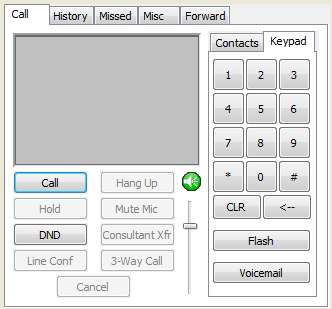
This dialer was installed on each employee’s computer, received calls and called where necessary. To make any changes in the settings, it was necessary to go around all the machines and do everything manually. At the same time, if the employee works remotely, he had to consult by phone how to do it all. And often it was quite difficult.
But the main problem was the lack of integration with our web-system and database. Such seemingly simple tasks as opening a customer card for an incoming call, saving call statistics for each employee and monitoring their activity from the administrative web interface are all very difficult to do with a desktop softphone, even if it has the corresponding integration capabilities with browser, for example using plugins.
There was an idea to combine all internal work and calls in one system and database. I dubbed our CRM with the built-in dialer function with call recording for a long time.
To make calls, I examined a number of technologies and came to the conclusion that there are not so many of them. There were a couple of open source and commercial implementations, as well as several SAAS services that were not suitable due to internal security policies - to process calls through their own server.
In the beginning I tried to use sipml5 :

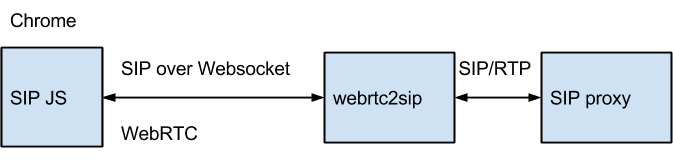
I had to collect the documentation in pieces from the network. As a result, I got a more or less working phone with a SIP stack on the browser side:
Installation, testing and settings lasted about 2 weeks, as a result I found a number of small but unpleasant bugs that could not be circumvented, for example, one of them was related to the settings Websockets over SSL. And after the Chrome browser version 35 web came out, the phone refused to work at all.
In addition, I did not want to disclose SIP accounts to operators, and the SIP stack on the browser side implies their open use and sending via Websockets. Even if Websockets work through SSL, a potential attacker has the opportunity to tamper with js code and pull out a SIP password. There was an option - to delegate SIP Digest authentication to our Web server, but it was not possible to get to its implementation.
This is how browser-side SIP requests look in the debug console:
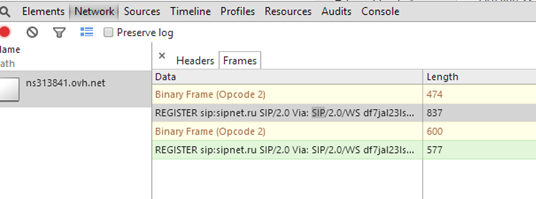
Full access to the SIP stack from Javascript is generally not bad. This has its advantages, for example, you can try to fix some kind of integration bug in JS SIP signaling. But there is one caveat. Just over 90% of SIP vendors do not currently support the specification.The WebSocket Protocol as a Transport for the Session Initiation Protocol (SIP) RFC 7118 dated January 2014 that runs JS SIP, which means that the webrtc2sip module must work as a stateful SIP proxy and actually duplicate server-side SIP stack support. This layout seemed very difficult for further work and support, and I decided to leave the SIP stack on the browser side and find some more simple and understandable API for such tasks with a server part that could be hosted by myself.
As a result, he began testing Web Call Server . This is not SAAS and allows you to process calls through your server, which in this case was required:
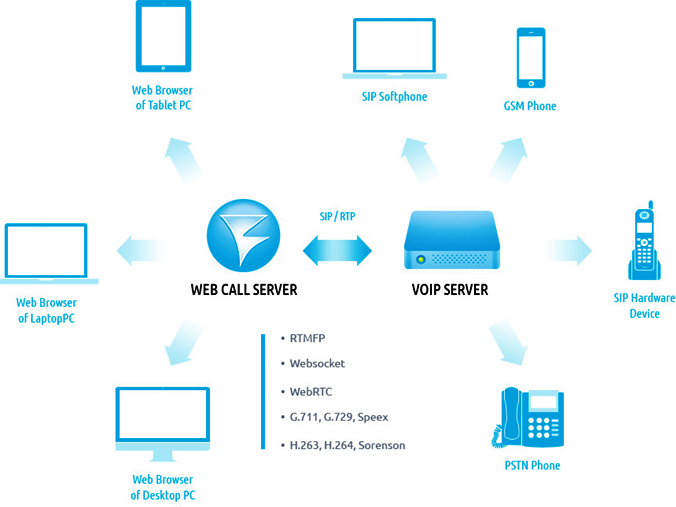
The functions are approximately the same as sipml5, the same WebRTC calls to SIP and vice versa. There is also support for Flash, but it was not necessary, since all operators use mainly Chrome and Firefox browser, and those who use IE had to switch to more “correct” browsers.
The load is given to the open source JS softphone , which can be redrawn and adapted for the web page.
The main difference from sipml5 is the interaction with the server through the API, and not through SIP over Websockets. Those. There is no SIP stack on the browser side. It is located only on the server side. This made the front-end task a bit easier for the developer. The SIP stack on the browser side threw it into confusion, and when working with the Javascript API and CSS, it became possible to concentrate on the interface part.
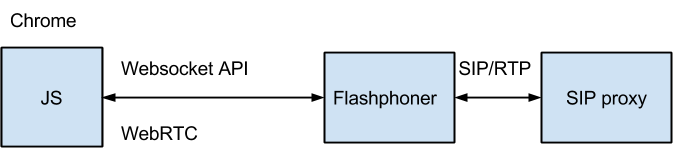
So, how I implemented it all.
1. I took this server on Amazon EC2 :
There is not much memory and disk space required. Except for the logs. And the computing power of the CPU in such tasks can be important, so it took not the weakest instance.

2. Raised Apache for the web-interface, installed and launched the WCS server.

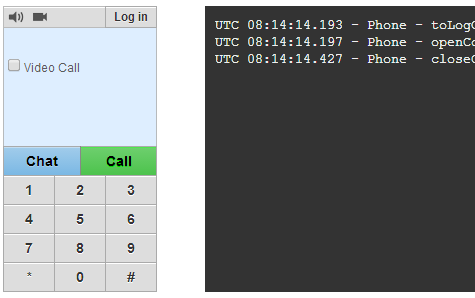
3. A standard web-phone appeared on the chrome page, the code of which is on github .
I didn’t really like the phone interface, I immediately decided to redesign it, and the debug console on the right turned out to be quite useful. It is a pity that later it had to be removed so as not to frighten a normal user.
4. Tested web-phone on the ability to call. I used our previous SIP accounts for this. Everything works as it should. And he calls to mobile phones, and to SIP-phones, and call retention and transfer, and blackjack and ...
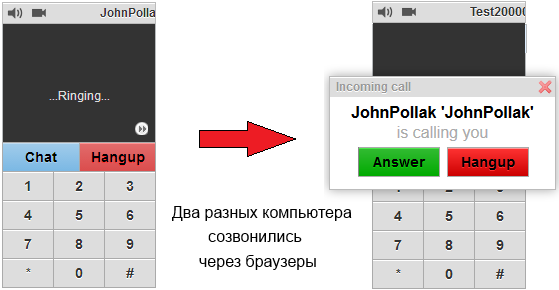
Similarly, the phoning works with a mobile phone.
5. I adapted the web-phone code for my web-CRM, redrawed its design and now it looks like this:
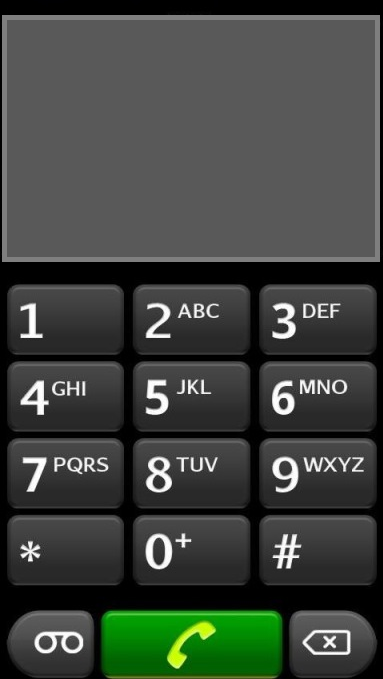
We should dwell on adaptation in more detail, because redrawing the design was not limited to.
The first serious task was the automatic registration of a web-phone on a SIP server. Otherwise, the operator would have to enter the SIP login and password again, after he entered the login and password for the CRM system. The question was how to integrate.
It turned out that the API has a special loginByToken function for this:
In order to understand how this function works, I had to try hard.
Using documentation and examples, it was possible to find out that all this works approximately like this:
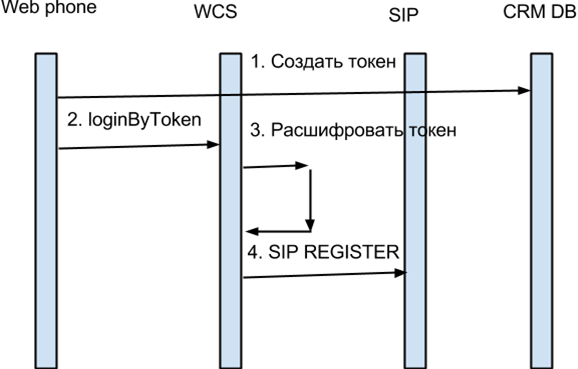
1) When creating a token on the CRM side, the AES encryption algorithm is used, which encrypts a string that includes the SIP username and password of the user, as well as other necessary information.
The encryption key is known only to our server where CRM is deployed, as well as to the WCS server. In addition, the token expiration date is set by the expires special attribute so that it is not possible to reuse it.
Token encryption occurs in AES CTR mode. Below is an example with openssl, in which an encrypted token is generated with SIP password transmission:
As a result, I got something like:
The name of our application is “CRM” on the left, and the token created earlier on the right.
I insert this token into the flashphoner.xml config of the web-phone in the following form:
In this case, the automatic token registration procedure will begin immediately after the page is reloaded.
2 and 3) loginByToken and decryption.
On the server side, the encryption keys for AES are registered in the config:
Thus, when a token arrives with the prefix “CRM:”, the corresponding key is used to decrypt it.
As a result of decryption, the WCS server receives the previously encrypted string:
and from this XML string takes all the data necessary for SIP registration.
3) As soon as the server has decrypted the data, it sends a SIP REGISTER request to SIP and returns a normal Digest authentication to 401 using the SIP login and password decrypted in the previous step.
In this case, only the CRM and Web Call Server know the SIP login and password. This data does not get to the browser in open form.
Thus, I managed to embed the phone in the operator’s page without forcing him to store two different accounts - one for CRM and another for SIP, because it is very inconvenient. Now, right after the page loads, loginByToken is called and the phone goes into a ready state.
Some results of implementing browser calls:
1. Calls are now made from the site and received on the site, where all actions are recorded in the system.
2. It became possible to listen to recorded conversations, which helps to resolve conflicts with customers and disagreements between employees. This is important for our distributed office.
3. The number of received calls increased by about 20%. It became clear that the operators did not always pick up the phone when a client called.
At the moment, we can say that everything works as intended. We managed to resolve problem situations without serious immersion in the SIP hardware.
Among the shortcomings can be noted the impossibility of installing under Windows. By the way, with Linux installation and integration, I also had to tinker with and it seems that only an advanced user / developer will master it.
WebRTC audio calls work stably and without any additional browser plug-ins, such as Flash Player. So we can say that I managed to implement the planned integration and two weeks of work were not wasted.
This dialer was installed on each employee’s computer, received calls and called where necessary. To make any changes in the settings, it was necessary to go around all the machines and do everything manually. At the same time, if the employee works remotely, he had to consult by phone how to do it all. And often it was quite difficult.
But the main problem was the lack of integration with our web-system and database. Such seemingly simple tasks as opening a customer card for an incoming call, saving call statistics for each employee and monitoring their activity from the administrative web interface are all very difficult to do with a desktop softphone, even if it has the corresponding integration capabilities with browser, for example using plugins.
There was an idea to combine all internal work and calls in one system and database. I dubbed our CRM with the built-in dialer function with call recording for a long time.
To make calls, I examined a number of technologies and came to the conclusion that there are not so many of them. There were a couple of open source and commercial implementations, as well as several SAAS services that were not suitable due to internal security policies - to process calls through their own server.
In the beginning I tried to use sipml5 :
I had to collect the documentation in pieces from the network. As a result, I got a more or less working phone with a SIP stack on the browser side:
Installation, testing and settings lasted about 2 weeks, as a result I found a number of small but unpleasant bugs that could not be circumvented, for example, one of them was related to the settings Websockets over SSL. And after the Chrome browser version 35 web came out, the phone refused to work at all.
In addition, I did not want to disclose SIP accounts to operators, and the SIP stack on the browser side implies their open use and sending via Websockets. Even if Websockets work through SSL, a potential attacker has the opportunity to tamper with js code and pull out a SIP password. There was an option - to delegate SIP Digest authentication to our Web server, but it was not possible to get to its implementation.
This is how browser-side SIP requests look in the debug console:
Full access to the SIP stack from Javascript is generally not bad. This has its advantages, for example, you can try to fix some kind of integration bug in JS SIP signaling. But there is one caveat. Just over 90% of SIP vendors do not currently support the specification.The WebSocket Protocol as a Transport for the Session Initiation Protocol (SIP) RFC 7118 dated January 2014 that runs JS SIP, which means that the webrtc2sip module must work as a stateful SIP proxy and actually duplicate server-side SIP stack support. This layout seemed very difficult for further work and support, and I decided to leave the SIP stack on the browser side and find some more simple and understandable API for such tasks with a server part that could be hosted by myself.
As a result, he began testing Web Call Server . This is not SAAS and allows you to process calls through your server, which in this case was required:
The functions are approximately the same as sipml5, the same WebRTC calls to SIP and vice versa. There is also support for Flash, but it was not necessary, since all operators use mainly Chrome and Firefox browser, and those who use IE had to switch to more “correct” browsers.
The load is given to the open source JS softphone , which can be redrawn and adapted for the web page.
The main difference from sipml5 is the interaction with the server through the API, and not through SIP over Websockets. Those. There is no SIP stack on the browser side. It is located only on the server side. This made the front-end task a bit easier for the developer. The SIP stack on the browser side threw it into confusion, and when working with the Javascript API and CSS, it became possible to concentrate on the interface part.
So, how I implemented it all.
1. I took this server on Amazon EC2 :
There is not much memory and disk space required. Except for the logs. And the computing power of the CPU in such tasks can be important, so it took not the weakest instance.
2. Raised Apache for the web-interface, installed and launched the WCS server.
3. A standard web-phone appeared on the chrome page, the code of which is on github .
I didn’t really like the phone interface, I immediately decided to redesign it, and the debug console on the right turned out to be quite useful. It is a pity that later it had to be removed so as not to frighten a normal user.
4. Tested web-phone on the ability to call. I used our previous SIP accounts for this. Everything works as it should. And he calls to mobile phones, and to SIP-phones, and call retention and transfer, and blackjack and ...
Similarly, the phoning works with a mobile phone.
5. I adapted the web-phone code for my web-CRM, redrawed its design and now it looks like this:
We should dwell on adaptation in more detail, because redrawing the design was not limited to.
The first serious task was the automatic registration of a web-phone on a SIP server. Otherwise, the operator would have to enter the SIP login and password again, after he entered the login and password for the CRM system. The question was how to integrate.
It turned out that the API has a special loginByToken function for this:
function loginByToken(token) {
           trace("Phone - loginByToken "+ token);
           connectingViewBeClosed = false;
           var result = flashphoner.loginByToken(flashphonerLoader.urlServer, token, document.URL);
           closeLoginView();
           openConnectingView("Connecting...", 0);
}
In order to understand how this function works, I had to try hard.
Using documentation and examples, it was possible to find out that all this works approximately like this:
1) When creating a token on the CRM side, the AES encryption algorithm is used, which encrypts a string that includes the SIP username and password of the user, as well as other necessary information.
The encryption key is known only to our server where CRM is deployed, as well as to the WCS server. In addition, the token expiration date is set by the expires special attribute so that it is not possible to reuse it.
Token encryption occurs in AES CTR mode. Below is an example with openssl, in which an encrypted token is generated with SIP password transmission:
echo -ne '' | openssl enc -aes-128-ctr -nosalt -K 8263D535FFFFFFFF7B0F60 -iv 00000000000000000000000000000000 | xxd -p As a result, I got something like:
CRM:cf4693eedaafda1390b261dcf29d45bd3556d64b1f69cd84db8c3ac8721e7e139b80be75e39da18154e897596e9317084faee0d24d6a6197b62a93a2647b263059167b2664179a5866738260c77372e04fe22104ebe1c7530e9215f50d111fd24384755d28d06673e866159c0b6b83289c045619e8481f9c2a6b56b182f393a7dea06b38b7856436895402a5b40f0525a17822ae0f3204b606e4f0169d1ca9176e8e1b696683d12c7db8208946c204e94f3c8ff285f2bcef4ca9b12187cf541ce37d508d3663ef65f944b01db9aea5c0f10002a376d051cbf1b19bc34f76b6d2a4e1ad1450ae412b51b3af1d3860167f5416b3d2c9eeff94d60b82279e8685beb543893e8a09dee640d7366e478d0d1ee7368e0b63b511
The name of our application is “CRM” on the left, and the token created earlier on the right.
I insert this token into the flashphoner.xml config of the web-phone in the following form:
CRM:cf4693eed... In this case, the automatic token registration procedure will begin immediately after the page is reloaded.
2 and 3) loginByToken and decryption.
On the server side, the encryption keys for AES are registered in the config:
CRM=8263D535FFFFFFFF7B0F60Thus, when a token arrives with the prefix “CRM:”, the corresponding key is used to decrypt it.
As a result of decryption, the WCS server receives the previously encrypted string:
and from this XML string takes all the data necessary for SIP registration.
3) As soon as the server has decrypted the data, it sends a SIP REGISTER request to SIP and returns a normal Digest authentication to 401 using the SIP login and password decrypted in the previous step.
REGISTER sip:sipnet.ru;lr SIP/2.0
Call-ID: [email protected]
CSeq: 2 REGISTER
From: ;tag=73a499a8
To:
Via: SIP/2.0/UDP 192.168.1.90:30000;branch=z9hG4bK2622ce723c34760d6a3f43dd631329e1
Max-Forwards: 70
User-Agent: WebRTC
Allow: UPDATE,MESSAGE,BYE,ACK,REFER,INVITE,NOTIFY,INFO,OPTIONS,CANCEL
Contact: ;expires=3600
Expires: 3600
Authorization: Digest
username="crm1",realm="etc.tario.ru",nonce="4A0674BEDF81E0B3F65D",uri="sip:sipnet.ru;lr",response="0762b862c544007f4fb7c43277312a3d",algorithm=MD5,opaque="opaq",qop=auth,cnonce="1234567890",nc=00000001
Content-Length: 0
In this case, only the CRM and Web Call Server know the SIP login and password. This data does not get to the browser in open form.
Thus, I managed to embed the phone in the operator’s page without forcing him to store two different accounts - one for CRM and another for SIP, because it is very inconvenient. Now, right after the page loads, loginByToken is called and the phone goes into a ready state.
Some results of implementing browser calls:
1. Calls are now made from the site and received on the site, where all actions are recorded in the system.
2. It became possible to listen to recorded conversations, which helps to resolve conflicts with customers and disagreements between employees. This is important for our distributed office.
3. The number of received calls increased by about 20%. It became clear that the operators did not always pick up the phone when a client called.
At the moment, we can say that everything works as intended. We managed to resolve problem situations without serious immersion in the SIP hardware.
Among the shortcomings can be noted the impossibility of installing under Windows. By the way, with Linux installation and integration, I also had to tinker with and it seems that only an advanced user / developer will master it.
WebRTC audio calls work stably and without any additional browser plug-ins, such as Flash Player. So we can say that I managed to implement the planned integration and two weeks of work were not wasted.









