June 2, 2014 at 07:05
Scroll Views inside Scroll Views
- Transfer
- Recovery mode
In this article, I want to introduce OLEContainerScrollView , which is a descendant of UIScrollView and allows you to add multiple scroll views, tables ( UITableView ) or collections ( UICollectionView ) in one container.
You can use OLEContainerScrollView to achieve the following goals:
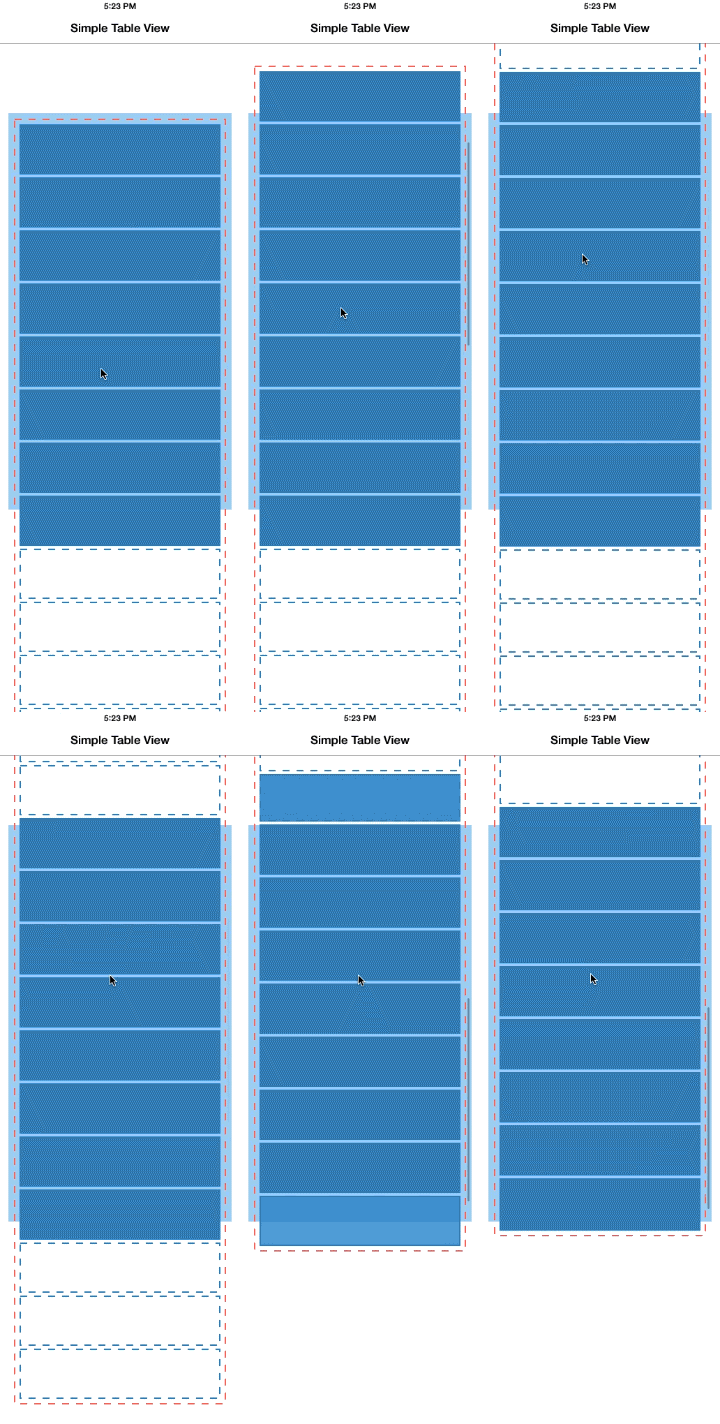
Before we look at the implementation of my class, let's look at how tables or collections generally work. Both classes, UITableView and UICollectionView , are descendants of UIScrollView and behave similarly. However, the key difference is that tables and collections reuse their cells . When the view scrolls and the cell extends beyond the screen, this cell is removed from the view hierarchy (in other words, it receives the message removeFromSuperview) and is transferred to the reuse queue. At the same time, before a new cell should appear, the table calls an empty cell from the waiting list for reuse and re-places it on its view hierarchy. This approach avoids significant memory consumption, minimizes the number of expensive operations of creating and allocating (allocating) new types of memory and ensures the fastest scrolling.
Placing multiple scroll views in one common container, also being a scroll view, is a fairly simple task:
Thus, when we set the frame size to each nested scroll view greater than or equal to the size of their content, we get a situation in which these scroll views will never scroll - the only scrollable object will be the container. This avoids interference in handling touches between the nested scroll view and their container.
This scheme certainly works, but there is one significant drawback: excessive memory waste. If the nested scroll views are tables or collections, then they create a cell for each row, because all cells in their understanding are visible. If the collection contains hundreds or thousands of cells, then the effect will be truly dramatic: scrolling will slow down, and your application will consume all available memory on the device.
Now I will talk about my container for scroll view. OLEContainerScrollView is the descendant of UIScrollView , which automatically arranges the views enclosed in it in the manner of a deck or stack (similar to NSStackView in OS X). This container works with all types of views, not only with scroll views, although it handles the scroll view in a special way.
To add a view to a container, you must use the addSubviewToContainer: method . I was forced to create new methods to add and remove views to the container, rather than relying on the existing addSubview: / removeFromSuperview pair , because I wanted to add views to the private contentView , and not directly to the container. This technique allowed us to avoid interference from the private subspecies of the UIScrollView itself , which are created to display scroll indicators, when later we will sort through the nested views and adjust their sizes.
As soon as the view is added to the container, the following happens:
During scrolling, the container continuously aligns the frames of the views attached to it in the following way:
This is still consistent with the simple approach described earlier. Now we need to align the frames of all scroll views in the container so that they get the minimum size that will fill the container's viewport ( according to bounds ):
Check out the video below to see how this algorithm works. At the beginning, the first table fills the entire container visibility (marked with a black stroke) - the table frame (light blue rectangle) is exactly equal to the bounds of the container. In this case, the second table is completely out of scope - its frame has a height of 0, the table is invisible. As a result, there is no need to create cells in it (yellow dotted line).
As soon as the user scrolls the contents of the container and the second table enters the scope, the height of the frame of the table (light yellow rectangle) begins to increase from the lower border of the scope until it reaches the height of the container. At the same timeThe frame of the first table is compressed to zero while the table is being removed off-screen. Both tables can use without restrictions all the possibilities of reusing cells without restrictions and any conditions.
The OLEContainerScrollView class interface looks like this:
The rest of the code is quite boilerplate, you can familiarize yourself with it on GitHub .
A few words about Auto Layout : OLEContainerScrollView does not use this function internally, and it is probably not possible to implement this behavior using Auto Layout spacers ( UIScrollView and Auto Layout are not very good friends, anyway ). However, there should be no problem using this class with other objects that use Auto Layout for layout inside themselves. As I said earlier, you can mix manual layout and auto layout quite freely.
I have intentionally not made (yet) CocoaPod from OLEContainerScrollView . I wrote this class to solve my very specific problem, and I believe that it has enough potential to grow into a common component. Of course, so far it is not. The limitations are as follows:
If you are interested in using this class, I will be glad if you look into its code and use it for your own purposes. I will also be happy to add your improvements (do pull requests ). And write to me if you want to see this class as CocoaPod .
Placing several (including scroll) views on one common container-scroll view is not a daily technique, but this approach can simplify your work with data sources for tables and collections, as well as simplify layout and layout, turning their sections into individual species.
OLEContainerScrollView is currently not a fully functional component, but I hope that it will become so with your help. In any case, writing this component helped me deepen my understanding of the UIScrollView device and the UIKit coordinate system .
Possible application
You can use OLEContainerScrollView to achieve the following goals:
- Placement of several scroll views (or tables, or collections) one under the other so that their normal behavior during scrolling is not affected. In the case of tables or collections, we are talking about maintaining the operability of the cell reuse mechanism.
- Turning one complex UITableViewDataSource or UICollectionViewDataSource into several simple data sources by splitting a table or collections consisting of several sections into several single-section tables or collections located one after another.
- Adding a header or footer ( header or footer ) above or below the collection without having to manage their layout. In this case, it will be simple UIScrollViews or UIViews .
Reusing cells in tables and collections
Before we look at the implementation of my class, let's look at how tables or collections generally work. Both classes, UITableView and UICollectionView , are descendants of UIScrollView and behave similarly. However, the key difference is that tables and collections reuse their cells . When the view scrolls and the cell extends beyond the screen, this cell is removed from the view hierarchy (in other words, it receives the message removeFromSuperview) and is transferred to the reuse queue. At the same time, before a new cell should appear, the table calls an empty cell from the waiting list for reuse and re-places it on its view hierarchy. This approach avoids significant memory consumption, minimizes the number of expensive operations of creating and allocating (allocating) new types of memory and ensures the fastest scrolling.
Illustration of cell reuse in a UITableView . Invisible cells are removed from the view hierarchy (indicated by a blue dotted line) and added to the table view before being displayed as a result of scrolling. Notice that the table frame (light blue rectangle) is smaller than the content size (content size, circled by a red dotted line), as is usually the case with scroll view. Download video (in H.264 format) .
A simple approach to container implementation
Placing multiple scroll views in one common container, also being a scroll view, is a fairly simple task:
- Create a UIScrollView that will be the container for the nested scroll view.
- Add nested scroll views to the container. It can be either simple scroll view, or tables or collections.
- Set the scroll view such frames so that they contain their entire content ( contentSize ). Set the positions of scroll views one below the other.
- Set the content size ( contentSize ) of the container as the sum of the frames of the nested views.
Thus, when we set the frame size to each nested scroll view greater than or equal to the size of their content, we get a situation in which these scroll views will never scroll - the only scrollable object will be the container. This avoids interference in handling touches between the nested scroll view and their container.
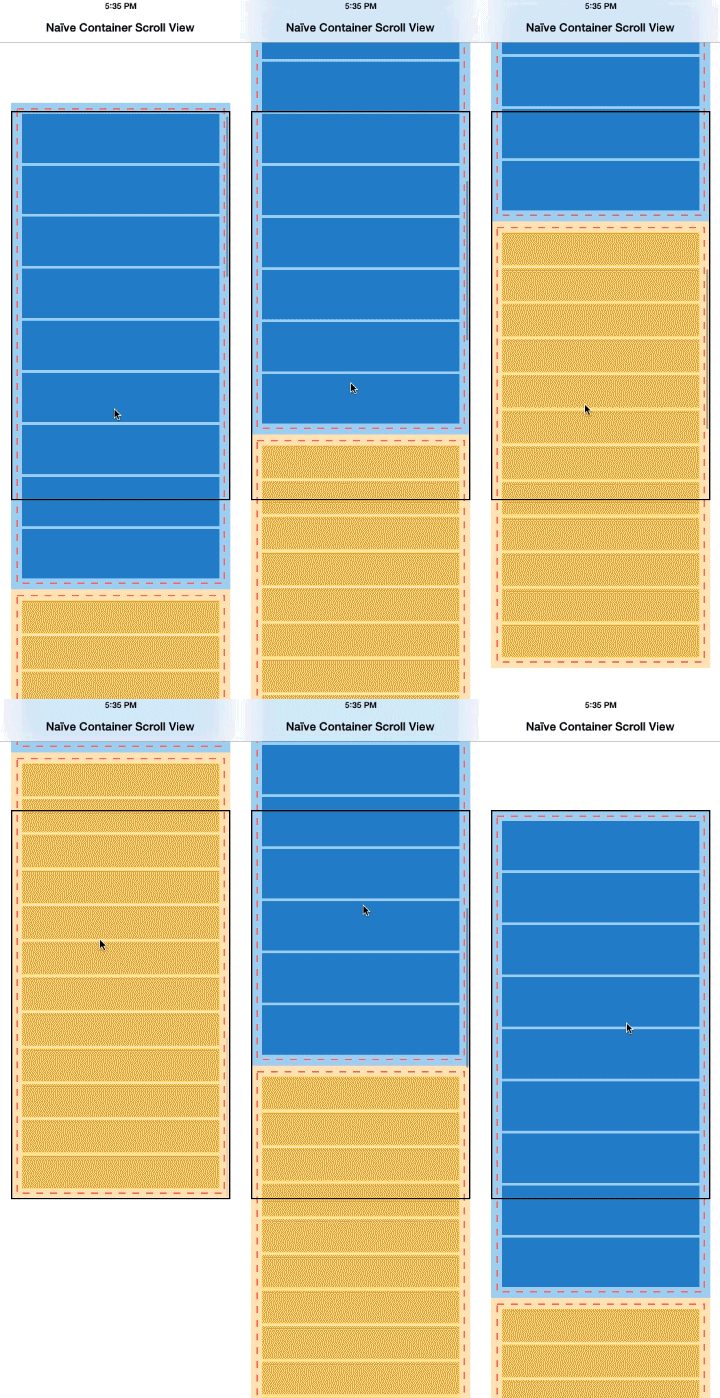
This scheme certainly works, but there is one significant drawback: excessive memory waste. If the nested scroll views are tables or collections, then they create a cell for each row, because all cells in their understanding are visible. If the collection contains hundreds or thousands of cells, then the effect will be truly dramatic: scrolling will slow down, and your application will consume all available memory on the device.
An example of a simple approach to implementing a container for multiple scroll views. Two tables are added as subviews in one common container, which itself is a scroll view (a rectangle with a black stroke). Frames of tables (light blue and light yellow rectangles) are changed to fully contain the content of each table (red dashed stroke). Notice how this affected the reuse of cells - it stopped, at the same time all the cells of each row are present, regardless of whether the cell is visible (inside the frame of the container, a black rectangle) or not. Download video (in H.264 format) .
OLEContainerScrollView
Now I will talk about my container for scroll view. OLEContainerScrollView is the descendant of UIScrollView , which automatically arranges the views enclosed in it in the manner of a deck or stack (similar to NSStackView in OS X). This container works with all types of views, not only with scroll views, although it handles the scroll view in a special way.
Adding Views
To add a view to a container, you must use the addSubviewToContainer: method . I was forced to create new methods to add and remove views to the container, rather than relying on the existing addSubview: / removeFromSuperview pair , because I wanted to add views to the private contentView , and not directly to the container. This technique allowed us to avoid interference from the private subspecies of the UIScrollView itself , which are created to display scroll indicators, when later we will sort through the nested views and adjust their sizes.
As soon as the view is added to the container, the following happens:
- If the new view is an instance of UIScrollView (or an inheritor), then its own scrolling is disabled using the subview.scrollEnabled = NO; . So only our container will be engaged in the processing of scroll gestures.
- We subscribe to KVO notifications on changes in the size of the attached view. For regular UIViews , we observe changes to the frames and bounds properties . For scroll view, we observe changes in the size of content through the contentSize property . This must be done in order to subsequently fit (relayout) nested views when changing their sizes from the outside.
Alignment while scrolling
During scrolling, the container continuously aligns the frames of the views attached to it in the following way:
- Iterates over all nested views in the order from the addition and positions them in a stack: each next view after the previous one. The width of all views is adjusted to the width of the container so that the view fits in the container 1 . For ordinary UIViews , space is allocated according to the height of their frame . A sufficient space is allocated for the scroll view to fit their content, the height is taken from contentSize.height . This means that the view following the scroll view will be placed in the container so that the entire contents of the scroll view fit before it.
- The container content size consists of the content sizes of all nested views.
This is still consistent with the simple approach described earlier. Now we need to align the frames of all scroll views in the container so that they get the minimum size that will fill the container's viewport ( according to bounds ):
- To do this, define for each nested scroll view in container 2 how their content areas intersect with the current scope of the container, and set them to frame in accordance with this. This means that the frame of any scroll view will never be larger than the size of the container, and that views that are not currently in scope will have a frame with a height of 0.
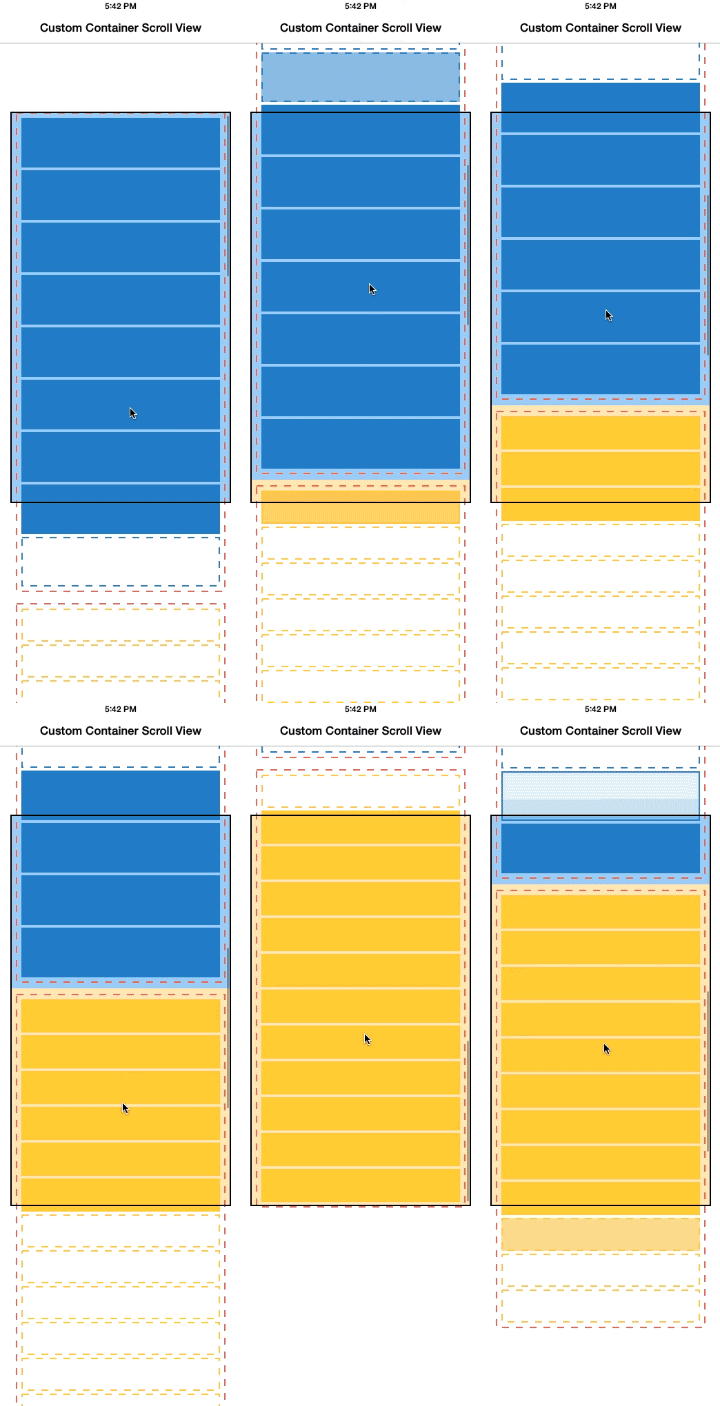
Check out the video below to see how this algorithm works. At the beginning, the first table fills the entire container visibility (marked with a black stroke) - the table frame (light blue rectangle) is exactly equal to the bounds of the container. In this case, the second table is completely out of scope - its frame has a height of 0, the table is invisible. As a result, there is no need to create cells in it (yellow dotted line).
As soon as the user scrolls the contents of the container and the second table enters the scope, the height of the frame of the table (light yellow rectangle) begins to increase from the lower border of the scope until it reaches the height of the container. At the same timeThe frame of the first table is compressed to zero while the table is being removed off-screen. Both tables can use without restrictions all the possibilities of reusing cells without restrictions and any conditions.
Demonstration of the work of OLEContainerScrollView . Download video (in H.264 format) .
The code
The OLEContainerScrollView class interface looks like this:
The code
And here is the implementation of the layoutSubviews method , which does all the work:
@interface OLEContainerScrollView : UIScrollView
- (void)addSubviewToContainer:(UIView *)subview;
- (void)removeSubviewFromContainer:(UIView *)subview;
@end
And here is the implementation of the layoutSubviews method , which does all the work:
@implementation OLEContainerScrollView
...
- (void)layoutSubviews
{
    [super layoutSubviews];
    // Translate the container view's content offset to contentView bounds.
    // This keeps the contentview always centered on the visible portion of the container view's
    // full content size, and avoids the need to make the contentView large enough to fit the
    // container view's full content size.
    self.contentView.frame = self.bounds;
    self.contentView.bounds = (CGRect){ self.contentOffset, self.contentView.bounds.size };
    // The logical vertical offset where the current subview (while iterating over all subviews)
    // must be positioned. Subviews are positioned below each other, in the order they were added
    // to the container. For scroll views, we reserve their entire contentSize.height as vertical
    // space. For non-scroll views, we reserve their current frame.size.height as vertical space.
    CGFloat yOffsetOfCurrentSubview = 0.0;
    for (UIView *subview in self.contentView.subviews)
    {
        if ([subview isKindOfClass:[UIScrollView class]]) {
            UIScrollView *scrollView = (UIScrollView *)subview;
            CGRect frame = scrollView.frame;
            CGPoint contentOffset = scrollView.contentOffset;
            // Translate the logical offset into the sub-scrollview's real content offset and frame size.
            // Methodology:
            // (1) As long as the sub-scrollview has not yet reached the top of the screen, set its scroll position
            // to 0.0 and position it just like a normal view. Its content scrolls naturally as the container
            // scroll view scrolls.
            if (self.contentOffset.y < yOffsetOfCurrentSubview) {
                contentOffset.y = 0.0;
                frame.origin.y = yOffsetOfCurrentSubview;
            }
            // (2) If the user has scrolled far enough down so that the sub-scrollview reaches the top of the
            // screen, position its frame at 0.0 and start adjusting the sub-scrollview's content offset to
            // scroll its content.
            else {
                contentOffset.y = self.contentOffset.y - yOffsetOfCurrentSubview;
                frame.origin.y = self.contentOffset.y;
            }
            // (3) The sub-scrollview's frame should never extend beyond the bottom of the screen, even if its
            // content height is potentially much greater. When the user has scrolled so far that the remaining
            // content height is smaller than the height of the screen, adjust the frame height accordingly.
            CGFloat remainingBoundsHeight = fmax(CGRectGetMaxY(self.bounds) - CGRectGetMinY(frame), 0.0);
            CGFloat remainingContentHeight = fmax(scrollView.contentSize.height - contentOffset.y, 0.0);
            frame.size.height = fmin(remainingBoundsHeight, remainingContentHeight);
            frame.size.width = self.contentView.bounds.size.width;
            scrollView.frame = frame;
            scrollView.contentOffset = contentOffset;
            yOffsetOfCurrentSubview += scrollView.contentSize.height;
        }
        else {
            // Normal views are simply positioned at the current offset
            CGRect frame = subview.frame;
            frame.origin.y = yOffsetOfCurrentSubview;
            frame.size.width = self.contentView.bounds.size.width;
            subview.frame = frame;
            yOffsetOfCurrentSubview += frame.size.height;
        }
    }
    self.contentSize = CGSizeMake(self.bounds.size.width, fmax(yOffsetOfCurrentSubview, self.bounds.size.height));
}
@end
The rest of the code is quite boilerplate, you can familiarize yourself with it on GitHub .
Auto layout
A few words about Auto Layout : OLEContainerScrollView does not use this function internally, and it is probably not possible to implement this behavior using Auto Layout spacers ( UIScrollView and Auto Layout are not very good friends, anyway ). However, there should be no problem using this class with other objects that use Auto Layout for layout inside themselves. As I said earlier, you can mix manual layout and auto layout quite freely.
Hey, where's the Podspec?
I have intentionally not made (yet) CocoaPod from OLEContainerScrollView . I wrote this class to solve my very specific problem, and I believe that it has enough potential to grow into a common component. Of course, so far it is not. The limitations are as follows:
- The class supports only vertical layout of nested views and only vertical scrolling.
- Vertical layout is very inflexible. With it, all nested views are stretched to the width of the container. It does not support the gaps between nested views or their free placement.
- The size of the content changes after the size of the nested views, but does not animate well enough.
If you are interested in using this class, I will be glad if you look into its code and use it for your own purposes. I will also be happy to add your improvements (do pull requests ). And write to me if you want to see this class as CocoaPod .
Conclusion
Placing several (including scroll) views on one common container-scroll view is not a daily technique, but this approach can simplify your work with data sources for tables and collections, as well as simplify layout and layout, turning their sections into individual species.
OLEContainerScrollView is currently not a fully functional component, but I hope that it will become so with your help. In any case, writing this component helped me deepen my understanding of the UIScrollView device and the UIKit coordinate system .
Footnotes:
- This is what I would like to make more flexible in a future version. Currently, the class only supports vertical layout.
- I have done this so far only for views inheriting from UIScrollView . The frame height of a normal UIView remains unchanged, even if the view is not in scope. I did so in order to avoid changes in the layout (or even errors in the auto layout ) that could be caused by zeroing the dimensions of the view, which does not expect such manipulations with its sizes. Changing this behavior will not be difficult in the future.
From translator
It is also advisable to read the article Understanding UIScrollView for a deeper understanding .