 May 29, 2014 at 17:18
Ext JS 5: MVC, MVVM, etc.
- Transfer
 The Sencha Ext JS framework has become the industry standard for enterprise web application development with an extensive widget library, powerful data support and a rich set of development tools. Since the release of Ext JS 1.0 in 2007, a lot has changed in our industry, and web applications have undoubtedly become larger and more complex than ever before.
 In 2010, Sencha released Touch 1.0, giving the industry the first MVC-enabled JavaScript framework to address the architectural problems faced by large web applications. We then took the same approach to Ext JS 4.0 in 2011, helping organize code in the new world of enterprise web applications.
Given that the architecture of the application is in many respects both the observance of structuredness and logic, as well as the use of modern framework capabilities, building a good architecture provides several important advantages:
- All applications work on the same principles that you need to remember once.
- Once the principles are the same, it becomes easy to reuse code between applications.
- You can use development tools to create optimized versions of applications for debugging or release in production.
Touch 1.0 and Ext JS 4.0 have identified some best practices on how to structure your applications using MVC, and Ext JS 5 takes this concept to a new level by adding support for the MVVM architectural pattern. Although MVC and MVVM are actually very similar, using MVVM provides some specific advantages that significantly reduce the amount of application logic.
It is important to recognize that Ext JS 5 is fully backward compatible with MVC-based applications. In order to understand what has changed and what has not, let's take a deeper look at MVC and MVVM.
What is MVC?
Model-View-Controller ( MVC ) is an architectural programming pattern. It divides the user interface of the application ( meaning in relation to Ext JS - approx. Transl. ) Into three separate parts, helping to organize the code according to logical representations depending on their functions.
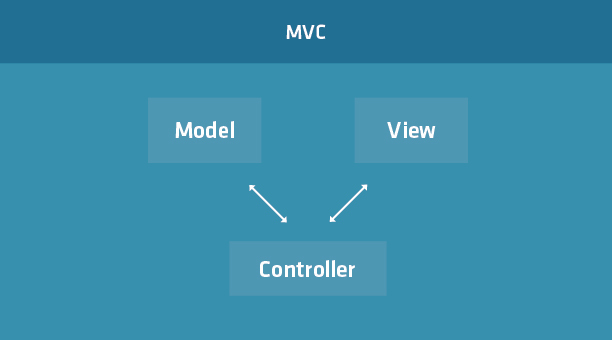
MVC implementations may vary from application to application, but basically, each part is responsible for its own:
- Model - describes the data format used in the application. May contain business rules, validation rules, and some other functions.
- View - Displays data to the user. Different views can display the same data in different ways (for example, tables and graphs).
- Controller is the central part of the MVC application. It monitors events within the application and distributes commands between the model and the view.
MVC: example
Let's look at an example in Sencha Fiddle:
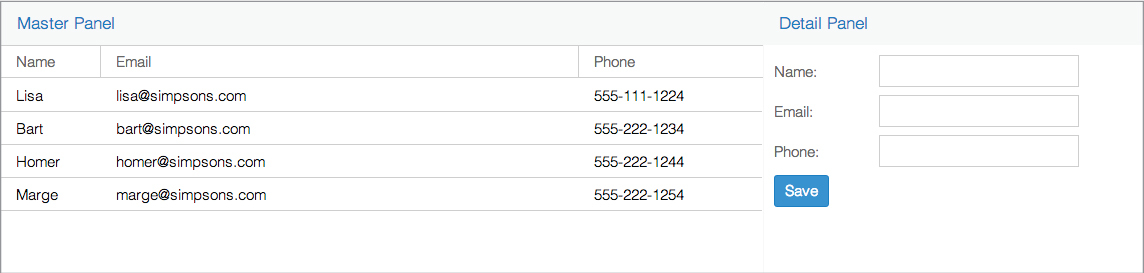
In this example, we see a simple MVC application that includes a Master / Detail scheme. The main (master) view (Ext.grid.Panel) contains records that, when selected, fill in the associated subordinate (detail) view (Ext.form.Panel). Clicking on the “Save” button (in the subview) updates the entry in the master.
Despite a simple example, you can see that the controller has a lot of manual work on binding the model and view, especially for the subordinate view.
A little later we will return to this example, but for now we will consider an alternative architecture.
What is MVVM?
Model-View-ViewModel ( MVVM ) is another MVC-based architectural programming pattern. The key difference between the two is that MVVM adds an abstraction of View - ViewModel, which tracks the changes in model data and displays them in the view (data binding) - something that is expensive to do in traditional MVC applications.
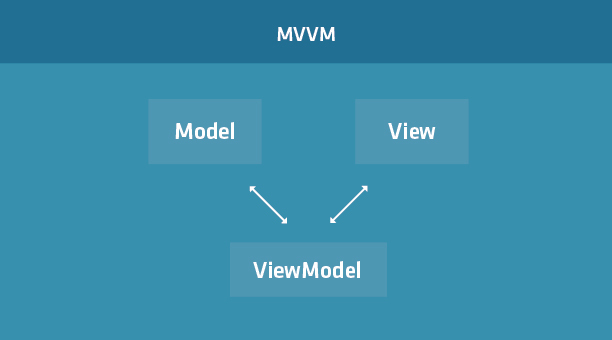
The MVVM template attempts to take advantage of the architectural benefits of MVC (separation of responsibility), while providing additional convenience in data binding. As a result, the model and the framework take over the work, thereby minimizing (and sometimes completely eliminating) the application logic, which directly controls the presentation.
Elements of the MVVM template include:
- Model - describes the used data format used in the application. As well as in MVC.
- View - displays data to the user. As well as in MVC.
- ViewModel is an abstraction of a view that connects View and its corresponding Model. In MVC, this would be the responsibility of some controller, but in MVVM ViewModel directly deals with data binding for a specific View.
Keep in mind that not all Views require a ViewModel, but if they are used, then ViewModel are created for each View, so multiple instances can work simultaneously.
MVVM: example
Looking at the previous MVC-based example, we can see that MVVM can solve some of the problems we had by manually doing data binding between the model and the components. In a new example built on Ext JS 5, we replaced the Detail controller with a ViewModel to transfer recording data between two views.
Now we are no longer required to click “Save”, because Thanks to bidirectional binning, record data is updated instantly everywhere. This saves a lot of manual work and fundamentally simplifies working with data in large applications.
What happened to the controllers in MVVM?
Despite the name Model-View-ViewModel, in the MVVM template you can still use Controllers, although someone might call it MVC + VM architecture. Leaving aside the abbreviations, the main idea here is that Ext JS 5 does not make you choose between MVC and MVVM (see a mixed example here ).
Ext JS 4 introduced MVCs in a broad sense, and Ext JS 5 also supports this concept. However, Ext JS 5 also supports a new option called ViewController.
ViewController is similar in nature to ViewModel. Both are aimed at a specific View, significantly eliminating the overhead in the traditional MVC for managing objects and restoring the state of the application.
ViewControllers are also similar to ExtJS 4's traditional (global) MVCs in the way they monitor events and execute logic in response to these events. Nevertheless, the key difference between ViewControllers and ordinary Controllers is that ViewControllers are created for each corresponding View when the Controllers are in the same instance and globally monitor the events of several View.
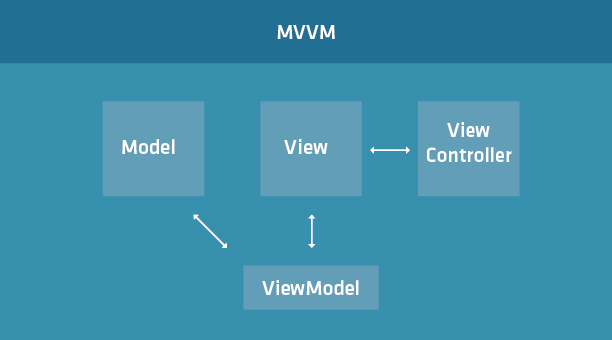
ViewControllers and ViewModels participate in the component life cycle, which means that unique instances of ViewModel and ViewController are created for each View instance. Also, when the View is destroyed, the ViewModel and ViewController are deleted.
On the one hand, this is good news. an application can (in theory) save memory and processing time, bypassing more general controllers that listen to presentation events globally, although there may not be any latter. On the other hand, memory can, on the contrary, outgrow due to the fact that several instances of ViewModels and ViewControllers work simultaneously.
The last thing to keep in mind is that not all Views in MVVM require a ViewController: they are completely optional.
Conclusion
Ext JS 4 paved the way for enterprise web applications to use MVC, which gave a stable code organization architecture. Ext JS 5 adds support for MVVM, while maintaining compatibility with MVC, so developers should not have problems upgrading their applications from Ext JS 4 to the latest version.
The best practices surrounding MVC are still relevant in Ext JS 5, and now, using bidirectional data binding, developers can significantly reduce the amount of code needed to build large and complex applications.
This is the first article in a series of reviews of the idea of application architecture, MVVM, and data binding. Stay tuned for upcoming extensive posts on ViewControllers and declarative listeners.
UPD dew1983 Video from the webinar on this topic:vimeo.com/sencha/review/96094423/0255aad109
Only registered users can participate in the survey. Please come in.
Continue translating Ext JS 5?
- 81.9% Yes 504
- 4.5% No 28
- 13.4% I don't care 83









