Scalability and resiliency TelecityGroup Dynamic Data Center IaaS
In the wake of interest in cloud services, many data center operators deployed cloud platforms on their sites and began to actively promote the "clouds" to the masses. TelecityGroup Finland was no exception. I bring to your attention an overview of our IaaS solution called Dynamic Data Center .
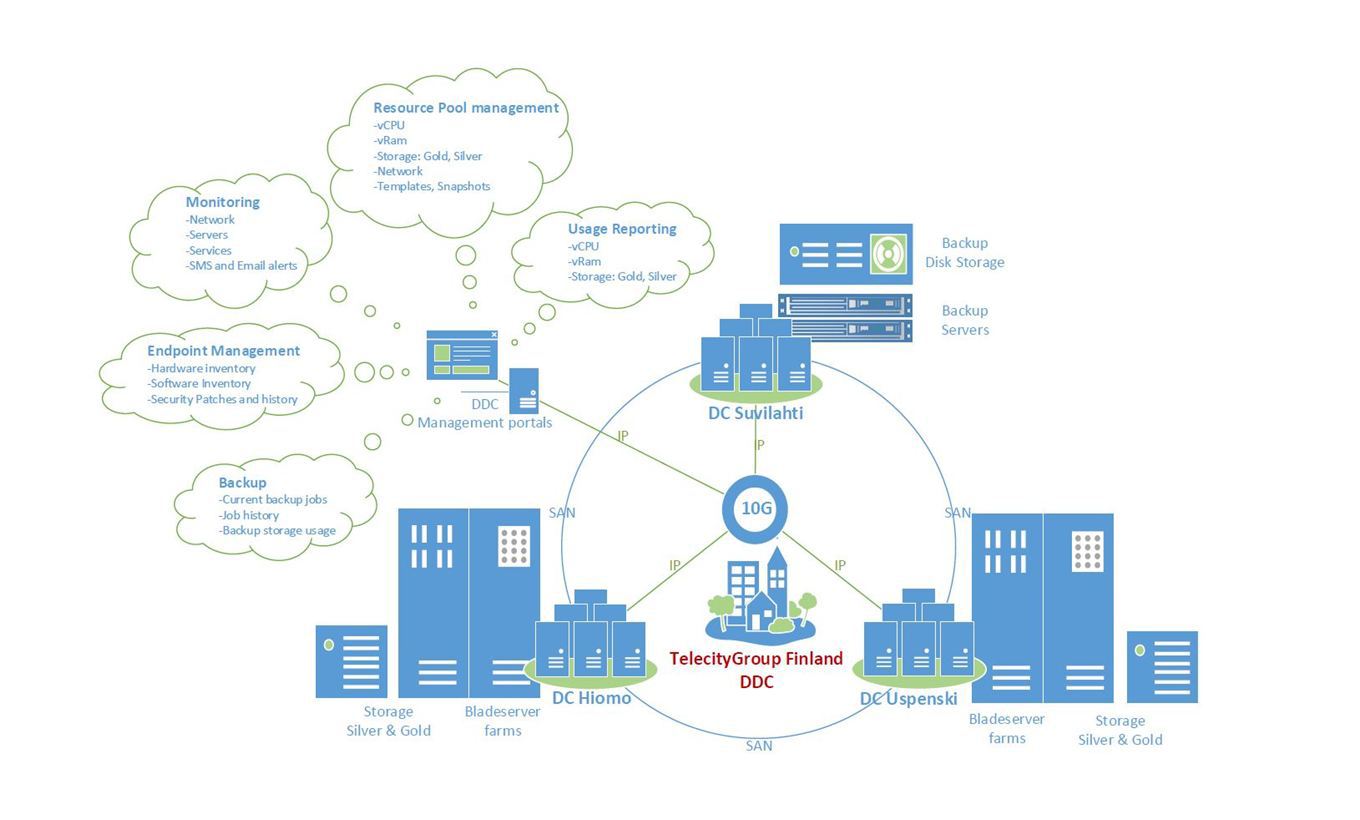
Dynamic Data Center Solution Diagram
TelecityGroup Finland knows firsthand about the "clouds". The first cloud platform was deployed back in 2008, and during this time various hardware resources and options for building cloud infrastructure were tested. At the beginning of this year, the platform was modernized, and the IaaS solution offered to customers was called Dynamic Data Center, or DDC for short. Why Dynamic Data Center, you ask? First of all, I wanted to reflect the scalability and the possibility of flexible capacity expansion. In addition, the services offered by various cloud providers abound in terms such as “virtual server”, “IaaS, PaaS, SaaS”, “cloud”, which is sometimes nothing more than a marketing move.
What distinguishes the DDC service from others?
The main “tricks” are the complete fault tolerance of the solution, unsurpassed performance of data storage systems, a package of additional services, a variety of resource accounting and a convenient self-service portal. But first things first.
Failover Solution
It is provided at all levels, from the physical site and communication channels to the innovative data storage system and blade server farms.
The physical platform on which the virtual infrastructure is deployed is no less important than the "filling" of the platform. If the data center "stood up", no forfeits will save your critical IT systems from interruptions in work. DDC solution is deployed on the basis of two own data centers TelecityGroup Hiomo and Uspenski . Both data centers are certified according to ISO 27001, which serves as additional confirmation of the reliability of information protection, as well as the availability of a set of measures to identify and eliminate potential risks. At the request of customers, virtual machines can be replicated to an additional data center, where they will be launched when the main data center is unavailable. Backups are stored in the third, physically remote, Suvilahti data center .
The hardware filling of the platform is represented by IBM Flex System and storage blade servers connected via SAN (Storage Area Network) using FC (Fiber Channel) technology. The solution is deployed on the basis of VMware, the world leader in virtualization. Thanks to VMware High Availability, when one physical server crashes, the VM automatically restarts on another (more on the VMware website) In addition, a daily backup copy of the image of each virtual machine is created, from which you can restore the "fallen" VM at the request of customers. In addition, we provide an agent-based backup service, details below.
As for storage, they vary depending on the category of disk resources. For the vStorage Silver category, these are, for example, the IBM DCS3700 and Hitachi. For the Gold category - IBM XIV Storage System , which I want to talk about in more detail.
With its innovative grid architecture, the IBM XIV Storage System delivers unmatched performance and scalability. Grid architecture consists of many components of the same type, united by a common interconnect. Disks in IBM XIV behave as “communicating vessels”, thereby achieving uniform load. All IBM XIV components are reserved for Active-Active N + 1, providing a high level of reliability and availability. In the event of a component failure, the fastest recovery possible.
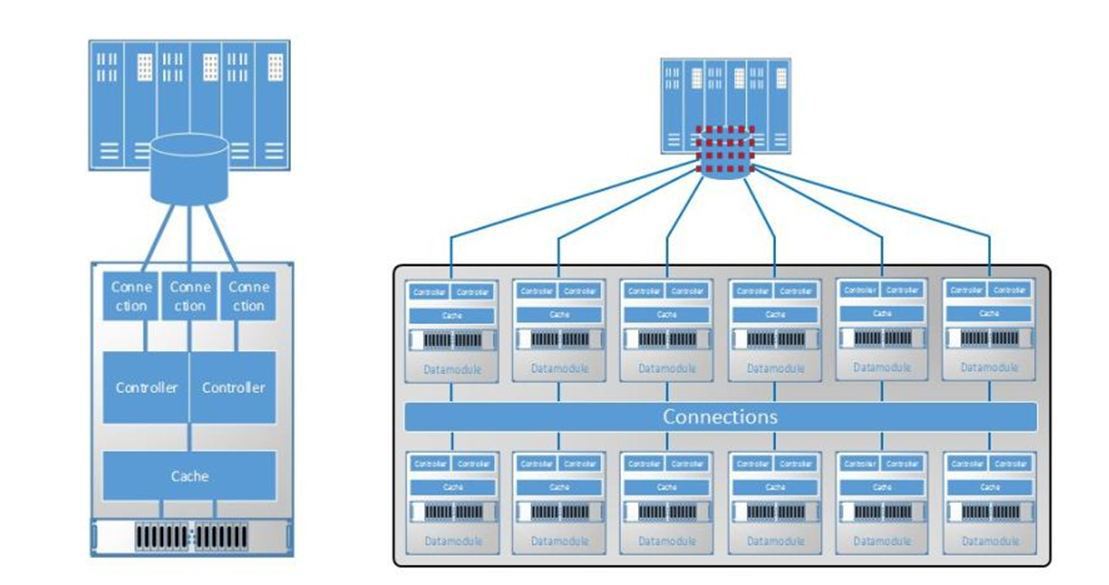
Comparison of traditional storage systems and IBM XIV Storage System
A few words about communication channels. Communication with the "outside world" is provided by our own 10 Gb / s fiber optic network, which unites all data centers using redundant connections. In the event of a failure of one of the communication channels, automatic switching to another occurs. By default, a guaranteed bandwidth of 100 Mbit / s is provided, which can be expanded to 10 Gbit / s if desired. For large customers, the connection of dedicated communication channels can be arranged. Let me remind you that TelecityGroup data centers are with neutral accessibility. If you want a specific communications provider on the site - always welcome. Dynamic Data Center solution is deployed on the basis of Finnish data centers → delays on communication channels to Russia (compared to other European countries) are negligible.
Unmatched Disk Performance
We were interested in comparing the performance of our storage systems with other cloud providers. The test results were pleasantly surprised. I will not publish the names of a number of companies for ethical reasons, but on the whole, I think the picture is clear. I note (so that we are not accused of bias) that now one independent company is conducting a similar test, the results of which are sure to be announced.
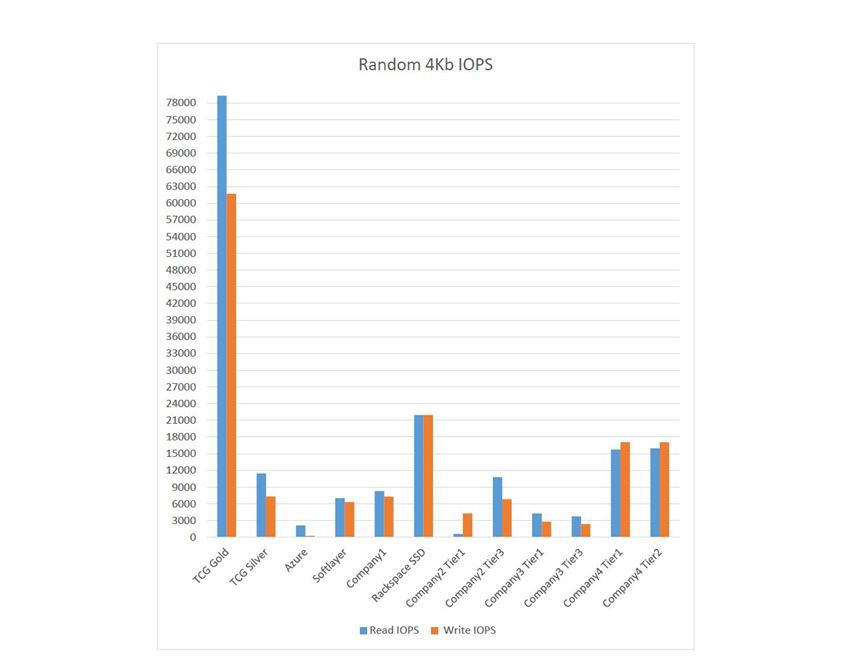
Test results for arbitrary reading and writing blocks of 4 kilobytes.
For the tests, the FIO utility (Flexible I / O tester) was used . It was installed VM 2 vCPU, 2GB RAM, CentOS 6.4 64bit.

More detailed statistics on our storage systems for Gold and Silver levels
Additional Services Package
A range of additional services is provided in conjunction with the DDC service:
• data backup, two options: Advanced and Simple.

For the Advanced option based on Commvalt Simpana software, a self-service portal is available where you can manage the backup schedule yourself, backup and restore data without involving a provider. The Simple option is deployed on the basis of Veeam Backup & Replication and provides the ability to backup a VM image with a storage horizon of 7 or 30 days at a remote site.
• Managed Firewall service
3 levels of service provision, from basic to advanced with IPsec tunneling support and performance up to 200 Mbps.
• load balancing based on Citrix Netscaller
• hybrid solution (physical + virtual infrastructure)
• connection of dedicated communication channels
• server monitoring
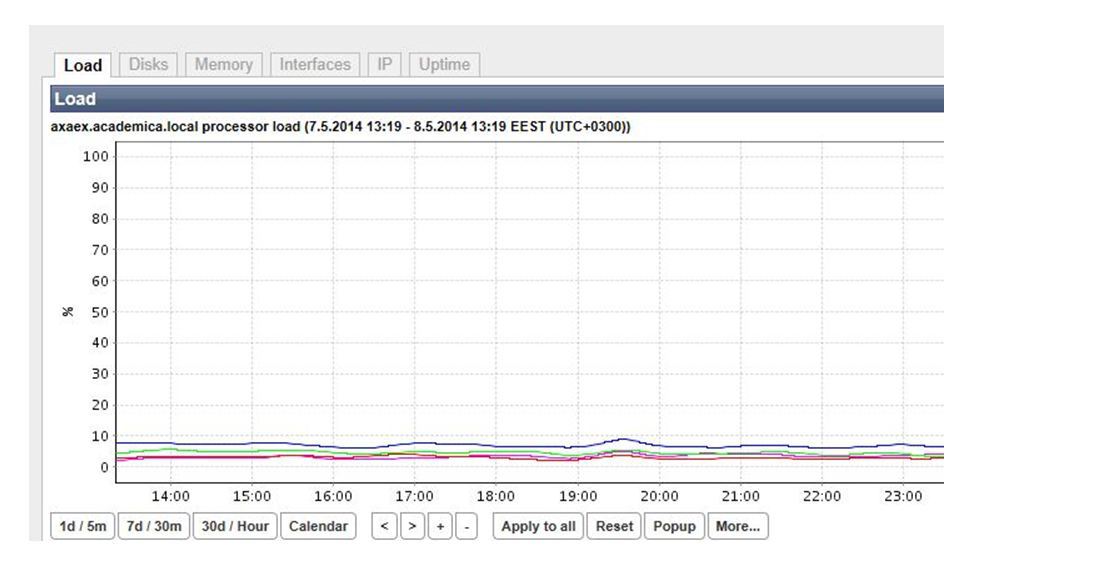
Variety of resource accounting
TelecityGroup is always for an individual approach to the client. We are pleased to offer various options for accounting for virtual resources, and we always pre-audit the current IT infrastructure of the customer to select the most optimal option.
Option 1: the upper and lower boundaries of the allocation of computing resources are individually negotiated. The lower limit is guaranteed, and the resources between the upper and lower limits are allocated on demand and are paid upon consumption. This ensures flexibility of payment and scalability. Disk resources are paid upon consumption.
Option 2: a pool of resources with a fixed monthly fee for customers who can predict the amount of virtual capacity they need.
Option 3:Full-time Pay-as-you-Go model with hourly billing.
Billing is automated, and soon it will be possible to view the statistics of spending funds directly on the self-service portal. Now information can be obtained from our support service, which is at the service of your interests around the clock and seven days a week. By the way, regardless of the option, prepayment is not required.
Convenient self-service portal
The self-service portal allows the customer to fully control the IT resources deployed in the cloud.
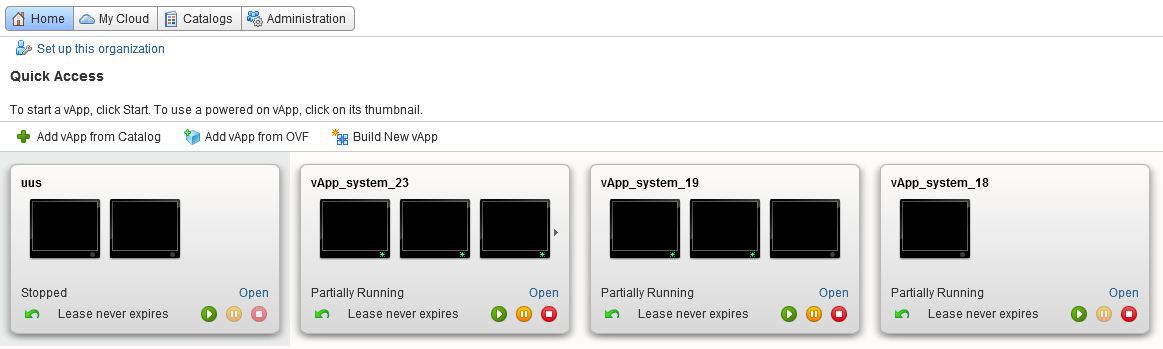
Portal homepage
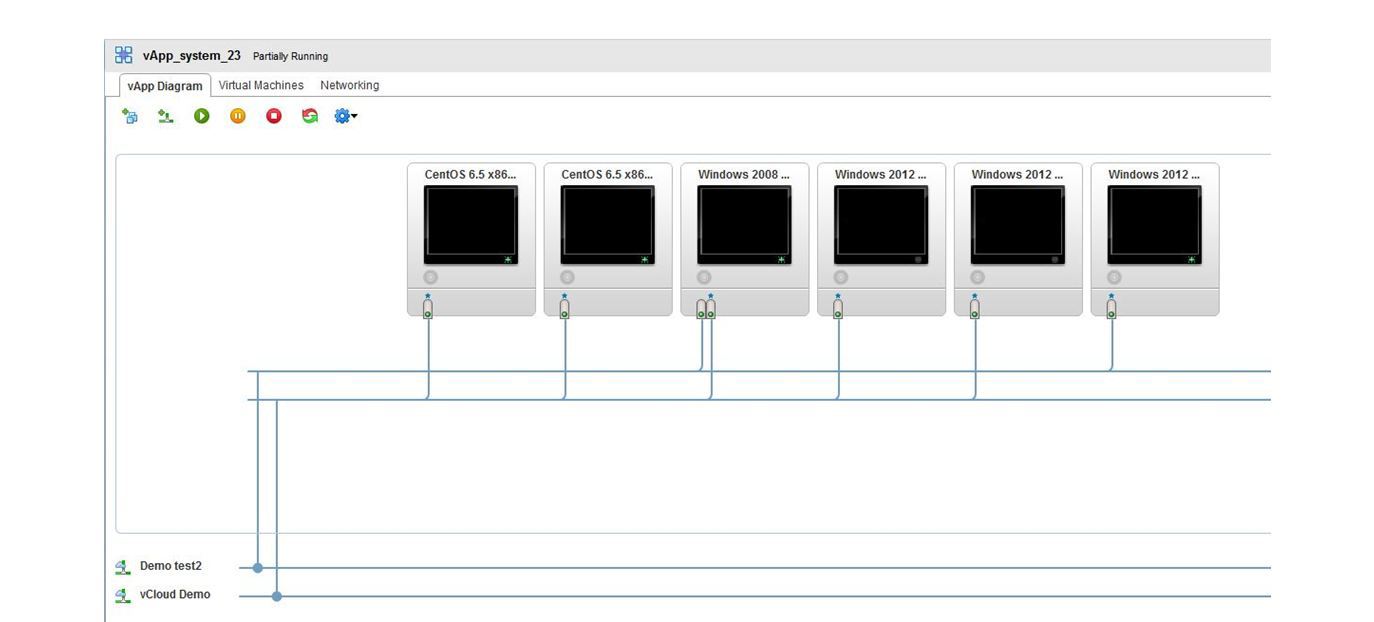
It is possible to manage all levels of virtual infrastructure, from one virtual machine (VM) to a VM group (vApp) and a whole virtual data center (vDC). Each vDC (for example, for Internal IT vDC and Production vDC) has its own billing and its own SLA at will.

vDC, consisting of four vApps
Through the portal you can:
• launch new virtual machines , including using templates: both your own and TelecityGroup templates;
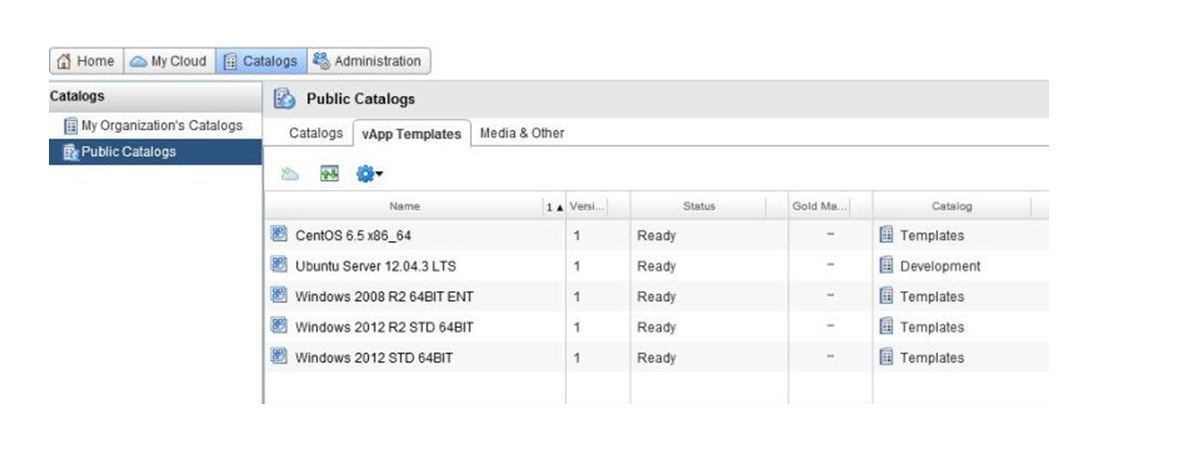
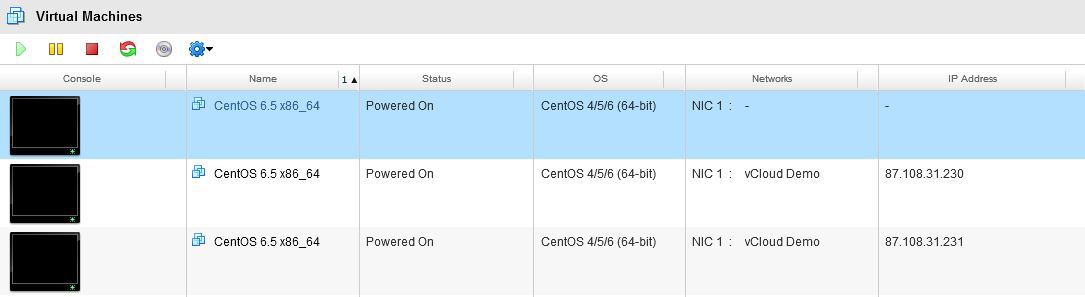
• pause and shut down the VM;
• select a physical site for each vDC;
• change server configuration and redistribute resources between several VMs;
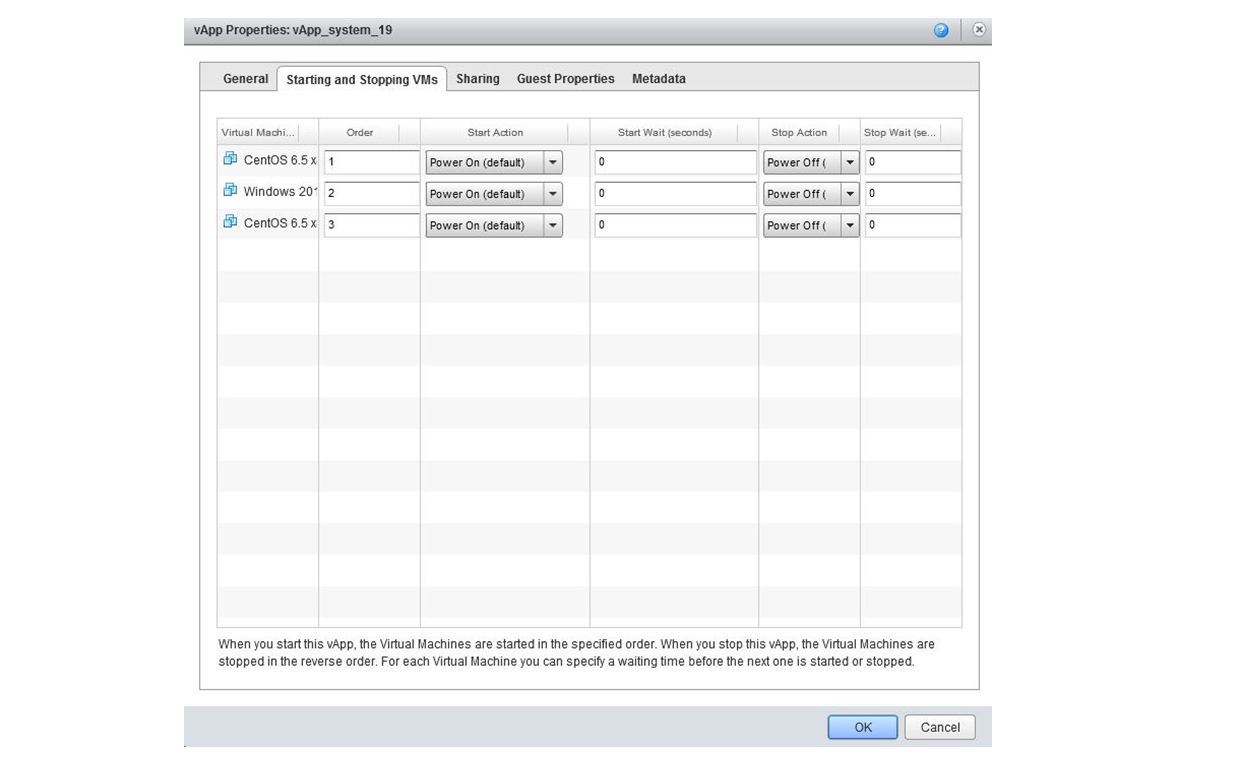
• set the startup sequence of VMs within vApp;
• install the OS;
• manage network configuration;
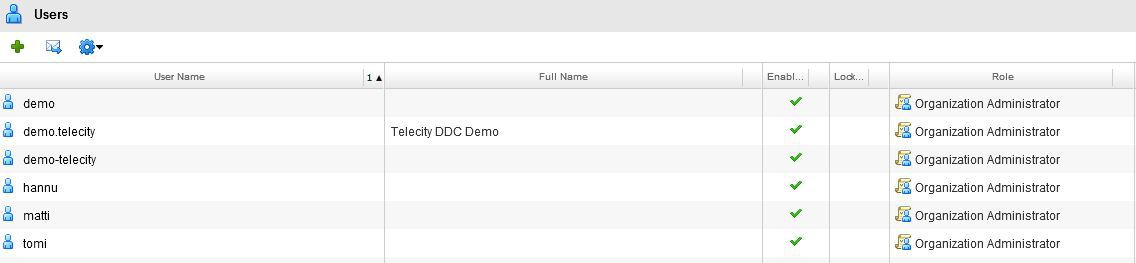
• manage user rights.
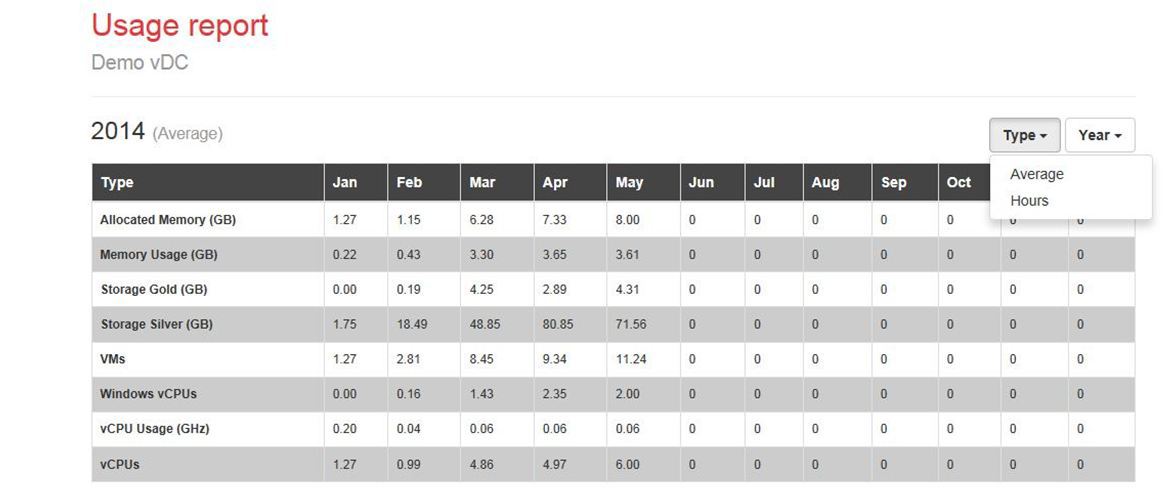
On a separate portal , statistics on the consumption of computing and disk resources for a certain period are available. Data is available on both average resource consumption per month and resource consumption in hours.
Statistics are updated every hour.
From theory to practice (Or about a test drive)
Forewarned is forearmed. Agree that it is better to check the performance of the disk subsystem, the functionality of the cloud platform and communication channels before the actual migration to the "cloud". Gentlemen who want to test the "cloud" in action, we always meet you.
To access the DDC demo version, just send an e-mail to [email protected] or fill out the form HERE .
For those who wish, a resource pool of 10 vCPU, 10 vRAM, 50GB of vStorage Gold and 50 GB of vStorage Silver will be provided.
The validity period of the demo version is up to two weeks.
Dynamic Data Center Solution Diagram
TelecityGroup Finland knows firsthand about the "clouds". The first cloud platform was deployed back in 2008, and during this time various hardware resources and options for building cloud infrastructure were tested. At the beginning of this year, the platform was modernized, and the IaaS solution offered to customers was called Dynamic Data Center, or DDC for short. Why Dynamic Data Center, you ask? First of all, I wanted to reflect the scalability and the possibility of flexible capacity expansion. In addition, the services offered by various cloud providers abound in terms such as “virtual server”, “IaaS, PaaS, SaaS”, “cloud”, which is sometimes nothing more than a marketing move.
What distinguishes the DDC service from others?
The main “tricks” are the complete fault tolerance of the solution, unsurpassed performance of data storage systems, a package of additional services, a variety of resource accounting and a convenient self-service portal. But first things first.
Failover Solution
It is provided at all levels, from the physical site and communication channels to the innovative data storage system and blade server farms.
The physical platform on which the virtual infrastructure is deployed is no less important than the "filling" of the platform. If the data center "stood up", no forfeits will save your critical IT systems from interruptions in work. DDC solution is deployed on the basis of two own data centers TelecityGroup Hiomo and Uspenski . Both data centers are certified according to ISO 27001, which serves as additional confirmation of the reliability of information protection, as well as the availability of a set of measures to identify and eliminate potential risks. At the request of customers, virtual machines can be replicated to an additional data center, where they will be launched when the main data center is unavailable. Backups are stored in the third, physically remote, Suvilahti data center .
The hardware filling of the platform is represented by IBM Flex System and storage blade servers connected via SAN (Storage Area Network) using FC (Fiber Channel) technology. The solution is deployed on the basis of VMware, the world leader in virtualization. Thanks to VMware High Availability, when one physical server crashes, the VM automatically restarts on another (more on the VMware website) In addition, a daily backup copy of the image of each virtual machine is created, from which you can restore the "fallen" VM at the request of customers. In addition, we provide an agent-based backup service, details below.
As for storage, they vary depending on the category of disk resources. For the vStorage Silver category, these are, for example, the IBM DCS3700 and Hitachi. For the Gold category - IBM XIV Storage System , which I want to talk about in more detail.
With its innovative grid architecture, the IBM XIV Storage System delivers unmatched performance and scalability. Grid architecture consists of many components of the same type, united by a common interconnect. Disks in IBM XIV behave as “communicating vessels”, thereby achieving uniform load. All IBM XIV components are reserved for Active-Active N + 1, providing a high level of reliability and availability. In the event of a component failure, the fastest recovery possible.
Comparison of traditional storage systems and IBM XIV Storage System
A few words about communication channels. Communication with the "outside world" is provided by our own 10 Gb / s fiber optic network, which unites all data centers using redundant connections. In the event of a failure of one of the communication channels, automatic switching to another occurs. By default, a guaranteed bandwidth of 100 Mbit / s is provided, which can be expanded to 10 Gbit / s if desired. For large customers, the connection of dedicated communication channels can be arranged. Let me remind you that TelecityGroup data centers are with neutral accessibility. If you want a specific communications provider on the site - always welcome. Dynamic Data Center solution is deployed on the basis of Finnish data centers → delays on communication channels to Russia (compared to other European countries) are negligible.
Unmatched Disk Performance
We were interested in comparing the performance of our storage systems with other cloud providers. The test results were pleasantly surprised. I will not publish the names of a number of companies for ethical reasons, but on the whole, I think the picture is clear. I note (so that we are not accused of bias) that now one independent company is conducting a similar test, the results of which are sure to be announced.
Test results for arbitrary reading and writing blocks of 4 kilobytes.
For the tests, the FIO utility (Flexible I / O tester) was used . It was installed VM 2 vCPU, 2GB RAM, CentOS 6.4 64bit.
More detailed statistics on our storage systems for Gold and Silver levels
Additional Services Package
A range of additional services is provided in conjunction with the DDC service:
• data backup, two options: Advanced and Simple.
For the Advanced option based on Commvalt Simpana software, a self-service portal is available where you can manage the backup schedule yourself, backup and restore data without involving a provider. The Simple option is deployed on the basis of Veeam Backup & Replication and provides the ability to backup a VM image with a storage horizon of 7 or 30 days at a remote site.
• Managed Firewall service
3 levels of service provision, from basic to advanced with IPsec tunneling support and performance up to 200 Mbps.
• load balancing based on Citrix Netscaller
• hybrid solution (physical + virtual infrastructure)
• connection of dedicated communication channels
• server monitoring
Variety of resource accounting
TelecityGroup is always for an individual approach to the client. We are pleased to offer various options for accounting for virtual resources, and we always pre-audit the current IT infrastructure of the customer to select the most optimal option.
Option 1: the upper and lower boundaries of the allocation of computing resources are individually negotiated. The lower limit is guaranteed, and the resources between the upper and lower limits are allocated on demand and are paid upon consumption. This ensures flexibility of payment and scalability. Disk resources are paid upon consumption.
Option 2: a pool of resources with a fixed monthly fee for customers who can predict the amount of virtual capacity they need.
Option 3:Full-time Pay-as-you-Go model with hourly billing.
Billing is automated, and soon it will be possible to view the statistics of spending funds directly on the self-service portal. Now information can be obtained from our support service, which is at the service of your interests around the clock and seven days a week. By the way, regardless of the option, prepayment is not required.
Convenient self-service portal
The self-service portal allows the customer to fully control the IT resources deployed in the cloud.
Portal homepage
It is possible to manage all levels of virtual infrastructure, from one virtual machine (VM) to a VM group (vApp) and a whole virtual data center (vDC). Each vDC (for example, for Internal IT vDC and Production vDC) has its own billing and its own SLA at will.
vDC, consisting of four vApps
Through the portal you can:
• launch new virtual machines , including using templates: both your own and TelecityGroup templates;
• pause and shut down the VM;
• select a physical site for each vDC;
• change server configuration and redistribute resources between several VMs;
• set the startup sequence of VMs within vApp;
• install the OS;
• manage network configuration;
• manage user rights.
On a separate portal , statistics on the consumption of computing and disk resources for a certain period are available. Data is available on both average resource consumption per month and resource consumption in hours.
Statistics are updated every hour.
From theory to practice (Or about a test drive)
Forewarned is forearmed. Agree that it is better to check the performance of the disk subsystem, the functionality of the cloud platform and communication channels before the actual migration to the "cloud". Gentlemen who want to test the "cloud" in action, we always meet you.
To access the DDC demo version, just send an e-mail to [email protected] or fill out the form HERE .
For those who wish, a resource pool of 10 vCPU, 10 vRAM, 50GB of vStorage Gold and 50 GB of vStorage Silver will be provided.
The validity period of the demo version is up to two weeks.









